DJI Osmo Mobile 6 Gimbal
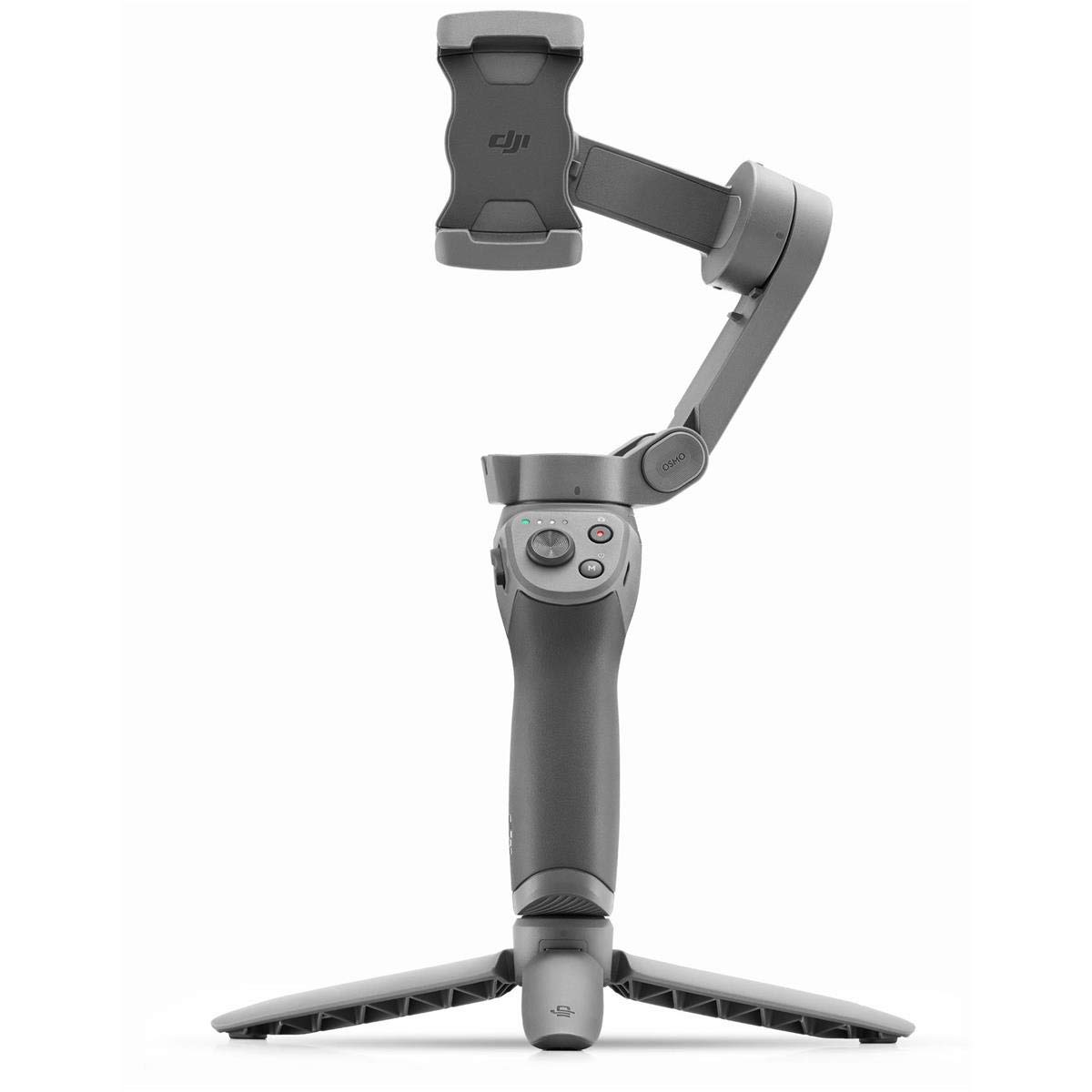
DJI Osmo Mobile 6 Unfold Your Creativity Osmo Mobile 6 is an intelligent smartphone stabilizer packed with creative features. It's not only compact and easily foldable to fit in your palm, but also launches automatically once unfolded to capture shots at a moment's notice. Get dynamic angles and perfect selfies by using the built-in extension rod. A whole host of intelligent functions and guides are at your disposal. The DJI Mimo app facilitates efficient shooting, editing, and sharing, allowing you to catch every unforgettable moment. Carry your Osmo Mobile 6 on exciting adventures. The compact and foldable design is easy to pack, and with the quick-release magnetic phone clamp, you can get going without the hassle of removing your phone case. Snap-in or out–you're ready to shoot or take a call at a moment's notice. Osmo Mobile 6 automatically powers on as soon as you unfold it. Snap in a paired smartphone, and the DJI Mimo app pops up automatically, allowing you to start shooting as soon as inspiration strikes. With 3-axis stabilization, capture smooth, lossless, on-the-move creations that impress and wow. Osmo Mobile 6 integrates DJI's advanced stabilization technology that puts strong, stable, shake-free results at your fingertips.
DJI Osmo Mobile 6 Unfold Your Creativity Osmo Mobile 6 is an intelligent smartphone stabilizer packed with creative features. It's not only compact and easily foldable to fit in your palm, but also launches automatically once unfolded to capture shots at a moment's notice. Get dynamic angles and perfect selfies by using the built-in extension rod. A whole host of intelligent functions and guides are at your disposal. The DJI Mimo app facilitates efficient shooting, editing, and sharing, allowing you to catch every unforgettable moment. Carry your Osmo Mobile 6 on exciting adventures. The compact and foldable design is easy to pack, and with the quick-release magnetic phone clamp, you can get going without the hassle of removing your phone case. Snap-in or out–you're ready to shoot or take a call at a moment's notice. Osmo Mobile 6 automatically powers on as soon as you unfold it. Snap in a paired smartphone, and the DJI Mimo app pops up automatically, allowing you to start shooting as soon as inspiration strikes. With 3-axis stabilization, capture smooth, lossless, on-the-move creations that impress and wow. Osmo Mobile 6 integrates DJI's advanced stabilization technology that puts strong, stable, shake-free results at your fingertips.
DJI Osmo Mobile 6 Unfold Your Creativity Osmo Mobile 6 is an intelligent smartphone stabilizer packed with creative features. It's not only compact and easily foldable to fit in your palm, but also launches automatically once unfolded to capture shots at a moment's notice. Get dynamic angles and perfect selfies by using the built-in extension rod. A whole host of intelligent functions and guides are at your disposal. The DJI Mimo app facilitates efficient shooting, editing, and sharing, allowing you to catch every unforgettable moment. Carry your Osmo Mobile 6 on exciting adventures. The compact and foldable design is easy to pack, and with the quick-release magnetic phone clamp, you can get going without the hassle of removing your phone case. Snap-in or out–you're ready to shoot or take a call at a moment's notice. Osmo Mobile 6 automatically powers on as soon as you unfold it. Snap in a paired smartphone, and the DJI Mimo app pops up automatically, allowing you to start shooting as soon as inspiration strikes. With 3-axis stabilization, capture smooth, lossless, on-the-move creations that impress and wow. Osmo Mobile 6 integrates DJI's advanced stabilization technology that puts strong, stable, shake-free results at your fingertips.
DJI Osmo Mobile 6 Unfold Your Creativity Osmo Mobile 6 is an intelligent smartphone stabilizer packed with creative features. It's not only compact and easily foldable to fit in your palm, but also launches automatically once unfolded to capture shots at a moment's notice. Get dynamic angles and perfect selfies by using the built-in extension rod. A whole host of intelligent functions and guides are at your disposal. The DJI Mimo app facilitates efficient shooting, editing, and sharing, allowing you to catch every unforgettable moment. Carry your Osmo Mobile 6 on exciting adventures. The compact and foldable design is easy to pack, and with the quick-release magnetic phone clamp, you can get going without the hassle of removing your phone case. Snap-in or out–you're ready to shoot or take a call at a moment's notice. Osmo Mobile 6 automatically powers on as soon as you unfold it. Snap in a paired smartphone, and the DJI Mimo app pops up automatically, allowing you to start shooting as soon as inspiration strikes. With 3-axis stabilization, capture smooth, lossless, on-the-move creations that impress and wow. Osmo Mobile 6 integrates DJI's advanced stabilization technology that puts strong, stable, shake-free results at your fingertips.
in 31 offers
The lowest price for DJI Osmo Mobile 6 Gimbal right now is $99.00 at Mobileciti, compared across 23 retailers.
The all-time low was $53.70 on 28 June 2026 — today's price is 84% above the lowest ever. It has been notably cheaper before — worth setting a price alert.
Prices last updated 12 Oct 2026.
Last updated at 12/10/2026 18:44:30
DJI Osmo Mobile 6 Smartphone Gimbal Stabilizer, Built-in Extension Rod | 3-Axis Phone Gimbal, Portable and Foldable, Android and iPhone Gimbal with
Free delivery
Affiliate Disclosure: We may receive a small commission for purchases made through this link at no extra cost to you. This helps support our site. Thank you!
DJI Osmo Mobile 6 Smartphone Gimbal Black (Gimbal Only) [Refur] - Excellent
Free next-day delivery
DJI Osmo Mobile 6 Smartphone Gimbal Black (Gimbal Only) [Refur] - Excellent
Delivery between 16–26 Oct $7.80
DJI Osmo Mobile 6 Smartphone Gimbal Black (Gimbal Only) [Refur] - Excellent
Delivery between 16–26 Oct $7.80
DJI Osmo Mobile 6 3-Axis Bluetooth Smartphone Gimbal - Slate
Delivery $9.95
DJI OSMO MOBILE 6 Gimbal** 3Axis/Blueth For Mobile SLATE
Delivery between Thu – Mon $10
DJI Osmo Mobile 6 Smartphone Gimbal Black (Gimbal Only) [Refur] - Excellent
Free delivery
DJI Osmo Mobile 6 Smartphone Gimbal Black (Gimbal Only) [Refur] - Excellent
Free delivery
DJI Osmo Mobile 6 Smartphone Gimbal Black (Gimbal Only) [Refur] - Excellent
Free delivery
DJI Osmo Mobile 6 Smartphone Gimbal Black (Gimbal Only) [Refur] - Excellent
Free delivery
originally posted on bestbuy.com
While initially slightly disappointed in the included 'instruction manual', it was made up for by following the QR code and going where I needed. That'll be an .apk download you'll have to give your phone permission for, but the app is super helpful. Well that and it's very nearly mandatory for complete, proper use of the gimbal.Because of that, I feel that the app is integral to using this device and needs to be brought up in the review.The device itself is sturdy and has a good weight to it. Most of the controls will be in easy reach of most users, with only the zoom/focus wheel posing any kind of problem for those with shorter thumbs. Along those lines, it does seem to be designed heavily toward right-handed use, and that may just be a statistical design ... MoreWhile initially slightly disappointed in the included 'instruction manual', it was made up for by following the QR code and going where I needed. That'll be an .apk download you'll have to give your phone permission for, but the app is super helpful. Well that and it's very nearly mandatory for complete, proper use of the gimbal.Because of that, I feel that the app is integral to using this device and needs to be brought up in the review.The device itself is sturdy and has a good weight to it. Most of the controls will be in easy reach of most users, with only the zoom/focus wheel posing any kind of problem for those with shorter thumbs. Along those lines, it does seem to be designed heavily toward right-handed use, and that may just be a statistical design choice. The magnet on the phone clamp feels strong and left no worries that the phone would drop from the gimbal, and the arm is strong enough to hold likely any phone currently on the market. Controls are simple to use and grasp once you know what they mean, and that's where the app really shines.As stated, the app is pretty much mandatory for proper use, as it connects via bluetooth to join your phone and the gimbal. Without it, most of the buttons don't properly function, if they do anything at all. The app, aside from granting full use of the device, grants full use of all camera controls by using the camera through the app. It also contains a number of templates and such to help make quick movies, with direction on how to set them up and pull the shots you need. Speaking of direction, you should find your way to the tutorial videos included within the app, as they give a step by step breakdown on how to use the device, what each of the settings mean and are capable of, and how to make the most out of your new accessory.Aside from the instruction manual issue, my only gripe is that I have to remove my case every time I want to put my phone in the gimbal, as I couldn't get it to function well with the case on--it seems to throw off the motors and the magnet.Overall, 4.75/5.
originally posted on wexphotographic.com
The latest phones have great stabilisation, but gimbals like this one are much more about technique and what you can achieve rather than 'just getting a steady shot'. You can get really creative with them, and create footage you wouldn't otherwise be able to.Pairing with my iPhone was really easy, and the setup software has lots of videos to help you along the way. Personally I find them too fast to learn so I downloaded the manual, which is really very clear indeed. The software is very comprehensive, with tons of options and manual controls. I found the tracking to be very effective, and the zoom-in effects and the pano feature to be very good. The pano tool is fascinating to watch - you park it on the built-in tripod, it does multi shots and pans itself and ... MoreThe latest phones have great stabilisation, but gimbals like this one are much more about technique and what you can achieve rather than 'just getting a steady shot'. You can get really creative with them, and create footage you wouldn't otherwise be able to.Pairing with my iPhone was really easy, and the setup software has lots of videos to help you along the way. Personally I find them too fast to learn so I downloaded the manual, which is really very clear indeed. The software is very comprehensive, with tons of options and manual controls. I found the tracking to be very effective, and the zoom-in effects and the pano feature to be very good. The pano tool is fascinating to watch - you park it on the built-in tripod, it does multi shots and pans itself and then stitches them.As a gimbal it has four modes for different uses, of which I find the Tilt Lock the most useful so far, but it offers so many creative opportunities it's mind boggling. The extension pole is strong and offers great support, and there's a kind-of hidden tilt in there once extended that is super effective for low shots (took me a little while to figure it out). It changes so much that it does require a lot of learning - not the gear or software, but for technique.Android users do miss some features, but from what I've seen about the missing functionality it doesn't seem as impactful as some say. Also, you don't have to film in the DJI app, you can use native tools and the gimbal still does its thing. Watch some Youtube video and most will tell you what isn't there.The only negatives for me is the zoom wheel works a little faster than I would like (though I don't expect I'll use it that much) and in low light there is a jump between wide and ultra-wide on my iPhone 13 Pro Max, which I'm confident is an iPhone aperture related issue - it works OK in good light.All-in-all I'm really happy with it - build quality, features, software etc. are all very good.
originally posted on bestbuy.com
As a mobile platform gimble, this phone option is amazing. From the various options provided within the initial presets to aide in learning how to setup, use, and take the best images and videos. Mobile photo and videos have taken over normal photography options with what’s being made avail today. Find my normal camera spends more time in it’s carrying bag these days when want that quick shot, my mobile is my go to. It does take a little bit to set this up for first use with a firmware update during the initial setup. Once past this and going through the various training videos provided within the app, some calibration to support the phone better (Samsung and Pixel Pro), thigs got only better. This is very responsive in hold to movement for vertical and horizontal ... MoreAs a mobile platform gimble, this phone option is amazing. From the various options provided within the initial presets to aide in learning how to setup, use, and take the best images and videos. Mobile photo and videos have taken over normal photography options with what’s being made avail today. Find my normal camera spends more time in it’s carrying bag these days when want that quick shot, my mobile is my go to. It does take a little bit to set this up for first use with a firmware update during the initial setup. Once past this and going through the various training videos provided within the app, some calibration to support the phone better (Samsung and Pixel Pro), thigs got only better. This is very responsive in hold to movement for vertical and horizontal filming. For first timer’s, this may seem a little overwhelming going through the initial steps depending on how familiar you are with what you’re presented. For those with experience and/or knowledge, should walk through fairly easily from adding the app to your mobile device, establishing the Bluetooth connection, and getting to the operational play state. Setup and play time took appox. 30 minutes due avid background with DJI product, other gimbals, and photography/video. Part the time included playing around with all of the options presented to annoying some of my family while out and about taking footage of high-rise buildings. Someone special had their own paparazzi for a little bit.The gimble itself looks and feels very sturdy, easily unlocked and opened for attachment of your mobile device. The magnet system on this and phone clamp attaches to the phone securely. Perhaps one of the most notable changes added are the zoom and focus options as they aide you in getting your best shots. It does telescope out to aide in those 360 degree and weird position footages where you need the extra length to capture appropriately. I would highly recommend this for any new or current photographer looking for something to use with their mobile device.To note, had to add one of my own wrist straps and capture cord to hand form my neck in the event I should drop the unit as nothing like this was provided in the box; a foul perhaps with the cost tied to this.
| Storage Media | Smartphone, App |
| Resolution | 4K |
| Durability | Anti-slip grip |
| Wireless Connectivity Type | Bluetooth |
| Wireless Interface | Bluetooth 5.1 |

DJI Osmo Mobile 6 Smartphone Gimbal Stabilizer, Built-in Extension Rod | 3-Axis Phone Gimbal, Portable and Foldable, Android and iPhone Gimbal with
Free delivery
Affiliate Disclosure: We may receive a small commission for purchases made through this link at no extra cost to you. This helps support our site. Thank you!
DJI Osmo Mobile 6 Smartphone Gimbal Black (Gimbal Only) [Refur] - Excellent
Free next-day delivery
DJI Osmo Mobile 6 Smartphone Gimbal Black (Gimbal Only) [Refur] - Excellent
Delivery between 16–26 Oct $7.80
DJI Osmo Mobile 6 Smartphone Gimbal Black (Gimbal Only) [Refur] - Excellent
Delivery between 16–26 Oct $7.80
DJI Osmo Mobile 6 3-Axis Bluetooth Smartphone Gimbal - Slate
Delivery $9.95
While initially slightly disappointed in the included 'instruction manual', it was made up for by following the QR code and going where I needed. That'll be an .apk download you'll have to give your phone permission for, but the app is super helpful. Well that and it's very nearly mandatory for complete, proper use of the gimbal.Because of that, I feel that the app is integral to using this device and needs to be brought up in the review.The device itself is sturdy and has a good weight to it. Most of the controls will be in easy reach of most users, with only the zoom/focus wheel posing any kind of problem for those with shorter thumbs. Along those lines, it does seem to be designed heavily toward right-handed use, and that may just be a statistical design ... MoreWhile initially slightly disappointed in the included 'instruction manual', it was made up for by following the QR code and going where I needed. That'll be an .apk download you'll have to give your phone permission for, but the app is super helpful. Well that and it's very nearly mandatory for complete, proper use of the gimbal.Because of that, I feel that the app is integral to using this device and needs to be brought up in the review.The device itself is sturdy and has a good weight to it. Most of the controls will be in easy reach of most users, with only the zoom/focus wheel posing any kind of problem for those with shorter thumbs. Along those lines, it does seem to be designed heavily toward right-handed use, and that may just be a statistical design choice. The magnet on the phone clamp feels strong and left no worries that the phone would drop from the gimbal, and the arm is strong enough to hold likely any phone currently on the market. Controls are simple to use and grasp once you know what they mean, and that's where the app really shines.As stated, the app is pretty much mandatory for proper use, as it connects via bluetooth to join your phone and the gimbal. Without it, most of the buttons don't properly function, if they do anything at all. The app, aside from granting full use of the device, grants full use of all camera controls by using the camera through the app. It also contains a number of templates and such to help make quick movies, with direction on how to set them up and pull the shots you need. Speaking of direction, you should find your way to the tutorial videos included within the app, as they give a step by step breakdown on how to use the device, what each of the settings mean and are capable of, and how to make the most out of your new accessory.Aside from the instruction manual issue, my only gripe is that I have to remove my case every time I want to put my phone in the gimbal, as I couldn't get it to function well with the case on--it seems to throw off the motors and the magnet.Overall, 4.75/5.
The latest phones have great stabilisation, but gimbals like this one are much more about technique and what you can achieve rather than 'just getting a steady shot'. You can get really creative with them, and create footage you wouldn't otherwise be able to.Pairing with my iPhone was really easy, and the setup software has lots of videos to help you along the way. Personally I find them too fast to learn so I downloaded the manual, which is really very clear indeed. The software is very comprehensive, with tons of options and manual controls. I found the tracking to be very effective, and the zoom-in effects and the pano feature to be very good. The pano tool is fascinating to watch - you park it on the built-in tripod, it does multi shots and pans itself and ... MoreThe latest phones have great stabilisation, but gimbals like this one are much more about technique and what you can achieve rather than 'just getting a steady shot'. You can get really creative with them, and create footage you wouldn't otherwise be able to.Pairing with my iPhone was really easy, and the setup software has lots of videos to help you along the way. Personally I find them too fast to learn so I downloaded the manual, which is really very clear indeed. The software is very comprehensive, with tons of options and manual controls. I found the tracking to be very effective, and the zoom-in effects and the pano feature to be very good. The pano tool is fascinating to watch - you park it on the built-in tripod, it does multi shots and pans itself and then stitches them.As a gimbal it has four modes for different uses, of which I find the Tilt Lock the most useful so far, but it offers so many creative opportunities it's mind boggling. The extension pole is strong and offers great support, and there's a kind-of hidden tilt in there once extended that is super effective for low shots (took me a little while to figure it out). It changes so much that it does require a lot of learning - not the gear or software, but for technique.Android users do miss some features, but from what I've seen about the missing functionality it doesn't seem as impactful as some say. Also, you don't have to film in the DJI app, you can use native tools and the gimbal still does its thing. Watch some Youtube video and most will tell you what isn't there.The only negatives for me is the zoom wheel works a little faster than I would like (though I don't expect I'll use it that much) and in low light there is a jump between wide and ultra-wide on my iPhone 13 Pro Max, which I'm confident is an iPhone aperture related issue - it works OK in good light.All-in-all I'm really happy with it - build quality, features, software etc. are all very good.
As a mobile platform gimble, this phone option is amazing. From the various options provided within the initial presets to aide in learning how to setup, use, and take the best images and videos. Mobile photo and videos have taken over normal photography options with what’s being made avail today. Find my normal camera spends more time in it’s carrying bag these days when want that quick shot, my mobile is my go to. It does take a little bit to set this up for first use with a firmware update during the initial setup. Once past this and going through the various training videos provided within the app, some calibration to support the phone better (Samsung and Pixel Pro), thigs got only better. This is very responsive in hold to movement for vertical and horizontal ... MoreAs a mobile platform gimble, this phone option is amazing. From the various options provided within the initial presets to aide in learning how to setup, use, and take the best images and videos. Mobile photo and videos have taken over normal photography options with what’s being made avail today. Find my normal camera spends more time in it’s carrying bag these days when want that quick shot, my mobile is my go to. It does take a little bit to set this up for first use with a firmware update during the initial setup. Once past this and going through the various training videos provided within the app, some calibration to support the phone better (Samsung and Pixel Pro), thigs got only better. This is very responsive in hold to movement for vertical and horizontal filming. For first timer’s, this may seem a little overwhelming going through the initial steps depending on how familiar you are with what you’re presented. For those with experience and/or knowledge, should walk through fairly easily from adding the app to your mobile device, establishing the Bluetooth connection, and getting to the operational play state. Setup and play time took appox. 30 minutes due avid background with DJI product, other gimbals, and photography/video. Part the time included playing around with all of the options presented to annoying some of my family while out and about taking footage of high-rise buildings. Someone special had their own paparazzi for a little bit.The gimble itself looks and feels very sturdy, easily unlocked and opened for attachment of your mobile device. The magnet system on this and phone clamp attaches to the phone securely. Perhaps one of the most notable changes added are the zoom and focus options as they aide you in getting your best shots. It does telescope out to aide in those 360 degree and weird position footages where you need the extra length to capture appropriately. I would highly recommend this for any new or current photographer looking for something to use with their mobile device.To note, had to add one of my own wrist straps and capture cord to hand form my neck in the event I should drop the unit as nothing like this was provided in the box; a foul perhaps with the cost tied to this.
If you’re looking to up your photography or videography using your mobile device, this stabilizer will help you accomplish that! Working the best with the DJI MIMO App and an iPhone, you’ll find you get some amazing features with this gimbal stabilizer. You get 3-axis stabilization, a built-in extension rod, and ActiveTrak 5.0 allowing you to track even the most difficult subjects and keep them in frame.Unboxing you’ll find the main Osmo Mobile 6, the magnetic phone clamp, the tripod, charging cable, and a little storage pouch. Getting the Osmo Mobile 6 setup is very simple. Download the DJI MIMO App and it will pair via Bluetooth to your phone and walk you through tutorials on how to operate the different features and modes of the device. While you can utilize ... MoreIf you’re looking to up your photography or videography using your mobile device, this stabilizer will help you accomplish that! Working the best with the DJI MIMO App and an iPhone, you’ll find you get some amazing features with this gimbal stabilizer. You get 3-axis stabilization, a built-in extension rod, and ActiveTrak 5.0 allowing you to track even the most difficult subjects and keep them in frame.Unboxing you’ll find the main Osmo Mobile 6, the magnetic phone clamp, the tripod, charging cable, and a little storage pouch. Getting the Osmo Mobile 6 setup is very simple. Download the DJI MIMO App and it will pair via Bluetooth to your phone and walk you through tutorials on how to operate the different features and modes of the device. While you can utilize the gimbal without connecting to the DJI MIMO App, you do lose some functions like ActiveTrak, switching between cameras, switching shooting modes (photo/video), using the focus or zoom wheel, or using the record button. The functions of the gimbal continue to work, but obviously any feature that relies on communication to your phone becomes very limited.Overall, the DJI Osmo Mobile 6 has a ton of features to allow flexibility and get you professional looking stabilized footage. With ActiveTrak, not only can you make sure your subject stays perfectly centered in frame, you can also use the included stand and have the gimbal follow you around even if you’re shooting something by yourself. This is a huge advantage if you’re a content creator on the go and use your phone a lot to shoot footage. The built-in tripod mount is also a huge advantage allowing the ultimate flexibility for whatever mount you need to connect the Osmo to. On top of all of those features, the gimbal will also extend into a selfie-stick.The different gimbal modes give you a good amount of flexibility on which axis you want to lock down or prioritize. You have Follow mode which will lock your orientation angle but allow you to pan up, down, left, and right. The second mode is Tilk Lock, which will only follow your left or right panning. If you need to pan up or down, you will use the joystick on the Osmo. The 3rd mode is FPV mode which will unlock all 3 axes. Not only will you get panning, the camera will now be allowed to change it’s orientation angle. The final mode is SpinShot allowing you to control the orientation angle using the joy stick. For me, I found the 1st mode the most natural, while modes 2 and 3 allowed some flexibility depending on what shot I was attempting to achieve.In conclusion, if you’re needing a compact, feature rich gimbal stabilizer, you don’t need to look further. DJI is a leader in image stabilization from their gimbals to their drones. They make great products and back them with good customer service. I’ve seen some users report issues or limited functionality using Android devices, but I’m confident DJI will be able to fix those bugs moving forward. For the best experience, pairing with an iPhone and the DJI MIMO App will not leave you disappointed.
I enjoy creating digital content videos, photos, and reels in my spare time and was fortunate to find the new DJI Osmo Mobile 6 stabilizer. I was using an android and an iPhone to create the content which was fun to shoot on vacations and occasionally use a selfie stick with a remote control. I was so happy when I found the new DJI Osmo 6 Stabilizer which immediately made me realize why the price was set above what I expected for my first experience with the brand. I started with the unboxing of the product and noticed immediately that the luxurious quality of the device was far greater than I ever expected. I saw the various sturdy buttons along with the digital display that provides the status of the device and the type of recording you are set to start. Even the ... MoreI enjoy creating digital content videos, photos, and reels in my spare time and was fortunate to find the new DJI Osmo Mobile 6 stabilizer. I was using an android and an iPhone to create the content which was fun to shoot on vacations and occasionally use a selfie stick with a remote control. I was so happy when I found the new DJI Osmo 6 Stabilizer which immediately made me realize why the price was set above what I expected for my first experience with the brand. I started with the unboxing of the product and noticed immediately that the luxurious quality of the device was far greater than I ever expected. I saw the various sturdy buttons along with the digital display that provides the status of the device and the type of recording you are set to start. Even the tripod stand was a higher quality of plastic and sturdier than my prior product.I was impressed with how strong the magnet was to firmly hold my brand-new iPhone 14 Pro Max which is not a light phone. When I hit the commands to flip my phone from portrait to landscape mode, I was thrilled to see it so quick and effortlessly. I downloaded the DJI application for my smartphones which I saw in the instructions and on the box. I found the setup videos and multiple device instruction videos to be extremely helpful for a newbie to the brand.I was able to pair it immediately via Bluetooth with my iPhone and it immediately started the setup process on the DJI Osmo gimble and in the application on my phone. I was like a kid having fun when I tried the various activities they take you through from shooting videos, to choosing a smaller area to target for video and then moved into the photo mode. After completing each task, it would flash a congratulatory type of message to let you know you were doing everything correctly. I was relieved that with so many features available on the device that the simple instructions took away the anxiety of having to learn how to make another accessory compatible with the smartphone I was using. I was able to use the device a couple of days before writing this review, so I found the best aspects of the smooth operating system that was satisfying for taking a chance on this new brand. I have already produced new media content and loved that the video stabilization feature proved to be great at keeping the final video from looking too shaky. I am confident that the Osmo Mobile 6 Stabilizer will be my go-to accessory when I create my special projects and for even fun family events to get everyone in the picture or produce even better videosI would highly recommend this product to my friends and family who have smartphones that are compatible with the devices listed on the company’s app and website. I look forward to many adventures with the brand and using their products on my international trips along with content created at home regularly.
The DJI Osmo Mobile 6 Stabilizer is one of the coolest products I’ve used in some time. Right out of the set up is super easy, scan the QR code to take you to the app store and download the DJI Mimo App and pair it via Bluetooth. Once in the app there are multiple tutorial videos that help you get familiar with the DJI Osmo Mobile 6, which is a nice feature to have so you're not having to Google or go on Youtube to learn how to properly use this device. The metal mounting clip is one of the better mounts I have come across, in that it stretches wide enough to grasp around my Iphone 14 Pro Max with a case on, I was for sure thinking that my case was going to be too bulky for it but it was able to. The Mimo software is great in that it basically mimics my iPhone’s ... MoreThe DJI Osmo Mobile 6 Stabilizer is one of the coolest products I’ve used in some time. Right out of the set up is super easy, scan the QR code to take you to the app store and download the DJI Mimo App and pair it via Bluetooth. Once in the app there are multiple tutorial videos that help you get familiar with the DJI Osmo Mobile 6, which is a nice feature to have so you're not having to Google or go on Youtube to learn how to properly use this device. The metal mounting clip is one of the better mounts I have come across, in that it stretches wide enough to grasp around my Iphone 14 Pro Max with a case on, I was for sure thinking that my case was going to be too bulky for it but it was able to. The Mimo software is great in that it basically mimics my iPhone’s camera interface but with some more options on the screen depending on which setting you are in, such as in photo mode where there is a shutter timer where you can pick from 3 seconds, 5 seconds and 7 seconds. In the Video mode it allows you to pick the resolution (720P,1080P or 4K) and what frame rate you would like to shoot in, which is super nice being able to pick that right from the camera interface and not having to dive into the setting to find it. Then the most outstanding feature of the DJI Osmo Mobile 6 has to be the head tracking feature in that when shooting video, a green box shows up and the arm will literally move and follow your head as you move which is perfect for filming things such as content or family videos. The buttons on the DJI Osmo Mobile 6 are very intuitive in that you get a Zoom knob, a record button, a focus stick that allows you to move the arm like you would with the right stick on a game controller, and A landscape to vertical button. There is a trigger button on the back of the handle that is not as intuitive and I highly recommend watching all the tutorial videos to learn all of its little tricks. In summary I think this is one of the best filming accessories you can buy to truly get the best photos and videos on your cell phone.
The DJI Osmo 6 Phone Stabilizer Gimbal is a handheld device that using a gyro-type system, will let you place your smartphone on it, and it stabilizes the phone for photos and videos while you are handholding the device. As you move, it moves with you, but your phone seems to “float” in it’s holder, not moving at all unless you get carried away and move too much or too fast. But with normal panning, walking, even jogging, your photos and videos will remain pretty much motion/jerky free.The Osmo 6 has a main body that consists of a hand grip and varied controls, along with an arm that extends (which turns it on when you do so). A strong magnetic disk with stretching clips wraps around your phone and then sticks onto this arm, so you can use it while moving around. ... MoreThe DJI Osmo 6 Phone Stabilizer Gimbal is a handheld device that using a gyro-type system, will let you place your smartphone on it, and it stabilizes the phone for photos and videos while you are handholding the device. As you move, it moves with you, but your phone seems to “float” in it’s holder, not moving at all unless you get carried away and move too much or too fast. But with normal panning, walking, even jogging, your photos and videos will remain pretty much motion/jerky free.The Osmo 6 has a main body that consists of a hand grip and varied controls, along with an arm that extends (which turns it on when you do so). A strong magnetic disk with stretching clips wraps around your phone and then sticks onto this arm, so you can use it while moving around. The arm itself also has a telescoping feature so you can extend it and get more than 8 inches of reach as well (think of it as a souped-up selfie stick if you want). A separate tripod attachment screws onto the bottom and has three legs you can extend – this way, you can use the Gimbal as a tripod for video, photo, podcasts, etc. It’s a standard mount so you can also use many normal sized tripods as well.You need to download the DJI app for best results. Once installed and set up, your phone connects to the Osmo 6 via Bluetooth, and when you magnetically snap it onto the Gimbal, the app auto-launches on your phone. There’s a variety of tutorials teaching you how to use the device, and it connects to your phone's album(s) with permission, so you can use it through the app. It WILL work without the app, but I found some of the features to work in a clunky way without it.The controls on the hand grip allow you to pan the camera, back and forth, up and down, control zoom and focus, flip from the main back camera to the front camera, re-center the phone, and track subjects of your choosing, and more. Some buttons have more than one function based on how many times you click them. I will say, the sheer number of click combinations for different functions at first seems a bit overwhelming and you will find yourself referring to the manual many times to remember what does what. It’s not the best experience in my opinion, but in time, all of the combinations should begin to sink in.The Osmo 6 does work as advertised. Panning at a fairly good clip, it keeps my video steadier than I can do by hand, even if I use the phone’s built-in stabilizer. Likewise, if taking still photos and you are moving a bit, it will help keep things steady hence, sharper photos and videos. I have a medical condition that sometimes makes it hard to remain super steady, and this definitely made a huge difference. I’ve only seen one or two millisecond hiccups where it stalled, but it hasn’t been common. The motor is not loud. Battery life is very good, and it charges via a USB-C port on the side of the main body. A battery icon on the main body tells you when you’re low.This isn’t the type of device that every person with a phone will want to invest in or spend the money for, especially if you really just use your phone for casual photography with an occasional video. But if you are more serious about your pics and vids and take a good number of both, and/or you like to experiment with podcasting or making more semi-pro videos, then it’s a worthy investment to make your media look more professionally done. Not perfect, but recommended if you need it.
This is a solid and portable gimble, from its hardware to its mobile app! It has a slight learning curve but is very easy to grasp.You will have a wide range of stable and directional control for your videos/photos, and the extender arm and the tripod attachment make it a bonus for hitting those angles or those POV and selfie shots.I am also impressed with the thumb access to all of those buttons to trigger all of your iPhone's video and photo features without using the touchscreen. It is a very efficient and well-thought-out user experience. It would also be great if the trigger finger button could be customized as the video record or photo snapshot button.My only gripe is the MagSafe clamp for iPhones using a protective case, as it could interfere with your ... MoreThis is a solid and portable gimble, from its hardware to its mobile app! It has a slight learning curve but is very easy to grasp.You will have a wide range of stable and directional control for your videos/photos, and the extender arm and the tripod attachment make it a bonus for hitting those angles or those POV and selfie shots.I am also impressed with the thumb access to all of those buttons to trigger all of your iPhone's video and photo features without using the touchscreen. It is a very efficient and well-thought-out user experience. It would also be great if the trigger finger button could be customized as the video record or photo snapshot button.My only gripe is the MagSafe clamp for iPhones using a protective case, as it could interfere with your buttons and continuously trigger them. It takes a little finesse, and it depends on your protective case, but you might be able to avoid it. Centering the MagSafe clamp is not difficult once you have done it a few times.In some cases, you might need to offset the positioning of the clamp to avoid button triggering, which could also affect the gimble's auto-balancing feature in landscape mode. The gimble may also use more battery life to maintain its balance during landscape mode.However, if you still have button/balancing issues with the DJI MagSafe clamp, I came across a perfect adapter mount if you Google "DJI magnetic ring holder phone clamp mount." It works perfectly with Magsafe iPhone cases and with the DJI Osmo 6 gimble!
This is a rather impressive piece of hardware. The folding/unfolding mechanism, magnets to attach the phone and stretch phone mount make it easy to attach your phone and get up and running quickly. The gimbals and motors really do keep the phone steady/the video stable and it can track people which is a nice touch. The joystick also moves the phone just where you want it smoothly without jerking and the buttons give you rapid control to start/stop recording, flip the phone from portrait to landscape and other key features. It also feels good in the hand with a good heft and solid feel without being too heavy which is huge.Where it lets down a bit (for Android users at least) is on the software side. Due to a dispute with Google (and, to some degree, the US ... MoreThis is a rather impressive piece of hardware. The folding/unfolding mechanism, magnets to attach the phone and stretch phone mount make it easy to attach your phone and get up and running quickly. The gimbals and motors really do keep the phone steady/the video stable and it can track people which is a nice touch. The joystick also moves the phone just where you want it smoothly without jerking and the buttons give you rapid control to start/stop recording, flip the phone from portrait to landscape and other key features. It also feels good in the hand with a good heft and solid feel without being too heavy which is huge.Where it lets down a bit (for Android users at least) is on the software side. Due to a dispute with Google (and, to some degree, the US government), DJI's app is not available on the Google Play store, and must be downloaded and "sideloaded" from their website. This means that you must enable installing non-Play Store apps in the security settings of your phone, turning off one of the security features of Android (with that setting turned off, it will let you install - purposefully or not - apps from ANY source). It's also a setting that some corporate environments require you to keep enabled. So, for Android users at least, this is an issue.Once you get the software installed, either on Android or iOS (where it is found in the Apple App Store), it's a pretty nice experience, giving you quick tutorials on the major features and letting you use some of the buttons to control the phone directly (it guides you through pairing the phone and the gimbal). Overall, the software is a big plus for the device - BUT I do wish it was directly available in Google's Play Store (DJI, can you work on that!)All told, this is a really nice package (with the one caveat about Android users) for those looking to get better video, but still looking to use their smartphones/not invest in an expensive dedicated camera. You can shoot cinematic looking videos easily and be the envy of all your followers - which is the goal, right?
This is my first smartphone gimbal, so I was super excited to get this Osmo 6 version and try it out. After a little bit of a learning curve, I love this thing!Right out of the box, you’ll notice that hard copy instructions or quick start guide material is lacking. For iOS users at least, that’s not a problem because you simply scan the included QR code and the app store takes you right to the DJi app to download, and the app immediately recognizes the Osmo 6 as the item you’re using, and begins walking you step by step through all the initial setup process, and explaining all the features along the way, in both text and videos. The app tutorial is quite impressive.It uses a super strong magnet base attachment for your phone, that easily expands to fit large ... MoreThis is my first smartphone gimbal, so I was super excited to get this Osmo 6 version and try it out. After a little bit of a learning curve, I love this thing!Right out of the box, you’ll notice that hard copy instructions or quick start guide material is lacking. For iOS users at least, that’s not a problem because you simply scan the included QR code and the app store takes you right to the DJi app to download, and the app immediately recognizes the Osmo 6 as the item you’re using, and begins walking you step by step through all the initial setup process, and explaining all the features along the way, in both text and videos. The app tutorial is quite impressive.It uses a super strong magnet base attachment for your phone, that easily expands to fit large phones with cases. I’m using an iPhone 14 Pro Max with an Otterbox case, and it has no trouble fitting inside the expanding base attachment. This then secures to the Osmo 6 with a strong magnet, allowing you to securely shoot your videos and photos, and remove your phone in a snap at any moment. The magnet is strong enough that I have no worries at all about the phone coming off the mount.Controls are perfectly placed no matter which hand you use to shoot with. You have controls for tilting and panning, quick access to front or rear cameras, zoom and manual focus control, preset modes for different shooting styles and a trigger for activating follow mode, to stay locked on to your subject as you or they move around. Also the buttons have double click features that allow extended options like flipping from portrait to landscape mode in a breeze, or re-centering the gimbal. It also has a tripod stand for table top placement and a built in extension rod.It uses it’s own DJi app for the video and photo controls, which I haven’t had a problem with. You get more controls over the aspects of your shots compared to Apple’s built in camera app, and you have the ability to customize things like ISO, Shutter Speed, Resolution and FPS, etc. The controls are pretty intuitive and easy to use, and the 3 axis stabilization really shows in your final videos. Everything is super smooth and centered, so much better than just using a traditional phone holder or selfie stick. The learning curve for me was adjusting to the “non” movement of the camera angles that I’m accustomed too, based on body and hand movements while filming. Letting the gimbal offer precise balance and stabilization is wonderful, it just takes a little getting used to in order to perfect your shooting style with it. So much fun to play with.It has a sold build, and pretty lightweight, not overly heavy, and folds down to a respectable size for travel.I don’t know that I ever want to shoot mobile video without a gimbal again, and the Osmo Mobile 6 has been the perfect tool for me so far.
| Storage Media | Smartphone, App |
| Resolution | 4K |
| Durability | Anti-slip grip |
| Wireless Connectivity Type | Bluetooth |
| Wireless Interface | Bluetooth 5.1 |