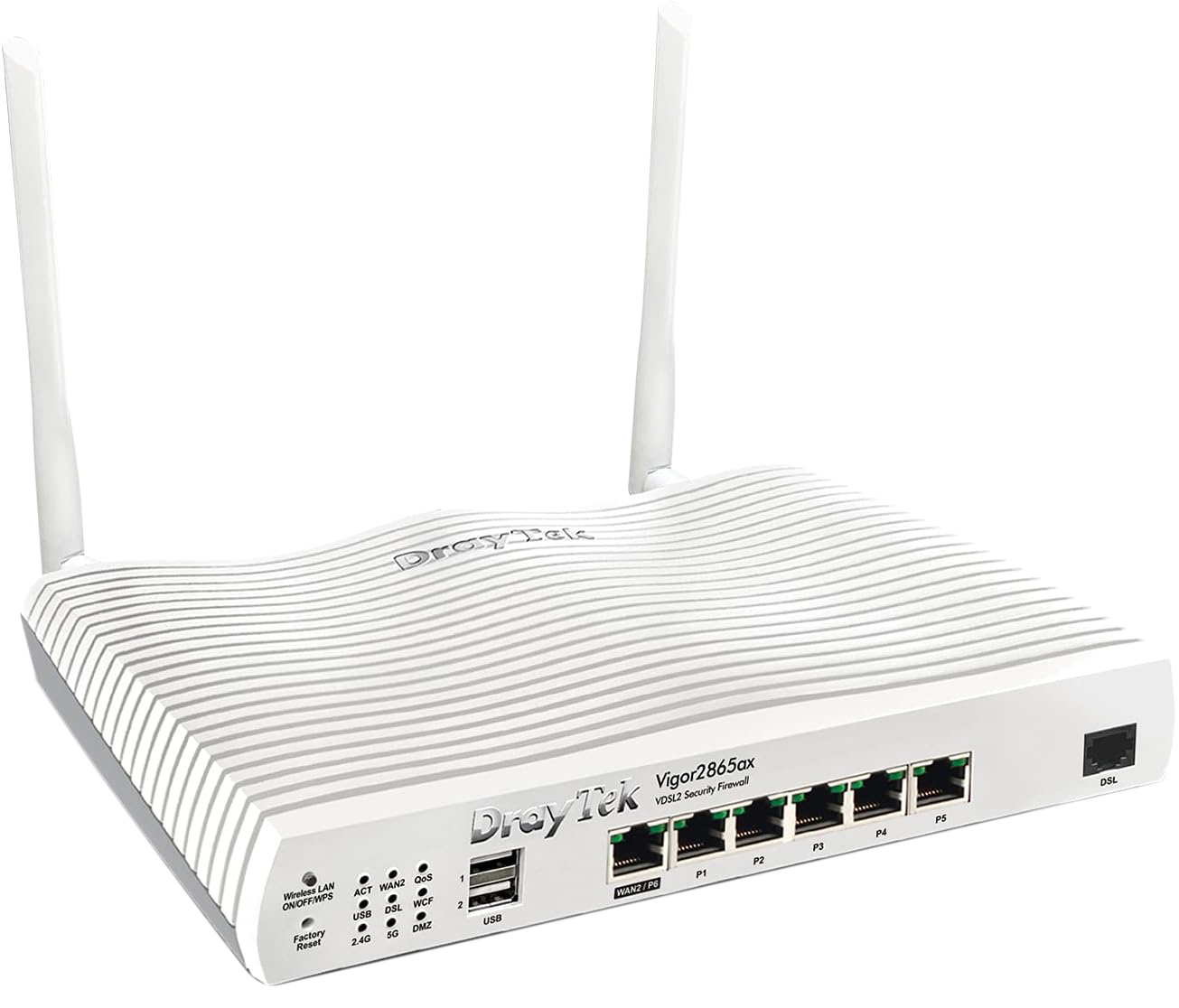
Vigor2865 Series is a Vdsl2 35b/adsl2+ Security Firewall Router Integrating a Dsl Modem Which is Compatible With Variants of Adsl And Vdsl, Including Profile 35b Supervectoring. There is Also a Gigabit Ethernet Wan Port For Broadband Connections to Share The Traffic Load or Serve as a Failover Connection. 3g/4g/ Lte Usb Modem Can Also be Attached to The Usb Ports of The Router. The 2865 Lte Series Includes Models With Built-in 802.11ac Wave 2 Wifi, 802.11ax Wifi, And Voip Gateway. App Qos Voip First: Voip is Always With Top Priority! With Default Udp 5060 Port (Configurable), Voip Qos is Out-of-box Ready. Improve Experience For Business-critical Apps: Select Your Business Critical Apps, And Easily Put Them Into Qos Classes Flexible Bandwidth Allocation:Bandwidth Will be Reserved For High-priority Classes, And Can be Used by Low-priority Classes When Available. What’s in it For You? Load Balancing: Maximize Throughput And Reliability by Using Multiple Internet Connections Hotspot Web Portal: Market Your Business And Communicate With The Guests While Offering Hospitality Wlan Bandwidth Management: Prevent One Device Using All The Bandwidth by Bandwidth Limit Policy, Session Limit Policy, And Qos Settings. Voip Friendly: Vigor2865 Series Can do Port Forwarding And Reserve Bandwidth For Voip Traffic Automatically, Making Voip Setup Effortless. Vpn (Virtual Private Network): Build a Secure And Private Tunnel From The Lan of Vigor2865 Series to The Remote Offices And Teleworkers Over The Internet. Ssl Vpn: The Vpn Works Through Firewalls Providing Secure Remote Access to Any Network Environment. Firewall & Content Filter: Filter Web Pages by Url Keyword or Web Category to Block Access to Insecure or Inappropriate Contents. Drayddns: The Free Ddns Service For You to Access The Router by a Fixed Hostname of Your Choice Central Switch Managemen: Set up Vlan Easily From The Router And Get a Centralized Hierarchy View of The Switches. Mesh (Wireless Model Only): Easily Link to Other Vigorap to Expand The Wireless Networt Wireless Wan (Wireless Model Only): Get Internet Access Wirelessly From a Wireless Network, a Mobile Hotspot, or a Personal Hotspot Set up on Smartphones
Vigor2865 Series is a Vdsl2 35b/adsl2+ Security Firewall Router Integrating a Dsl Modem Which is Compatible With Variants of Adsl And Vdsl, Including Profile 35b Supervectoring. There is Also a Gigabit Ethernet Wan Port For Broadband Connections to Share The Traffic Load or Serve as a Failover Connection. 3g/4g/ Lte Usb Modem Can Also be Attached to The Usb Ports of The Router. The 2865 Lte Series Includes Models With Built-in 802.11ac Wave 2 Wifi, 802.11ax Wifi, And Voip Gateway. App Qos Voip First: Voip is Always With Top Priority! With Default Udp 5060 Port (Configurable), Voip Qos is Out-of-box Ready. Improve Experience For Business-critical Apps: Select Your Business Critical Apps, And Easily Put Them Into Qos Classes Flexible Bandwidth Allocation:Bandwidth Will be Reserved For High-priority Classes, And Can be Used by Low-priority Classes When Available. What’s in it For You? Load Balancing: Maximize Throughput And Reliability by Using Multiple Internet Connections Hotspot Web Portal: Market Your Business And Communicate With The Guests While Offering Hospitality Wlan Bandwidth Management: Prevent One Device Using All The Bandwidth by Bandwidth Limit Policy, Session Limit Policy, And Qos Settings. Voip Friendly: Vigor2865 Series Can do Port Forwarding And Reserve Bandwidth For Voip Traffic Automatically, Making Voip Setup Effortless. Vpn (Virtual Private Network): Build a Secure And Private Tunnel From The Lan of Vigor2865 Series to The Remote Offices And Teleworkers Over The Internet. Ssl Vpn: The Vpn Works Through Firewalls Providing Secure Remote Access to Any Network Environment. Firewall & Content Filter: Filter Web Pages by Url Keyword or Web Category to Block Access to Insecure or Inappropriate Contents. Drayddns: The Free Ddns Service For You to Access The Router by a Fixed Hostname of Your Choice Central Switch Managemen: Set up Vlan Easily From The Router And Get a Centralized Hierarchy View of The Switches. Mesh (Wireless Model Only): Easily Link to Other Vigorap to Expand The Wireless Networt Wireless Wan (Wireless Model Only): Get Internet Access Wirelessly From a Wireless Network, a Mobile Hotspot, or a Personal Hotspot Set up on Smartphones
DrayTek Vigor 2865ax Wifi 6 Modem Router
Vigor2865 Series is a Vdsl2 35b/adsl2+ Security Firewall Router Integrating a Dsl Modem Which is Compatible With Variants of Adsl And Vdsl, Including Profile 35b Supervectoring. There is Also a Gigabit Ethernet Wan Port For Broadband Connections to Share The Traffic Load or Serve as a Failover Connection. 3g/4g/ Lte Usb Modem Can Also be Attached to The Usb Ports of The Router. The 2865 Lte Series Includes Models With Built-in 802.11ac Wave 2 Wifi, 802.11ax Wifi, And Voip Gateway. App Qos Voip First: Voip is Always With Top Priority! With Default Udp 5060 Port (Configurable), Voip Qos is Out-of-box Ready. Improve Experience For Business-critical Apps: Select Your Business Critical Apps, And Easily Put Them Into Qos Classes Flexible Bandwidth Allocation:Bandwidth Will be Reserved For High-priority Classes, And Can be Used by Low-priority Classes When Available. What’s in it For You? Load Balancing: Maximize Throughput And Reliability by Using Multiple Internet Connections Hotspot Web Portal: Market Your Business And Communicate With The Guests While Offering Hospitality Wlan Bandwidth Management: Prevent One Device Using All The Bandwidth by Bandwidth Limit Policy, Session Limit Policy, And Qos Settings. Voip Friendly: Vigor2865 Series Can do Port Forwarding And Reserve Bandwidth For Voip Traffic Automatically, Making Voip Setup Effortless. Vpn (Virtual Private Network): Build a Secure And Private Tunnel From The Lan of Vigor2865 Series to The Remote Offices And Teleworkers Over The Internet. Ssl Vpn: The Vpn Works Through Firewalls Providing Secure Remote Access to Any Network Environment. Firewall & Content Filter: Filter Web Pages by Url Keyword or Web Category to Block Access to Insecure or Inappropriate Contents. Drayddns: The Free Ddns Service For You to Access The Router by a Fixed Hostname of Your Choice Central Switch Managemen: Set up Vlan Easily From The Router And Get a Centralized Hierarchy View of The Switches. Mesh (Wireless Model Only): Easily Link to Other Vigorap to Expand The Wireless Networt Wireless Wan (Wireless Model Only): Get Internet Access Wirelessly From a Wireless Network, a Mobile Hotspot, or a Personal Hotspot Set up on Smartphones
Vigor2865 Series is a Vdsl2 35b/adsl2+ Security Firewall Router Integrating a Dsl Modem Which is Compatible With Variants of Adsl And Vdsl, Including Profile 35b Supervectoring. There is Also a Gigabit Ethernet Wan Port For Broadband Connections to Share The Traffic Load or Serve as a Failover Connection. 3g/4g/ Lte Usb Modem Can Also be Attached to The Usb Ports of The Router. The 2865 Lte Series Includes Models With Built-in 802.11ac Wave 2 Wifi, 802.11ax Wifi, And Voip Gateway. App Qos Voip First: Voip is Always With Top Priority! With Default Udp 5060 Port (Configurable), Voip Qos is Out-of-box Ready. Improve Experience For Business-critical Apps: Select Your Business Critical Apps, And Easily Put Them Into Qos Classes Flexible Bandwidth Allocation:Bandwidth Will be Reserved For High-priority Classes, And Can be Used by Low-priority Classes When Available. What’s in it For You? Load Balancing: Maximize Throughput And Reliability by Using Multiple Internet Connections Hotspot Web Portal: Market Your Business And Communicate With The Guests While Offering Hospitality Wlan Bandwidth Management: Prevent One Device Using All The Bandwidth by Bandwidth Limit Policy, Session Limit Policy, And Qos Settings. Voip Friendly: Vigor2865 Series Can do Port Forwarding And Reserve Bandwidth For Voip Traffic Automatically, Making Voip Setup Effortless. Vpn (Virtual Private Network): Build a Secure And Private Tunnel From The Lan of Vigor2865 Series to The Remote Offices And Teleworkers Over The Internet. Ssl Vpn: The Vpn Works Through Firewalls Providing Secure Remote Access to Any Network Environment. Firewall & Content Filter: Filter Web Pages by Url Keyword or Web Category to Block Access to Insecure or Inappropriate Contents. Drayddns: The Free Ddns Service For You to Access The Router by a Fixed Hostname of Your Choice Central Switch Managemen: Set up Vlan Easily From The Router And Get a Centralized Hierarchy View of The Switches. Mesh (Wireless Model Only): Easily Link to Other Vigorap to Expand The Wireless Networt Wireless Wan (Wireless Model Only): Get Internet Access Wirelessly From a Wireless Network, a Mobile Hotspot, or a Personal Hotspot Set up on Smartphones
in 7 offers
The lowest price for DrayTek Vigor 2865ax Wifi 6 Modem Router right now is $449.96 at Local Electronics, compared across 7 retailers.
The all-time low was $430.00 on 2 May 2026 — today's price is 5% above the lowest ever. This is at or near its all-time low — a good time to buy.
Prices last updated 24 June 2026.
Last updated at 24/06/2026 09:45:37
DrayTek Vigor2865ax Dual-WAN (Annex-B) VPN Firewall Router
Affiliate Disclosure: We may receive a small commission for purchases made through this link at no extra cost to you. This helps support our site. Thank you!
Vigor2865
DrayTek DV2865ax Vigor2865ax Multi-WAN ADSL/VDSL Wi-Fi 6 Modem Router
DrayTek DV2865ax Vigor2865ax VDSL2 35b Multi-WAN WiFi 6 Modem Router
Delivery between 29 June – 7 July $12.95
Draytek Dv2865ax - Multi WAN Router with Vdsl2 35b/ADSL2+, Gigabit Ethernet WAN, 3G/4G USB WAN, 802.11ax (Ax2300) Wi-Fi, 16 SSL VPNs, VoIP, and
Delivery between Fri – Tue $13.50
DrayTek Vigor2865ax Wi-Fi 6 Modem Router
30-day returns
DrayTek DV2865ax - Multi WAN Router with VDSL2 35b/ADSL2+, 1 x GbE WAN/LAN, and 3G/4G USB WAN port for Load Balancing and Fail-over, 802.11ax (AX2300)
Delivery $10
originally posted on box.co.uk
Pros: It’s a Dreytek, infinite tweaking opportunities, safe and fast. AX is a big step up in terms of Wi-Fi speed. Top notch support. Build quality.Cons: New auto firmware update needs some work. It downloaded the wrong FW and we lost the Wi-Fi option. Teething problems and DT sorted out the issue with an updated FW file.
originally posted on bt.com
Pros: Extremely versatile router. When you know how to configure these they can do so much. Makes then a great choice for SMBs.Cons: The firewall throughput speeds are starting to be a little limiting and I'd like to see new models with firewall throughput at least doubled. 500 Meg synchronous speeds are being offered as relatively common services now.
originally posted on scan.co.uk
What an amazing bit of kit. I was seeking a solution to a problem that admittedly not many people have, but I can't recommend this highly enough.I have two internet lines, one via my phone line and the other is fibre to the premises. I had been using equipment supplied by the fibre vendor but found that the signal kept dropping. The kit supplied was Linksys Velop. It kept dropping the mesh between itself and dropping the internet connection completely. The problem was not only this but having to two internet services, I had two sets of peripherals.The DrayTek device acts as a VDSL router, dealing with that conneciton without issue, it also has the ability to plug in the second line to 'WAN 2' directly from the FttP modem.You can can now just forget about and let ... MoreWhat an amazing bit of kit. I was seeking a solution to a problem that admittedly not many people have, but I can't recommend this highly enough.I have two internet lines, one via my phone line and the other is fibre to the premises. I had been using equipment supplied by the fibre vendor but found that the signal kept dropping. The kit supplied was Linksys Velop. It kept dropping the mesh between itself and dropping the internet connection completely. The problem was not only this but having to two internet services, I had two sets of peripherals.The DrayTek device acts as a VDSL router, dealing with that conneciton without issue, it also has the ability to plug in the second line to 'WAN 2' directly from the FttP modem.You can can now just forget about and let it do its thing or create some VLANs to ensure that different devices are serviced by the different connections.It hasn't dropped once, the fibre remains super fast (synchronous 600Mbps) and the VDSL is perfect. I've also noticed the speed within the house has improved.I have also set up my WRT3200 as an access point to boost the range.All in all, I'd say ditch the rubbish supplied by your ISP and get one of these.
DrayTek Vigor2865ax Dual-WAN (Annex-B) VPN Firewall Router
Affiliate Disclosure: We may receive a small commission for purchases made through this link at no extra cost to you. This helps support our site. Thank you!
Vigor2865
DrayTek DV2865ax Vigor2865ax Multi-WAN ADSL/VDSL Wi-Fi 6 Modem Router
DrayTek DV2865ax Vigor2865ax VDSL2 35b Multi-WAN WiFi 6 Modem Router
Delivery between 29 June – 7 July $12.95
Draytek Dv2865ax - Multi WAN Router with Vdsl2 35b/ADSL2+, Gigabit Ethernet WAN, 3G/4G USB WAN, 802.11ax (Ax2300) Wi-Fi, 16 SSL VPNs, VoIP, and
Delivery between Fri – Tue $13.50
Pros: It’s a Dreytek, infinite tweaking opportunities, safe and fast. AX is a big step up in terms of Wi-Fi speed. Top notch support. Build quality.Cons: New auto firmware update needs some work. It downloaded the wrong FW and we lost the Wi-Fi option. Teething problems and DT sorted out the issue with an updated FW file.
Pros: Extremely versatile router. When you know how to configure these they can do so much. Makes then a great choice for SMBs.Cons: The firewall throughput speeds are starting to be a little limiting and I'd like to see new models with firewall throughput at least doubled. 500 Meg synchronous speeds are being offered as relatively common services now.
What an amazing bit of kit. I was seeking a solution to a problem that admittedly not many people have, but I can't recommend this highly enough.I have two internet lines, one via my phone line and the other is fibre to the premises. I had been using equipment supplied by the fibre vendor but found that the signal kept dropping. The kit supplied was Linksys Velop. It kept dropping the mesh between itself and dropping the internet connection completely. The problem was not only this but having to two internet services, I had two sets of peripherals.The DrayTek device acts as a VDSL router, dealing with that conneciton without issue, it also has the ability to plug in the second line to 'WAN 2' directly from the FttP modem.You can can now just forget about and let ... MoreWhat an amazing bit of kit. I was seeking a solution to a problem that admittedly not many people have, but I can't recommend this highly enough.I have two internet lines, one via my phone line and the other is fibre to the premises. I had been using equipment supplied by the fibre vendor but found that the signal kept dropping. The kit supplied was Linksys Velop. It kept dropping the mesh between itself and dropping the internet connection completely. The problem was not only this but having to two internet services, I had two sets of peripherals.The DrayTek device acts as a VDSL router, dealing with that conneciton without issue, it also has the ability to plug in the second line to 'WAN 2' directly from the FttP modem.You can can now just forget about and let it do its thing or create some VLANs to ensure that different devices are serviced by the different connections.It hasn't dropped once, the fibre remains super fast (synchronous 600Mbps) and the VDSL is perfect. I've also noticed the speed within the house has improved.I have also set up my WRT3200 as an access point to boost the range.All in all, I'd say ditch the rubbish supplied by your ISP and get one of these.
Professional IT opinion: Buy it! The Rolls Royce of Routers for ADSL & ADSL2. Solid and dependable. The first thing our engineers tell BT customers is to ditch the 'Hubs' and get a bit of kit that won't force retrains and constantly disconnect. Packed with features and security to keep business and security conscious home users happy.
I purchased this from Scortec to replace a Vigor 2862 which was having issues with SOS/ROC on the VDSL2 line. Fast delivery, good price. New router has been working perfectly since installed some time ago. Also comes with OpenVPN which is an improvement on the 2862 model.
First, from examining the box I thought I was buying a dual-band router, but in fact it is single band - it appears that DrayTek have been selling both dual-band and single-band routers in boxes marked 'Dual Band', which, in the UK, is a clear breach of advertising rules. Also, when the DHCP server is enabled to provide IP addresses on the LAN, there is no corresponding DNS server present to manage machine names on the LAN. Apart from these points, this is an excellent router. However, the failures above are not what one would expect from a company with the reputation of DrayTek.
I love Draytek routers! Robust security, good Wi-Fi signal strength and pattern, reliable for months on end (mine has been off once in 3 years because I moved it when I decorated) without intervention, low power consumption, huge number of features and extremely flexible. In my opinion, they beat the living hell out of every other ISP supplied router, especially the BT supplied rubbish. BT say they have the most powerful Wi-Fi signal? Really? If they believe that, then they should broadcast a live comparison with a Draytek. The Draytek will win, hands down, every single time. I'm a professional IT person and I use nothing else for me and my business (and have done since 2002) and ALL of my clients use Draytek routers and that's for a reason. There are none better - ... MoreI love Draytek routers! Robust security, good Wi-Fi signal strength and pattern, reliable for months on end (mine has been off once in 3 years because I moved it when I decorated) without intervention, low power consumption, huge number of features and extremely flexible. In my opinion, they beat the living hell out of every other ISP supplied router, especially the BT supplied rubbish. BT say they have the most powerful Wi-Fi signal? Really? If they believe that, then they should broadcast a live comparison with a Draytek. The Draytek will win, hands down, every single time. I'm a professional IT person and I use nothing else for me and my business (and have done since 2002) and ALL of my clients use Draytek routers and that's for a reason. There are none better - in my opinion that is :)
Pros: Feature packed router with built in ax wifi and G.Fast support. Able to set up VLANs. Dual WAN support.Good replacement for existing Draytek ADSL router.Cons: Web interface is not modern or intuitive.Firewall is difficult to configure and appears to block some things (e.g. FTP outbound) by default. Many configuration changes result in full reboot of the router. Takes several minutes to re-connect to WAN (G.Fast) when rebooted.
Pros: Draytek name for quality and reliabilityCons: Been promising Mesh for a year, still no firmware
Pros: Latest technology built in highly configurableCons: Could be a little simpler to set up, definitely not for the beginner.