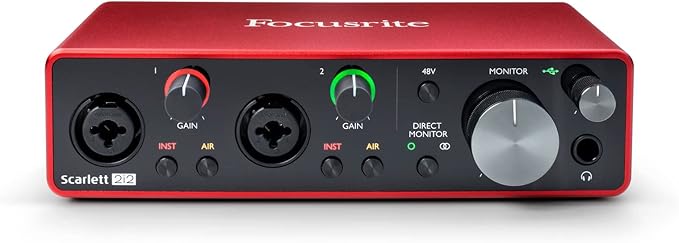
Focusrite Scarlett 2i2 (Gen 3) 2-in/2-out USB Audio Interface
Create studio quality vocals, powerful guitars, luscious keys and huge drums. Easy Start It's easier than ever to get up and running with your Scarlett with the online tool, Easy Start. Your recordings will retain all of their sonic qualities so that you can sound like the artists you admire. Lownoise for crystal clear listening Two lownoise balanced outputs provide clean audio playback. Hear all the details and nuances of your own track or music from Spotify, Apple Music and Music. Plugin your headphones to the highpowered output for monitoring in highfidelity. Get the perfect guitar and vocal take There's no need to sacrifice your tone with two highheadroom instrument inputs to plug in your guitar or bass so that they shine through. Capture your voice with clarity and your instruments in all their glory without any unwanted clipping or distortion thanks to the Gain Halos. Pro performance with the finest preamps Achieve a brighter and a more open recording thanks to the best performing mic preamps the Scarlett range has ever seen. A switchable Air mode will add extra clarity to your acoustic instruments when recording with your Scarlett 2i2.
Create studio quality vocals, powerful guitars, luscious keys and huge drums. Easy Start It's easier than ever to get up and running with your Scarlett with the online tool, Easy Start. Your recordings will retain all of their sonic qualities so that you can sound like the artists you admire. Lownoise for crystal clear listening Two lownoise balanced outputs provide clean audio playback. Hear all the details and nuances of your own track or music from Spotify, Apple Music and Music. Plugin your headphones to the highpowered output for monitoring in highfidelity. Get the perfect guitar and vocal take There's no need to sacrifice your tone with two highheadroom instrument inputs to plug in your guitar or bass so that they shine through. Capture your voice with clarity and your instruments in all their glory without any unwanted clipping or distortion thanks to the Gain Halos. Pro performance with the finest preamps Achieve a brighter and a more open recording thanks to the best performing mic preamps the Scarlett range has ever seen. A switchable Air mode will add extra clarity to your acoustic instruments when recording with your Scarlett 2i2.
Create studio quality vocals, powerful guitars, luscious keys and huge drums. Easy Start It's easier than ever to get up and running with your Scarlett with the online tool, Easy Start. Your recordings will retain all of their sonic qualities so that you can sound like the artists you admire. Lownoise for crystal clear listening Two lownoise balanced outputs provide clean audio playback. Hear all the details and nuances of your own track or music from Spotify, Apple Music and Music. Plugin your headphones to the highpowered output for monitoring in highfidelity. Get the perfect guitar and vocal take There's no need to sacrifice your tone with two highheadroom instrument inputs to plug in your guitar or bass so that they shine through. Capture your voice with clarity and your instruments in all their glory without any unwanted clipping or distortion thanks to the Gain Halos. Pro performance with the finest preamps Achieve a brighter and a more open recording thanks to the best performing mic preamps the Scarlett range has ever seen. A switchable Air mode will add extra clarity to your acoustic instruments when recording with your Scarlett 2i2.
Create studio quality vocals, powerful guitars, luscious keys and huge drums. Easy Start It's easier than ever to get up and running with your Scarlett with the online tool, Easy Start. Your recordings will retain all of their sonic qualities so that you can sound like the artists you admire. Lownoise for crystal clear listening Two lownoise balanced outputs provide clean audio playback. Hear all the details and nuances of your own track or music from Spotify, Apple Music and Music. Plugin your headphones to the highpowered output for monitoring in highfidelity. Get the perfect guitar and vocal take There's no need to sacrifice your tone with two highheadroom instrument inputs to plug in your guitar or bass so that they shine through. Capture your voice with clarity and your instruments in all their glory without any unwanted clipping or distortion thanks to the Gain Halos. Pro performance with the finest preamps Achieve a brighter and a more open recording thanks to the best performing mic preamps the Scarlett range has ever seen. A switchable Air mode will add extra clarity to your acoustic instruments when recording with your Scarlett 2i2.
in 39 offers
The lowest price for Focusrite Scarlett 2i2 (Gen 3) 2-in/2-out USB Audio Interface right now is $177.06 at eBay.com.au, compared across 10 retailers.
The all-time low was $72.90 on 5 June 2026 — today's price is 143% above the lowest ever. It has been notably cheaper before — worth setting a price alert.
Prices last updated 9 Oct 2026.
Last updated at 09/10/2026 22:16:38
Focusrite Scarlett 2i2 3rd Gen Usb Audio Interface For Recording,
Free delivery
Affiliate Disclosure: We may receive a small commission for purchases made through this link at no extra cost to you. This helps support our site. Thank you!
Focusrite Scarlett 2i2 3rd Gen USB Audio Interface Refurbished
Free delivery between 16–21 Oct
Focusrite Scarlett 2i2 3rd Gen USB Audio Interface (Cubase LE included)
Free delivery between 15–21 Oct
Focusrite Scarlett 2i2 3rd Gen. 2-Channel USB Audio Interface - MOSC0025
Delivery between 14–18 Oct $41
Focusrite Scarlett 2i2 Gen 3 2-in/2-out USB Audio Interface
Delivery $20
Focusrite Scarlett 2i2 (GEN 3) 2-in/2-out USB Audio Interface
Focusrite Scarlett 2I2 MK3 Usb Audio Interface
Free delivery
Focusrite Scarlett 2i2 G3 USB 2.0 Type C Audio Interface Red NEW from Japan
Delivery $28.63
Focusrite Scarlett 2i2 3rd Gen USB Audio Interface for Recording, Songwriting, Streaming and Podcasting High-Fidelity, Studio Quality Recording, and
Free delivery between 20–23 Oct
Focusrite 2/2 24bit/192kHz Scarlett 2i2 (3rd Gen)
Free delivery between 20–23 Oct
originally posted on guitarcenter.com
I've had this interface for 14 months. I had problems with it immediately, but they weren't bad enough to really make me want to return it, just some small audio glitches that were fixed by unplugging it and plugging it back in. At some point this year, however, I noticed that there was a popping sound whenever I would unplug an input, in this case a good quality guitar cable. Then, I noticed that whenever I would do this, I would sometimes lose the right channel of the headphone/monitor jack. This problem got worse and worse until I would have to plug and unplug a cable until I'd magically get audio back to both channels evenly. That was bad enough, but it gets worse.I use this as my primary communication device over programs like discord and when playing games, ... MoreI've had this interface for 14 months. I had problems with it immediately, but they weren't bad enough to really make me want to return it, just some small audio glitches that were fixed by unplugging it and plugging it back in. At some point this year, however, I noticed that there was a popping sound whenever I would unplug an input, in this case a good quality guitar cable. Then, I noticed that whenever I would do this, I would sometimes lose the right channel of the headphone/monitor jack. This problem got worse and worse until I would have to plug and unplug a cable until I'd magically get audio back to both channels evenly. That was bad enough, but it gets worse.I use this as my primary communication device over programs like discord and when playing games, in addition to my interface for recording audio into a DAW. I had to program a batch file to reset the Windows Audio Service in addition to another service in Windows because I started to have audio glitch problems very, very frequently (at least once per day, usually more like 3-to-5 times.) I tried fixing it by installing newer drivers, but that caused my mic volume to drop by more than 50% in all programs permanently, essentially ruining this interface for half of the time I use it. And still, it gets worse.Today, while watching a video, I hear a loud popping, followed by an incredible amount of static. Loud enough that if my volume were turned up just a bit more, I would have blown out my expensive headphones, or worse, damaged my hearing. Both of my inputs were maxed out with static noise that made this thing completely unusable for about an hour. After some time, the sound subsided, and it went back to its usual half-busted behavior.I wouldn't trust this interface. I know it's at a decent price point, but trust me, it's not worth it. This is hands-down the worst audio interface I've ever used. It's riddled with problems. Save your money and go with something else, anything else. I know there are a lot of 5-star reviews, but it's not worth the risk to your equipment or your hearing.
originally posted on Sam Ash
I replaced my 2nd generation Scarlett 2i2 with the 3rd generation 4i4. I was a bit skeptical of the software application required to set the inputs to line/instrument, but it turned out to be fairly intuitive. The unit comes with a pad and air feature. Pad is self explanatory (gain reduction for loud recordings), the air setting is supposed to model some classic microphone preamp or something to that effect. I'm not totally sure what the difference is, but I've left the Air feature on anyways while recording and I've been pleased with the results, how much of that satisfaction is a result of the Air setting is hard to say since I haven't actually done any objective testing but it certainly doesn't seem to hurt anything by having it on. Initially, when I got the ... MoreI replaced my 2nd generation Scarlett 2i2 with the 3rd generation 4i4. I was a bit skeptical of the software application required to set the inputs to line/instrument, but it turned out to be fairly intuitive. The unit comes with a pad and air feature. Pad is self explanatory (gain reduction for loud recordings), the air setting is supposed to model some classic microphone preamp or something to that effect. I'm not totally sure what the difference is, but I've left the Air feature on anyways while recording and I've been pleased with the results, how much of that satisfaction is a result of the Air setting is hard to say since I haven't actually done any objective testing but it certainly doesn't seem to hurt anything by having it on. Initially, when I got the hardware going on my iMac I experienced significant lag while using Logic at various times, particularly when I was trying to copy logic drum tracks or expand the timeline but also while trying to do basic functions as well. I was concerned that I would have to get more RAM for my Mac which is problematic because the model I have makes it both difficult and expensive to increase RAM. However, after a few repeated uses the issue seems to have subsided, so I don't really know what that was about or whether the change in hardware even had anything to do with it, however it definitely was not an issue while I used my 2i2 so it's something to consider. I mainly upgraded because I wanted to start using midi with my electronic drum kit and that was basically as easy as plug and play (aside from a couple added steps in Logic which didn't have anything to do with the 4i4). However, for some reason the midi tracks seem to cause Logic to experience errors during playback when I close and then reopen a project. Again, can't say that this is a result of the 4i4 but I've been able to resolve the issue by simply quitting Logic entirely before reopening a project which isn't much of an inconvenience at all.
originally posted on guitarcenter.com
The interface is great. As a first time user there was a bit of a learning curve so a few things I had to find out for myself.First off...If you previously used "ASIO4ALL" for everything, DON'T USE THAT..use "focusriteASIO"Using ASIO4ALL my recordings were off beat and I had crazy latency. After hours of changing sample rates I found out to just change the setting.I found the direct monitor function to do me no good at all because you can't adjust the volume of the mic to hear yourself properly when you record. You can only adjust the gain which then will distort your recording if you turn it up too high...so...useless. Better to just use your DAW.Also I got running noise from my computer going through my monitors from the interface. Using ground loop isolators ... MoreThe interface is great. As a first time user there was a bit of a learning curve so a few things I had to find out for myself.First off...If you previously used "ASIO4ALL" for everything, DON'T USE THAT..use "focusriteASIO"Using ASIO4ALL my recordings were off beat and I had crazy latency. After hours of changing sample rates I found out to just change the setting.I found the direct monitor function to do me no good at all because you can't adjust the volume of the mic to hear yourself properly when you record. You can only adjust the gain which then will distort your recording if you turn it up too high...so...useless. Better to just use your DAW.Also I got running noise from my computer going through my monitors from the interface. Using ground loop isolators degraded the quality of the playback audio. So I found the only options to be deal with it, or pay a crazy amount for a power conditioner. So...I deal.I also didn't hear much difference in my vocals using the AiR filter. I have a decent mic, so maybe it helps lower end ones idk.Outside of those things, it works great! No latency, once it's set up it's easy to use. It seems solid, and I hear it's reliable. I hope I can save someone a headache or two.
| Connector Type | USB-C |
| Interfaces | Two outputs, Headphone output, Hi-Z instrument inputs, Line inputs, Two balanced outputs |
| Wireless Technology | USB, Wired |
| Included Accessories | Ableton Live Lite |
| Power Source | USB |
Focusrite Scarlett 2i2 3rd Gen Usb Audio Interface For Recording,
Free delivery
Affiliate Disclosure: We may receive a small commission for purchases made through this link at no extra cost to you. This helps support our site. Thank you!
Focusrite Scarlett 2i2 3rd Gen USB Audio Interface Refurbished
Free delivery between 16–21 Oct
Focusrite Scarlett 2i2 3rd Gen USB Audio Interface (Cubase LE included)
Free delivery between 15–21 Oct
Focusrite Scarlett 2i2 3rd Gen. 2-Channel USB Audio Interface - MOSC0025
Delivery between 14–18 Oct $41
Focusrite Scarlett 2i2 Gen 3 2-in/2-out USB Audio Interface
Delivery $20
I've had this interface for 14 months. I had problems with it immediately, but they weren't bad enough to really make me want to return it, just some small audio glitches that were fixed by unplugging it and plugging it back in. At some point this year, however, I noticed that there was a popping sound whenever I would unplug an input, in this case a good quality guitar cable. Then, I noticed that whenever I would do this, I would sometimes lose the right channel of the headphone/monitor jack. This problem got worse and worse until I would have to plug and unplug a cable until I'd magically get audio back to both channels evenly. That was bad enough, but it gets worse.I use this as my primary communication device over programs like discord and when playing games, ... MoreI've had this interface for 14 months. I had problems with it immediately, but they weren't bad enough to really make me want to return it, just some small audio glitches that were fixed by unplugging it and plugging it back in. At some point this year, however, I noticed that there was a popping sound whenever I would unplug an input, in this case a good quality guitar cable. Then, I noticed that whenever I would do this, I would sometimes lose the right channel of the headphone/monitor jack. This problem got worse and worse until I would have to plug and unplug a cable until I'd magically get audio back to both channels evenly. That was bad enough, but it gets worse.I use this as my primary communication device over programs like discord and when playing games, in addition to my interface for recording audio into a DAW. I had to program a batch file to reset the Windows Audio Service in addition to another service in Windows because I started to have audio glitch problems very, very frequently (at least once per day, usually more like 3-to-5 times.) I tried fixing it by installing newer drivers, but that caused my mic volume to drop by more than 50% in all programs permanently, essentially ruining this interface for half of the time I use it. And still, it gets worse.Today, while watching a video, I hear a loud popping, followed by an incredible amount of static. Loud enough that if my volume were turned up just a bit more, I would have blown out my expensive headphones, or worse, damaged my hearing. Both of my inputs were maxed out with static noise that made this thing completely unusable for about an hour. After some time, the sound subsided, and it went back to its usual half-busted behavior.I wouldn't trust this interface. I know it's at a decent price point, but trust me, it's not worth it. This is hands-down the worst audio interface I've ever used. It's riddled with problems. Save your money and go with something else, anything else. I know there are a lot of 5-star reviews, but it's not worth the risk to your equipment or your hearing.
I replaced my 2nd generation Scarlett 2i2 with the 3rd generation 4i4. I was a bit skeptical of the software application required to set the inputs to line/instrument, but it turned out to be fairly intuitive. The unit comes with a pad and air feature. Pad is self explanatory (gain reduction for loud recordings), the air setting is supposed to model some classic microphone preamp or something to that effect. I'm not totally sure what the difference is, but I've left the Air feature on anyways while recording and I've been pleased with the results, how much of that satisfaction is a result of the Air setting is hard to say since I haven't actually done any objective testing but it certainly doesn't seem to hurt anything by having it on. Initially, when I got the ... MoreI replaced my 2nd generation Scarlett 2i2 with the 3rd generation 4i4. I was a bit skeptical of the software application required to set the inputs to line/instrument, but it turned out to be fairly intuitive. The unit comes with a pad and air feature. Pad is self explanatory (gain reduction for loud recordings), the air setting is supposed to model some classic microphone preamp or something to that effect. I'm not totally sure what the difference is, but I've left the Air feature on anyways while recording and I've been pleased with the results, how much of that satisfaction is a result of the Air setting is hard to say since I haven't actually done any objective testing but it certainly doesn't seem to hurt anything by having it on. Initially, when I got the hardware going on my iMac I experienced significant lag while using Logic at various times, particularly when I was trying to copy logic drum tracks or expand the timeline but also while trying to do basic functions as well. I was concerned that I would have to get more RAM for my Mac which is problematic because the model I have makes it both difficult and expensive to increase RAM. However, after a few repeated uses the issue seems to have subsided, so I don't really know what that was about or whether the change in hardware even had anything to do with it, however it definitely was not an issue while I used my 2i2 so it's something to consider. I mainly upgraded because I wanted to start using midi with my electronic drum kit and that was basically as easy as plug and play (aside from a couple added steps in Logic which didn't have anything to do with the 4i4). However, for some reason the midi tracks seem to cause Logic to experience errors during playback when I close and then reopen a project. Again, can't say that this is a result of the 4i4 but I've been able to resolve the issue by simply quitting Logic entirely before reopening a project which isn't much of an inconvenience at all.
The interface is great. As a first time user there was a bit of a learning curve so a few things I had to find out for myself.First off...If you previously used "ASIO4ALL" for everything, DON'T USE THAT..use "focusriteASIO"Using ASIO4ALL my recordings were off beat and I had crazy latency. After hours of changing sample rates I found out to just change the setting.I found the direct monitor function to do me no good at all because you can't adjust the volume of the mic to hear yourself properly when you record. You can only adjust the gain which then will distort your recording if you turn it up too high...so...useless. Better to just use your DAW.Also I got running noise from my computer going through my monitors from the interface. Using ground loop isolators ... MoreThe interface is great. As a first time user there was a bit of a learning curve so a few things I had to find out for myself.First off...If you previously used "ASIO4ALL" for everything, DON'T USE THAT..use "focusriteASIO"Using ASIO4ALL my recordings were off beat and I had crazy latency. After hours of changing sample rates I found out to just change the setting.I found the direct monitor function to do me no good at all because you can't adjust the volume of the mic to hear yourself properly when you record. You can only adjust the gain which then will distort your recording if you turn it up too high...so...useless. Better to just use your DAW.Also I got running noise from my computer going through my monitors from the interface. Using ground loop isolators degraded the quality of the playback audio. So I found the only options to be deal with it, or pay a crazy amount for a power conditioner. So...I deal.I also didn't hear much difference in my vocals using the AiR filter. I have a decent mic, so maybe it helps lower end ones idk.Outside of those things, it works great! No latency, once it's set up it's easy to use. It seems solid, and I hear it's reliable. I hope I can save someone a headache or two.
Just buy this! Old gigging musician (ex touring road rat) - have many ways to record. Been researching using PC laptop for live tracks, etc. Using Audacity for now. Formally had a digital mixer to connect to PC, horrible connectivity issues, wasted hours EVERY time I tried to use it... Admittedly I'm not all that IT computer savvy. Fought this digital PC conversion for forever (analog GUITAR PLAYER!), paralyzed by research... Was going to buy an expensive Audio interface, but had a friend who recommended Focusrite and Scarlett 2i2 3rd Generation...Here is where it gets good; purchased this unit from Guitar Center on 6.23. Plugged it in, no connectivity issues! Audacity recognized Focusrite immediately, playback and monitoring are in sync, EVERYTHING worked almost ... MoreJust buy this! Old gigging musician (ex touring road rat) - have many ways to record. Been researching using PC laptop for live tracks, etc. Using Audacity for now. Formally had a digital mixer to connect to PC, horrible connectivity issues, wasted hours EVERY time I tried to use it... Admittedly I'm not all that IT computer savvy. Fought this digital PC conversion for forever (analog GUITAR PLAYER!), paralyzed by research... Was going to buy an expensive Audio interface, but had a friend who recommended Focusrite and Scarlett 2i2 3rd Generation...Here is where it gets good; purchased this unit from Guitar Center on 6.23. Plugged it in, no connectivity issues! Audacity recognized Focusrite immediately, playback and monitoring are in sync, EVERYTHING worked almost too easy? Bought this on Wednesday 6.23, solo gigged with 5 new easily recorded background tracks 2 days later.. Should have made this move sooner. I did not have to download ANY drivers, no hassle set up, pretty much, PLUG & PLAY, for this older musician - this is how technology is supposed to work. For less than $200, I now have another great tool to digitally record. The reason I am writing about how "easy" this was; is I was "frozen" due to my first experience trying to sync up digital mixer, huge hassle for me. But took the leap, bought the Scarlett, not looking back, don't hesitate, EASY, quiet, and Pre Amps sound fantastic for the price! Thanks Memphis and Dave!
Focusrite sounds wonderful!! I'm using it to listen to music on my MacBook Pro. My first way of listening to music before the Focusrite was by using the DA converters in the MacBook Pro. At first I was listening to music off of my headphone jack on my iPhone. The DA conversion was not very good and to operate a subwoofer I had to run the entire mix into a mixer and use an aux in to drive the subwoofer. Then I decided to try the DA converters on my MacBook Pro using the same method. The DA converters were much better on the MacBook Pro but I wanted to see if the Focusrite DA converter was better than the MacBook converter and it was considerably better. I was very pleased with the sound except for one issue. To hear the subwoofer I still had to use a mixer. After ... MoreFocusrite sounds wonderful!! I'm using it to listen to music on my MacBook Pro. My first way of listening to music before the Focusrite was by using the DA converters in the MacBook Pro. At first I was listening to music off of my headphone jack on my iPhone. The DA conversion was not very good and to operate a subwoofer I had to run the entire mix into a mixer and use an aux in to drive the subwoofer. Then I decided to try the DA converters on my MacBook Pro using the same method. The DA converters were much better on the MacBook Pro but I wanted to see if the Focusrite DA converter was better than the MacBook converter and it was considerably better. I was very pleased with the sound except for one issue. To hear the subwoofer I still had to use a mixer. After listening to the Focusrite without the subwoofer not going through a mixer the sound was absolutely pristine. Then when I ran it back through the mixer to hear the subwoofer I was totally bummed out because of the slight addition of distortion that the mixer had. Any mixer would have this problem. I needed one more output to drive the subwoofer without the mixer. Then it finally hit me. Use the headphone jack. It drove the subwoofer beautifully and now I have pristine sound with everything coming through the Focusrite. The only slight downside is that when you turn the volume down the bass was still being heard. This was no problem because the knobs are so close together and it's not that critical anyway. It was just like having an aux prefader send to drive the sub. I am writing this in hopes that it is helpful to someone with the same problem. Bottom line: The Focusrite sounds beautiful and is better than any computer DA converter.
A great high quality product!Design-I love the sleek and compact design. The red matte metal contrasts well with the glossy black front and back panels. It has more than enough Jack inputs and contains two ports that function as both XLR and Jack inputs- awesome!It has LED’s on the panels which indicate the selected inputs (INST, AIR, PAD) which can be changed via the focusrite interface.Sound and preformance-Amazing sound quality covering a full range of frequencies! There is also pretty much zero latency so it sounds great and is very much a joy to record with.Handling-For the past couple weeks of use, this audio interface has been very intuitive to use, I’m a novice producer yet I’ve barely had to touch the manual!It also comes with its own interface ... MoreA great high quality product!Design-I love the sleek and compact design. The red matte metal contrasts well with the glossy black front and back panels. It has more than enough Jack inputs and contains two ports that function as both XLR and Jack inputs- awesome!It has LED’s on the panels which indicate the selected inputs (INST, AIR, PAD) which can be changed via the focusrite interface.Sound and preformance-Amazing sound quality covering a full range of frequencies! There is also pretty much zero latency so it sounds great and is very much a joy to record with.Handling-For the past couple weeks of use, this audio interface has been very intuitive to use, I’m a novice producer yet I’ve barely had to touch the manual!It also comes with its own interface which allows you to change the inputs and their volumes. The box has a light around the volume knobs which advises you on the correct volume to have the instrument at (green, orange or red). This interface is also great for troubleshooting when you don’t know whether there’s an issue with the setup or the DAW.
You read my headline clear. DO NOT buy this brand/model if you own a Windows PC. 10 or 11. The drivers are known for conflicting with the updates, including Audio (given) I've owned this device one solid year - under a 3-yr warranty - and already have had nothing but problems with my 3rd Gen for months now. Scratching the head as to why... until I invested in a few forums including Focusrite community and Reddit for interfaces and audio. Every one of the users sharing the same issue.... Incompatible Windows drivers.A tech had me install Latency Mon. A very common computer latency tester. And sure enough, within seconds, it gave me warning errors we'd already guessed, pinpointing the Focusrite. I do professional voice recording from my home studio, and ALL my ... MoreYou read my headline clear. DO NOT buy this brand/model if you own a Windows PC. 10 or 11. The drivers are known for conflicting with the updates, including Audio (given) I've owned this device one solid year - under a 3-yr warranty - and already have had nothing but problems with my 3rd Gen for months now. Scratching the head as to why... until I invested in a few forums including Focusrite community and Reddit for interfaces and audio. Every one of the users sharing the same issue.... Incompatible Windows drivers.A tech had me install Latency Mon. A very common computer latency tester. And sure enough, within seconds, it gave me warning errors we'd already guessed, pinpointing the Focusrite. I do professional voice recording from my home studio, and ALL my recordings prior to the October Windows updates, are pitch perfect. All the recent ones.... garbage. I've messed with the buffer settings from 125 to 1026, and the same junk results. Tried sitting my mic in different areas, hoping I'd get lucky, and it'd finally record a great line. NOPE. Still the same staticy nonsense... alongside the random glitching, popping, and dialogue skips. Just terrible. No, I do not recommend this device for audio interface. Look at something else with better long term quality.
Great build quality, compact and pretty. Useful range of IO, overall happy with it.I just wish the software was a little clearer - setting up custom mixes is strange. Instead of going to each output and selecting which inputs you want on it, you add inputs to _every_ output, then set the volume to 0 for any you don't want broadcasting.Also, enabling more than a single software input in windows requires using a secondary little setttings menu by right clicking the task tray icon, not using the in-software big cog button.It would also be cool if you could change the mix presets with binds of some sort, but I understand this product was not designed for this usecase.
I bought this because I need guitar and mic inputs. I have been using it daily since I received it three days ago and I have not encountered any problems so far.Aesthetics: The metal shell is attractive and it is not very reflective so it does not create any glare from my computer monitor even in the dark. I only wish it came in multiple colors. The face is well designed and everything is labeled clearly. The buttons and knobs all look nice.Hardware Quality: I have to say that I could probably drop this on my kitchen floor and the unit would be fine. The only breakable parts are the input gain knobs because they protrude about 1/3 inch from the face. Speaking of knobs, the monitor volume knob is very smooth and satisfying. The input gain knobs are stiffer to ... MoreI bought this because I need guitar and mic inputs. I have been using it daily since I received it three days ago and I have not encountered any problems so far.Aesthetics: The metal shell is attractive and it is not very reflective so it does not create any glare from my computer monitor even in the dark. I only wish it came in multiple colors. The face is well designed and everything is labeled clearly. The buttons and knobs all look nice.Hardware Quality: I have to say that I could probably drop this on my kitchen floor and the unit would be fine. The only breakable parts are the input gain knobs because they protrude about 1/3 inch from the face. Speaking of knobs, the monitor volume knob is very smooth and satisfying. The input gain knobs are stiffer to turn, but this is not a problem as it makes them much more precise.Sound Quality: I haven't experienced anything other than clear sound from all of the inputs and outputs.Portability: This is a big thing for me because I don't like to have a bunch of cords to unplug every time I want to move my equipment. The single USB-C makes it possible to simply unplug the entire device from my laptop and take my laptop with no hassle or I can just unplug it from my laptop and plug it into a different device.Overall this is a very good product, especially for the price. I haven't found any compromises or issues yet.
The Focusrite 2i2 (3rd Gen) does exactly as how it's described. - It's an overwhelming improvement to you overal sound quality! - Straight forward, no-nonsense! - Easy to use! - Flexibility due to it's 2x2 channel. - Beautiful design! - It even comes with a wide range of software like; Ableton, Antares, Relab, Softube, XLN Audio, Brainworkx and Avid, plus a three-month subscription on Splice Sounds! This is a steal for what you're getting at this price! If you want to build your own Home Studio or looking to upgrade your current audio interface, this is THE perfect solution for you! With a smile, Reggy
| Connector Type | USB-C |
| Interfaces | Two outputs, Headphone output, Hi-Z instrument inputs, Line inputs, Two balanced outputs |
| Wireless Technology | USB, Wired |
| Included Accessories | Ableton Live Lite |
| Power Source | USB |


