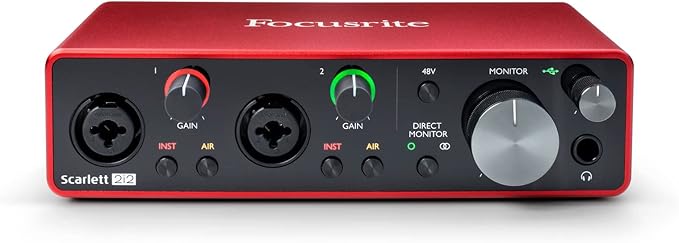
Focusrite Scarlett Solo (Gen 3) 2-in/2-out USB Audio Interface
As the simplest model in the series, Scarlett Solo third-generation singer-songwriter allows a reassuringly simple recording process. Equipped with powerful AD DA converters with up to 24 bit/192 kHz, Scarlett guarantees the same professional sound quality for the entire third-generation series. It features a redesigned Scarlett microphone preamp, with optional Air mode to reproduce the Air effect of the original Focusrite ISA microphone preamp, giving your vocal recordings a brighter and more open sound. The instrument input with lots of resistor and headroom allows you to record guitars and basses without overdriving or unwanted distortion, while the gain halos make it easy to read the input level. The Scarlett Solo's balanced outputs are hum-free when connected to balanced studio monitor inputs, so you can always count on perfect audio playback. The Scarlett Solo is prepared for the rough touring life and can be connected directly to your Mac or PC via a USB cable; you don't need an external power supply. The most convincing microphone preamps the Scarlett range has to offer - now with switchable Air function to give your recordings a brighter, more open sound. An instrument input with lots of headroom for your guitar or bass. Powerful converters for recording and mixing up to 192 kHz/24 bit. Two hum-free balanced outputs ensure clean audio reproduction. The Quick Start Tool lets you get started in no time at all.
As the simplest model in the series, Scarlett Solo third-generation singer-songwriter allows a reassuringly simple recording process. Equipped with powerful AD DA converters with up to 24 bit/192 kHz, Scarlett guarantees the same professional sound quality for the entire third-generation series. It features a redesigned Scarlett microphone preamp, with optional Air mode to reproduce the Air effect of the original Focusrite ISA microphone preamp, giving your vocal recordings a brighter and more open sound. The instrument input with lots of resistor and headroom allows you to record guitars and basses without overdriving or unwanted distortion, while the gain halos make it easy to read the input level. The Scarlett Solo's balanced outputs are hum-free when connected to balanced studio monitor inputs, so you can always count on perfect audio playback. The Scarlett Solo is prepared for the rough touring life and can be connected directly to your Mac or PC via a USB cable; you don't need an external power supply. The most convincing microphone preamps the Scarlett range has to offer - now with switchable Air function to give your recordings a brighter, more open sound. An instrument input with lots of headroom for your guitar or bass. Powerful converters for recording and mixing up to 192 kHz/24 bit. Two hum-free balanced outputs ensure clean audio reproduction. The Quick Start Tool lets you get started in no time at all.
As the simplest model in the series, Scarlett Solo third-generation singer-songwriter allows a reassuringly simple recording process. Equipped with powerful AD DA converters with up to 24 bit/192 kHz, Scarlett guarantees the same professional sound quality for the entire third-generation series. It features a redesigned Scarlett microphone preamp, with optional Air mode to reproduce the Air effect of the original Focusrite ISA microphone preamp, giving your vocal recordings a brighter and more open sound. The instrument input with lots of resistor and headroom allows you to record guitars and basses without overdriving or unwanted distortion, while the gain halos make it easy to read the input level. The Scarlett Solo's balanced outputs are hum-free when connected to balanced studio monitor inputs, so you can always count on perfect audio playback. The Scarlett Solo is prepared for the rough touring life and can be connected directly to your Mac or PC via a USB cable; you don't need an external power supply. The most convincing microphone preamps the Scarlett range has to offer - now with switchable Air function to give your recordings a brighter, more open sound. An instrument input with lots of headroom for your guitar or bass. Powerful converters for recording and mixing up to 192 kHz/24 bit. Two hum-free balanced outputs ensure clean audio reproduction. The Quick Start Tool lets you get started in no time at all.
As the simplest model in the series, Scarlett Solo third-generation singer-songwriter allows a reassuringly simple recording process. Equipped with powerful AD DA converters with up to 24 bit/192 kHz, Scarlett guarantees the same professional sound quality for the entire third-generation series. It features a redesigned Scarlett microphone preamp, with optional Air mode to reproduce the Air effect of the original Focusrite ISA microphone preamp, giving your vocal recordings a brighter and more open sound. The instrument input with lots of resistor and headroom allows you to record guitars and basses without overdriving or unwanted distortion, while the gain halos make it easy to read the input level. The Scarlett Solo's balanced outputs are hum-free when connected to balanced studio monitor inputs, so you can always count on perfect audio playback. The Scarlett Solo is prepared for the rough touring life and can be connected directly to your Mac or PC via a USB cable; you don't need an external power supply. The most convincing microphone preamps the Scarlett range has to offer - now with switchable Air function to give your recordings a brighter, more open sound. An instrument input with lots of headroom for your guitar or bass. Powerful converters for recording and mixing up to 192 kHz/24 bit. Two hum-free balanced outputs ensure clean audio reproduction. The Quick Start Tool lets you get started in no time at all.
in 45 offers
The lowest price for Focusrite Scarlett Solo (Gen 3) 2-in/2-out USB Audio Interface right now is $90.05 at Reverb, compared across 15 retailers.
The all-time low was $37.53 on 13 Feb 2026 — today's price is 140% above the lowest ever. It has been notably cheaper before — worth setting a price alert.
Prices last updated 10 Oct 2026.
Last updated at 10/10/2026 07:00:45
Focusrite Scarlett Solo 3rd Gen USB Audio Interface for Guitarists, Vocalists, Podcasters or Producers to record and playback studio quality sound
Affiliate Disclosure: We may receive a small commission for purchases made through this link at no extra cost to you. This helps support our site. Thank you!
Focusrite Scarlett Solo 3rd Gen USB Audio Interface
Focusrite Scarlett Solo 3rd Gen USB Audio Interface Refurbished
Free delivery between 16–21 Oct
For Focusrite Scarlett Solo 3rd Gen Usb Audio Interface The Guitarist
Free delivery
Affiliate Disclosure: We may receive a small commission for purchases made through this link at no extra cost to you. This helps support our site. Thank you!
Focusrite Scarlett Solo 3rd Gen Audio Interface (USB), B
Free delivery
Focusrite Scarlett Solo 3rd Gen USB Audio Interface
Delivery between 14–22 Oct $15
Focusrite Scarlett Solo 3RD Generation Headphone Amplifier Sound Card 24-bit/192kHz AD-Converters
Free delivery
Focusrite Scarlett Solo 3rd Gen USB Audio Interface (Cubase LE included)
30-day returns
Focusrite Scarlett Solo Gen 3 2-in/2-out USB Audio Interface
Delivery $20
Focusrite Scarlett SOLO USB Audio Interface (Gen 3)
originally posted on americanmusical.com
I have two AVID Mboxes that I have used for years. The Focusrite Solo 3rd Generation is so much better. I bought the Recording package with the CM25 MIC and Headphones at least half the cost of my MBOX mini and MBOX2. The Preamps are amazing, The MIc is great, the flat response headphones for mixing are very clear and The interface is very easy to install and set up. Most importantly the recording freq of 192KHZ gives you a very pristine recording for acoustic guitar and vocals. The other recording interfaces being sold in this price range are 96 kHz or 48 kHz. The Air button gives your recordings a live sound which is very cool. The stock plugins are also good and there is enough for your mixing needs. It also comes with a Few free DAW options. You Can download ... MoreI have two AVID Mboxes that I have used for years. The Focusrite Solo 3rd Generation is so much better. I bought the Recording package with the CM25 MIC and Headphones at least half the cost of my MBOX mini and MBOX2. The Preamps are amazing, The MIc is great, the flat response headphones for mixing are very clear and The interface is very easy to install and set up. Most importantly the recording freq of 192KHZ gives you a very pristine recording for acoustic guitar and vocals. The other recording interfaces being sold in this price range are 96 kHz or 48 kHz. The Air button gives your recordings a live sound which is very cool. The stock plugins are also good and there is enough for your mixing needs. It also comes with a Few free DAW options. You Can download free plugins, join the Focusrite plugin collective and start on a project within a few mins. thus is a good Product
originally posted on americanmusical.com
I owned this before and it is awesome. The sound quality is great very simple easy to use. I would not look at any other company for an audio interface. Especially if you only need a couple of inputs. And one output for monitors. I eventually got the Mackie big knob studio Plus for my music room upstairs because I can set it up into two different monitors and it has all the inputs and outputs that I need. This one will be great for my secondary music setup which why I will use downstairs when I'm feeling lazy and what I want to watch TV and record music. I would not get any other brand I don't care how positive the reviews are for other ones. If you only need one input of each kind or two inputs which the 212 has, then I would get this company because it sounds ... MoreI owned this before and it is awesome. The sound quality is great very simple easy to use. I would not look at any other company for an audio interface. Especially if you only need a couple of inputs. And one output for monitors. I eventually got the Mackie big knob studio Plus for my music room upstairs because I can set it up into two different monitors and it has all the inputs and outputs that I need. This one will be great for my secondary music setup which why I will use downstairs when I'm feeling lazy and what I want to watch TV and record music. I would not get any other brand I don't care how positive the reviews are for other ones. If you only need one input of each kind or two inputs which the 212 has, then I would get this company because it sounds excellent great quality
originally posted on adorama.com
This review is from a VO perspective. I only use this interface for a mic input. I do voiceover from a home studio; some production mixing, but I'm not a musician nor an engineer. I'm a VO guy who provides pro-level work to clients. Overall, the Focusrite Scarlett 3rd Gen is an incredible improvement over my previous analog interface. The engineering on this little beast is amazing. It is definitely worth keeping -- with a caveat or two. Using it's dead easy, basically plug and play. Download and run the Focusrite Control software to set up the Focusrite ASIO, which is highly intelligent and works like a champ. I have almost no latency problems. (With one big exception, see below.) Mic in, USB out to the computer. I use Adobe Audition 3.0 and the interface has ... MoreThis review is from a VO perspective. I only use this interface for a mic input. I do voiceover from a home studio; some production mixing, but I'm not a musician nor an engineer. I'm a VO guy who provides pro-level work to clients. Overall, the Focusrite Scarlett 3rd Gen is an incredible improvement over my previous analog interface. The engineering on this little beast is amazing. It is definitely worth keeping -- with a caveat or two. Using it's dead easy, basically plug and play. Download and run the Focusrite Control software to set up the Focusrite ASIO, which is highly intelligent and works like a champ. I have almost no latency problems. (With one big exception, see below.) Mic in, USB out to the computer. I use Adobe Audition 3.0 and the interface has totally ELIMINATED problems with dirty power noise in my audio signal. Noise floor on recordings for video games is often well below -70dB because of preferred basic recording levels. That's great signal-to-noise ratio. I bought a power conditioner that I haven't even plugged in. Inputs are a single XLR mic input and a ¼" instrument jack. This is caveat number one; I believe earlier models of the Scarlett had multi-purpose inputs, combo XLR and ¼" plug inputs. Other Focusrite models have multiple inputs, but for $109 dollars at most outlets this is all I need for now to deliver a damn fine sound. CONTROLS: The interface draws all of its power from the USB connection, and I've had no problems whether using a 2.0 or 3.0 port. The "48V" button provides phantom power for a standard XLR mic. The "AIR" button opens up the sound and gives it a little more, well, air. Personally I don't much care for it, it's simply on / off, no gradation, and sounds too bright for my taste. Musicians would undoubtedly find it useful for instrumentation, but VO not so much. The INST button is for the instrument jack. It increases gain but also impedance for high-attack instrumental sources. So far I've limited myself to using the USB connection for audio in. I haven't experimented with using the line outs to go through a real-time compressor/limiter, although when I have time I really want to see how that sounds. While I can do any fiddling I want in post, some real-time processing could also be useful, especially for dynamic changes in fight scenes etc. It's got clean, simple controls for the two inputs, imaginatively labeled "1" (mic) and "2" (line). Separate gain for each one, and a "MONITOR" gain control. Knobs to turn, thank you very much! Don't give me any push button with changing percentage levels, keep it natural and intuitive. I believe earlier versions may have also had a "PAD" button to modify the input. I haven't found that necessary; I've got a -10dB pad on the mic which seems to address any problem in my higher-energy VOs. Again, later I may fiddle with putting a compressor into the chain. The ¼" monitor jack (to phones, speakers, etc) will let you hear everything in your computer if you choose Focusrite for your default playback, which works great. Fine sound through cans, though you'll probably need powered speakers if you go that way. If you want to listen through another sound device you may be courting possible latency problems if recording. That brings us to the "DIRECT MONITOR" button, which is caveat number two – and it's a big one. This lets you listen to your input directly in addition to system sound. The Focusrite ASIO totally eliminates any latency for me, so I hear what I'm recording natively along with whatever I may have playing. If music will help a read, I can hear the music and my voice together while only recording the voice input. BUT THE ASIO TAKES A COMPLETE DUMP WHEN RECORDING AT 48 kHz. Why? Not a friggin' clue. The interface supports sample rates from 44,1 kHz up to 192 kHz and everything's fine, 16 or 32 bit, makes no difference. But if the sample rate's at 48 kHz there's a ¼ second delay, which is annoying as hell and will definitely throw off your timing. You don't even have to be recording to hear it, just listening to your mic input. I've seen posts about this, but no solutions. It's irritating ... but by no means a fatal flaw. CD quality of 44.1 kHz / 16 bits is more than good enough for broadcast. If a client absolutely requires 48 kHz you can always record at 96 kHz and downsample afterward. That's a potload of audio information, and even after cutting it in half the end result will be spectacularly clean. It's just a pain if you have to do it. BOTTOM LINE: The Focusrite Scarlett 2nd Gen absolutely gives me the clean sound I need with a minimum of fuss and expense. The time I've saved in not having to clean out dirty power artifacts in my recordings is priceless. The cost is minimal, and I absolutely recommend this as a perfect audio interface for VO people. Musicians may have other needs. Hope this helps if you're on the fence.
| Included Accessories | Ableton Live Lite, 3m XLR cable, Avid Pro Tools Artist, CM25 MkIII mic, HP60MkIII headphones, USB-C connectivity |
| Format | Bundle, Audio Interface |
| Subtype | USB |
| Type | Audio Interface, Studio microphone (CM25 MkIII mic) |
| Signal Type | 24-bit/192kHz Sample Rate (A/D Resolution) |

Focusrite Scarlett Solo 3rd Gen USB Audio Interface for Guitarists, Vocalists, Podcasters or Producers to record and playback studio quality sound
Affiliate Disclosure: We may receive a small commission for purchases made through this link at no extra cost to you. This helps support our site. Thank you!
Focusrite Scarlett Solo 3rd Gen USB Audio Interface
Focusrite Scarlett Solo 3rd Gen USB Audio Interface Refurbished
Free delivery between 16–21 Oct
For Focusrite Scarlett Solo 3rd Gen Usb Audio Interface The Guitarist
Free delivery
Affiliate Disclosure: We may receive a small commission for purchases made through this link at no extra cost to you. This helps support our site. Thank you!
Focusrite Scarlett Solo 3rd Gen Audio Interface (USB), B
Free delivery
I have two AVID Mboxes that I have used for years. The Focusrite Solo 3rd Generation is so much better. I bought the Recording package with the CM25 MIC and Headphones at least half the cost of my MBOX mini and MBOX2. The Preamps are amazing, The MIc is great, the flat response headphones for mixing are very clear and The interface is very easy to install and set up. Most importantly the recording freq of 192KHZ gives you a very pristine recording for acoustic guitar and vocals. The other recording interfaces being sold in this price range are 96 kHz or 48 kHz. The Air button gives your recordings a live sound which is very cool. The stock plugins are also good and there is enough for your mixing needs. It also comes with a Few free DAW options. You Can download ... MoreI have two AVID Mboxes that I have used for years. The Focusrite Solo 3rd Generation is so much better. I bought the Recording package with the CM25 MIC and Headphones at least half the cost of my MBOX mini and MBOX2. The Preamps are amazing, The MIc is great, the flat response headphones for mixing are very clear and The interface is very easy to install and set up. Most importantly the recording freq of 192KHZ gives you a very pristine recording for acoustic guitar and vocals. The other recording interfaces being sold in this price range are 96 kHz or 48 kHz. The Air button gives your recordings a live sound which is very cool. The stock plugins are also good and there is enough for your mixing needs. It also comes with a Few free DAW options. You Can download free plugins, join the Focusrite plugin collective and start on a project within a few mins. thus is a good Product
I owned this before and it is awesome. The sound quality is great very simple easy to use. I would not look at any other company for an audio interface. Especially if you only need a couple of inputs. And one output for monitors. I eventually got the Mackie big knob studio Plus for my music room upstairs because I can set it up into two different monitors and it has all the inputs and outputs that I need. This one will be great for my secondary music setup which why I will use downstairs when I'm feeling lazy and what I want to watch TV and record music. I would not get any other brand I don't care how positive the reviews are for other ones. If you only need one input of each kind or two inputs which the 212 has, then I would get this company because it sounds ... MoreI owned this before and it is awesome. The sound quality is great very simple easy to use. I would not look at any other company for an audio interface. Especially if you only need a couple of inputs. And one output for monitors. I eventually got the Mackie big knob studio Plus for my music room upstairs because I can set it up into two different monitors and it has all the inputs and outputs that I need. This one will be great for my secondary music setup which why I will use downstairs when I'm feeling lazy and what I want to watch TV and record music. I would not get any other brand I don't care how positive the reviews are for other ones. If you only need one input of each kind or two inputs which the 212 has, then I would get this company because it sounds excellent great quality
This review is from a VO perspective. I only use this interface for a mic input. I do voiceover from a home studio; some production mixing, but I'm not a musician nor an engineer. I'm a VO guy who provides pro-level work to clients. Overall, the Focusrite Scarlett 3rd Gen is an incredible improvement over my previous analog interface. The engineering on this little beast is amazing. It is definitely worth keeping -- with a caveat or two. Using it's dead easy, basically plug and play. Download and run the Focusrite Control software to set up the Focusrite ASIO, which is highly intelligent and works like a champ. I have almost no latency problems. (With one big exception, see below.) Mic in, USB out to the computer. I use Adobe Audition 3.0 and the interface has ... MoreThis review is from a VO perspective. I only use this interface for a mic input. I do voiceover from a home studio; some production mixing, but I'm not a musician nor an engineer. I'm a VO guy who provides pro-level work to clients. Overall, the Focusrite Scarlett 3rd Gen is an incredible improvement over my previous analog interface. The engineering on this little beast is amazing. It is definitely worth keeping -- with a caveat or two. Using it's dead easy, basically plug and play. Download and run the Focusrite Control software to set up the Focusrite ASIO, which is highly intelligent and works like a champ. I have almost no latency problems. (With one big exception, see below.) Mic in, USB out to the computer. I use Adobe Audition 3.0 and the interface has totally ELIMINATED problems with dirty power noise in my audio signal. Noise floor on recordings for video games is often well below -70dB because of preferred basic recording levels. That's great signal-to-noise ratio. I bought a power conditioner that I haven't even plugged in. Inputs are a single XLR mic input and a ¼" instrument jack. This is caveat number one; I believe earlier models of the Scarlett had multi-purpose inputs, combo XLR and ¼" plug inputs. Other Focusrite models have multiple inputs, but for $109 dollars at most outlets this is all I need for now to deliver a damn fine sound. CONTROLS: The interface draws all of its power from the USB connection, and I've had no problems whether using a 2.0 or 3.0 port. The "48V" button provides phantom power for a standard XLR mic. The "AIR" button opens up the sound and gives it a little more, well, air. Personally I don't much care for it, it's simply on / off, no gradation, and sounds too bright for my taste. Musicians would undoubtedly find it useful for instrumentation, but VO not so much. The INST button is for the instrument jack. It increases gain but also impedance for high-attack instrumental sources. So far I've limited myself to using the USB connection for audio in. I haven't experimented with using the line outs to go through a real-time compressor/limiter, although when I have time I really want to see how that sounds. While I can do any fiddling I want in post, some real-time processing could also be useful, especially for dynamic changes in fight scenes etc. It's got clean, simple controls for the two inputs, imaginatively labeled "1" (mic) and "2" (line). Separate gain for each one, and a "MONITOR" gain control. Knobs to turn, thank you very much! Don't give me any push button with changing percentage levels, keep it natural and intuitive. I believe earlier versions may have also had a "PAD" button to modify the input. I haven't found that necessary; I've got a -10dB pad on the mic which seems to address any problem in my higher-energy VOs. Again, later I may fiddle with putting a compressor into the chain. The ¼" monitor jack (to phones, speakers, etc) will let you hear everything in your computer if you choose Focusrite for your default playback, which works great. Fine sound through cans, though you'll probably need powered speakers if you go that way. If you want to listen through another sound device you may be courting possible latency problems if recording. That brings us to the "DIRECT MONITOR" button, which is caveat number two – and it's a big one. This lets you listen to your input directly in addition to system sound. The Focusrite ASIO totally eliminates any latency for me, so I hear what I'm recording natively along with whatever I may have playing. If music will help a read, I can hear the music and my voice together while only recording the voice input. BUT THE ASIO TAKES A COMPLETE DUMP WHEN RECORDING AT 48 kHz. Why? Not a friggin' clue. The interface supports sample rates from 44,1 kHz up to 192 kHz and everything's fine, 16 or 32 bit, makes no difference. But if the sample rate's at 48 kHz there's a ¼ second delay, which is annoying as hell and will definitely throw off your timing. You don't even have to be recording to hear it, just listening to your mic input. I've seen posts about this, but no solutions. It's irritating ... but by no means a fatal flaw. CD quality of 44.1 kHz / 16 bits is more than good enough for broadcast. If a client absolutely requires 48 kHz you can always record at 96 kHz and downsample afterward. That's a potload of audio information, and even after cutting it in half the end result will be spectacularly clean. It's just a pain if you have to do it. BOTTOM LINE: The Focusrite Scarlett 2nd Gen absolutely gives me the clean sound I need with a minimum of fuss and expense. The time I've saved in not having to clean out dirty power artifacts in my recordings is priceless. The cost is minimal, and I absolutely recommend this as a perfect audio interface for VO people. Musicians may have other needs. Hope this helps if you're on the fence.
I have just gotten into recording music and didn't want to invest too much into the equipment. I have been familiar with the Focusrite brand for a long time, and knew that a lot of my musician friends use their interfaces for their own professional recordings. I checked a lot of reviews and validated those assumptions. I bought this and have loved using it. Just having it plugged in constantly is a huge source of inspiration. I can fire up my DAW and start playing immediately knowing that I am getting a very clean and crisp instrument signal with negligible latency. I only use this with a guitar and a violin so I don't have firsthand experience with using a mic. I also do not have studio monitors so I just monitor with a pair of Audio Technica m50x'. I could not be ... MoreI have just gotten into recording music and didn't want to invest too much into the equipment. I have been familiar with the Focusrite brand for a long time, and knew that a lot of my musician friends use their interfaces for their own professional recordings. I checked a lot of reviews and validated those assumptions. I bought this and have loved using it. Just having it plugged in constantly is a huge source of inspiration. I can fire up my DAW and start playing immediately knowing that I am getting a very clean and crisp instrument signal with negligible latency. I only use this with a guitar and a violin so I don't have firsthand experience with using a mic. I also do not have studio monitors so I just monitor with a pair of Audio Technica m50x'. I could not be more pleased with the performance of this interface. My only gripes with it are the lack of a direct / USB blend knob and a usable signal meter. For the former, there is a button that switches from the direct signal to the USB one, but having the ability to blend the two would help if you need to play along to a backing track. For the latter, I get that the glowing ring is cool looking, but it's not actionably useful if you're trying to monitor your gain levels. By the time you see the red ring, you're already clipping making it difficult to adjust in real-time. Otherwise this is a GREAT interface and incredible value for money. I can't recommend this enough for beginners in home recording or even for pros who don't need more than two inputs.
The cheaper scarletts are not perfect but if you only need to have an interface for an XLR mic then it is a good choice. The preamps are not really clean so try to keep the gain down as much as you can. I wish they had meters too but for the price what you get is acceptable. They include the USB C type and that's excellent and why it gets 4 stars. If you have small needs then you will be complete with the Solo but if you have more complex needs then plan to spend more. Great for line level instruments, XLR mics and can output to studio monitors also.Here are the pros:solid build, small footprintUSB Type C+48v phantom powerLots of software for producers etcCan drive some demanding dynamic micsDirect monitoring is awesome and the Air switch is fantastic ... MoreThe cheaper scarletts are not perfect but if you only need to have an interface for an XLR mic then it is a good choice. The preamps are not really clean so try to keep the gain down as much as you can. I wish they had meters too but for the price what you get is acceptable. They include the USB C type and that's excellent and why it gets 4 stars. If you have small needs then you will be complete with the Solo but if you have more complex needs then plan to spend more. Great for line level instruments, XLR mics and can output to studio monitors also.Here are the pros:solid build, small footprintUSB Type C+48v phantom powerLots of software for producers etcCan drive some demanding dynamic micsDirect monitoring is awesome and the Air switch is fantastic for making voices more airyCons:No gain meters-come on Focusrite add them pleaseNot the cleanest preamps but not worstHigh impedence headphones suffer from low output-connect a headphone ampThe Type C cable is too short and limits where you place the Solo device-buy a longer one in advance
This is one of the simplest and most common interfaces on the market. It works pretty well for most use cases, and it has surprisingly good audio quality at this price point. Even the built-in mic pre is pretty good! The only big flaw, however, is that despite having two inputs, this cannot record a stereo input signal. Each input is mono, so even if you use both inputs from an external mixer or other audio source, it does not split the signals L/R. Other than that, the headphone output is too weak to power high-impedance headphones, and even low-impedance headphones experience distortion at higher volume levels. Given the above caveats, this is a great beginner interface, but for slightly more cash I'd upgrade to the 2i2.
I love the device but I would give it 5 stars if it worked more seamlessly with PC programs. I know it already does so pretty well in a HUGE number of ways that probably is deserving of 5*s, but it just doesn't quite step up to be the device it could have been during lockdown; but only over Skype for me, although I assume it is a point of contention for streaming too. The problem arises when I Skype call my bass teacher for my grade 7 lessons. Because Skype only really accepts a single microphone input I'm stuffed if I want Skype to take a microphone, instrument and backing track all at once. I guess a mixer would fix the problem, but really software should make this way easier. Why can't I just convert all audio inputs into one source and mix that with realtek ... MoreI love the device but I would give it 5 stars if it worked more seamlessly with PC programs. I know it already does so pretty well in a HUGE number of ways that probably is deserving of 5*s, but it just doesn't quite step up to be the device it could have been during lockdown; but only over Skype for me, although I assume it is a point of contention for streaming too. The problem arises when I Skype call my bass teacher for my grade 7 lessons. Because Skype only really accepts a single microphone input I'm stuffed if I want Skype to take a microphone, instrument and backing track all at once. I guess a mixer would fix the problem, but really software should make this way easier. Why can't I just convert all audio inputs into one source and mix that with realtek audio mix? No reason except no one thought of it I guess
Thankfully they have changed the rear power input to USBC, which is great news. My last one never got used because the input was broken, it ran a similar cable to a printer. Warranty runs out after one year and I never even got to use it. It costs the same amount to post out and repair as to buy another new one. Definitely make sure you're getting USBC. Don't wrap the cable around when storing and transporting. Unplugging is absolute must. Take care of your gear. Quality wise, it does the job. If recording directly you will need to have a DAW with VST3I, VST, VST3 files to augment the sound virtually. It basically turns your computer into an amp. Only for those who wish to record at home and avoid studio costs. Don't waste your time if you don't have a computer. ... MoreThankfully they have changed the rear power input to USBC, which is great news. My last one never got used because the input was broken, it ran a similar cable to a printer. Warranty runs out after one year and I never even got to use it. It costs the same amount to post out and repair as to buy another new one. Definitely make sure you're getting USBC. Don't wrap the cable around when storing and transporting. Unplugging is absolute must. Take care of your gear. Quality wise, it does the job. If recording directly you will need to have a DAW with VST3I, VST, VST3 files to augment the sound virtually. It basically turns your computer into an amp. Only for those who wish to record at home and avoid studio costs. Don't waste your time if you don't have a computer. Check for Mac compatibility.
I bought this because I need guitar and mic inputs. I have been using it daily since I received it three days ago and I have not encountered any problems so far.Aesthetics: The metal shell is attractive and it is not very reflective so it does not create any glare from my computer monitor even in the dark. I only wish it came in multiple colors. The face is well designed and everything is labeled clearly. The buttons and knobs all look nice.Hardware Quality: I have to say that I could probably drop this on my kitchen floor and the unit would be fine. The only breakable parts are the input gain knobs because they protrude about 1/3 inch from the face. Speaking of knobs, the monitor volume knob is very smooth and satisfying. The input gain knobs are stiffer to ... MoreI bought this because I need guitar and mic inputs. I have been using it daily since I received it three days ago and I have not encountered any problems so far.Aesthetics: The metal shell is attractive and it is not very reflective so it does not create any glare from my computer monitor even in the dark. I only wish it came in multiple colors. The face is well designed and everything is labeled clearly. The buttons and knobs all look nice.Hardware Quality: I have to say that I could probably drop this on my kitchen floor and the unit would be fine. The only breakable parts are the input gain knobs because they protrude about 1/3 inch from the face. Speaking of knobs, the monitor volume knob is very smooth and satisfying. The input gain knobs are stiffer to turn, but this is not a problem as it makes them much more precise.Sound Quality: I haven't experienced anything other than clear sound from all of the inputs and outputs.Portability: This is a big thing for me because I don't like to have a bunch of cords to unplug every time I want to move my equipment. The single USB-C makes it possible to simply unplug the entire device from my laptop and take my laptop with no hassle or I can just unplug it from my laptop and plug it into a different device.Overall this is a very good product, especially for the price. I haven't found any compromises or issues yet.
I bought this to record my band using a single condenser mic setup.It seems to work very well. Drivers are recognized by Windows (11). Solid metal casing. Provides phantom power for the condenser mic.I use Audacity to control the recording and edit the results. It comes with several free downloadable software packages, but I have not tried them.I had a Behringer U-Phoria UM2, but is kind of clunky and does not have a good ASIO driver. Plastic casing.
| Included Accessories | Ableton Live Lite, 3m XLR cable, Avid Pro Tools Artist, CM25 MkIII mic, HP60MkIII headphones, USB-C connectivity |
| Format | Bundle, Audio Interface |
| Subtype | USB |
| Type | Audio Interface, Studio microphone (CM25 MkIII mic) |
| Signal Type | 24-bit/192kHz Sample Rate (A/D Resolution) |