Kensington Pro Fit Mouse Wireless Mid Size Blue
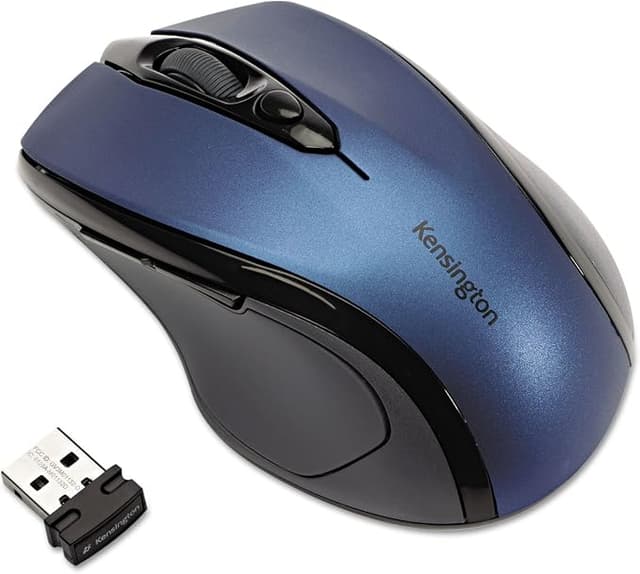
The ergonomic design for right-handed users allows for comfortable work - even for hours on end. With four color options available, this mouse adds a splash of color to the workday. The Pro Fit wireless mid-size mouse is highly durable and suitable for both stationary and mobile use. Its 2.4GHz nano receiver is ideal for cramped office environments. The receiver is so small that it can remain plugged in but can also be stored in the integrated storage compartment of the Pro Fit mouse. The Pro Fit wireless mid-size mouse is large enough to fit comfortably in your hand yet small enough to easily fit in a laptop or travel bag. Wherever you go, the highly sensitive optical sensor provides precise, reliable cursor control on almost any surface. The mouse comes with two AAA batteries that have a lifespan of 12 months.
The ergonomic design for right-handed users allows for comfortable work - even for hours on end. With four color options available, this mouse adds a splash of color to the workday. The Pro Fit wireless mid-size mouse is highly durable and suitable for both stationary and mobile use. Its 2.4GHz nano receiver is ideal for cramped office environments. The receiver is so small that it can remain plugged in but can also be stored in the integrated storage compartment of the Pro Fit mouse. The Pro Fit wireless mid-size mouse is large enough to fit comfortably in your hand yet small enough to easily fit in a laptop or travel bag. Wherever you go, the highly sensitive optical sensor provides precise, reliable cursor control on almost any surface. The mouse comes with two AAA batteries that have a lifespan of 12 months.
The ergonomic design for right-handed users allows for comfortable work - even for hours on end. With four color options available, this mouse adds a splash of color to the workday. The Pro Fit wireless mid-size mouse is highly durable and suitable for both stationary and mobile use. Its 2.4GHz nano receiver is ideal for cramped office environments. The receiver is so small that it can remain plugged in but can also be stored in the integrated storage compartment of the Pro Fit mouse. The Pro Fit wireless mid-size mouse is large enough to fit comfortably in your hand yet small enough to easily fit in a laptop or travel bag. Wherever you go, the highly sensitive optical sensor provides precise, reliable cursor control on almost any surface. The mouse comes with two AAA batteries that have a lifespan of 12 months.
The ergonomic design for right-handed users allows for comfortable work - even for hours on end. With four color options available, this mouse adds a splash of color to the workday. The Pro Fit wireless mid-size mouse is highly durable and suitable for both stationary and mobile use. Its 2.4GHz nano receiver is ideal for cramped office environments. The receiver is so small that it can remain plugged in but can also be stored in the integrated storage compartment of the Pro Fit mouse. The Pro Fit wireless mid-size mouse is large enough to fit comfortably in your hand yet small enough to easily fit in a laptop or travel bag. Wherever you go, the highly sensitive optical sensor provides precise, reliable cursor control on almost any surface. The mouse comes with two AAA batteries that have a lifespan of 12 months.
in 45 offers
The lowest price for Kensington Pro Fit Mouse Wireless Mid Size Blue right now is $36.89 at PB Tech, compared across 25 retailers.
The all-time low was $15.00 on 2 June 2024 — today's price is 146% above the lowest ever. It has been notably cheaper before — worth setting a price alert.
Prices last updated 24 Oct 2026.
Last updated at 24/10/2026 00:10:17
Kensington Pro Fit? Wireless Mid Size Mouse Blue
Affiliate Disclosure: We may receive a small commission for purchases made through this link at no extra cost to you. This helps support our site. Thank you!
Kensington Pro Fit Wireless Mouse - Blue Midsize
7-day returns
Kensington PRO FIT MIDSIZE WLS Mouse (BLUE)
Delivery $11.99
Kensington Pro Fit Wireless Mouse - Blue Midsize [72421]
Delivery $11
Affiliate Disclosure: We may receive a small commission for purchases made through this link at no extra cost to you. This helps support our site. Thank you!
Computer Mouse Right Handed Mid-size Wireless Kensington Pro Fit #72421 Blue By Ok Office Pty Ltd Australia
Delivery between 29 Oct – 6 Nov $11
Kensington Pro Fit Mid-Size Wireless Mouse Blue
Delivery $14.50
Kensington Pro Fit Wireless Mid Size Mouse - Blue
Delivery between Mon – Wed $7.95
Kensington Pro Fit Wireless Mid Size Mouse Blue
Delivery $13.90
Kensington Pro Fit Wireless Mid Size Mouse Blue
Delivery between 26 Oct – 3 Nov $10
Kensington Pro Fit Wireless Mid Size Mouse Blue
14-day returns
originally posted on bhphotovideo.com
I've been using mine for close to a year; it was used when I inherited it from a departing colleague, so don't know how long it's overall lifespan has been, but I need a replacement since it's starting to occasionally double click when I single click. I really like this model. Another reviewer stated that it's too small for them; granted, I'm a woman and my hands are on the smaller side. Pros: wireless, lightweight (but not too unweighted so it feels weird), and very much ergonomic, but not excessively (ie, to the point where maneuvering speed and usage are impeded). My hand gradually slopes over it at a very naturally angle. My previous generic wireless mouse didn't have this variable curvature and was starting to hurt my wrist during long stretches of use, but ... MoreI've been using mine for close to a year; it was used when I inherited it from a departing colleague, so don't know how long it's overall lifespan has been, but I need a replacement since it's starting to occasionally double click when I single click. I really like this model. Another reviewer stated that it's too small for them; granted, I'm a woman and my hands are on the smaller side. Pros: wireless, lightweight (but not too unweighted so it feels weird), and very much ergonomic, but not excessively (ie, to the point where maneuvering speed and usage are impeded). My hand gradually slopes over it at a very naturally angle. My previous generic wireless mouse didn't have this variable curvature and was starting to hurt my wrist during long stretches of use, but this one is great no matter how long I'm at the computer. I like a mouse that moves quickly, and when I tried a Microsoft model which came with my wireless keyboard, I switched back to the Kensington within 5 minutes. I need something that's snappy and doesn't impeded my workflow, and this model does the trick.
originally posted on microcenter.com
This USB mouse is instantly found by both Win 10 and Win 7. I use it with my Lenovo Laptop and it works flawlessly every time. The size is not too small and not too large. it never causes my hand to fatigue. The response is the same whether using a mouse pad or just a flat bench or table surface. The storage space for the compact USB connector is a slot on the bottom and it holds the USB connector magnetically. It's so very convenient and quick to remove and insert. Nothing else to open or break. The batteries last long and has an indicator light for low battery. It's well worth the $25. I bought two: one in blue and one in red. Very satisfied.
originally posted on homeessentialsdirect.com
I had been happily using a Logitech Anywhere mouse for several years that was starting to fail. I did not feel like spending a lot of money on a mouse, but did not also want to be stuck with cheap junk. I personally like having the forward and back buttons for the browser, and I am particular about size. I hate the large ones that take up too much footprint - but also dislike the tiny ones that are so uncomfortable to use. This one is very similar to the Anywhere mouse in size which had fit my hand well, but this mouse looks more comfortable than it really is. Despite the curves and shape which appears ergonomic - the simple, flatter shape of the Logitech was much more comfortable to use. If you are an Apple user- out of the box, this mouse is useless for anything ... MoreI had been happily using a Logitech Anywhere mouse for several years that was starting to fail. I did not feel like spending a lot of money on a mouse, but did not also want to be stuck with cheap junk. I personally like having the forward and back buttons for the browser, and I am particular about size. I hate the large ones that take up too much footprint - but also dislike the tiny ones that are so uncomfortable to use. This one is very similar to the Anywhere mouse in size which had fit my hand well, but this mouse looks more comfortable than it really is. Despite the curves and shape which appears ergonomic - the simple, flatter shape of the Logitech was much more comfortable to use. If you are an Apple user- out of the box, this mouse is useless for anything other than the major left and right buttons. I had to go download the Steermouse app off the web, and then I was able to program all of the buttons as I wanted. It is very light - but seems sturdy enough. The Logitech was a beast when it came to the battery - draining it every few weeks. Hoping this one lasts longer. The receiver is nice and small - like all the other nano receivers out there. For the price - it's hard to go wrong with this one.
| General | |
| Device Type | Mouse |
| Wireless Receiver | USB wireless receiver |
| Orientation | Right-handed |
| Colour | Sapphire blue |

Kensington Pro Fit? Wireless Mid Size Mouse Blue
Affiliate Disclosure: We may receive a small commission for purchases made through this link at no extra cost to you. This helps support our site. Thank you!
Kensington Pro Fit Wireless Mouse - Blue Midsize
7-day returns
Kensington PRO FIT MIDSIZE WLS Mouse (BLUE)
Delivery $11.99
Kensington Pro Fit Wireless Mouse - Blue Midsize [72421]
Delivery $11
Affiliate Disclosure: We may receive a small commission for purchases made through this link at no extra cost to you. This helps support our site. Thank you!
Computer Mouse Right Handed Mid-size Wireless Kensington Pro Fit #72421 Blue By Ok Office Pty Ltd Australia
Delivery between 29 Oct – 6 Nov $11
I've been using mine for close to a year; it was used when I inherited it from a departing colleague, so don't know how long it's overall lifespan has been, but I need a replacement since it's starting to occasionally double click when I single click. I really like this model. Another reviewer stated that it's too small for them; granted, I'm a woman and my hands are on the smaller side. Pros: wireless, lightweight (but not too unweighted so it feels weird), and very much ergonomic, but not excessively (ie, to the point where maneuvering speed and usage are impeded). My hand gradually slopes over it at a very naturally angle. My previous generic wireless mouse didn't have this variable curvature and was starting to hurt my wrist during long stretches of use, but ... MoreI've been using mine for close to a year; it was used when I inherited it from a departing colleague, so don't know how long it's overall lifespan has been, but I need a replacement since it's starting to occasionally double click when I single click. I really like this model. Another reviewer stated that it's too small for them; granted, I'm a woman and my hands are on the smaller side. Pros: wireless, lightweight (but not too unweighted so it feels weird), and very much ergonomic, but not excessively (ie, to the point where maneuvering speed and usage are impeded). My hand gradually slopes over it at a very naturally angle. My previous generic wireless mouse didn't have this variable curvature and was starting to hurt my wrist during long stretches of use, but this one is great no matter how long I'm at the computer. I like a mouse that moves quickly, and when I tried a Microsoft model which came with my wireless keyboard, I switched back to the Kensington within 5 minutes. I need something that's snappy and doesn't impeded my workflow, and this model does the trick.
This USB mouse is instantly found by both Win 10 and Win 7. I use it with my Lenovo Laptop and it works flawlessly every time. The size is not too small and not too large. it never causes my hand to fatigue. The response is the same whether using a mouse pad or just a flat bench or table surface. The storage space for the compact USB connector is a slot on the bottom and it holds the USB connector magnetically. It's so very convenient and quick to remove and insert. Nothing else to open or break. The batteries last long and has an indicator light for low battery. It's well worth the $25. I bought two: one in blue and one in red. Very satisfied.
I had been happily using a Logitech Anywhere mouse for several years that was starting to fail. I did not feel like spending a lot of money on a mouse, but did not also want to be stuck with cheap junk. I personally like having the forward and back buttons for the browser, and I am particular about size. I hate the large ones that take up too much footprint - but also dislike the tiny ones that are so uncomfortable to use. This one is very similar to the Anywhere mouse in size which had fit my hand well, but this mouse looks more comfortable than it really is. Despite the curves and shape which appears ergonomic - the simple, flatter shape of the Logitech was much more comfortable to use. If you are an Apple user- out of the box, this mouse is useless for anything ... MoreI had been happily using a Logitech Anywhere mouse for several years that was starting to fail. I did not feel like spending a lot of money on a mouse, but did not also want to be stuck with cheap junk. I personally like having the forward and back buttons for the browser, and I am particular about size. I hate the large ones that take up too much footprint - but also dislike the tiny ones that are so uncomfortable to use. This one is very similar to the Anywhere mouse in size which had fit my hand well, but this mouse looks more comfortable than it really is. Despite the curves and shape which appears ergonomic - the simple, flatter shape of the Logitech was much more comfortable to use. If you are an Apple user- out of the box, this mouse is useless for anything other than the major left and right buttons. I had to go download the Steermouse app off the web, and then I was able to program all of the buttons as I wanted. It is very light - but seems sturdy enough. The Logitech was a beast when it came to the battery - draining it every few weeks. Hoping this one lasts longer. The receiver is nice and small - like all the other nano receivers out there. For the price - it's hard to go wrong with this one.
I have had this mouse since mid-February 2020 and I love the buttons it has, the feel, and how it worked in the beginning. BUT, in the last few weeks, the mouse has become more and more slow to respond, sometimes freezing up altogether. I have check drivers, changed batteries, moved the fob to a closer location (using a good USB extension cord) and changed USB ports for the fob. I've even done a computer re-build with a new case, new CPU and mobo, and a new M2 SSD. I have done all the standard troubleshooting and then some - even changed mouse pads, in case the old one was too dirty or whatever. The pad is a plain, solid black - standard, boring mouse pad, so it isn't a design interference problem. No, it just cuts out, lags, or loses signal every few minutes. The ... MoreI have had this mouse since mid-February 2020 and I love the buttons it has, the feel, and how it worked in the beginning. BUT, in the last few weeks, the mouse has become more and more slow to respond, sometimes freezing up altogether. I have check drivers, changed batteries, moved the fob to a closer location (using a good USB extension cord) and changed USB ports for the fob. I've even done a computer re-build with a new case, new CPU and mobo, and a new M2 SSD. I have done all the standard troubleshooting and then some - even changed mouse pads, in case the old one was too dirty or whatever. The pad is a plain, solid black - standard, boring mouse pad, so it isn't a design interference problem. No, it just cuts out, lags, or loses signal every few minutes. The mouse still looks great, hasn't been dropped or gotten wet. I'm a 50 year old computer nerd and take decent care of my stuff. There is no acceptable reason for this mouse to be behaving this way. This is troubling because, a) I like the mouse when it works and b) no one should build a product that lasts less than 6 months. My last mouse lasted years (4-6). Very disappointed by this. I had such high hopes. UPDATE: The mouse limped along for another couple of weeks and as of today (07/14/2020) is totally dead. Nothing - fresh batteries and all. Lowered it to 2 stars because it really should have lasted longer - this wasn't a $10 mouse, but it also wasn't a $70 mouse so a couple stars for features and feel. Work on longevity, Kensington, and I'll consider you again. Meanwhile, back to Logitech....
With a few minor changes this mouse could be fantastic. If both the DPI settings were doubled and the scroll wheel was flat this mouse would be the best wireless mouse Ive ever seen.
This mouse curser will jump to a random corner of the desktop on its own. Kensington is of no help as this is a plug and play device. Its disfunction makes it practically useless. I would suggest avoiding this company as they were insistent that I create an account if I wanted help trouble shooting their product.
Pros: Nice looking mouse. There's a space in the mouse to store the usb dongle.Cons: It's a little small for me and the cursor does not move smoothly. The scroll wheel is also not smooth and often doesn't register at all. Response need to be improved.
This mouse has the feel of an entry level Logitech mouse. The buttons and wheel are just ok. The ergonomics for me were decent. I bought it to use with my laptop. I thought the red would look really nice with my red laptop, and it does. Where it loses a couple of stars is that inane and pointless power saving sleep mode nonsense. Nothing more annoying than having to click to "wake up" the mouse and have it click something open on your computer. Having to make a point of remembering to leave the mouse pointer in a "safe" position on the screen if your going to leave the computer for a while and have the screen shut off is just dumb. You can't wake it up by just moving it on the mouse pad, you have to actually click a button. I don't use it anymore. I went back to ... MoreThis mouse has the feel of an entry level Logitech mouse. The buttons and wheel are just ok. The ergonomics for me were decent. I bought it to use with my laptop. I thought the red would look really nice with my red laptop, and it does. Where it loses a couple of stars is that inane and pointless power saving sleep mode nonsense. Nothing more annoying than having to click to "wake up" the mouse and have it click something open on your computer. Having to make a point of remembering to leave the mouse pointer in a "safe" position on the screen if your going to leave the computer for a while and have the screen shut off is just dumb. You can't wake it up by just moving it on the mouse pad, you have to actually click a button. I don't use it anymore. I went back to using a Microsoft 4000 series mouse. Some people may not care about the sleep mode, if so it's a decent mouse for the price. I had no problem with it for the month or so I used it. It worked like it is supposed to.
The tracking isn't great despite the receiver is within 1m away. I have tried reconnecting, changing the batteries, plugging the receiver into another USB port but none of these helped. The rubber padding on the left started coming off. It wasn't glued down, it was attached with a sticky film that's obviously not sticky enough. I tried glueing it but didn't help. The only plus was that it was comfortable in my hand. I am a lady with small hands.
I don't think I like any modern mouses that are inexpensive. somehow when I'm using the cursor it depresses the left mouse button and drag stuff around when I don't want it to I had to put a piece of material and tape it to the top to keep my fingers away from the button maybe I'm heavy-handed but maybe I just have big hands I don't know. I don't want to spend $100 on a mouse so far they don't have one with a large grip that works for me. so this is just average
| General | |
| Device Type | Mouse |
| Wireless Receiver | USB wireless receiver |
| Orientation | Right-handed |
| Colour | Sapphire blue |