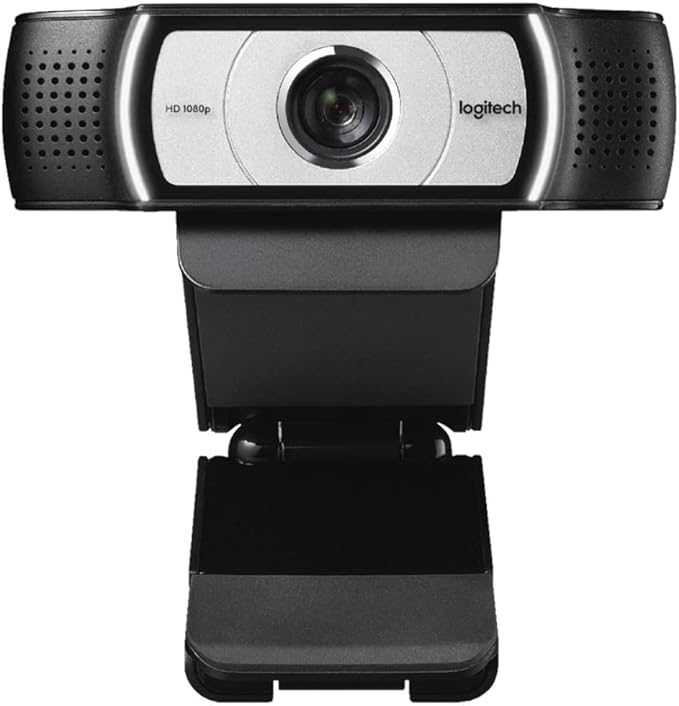
Logitech C930e 90 Degree View Full HD 1080P Desktop Webcam
TheLogitechWebcamC930efeaturesthewidest-everfield-of-viewinabusinesswebcam - 90-degrees - andisthefirstwithHD1080pH.264/SVCUVC1.5encoding, theexcellenttechnologythatfreesupPCbandwidthwithon-cameravideo-processing. Withpan, tiltandzoomfunctionsandRightLight2technology, thiswebcamdeliversthemostprofessionaldesktopvideocollaborationexperienceyet.
TheLogitechWebcamC930efeaturesthewidest-everfield-of-viewinabusinesswebcam - 90-degrees - andisthefirstwithHD1080pH.264/SVCUVC1.5encoding, theexcellenttechnologythatfreesupPCbandwidthwithon-cameravideo-processing. Withpan, tiltandzoomfunctionsandRightLight2technology, thiswebcamdeliversthemostprofessionaldesktopvideocollaborationexperienceyet.
TheLogitechWebcamC930efeaturesthewidest-everfield-of-viewinabusinesswebcam - 90-degrees - andisthefirstwithHD1080pH.264/SVCUVC1.5encoding, theexcellenttechnologythatfreesupPCbandwidthwithon-cameravideo-processing. Withpan, tiltandzoomfunctionsandRightLight2technology, thiswebcamdeliversthemostprofessionaldesktopvideocollaborationexperienceyet.
TheLogitechWebcamC930efeaturesthewidest-everfield-of-viewinabusinesswebcam - 90-degrees - andisthefirstwithHD1080pH.264/SVCUVC1.5encoding, theexcellenttechnologythatfreesupPCbandwidthwithon-cameravideo-processing. Withpan, tiltandzoomfunctionsandRightLight2technology, thiswebcamdeliversthemostprofessionaldesktopvideocollaborationexperienceyet.
in 38 offers
The lowest price for Logitech C930e 90 Degree View Full HD 1080P Desktop Webcam right now is $17.66 at eBay.com.au, compared across 28 retailers.
The all-time low was $17.21 on 30 Aug 2026 — today's price is 3% above the lowest ever. This is at or near its all-time low — a good time to buy.
Prices last updated 20 Oct 2026.
Last updated at 20/10/2026 05:57:19
Logitech C930-E Business Webcam, Full HD 1080p/30fps Video Calling, Light Correction, Autofocus, 4X Zoom, Privacy Shade, Works with Skype Business,
Free delivery
Affiliate Disclosure: We may receive a small commission for purchases made through this link at no extra cost to you. This helps support our site. Thank you!
For Logitech C920 C930e 1080p Hd Webcam Usb Cable Camera Connection
Delivery $3.12
Affiliate Disclosure: We may receive a small commission for purchases made through this link at no extra cost to you. This helps support our site. Thank you!
Logitech C930e V-U0031 Business Webcam | Reboot IT
Logitech C930e USB Desktop or Laptop Webcam, HD 1080p Camera, 30 fps Frame Rate, 90 Field of View, Auto Focus, Glass Lens, Dual Omnidirectional Mics,
Delivery between 23–29 Oct $34.30
Logitech C930e Webcam black
Free delivery
Logitech C930e Webcam Black
Delivery $19.99
Logitech C930e HD Webcam
Free delivery
Logitech C930e Webcam - 30 fps - USB 2.0
Delivery $30
Logitech C930e Business Grade Full HD 1080P Webcam with 90-Degree Wide View for Video Conferences and Presentations
Delivery between 24–28 Oct $41
Camera Webcam C930E Oem/960-000972 Logitech
originally posted on bhphotovideo.com
I needed a webcam to use for working from home. I was skeptical at first that a small webcam such as this could produce a great image but I purchased anyway.After hooking the camera up and installing the optional Logitech Camera Settings app, I was blown away at the quality and field of view this camera offered. The 1080p resolution is crystal clear, even when zooming in.The zoom and pan options in the Logitech Camera Settings app were a nice touch to allow you to zoom in on yourself or pull focus on something else in view without having to physically move the camera.One thing I was happy to see is that this camera doesn't do that weird zoom/auto-focus thing that many Logitech cameras do where the person goes completely out of focus for a few seconds while it ... MoreI needed a webcam to use for working from home. I was skeptical at first that a small webcam such as this could produce a great image but I purchased anyway.After hooking the camera up and installing the optional Logitech Camera Settings app, I was blown away at the quality and field of view this camera offered. The 1080p resolution is crystal clear, even when zooming in.The zoom and pan options in the Logitech Camera Settings app were a nice touch to allow you to zoom in on yourself or pull focus on something else in view without having to physically move the camera.One thing I was happy to see is that this camera doesn't do that weird zoom/auto-focus thing that many Logitech cameras do where the person goes completely out of focus for a few seconds while it tries to auto-focus.I have a headset that I use for my video conferencing but the camera includes a microphone, should you need one.So far, I have zero complaints on the product.Overall, I would highly recommend this webcam for it's quality and features.
originally posted on box.co.uk
Pros: The C930e has excellent image quality. It deals really well with low-light situations, the auto-focus is fantastic, and the white balance is really good - it produces natural-looking skin tones every time. When I swapped to this camera, people I'd been conferencing with on my old camera commented on the improvement in picture quality.Cons: This is a "business" camera and claims compatibility with industry standards, but beware that software support for this camera is patchy at best. The Logitech camera control software is clunky as anything - the only way to use it is to start the conferencing app of your choice, connect to the camera, THEN start the camera control app to adjust the image. You have to do this every time - if you leave the camera app running, ... MorePros: The C930e has excellent image quality. It deals really well with low-light situations, the auto-focus is fantastic, and the white balance is really good - it produces natural-looking skin tones every time. When I swapped to this camera, people I'd been conferencing with on my old camera commented on the improvement in picture quality.Cons: This is a "business" camera and claims compatibility with industry standards, but beware that software support for this camera is patchy at best. The Logitech camera control software is clunky as anything - the only way to use it is to start the conferencing app of your choice, connect to the camera, THEN start the camera control app to adjust the image. You have to do this every time - if you leave the camera app running, conferencing software (Zoom, Meet etc.) won't be able to use the video feed from the camera. It's also not supported by Logitech's own "Capture" software (frustrating!), so you need to use 3rd party software if you want to use it for recording video (I'm a University lecturer, and my University's lecture recording suite works really well with this camera). Don't even bother trying to register your purchase with Logitech. Their website and customer support are a broken, infuriating mess.
originally posted on ebay.com
Excellent webcam, suitable for streaming or video work. I had an old Logitech C600, it was 2MP with autofocus- but it needed a lot of light to work properly. In dimmer light it got very grainy & jittery. So I decided to get a newer webcam, and this one does just what I want! Since I'm using a 32" TV as a monitor, it's great that this webcam has the capability to be attached to a tripod; I've got it set up now in front of my monitor, at just under eye level, so to my family it appears that I'm looking directly at them- which I am! It works in bright light or dim light, the images are crystal-clear, it has autofocus & zoom, facial tracking- in short, it's perfect for my needs. My family is in Australia, where they can't leave & I can't enter, so for the foreseeable ... MoreExcellent webcam, suitable for streaming or video work. I had an old Logitech C600, it was 2MP with autofocus- but it needed a lot of light to work properly. In dimmer light it got very grainy & jittery. So I decided to get a newer webcam, and this one does just what I want! Since I'm using a 32" TV as a monitor, it's great that this webcam has the capability to be attached to a tripod; I've got it set up now in front of my monitor, at just under eye level, so to my family it appears that I'm looking directly at them- which I am! It works in bright light or dim light, the images are crystal-clear, it has autofocus & zoom, facial tracking- in short, it's perfect for my needs. My family is in Australia, where they can't leave & I can't enter, so for the foreseeable future we can only get together by video chats, and this webcam is the bee's knees!
| Frame Rate | 30 fps |
| Storage Media | Hard drive (for recording) |
| Photo Resolution | 1920 x 1080 |
| Resolution | 1080p |
| HD Format | 1080p |

Logitech C930-E Business Webcam, Full HD 1080p/30fps Video Calling, Light Correction, Autofocus, 4X Zoom, Privacy Shade, Works with Skype Business,
Free delivery
Affiliate Disclosure: We may receive a small commission for purchases made through this link at no extra cost to you. This helps support our site. Thank you!
For Logitech C920 C930e 1080p Hd Webcam Usb Cable Camera Connection
Delivery $3.12
Affiliate Disclosure: We may receive a small commission for purchases made through this link at no extra cost to you. This helps support our site. Thank you!
Logitech C930e V-U0031 Business Webcam | Reboot IT
Logitech C930e USB Desktop or Laptop Webcam, HD 1080p Camera, 30 fps Frame Rate, 90 Field of View, Auto Focus, Glass Lens, Dual Omnidirectional Mics,
Delivery between 23–29 Oct $34.30
Logitech C930e Webcam black
Free delivery
I needed a webcam to use for working from home. I was skeptical at first that a small webcam such as this could produce a great image but I purchased anyway.After hooking the camera up and installing the optional Logitech Camera Settings app, I was blown away at the quality and field of view this camera offered. The 1080p resolution is crystal clear, even when zooming in.The zoom and pan options in the Logitech Camera Settings app were a nice touch to allow you to zoom in on yourself or pull focus on something else in view without having to physically move the camera.One thing I was happy to see is that this camera doesn't do that weird zoom/auto-focus thing that many Logitech cameras do where the person goes completely out of focus for a few seconds while it ... MoreI needed a webcam to use for working from home. I was skeptical at first that a small webcam such as this could produce a great image but I purchased anyway.After hooking the camera up and installing the optional Logitech Camera Settings app, I was blown away at the quality and field of view this camera offered. The 1080p resolution is crystal clear, even when zooming in.The zoom and pan options in the Logitech Camera Settings app were a nice touch to allow you to zoom in on yourself or pull focus on something else in view without having to physically move the camera.One thing I was happy to see is that this camera doesn't do that weird zoom/auto-focus thing that many Logitech cameras do where the person goes completely out of focus for a few seconds while it tries to auto-focus.I have a headset that I use for my video conferencing but the camera includes a microphone, should you need one.So far, I have zero complaints on the product.Overall, I would highly recommend this webcam for it's quality and features.
Pros: The C930e has excellent image quality. It deals really well with low-light situations, the auto-focus is fantastic, and the white balance is really good - it produces natural-looking skin tones every time. When I swapped to this camera, people I'd been conferencing with on my old camera commented on the improvement in picture quality.Cons: This is a "business" camera and claims compatibility with industry standards, but beware that software support for this camera is patchy at best. The Logitech camera control software is clunky as anything - the only way to use it is to start the conferencing app of your choice, connect to the camera, THEN start the camera control app to adjust the image. You have to do this every time - if you leave the camera app running, ... MorePros: The C930e has excellent image quality. It deals really well with low-light situations, the auto-focus is fantastic, and the white balance is really good - it produces natural-looking skin tones every time. When I swapped to this camera, people I'd been conferencing with on my old camera commented on the improvement in picture quality.Cons: This is a "business" camera and claims compatibility with industry standards, but beware that software support for this camera is patchy at best. The Logitech camera control software is clunky as anything - the only way to use it is to start the conferencing app of your choice, connect to the camera, THEN start the camera control app to adjust the image. You have to do this every time - if you leave the camera app running, conferencing software (Zoom, Meet etc.) won't be able to use the video feed from the camera. It's also not supported by Logitech's own "Capture" software (frustrating!), so you need to use 3rd party software if you want to use it for recording video (I'm a University lecturer, and my University's lecture recording suite works really well with this camera). Don't even bother trying to register your purchase with Logitech. Their website and customer support are a broken, infuriating mess.
Excellent webcam, suitable for streaming or video work. I had an old Logitech C600, it was 2MP with autofocus- but it needed a lot of light to work properly. In dimmer light it got very grainy & jittery. So I decided to get a newer webcam, and this one does just what I want! Since I'm using a 32" TV as a monitor, it's great that this webcam has the capability to be attached to a tripod; I've got it set up now in front of my monitor, at just under eye level, so to my family it appears that I'm looking directly at them- which I am! It works in bright light or dim light, the images are crystal-clear, it has autofocus & zoom, facial tracking- in short, it's perfect for my needs. My family is in Australia, where they can't leave & I can't enter, so for the foreseeable ... MoreExcellent webcam, suitable for streaming or video work. I had an old Logitech C600, it was 2MP with autofocus- but it needed a lot of light to work properly. In dimmer light it got very grainy & jittery. So I decided to get a newer webcam, and this one does just what I want! Since I'm using a 32" TV as a monitor, it's great that this webcam has the capability to be attached to a tripod; I've got it set up now in front of my monitor, at just under eye level, so to my family it appears that I'm looking directly at them- which I am! It works in bright light or dim light, the images are crystal-clear, it has autofocus & zoom, facial tracking- in short, it's perfect for my needs. My family is in Australia, where they can't leave & I can't enter, so for the foreseeable future we can only get together by video chats, and this webcam is the bee's knees!
This is a good product at a competitive price, and I had only slight problems with the set-up. The zoom and autofocus work out-of-the-box with Logitech Camera Settings software (we use Windows10). However, be aware that this model is C930C (not C930E) and is basically the Chinese version of this device. We use Logitech's "Logicapture" software which in the Uk has support for the C930E but NOT the C930C, so Logicapture did NOT recognise the device. I researched this problem and found that it's necessary to edit the logicapture.exe.config (just an XML file in the "bin" folder, so any text editor will do) to change the PID of the C930E (0x0843) to that of the C930C (0x0891). After that simple change the camera works very well with Logicapture. Of course if Logicapture ... MoreThis is a good product at a competitive price, and I had only slight problems with the set-up. The zoom and autofocus work out-of-the-box with Logitech Camera Settings software (we use Windows10). However, be aware that this model is C930C (not C930E) and is basically the Chinese version of this device. We use Logitech's "Logicapture" software which in the Uk has support for the C930E but NOT the C930C, so Logicapture did NOT recognise the device. I researched this problem and found that it's necessary to edit the logicapture.exe.config (just an XML file in the "bin" folder, so any text editor will do) to change the PID of the C930E (0x0843) to that of the C930C (0x0891). After that simple change the camera works very well with Logicapture. Of course if Logicapture ever needs to be reinstalled the above change will need to be repeated. It's also possible that in the future updated versions of Logicapture may have a bearing on the above.
I have just bought and tested the Logitech C920, C925 and the C930. The Webcams are primarily used for VC for business discussions and have been used in single person and also with group VC calls. - C930e: Highest price sharper than C920. Much wider at 90degrees -- much wider at 90 degrees - for my use this was the best for VC's where we have 4 people around the table - the wider angle makes a clear difference - I would recommend the C930e for group video calls as the 90 degrees makes a huge difference. I am using it on two Macs - with OS Catalina and Big Sur, works perfectly fine. Make sure you download the utility software named as "Camera Settings". This is like pimping the c930e, it does magics. Don't use Capture software, use only "Camera Settings" software and ... MoreI have just bought and tested the Logitech C920, C925 and the C930. The Webcams are primarily used for VC for business discussions and have been used in single person and also with group VC calls. - C930e: Highest price sharper than C920. Much wider at 90degrees -- much wider at 90 degrees - for my use this was the best for VC's where we have 4 people around the table - the wider angle makes a clear difference - I would recommend the C930e for group video calls as the 90 degrees makes a huge difference. I am using it on two Macs - with OS Catalina and Big Sur, works perfectly fine. Make sure you download the utility software named as "Camera Settings". This is like pimping the c930e, it does magics. Don't use Capture software, use only "Camera Settings" software and you will never look behind.
Image quality is good. Sound is usable, but I've opted to use a separate dynamic mic; trust me, your audience will thank you.Software is usable and provides the basic adjustments one might need. But don't expect to find an image rotation feature. I mount my camera above my monitor on an articulating arm and when in use I adjust the camera down to eye level (see picture). This mounting system works best if the camera is mounted upside down, thus the need for 180 degree rotation. Frustrating not to have the rotation feature. I believe it could be rolled-out in a software update; Logitech?If you always hang your camera on the monitor using the flexible clip/base, then this next issue I'll talk about won't apply to you. The metal 1/4-20 mounting insert that's ... MoreImage quality is good. Sound is usable, but I've opted to use a separate dynamic mic; trust me, your audience will thank you.Software is usable and provides the basic adjustments one might need. But don't expect to find an image rotation feature. I mount my camera above my monitor on an articulating arm and when in use I adjust the camera down to eye level (see picture). This mounting system works best if the camera is mounted upside down, thus the need for 180 degree rotation. Frustrating not to have the rotation feature. I believe it could be rolled-out in a software update; Logitech?If you always hang your camera on the monitor using the flexible clip/base, then this next issue I'll talk about won't apply to you. The metal 1/4-20 mounting insert that's pressed into the flexible base pulled out of it's hole (see picture). So please be very gentle if you use a 1/4-20 mounting option (tripods, magic arms, articulating arms, etc.). I will most likely have to epoxy glue this insert into the hole. They must have let the interns design the 1/4-20 mounting system. Certainly not something you'd expect from Logitech. Perhaps the insert itself should have been encapsulated into the plastic base. I think this was the cheapest way Logitech could offer a 1/4-20 mounting solution (they get a D- here).In the end, I felt like I waited a long time and pay more for a webcam, only to be disappointed.
The Logitech c930e webcam is available again, after the great demand that resulted from all the work-from-home necessary due to the Covid19 public health problem. We had been using a much older Logitech C920 webcam that we purchased years ago, which was quite useful considering the age of the technology.However, this webcam provides a much wider field of view. Our older webcam has a smaller 70+ degree field of view, but this 930e has a 90 degree field of view. It also has 1080p HD quality resolution, enhanced lighting and low light compensation, digital zoom, a removable privacy shutter, and many other features. We are very happy with this webcam.This model no longer comes with a Zeiss lens, but it is listed as a quality glass lens. The webcam works well, right ... MoreThe Logitech c930e webcam is available again, after the great demand that resulted from all the work-from-home necessary due to the Covid19 public health problem. We had been using a much older Logitech C920 webcam that we purchased years ago, which was quite useful considering the age of the technology.However, this webcam provides a much wider field of view. Our older webcam has a smaller 70+ degree field of view, but this 930e has a 90 degree field of view. It also has 1080p HD quality resolution, enhanced lighting and low light compensation, digital zoom, a removable privacy shutter, and many other features. We are very happy with this webcam.This model no longer comes with a Zeiss lens, but it is listed as a quality glass lens. The webcam works well, right out of the box, but the enhanced software drivers do not. Windows 10 loads generic software drivers automatically and it is a bit of hassle getting the better Logitech drivers to install. The generic drivers work fairly well, but the extra features and enhanced video provided with the Logitech software are not to be found.B & H Photo shipped promptly and the package arrived safely.Thank you!!!
I bought the Logitech C930e webcam to stream our church service. It works well with our PC laptop on Zoom and is a great improvement over the integrated laptop webcam. Exposure is much better especially in backlight instances. The digital zoom is nice too up to about 3x, beyond 3x the resolution is not good. Make sure you switch to HD, my webcam defaulted to a lower resolution at first.Download the software apps for the webcam too. They are easy to use and allow one to take advantage of the webcam's features.
As a tech consultant steeped in Work From Home optimization projects for clients, it rapidly became clear that a significant part of the optimization centered around the audio/video environments. And, at the center of those environments was the webcam.We went through a very long process of evaluation. We went in knowing the market dominance of the Logitech line of electronics. But our minds were open. The end result is our forming the opinion that the C9xx series of webcams from Logitech were popular for a reason. As with any and all cameras it comes down to the lens. The glass lens on the C930 is what marks its best and most important quality feature. The subtle difference between the 930 and the even more popular 920 model is the zooming capability. It can be ... MoreAs a tech consultant steeped in Work From Home optimization projects for clients, it rapidly became clear that a significant part of the optimization centered around the audio/video environments. And, at the center of those environments was the webcam.We went through a very long process of evaluation. We went in knowing the market dominance of the Logitech line of electronics. But our minds were open. The end result is our forming the opinion that the C9xx series of webcams from Logitech were popular for a reason. As with any and all cameras it comes down to the lens. The glass lens on the C930 is what marks its best and most important quality feature. The subtle difference between the 930 and the even more popular 920 model is the zooming capability. It can be seen why, because of that, they deem the C930 model as a more 'business' oriented version. Being able to frame via zooming to the 4X level helps frame more effectively for video conference calls.The omni-directional speaker capability although by no means comparable to external mics with the same capability still punches well in that capability weight class. In fact, in a couple of situations, we deemed the mic capabilities well strong enough to completely avoid recommending external mics in business use case situations. And, it is certainly by a noticeable measure stronger than most laptop mics.The design (for positioning on both a monitor and a laptop) is standard issue and just plain works. Setup, as it should be for a USB device, was as easy as it could be. No drivers or apps to install to allow it to function. We did download and test the small app to add the functionality of zooming and other camera adjustments and feel that it is a useful add-on. It certainly is more straight-forward to use than many video conference apps (especially those that don't offer the ability to adjust in app at all).For the cost, the quality, the functionality and the improvement to the audio/video environment - especially the work from home one - it is a device we'd not only buy again but continue to recommend others to purchase as well.
I wasn't sure whether my Kubuntu 16.04 desktop system would support this, but it does. I've used two webcam-specific programs with it, and they both work: Cheese and Webcamoid. Webcamoid allows controlling the zoom, pan, tilt, etc., although it's somewhat buggy and often closes without warning.One thing to note is that it was not recognized when I had it plugged in to a USB 3.0 extension cable which was plugged into a USB 3.0 port in the back of the computer. When I plugged it directly in to a USB port on the top of the computer (also USB 3.0, I think, but not positive -- could be 2.0), it was recognized immediately.I have yet to try the camera with the Zoom teleconferencing service, but assume that it will work; I'll update this review later if it DOESN'T work ... MoreI wasn't sure whether my Kubuntu 16.04 desktop system would support this, but it does. I've used two webcam-specific programs with it, and they both work: Cheese and Webcamoid. Webcamoid allows controlling the zoom, pan, tilt, etc., although it's somewhat buggy and often closes without warning.One thing to note is that it was not recognized when I had it plugged in to a USB 3.0 extension cable which was plugged into a USB 3.0 port in the back of the computer. When I plugged it directly in to a USB port on the top of the computer (also USB 3.0, I think, but not positive -- could be 2.0), it was recognized immediately.I have yet to try the camera with the Zoom teleconferencing service, but assume that it will work; I'll update this review later if it DOESN'T work with Zoom.The picture quality is excellent and the build quality seems quite sturdy. The stand has various folding parts, allowing it to be set on a surface or mounted in a variety of positions, such as hung over the top of your monitor.The only gripe I have is that it doesn't have as much physical tilt range as I'd like. With the base set on a flat surface, the camera can tilt over a range of approximately 30 degrees (judged by an uncalibrated eyeball), from slightly up to a little more slightly down. I'd like to see about a 60-degree tilt range.Overall, I feel it's well worth the money, and would get it again.
| Frame Rate | 30 fps |
| Storage Media | Hard drive (for recording) |
| Photo Resolution | 1920 x 1080 |
| Resolution | 1080p |
| HD Format | 1080p |