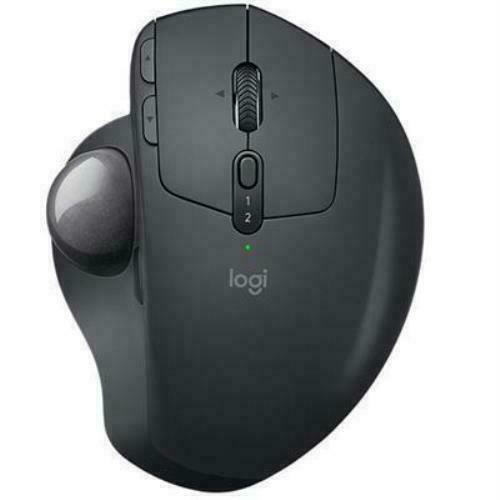
Logitech Ergo M575 Wireless Trackball For Business
Pro X Superlight ZERØ OPPOSITION Remove all obstacles in the way of winning with our lightest and fastest PRO mouse ever. The new weapon of choice for the world’s top esports professional athletes, it weighs less than 63 grams and delivers near frictionless glide. PRO X SUPERLIGHT continues our design philosophy of ZERØ OPPOSITION—our commitment to remove all obstacles to create the purest possible connection between the player and the game. ZERØ OBSTACLES A result of our continued collaboration with top esports pros, PRO X SUPERLIGHT is engineered with a single goal—to create the lightest possible PRO wireless gaming mouse while retaining the quality, structural integrity and pro-grade standards that Logitech G delivers. Take first faster than ever. ZERØ SHORTCUTS Our lightest PRO mouse yet, PRO X SUPERLIGHT is an engineering breakthrough achieving a weight of less than 63 grams—nearly 25% lighter than our standard PRO Wireless mouse. This was accomplished through meticulous engineering to produce extreme weight reduction with zero compromises to performance. ZERØ HESITATION Focus on nothing but winning with LIGHTSPEED, our innovative, pro-grade wireless technology for responsive performance and robust connectivity. ZERØ MISSES Logitech G exclusive HERO 25K sensor provides unrivaled precision, speed, and consistency. PRO X SUPERLIGHT delivers extreme accuracy and ultra fine control for complete confidence especially during the intense, split-second moments of tournament play. ZERØ RESISTANCE Large, zero-additive PTFE feet deliver a smooth glide for a pure, fluid connection with the game. ZERØ CARBON PRO X SUPERLIGHT meets the highest standards in sustainability. It’s a fully carbon neutral certified product. Our manufacturing facilities have been reduced to net zero carbon emissions through the purchase of renewable energy and carbon offsets.
Pro X Superlight ZERØ OPPOSITION Remove all obstacles in the way of winning with our lightest and fastest PRO mouse ever. The new weapon of choice for the world’s top esports professional athletes, it weighs less than 63 grams and delivers near frictionless glide. PRO X SUPERLIGHT continues our design philosophy of ZERØ OPPOSITION—our commitment to remove all obstacles to create the purest possible connection between the player and the game. ZERØ OBSTACLES A result of our continued collaboration with top esports pros, PRO X SUPERLIGHT is engineered with a single goal—to create the lightest possible PRO wireless gaming mouse while retaining the quality, structural integrity and pro-grade standards that Logitech G delivers. Take first faster than ever. ZERØ SHORTCUTS Our lightest PRO mouse yet, PRO X SUPERLIGHT is an engineering breakthrough achieving a weight of less than 63 grams—nearly 25% lighter than our standard PRO Wireless mouse. This was accomplished through meticulous engineering to produce extreme weight reduction with zero compromises to performance. ZERØ HESITATION Focus on nothing but winning with LIGHTSPEED, our innovative, pro-grade wireless technology for responsive performance and robust connectivity. ZERØ MISSES Logitech G exclusive HERO 25K sensor provides unrivaled precision, speed, and consistency. PRO X SUPERLIGHT delivers extreme accuracy and ultra fine control for complete confidence especially during the intense, split-second moments of tournament play. ZERØ RESISTANCE Large, zero-additive PTFE feet deliver a smooth glide for a pure, fluid connection with the game. ZERØ CARBON PRO X SUPERLIGHT meets the highest standards in sustainability. It’s a fully carbon neutral certified product. Our manufacturing facilities have been reduced to net zero carbon emissions through the purchase of renewable energy and carbon offsets.
Pro X Superlight ZERØ OPPOSITION Remove all obstacles in the way of winning with our lightest and fastest PRO mouse ever. The new weapon of choice for the world’s top esports professional athletes, it weighs less than 63 grams and delivers near frictionless glide. PRO X SUPERLIGHT continues our design philosophy of ZERØ OPPOSITION—our commitment to remove all obstacles to create the purest possible connection between the player and the game. ZERØ OBSTACLES A result of our continued collaboration with top esports pros, PRO X SUPERLIGHT is engineered with a single goal—to create the lightest possible PRO wireless gaming mouse while retaining the quality, structural integrity and pro-grade standards that Logitech G delivers. Take first faster than ever. ZERØ SHORTCUTS Our lightest PRO mouse yet, PRO X SUPERLIGHT is an engineering breakthrough achieving a weight of less than 63 grams—nearly 25% lighter than our standard PRO Wireless mouse. This was accomplished through meticulous engineering to produce extreme weight reduction with zero compromises to performance. ZERØ HESITATION Focus on nothing but winning with LIGHTSPEED, our innovative, pro-grade wireless technology for responsive performance and robust connectivity. ZERØ MISSES Logitech G exclusive HERO 25K sensor provides unrivaled precision, speed, and consistency. PRO X SUPERLIGHT delivers extreme accuracy and ultra fine control for complete confidence especially during the intense, split-second moments of tournament play. ZERØ RESISTANCE Large, zero-additive PTFE feet deliver a smooth glide for a pure, fluid connection with the game. ZERØ CARBON PRO X SUPERLIGHT meets the highest standards in sustainability. It’s a fully carbon neutral certified product. Our manufacturing facilities have been reduced to net zero carbon emissions through the purchase of renewable energy and carbon offsets.
Pro X Superlight ZERØ OPPOSITION Remove all obstacles in the way of winning with our lightest and fastest PRO mouse ever. The new weapon of choice for the world’s top esports professional athletes, it weighs less than 63 grams and delivers near frictionless glide. PRO X SUPERLIGHT continues our design philosophy of ZERØ OPPOSITION—our commitment to remove all obstacles to create the purest possible connection between the player and the game. ZERØ OBSTACLES A result of our continued collaboration with top esports pros, PRO X SUPERLIGHT is engineered with a single goal—to create the lightest possible PRO wireless gaming mouse while retaining the quality, structural integrity and pro-grade standards that Logitech G delivers. Take first faster than ever. ZERØ SHORTCUTS Our lightest PRO mouse yet, PRO X SUPERLIGHT is an engineering breakthrough achieving a weight of less than 63 grams—nearly 25% lighter than our standard PRO Wireless mouse. This was accomplished through meticulous engineering to produce extreme weight reduction with zero compromises to performance. ZERØ HESITATION Focus on nothing but winning with LIGHTSPEED, our innovative, pro-grade wireless technology for responsive performance and robust connectivity. ZERØ MISSES Logitech G exclusive HERO 25K sensor provides unrivaled precision, speed, and consistency. PRO X SUPERLIGHT delivers extreme accuracy and ultra fine control for complete confidence especially during the intense, split-second moments of tournament play. ZERØ RESISTANCE Large, zero-additive PTFE feet deliver a smooth glide for a pure, fluid connection with the game. ZERØ CARBON PRO X SUPERLIGHT meets the highest standards in sustainability. It’s a fully carbon neutral certified product. Our manufacturing facilities have been reduced to net zero carbon emissions through the purchase of renewable energy and carbon offsets.
in 13 offers
The lowest price for Logitech Ergo M575 Wireless Trackball For Business right now is $52.50 at TechCart, compared across 13 retailers.
The all-time low was $45.60 on 21 Feb 2026 — today's price is 15% above the lowest ever. That's a little above the best price we've seen.
Prices last updated 29 Sept 2026.
Last updated at 29/09/2026 03:24:17
Ergo M575 Wireless Trackball Mouse for Business -Graphite
Affiliate Disclosure: We may receive a small commission for purchases made through this link at no extra cost to you. This helps support our site. Thank you!
Logitech Ergo M575 Wireless Trackball Mouse (White, 910-005981])
Delivery $48
Wholesale logitech ergo m575 logitech m575 logitech ergo m575 wireless trackball mouse right-handed ergonomic mouse,1 Piece
Delivery $12.65
Logitech Ergo M575S Wireless Trackball Mouse Grey
Delivery between 2–13 Oct $9.95
Logitech Ergo M575 Wireless Trackball Mouse White at Etoren
Delivery $43
Logitech ERGO M575 Mouse - Bluetooth - USB Type A - Optical - Graphite
Free delivery
Logitech Ergo M575 Wireless Ergonomic Mouse 2000 Dpi White
Delivery $19.99
Logitech ERGO M575 Mouse - Bluetooth - USB Type A - Optical - Graphite - Wireless - Trackball
Free delivery between 6–8 Oct
Logitech ERGO M575 Mouse - Bluetooth - USB Type A - Optical - Graphite - Wireless - Trackball
Delivery $7.95
910-006439 Logitech M575 Ergo Wireless Trackball Mouse,Bolt Receiver,Bt,White - 2YR Wty 910-006439
Delivery $15
originally posted on ebay.com
I like trackballs, although not all trackballs. My favorite was the Logitech TrackMan Marble FX, discontinued by Logitech several years ago. I have a couple of them sitting in a box of unused electronics. So for the last several years I have been using wireless mice -- until I saw an ad for the Logitech Ergo 575 trackball. Its not the same as the old TrackMan Marble FX, which mainly used your fingers to control the enormous ball. The Ergo M575 uses the thumb to control a much smaller ball -- but it is surprisingly easy and not at all tiring or stressful on the thumb. That's all I needed to bring me back into the trackball fold. The Ergo 575 doesn't have all the options of some higher priced trackballs, but it has some options through the Logitech Options software ... MoreI like trackballs, although not all trackballs. My favorite was the Logitech TrackMan Marble FX, discontinued by Logitech several years ago. I have a couple of them sitting in a box of unused electronics. So for the last several years I have been using wireless mice -- until I saw an ad for the Logitech Ergo 575 trackball. Its not the same as the old TrackMan Marble FX, which mainly used your fingers to control the enormous ball. The Ergo M575 uses the thumb to control a much smaller ball -- but it is surprisingly easy and not at all tiring or stressful on the thumb. That's all I needed to bring me back into the trackball fold. The Ergo 575 doesn't have all the options of some higher priced trackballs, but it has some options through the Logitech Options software (download for free from Logitech.) The Ergo 575 connects with either Bluetooth or WiFi. I use the Bluetooth myself. Logitech Ergo 575 trackball -- good price, comfortable, modifiable, and ergonomic.
originally posted on walmart.com
Just in the nick of time as my wireless mouse was going out on me, the left click button kept messing up, I received my Logitech Ergo M575 Wireless Trackball and boy was I excited. For years I used a trackball, my last one was a Logitech Marble which lasted for years, and I absolutely loved it. No need for a mousepad and since there’s no arm/hand/mouse movement of any kind then there’s no need for all that room to move a mouse around, just roll the trackball where you want to go et voila!The Ergo is sleek, black and pretty solid. My hand fit perfectly and it felt natural to me. It’s wireless, thru a USB dongle, so there’s no extra cordage hanging about and in your way. It has the normal left/right click buttons, a wheel/middle button, and two extra buttons on the ... MoreJust in the nick of time as my wireless mouse was going out on me, the left click button kept messing up, I received my Logitech Ergo M575 Wireless Trackball and boy was I excited. For years I used a trackball, my last one was a Logitech Marble which lasted for years, and I absolutely loved it. No need for a mousepad and since there’s no arm/hand/mouse movement of any kind then there’s no need for all that room to move a mouse around, just roll the trackball where you want to go et voila!The Ergo is sleek, black and pretty solid. My hand fit perfectly and it felt natural to me. It’s wireless, thru a USB dongle, so there’s no extra cordage hanging about and in your way. It has the normal left/right click buttons, a wheel/middle button, and two extra buttons on the left hand side that you can customized to your liking thru the software from Logitech.I excitedly opened the package, put the included AA battery in it and turned it on. I downloaded the newest drivers/software from Logitech and proceeded to get use to using a trackball once again.I scrolled thru social media, browsed thru various websites and came to the realization that I have a drunk thumb. My thumb doesn’t know up from down and left from right. Just as I’m curlers/curling iron stupid, I am also thumb trackball dumb. This Logitech Ergo is perfect in every way except it’s requiring an input from my thumb. I’m used to zipping about on the other trackball. I’d spin that ball left and right without abandon like I was an artist painting a masterpiece on canvas. And since it’s been years that my Marble trackball bit the dust I have been using a regular mouse and now I want to physically move this Ergo trackball all over my table and thankfully the rubber feet on the bottom stopped me from doing so.I can see it’s going to take me a while to get use to it and retrain my thumb to do my bidding but overall this Logitech Ergo M575 Wireless Trackball is well worth the price. It’s sturdy, made from recycled plastic, the battery lasts forever and ever since it uses very little power, and it’s ergonomic so it’ll save your hand/wrists from any harm. I highly recommend getting it.
originally posted on walmart.com
This Logitech Ergonomic Wireless Trackball Mouse-Easy thumb control, precision and smooth tracking, ergonomic comfort design, for Windows, PC and Mac with Bluetooth and USB capabilities-Black is a great mouse. It takes a day or two to get used to, but then it's wonderful. Your hand rests very comfortably on the mouse and all the buttons are right there, at your fingertips. The scroll is much easier than any other mouse I have owned in the past. I love the thumb control. It just feels natural. The battery is easy to take out or put in. The ball on the bottom is removable so it's easy to clean. I also like the look of this mouse. It's kind of a modern style. All-in-all, I love this mouse and would recommend it to anyone that uses a mouse. And you don't have to move ... MoreThis Logitech Ergonomic Wireless Trackball Mouse-Easy thumb control, precision and smooth tracking, ergonomic comfort design, for Windows, PC and Mac with Bluetooth and USB capabilities-Black is a great mouse. It takes a day or two to get used to, but then it's wonderful. Your hand rests very comfortably on the mouse and all the buttons are right there, at your fingertips. The scroll is much easier than any other mouse I have owned in the past. I love the thumb control. It just feels natural. The battery is easy to take out or put in. The ball on the bottom is removable so it's easy to clean. I also like the look of this mouse. It's kind of a modern style. All-in-all, I love this mouse and would recommend it to anyone that uses a mouse. And you don't have to move the mouse itself around. You just need your hand on the mouse to move it on the page, or scroll.
| Mouse | |
| Buttons durability (million clicks) | 10 |
| Bluetooth Low Energy (BLE) | Y |
| Input device | |
| Number of scroll wheels | 1 |

Ergo M575 Wireless Trackball Mouse for Business -Graphite
Affiliate Disclosure: We may receive a small commission for purchases made through this link at no extra cost to you. This helps support our site. Thank you!
Logitech Ergo M575 Wireless Trackball Mouse (White, 910-005981])
Delivery $48
Wholesale logitech ergo m575 logitech m575 logitech ergo m575 wireless trackball mouse right-handed ergonomic mouse,1 Piece
Delivery $12.65
Logitech Ergo M575S Wireless Trackball Mouse Grey
Delivery between 2–13 Oct $9.95
Logitech Ergo M575 Wireless Trackball Mouse White at Etoren
Delivery $43
I like trackballs, although not all trackballs. My favorite was the Logitech TrackMan Marble FX, discontinued by Logitech several years ago. I have a couple of them sitting in a box of unused electronics. So for the last several years I have been using wireless mice -- until I saw an ad for the Logitech Ergo 575 trackball. Its not the same as the old TrackMan Marble FX, which mainly used your fingers to control the enormous ball. The Ergo M575 uses the thumb to control a much smaller ball -- but it is surprisingly easy and not at all tiring or stressful on the thumb. That's all I needed to bring me back into the trackball fold. The Ergo 575 doesn't have all the options of some higher priced trackballs, but it has some options through the Logitech Options software ... MoreI like trackballs, although not all trackballs. My favorite was the Logitech TrackMan Marble FX, discontinued by Logitech several years ago. I have a couple of them sitting in a box of unused electronics. So for the last several years I have been using wireless mice -- until I saw an ad for the Logitech Ergo 575 trackball. Its not the same as the old TrackMan Marble FX, which mainly used your fingers to control the enormous ball. The Ergo M575 uses the thumb to control a much smaller ball -- but it is surprisingly easy and not at all tiring or stressful on the thumb. That's all I needed to bring me back into the trackball fold. The Ergo 575 doesn't have all the options of some higher priced trackballs, but it has some options through the Logitech Options software (download for free from Logitech.) The Ergo 575 connects with either Bluetooth or WiFi. I use the Bluetooth myself. Logitech Ergo 575 trackball -- good price, comfortable, modifiable, and ergonomic.
Just in the nick of time as my wireless mouse was going out on me, the left click button kept messing up, I received my Logitech Ergo M575 Wireless Trackball and boy was I excited. For years I used a trackball, my last one was a Logitech Marble which lasted for years, and I absolutely loved it. No need for a mousepad and since there’s no arm/hand/mouse movement of any kind then there’s no need for all that room to move a mouse around, just roll the trackball where you want to go et voila!The Ergo is sleek, black and pretty solid. My hand fit perfectly and it felt natural to me. It’s wireless, thru a USB dongle, so there’s no extra cordage hanging about and in your way. It has the normal left/right click buttons, a wheel/middle button, and two extra buttons on the ... MoreJust in the nick of time as my wireless mouse was going out on me, the left click button kept messing up, I received my Logitech Ergo M575 Wireless Trackball and boy was I excited. For years I used a trackball, my last one was a Logitech Marble which lasted for years, and I absolutely loved it. No need for a mousepad and since there’s no arm/hand/mouse movement of any kind then there’s no need for all that room to move a mouse around, just roll the trackball where you want to go et voila!The Ergo is sleek, black and pretty solid. My hand fit perfectly and it felt natural to me. It’s wireless, thru a USB dongle, so there’s no extra cordage hanging about and in your way. It has the normal left/right click buttons, a wheel/middle button, and two extra buttons on the left hand side that you can customized to your liking thru the software from Logitech.I excitedly opened the package, put the included AA battery in it and turned it on. I downloaded the newest drivers/software from Logitech and proceeded to get use to using a trackball once again.I scrolled thru social media, browsed thru various websites and came to the realization that I have a drunk thumb. My thumb doesn’t know up from down and left from right. Just as I’m curlers/curling iron stupid, I am also thumb trackball dumb. This Logitech Ergo is perfect in every way except it’s requiring an input from my thumb. I’m used to zipping about on the other trackball. I’d spin that ball left and right without abandon like I was an artist painting a masterpiece on canvas. And since it’s been years that my Marble trackball bit the dust I have been using a regular mouse and now I want to physically move this Ergo trackball all over my table and thankfully the rubber feet on the bottom stopped me from doing so.I can see it’s going to take me a while to get use to it and retrain my thumb to do my bidding but overall this Logitech Ergo M575 Wireless Trackball is well worth the price. It’s sturdy, made from recycled plastic, the battery lasts forever and ever since it uses very little power, and it’s ergonomic so it’ll save your hand/wrists from any harm. I highly recommend getting it.
This Logitech Ergonomic Wireless Trackball Mouse-Easy thumb control, precision and smooth tracking, ergonomic comfort design, for Windows, PC and Mac with Bluetooth and USB capabilities-Black is a great mouse. It takes a day or two to get used to, but then it's wonderful. Your hand rests very comfortably on the mouse and all the buttons are right there, at your fingertips. The scroll is much easier than any other mouse I have owned in the past. I love the thumb control. It just feels natural. The battery is easy to take out or put in. The ball on the bottom is removable so it's easy to clean. I also like the look of this mouse. It's kind of a modern style. All-in-all, I love this mouse and would recommend it to anyone that uses a mouse. And you don't have to move ... MoreThis Logitech Ergonomic Wireless Trackball Mouse-Easy thumb control, precision and smooth tracking, ergonomic comfort design, for Windows, PC and Mac with Bluetooth and USB capabilities-Black is a great mouse. It takes a day or two to get used to, but then it's wonderful. Your hand rests very comfortably on the mouse and all the buttons are right there, at your fingertips. The scroll is much easier than any other mouse I have owned in the past. I love the thumb control. It just feels natural. The battery is easy to take out or put in. The ball on the bottom is removable so it's easy to clean. I also like the look of this mouse. It's kind of a modern style. All-in-all, I love this mouse and would recommend it to anyone that uses a mouse. And you don't have to move the mouse itself around. You just need your hand on the mouse to move it on the page, or scroll.
Having had the first generation Logitech Wired trackball, T-BC21 Trackman, and using it for years, I was very curious about the new Logitech Ergo M575 Wireless trackball. Curiosity solved and completely satisfied. The ergonomics are vastly superior to the previous generation. The positioning of your hand on the Trackman was challenging, in a sense, where you would need to keep your hand straight to be able to work the ball with your index to ring finger while left-clicking with your thumb or right-clicking ring finger. Eventually, that became tiring, wrist-wise, after an extended period because of the unnatural position of the hand/wrist. Don't get me wrong the Trackman was a vast improvement over the original mouse in keeping your hand in one location without ... MoreHaving had the first generation Logitech Wired trackball, T-BC21 Trackman, and using it for years, I was very curious about the new Logitech Ergo M575 Wireless trackball. Curiosity solved and completely satisfied. The ergonomics are vastly superior to the previous generation. The positioning of your hand on the Trackman was challenging, in a sense, where you would need to keep your hand straight to be able to work the ball with your index to ring finger while left-clicking with your thumb or right-clicking ring finger. Eventually, that became tiring, wrist-wise, after an extended period because of the unnatural position of the hand/wrist. Don't get me wrong the Trackman was a vast improvement over the original mouse in keeping your hand in one location without having to have space to move the pointer same as the new Logitech M575 puts your hand/fingers in such a natural position for hours of painless/discomfort-free operation. Additionally, because of the perfect position you can literally use only two fingers to operate the M575. The trackball is completely within the thumbs scope of range and the index fingers ability to click or work the scroll wheel. Effortless manipulation to use for hours on end is what I have experienced. Also it has a removable ball to clean. This is a giant leap forward in trackball use. I will use the old Trackman as a backup but the new Logitech Wireless M575 Trackball is my primary piece of hardware from here forward. Extremely satisfies with this product, HIGHLY recommended.
This is good for a trackball mouse. It is not like the older ones where your hand sets on top. This one is much wider & tilts to the right giving your hand a much more natural hold. And the extra width feels good also. It really does fit my hand quite well. The ball has smooth tracking & is removable for cleaning. You have the normal left & right buttons but it also has a page forward & page back button along with your wheel. The only thing I have against this mouse is that the on/off switch is on the bottom. It's a little aggravating to have to turn the mouse over to turn it on but worse is forgetting & leaving it on because you can't see the light to remind you that it's on. This makes the battery, of course, run down faster.
I have a wireless keyboard with a touchpad that I bought for my home theater PC setup. It's OK, but I still found myself using a mouse more than the keyboard. The problem with using a regular wireless mouse on the couch was I didn't really have a place to set it. This ERGO trackball mouse was the solution. No matter where I sit, I can easily navigate the web with this mouse since the trackball moves, not the mouse. If I really need to use a keyboard, I just use the Windows on screen keyboard, but most of the time I'm just picking from speed dials/bookmarks. If you're used to a mouse it does take a little bit of practice, but once you get your thumb trained it's very easy. The quality of this mouse is top-notch as you would expect with a Logitech product. I give it ... MoreI have a wireless keyboard with a touchpad that I bought for my home theater PC setup. It's OK, but I still found myself using a mouse more than the keyboard. The problem with using a regular wireless mouse on the couch was I didn't really have a place to set it. This ERGO trackball mouse was the solution. No matter where I sit, I can easily navigate the web with this mouse since the trackball moves, not the mouse. If I really need to use a keyboard, I just use the Windows on screen keyboard, but most of the time I'm just picking from speed dials/bookmarks. If you're used to a mouse it does take a little bit of practice, but once you get your thumb trained it's very easy. The quality of this mouse is top-notch as you would expect with a Logitech product. I give it two thumbs up!
It has pros and cons, but it is fun to use! If you're used to moving a mouse around to get the pointer across, then this will be weird for a bit, but then once your used to it, it's pretty cool. I like that fact that it remains in one spot so I am not bumping paperwork, drinks, on anything else trying to move a mouse in a small work space. It's comfortable to lay my hand over it and only move my thumb to roll the ball. The clicks and scroller are easy too. I am not entirely sure what functionality the 2 smaller buttons have, but assume they are more for gaming purposes. It's overall design is comfortable. Again, this does take and adjustment, but I flop from my work desk with an old fashion mouse to my home desk with this mouse and can do both fairly easily now.
Many times I order a product and when I receive it, I discover it’s not as useful as I anticipated. This Logitech Ergonomic Wireless Trackball Mouse has far exceeded my expectations. I enjoy playing a particular game which requires very precise mouse control. That was very difficult to achieve when using the built in mouse on my laptop computer. Since receiving this product, I’m simply placing it below the keyboard on my laptop and using it to play this game. It fits my hand very comfortably and allows me to have perfect control by using the trackball so I never have to move the mouse itself. This is very different from the traditional computer mouse I’ve used in the past. Since I’m only allowed to give a 5 star rating that’s what I give it, but I think it deserves ... MoreMany times I order a product and when I receive it, I discover it’s not as useful as I anticipated. This Logitech Ergonomic Wireless Trackball Mouse has far exceeded my expectations. I enjoy playing a particular game which requires very precise mouse control. That was very difficult to achieve when using the built in mouse on my laptop computer. Since receiving this product, I’m simply placing it below the keyboard on my laptop and using it to play this game. It fits my hand very comfortably and allows me to have perfect control by using the trackball so I never have to move the mouse itself. This is very different from the traditional computer mouse I’ve used in the past. Since I’m only allowed to give a 5 star rating that’s what I give it, but I think it deserves 10 stars! I absolutely love this product and highly recommend it!
Never having had much experience with a trackball mouse before, I was happy to review it. This is an ergonomically-designed wireless trackball pointing device that connects to your computer via the included dongle or through Bluetooth. Once I discovered the location of the USB receiver (“dongle”) in the package (the instructions were unclear and should have been more detailed – the dongle is hidden in a little slot inside the battery compartment of the trackball with only a small tab sticking out to indicate removal of the tab!), from removing the trackball from its packing to full setup took less than a minute. The trackball is sturdy and well made, with rubber feet to prevent slippage. The smooth, transparently coated ball is controlled by thumb movements and ... MoreNever having had much experience with a trackball mouse before, I was happy to review it. This is an ergonomically-designed wireless trackball pointing device that connects to your computer via the included dongle or through Bluetooth. Once I discovered the location of the USB receiver (“dongle”) in the package (the instructions were unclear and should have been more detailed – the dongle is hidden in a little slot inside the battery compartment of the trackball with only a small tab sticking out to indicate removal of the tab!), from removing the trackball from its packing to full setup took less than a minute. The trackball is sturdy and well made, with rubber feet to prevent slippage. The smooth, transparently coated ball is controlled by thumb movements and while this may be part of my learning curve, I did not think that the ball movement, as a pointing function, was quite as precise as my mouse. However, the trackball is stationary and eliminates the back-and-forth wrist and hand movements of a mouse, thereby reducing fatigue and potential for carpal tunnel syndrome. The case of the trackball is designed to fit the contours of your hand. I had to make a conscious effort to keep my hand far enough forward on the trackball to properly manipulate it, as my hand kept slipping off the back and resting on my desk. Once I got used to it, however, it was most comfortable. The desktop footprint of the trackball is somewhat larger than the mouse, but the trackball does not move on the desktop. However, since a mouse can be set to a longer track for shorter movements, it’s a fairly even tradeoff whether the trackball or a mouse takes up less desktop space and therefore a matter of personal preference. A definite advantage of the trackball is to be able to sit back away from the computer with the trackball in your lap – no mousepad or hard surface required. If you are looking to upgrade or replace your mouse, this trackball is a good value for the price and I would therefore recommend it.
Consider these disposable. I mean if you can get a year out of a mouse before losing it I suppose you are doing well. I've had 3 of these. Inevitably the same thing happens.The mouse starts getting laggy, you'll notice your pointer skipping across the screen and disappearing. You'll reach out to Logitech support who will have you download the "unifying software" and try to re-pair your mouse. They'll also have you do a bunch of other diagnostics, wasting your time. All that will get the mouse running intermittently.Sometimes it will work flawlessly for a day, or a week, or only an hour. Eventually the same behaviour will occur until the trackball simply won't re-pair to the receiver. Logitech will leave you high and dry without compensation or resolution. But ... MoreConsider these disposable. I mean if you can get a year out of a mouse before losing it I suppose you are doing well. I've had 3 of these. Inevitably the same thing happens.The mouse starts getting laggy, you'll notice your pointer skipping across the screen and disappearing. You'll reach out to Logitech support who will have you download the "unifying software" and try to re-pair your mouse. They'll also have you do a bunch of other diagnostics, wasting your time. All that will get the mouse running intermittently.Sometimes it will work flawlessly for a day, or a week, or only an hour. Eventually the same behaviour will occur until the trackball simply won't re-pair to the receiver. Logitech will leave you high and dry without compensation or resolution. But will endlessly send you surveys asking to rate their support just to add insult to injury.If you accept the life expectency of a mouse to ony be 6months to a year buy this when it works it's flawless. If you expect more buy the cheapest non-logitech trackball you can from BB or Amazon or anywhere. It'll probably still die as quickly but it will only cost you half as much along the way.
| Mouse | |
| Buttons durability (million clicks) | 10 |
| Bluetooth Low Energy (BLE) | Y |
| Input device | |
| Number of scroll wheels | 1 |