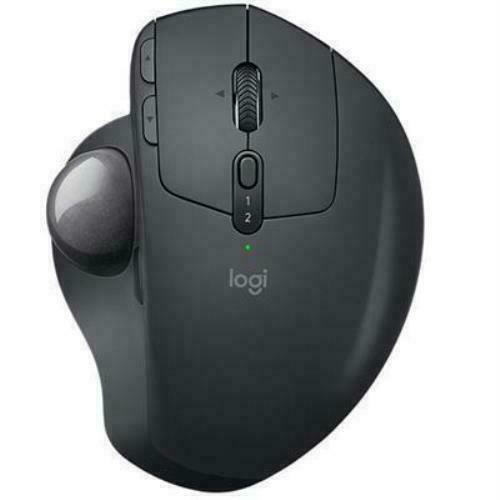
Logitech Ergo M575 Wireless Trackball Mouse - White
ERGO M575 has been designed and developed to ergonomically fit the shape of your hand. No need to move your arm around to move the cursor you’ll reduce fatigue in your hand and arm. Your thumb will glide across the smooth ball surface with total ease thanks to transparent finish coating. The high-performance optical sensor matches great accuracy with ultra-low power consumption. ERGO M575 features a super compact footprint since it doesn’t move to control the cursor. ERGO M575 is ideal for tight workspaces, or for those of us that have desks full of papers, personal items – and sometimes even a bowl of cereal.
ERGO M575 has been designed and developed to ergonomically fit the shape of your hand. No need to move your arm around to move the cursor you’ll reduce fatigue in your hand and arm. Your thumb will glide across the smooth ball surface with total ease thanks to transparent finish coating. The high-performance optical sensor matches great accuracy with ultra-low power consumption. ERGO M575 features a super compact footprint since it doesn’t move to control the cursor. ERGO M575 is ideal for tight workspaces, or for those of us that have desks full of papers, personal items – and sometimes even a bowl of cereal.
ERGO M575 has been designed and developed to ergonomically fit the shape of your hand. No need to move your arm around to move the cursor you’ll reduce fatigue in your hand and arm. Your thumb will glide across the smooth ball surface with total ease thanks to transparent finish coating. The high-performance optical sensor matches great accuracy with ultra-low power consumption. ERGO M575 features a super compact footprint since it doesn’t move to control the cursor. ERGO M575 is ideal for tight workspaces, or for those of us that have desks full of papers, personal items – and sometimes even a bowl of cereal.
ERGO M575 has been designed and developed to ergonomically fit the shape of your hand. No need to move your arm around to move the cursor you’ll reduce fatigue in your hand and arm. Your thumb will glide across the smooth ball surface with total ease thanks to transparent finish coating. The high-performance optical sensor matches great accuracy with ultra-low power consumption. ERGO M575 features a super compact footprint since it doesn’t move to control the cursor. ERGO M575 is ideal for tight workspaces, or for those of us that have desks full of papers, personal items – and sometimes even a bowl of cereal.
in 12 offers
The lowest price for Logitech Ergo M575 Wireless Trackball Mouse - White right now is $52.50 at TechCart, compared across 12 retailers.
The all-time low was $42.99 on 12 Feb 2026 — today's price is 22% above the lowest ever. It has been notably cheaper before — worth setting a price alert.
Prices last updated 30 Sept 2026.
Last updated at 30/09/2026 20:49:43
Ergo M575 Wireless Trackball Mouse for Business -Graphite
Affiliate Disclosure: We may receive a small commission for purchases made through this link at no extra cost to you. This helps support our site. Thank you!
Logitech Ergo M575 Wireless Trackball Mouse (White, 910-005981])
Delivery $48
Wholesale logitech ergo m575 logitech m575 logitech ergo m575 wireless trackball mouse right-handed ergonomic mouse,1 Piece
Delivery $12.79
Logitech Ergo M575S Wireless Trackball Mouse Grey
Delivery between 6–14 Oct $9.95
Logitech Ergo M575 Wireless Trackball Mouse White at Etoren
Delivery $43
Logitech ERGO M575 Mouse - Bluetooth - USB Type A - Optical - Graphite
Free delivery
Logitech Ergo M575 Wireless Ergonomic Mouse 2000 Dpi White
Delivery $19.99
Logitech ERGO M575 Mouse - Bluetooth - USB Type A - Optical - Graphite - Wireless - Trackball
Free delivery between 7–9 Oct
Logitech ERGO M575 Mouse - Bluetooth - USB Type A - Optical - Graphite - Wireless - Trackball
Delivery $7.95
910-006439 Logitech M575 Ergo Wireless Trackball Mouse,Bolt Receiver,Bt,White - 2YR Wty 910-006439
Delivery $15
originally posted on bestbuy.com
I'm not a newbie to the trackball mouse. Years ago I had a wired Logitech trackball but found, over time, the ball lost its smooth movement; the ball became sluggish and cleaning it didn't help, so I went back to the traditional mouse. Recently I decided to give the Logitech trackball another shot and scored the ERGO M575.I've always liked the trackball setup, it's definitely easier on the wrist and hand. With a trackball, you don't need the desktop "real estate" needed with a conventional mouse. The "metalflake" looking blue ball has a nice, smooth feel to it and I find it very accurate and easy to use. I hope as time passes, the ball stays as easy moving as it does now. If you've not used a track ball before, it may take some getting used to, so give it some ... MoreI'm not a newbie to the trackball mouse. Years ago I had a wired Logitech trackball but found, over time, the ball lost its smooth movement; the ball became sluggish and cleaning it didn't help, so I went back to the traditional mouse. Recently I decided to give the Logitech trackball another shot and scored the ERGO M575.I've always liked the trackball setup, it's definitely easier on the wrist and hand. With a trackball, you don't need the desktop "real estate" needed with a conventional mouse. The "metalflake" looking blue ball has a nice, smooth feel to it and I find it very accurate and easy to use. I hope as time passes, the ball stays as easy moving as it does now. If you've not used a track ball before, it may take some getting used to, so give it some time before you pass judgement. A big component as to how comfortable ...or not ...this ERGO trackball is going to be has a lot to do with your hand ...and how it fits the M575. Strongly suggest you try it on for size at your local BestBuy store. For me, it fits fine and is a lot more comfortable than a traditional mouse. But my hands aren't that big; a size "medium" in work gloves if that helps.The ERGO M575 offers both wireless and Bluetooth connections. I found the wireless connection to be a bit sketchy. I have a thin profile iMac Pro ...and all the USB ports are on the backside. The M575 had a very hard time maintaining a good wireless radio connection with the receiver plugged into the back of my iMac. The thin profile iMac is made of a lot of aluminum ...and probably blocks or reduces the signal strength to the USB receiver. The M575 would work sometimes and at other times get jumpy or unresponsive; it wasn't 100% reliable in its function. I decided to try the Bluetooth connection and that has worked well; I've been running it via Bluetooth for a week and it's working flawlessly. Some have commented on having a wired option and, given the potentially poor signal strength and reception of the wireless connection, having a wired option makes sense. Depending on the location of the desktop, the location of the USB port and how much metal is involved, will determine your success in using the wireless connection. IMHO, for desktop style computers without Bluetooth, it would be best to have a key board with a USB port to plug the M575's receiver into. I tried plugging the wireless USB receiver into a USB hub, to move it from behind the iMac, but that didn't work well either.The functions of the buttons and scroller of the M575 trackball are identical to a regular mouse. You can get free downloads of Logitech software to help customize the M575 potentially offering a higher level of customization.Overall I'm very happy with the ERGO M575 trackball mouse. Like every other Logitech device I've purchased, it is well made and exudes a level of high quality. The M575, for me, is definitely more comfortable than any traditional mouse I've used. It's weak point seems to be the wireless connection; the location of the USB receiver is critical in how well the M575 reliably connects and functions. Bluetooth works well in lieu of wireless if your computer has it. If you don't have a Bluetooth option then having a keyboard with a USB port would be best IMHO. Otherwise you'll have to take your chances on reliable reception. I dinged it a star for the iffy wireless connection and no option for a wired connection; this is one mouse that needs a tail.
originally posted on bestbuy.com
When you Tweeted that you fell into the Bill Ackman camp on SBF, I scratched my head. Now it all makes sense. I thought how could guys as shrewd and cut throat as O’Leary and Ackman be giving SBF a pass and why would they going out of their way to publicly give him the benefit of the doubt? I see the strategy now. There is so much information investors need in order to straighten this out so that they can report losses properly and start the process of getting their money back. It’s counter intuitive to put SBF or any of his team any more on the defensive than they already are because you might need his/their cooperation to find some of these funds and there’s a real chance that without tht cooperation you may never find a portion of them again. But once you know ... MoreWhen you Tweeted that you fell into the Bill Ackman camp on SBF, I scratched my head. Now it all makes sense. I thought how could guys as shrewd and cut throat as O’Leary and Ackman be giving SBF a pass and why would they going out of their way to publicly give him the benefit of the doubt? I see the strategy now. There is so much information investors need in order to straighten this out so that they can report losses properly and start the process of getting their money back. It’s counter intuitive to put SBF or any of his team any more on the defensive than they already are because you might need his/their cooperation to find some of these funds and there’s a real chance that without tht cooperation you may never find a portion of them again. But once you know what you need to know to line up the path to recovery, it’s going to be knives out! Full shark mode! SBF made a lot of cunning and smart people look dumb. I think he’s going to pay the price for it and I think you just might be leading the charge!I recently purchased an ergonomically correct optical mouse with a ball cursor and have been using it for work in Excel. I must say, I am thoroughly impressed with its performance. The ergonomic design fits comfortably in my hand and reduces strain on my wrist during long periods of use. The ball cursor allows for precise movements and makes navigating spreadsheets a breeze. Overall, I am very satisfied with my purchase and would highly recommend this mouse to anyone looking for an ergonomic and efficient tool for working in Excel.Logitech has a few ergonomic mice with ball cursors that you might be interested in. One of them is the Logitech MX ERGO Advanced Wireless Trackball Mouse which is crafted for the shape of your hand and built for fast and precise tracking. It has a unique 0 or 20° tilt angle that allows you to adjust your hand and wrist posture to conquer those lengthy decks and spreadsheets with ease 1. Another option is the Logitech ERGO M575 Wireless Trackball which has a sculpted ergonomic shape and smooth, responsive thumb control 2. Both of these mice are designed to minimize movement and maximize comfort while using them.
originally posted on staples.com
My initial reaction to this mouse was a bit of trepidation. I was curious, though, and I knew I wanted a Bluetooth mouse for my work computer, so I decided to give this a try. After getting it all connected, I was intimidated by the way the track ball moved and I was convinced I had made a mistake; however, I vowed to just give it a try. Well, within just a few hours, I was converted, and I had purchased another one for my computer at home.It's a great mouse, it really is much easier to use than a traditional mouse (once you get over the learning curve which, truth be told, wasn't that steep for me.) I adjusted to the track wheel on the side very quickly and now when I use a regular mouse, it feels so awkward, having to pick up the mouse to move the track wheel... ... MoreMy initial reaction to this mouse was a bit of trepidation. I was curious, though, and I knew I wanted a Bluetooth mouse for my work computer, so I decided to give this a try. After getting it all connected, I was intimidated by the way the track ball moved and I was convinced I had made a mistake; however, I vowed to just give it a try. Well, within just a few hours, I was converted, and I had purchased another one for my computer at home.It's a great mouse, it really is much easier to use than a traditional mouse (once you get over the learning curve which, truth be told, wasn't that steep for me.) I adjusted to the track wheel on the side very quickly and now when I use a regular mouse, it feels so awkward, having to pick up the mouse to move the track wheel... Ugh. I'm sticking with Ergo! :)

Ergo M575 Wireless Trackball Mouse for Business -Graphite
Affiliate Disclosure: We may receive a small commission for purchases made through this link at no extra cost to you. This helps support our site. Thank you!
Logitech Ergo M575 Wireless Trackball Mouse (White, 910-005981])
Delivery $48
Wholesale logitech ergo m575 logitech m575 logitech ergo m575 wireless trackball mouse right-handed ergonomic mouse,1 Piece
Delivery $12.79
Logitech Ergo M575S Wireless Trackball Mouse Grey
Delivery between 6–14 Oct $9.95
Logitech Ergo M575 Wireless Trackball Mouse White at Etoren
Delivery $43
I'm not a newbie to the trackball mouse. Years ago I had a wired Logitech trackball but found, over time, the ball lost its smooth movement; the ball became sluggish and cleaning it didn't help, so I went back to the traditional mouse. Recently I decided to give the Logitech trackball another shot and scored the ERGO M575.I've always liked the trackball setup, it's definitely easier on the wrist and hand. With a trackball, you don't need the desktop "real estate" needed with a conventional mouse. The "metalflake" looking blue ball has a nice, smooth feel to it and I find it very accurate and easy to use. I hope as time passes, the ball stays as easy moving as it does now. If you've not used a track ball before, it may take some getting used to, so give it some ... MoreI'm not a newbie to the trackball mouse. Years ago I had a wired Logitech trackball but found, over time, the ball lost its smooth movement; the ball became sluggish and cleaning it didn't help, so I went back to the traditional mouse. Recently I decided to give the Logitech trackball another shot and scored the ERGO M575.I've always liked the trackball setup, it's definitely easier on the wrist and hand. With a trackball, you don't need the desktop "real estate" needed with a conventional mouse. The "metalflake" looking blue ball has a nice, smooth feel to it and I find it very accurate and easy to use. I hope as time passes, the ball stays as easy moving as it does now. If you've not used a track ball before, it may take some getting used to, so give it some time before you pass judgement. A big component as to how comfortable ...or not ...this ERGO trackball is going to be has a lot to do with your hand ...and how it fits the M575. Strongly suggest you try it on for size at your local BestBuy store. For me, it fits fine and is a lot more comfortable than a traditional mouse. But my hands aren't that big; a size "medium" in work gloves if that helps.The ERGO M575 offers both wireless and Bluetooth connections. I found the wireless connection to be a bit sketchy. I have a thin profile iMac Pro ...and all the USB ports are on the backside. The M575 had a very hard time maintaining a good wireless radio connection with the receiver plugged into the back of my iMac. The thin profile iMac is made of a lot of aluminum ...and probably blocks or reduces the signal strength to the USB receiver. The M575 would work sometimes and at other times get jumpy or unresponsive; it wasn't 100% reliable in its function. I decided to try the Bluetooth connection and that has worked well; I've been running it via Bluetooth for a week and it's working flawlessly. Some have commented on having a wired option and, given the potentially poor signal strength and reception of the wireless connection, having a wired option makes sense. Depending on the location of the desktop, the location of the USB port and how much metal is involved, will determine your success in using the wireless connection. IMHO, for desktop style computers without Bluetooth, it would be best to have a key board with a USB port to plug the M575's receiver into. I tried plugging the wireless USB receiver into a USB hub, to move it from behind the iMac, but that didn't work well either.The functions of the buttons and scroller of the M575 trackball are identical to a regular mouse. You can get free downloads of Logitech software to help customize the M575 potentially offering a higher level of customization.Overall I'm very happy with the ERGO M575 trackball mouse. Like every other Logitech device I've purchased, it is well made and exudes a level of high quality. The M575, for me, is definitely more comfortable than any traditional mouse I've used. It's weak point seems to be the wireless connection; the location of the USB receiver is critical in how well the M575 reliably connects and functions. Bluetooth works well in lieu of wireless if your computer has it. If you don't have a Bluetooth option then having a keyboard with a USB port would be best IMHO. Otherwise you'll have to take your chances on reliable reception. I dinged it a star for the iffy wireless connection and no option for a wired connection; this is one mouse that needs a tail.
When you Tweeted that you fell into the Bill Ackman camp on SBF, I scratched my head. Now it all makes sense. I thought how could guys as shrewd and cut throat as O’Leary and Ackman be giving SBF a pass and why would they going out of their way to publicly give him the benefit of the doubt? I see the strategy now. There is so much information investors need in order to straighten this out so that they can report losses properly and start the process of getting their money back. It’s counter intuitive to put SBF or any of his team any more on the defensive than they already are because you might need his/their cooperation to find some of these funds and there’s a real chance that without tht cooperation you may never find a portion of them again. But once you know ... MoreWhen you Tweeted that you fell into the Bill Ackman camp on SBF, I scratched my head. Now it all makes sense. I thought how could guys as shrewd and cut throat as O’Leary and Ackman be giving SBF a pass and why would they going out of their way to publicly give him the benefit of the doubt? I see the strategy now. There is so much information investors need in order to straighten this out so that they can report losses properly and start the process of getting their money back. It’s counter intuitive to put SBF or any of his team any more on the defensive than they already are because you might need his/their cooperation to find some of these funds and there’s a real chance that without tht cooperation you may never find a portion of them again. But once you know what you need to know to line up the path to recovery, it’s going to be knives out! Full shark mode! SBF made a lot of cunning and smart people look dumb. I think he’s going to pay the price for it and I think you just might be leading the charge!I recently purchased an ergonomically correct optical mouse with a ball cursor and have been using it for work in Excel. I must say, I am thoroughly impressed with its performance. The ergonomic design fits comfortably in my hand and reduces strain on my wrist during long periods of use. The ball cursor allows for precise movements and makes navigating spreadsheets a breeze. Overall, I am very satisfied with my purchase and would highly recommend this mouse to anyone looking for an ergonomic and efficient tool for working in Excel.Logitech has a few ergonomic mice with ball cursors that you might be interested in. One of them is the Logitech MX ERGO Advanced Wireless Trackball Mouse which is crafted for the shape of your hand and built for fast and precise tracking. It has a unique 0 or 20° tilt angle that allows you to adjust your hand and wrist posture to conquer those lengthy decks and spreadsheets with ease 1. Another option is the Logitech ERGO M575 Wireless Trackball which has a sculpted ergonomic shape and smooth, responsive thumb control 2. Both of these mice are designed to minimize movement and maximize comfort while using them.
My initial reaction to this mouse was a bit of trepidation. I was curious, though, and I knew I wanted a Bluetooth mouse for my work computer, so I decided to give this a try. After getting it all connected, I was intimidated by the way the track ball moved and I was convinced I had made a mistake; however, I vowed to just give it a try. Well, within just a few hours, I was converted, and I had purchased another one for my computer at home.It's a great mouse, it really is much easier to use than a traditional mouse (once you get over the learning curve which, truth be told, wasn't that steep for me.) I adjusted to the track wheel on the side very quickly and now when I use a regular mouse, it feels so awkward, having to pick up the mouse to move the track wheel... ... MoreMy initial reaction to this mouse was a bit of trepidation. I was curious, though, and I knew I wanted a Bluetooth mouse for my work computer, so I decided to give this a try. After getting it all connected, I was intimidated by the way the track ball moved and I was convinced I had made a mistake; however, I vowed to just give it a try. Well, within just a few hours, I was converted, and I had purchased another one for my computer at home.It's a great mouse, it really is much easier to use than a traditional mouse (once you get over the learning curve which, truth be told, wasn't that steep for me.) I adjusted to the track wheel on the side very quickly and now when I use a regular mouse, it feels so awkward, having to pick up the mouse to move the track wheel... Ugh. I'm sticking with Ergo! :)
I work on computers 10+ hours per day, and this is my 4th time getting this mouse from logitech. It was recommended 12ish years ago after I had some hand/elbow issues and it's truly saved me from further strain.That being said, the prior model M570 had very smooth edges, large rubber pads on the bottom, and a smooth/shiny ball. This M575 has more sharp edges which doesn't make sense as any time a finger/hand rests on one for a few seconds it feels sharp and uncomfy.It has smaller rubber pads on the bottom and seems lighter, so when I unintentionally move my full hand the whole mouse moves (whereas the old one stayed in place).The ball seems textured, and makes more noise when rolling it.It's also a tiny bit taller, making for a bit more wrist strain. And I ... MoreI work on computers 10+ hours per day, and this is my 4th time getting this mouse from logitech. It was recommended 12ish years ago after I had some hand/elbow issues and it's truly saved me from further strain.That being said, the prior model M570 had very smooth edges, large rubber pads on the bottom, and a smooth/shiny ball. This M575 has more sharp edges which doesn't make sense as any time a finger/hand rests on one for a few seconds it feels sharp and uncomfy.It has smaller rubber pads on the bottom and seems lighter, so when I unintentionally move my full hand the whole mouse moves (whereas the old one stayed in place).The ball seems textured, and makes more noise when rolling it.It's also a tiny bit taller, making for a bit more wrist strain. And I can feel it press in my palm more, if that makes sense. I couldn't find the exact specs, but I measured the height of the M575 at 1.75" and the M570 at 1.68". When you already have hand/wrist strain, you feel that.Still better than a regular mouse. Hopefully the next (M580?) will be better.
Purchased this to alleviate sore wrist from normal mouse. So far, it's operated flawlessly. Your hand stays in one place and avoids moving the arm all around a mouse pad.It does take some getting used to (as you want to move it like a normal mouse) but, once used for a day it becomes just as natural.Only 4-stars because it'd be nice if the ergonomics were a bit more angled. (More up-and-down) My finger often presses the left button because of the design being so parallel to the table top. Sometimes if you're rolling the ball too fast it will jump on you. Not out of the casing, per se, just jumps up on you.Overall, the price is a little high for this but I've used Logitech for decades and they're a quality brand.Would recommend.
It works fine and I'm a die-hard logitech trackball user (since the Trackman Marble from the 90's), so I'm keeping it. I really like that this version connects by bluetooth so I dont need to use the dongle in a USB port. But I really dont like the feel when clicking the wheel (it barely pushes and wants to roll under your finger when you use it). The M570 click wheel had a better feel and response. And for some reason, when I roll the ball, I occasionally feel what I can only describe as a "groove" or a "bump" in the ball that I pass over. But there is nothing on the ball, so I guess its just in the way the socket holds the ball. But its only once in a while. Weird. Price has gone up too.
It was recommended by the ergonomic specialist at work about 5 years ago to switch over to a trackball mouse. After trying a few different ones, this particular trackball mouse (well, the previous model) was the one that made all the difference. I reluctantly agreed to change. I am an analyst that deals with huge amounts of data and really didn’t want anything to slow me down. It’s safe to say I log more miles on my mouse than anything else in life . After a few days of getting used to, I was so pleasantly surprised that I never looked back. Not only did my wrist/arm/hand pain go away but I was much quicker. Not having to drag your whole arm around to move the mouse makes a big difference in so many ways. Needless to say, this purchase was my 4th or 5th Logitech ... MoreIt was recommended by the ergonomic specialist at work about 5 years ago to switch over to a trackball mouse. After trying a few different ones, this particular trackball mouse (well, the previous model) was the one that made all the difference. I reluctantly agreed to change. I am an analyst that deals with huge amounts of data and really didn’t want anything to slow me down. It’s safe to say I log more miles on my mouse than anything else in life . After a few days of getting used to, I was so pleasantly surprised that I never looked back. Not only did my wrist/arm/hand pain go away but I was much quicker. Not having to drag your whole arm around to move the mouse makes a big difference in so many ways. Needless to say, this purchase was my 4th or 5th Logitech trackball in this particular design. It was the first of this newer model which, of course, I was reluctant to switch to. This newer model seems just as comfortable asthe old but the ball seems slightly tighter (best way I can describe it). This might actually be ideal for some but I am a creature of habit and I liked the looseness of the original. It wasn’t to the point that I have put this away and looked for the oldermodel but just an observation. Given the choice, I had one or two of the older model die out on me over time so if this one lasts longer I’ll deal with the different resistance of the trackball. Either way, hands down, if you are looking for an ergonomic trackball or any mouse in general I 100% choose this one over all the rest.
I have owned Logitech trackball mouses since 2000. Most I loved, a few I used but recognized some issues. In general, I consider a thumb based trackball mouse to be the best out there. It uses a thumb which can rotate in any direction and is built for fine motor skills unlike the wrist driven mice.Here's why I like this particular mouse and call it the best I've ever had:1. Everything is well built and works without issues. The ball itself swivels easily. It's easy to clean. The buttons work. It sticks to the desk and doesn't move2. Bluetooth is a dream. It connects easily to my Mac and stays connected. It's just rock solid in that way.3. Battery life is long. I have usually forgotten the last time I replaced the battery by the time I swap in a new pair. I ... MoreI have owned Logitech trackball mouses since 2000. Most I loved, a few I used but recognized some issues. In general, I consider a thumb based trackball mouse to be the best out there. It uses a thumb which can rotate in any direction and is built for fine motor skills unlike the wrist driven mice.Here's why I like this particular mouse and call it the best I've ever had:1. Everything is well built and works without issues. The ball itself swivels easily. It's easy to clean. The buttons work. It sticks to the desk and doesn't move2. Bluetooth is a dream. It connects easily to my Mac and stays connected. It's just rock solid in that way.3. Battery life is long. I have usually forgotten the last time I replaced the battery by the time I swap in a new pair. I was a bit worried because I wanted to use bluetooth and Logitech warns that bluetooth connections consume more battery than their proprietary connector4. It's easy to use Mac config to set tracking speed, scrolling speed, and double click speed.Overall, this is the best mouse I've owned.
Easy to be able to do almost all select activities with y right hand -- this is definitely for right-handed people. It is quite sensitive and difficult to hold the cursor in a narrow vertical as in selecting from Microsoft's menu of applications on the home page overlay. Sometimes the select drops and if you are trying to move an object, the object returns to its original place. Another concern is that the left mouse key next to the wheel needs to be pressed to "let go" of the object being moved. It is an improvement over the wheel mouse if only because the wireless trackball stays in one place. A mouse needs to be moved and other things on my work surface (desk) get in the way.
Consider these disposable. I mean if you can get a year out of a mouse before losing it I suppose you are doing well. I've had 3 of these. Inevitably the same thing happens.The mouse starts getting laggy, you'll notice your pointer skipping across the screen and disappearing. You'll reach out to Logitech support who will have you download the "unifying software" and try to re-pair your mouse. They'll also have you do a bunch of other diagnostics, wasting your time. All that will get the mouse running intermittently.Sometimes it will work flawlessly for a day, or a week, or only an hour. Eventually the same behaviour will occur until the trackball simply won't re-pair to the receiver. Logitech will leave you high and dry without compensation or resolution. But ... MoreConsider these disposable. I mean if you can get a year out of a mouse before losing it I suppose you are doing well. I've had 3 of these. Inevitably the same thing happens.The mouse starts getting laggy, you'll notice your pointer skipping across the screen and disappearing. You'll reach out to Logitech support who will have you download the "unifying software" and try to re-pair your mouse. They'll also have you do a bunch of other diagnostics, wasting your time. All that will get the mouse running intermittently.Sometimes it will work flawlessly for a day, or a week, or only an hour. Eventually the same behaviour will occur until the trackball simply won't re-pair to the receiver. Logitech will leave you high and dry without compensation or resolution. But will endlessly send you surveys asking to rate their support just to add insult to injury.If you accept the life expectency of a mouse to ony be 6months to a year buy this when it works it's flawless. If you expect more buy the cheapest non-logitech trackball you can from BB or Amazon or anywhere. It'll probably still die as quickly but it will only cost you half as much along the way.