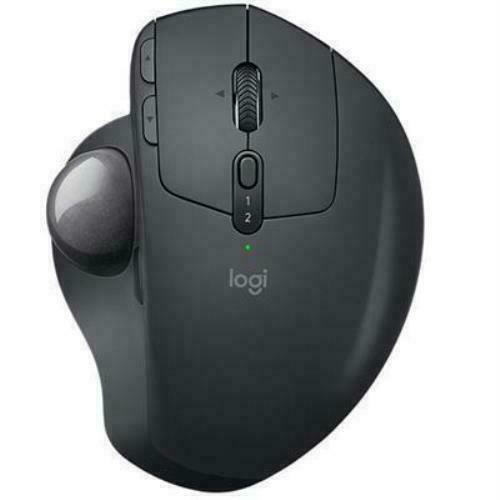
Logitech MX ERGO Advanced Wireless Trackball Mouse
Logitech MX ERGO Advanced Wireless Trackball Mouse
in 2 offers
The lowest price for Logitech MX Ergo Plus Trackball Mouse right now is $119.52 at eBay.com.au, compared across 2 retailers.
The all-time low was $69.59 on 17 Mar 2026 — today's price is 72% above the lowest ever. It has been notably cheaper before — worth setting a price alert.
Prices last updated 15 Oct 2026.
Logitech MX Ergo Plus Trackball Mouse
Logitech MX ERGO Advanced Wireless Trackball Mouse
Logitech MX ERGO Advanced Wireless Trackball Mouse
Last updated at 15/10/2026 14:28:03
Logitech Mx Ergo Plus Advanced Wireless Trackball Mouse With Optical
Delivery $63.06
Affiliate Disclosure: We may receive a small commission for purchases made through this link at no extra cost to you. This helps support our site. Thank you!
Logitech MX ERGO Wireless Trackball
Delivery between 21–24 Oct $29
originally posted on bhphotovideo.com
This replaced my recent trackball (one of many) that I used in addition to a large pen tablet. I have used many different conventional mice and several trackball devices, but this MX ERGO feels better than any of the others once I got accustomed to the different controls layout.To start, I thought the smaller trackball than found in my previous devices might be harder to control with precision, but it proved to be as precise as the larger ones. The additional Precise movement switch just above the ball makes sure it is easily controlled when more accuracy is required. The ability to adjust the angle of the trackball base from full horizontal up to 30 degrees makes it easy to get a comfortable grip with reduced stress on the wrist. There are enough control buttons ... MoreThis replaced my recent trackball (one of many) that I used in addition to a large pen tablet. I have used many different conventional mice and several trackball devices, but this MX ERGO feels better than any of the others once I got accustomed to the different controls layout.To start, I thought the smaller trackball than found in my previous devices might be harder to control with precision, but it proved to be as precise as the larger ones. The additional Precise movement switch just above the ball makes sure it is easily controlled when more accuracy is required. The ability to adjust the angle of the trackball base from full horizontal up to 30 degrees makes it easy to get a comfortable grip with reduced stress on the wrist. There are enough control buttons to make it adapt to most photographic editing purposes.The few negative attributes include a lack of a real user guide - any info needed had to be searched online, which wasted more time than I wished to spend. How hard is it to include a decent printed user guide for a $100 trackball?Another issue is a lack of decent software for this trackball - there is an Logi Options+ software available, but it currently does not work with the MX ERGO trackball model.Finally, the Bluetooth function is useless since the trackball goes to sleep if not moved for several seconds and takes several seconds to react to movement once it is in sleep mode. This was too annoying in a working environment so I just used the provided Logitech Unifying Receiver that worked perfectly, but occupied a USB port, which I hoped to keep free if the Bluetooth worked correctly. The issue of delayed Bluetooth did not occur with other Bluetooth mice on this computer, so I hope Logitech fixes this in a firmware or software update.The cons I just mentioned, while annoying, did not change my positive experience with this trackball mouse and I will continue to use it.
originally posted on logitech.com
I'm a fan of the MX Master 3S. I've been waiting for a silent version of the MX Master series, and Logitech delivered.Unfortunately, I injured my wrist and have to use the MX Ergo. The MX Ergo helps a bit with wrist pain.Here are the issues:1. Loud, Loud obnoxious Left, Right clicks2. Loud and obnoxious scroll wheel3. Slowest scroll wheel I have ever used (probably just as slow as normal, vanilla mice you get for free).4. Pain in fingers: because the scroll wheel is so slow, I'm forced to exert much effort and force just to get through pages and documents.5. Pain in my thumb: Perhaps there can be some dynamic speed technology like the mag speed scroll wheel for the trackball. I have multiple monitors and the pain in my thumb is increasing the more work I have ... MoreI'm a fan of the MX Master 3S. I've been waiting for a silent version of the MX Master series, and Logitech delivered.Unfortunately, I injured my wrist and have to use the MX Ergo. The MX Ergo helps a bit with wrist pain.Here are the issues:1. Loud, Loud obnoxious Left, Right clicks2. Loud and obnoxious scroll wheel3. Slowest scroll wheel I have ever used (probably just as slow as normal, vanilla mice you get for free).4. Pain in fingers: because the scroll wheel is so slow, I'm forced to exert much effort and force just to get through pages and documents.5. Pain in my thumb: Perhaps there can be some dynamic speed technology like the mag speed scroll wheel for the trackball. I have multiple monitors and the pain in my thumb is increasing the more work I have to accomplish with this mouse.What is needed:1. Quiet Click technology2. Silent scroll3. Mag Speed Scroll Wheel4. Dynamic speed for trackball (the button location for slower precise speed is very inconvenient; We need more speed variation like the Mag Speed scroll wheel).
originally posted on bestbuy.com
I chose the MX Ergo over the Lift and Vertical because it had more programmable buttons like my MX Master 3. The reason I'm giving The MX Ergo 3 out of 5 stars is because the horrible out-of-the-box vertical scrolling, and the mouse feels a little cheap and outdated for the premium price. Understandable since it hasn't been updated since 2017.The Ergo's two main mouse buttons are loud and clicky, and the trackball definitely isn't as smooth as it could or should be. It's ok, but it's not as smooth as I would like it to be. The worst part about this mouse is the lack of smooth vertical scrolling. The Ergo scroll wheel jumps/bumps as you scroll, it's not smooth like the MX Master 3. You need to buy third-party software in order to make the scrolling smoother (I ... MoreI chose the MX Ergo over the Lift and Vertical because it had more programmable buttons like my MX Master 3. The reason I'm giving The MX Ergo 3 out of 5 stars is because the horrible out-of-the-box vertical scrolling, and the mouse feels a little cheap and outdated for the premium price. Understandable since it hasn't been updated since 2017.The Ergo's two main mouse buttons are loud and clicky, and the trackball definitely isn't as smooth as it could or should be. It's ok, but it's not as smooth as I would like it to be. The worst part about this mouse is the lack of smooth vertical scrolling. The Ergo scroll wheel jumps/bumps as you scroll, it's not smooth like the MX Master 3. You need to buy third-party software in order to make the scrolling smoother (I chose Smooze Pro for $19). The app works well with the Ergo, but it's not a perfect solution. And why isn't this functionality built into LogiOptions? Why am I paying a third-party for functionality that should already be there? Logitech never fails to confound me. They never seem to get anything right.So far, I'm satisfied enough that I am going to keep the Ergo. I don't really see other better options for this type of mouse on a Mac. The different ergonomics this mouse offers has definitely alleviated my wrist pain. I use the Ergo about 75% of the time now, and the MX Master 3 the rest. I still prefer the MX Master for fine/precision/detail work, but the Ergo is satisfactory for everything else. If using a traditional mouse 100% of the time is causing you wrist pain, then the Ergo is worth trying. Just realize, you will need to buy third-party software to improve the vertical scrolling, and there is a very high likelihood Logitech releases a new and improved version of the MX Ergo sometime soon, 2023-2024.
| Mouse | |
| Buttons durability (million clicks) | 10 |
| Input device | |
| Frequency band | 2.4 GHz |
| Customizable movement resolution | Y |
Logitech Mx Ergo Plus Advanced Wireless Trackball Mouse With Optical
Delivery $63.06
Affiliate Disclosure: We may receive a small commission for purchases made through this link at no extra cost to you. This helps support our site. Thank you!
Logitech MX ERGO Wireless Trackball
Delivery between 21–24 Oct $29
This replaced my recent trackball (one of many) that I used in addition to a large pen tablet. I have used many different conventional mice and several trackball devices, but this MX ERGO feels better than any of the others once I got accustomed to the different controls layout.To start, I thought the smaller trackball than found in my previous devices might be harder to control with precision, but it proved to be as precise as the larger ones. The additional Precise movement switch just above the ball makes sure it is easily controlled when more accuracy is required. The ability to adjust the angle of the trackball base from full horizontal up to 30 degrees makes it easy to get a comfortable grip with reduced stress on the wrist. There are enough control buttons ... MoreThis replaced my recent trackball (one of many) that I used in addition to a large pen tablet. I have used many different conventional mice and several trackball devices, but this MX ERGO feels better than any of the others once I got accustomed to the different controls layout.To start, I thought the smaller trackball than found in my previous devices might be harder to control with precision, but it proved to be as precise as the larger ones. The additional Precise movement switch just above the ball makes sure it is easily controlled when more accuracy is required. The ability to adjust the angle of the trackball base from full horizontal up to 30 degrees makes it easy to get a comfortable grip with reduced stress on the wrist. There are enough control buttons to make it adapt to most photographic editing purposes.The few negative attributes include a lack of a real user guide - any info needed had to be searched online, which wasted more time than I wished to spend. How hard is it to include a decent printed user guide for a $100 trackball?Another issue is a lack of decent software for this trackball - there is an Logi Options+ software available, but it currently does not work with the MX ERGO trackball model.Finally, the Bluetooth function is useless since the trackball goes to sleep if not moved for several seconds and takes several seconds to react to movement once it is in sleep mode. This was too annoying in a working environment so I just used the provided Logitech Unifying Receiver that worked perfectly, but occupied a USB port, which I hoped to keep free if the Bluetooth worked correctly. The issue of delayed Bluetooth did not occur with other Bluetooth mice on this computer, so I hope Logitech fixes this in a firmware or software update.The cons I just mentioned, while annoying, did not change my positive experience with this trackball mouse and I will continue to use it.
I'm a fan of the MX Master 3S. I've been waiting for a silent version of the MX Master series, and Logitech delivered.Unfortunately, I injured my wrist and have to use the MX Ergo. The MX Ergo helps a bit with wrist pain.Here are the issues:1. Loud, Loud obnoxious Left, Right clicks2. Loud and obnoxious scroll wheel3. Slowest scroll wheel I have ever used (probably just as slow as normal, vanilla mice you get for free).4. Pain in fingers: because the scroll wheel is so slow, I'm forced to exert much effort and force just to get through pages and documents.5. Pain in my thumb: Perhaps there can be some dynamic speed technology like the mag speed scroll wheel for the trackball. I have multiple monitors and the pain in my thumb is increasing the more work I have ... MoreI'm a fan of the MX Master 3S. I've been waiting for a silent version of the MX Master series, and Logitech delivered.Unfortunately, I injured my wrist and have to use the MX Ergo. The MX Ergo helps a bit with wrist pain.Here are the issues:1. Loud, Loud obnoxious Left, Right clicks2. Loud and obnoxious scroll wheel3. Slowest scroll wheel I have ever used (probably just as slow as normal, vanilla mice you get for free).4. Pain in fingers: because the scroll wheel is so slow, I'm forced to exert much effort and force just to get through pages and documents.5. Pain in my thumb: Perhaps there can be some dynamic speed technology like the mag speed scroll wheel for the trackball. I have multiple monitors and the pain in my thumb is increasing the more work I have to accomplish with this mouse.What is needed:1. Quiet Click technology2. Silent scroll3. Mag Speed Scroll Wheel4. Dynamic speed for trackball (the button location for slower precise speed is very inconvenient; We need more speed variation like the Mag Speed scroll wheel).
I chose the MX Ergo over the Lift and Vertical because it had more programmable buttons like my MX Master 3. The reason I'm giving The MX Ergo 3 out of 5 stars is because the horrible out-of-the-box vertical scrolling, and the mouse feels a little cheap and outdated for the premium price. Understandable since it hasn't been updated since 2017.The Ergo's two main mouse buttons are loud and clicky, and the trackball definitely isn't as smooth as it could or should be. It's ok, but it's not as smooth as I would like it to be. The worst part about this mouse is the lack of smooth vertical scrolling. The Ergo scroll wheel jumps/bumps as you scroll, it's not smooth like the MX Master 3. You need to buy third-party software in order to make the scrolling smoother (I ... MoreI chose the MX Ergo over the Lift and Vertical because it had more programmable buttons like my MX Master 3. The reason I'm giving The MX Ergo 3 out of 5 stars is because the horrible out-of-the-box vertical scrolling, and the mouse feels a little cheap and outdated for the premium price. Understandable since it hasn't been updated since 2017.The Ergo's two main mouse buttons are loud and clicky, and the trackball definitely isn't as smooth as it could or should be. It's ok, but it's not as smooth as I would like it to be. The worst part about this mouse is the lack of smooth vertical scrolling. The Ergo scroll wheel jumps/bumps as you scroll, it's not smooth like the MX Master 3. You need to buy third-party software in order to make the scrolling smoother (I chose Smooze Pro for $19). The app works well with the Ergo, but it's not a perfect solution. And why isn't this functionality built into LogiOptions? Why am I paying a third-party for functionality that should already be there? Logitech never fails to confound me. They never seem to get anything right.So far, I'm satisfied enough that I am going to keep the Ergo. I don't really see other better options for this type of mouse on a Mac. The different ergonomics this mouse offers has definitely alleviated my wrist pain. I use the Ergo about 75% of the time now, and the MX Master 3 the rest. I still prefer the MX Master for fine/precision/detail work, but the Ergo is satisfactory for everything else. If using a traditional mouse 100% of the time is causing you wrist pain, then the Ergo is worth trying. Just realize, you will need to buy third-party software to improve the vertical scrolling, and there is a very high likelihood Logitech releases a new and improved version of the MX Ergo sometime soon, 2023-2024.
Pros:1. Build quality and feel (esp. the metal plate on the bottom that can be seen shining in the photos).2. Space efficiency: no need to move the mouse a foot left and right if you have multiple monitors.3. 6 programmable buttons: middle mouse button, 2 wheel tilt directions, forward and backward buttons, precision button.4. The precision mode is great for pixel perfect cursor positioning.5. The ball can easily be removed by pushing a pen or pencil's blunt end through the hole in the bottom of the mouse.6. Connect to a maximum of 2 devices: 1 through RF with the included USB or up to 2 through Bluetooth, and easily switch computers with the dedicated button.7. The mouse wheel is pretty smooth feeling and doesn't have an obnoxious clicking noise.8. ... MorePros:1. Build quality and feel (esp. the metal plate on the bottom that can be seen shining in the photos).2. Space efficiency: no need to move the mouse a foot left and right if you have multiple monitors.3. 6 programmable buttons: middle mouse button, 2 wheel tilt directions, forward and backward buttons, precision button.4. The precision mode is great for pixel perfect cursor positioning.5. The ball can easily be removed by pushing a pen or pencil's blunt end through the hole in the bottom of the mouse.6. Connect to a maximum of 2 devices: 1 through RF with the included USB or up to 2 through Bluetooth, and easily switch computers with the dedicated button.7. The mouse wheel is pretty smooth feeling and doesn't have an obnoxious clicking noise.8. This thing has an awesome battery life. I haven't charged it since I got it about a week ago yet it still shows full battery, and I use it quiiite a bit daily.9. The mouse has surprisingly strong magnets to keep the metal plate in place both for zero tilt and 20 degrees, and the additional wedge also has a magnet built in to snap to the metal plate for the extra 10 degrees of tilt. Maybe not the most rigid way to attach the parts, but I just like magnets.Cons:1. The Logitech Flow software didn't work for me, but in Logitech's defense, I was trying to get it to work on a 4 year old laptop that was struggling to run Windows 10.2. The Logitech Options software could stand to be a teeny bit more customizable, for example, I use the wheel tilt to switch tabs and the shortcut for moving one tab to the left is Ctrl Tab, and when I tilt the wheel to the left it switches but keeps the Ctrl signal active meaning if I accidentally rotate the wheel as I tilt it, it will switch tabs and zoom in or out because Ctrl scrolling will zoom on Chrome. As far as I know, there is no solution to this within Options.3. The height of the mouse when it is tilted 30 degrees up is about 2 5/8" or 67 mm which could be a concern if you plan to put it on a retractable keyboard tray. On my specific desk, that is just barely enough room to fit it on the retractable keyboard tray. If I even put a mouse pad under it, it won't fit.4. The ball and the bearings in the socket may need to be cleaned fairly often (1-2 times per week) if you have oily hands like I do.5. Just my personal preference, but all of the buttons except the precision control are a bit clicky/poppy/clacky (they all sound different), I like silent buttons that are felt and not heard. The main 3 buttons are the loudest but realistically not too annoying.6. If it's on a rough surface, it can slide around a little bit, but it's not too bad.7. The wedge for an additional 10 degrees of tilt can slide a little bit against the metal plate over time, but the magnets do keep it from moving too far.
.I absolutely love this trackball mouse! The ergonomic design is extremely comfortable and helps me avoid any discomfort or strain on my wrist and hand. The trackball itself is smooth and precise, and the buttons are very responsive and easy to reach. The wireless connection is very reliable and I've had no issues with lag or dropouts.The build quality is excellent, and the mouse feels very sturdy and well-made. The Graphite color looks sleek and professional, and the overall design is very attractive.I also appreciate the additional programmable buttons, which allow me to customize the mouse to suit my specific needs. This feature has helped me streamline my workflow and become more efficient in my work.Overall, I am extremely satisfied with the Logitech MX ... More.I absolutely love this trackball mouse! The ergonomic design is extremely comfortable and helps me avoid any discomfort or strain on my wrist and hand. The trackball itself is smooth and precise, and the buttons are very responsive and easy to reach. The wireless connection is very reliable and I've had no issues with lag or dropouts.The build quality is excellent, and the mouse feels very sturdy and well-made. The Graphite color looks sleek and professional, and the overall design is very attractive.I also appreciate the additional programmable buttons, which allow me to customize the mouse to suit my specific needs. This feature has helped me streamline my workflow and become more efficient in my work.Overall, I am extremely satisfied with the Logitech MX ERGO Plus Wireless Trackball Mouse with Ergonomic design in Graphite. It has exceeded my expectations in every way and I highly recommend it to anyone in need of a high-quality, ergonomic mouse. I would definitely give it a 5-star rating!
Logitech mice have been the cream of the crop in my opinion. I have used Logitech gaming mice for years for business use. Mainly because I could program simple keyboard shortcuts. For instance, copying, cutting, and pasting made editing documents a breeze. I recently purchase this mouse as I have been having some wrist trouble. Overall, made with quality material and craftsmanship; a lot of research has gone into making this mouse. The previous gaming mice I have used allowed you to edit the configuration, and that configuration could be saved on the mouse. Allowing me to use the mice for business use. Now the reason for my 4 stars, most businesses dont allow you to install software, unless you are an administrator. When downloading the software on my personal ... MoreLogitech mice have been the cream of the crop in my opinion. I have used Logitech gaming mice for years for business use. Mainly because I could program simple keyboard shortcuts. For instance, copying, cutting, and pasting made editing documents a breeze. I recently purchase this mouse as I have been having some wrist trouble. Overall, made with quality material and craftsmanship; a lot of research has gone into making this mouse. The previous gaming mice I have used allowed you to edit the configuration, and that configuration could be saved on the mouse. Allowing me to use the mice for business use. Now the reason for my 4 stars, most businesses dont allow you to install software, unless you are an administrator. When downloading the software on my personal computer and editing the configuration, I was hoping I could then use it for work. I totally understand the software allows for increase functionality of this particular mouse. If at all possible, have users create an account, secure it with multi-factor authentication, and allow users to make configuration changes, without the use of installed software? I know this mouse doesn’t have any onboard storage, or at least any I am aware of. That really is my only complaint.
I've owned this mouse for less than 2 years, using it for about half of my computer usage alongside a gaming mouse, and in normal logitech fashion the buttons have begun to fail (randomly releasing or rapid-clicking when held, or outright ignoring clicks).The design is decently comfortable, though it sports and unnecessary magnetic underside to hold a base plate that leaves me perpetually concerned about where I place the mouse around all the electronics it's designed to accompany.The downsides:- the aforementioned crappy logitech button switches that wear out extremely quickly- magnetic baseThe upsides:- it's easy to pop out the trackball to clean, but has never fallen out on accident- it uses the logitech unifying receiver, so no additional USB ports ... MoreI've owned this mouse for less than 2 years, using it for about half of my computer usage alongside a gaming mouse, and in normal logitech fashion the buttons have begun to fail (randomly releasing or rapid-clicking when held, or outright ignoring clicks).The design is decently comfortable, though it sports and unnecessary magnetic underside to hold a base plate that leaves me perpetually concerned about where I place the mouse around all the electronics it's designed to accompany.The downsides:- the aforementioned crappy logitech button switches that wear out extremely quickly- magnetic baseThe upsides:- it's easy to pop out the trackball to clean, but has never fallen out on accident- it uses the logitech unifying receiver, so no additional USB ports needed if you have other wireless logitech peripherals that also use it
I recently purchased the Logitech MX ERGO Trackball Mouse and I couldn't be happier with my decision! This mouse has exceeded my expectations in every way.First of all, the design is amazing. The ergonomic shape and adjustable angle make it incredibly comfortable to use for extended periods of time. The trackball is also very responsive and precise, allowing me to easily navigate my computer screen without any issues.Additionally, the customizable buttons are a great feature that I use frequently. It allows me to easily access my most commonly used functions and programs without having to go through a series of clicks.One of the biggest selling points for me was the fact that this mouse can connect to multiple devices at once. This means that I can seamlessly ... MoreI recently purchased the Logitech MX ERGO Trackball Mouse and I couldn't be happier with my decision! This mouse has exceeded my expectations in every way.First of all, the design is amazing. The ergonomic shape and adjustable angle make it incredibly comfortable to use for extended periods of time. The trackball is also very responsive and precise, allowing me to easily navigate my computer screen without any issues.Additionally, the customizable buttons are a great feature that I use frequently. It allows me to easily access my most commonly used functions and programs without having to go through a series of clicks.One of the biggest selling points for me was the fact that this mouse can connect to multiple devices at once. This means that I can seamlessly switch between my laptop and desktop without having to constantly unplug and re-plug the mouse.Overall, I highly recommend the Logitech MX ERGO Trackball Mouse to anyone in the market for a new mouse. It's comfortable, responsive, and highly customizable, making it a great investment for anyone who spends a lot of time on their computer. Five stars!
I really wanted to like this. It's almost impossible to find a vertical trackball, and I was thrilled to see Logitech offer one. It doesn't feel like a finished product, though. I really hope Logitech continues to develop it into a better version.The body is well-built but the most important part, the ball, feels cheap. It's light-weight, and the tracking is a bit sticky and jerky --- definitely not the smooth tracking experience of high-end trackballs. The ball is also very small, which means that it's hard to cover large areas on my monitor while maintaining any ability to do detailed image editing.The buttons are very loud. I really like quite mouse buttons, and the sharp clicks of these drive me nuts.I was delighted to see if offer both USB and bluetooth. But ... MoreI really wanted to like this. It's almost impossible to find a vertical trackball, and I was thrilled to see Logitech offer one. It doesn't feel like a finished product, though. I really hope Logitech continues to develop it into a better version.The body is well-built but the most important part, the ball, feels cheap. It's light-weight, and the tracking is a bit sticky and jerky --- definitely not the smooth tracking experience of high-end trackballs. The ball is also very small, which means that it's hard to cover large areas on my monitor while maintaining any ability to do detailed image editing.The buttons are very loud. I really like quite mouse buttons, and the sharp clicks of these drive me nuts.I was delighted to see if offer both USB and bluetooth. But it's weird that USB mean a dongle and not the USB charging cord. For whatever reason, Logitech decided to not let the mouse connect to the computer through the USB charging cord. Also, there's no space to store the USB dongle in the mouse's body, which doesn't bother me, but could make travel more annoying.Photos show it next to my Mojo MJ-156, which I love.
The shape and/or size of the buttons and scroll wheel make it awkward to use the scroll wheel. I think the buttons need indentations for the fingers so that you know where your fingers are without looking. The button to switch between precision tracking and speed tracking is useful, but inconveniently placed. Although the body of the mouse is significantly larger than that of a regular mouse, it serves no purpose because it is too small to support your palm. With the mouse sitting flat, your palm curves down and your wrist area provides all the support, just like a regular mouse. With the mouse on an angle, your hand slides off to the side of the mouse, and there is not enough downward pressure to keep the mouse from sliding around. Although the mouse has a rubbery ... MoreThe shape and/or size of the buttons and scroll wheel make it awkward to use the scroll wheel. I think the buttons need indentations for the fingers so that you know where your fingers are without looking. The button to switch between precision tracking and speed tracking is useful, but inconveniently placed. Although the body of the mouse is significantly larger than that of a regular mouse, it serves no purpose because it is too small to support your palm. With the mouse sitting flat, your palm curves down and your wrist area provides all the support, just like a regular mouse. With the mouse on an angle, your hand slides off to the side of the mouse, and there is not enough downward pressure to keep the mouse from sliding around. Although the mouse has a rubbery feel, it is slippery, and unlike a regular mouse, there are no areas to grab onto the mouse, so at times, there is a feeling of lack of control. Regardless of whether the mouse is sitting flat or angled, most of the support is still provided by your wrist. Because you use your thumb on the trackball, your arm stays resting in one place, and you have no relief like you get with a regular mouse when you lift it. Also, it’s virtually impossible to find left-handed version of ergonomic mice, so there is no chance of using your other hand to give each hand a break. Either this is not an ergonomic mouse, or a very poorly conceived one because it is worse for my wrist than a regular mouse.Although it can connect through Bluetooth or a USB transceiver, after a bit of inactivity, Bluetooth will take a couple seconds to wake up, which is too annoying, so I waste a USB port and use the USB transceiver to save my sanity.
| Mouse | |
| Buttons durability (million clicks) | 10 |
| Input device | |
| Frequency band | 2.4 GHz |
| Customizable movement resolution | Y |

