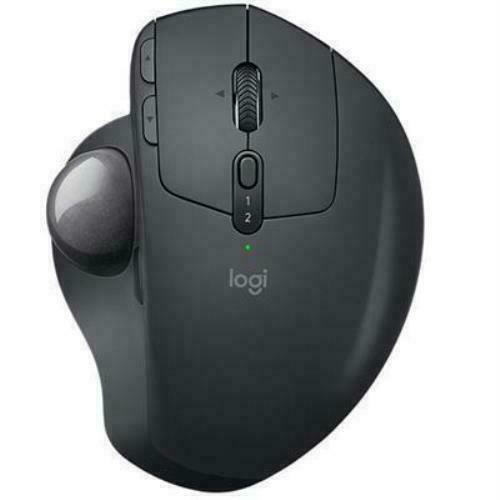
Logitech MX Ergo S Wireless Trackball Mouse
More control with less movement. Switch between speed and high-precision tracking at the tap of a button. Wireless ergonomic mouse with a tilt angle for better forearm posture, reducing muscle strain by 27% with 80% quieter clicks. Certified by ergonomists for improved comfort, with a sculpted ergonomic design, 20-degree tilt angle, and soft rubber grip. For medium- to large-sized hands. Boost your productivity using the Logi Options+ App. Experience enhanced control in your daily tasks with 6 customizable buttons, time-saving shortcuts, and Smart Actions. Quick USB-C charging. Enjoy up to 24h of use from a 1 min charge or up to 120 days with a full charge. Charges with a USB Type C to Type C or USB Type A to Type C cable (not included). Connect your rechargeable wireless mouse via Bluetooth or Logi Bolt USB receiver (included). Supported by an Easy-Switch button. Made with recycled plastic. The plastic parts in the MX Ergo S wireless rechargeable mouse are made of 20% certified post-consumer recycled plastic.
More control with less movement. Switch between speed and high-precision tracking at the tap of a button. Wireless ergonomic mouse with a tilt angle for better forearm posture, reducing muscle strain by 27% with 80% quieter clicks. Certified by ergonomists for improved comfort, with a sculpted ergonomic design, 20-degree tilt angle, and soft rubber grip. For medium- to large-sized hands. Boost your productivity using the Logi Options+ App. Experience enhanced control in your daily tasks with 6 customizable buttons, time-saving shortcuts, and Smart Actions. Quick USB-C charging. Enjoy up to 24h of use from a 1 min charge or up to 120 days with a full charge. Charges with a USB Type C to Type C or USB Type A to Type C cable (not included). Connect your rechargeable wireless mouse via Bluetooth or Logi Bolt USB receiver (included). Supported by an Easy-Switch button. Made with recycled plastic. The plastic parts in the MX Ergo S wireless rechargeable mouse are made of 20% certified post-consumer recycled plastic.
More control with less movement. Switch between speed and high-precision tracking at the tap of a button. Wireless ergonomic mouse with a tilt angle for better forearm posture, reducing muscle strain by 27% with 80% quieter clicks. Certified by ergonomists for improved comfort, with a sculpted ergonomic design, 20-degree tilt angle, and soft rubber grip. For medium- to large-sized hands. Boost your productivity using the Logi Options+ App. Experience enhanced control in your daily tasks with 6 customizable buttons, time-saving shortcuts, and Smart Actions. Quick USB-C charging. Enjoy up to 24h of use from a 1 min charge or up to 120 days with a full charge. Charges with a USB Type C to Type C or USB Type A to Type C cable (not included). Connect your rechargeable wireless mouse via Bluetooth or Logi Bolt USB receiver (included). Supported by an Easy-Switch button. Made with recycled plastic. The plastic parts in the MX Ergo S wireless rechargeable mouse are made of 20% certified post-consumer recycled plastic.
More control with less movement. Switch between speed and high-precision tracking at the tap of a button. Wireless ergonomic mouse with a tilt angle for better forearm posture, reducing muscle strain by 27% with 80% quieter clicks. Certified by ergonomists for improved comfort, with a sculpted ergonomic design, 20-degree tilt angle, and soft rubber grip. For medium- to large-sized hands. Boost your productivity using the Logi Options+ App. Experience enhanced control in your daily tasks with 6 customizable buttons, time-saving shortcuts, and Smart Actions. Quick USB-C charging. Enjoy up to 24h of use from a 1 min charge or up to 120 days with a full charge. Charges with a USB Type C to Type C or USB Type A to Type C cable (not included). Connect your rechargeable wireless mouse via Bluetooth or Logi Bolt USB receiver (included). Supported by an Easy-Switch button. Made with recycled plastic. The plastic parts in the MX Ergo S wireless rechargeable mouse are made of 20% certified post-consumer recycled plastic.
in 17 offers
The lowest price for Logitech MX Ergo S Wireless Trackball Mouse right now is $65.00 at eBay.com.au, compared across 12 retailers.
The all-time low was $30.00 on 22 July 2026 — today's price is 117% above the lowest ever. It has been notably cheaper before — worth setting a price alert.
Prices last updated 20 Oct 2026.
Last updated at 20/10/2026 10:38:17
Logitech MX Ergo S Advanced Wireless Trackball Mouse, USB-C Rechargeable Wireless Ergonomic Mouse with Bluetooth and Encrypted Dongle, 6 Programmable
Free delivery
Affiliate Disclosure: We may receive a small commission for purchases made through this link at no extra cost to you. This helps support our site. Thank you!
Logitech Mx Ergo S Advanced Wireless Trackball Mouse Black Tested
Delivery $10.80
Affiliate Disclosure: We may receive a small commission for purchases made through this link at no extra cost to you. This helps support our site. Thank you!
Wholesale logitech mx ergo logitech mx combo logitech mx,1 Piece
Delivery $44.34
Logitech Mx Ergo S Wireless Mouse Black
Delivery $19.99
Logitech MX Ergo S mouse Office Right-hand RF Wireless + Bluetooth Optical 2048 DPI
Free delivery
Logitech MX Ergo S Advanced Wireless Trackball Mouse
Delivery between 24–28 Oct $41
Logitech Ergo Lift Graphite Wireless Mouse by SimplyWholesale.com.au
Free delivery
Logitech MX Ergo S Trackball - Bluetooth - USB Type A - Optical - 8 Button(s) - 6 Programmable Button(s) - Graphite
Delivery $30
MX Ergo S Advanced Wireless Trackball Mouse
Free delivery between 28 Oct – 3 Nov
Logitech MX ERGO S Wireless Ergonomic Trackball Mouse, Graphite
Free delivery
originally posted on lazada.sg
editing the rating.I bought 2 same logitech mx ergo mouse just last month (SEP). Just less than 1 month, on Oct, 1 of the mouse cannot be charged and turned on. I sent an email to inquire on the faulty mouse and warranty. They questioned me whether the actual purchase of the mouse is from another dealer because the serial number on the mouse dont match the serial number on the box.I went to check both of the mouse purchased from this shop. Turned out both mouse and box serial numbers are different. I have replied to the email and inquired on this. Please beware when purchasing from this shop. I'm not sure whether I can still claim the warranty. Will update the review once I get the result.
originally posted on walmart.ca
Amazing mouse, ergonomic and covers my whole palm. I had upgraded from the M570, which seemed more like an intro model. The bluetooth/dongle would constantly lag ad pointer would skip, the ball was loose and got dirty quickly and the buttons were finicky. The ball on the ergo is sturdy, the buttons and wheels feel great and the multi angles make resting my hand a breeze. I opted for a ball mouse because my wrist became really sore from using a conventional mouse at the office all day. This took the pain away and all i use is my thumb which rests comfortably on the ball. I wouldn't recommend any other mouse due to the vigorous movement of the wrist which the pain can keep you up at night, especially if working with documents and spreadsheets. Definitely recommend ... MoreAmazing mouse, ergonomic and covers my whole palm. I had upgraded from the M570, which seemed more like an intro model. The bluetooth/dongle would constantly lag ad pointer would skip, the ball was loose and got dirty quickly and the buttons were finicky. The ball on the ergo is sturdy, the buttons and wheels feel great and the multi angles make resting my hand a breeze. I opted for a ball mouse because my wrist became really sore from using a conventional mouse at the office all day. This took the pain away and all i use is my thumb which rests comfortably on the ball. I wouldn't recommend any other mouse due to the vigorous movement of the wrist which the pain can keep you up at night, especially if working with documents and spreadsheets. Definitely recommend this mouse.
originally posted on logitech.com
I have been using this computer mouse for nearly two years, averaging around four hours of daily usage. However, I have encountered an issue with the mouse's rubber material, which has become detached from the devices bottom. Consequently, I am now faced with the choice of purchasing a replacement pad if that is even possible or resorting to the use of a mouse pad, as the exposed slippery metal surface hampers the mouse's movement. This design flaw could have been easily avoided.Furthermore, after approximately a year of use, I noticed a lag in the mouse sensor's responsiveness. This occasional delay has proven to be problematic, especially when working on time-sensitive projects. Unfortunately, the MX Ergo mouse cannot be relied upon to consistently perform ... MoreI have been using this computer mouse for nearly two years, averaging around four hours of daily usage. However, I have encountered an issue with the mouse's rubber material, which has become detached from the devices bottom. Consequently, I am now faced with the choice of purchasing a replacement pad if that is even possible or resorting to the use of a mouse pad, as the exposed slippery metal surface hampers the mouse's movement. This design flaw could have been easily avoided.Furthermore, after approximately a year of use, I noticed a lag in the mouse sensor's responsiveness. This occasional delay has proven to be problematic, especially when working on time-sensitive projects. Unfortunately, the MX Ergo mouse cannot be relied upon to consistently perform flawlessly.Despite the frustrations and inconvenience caused, I would recommend this mouse to video editors and colorists seeking enhanced efficiency in their work. Personally, I would be willing to purchase another unit, had it not been for an unresolved issue regarding a refund for a keypad I purchased alongside the mouse. The lack of trust stems from my interactions with Logitech's support team, who have repeatedly provided false assurances regarding the reimbursement, creating an unpleasant experience.
| Brand | Logitech |
| Programmable | Yes |
| Ergonomic | Yes |
| Vertical | Yes |
| Bluetooth | Yes |

Logitech MX Ergo S Advanced Wireless Trackball Mouse, USB-C Rechargeable Wireless Ergonomic Mouse with Bluetooth and Encrypted Dongle, 6 Programmable
Free delivery
Affiliate Disclosure: We may receive a small commission for purchases made through this link at no extra cost to you. This helps support our site. Thank you!
Logitech Mx Ergo S Advanced Wireless Trackball Mouse Black Tested
Delivery $10.80
Affiliate Disclosure: We may receive a small commission for purchases made through this link at no extra cost to you. This helps support our site. Thank you!
Wholesale logitech mx ergo logitech mx combo logitech mx,1 Piece
Delivery $44.34
Logitech Mx Ergo S Wireless Mouse Black
Delivery $19.99
Logitech MX Ergo S mouse Office Right-hand RF Wireless + Bluetooth Optical 2048 DPI
Free delivery
editing the rating.I bought 2 same logitech mx ergo mouse just last month (SEP). Just less than 1 month, on Oct, 1 of the mouse cannot be charged and turned on. I sent an email to inquire on the faulty mouse and warranty. They questioned me whether the actual purchase of the mouse is from another dealer because the serial number on the mouse dont match the serial number on the box.I went to check both of the mouse purchased from this shop. Turned out both mouse and box serial numbers are different. I have replied to the email and inquired on this. Please beware when purchasing from this shop. I'm not sure whether I can still claim the warranty. Will update the review once I get the result.
Amazing mouse, ergonomic and covers my whole palm. I had upgraded from the M570, which seemed more like an intro model. The bluetooth/dongle would constantly lag ad pointer would skip, the ball was loose and got dirty quickly and the buttons were finicky. The ball on the ergo is sturdy, the buttons and wheels feel great and the multi angles make resting my hand a breeze. I opted for a ball mouse because my wrist became really sore from using a conventional mouse at the office all day. This took the pain away and all i use is my thumb which rests comfortably on the ball. I wouldn't recommend any other mouse due to the vigorous movement of the wrist which the pain can keep you up at night, especially if working with documents and spreadsheets. Definitely recommend ... MoreAmazing mouse, ergonomic and covers my whole palm. I had upgraded from the M570, which seemed more like an intro model. The bluetooth/dongle would constantly lag ad pointer would skip, the ball was loose and got dirty quickly and the buttons were finicky. The ball on the ergo is sturdy, the buttons and wheels feel great and the multi angles make resting my hand a breeze. I opted for a ball mouse because my wrist became really sore from using a conventional mouse at the office all day. This took the pain away and all i use is my thumb which rests comfortably on the ball. I wouldn't recommend any other mouse due to the vigorous movement of the wrist which the pain can keep you up at night, especially if working with documents and spreadsheets. Definitely recommend this mouse.
I have been using this computer mouse for nearly two years, averaging around four hours of daily usage. However, I have encountered an issue with the mouse's rubber material, which has become detached from the devices bottom. Consequently, I am now faced with the choice of purchasing a replacement pad if that is even possible or resorting to the use of a mouse pad, as the exposed slippery metal surface hampers the mouse's movement. This design flaw could have been easily avoided.Furthermore, after approximately a year of use, I noticed a lag in the mouse sensor's responsiveness. This occasional delay has proven to be problematic, especially when working on time-sensitive projects. Unfortunately, the MX Ergo mouse cannot be relied upon to consistently perform ... MoreI have been using this computer mouse for nearly two years, averaging around four hours of daily usage. However, I have encountered an issue with the mouse's rubber material, which has become detached from the devices bottom. Consequently, I am now faced with the choice of purchasing a replacement pad if that is even possible or resorting to the use of a mouse pad, as the exposed slippery metal surface hampers the mouse's movement. This design flaw could have been easily avoided.Furthermore, after approximately a year of use, I noticed a lag in the mouse sensor's responsiveness. This occasional delay has proven to be problematic, especially when working on time-sensitive projects. Unfortunately, the MX Ergo mouse cannot be relied upon to consistently perform flawlessly.Despite the frustrations and inconvenience caused, I would recommend this mouse to video editors and colorists seeking enhanced efficiency in their work. Personally, I would be willing to purchase another unit, had it not been for an unresolved issue regarding a refund for a keypad I purchased alongside the mouse. The lack of trust stems from my interactions with Logitech's support team, who have repeatedly provided false assurances regarding the reimbursement, creating an unpleasant experience.
Logitech mice have been the cream of the crop in my opinion. I have used Logitech gaming mice for years for business use. Mainly because I could program simple keyboard shortcuts. For instance, copying, cutting, and pasting made editing documents a breeze. I recently purchase this mouse as I have been having some wrist trouble. Overall, made with quality material and craftsmanship; a lot of research has gone into making this mouse. The previous gaming mice I have used allowed you to edit the configuration, and that configuration could be saved on the mouse. Allowing me to use the mice for business use. Now the reason for my 4 stars, most businesses dont allow you to install software, unless you are an administrator. When downloading the software on my personal ... MoreLogitech mice have been the cream of the crop in my opinion. I have used Logitech gaming mice for years for business use. Mainly because I could program simple keyboard shortcuts. For instance, copying, cutting, and pasting made editing documents a breeze. I recently purchase this mouse as I have been having some wrist trouble. Overall, made with quality material and craftsmanship; a lot of research has gone into making this mouse. The previous gaming mice I have used allowed you to edit the configuration, and that configuration could be saved on the mouse. Allowing me to use the mice for business use. Now the reason for my 4 stars, most businesses dont allow you to install software, unless you are an administrator. When downloading the software on my personal computer and editing the configuration, I was hoping I could then use it for work. I totally understand the software allows for increase functionality of this particular mouse. If at all possible, have users create an account, secure it with multi-factor authentication, and allow users to make configuration changes, without the use of installed software? I know this mouse doesn’t have any onboard storage, or at least any I am aware of. That really is my only complaint.
This is a fair bit to spend on a mouse but I'm very happy with it. I hadn't used a trackball mouse for many years, but this is the best one I've had. Everything works as smoothly as you'd expect from Logitech, buttons are all customisable (though not fully programmable) and it's super comfy to use. My main reason for purchasing was desk space -- mine is limited and not having to move the mouse itself really helps, especially with dragging and dropping, which I do a lot of. The angle feature is by means of a magnetic plate on which the main unit rocks, so it's a two-position switch between flat and a 20-degree slant, nothing in between. In practice I think the 20-degree setting is going to be good for most users. The fact that it's just a plate that sticks to the ... MoreThis is a fair bit to spend on a mouse but I'm very happy with it. I hadn't used a trackball mouse for many years, but this is the best one I've had. Everything works as smoothly as you'd expect from Logitech, buttons are all customisable (though not fully programmable) and it's super comfy to use. My main reason for purchasing was desk space -- mine is limited and not having to move the mouse itself really helps, especially with dragging and dropping, which I do a lot of. The angle feature is by means of a magnetic plate on which the main unit rocks, so it's a two-position switch between flat and a 20-degree slant, nothing in between. In practice I think the 20-degree setting is going to be good for most users. The fact that it's just a plate that sticks to the mouse also means there's no mechanism to break there. The plate is a good weight and its rubber coating sticks well to the work surface - it's definitely not moving around unless you want it to. This is a big unit (I guess calling it a rat rather than a mouse would be bad marketing). The size means it fits and supports your hand much better than a smaller mouse, helped by a rubberised coating on the palm area, similar to the bottom of the base plate. But if you use a laptop in various locations, you might find the Ergodoesn't fit easily into your existing bag. It would be a shame not to take it with you though because it's a big upgrade on a touchpad (which, for me, a regular mouse isn't). Other than that, I don't really have a gripe.
I bought the MX Ergo at the start of the pandemic to optimize the ergonomics of my dining-room-table-turned-office. I've loved everything about this mouse and appreciate its versatility--from how its positioned to the settings. However, two years in, it started acting quirky, so we figured it needed a new battery. The only battery we could find was a generic brand coming out of China; there was nothing from Logitech about battery replacements, so we took the chance and replaced the battery. The battery worked for about six months, and now my mouse has stopped working. Sometimes it gets a slight charge and works; other times, scrolling moves the cursor in any direction except the direction I want it to go; and other times, it stops working altogether. I honestly ... MoreI bought the MX Ergo at the start of the pandemic to optimize the ergonomics of my dining-room-table-turned-office. I've loved everything about this mouse and appreciate its versatility--from how its positioned to the settings. However, two years in, it started acting quirky, so we figured it needed a new battery. The only battery we could find was a generic brand coming out of China; there was nothing from Logitech about battery replacements, so we took the chance and replaced the battery. The battery worked for about six months, and now my mouse has stopped working. Sometimes it gets a slight charge and works; other times, scrolling moves the cursor in any direction except the direction I want it to go; and other times, it stops working altogether. I honestly expected a $100 mouse to have a legitimate battery replacement option and for there to be some indication that the mouse is dying. It seems so wasteful to buy a mouse every 2-3 years. I still love the mouse, though, but I don't know if I'll buy another MX Ergo.
I really wanted to like this. It's almost impossible to find a vertical trackball, and I was thrilled to see Logitech offer one. It doesn't feel like a finished product, though. I really hope Logitech continues to develop it into a better version.The body is well-built but the most important part, the ball, feels cheap. It's light-weight, and the tracking is a bit sticky and jerky --- definitely not the smooth tracking experience of high-end trackballs. The ball is also very small, which means that it's hard to cover large areas on my monitor while maintaining any ability to do detailed image editing.The buttons are very loud. I really like quite mouse buttons, and the sharp clicks of these drive me nuts.I was delighted to see if offer both USB and bluetooth. But ... MoreI really wanted to like this. It's almost impossible to find a vertical trackball, and I was thrilled to see Logitech offer one. It doesn't feel like a finished product, though. I really hope Logitech continues to develop it into a better version.The body is well-built but the most important part, the ball, feels cheap. It's light-weight, and the tracking is a bit sticky and jerky --- definitely not the smooth tracking experience of high-end trackballs. The ball is also very small, which means that it's hard to cover large areas on my monitor while maintaining any ability to do detailed image editing.The buttons are very loud. I really like quite mouse buttons, and the sharp clicks of these drive me nuts.I was delighted to see if offer both USB and bluetooth. But it's weird that USB mean a dongle and not the USB charging cord. For whatever reason, Logitech decided to not let the mouse connect to the computer through the USB charging cord. Also, there's no space to store the USB dongle in the mouse's body, which doesn't bother me, but could make travel more annoying.Photos show it next to my Mojo MJ-156, which I love.
As a 27 year old founder and entrepreneur, my job involves sitting at a desk for 10 hours every day typing documents, scrolling through websites and uploading important documents to the cloud so I can access them on all my devices. My friends who have regular office jobs and spend half the time on the computer than me have already started developing joint issues and going to physiotherapy. So I decided being proactive with my health is better than getting reactive surgery down the line.The MX Ergo feels extremely comfortable in my hand. Its so we'll designed that it only took me all of 15 minutes to get used to the trackball design. It's also eliminated the staring feeling I get in my wrist after working the whole day. Thanks to the MX Ergo I've also seen an ... MoreAs a 27 year old founder and entrepreneur, my job involves sitting at a desk for 10 hours every day typing documents, scrolling through websites and uploading important documents to the cloud so I can access them on all my devices. My friends who have regular office jobs and spend half the time on the computer than me have already started developing joint issues and going to physiotherapy. So I decided being proactive with my health is better than getting reactive surgery down the line.The MX Ergo feels extremely comfortable in my hand. Its so we'll designed that it only took me all of 15 minutes to get used to the trackball design. It's also eliminated the staring feeling I get in my wrist after working the whole day. Thanks to the MX Ergo I've also seen an improvment in my productivity thanks to its 6 programmable buttons that are customisable for each application. Just like Logitech's other very high-end products. Not having to move my mouse to switch between applications, open and close new browser tabs, and pressing one button to copy and paste text has cut down the time it takes me to complete important documents by a considerable amount. The Flow features which allows me to copy files from my MacBook to my PC seamlessly is incredible. Gone are the days of having to sign into OneDrive, using two Sept authentication, uploading the file from my device, logging in on my other device again, searching for the file location, downloading the file, and then choosing the file download location. Flow literally lets me copy and paste files within seconds and works flawlessly.The combination of improved productivity and the lack of pain at the end of the day have made this the smartest purchase I've made in a long time.
You're probably not going to believe this but I(the very few) play fps shooters with this. My friend along time ago got me into using them when I first started out by playing on his rig. I have to say I should have bought this when it first came out. Before I was using the M 570 since it first came out. Plus the red ball one before that. This is the smoothest I've ever encountered. If I played all the time like I used to I would be deadly with it. I like the larger size too. Although I have long skinny hands it should be good for people with bear claws too. Software is extremely simple and in no time I was killing zombies and demons like a fury. The precision button is perfect for working in Hammer editor or Cubase anything actually. We'll have to see how long the ... MoreYou're probably not going to believe this but I(the very few) play fps shooters with this. My friend along time ago got me into using them when I first started out by playing on his rig. I have to say I should have bought this when it first came out. Before I was using the M 570 since it first came out. Plus the red ball one before that. This is the smoothest I've ever encountered. If I played all the time like I used to I would be deadly with it. I like the larger size too. Although I have long skinny hands it should be good for people with bear claws too. Software is extremely simple and in no time I was killing zombies and demons like a fury. The precision button is perfect for working in Hammer editor or Cubase anything actually. We'll have to see how long the battery lasts since it comes with the mouse and chargeable. Nice rubber feel as well. Better than the old light plastic mice. The tilt feature good too although I keep it flat for shooting. I kinda wished the extra buttons on the left more easily noticeable like the m 570 . While the dpi @ 2048 is good I would like to see it a little higher around 3000 dpi since I run everything @ 2160p or 4k as they say. It's still pretty tight though. Definitely a improvement and a step up. It's also nice that the company isn't tainting their products with carbons and such so they're safer..
I do like Logitech products. I have bought their keyboards and mice from way back, so this review is from my knowledge of their MX products in the past.This is the second MX Ergo I have bought, with the last one lasting over 7 years. The reason for a replacement was the left button starts to fail, as they all do.After being on the market for at least that amount of time, I feel the MX Ergo should be the best trackball on the market (It could be already, but I've not tried other brands).Pros-Great feel, good for the wrist, good surface feel, buttons feel solid, trackball is smooth, good for limited spaceCons-trackball is smooth, I had to use my old metal base (the new one was slipping on the table), still uses USB microBiggest Con-It takes too long for the ... MoreI do like Logitech products. I have bought their keyboards and mice from way back, so this review is from my knowledge of their MX products in the past.This is the second MX Ergo I have bought, with the last one lasting over 7 years. The reason for a replacement was the left button starts to fail, as they all do.After being on the market for at least that amount of time, I feel the MX Ergo should be the best trackball on the market (It could be already, but I've not tried other brands).Pros-Great feel, good for the wrist, good surface feel, buttons feel solid, trackball is smooth, good for limited spaceCons-trackball is smooth, I had to use my old metal base (the new one was slipping on the table), still uses USB microBiggest Con-It takes too long for the mouse to wake up if you haven't used it for a minute or two.Final thoughts-I feel this trackball was a fabulous piece of hardware about 8 years ago, but these cons just feel like Logitech isn't trying to improve the hardware anymore. I only use a USB micro to charge my 10-year-old Bose headphones and this 1-year-old trackball.Would I buy again? - Yes, because it feels good on the wrist and it works for my limited workspace
| Brand | Logitech |
| Programmable | Yes |
| Ergonomic | Yes |
| Vertical | Yes |
| Bluetooth | Yes |