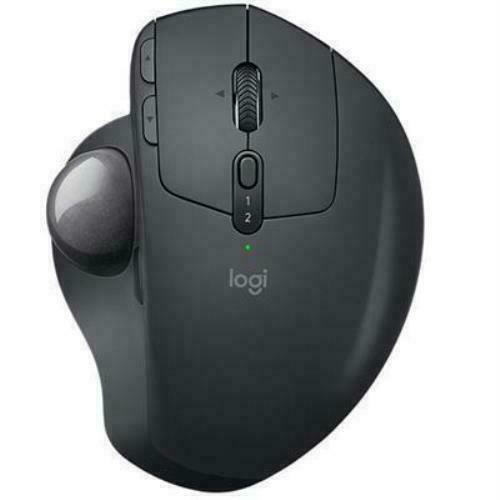
Logitech MX Ergo Wireless Trackball Mouse - Black
The Logitech MX Ergo Mouse features an adjustable hinge for personalised comfort and to deliver 20% less muscular strain compared to a regular mouse. It has a precision mode button for instantly switching between speed and precise tracking and it can be paired with up to 2 computers for changing between them when copying and pasting files. The adjustable hinge can be altered between 0 and 20 degree angles allowing you to find a comfortable position. The battery can hold power for up to 4 months while 1 minute of charge will give you up to a full day of use. You can connect the mouse via Bluetooth or using the included Logitech Unifying receiver. The speed and accuracy of your cursor can be adjusted with a simple press of a button. The unique trackball allows for optimum comfort. The scrolling wheel has tilt functionality so that it moves as you move. Logitech FLOW technology allows for effortless cross computer control.
The Logitech MX Ergo Mouse features an adjustable hinge for personalised comfort and to deliver 20% less muscular strain compared to a regular mouse. It has a precision mode button for instantly switching between speed and precise tracking and it can be paired with up to 2 computers for changing between them when copying and pasting files. The adjustable hinge can be altered between 0 and 20 degree angles allowing you to find a comfortable position. The battery can hold power for up to 4 months while 1 minute of charge will give you up to a full day of use. You can connect the mouse via Bluetooth or using the included Logitech Unifying receiver. The speed and accuracy of your cursor can be adjusted with a simple press of a button. The unique trackball allows for optimum comfort. The scrolling wheel has tilt functionality so that it moves as you move. Logitech FLOW technology allows for effortless cross computer control.
The Logitech MX Ergo Mouse features an adjustable hinge for personalised comfort and to deliver 20% less muscular strain compared to a regular mouse. It has a precision mode button for instantly switching between speed and precise tracking and it can be paired with up to 2 computers for changing between them when copying and pasting files. The adjustable hinge can be altered between 0 and 20 degree angles allowing you to find a comfortable position. The battery can hold power for up to 4 months while 1 minute of charge will give you up to a full day of use. You can connect the mouse via Bluetooth or using the included Logitech Unifying receiver. The speed and accuracy of your cursor can be adjusted with a simple press of a button. The unique trackball allows for optimum comfort. The scrolling wheel has tilt functionality so that it moves as you move. Logitech FLOW technology allows for effortless cross computer control.
The Logitech MX Ergo Mouse features an adjustable hinge for personalised comfort and to deliver 20% less muscular strain compared to a regular mouse. It has a precision mode button for instantly switching between speed and precise tracking and it can be paired with up to 2 computers for changing between them when copying and pasting files. The adjustable hinge can be altered between 0 and 20 degree angles allowing you to find a comfortable position. The battery can hold power for up to 4 months while 1 minute of charge will give you up to a full day of use. You can connect the mouse via Bluetooth or using the included Logitech Unifying receiver. The speed and accuracy of your cursor can be adjusted with a simple press of a button. The unique trackball allows for optimum comfort. The scrolling wheel has tilt functionality so that it moves as you move. Logitech FLOW technology allows for effortless cross computer control.
in 13 offers
The lowest price for Logitech MX Ergo Wireless Trackball Mouse - Black right now is $65.00 at CeX, compared across 13 retailers.
The all-time low was $39.78 on 2 Sept 2026 — today's price is 63% above the lowest ever. It has been notably cheaper before — worth setting a price alert.
Prices last updated 4 Nov 2026.
Last updated at 04/11/2026 05:57:44
Logitech MX Ergo Trackball Mouse, B
Free delivery
Logitech MX Ergo Mouse (910-005180)
Logitech MX ERGO S Wireless Trackball Mouse - Adjustable Ergonomic Rechargeable Bluetooth for Office
Free delivery
Logitech Mx Ergo S Advanced Wireless Trackball Mouse Usb-c
Free delivery
Affiliate Disclosure: We may receive a small commission for purchases made through this link at no extra cost to you. This helps support our site. Thank you!
(LS) Logitech MX Ergo S SILENT Wireless trackball USB-C charging mouse
Logitech MX Ergo S Wireless Trackball Mouse Ergonomic Graphite
Delivery between 7–15 Nov $10
Logitech MX Ergo Wireless Bluetooth Trackball Mouse Customized Comfort 2048DPI 2.4GHz wireless 8 Buttons Rechargeable battery | Torstar
Logitech MX Ergo Plus Wireless Trackball
Delivery between 10–13 Nov $29
Logitech MX Ergo Wireless Trackball Mouse
Free delivery
MX Ergo S Wireless Trackball Mouse
Delivery $9.70
originally posted on walmart.com
Bought this around a week ago. This trackball works well: ball moves smoothly, buttons are responsive and solid, and the scroll wheel is not too ratchety to impede smooth scrolling (no free-spin mode though). The whole unit seems to be solidly built. It has a solid metal base held in place my strong magnets. When changing mouse/orientation angles, I recommend placing the unit on your work surface and press on the left or right edge while your hand is holding it normally.Having used a traditional mouse for years, it took a little time to get used to this unit; not used to finely manipulating things, my (anyone's) thumb is naturally unstable, but practice should help with that. I find playing card solitaire and Mahjongg Titans helps as an exercise. Yes; your index, ... MoreBought this around a week ago. This trackball works well: ball moves smoothly, buttons are responsive and solid, and the scroll wheel is not too ratchety to impede smooth scrolling (no free-spin mode though). The whole unit seems to be solidly built. It has a solid metal base held in place my strong magnets. When changing mouse/orientation angles, I recommend placing the unit on your work surface and press on the left or right edge while your hand is holding it normally.Having used a traditional mouse for years, it took a little time to get used to this unit; not used to finely manipulating things, my (anyone's) thumb is naturally unstable, but practice should help with that. I find playing card solitaire and Mahjongg Titans helps as an exercise. Yes; your index, middle and ring fingers would have more natural control, but I've used that style of trackball years ago, and I can remember trying keep my fingers off the ball for long periods of time to be tiring (especially if I'm doing a stressful task).As for functionality, there is technically only five buttons; left, right, page-forward, page-backward, and the wheel serving as the middle button. However, the software program, "Logitech Options," (downloaded separately) allows you to program all five plus one more for other things, so you actually have six customizeable buttons. The sixth button is defaulted to "precision mode" for the track ball, but it's not adjustable and is fixed on really fine-tune movements. However(2), in the settings, it can be switched to "trackball sensitivity" (yes; it is a separate custom option) that allows you to adjust two different sensitivity modes.Lastly as a bonus plus, it is not immediately obvious, but there is a small diagram what comes with the included documents that actually shows how the unit can be dismantled with just six screws. It is part of the warning that Logitech verified batteries should be used for replacement. This is great since despite being a lithium rechargeable battery pack, it looks to be a standard form I've seen sold--and even rechargeable lithiums don't last forever. But this is more advantageous because this also means I (or anyone) can take apart the mouse for more thorough cleaning if needed. In the past with every mouse I've ever owned, there always come a time when I wished I could take apart the mouse so I can clean the nooks and crannies I can't reach like the sides of the scroll wheel.
originally posted on logitech.com
I'm a fan of the MX Master 3S. I've been waiting for a silent version of the MX Master series, and Logitech delivered.Unfortunately, I injured my wrist and have to use the MX Ergo. The MX Ergo helps a bit with wrist pain.Here are the issues:1. Loud, Loud obnoxious Left, Right clicks2. Loud and obnoxious scroll wheel3. Slowest scroll wheel I have ever used (probably just as slow as normal, vanilla mice you get for free).4. Pain in fingers: because the scroll wheel is so slow, I'm forced to exert much effort and force just to get through pages and documents.5. Pain in my thumb: Perhaps there can be some dynamic speed technology like the mag speed scroll wheel for the trackball. I have multiple monitors and the pain in my thumb is increasing the more work I have ... MoreI'm a fan of the MX Master 3S. I've been waiting for a silent version of the MX Master series, and Logitech delivered.Unfortunately, I injured my wrist and have to use the MX Ergo. The MX Ergo helps a bit with wrist pain.Here are the issues:1. Loud, Loud obnoxious Left, Right clicks2. Loud and obnoxious scroll wheel3. Slowest scroll wheel I have ever used (probably just as slow as normal, vanilla mice you get for free).4. Pain in fingers: because the scroll wheel is so slow, I'm forced to exert much effort and force just to get through pages and documents.5. Pain in my thumb: Perhaps there can be some dynamic speed technology like the mag speed scroll wheel for the trackball. I have multiple monitors and the pain in my thumb is increasing the more work I have to accomplish with this mouse.What is needed:1. Quiet Click technology2. Silent scroll3. Mag Speed Scroll Wheel4. Dynamic speed for trackball (the button location for slower precise speed is very inconvenient; We need more speed variation like the Mag Speed scroll wheel).
originally posted on logitech.com
I have been using this computer mouse for nearly two years, averaging around four hours of daily usage. However, I have encountered an issue with the mouse's rubber material, which has become detached from the devices bottom. Consequently, I am now faced with the choice of purchasing a replacement pad if that is even possible or resorting to the use of a mouse pad, as the exposed slippery metal surface hampers the mouse's movement. This design flaw could have been easily avoided.Furthermore, after approximately a year of use, I noticed a lag in the mouse sensor's responsiveness. This occasional delay has proven to be problematic, especially when working on time-sensitive projects. Unfortunately, the MX Ergo mouse cannot be relied upon to consistently perform ... MoreI have been using this computer mouse for nearly two years, averaging around four hours of daily usage. However, I have encountered an issue with the mouse's rubber material, which has become detached from the devices bottom. Consequently, I am now faced with the choice of purchasing a replacement pad if that is even possible or resorting to the use of a mouse pad, as the exposed slippery metal surface hampers the mouse's movement. This design flaw could have been easily avoided.Furthermore, after approximately a year of use, I noticed a lag in the mouse sensor's responsiveness. This occasional delay has proven to be problematic, especially when working on time-sensitive projects. Unfortunately, the MX Ergo mouse cannot be relied upon to consistently perform flawlessly.Despite the frustrations and inconvenience caused, I would recommend this mouse to video editors and colorists seeking enhanced efficiency in their work. Personally, I would be willing to purchase another unit, had it not been for an unresolved issue regarding a refund for a keypad I purchased alongside the mouse. The lack of trust stems from my interactions with Logitech's support team, who have repeatedly provided false assurances regarding the reimbursement, creating an unpleasant experience.
| Mouse | |
| Bluetooth | Y |
| Input device | |
| Frequency band | 2.4 GHz |
| Recommended usage | PC |
Logitech MX Ergo Trackball Mouse, B
Free delivery
Logitech MX Ergo Mouse (910-005180)
Logitech MX ERGO S Wireless Trackball Mouse - Adjustable Ergonomic Rechargeable Bluetooth for Office
Free delivery
Logitech Mx Ergo S Advanced Wireless Trackball Mouse Usb-c
Free delivery
Affiliate Disclosure: We may receive a small commission for purchases made through this link at no extra cost to you. This helps support our site. Thank you!
(LS) Logitech MX Ergo S SILENT Wireless trackball USB-C charging mouse
Bought this around a week ago. This trackball works well: ball moves smoothly, buttons are responsive and solid, and the scroll wheel is not too ratchety to impede smooth scrolling (no free-spin mode though). The whole unit seems to be solidly built. It has a solid metal base held in place my strong magnets. When changing mouse/orientation angles, I recommend placing the unit on your work surface and press on the left or right edge while your hand is holding it normally.Having used a traditional mouse for years, it took a little time to get used to this unit; not used to finely manipulating things, my (anyone's) thumb is naturally unstable, but practice should help with that. I find playing card solitaire and Mahjongg Titans helps as an exercise. Yes; your index, ... MoreBought this around a week ago. This trackball works well: ball moves smoothly, buttons are responsive and solid, and the scroll wheel is not too ratchety to impede smooth scrolling (no free-spin mode though). The whole unit seems to be solidly built. It has a solid metal base held in place my strong magnets. When changing mouse/orientation angles, I recommend placing the unit on your work surface and press on the left or right edge while your hand is holding it normally.Having used a traditional mouse for years, it took a little time to get used to this unit; not used to finely manipulating things, my (anyone's) thumb is naturally unstable, but practice should help with that. I find playing card solitaire and Mahjongg Titans helps as an exercise. Yes; your index, middle and ring fingers would have more natural control, but I've used that style of trackball years ago, and I can remember trying keep my fingers off the ball for long periods of time to be tiring (especially if I'm doing a stressful task).As for functionality, there is technically only five buttons; left, right, page-forward, page-backward, and the wheel serving as the middle button. However, the software program, "Logitech Options," (downloaded separately) allows you to program all five plus one more for other things, so you actually have six customizeable buttons. The sixth button is defaulted to "precision mode" for the track ball, but it's not adjustable and is fixed on really fine-tune movements. However(2), in the settings, it can be switched to "trackball sensitivity" (yes; it is a separate custom option) that allows you to adjust two different sensitivity modes.Lastly as a bonus plus, it is not immediately obvious, but there is a small diagram what comes with the included documents that actually shows how the unit can be dismantled with just six screws. It is part of the warning that Logitech verified batteries should be used for replacement. This is great since despite being a lithium rechargeable battery pack, it looks to be a standard form I've seen sold--and even rechargeable lithiums don't last forever. But this is more advantageous because this also means I (or anyone) can take apart the mouse for more thorough cleaning if needed. In the past with every mouse I've ever owned, there always come a time when I wished I could take apart the mouse so I can clean the nooks and crannies I can't reach like the sides of the scroll wheel.
I'm a fan of the MX Master 3S. I've been waiting for a silent version of the MX Master series, and Logitech delivered.Unfortunately, I injured my wrist and have to use the MX Ergo. The MX Ergo helps a bit with wrist pain.Here are the issues:1. Loud, Loud obnoxious Left, Right clicks2. Loud and obnoxious scroll wheel3. Slowest scroll wheel I have ever used (probably just as slow as normal, vanilla mice you get for free).4. Pain in fingers: because the scroll wheel is so slow, I'm forced to exert much effort and force just to get through pages and documents.5. Pain in my thumb: Perhaps there can be some dynamic speed technology like the mag speed scroll wheel for the trackball. I have multiple monitors and the pain in my thumb is increasing the more work I have ... MoreI'm a fan of the MX Master 3S. I've been waiting for a silent version of the MX Master series, and Logitech delivered.Unfortunately, I injured my wrist and have to use the MX Ergo. The MX Ergo helps a bit with wrist pain.Here are the issues:1. Loud, Loud obnoxious Left, Right clicks2. Loud and obnoxious scroll wheel3. Slowest scroll wheel I have ever used (probably just as slow as normal, vanilla mice you get for free).4. Pain in fingers: because the scroll wheel is so slow, I'm forced to exert much effort and force just to get through pages and documents.5. Pain in my thumb: Perhaps there can be some dynamic speed technology like the mag speed scroll wheel for the trackball. I have multiple monitors and the pain in my thumb is increasing the more work I have to accomplish with this mouse.What is needed:1. Quiet Click technology2. Silent scroll3. Mag Speed Scroll Wheel4. Dynamic speed for trackball (the button location for slower precise speed is very inconvenient; We need more speed variation like the Mag Speed scroll wheel).
I have been using this computer mouse for nearly two years, averaging around four hours of daily usage. However, I have encountered an issue with the mouse's rubber material, which has become detached from the devices bottom. Consequently, I am now faced with the choice of purchasing a replacement pad if that is even possible or resorting to the use of a mouse pad, as the exposed slippery metal surface hampers the mouse's movement. This design flaw could have been easily avoided.Furthermore, after approximately a year of use, I noticed a lag in the mouse sensor's responsiveness. This occasional delay has proven to be problematic, especially when working on time-sensitive projects. Unfortunately, the MX Ergo mouse cannot be relied upon to consistently perform ... MoreI have been using this computer mouse for nearly two years, averaging around four hours of daily usage. However, I have encountered an issue with the mouse's rubber material, which has become detached from the devices bottom. Consequently, I am now faced with the choice of purchasing a replacement pad if that is even possible or resorting to the use of a mouse pad, as the exposed slippery metal surface hampers the mouse's movement. This design flaw could have been easily avoided.Furthermore, after approximately a year of use, I noticed a lag in the mouse sensor's responsiveness. This occasional delay has proven to be problematic, especially when working on time-sensitive projects. Unfortunately, the MX Ergo mouse cannot be relied upon to consistently perform flawlessly.Despite the frustrations and inconvenience caused, I would recommend this mouse to video editors and colorists seeking enhanced efficiency in their work. Personally, I would be willing to purchase another unit, had it not been for an unresolved issue regarding a refund for a keypad I purchased alongside the mouse. The lack of trust stems from my interactions with Logitech's support team, who have repeatedly provided false assurances regarding the reimbursement, creating an unpleasant experience.
I like to give a " first impression review" and then later on an updated review after some use. I am a full time SolidWorks user as an Engineer. I use a standing desk 90% of the day and a regular mouse creates down right awful posture in the hand all the way up to your shoulder blades. It starts to hurt after a long day. the MX ERGO Plus is down right comfortable. in every way. the 3 different adjustments are quick, easy and the placement of each is very sturdy. I use the mouse at the 30 degree angel by setting it to 20degrees and then adding the supplied wedge for the additional 10. the 30 degree rotation REALLY takes the twisting strain off of the body and it is instantly noticeable. I have only had about an hour of use on SolidWorks with it and I'm learning the ... MoreI like to give a " first impression review" and then later on an updated review after some use. I am a full time SolidWorks user as an Engineer. I use a standing desk 90% of the day and a regular mouse creates down right awful posture in the hand all the way up to your shoulder blades. It starts to hurt after a long day. the MX ERGO Plus is down right comfortable. in every way. the 3 different adjustments are quick, easy and the placement of each is very sturdy. I use the mouse at the 30 degree angel by setting it to 20degrees and then adding the supplied wedge for the additional 10. the 30 degree rotation REALLY takes the twisting strain off of the body and it is instantly noticeable. I have only had about an hour of use on SolidWorks with it and I'm learning the track ball quicker than I though I would. I honestly thought I was going to end up returning this but I just had to try it. the shape of the "grip" portion is very natural and fills the hand comfortably, you could say. the speed adjustment with the downloadable software is very nice. I have it on 100 % and I can use the entire screen without lifting my thumb off the ball. I have a 15" on a Lenovo ThinkPad.The programming software has a handful of standard applications pre-loaded but there are LOTS of additional applications that can be added allowing you to customize the buttons for each individual application. and YES it also has SolidWorks as an app :):):)1 con. the speed adjustment button next to the tack ball is a bit to close to the track ball IMO. I end up rolling the ball and moving the cursor out of the desired place when I'm going to switch it the the "precision mode". I just need to learn to lift my thumb up over the ball further. just a very minor thing to deal with until I build the muscle memory. the center wheel is nothing out of the ordinary.I would pay more for the same exact mouse with additional programable buttons on the pinky side of the mouse.overall an great buy and I would do it again. ill be back for a long term review at some point. 4/5 because its new and I need time to give it any better of a review than that.
I would have loved to give a more elaborate review of this product since it is fairly good at replacing a traditional mouse and helped me with a more relaxed and natural wrist pose. Works decently, is intuitive and the trackball feels great, although the software to map the keys is not the best, like in the case of many tools of this kind (mechanical keyboards anyone?).However, this product suffers from a major flaw that at this point, it made me frustrated above all. I used the MX Ergo for more than two years now, daily.This product has THE WORST choice of materials and it is impossible to clean! The top surface is made of a sort of spongy rubber membrane that does not allow your hand to breathe. This means that your hand is going to sweat a lot, which means that ... MoreI would have loved to give a more elaborate review of this product since it is fairly good at replacing a traditional mouse and helped me with a more relaxed and natural wrist pose. Works decently, is intuitive and the trackball feels great, although the software to map the keys is not the best, like in the case of many tools of this kind (mechanical keyboards anyone?).However, this product suffers from a major flaw that at this point, it made me frustrated above all. I used the MX Ergo for more than two years now, daily.This product has THE WORST choice of materials and it is impossible to clean! The top surface is made of a sort of spongy rubber membrane that does not allow your hand to breathe. This means that your hand is going to sweat a lot, which means that the top part is turning out to be very dirty, especially after very long and intense work sessions where sometimes you sit 10 hours and more at your desk for a whole week (I work as a video editor).The dirt literally gets trapped in the spongy surface and it is impossible to get rid of. There is no real way to clean it as you would with anything else since a paper tissue would disintegrate against the surface because of the friction generated by the spongy material, so I understood that the best way is to rub it with a cloth soaked with soap and water. That's right! And even so, I would struggle for at least fifteen minutes of brushing to make the MX Ergo decently cleaned.Cleaning the trackball housing is also a problem since the sensor is located in a hollow aperture that gets easily covered with dirt but it is so tiny that makes the task difficult and frustrating. Not being able to clean the sensor properly would obviously result in a malfunction of the trackball.I don't care if the surface of the Ergo is smooth, I would rather prefer to have a stiff piece of hard plastic that can get easily cleaned after a fair amount of use than a material that requires daily care in order not to look like a gross smudge of dirt. This is a piece of hardware that is supposed to be used every single day and I believe its efficiency relies also on this.
Logitech mice have been the cream of the crop in my opinion. I have used Logitech gaming mice for years for business use. Mainly because I could program simple keyboard shortcuts. For instance, copying, cutting, and pasting made editing documents a breeze. I recently purchase this mouse as I have been having some wrist trouble. Overall, made with quality material and craftsmanship; a lot of research has gone into making this mouse. The previous gaming mice I have used allowed you to edit the configuration, and that configuration could be saved on the mouse. Allowing me to use the mice for business use. Now the reason for my 4 stars, most businesses dont allow you to install software, unless you are an administrator. When downloading the software on my personal ... MoreLogitech mice have been the cream of the crop in my opinion. I have used Logitech gaming mice for years for business use. Mainly because I could program simple keyboard shortcuts. For instance, copying, cutting, and pasting made editing documents a breeze. I recently purchase this mouse as I have been having some wrist trouble. Overall, made with quality material and craftsmanship; a lot of research has gone into making this mouse. The previous gaming mice I have used allowed you to edit the configuration, and that configuration could be saved on the mouse. Allowing me to use the mice for business use. Now the reason for my 4 stars, most businesses dont allow you to install software, unless you are an administrator. When downloading the software on my personal computer and editing the configuration, I was hoping I could then use it for work. I totally understand the software allows for increase functionality of this particular mouse. If at all possible, have users create an account, secure it with multi-factor authentication, and allow users to make configuration changes, without the use of installed software? I know this mouse doesn’t have any onboard storage, or at least any I am aware of. That really is my only complaint.
This is a fair bit to spend on a mouse but I'm very happy with it. I hadn't used a trackball mouse for many years, but this is the best one I've had. Everything works as smoothly as you'd expect from Logitech, buttons are all customisable (though not fully programmable) and it's super comfy to use. My main reason for purchasing was desk space -- mine is limited and not having to move the mouse itself really helps, especially with dragging and dropping, which I do a lot of. The angle feature is by means of a magnetic plate on which the main unit rocks, so it's a two-position switch between flat and a 20-degree slant, nothing in between. In practice I think the 20-degree setting is going to be good for most users. The fact that it's just a plate that sticks to the ... MoreThis is a fair bit to spend on a mouse but I'm very happy with it. I hadn't used a trackball mouse for many years, but this is the best one I've had. Everything works as smoothly as you'd expect from Logitech, buttons are all customisable (though not fully programmable) and it's super comfy to use. My main reason for purchasing was desk space -- mine is limited and not having to move the mouse itself really helps, especially with dragging and dropping, which I do a lot of. The angle feature is by means of a magnetic plate on which the main unit rocks, so it's a two-position switch between flat and a 20-degree slant, nothing in between. In practice I think the 20-degree setting is going to be good for most users. The fact that it's just a plate that sticks to the mouse also means there's no mechanism to break there. The plate is a good weight and its rubber coating sticks well to the work surface - it's definitely not moving around unless you want it to. This is a big unit (I guess calling it a rat rather than a mouse would be bad marketing). The size means it fits and supports your hand much better than a smaller mouse, helped by a rubberised coating on the palm area, similar to the bottom of the base plate. But if you use a laptop in various locations, you might find the Ergodoesn't fit easily into your existing bag. It would be a shame not to take it with you though because it's a big upgrade on a touchpad (which, for me, a regular mouse isn't). Other than that, I don't really have a gripe.
I work on computers 10 hours per day, and this is my 4th time getting this mouse from logitech. It was recommended 12ish years ago after I had some handelbow issues and its truly saved me from further strain. That being said, the prior model M570 had very smooth edges, large rubber pads on the bottom, and a smoothshiny ball. This M575 has more sharp edges which doesnt make sense as any time a fingerhand rests on one for a few seconds it feels sharp and uncomfy. It has smaller rubber pads on the bottom and seems lighter, so when I unintentionally move my full hand the whole mouse moves whereas the old one stayed in place. The ball seems textured, and makes more noise when rolling it. Its also a tiny bit taller, making for a bit more wrist strain. And I can feel it ... MoreI work on computers 10 hours per day, and this is my 4th time getting this mouse from logitech. It was recommended 12ish years ago after I had some handelbow issues and its truly saved me from further strain. That being said, the prior model M570 had very smooth edges, large rubber pads on the bottom, and a smoothshiny ball. This M575 has more sharp edges which doesnt make sense as any time a fingerhand rests on one for a few seconds it feels sharp and uncomfy. It has smaller rubber pads on the bottom and seems lighter, so when I unintentionally move my full hand the whole mouse moves whereas the old one stayed in place. The ball seems textured, and makes more noise when rolling it. Its also a tiny bit taller, making for a bit more wrist strain. And I can feel it press in my palm more, if that makes sense. I couldnt find the exact specs, but I measured the height of the M575 at 1.75 and the M570 at 1.68. When you already have handwrist strain, you feel that. Still better than a regular mouse. Hopefully the next M580 will be better.
I bought the MX Ergo at the start of the pandemic to optimize the ergonomics of my dining-room-table-turned-office. I've loved everything about this mouse and appreciate its versatility--from how its positioned to the settings. However, two years in, it started acting quirky, so we figured it needed a new battery. The only battery we could find was a generic brand coming out of China; there was nothing from Logitech about battery replacements, so we took the chance and replaced the battery. The battery worked for about six months, and now my mouse has stopped working. Sometimes it gets a slight charge and works; other times, scrolling moves the cursor in any direction except the direction I want it to go; and other times, it stops working altogether. I honestly ... MoreI bought the MX Ergo at the start of the pandemic to optimize the ergonomics of my dining-room-table-turned-office. I've loved everything about this mouse and appreciate its versatility--from how its positioned to the settings. However, two years in, it started acting quirky, so we figured it needed a new battery. The only battery we could find was a generic brand coming out of China; there was nothing from Logitech about battery replacements, so we took the chance and replaced the battery. The battery worked for about six months, and now my mouse has stopped working. Sometimes it gets a slight charge and works; other times, scrolling moves the cursor in any direction except the direction I want it to go; and other times, it stops working altogether. I honestly expected a $100 mouse to have a legitimate battery replacement option and for there to be some indication that the mouse is dying. It seems so wasteful to buy a mouse every 2-3 years. I still love the mouse, though, but I don't know if I'll buy another MX Ergo.
I really wanted to like this. It's almost impossible to find a vertical trackball, and I was thrilled to see Logitech offer one. It doesn't feel like a finished product, though. I really hope Logitech continues to develop it into a better version.The body is well-built but the most important part, the ball, feels cheap. It's light-weight, and the tracking is a bit sticky and jerky --- definitely not the smooth tracking experience of high-end trackballs. The ball is also very small, which means that it's hard to cover large areas on my monitor while maintaining any ability to do detailed image editing.The buttons are very loud. I really like quite mouse buttons, and the sharp clicks of these drive me nuts.I was delighted to see if offer both USB and bluetooth. But ... MoreI really wanted to like this. It's almost impossible to find a vertical trackball, and I was thrilled to see Logitech offer one. It doesn't feel like a finished product, though. I really hope Logitech continues to develop it into a better version.The body is well-built but the most important part, the ball, feels cheap. It's light-weight, and the tracking is a bit sticky and jerky --- definitely not the smooth tracking experience of high-end trackballs. The ball is also very small, which means that it's hard to cover large areas on my monitor while maintaining any ability to do detailed image editing.The buttons are very loud. I really like quite mouse buttons, and the sharp clicks of these drive me nuts.I was delighted to see if offer both USB and bluetooth. But it's weird that USB mean a dongle and not the USB charging cord. For whatever reason, Logitech decided to not let the mouse connect to the computer through the USB charging cord. Also, there's no space to store the USB dongle in the mouse's body, which doesn't bother me, but could make travel more annoying.Photos show it next to my Mojo MJ-156, which I love.
| Mouse | |
| Bluetooth | Y |
| Input device | |
| Frequency band | 2.4 GHz |
| Recommended usage | PC |