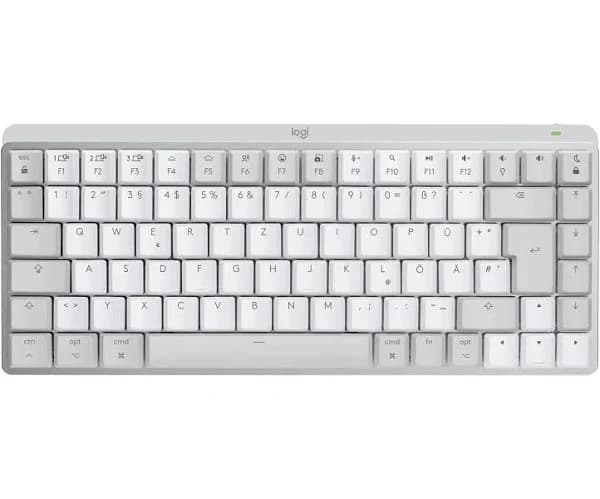
Logitech - MX Mechanical WRLS Illum. Keyb - Graphite - UK - Emea
Feel every moment of your creative process or every line of code with the irresistibly tactile MX Mechanical. Low-profile mechanical keys in your choice of 3 switch types for satisfying feedback with every keystroke, smart illumination and Easy-Switch, allowing you to connect up to 3 devices. Low-profile mechanical switches offer a deep and reassuring typing feel. Your fingers glide effortlessly across the matte surface of the keys. Dual color keycaps make it easy to orient your fingers and stay in your flow. Mechanical key switches with a satisfying tactile bump you feel for precise feedback, reactive key reset, and less noise so your typing doesn’t disturb those around you. The backlit keys magically light up when your hands approach and automatically adjust to suit your lighting conditions. You can also choose between a variety of immersive backlighting effects in Logi Options+. Easily switch between up to 3 devices at the push of a button. Compatible with Windows, macOS, ChromeOS, Linux, iPadOS. Work across devices and operating systems, change Fn key functions, select backlighting effects, assign app-specific profiles and Smart Actions shortcuts to optimize nearly every aspect of your workflow. MX Mechanical stays powered up to 15 days on a full charge or up to 10 months with backlighting turned off. Charge while you work with the included USB-C charging cable.
Feel every moment of your creative process or every line of code with the irresistibly tactile MX Mechanical. Low-profile mechanical keys in your choice of 3 switch types for satisfying feedback with every keystroke, smart illumination and Easy-Switch, allowing you to connect up to 3 devices. Low-profile mechanical switches offer a deep and reassuring typing feel. Your fingers glide effortlessly across the matte surface of the keys. Dual color keycaps make it easy to orient your fingers and stay in your flow. Mechanical key switches with a satisfying tactile bump you feel for precise feedback, reactive key reset, and less noise so your typing doesn’t disturb those around you. The backlit keys magically light up when your hands approach and automatically adjust to suit your lighting conditions. You can also choose between a variety of immersive backlighting effects in Logi Options+. Easily switch between up to 3 devices at the push of a button. Compatible with Windows, macOS, ChromeOS, Linux, iPadOS. Work across devices and operating systems, change Fn key functions, select backlighting effects, assign app-specific profiles and Smart Actions shortcuts to optimize nearly every aspect of your workflow. MX Mechanical stays powered up to 15 days on a full charge or up to 10 months with backlighting turned off. Charge while you work with the included USB-C charging cable.
Feel every moment of your creative process or every line of code with the irresistibly tactile MX Mechanical. Low-profile mechanical keys in your choice of 3 switch types for satisfying feedback with every keystroke, smart illumination and Easy-Switch, allowing you to connect up to 3 devices. Low-profile mechanical switches offer a deep and reassuring typing feel. Your fingers glide effortlessly across the matte surface of the keys. Dual color keycaps make it easy to orient your fingers and stay in your flow. Mechanical key switches with a satisfying tactile bump you feel for precise feedback, reactive key reset, and less noise so your typing doesn’t disturb those around you. The backlit keys magically light up when your hands approach and automatically adjust to suit your lighting conditions. You can also choose between a variety of immersive backlighting effects in Logi Options+. Easily switch between up to 3 devices at the push of a button. Compatible with Windows, macOS, ChromeOS, Linux, iPadOS. Work across devices and operating systems, change Fn key functions, select backlighting effects, assign app-specific profiles and Smart Actions shortcuts to optimize nearly every aspect of your workflow. MX Mechanical stays powered up to 15 days on a full charge or up to 10 months with backlighting turned off. Charge while you work with the included USB-C charging cable.
Feel every moment of your creative process or every line of code with the irresistibly tactile MX Mechanical. Low-profile mechanical keys in your choice of 3 switch types for satisfying feedback with every keystroke, smart illumination and Easy-Switch, allowing you to connect up to 3 devices. Low-profile mechanical switches offer a deep and reassuring typing feel. Your fingers glide effortlessly across the matte surface of the keys. Dual color keycaps make it easy to orient your fingers and stay in your flow. Mechanical key switches with a satisfying tactile bump you feel for precise feedback, reactive key reset, and less noise so your typing doesn’t disturb those around you. The backlit keys magically light up when your hands approach and automatically adjust to suit your lighting conditions. You can also choose between a variety of immersive backlighting effects in Logi Options+. Easily switch between up to 3 devices at the push of a button. Compatible with Windows, macOS, ChromeOS, Linux, iPadOS. Work across devices and operating systems, change Fn key functions, select backlighting effects, assign app-specific profiles and Smart Actions shortcuts to optimize nearly every aspect of your workflow. MX Mechanical stays powered up to 15 days on a full charge or up to 10 months with backlighting turned off. Charge while you work with the included USB-C charging cable.
in 13 offers
The lowest price for Logitech - MX Mechanical WRLS Illum. Keyb - Graphite - UK - Emea right now is $206.24 at Tech Wizz, compared across 12 retailers.
The all-time low was $89.00 on 3 Aug 2026 — today's price is 132% above the lowest ever. It has been notably cheaper before — worth setting a price alert.
Prices last updated 4 Oct 2026.
Last updated at 04/10/2026 16:29:04
LOGITECH MX Wireless Mechanical Keyboard Tactile Quiet - Graphite - Full Size
Delivery between 7–14 Oct $81.84
Logitech MX Mechanical Wireless Bluetooth Keyboard with Logi Bolt USB Office Gaming Keyboard for
Free delivery
Logitech MX Mechanical Wireless Keyboard - Graphite Full-size (numpad), Tactile Quiet MX switches, RGB backlight, Bluetooth/2.4 GHz RF, 10 m range,
Delivery between 9–19 Oct $12
Logitech MX Mechanical Wireless Keyboard [Tactile Quiet], Grey
Delivery between 7–12 Oct $10
Logitech MX Mechanical keyboard RF Wireless + Bluetooth QWERTY English Graphite, Grey
Delivery between 8–16 Oct $10
Tipkovnica LOGITECH MX Mechanical Tactile Quiet, bežična, BT, crna
Logitech MX Mechanical keyboard RF Wireless + Bluetooth QWERTY English Graphite, Grey
Delivery $15.25
Logitech MX Mechanical keyboard RF Wireless + Bluetooth QWERTY English Graphite, Grey
Delivery $15.25
Tipkovnica LOGITECH MX Mechanical bežična bluetooth Tactile Quiet crna (920-010757)
Delivery $8.10
Logitech MX Mechanical Mini Wireless Illuminated Keyboard
Delivery between 9–13 Oct $41
originally posted on bestbuy.com
Finally - All the features of MX series with mechanical characteristics!I'm already a BIG fan of the MX series, owning a full-size MX Keys keyboard and a separate Craft keyboard for my second workstation at my desk (for my creative work!). I also have both an MX Master 3 and 3S mouse, an MX Vertical mouse, and the MX Anywhere portable mouse for travel (spoiler alert, I'm a Logitech peripheral fan!). Alas, I loved the MX series, but the keyboards required a compromise to take advantage of their build quality, backlighting, and reliability - Chiclet keys (low profile keys like a Laptop has!)The MX Mechanical doesn't disappoint. It has smooth, reliable key travel with a satisfying, but not-too-loud "clack" feedback that mechanical keyboard users crave. ALL of the ... MoreFinally - All the features of MX series with mechanical characteristics!I'm already a BIG fan of the MX series, owning a full-size MX Keys keyboard and a separate Craft keyboard for my second workstation at my desk (for my creative work!). I also have both an MX Master 3 and 3S mouse, an MX Vertical mouse, and the MX Anywhere portable mouse for travel (spoiler alert, I'm a Logitech peripheral fan!). Alas, I loved the MX series, but the keyboards required a compromise to take advantage of their build quality, backlighting, and reliability - Chiclet keys (low profile keys like a Laptop has!)The MX Mechanical doesn't disappoint. It has smooth, reliable key travel with a satisfying, but not-too-loud "clack" feedback that mechanical keyboard users crave. ALL of the MX Keys features are here, including customizability, EXCELLENT backlighting, and compatibility with Logitech's own receiver format, and bluetooth PCs, tablets, phones and other compute devices.There are a few new features specific to the mechanical keyboard that I thought were great:- The keys are two-tone, separating alphanumeric keys from functional counterparts - ABCDEFG1234 etc are all in a lighter gray cast, while SHIFT, ALT, CTRL, TAB, SPACE, etc are a darker color - It just gives the keyboard some style without losing the professionalism of the MX line - It would fit in with a business PC on an office desk, or in front of the latest gaming PC and frame sync monitor. It really bridges the two worlds.- The keys aren't just backlit, but customizable... There are multiple backlight settings available - Not just brightness adjustments... A few of note include a "wave" pattern to show off the variable backlighting in a wave pattern across the keyboard, and "breathe" pulse of all the keys, and a "contrast" feature (my favorite) where the functional keys are highlighted vs the alphabetical keys - Something that makes a difference for me in finding my way around the keyboard in my peripheral vision in a dark office.There are a few quirks as well, mostly due to a generational leap that Logitech is making:- This keyboard is NOT compatible with Logitech's UNIFYING receivers that they've been including with peripherals for YEARS now. They have upgraded it to a new technology called Logitech BOLT which will replace UNIFYING in their lineup. BOLT has some technical advantages, such as reduced USB bandwidth and I believe better coverage/reduced latency but this will disappoint those who are only upgrading one peripheral and expected backwards compatibility with their other desktop components. BOLT is the new UNIFYING at Logi, but you'll need to upgrade everything to take advantage.- Just as with the hardware, the software is being replaced also- Gone is support for Logitech Options, the keyboard and mouse customization software for the rest of the MX series, to be replaced by Logitech Options+, which gets nary a mention on their Options website. I spent about 30 minutes troubleshooting how I had the latest version of Options and STILL couldn't see my MX Mechanical in its configuration screen. The good news here is that Options+ DOES support many of the older MX series items also, so upgrading to it in a mixed estate should be no problem.All in all this is a generational change, which will delight some and infuriate others, but I'm so happy to have this device, no doubt inspired by Logitech's gaming division and enabled as well as the rest of the EXCELLENT MX Series, in the stable. I loved it so much I went out and added an MX Master 3S to the set (which I will review separately) just to have everything on my station on BOLT and Options+ and to take advantage of its improvements.
originally posted on logitech.com
The MX Mechanical Mini is a TKL keyboard with a great build quality and elegant coloring for a professional setting. My previous keyboard is a K780 and it has been a great experience, which made me hopeful the MX Mechanical Mini would be even better. Unfortunately, that hasn't been the case and my issues basically boil down to the addition of the Logi Bolt.Logi Bolt simply doesn't work as well as the Unifying Receiver, which allowed you to link multiple keyboards / mice and bring the connection on the go. I was also able to enter my PIN at boot, which I'm no longer able to do and forces me to have an alternate keyboard to type that up. One other annoyance is that I've used Logitech for the convenience of using devices on more than one computer and that requires ... MoreThe MX Mechanical Mini is a TKL keyboard with a great build quality and elegant coloring for a professional setting. My previous keyboard is a K780 and it has been a great experience, which made me hopeful the MX Mechanical Mini would be even better. Unfortunately, that hasn't been the case and my issues basically boil down to the addition of the Logi Bolt.Logi Bolt simply doesn't work as well as the Unifying Receiver, which allowed you to link multiple keyboards / mice and bring the connection on the go. I was also able to enter my PIN at boot, which I'm no longer able to do and forces me to have an alternate keyboard to type that up. One other annoyance is that I've used Logitech for the convenience of using devices on more than one computer and that requires multiple dongles, which I haven't found in Mexico for less than $60 USD.One other thing is that I own an MX Master 3, which means I must keep using the Unifying Receiver. Between that and the Bolt, it's taking up two of my USB ports. And neither play nicely with USB hubs, which is really annoying. I'm definitely not upgrading to the MX Master 3S anytime soon as I just switched a few months ago, and my experience with the Bolt is pushing it even further away (if at all).Also, I'd really like to customize my keyboard and I'm not able to since the Logitech Options+ installation crashes every time I attempt it. I've restarted my computer, downloaded several times, wiped temp files, checked the Windows event log, to no avail. There's just no lOverall, even though the keyboard itself is great, the software and connectivity that goes with it just sucks. I know the Logi Bolt was introduced to provide a secure environment, but it came at a great cost. One that I'm not sure I'm willing to pay up and might end up going back to my K780.
originally posted on microcenter.com
Been on a keyboard binge lately, and had to give this a try. Pairing this with a Mac was super easy, using the BOLT receiver I already had from an MX Master 3S. Zero connection or lag problems, the connection is 100% solid to a 24" iMac. Love the feel of this keyboard, it's similar to, but not exactly like a Logitech G815/G916 with clicky switches, nice low profile feel/experience. Solid feeling board, not a lot of heft though, but still rigid enough for a solid typing experience. I have no gaming experience with this.The backlight works well enough for me, but I'm not one who normally looks at the keys, but it does help at times with low light on those less used keys. On mine, the backlight works well, although I have read some complaints about it being ... MoreBeen on a keyboard binge lately, and had to give this a try. Pairing this with a Mac was super easy, using the BOLT receiver I already had from an MX Master 3S. Zero connection or lag problems, the connection is 100% solid to a 24" iMac. Love the feel of this keyboard, it's similar to, but not exactly like a Logitech G815/G916 with clicky switches, nice low profile feel/experience. Solid feeling board, not a lot of heft though, but still rigid enough for a solid typing experience. I have no gaming experience with this.The backlight works well enough for me, but I'm not one who normally looks at the keys, but it does help at times with low light on those less used keys. On mine, the backlight works well, although I have read some complaints about it being intermittent or inconsistent. I like very much how Mac friendly they made this keyboard, it's something that some manufacturers don't address. The software, in my case is easy to use, and works well.I'm a huge Keychron fan, and this keyboard certainly gives them a run for the money against the K5, but I think it would be wise to compare them if you are considering this purchase. Logitech does have some major advantages here though, such as customer support and local availability, etc.Overall, a great purchase, although I think the price is on the high side for what you get, but if you are in the market for a very nice typing, low profile, Mac friendly, backlit keyboard, it would be hard to go wrong with this purchase!
| Wireless range | 10 m |
| Cable length | 1 m |
| Surface coloration | Monochromatic |
| LED indicators | Y |
| Keyboard style | Straight |
LOGITECH MX Wireless Mechanical Keyboard Tactile Quiet - Graphite - Full Size
Delivery between 7–14 Oct $81.84
Logitech MX Mechanical Wireless Bluetooth Keyboard with Logi Bolt USB Office Gaming Keyboard for
Free delivery
Logitech MX Mechanical Wireless Keyboard - Graphite Full-size (numpad), Tactile Quiet MX switches, RGB backlight, Bluetooth/2.4 GHz RF, 10 m range,
Delivery between 9–19 Oct $12
Logitech MX Mechanical Wireless Keyboard [Tactile Quiet], Grey
Delivery between 7–12 Oct $10
Logitech MX Mechanical keyboard RF Wireless + Bluetooth QWERTY English Graphite, Grey
Delivery between 8–16 Oct $10
Finally - All the features of MX series with mechanical characteristics!I'm already a BIG fan of the MX series, owning a full-size MX Keys keyboard and a separate Craft keyboard for my second workstation at my desk (for my creative work!). I also have both an MX Master 3 and 3S mouse, an MX Vertical mouse, and the MX Anywhere portable mouse for travel (spoiler alert, I'm a Logitech peripheral fan!). Alas, I loved the MX series, but the keyboards required a compromise to take advantage of their build quality, backlighting, and reliability - Chiclet keys (low profile keys like a Laptop has!)The MX Mechanical doesn't disappoint. It has smooth, reliable key travel with a satisfying, but not-too-loud "clack" feedback that mechanical keyboard users crave. ALL of the ... MoreFinally - All the features of MX series with mechanical characteristics!I'm already a BIG fan of the MX series, owning a full-size MX Keys keyboard and a separate Craft keyboard for my second workstation at my desk (for my creative work!). I also have both an MX Master 3 and 3S mouse, an MX Vertical mouse, and the MX Anywhere portable mouse for travel (spoiler alert, I'm a Logitech peripheral fan!). Alas, I loved the MX series, but the keyboards required a compromise to take advantage of their build quality, backlighting, and reliability - Chiclet keys (low profile keys like a Laptop has!)The MX Mechanical doesn't disappoint. It has smooth, reliable key travel with a satisfying, but not-too-loud "clack" feedback that mechanical keyboard users crave. ALL of the MX Keys features are here, including customizability, EXCELLENT backlighting, and compatibility with Logitech's own receiver format, and bluetooth PCs, tablets, phones and other compute devices.There are a few new features specific to the mechanical keyboard that I thought were great:- The keys are two-tone, separating alphanumeric keys from functional counterparts - ABCDEFG1234 etc are all in a lighter gray cast, while SHIFT, ALT, CTRL, TAB, SPACE, etc are a darker color - It just gives the keyboard some style without losing the professionalism of the MX line - It would fit in with a business PC on an office desk, or in front of the latest gaming PC and frame sync monitor. It really bridges the two worlds.- The keys aren't just backlit, but customizable... There are multiple backlight settings available - Not just brightness adjustments... A few of note include a "wave" pattern to show off the variable backlighting in a wave pattern across the keyboard, and "breathe" pulse of all the keys, and a "contrast" feature (my favorite) where the functional keys are highlighted vs the alphabetical keys - Something that makes a difference for me in finding my way around the keyboard in my peripheral vision in a dark office.There are a few quirks as well, mostly due to a generational leap that Logitech is making:- This keyboard is NOT compatible with Logitech's UNIFYING receivers that they've been including with peripherals for YEARS now. They have upgraded it to a new technology called Logitech BOLT which will replace UNIFYING in their lineup. BOLT has some technical advantages, such as reduced USB bandwidth and I believe better coverage/reduced latency but this will disappoint those who are only upgrading one peripheral and expected backwards compatibility with their other desktop components. BOLT is the new UNIFYING at Logi, but you'll need to upgrade everything to take advantage.- Just as with the hardware, the software is being replaced also- Gone is support for Logitech Options, the keyboard and mouse customization software for the rest of the MX series, to be replaced by Logitech Options+, which gets nary a mention on their Options website. I spent about 30 minutes troubleshooting how I had the latest version of Options and STILL couldn't see my MX Mechanical in its configuration screen. The good news here is that Options+ DOES support many of the older MX series items also, so upgrading to it in a mixed estate should be no problem.All in all this is a generational change, which will delight some and infuriate others, but I'm so happy to have this device, no doubt inspired by Logitech's gaming division and enabled as well as the rest of the EXCELLENT MX Series, in the stable. I loved it so much I went out and added an MX Master 3S to the set (which I will review separately) just to have everything on my station on BOLT and Options+ and to take advantage of its improvements.
The MX Mechanical Mini is a TKL keyboard with a great build quality and elegant coloring for a professional setting. My previous keyboard is a K780 and it has been a great experience, which made me hopeful the MX Mechanical Mini would be even better. Unfortunately, that hasn't been the case and my issues basically boil down to the addition of the Logi Bolt.Logi Bolt simply doesn't work as well as the Unifying Receiver, which allowed you to link multiple keyboards / mice and bring the connection on the go. I was also able to enter my PIN at boot, which I'm no longer able to do and forces me to have an alternate keyboard to type that up. One other annoyance is that I've used Logitech for the convenience of using devices on more than one computer and that requires ... MoreThe MX Mechanical Mini is a TKL keyboard with a great build quality and elegant coloring for a professional setting. My previous keyboard is a K780 and it has been a great experience, which made me hopeful the MX Mechanical Mini would be even better. Unfortunately, that hasn't been the case and my issues basically boil down to the addition of the Logi Bolt.Logi Bolt simply doesn't work as well as the Unifying Receiver, which allowed you to link multiple keyboards / mice and bring the connection on the go. I was also able to enter my PIN at boot, which I'm no longer able to do and forces me to have an alternate keyboard to type that up. One other annoyance is that I've used Logitech for the convenience of using devices on more than one computer and that requires multiple dongles, which I haven't found in Mexico for less than $60 USD.One other thing is that I own an MX Master 3, which means I must keep using the Unifying Receiver. Between that and the Bolt, it's taking up two of my USB ports. And neither play nicely with USB hubs, which is really annoying. I'm definitely not upgrading to the MX Master 3S anytime soon as I just switched a few months ago, and my experience with the Bolt is pushing it even further away (if at all).Also, I'd really like to customize my keyboard and I'm not able to since the Logitech Options+ installation crashes every time I attempt it. I've restarted my computer, downloaded several times, wiped temp files, checked the Windows event log, to no avail. There's just no lOverall, even though the keyboard itself is great, the software and connectivity that goes with it just sucks. I know the Logi Bolt was introduced to provide a secure environment, but it came at a great cost. One that I'm not sure I'm willing to pay up and might end up going back to my K780.
Been on a keyboard binge lately, and had to give this a try. Pairing this with a Mac was super easy, using the BOLT receiver I already had from an MX Master 3S. Zero connection or lag problems, the connection is 100% solid to a 24" iMac. Love the feel of this keyboard, it's similar to, but not exactly like a Logitech G815/G916 with clicky switches, nice low profile feel/experience. Solid feeling board, not a lot of heft though, but still rigid enough for a solid typing experience. I have no gaming experience with this.The backlight works well enough for me, but I'm not one who normally looks at the keys, but it does help at times with low light on those less used keys. On mine, the backlight works well, although I have read some complaints about it being ... MoreBeen on a keyboard binge lately, and had to give this a try. Pairing this with a Mac was super easy, using the BOLT receiver I already had from an MX Master 3S. Zero connection or lag problems, the connection is 100% solid to a 24" iMac. Love the feel of this keyboard, it's similar to, but not exactly like a Logitech G815/G916 with clicky switches, nice low profile feel/experience. Solid feeling board, not a lot of heft though, but still rigid enough for a solid typing experience. I have no gaming experience with this.The backlight works well enough for me, but I'm not one who normally looks at the keys, but it does help at times with low light on those less used keys. On mine, the backlight works well, although I have read some complaints about it being intermittent or inconsistent. I like very much how Mac friendly they made this keyboard, it's something that some manufacturers don't address. The software, in my case is easy to use, and works well.I'm a huge Keychron fan, and this keyboard certainly gives them a run for the money against the K5, but I think it would be wise to compare them if you are considering this purchase. Logitech does have some major advantages here though, such as customer support and local availability, etc.Overall, a great purchase, although I think the price is on the high side for what you get, but if you are in the market for a very nice typing, low profile, Mac friendly, backlit keyboard, it would be hard to go wrong with this purchase!
The good: Battery life seems great so far. Quieter than my old regular keyboard. Its ability to change devices is fantastic. The backlight lights up when it senses that your hand is near. I like that it is heavy, so it does not slide easily on the desktop. I like that it looks smaller than my old keyboard. I love the contrast in color and the low profile. It is an upgrade from my old keyboard.The bad: I don't like the lack of space between the numbers and the F keys. When pressing the numbers, I sometimes accidentally press the F keys. Same with the Numpad keys, I lock my computer constantly when pressing the minus key right below the lock key. Again, the lack of space between the keys is annoying. I want to change the key cap of the window key and the alt keys so ... MoreThe good: Battery life seems great so far. Quieter than my old regular keyboard. Its ability to change devices is fantastic. The backlight lights up when it senses that your hand is near. I like that it is heavy, so it does not slide easily on the desktop. I like that it looks smaller than my old keyboard. I love the contrast in color and the low profile. It is an upgrade from my old keyboard.The bad: I don't like the lack of space between the numbers and the F keys. When pressing the numbers, I sometimes accidentally press the F keys. Same with the Numpad keys, I lock my computer constantly when pressing the minus key right below the lock key. Again, the lack of space between the keys is annoying. I want to change the key cap of the window key and the alt keys so they only show Windows options and not Mac options, but Logitech offers no keycaps replacements as far as I know. I would have liked the travel distance to be longer since I tend to accidentally press adjacent keys constantly, which causes me to make mistakes while typing. My old keyboard had a context menu key (the menu that pops up when right-clicking) to the right side of the space bar, but in this new keyboard, it was replaced with a function (fn) keyboard. This context menu key was moved to above the * on the Numpad side, and it is shared between a search option. So, the primary mode of this key is the search option, and the context menu is a secondary option, which needs the fn to be pressed first (fn + context menu key). The problem is that even if I lock the fn function (fn + esc) to keep the 2nd option on, I still have to do "fn + context menu key."
I ended up returning this for the narrower, Mac specific version. This was so wide that it was awkward to use a mouse. Either the mouse is very far to your right and the keyboard is centered, or the keyboard is far to the left that the keys are not centered in front of you so that the mouse is comfortable to reach.The buttons are located close together so I find it hard to type without hitting others unintentionally. I type more slowly and make more mistakes with this keyboard.I own a MacBook Pro from 2016 running Monterrey 12.6.2 (todays latest) and the Logitech App doesn't function properly. My settings do not save (chosen backlight for example) although they should and although I am using the keyboard to interface with the app, the app says it cannot detect ... MoreI ended up returning this for the narrower, Mac specific version. This was so wide that it was awkward to use a mouse. Either the mouse is very far to your right and the keyboard is centered, or the keyboard is far to the left that the keys are not centered in front of you so that the mouse is comfortable to reach.The buttons are located close together so I find it hard to type without hitting others unintentionally. I type more slowly and make more mistakes with this keyboard.I own a MacBook Pro from 2016 running Monterrey 12.6.2 (todays latest) and the Logitech App doesn't function properly. My settings do not save (chosen backlight for example) although they should and although I am using the keyboard to interface with the app, the app says it cannot detect any keyboards so software cannot be updated. I have tried both plugged in and unplugged, on and off. I have the same issue with the matching MX Master 3X mouse I also own.If you are a Mac user you should know that the function key is in a different place on these keyboards so if you use the Function + Backspace function for deleting, you need to retrain your brain to hit the correct buttons.Build quality is high. Battery lasts a long time and charges quickly. Key stroke sounds are satisfying. It has a lot of functions like dedicated buttons for mic mute, screenshot, and switching between computers which could be useful. But I never use them. I would happily lose those and the dongle to save some $ as this keyboard is very expensive, in my opinion.I have tried several keyboards from several brands in the last 2 months and cannot find one I really like, including this one.
So this follows a MX Keys purchase, where the KB ultimately suffered some kind of internal failure due to liquid intrusion that damages the Easy-Switch hotkeys, rendering it effectively useless. So, I needed another KB, and wanted either a TKL or smaller. I liked the form factor of the MX Keys Mini, but hated the layout of the arrow keys, as I much prefer an inverted-T. I lusted after the 915TKL, but I had three machines, would have to buy at least one more receiver, and didn't need RGB (or low-latency, for that matter I'd just use a wire), so the $225+ price was just beyond what I'd stand. This left me with the uncomfortable position of finding something mechanical, low-profile, with backlighting. On Amazon (blech). Every time I'd find a suitable equivalent, there ... MoreSo this follows a MX Keys purchase, where the KB ultimately suffered some kind of internal failure due to liquid intrusion that damages the Easy-Switch hotkeys, rendering it effectively useless. So, I needed another KB, and wanted either a TKL or smaller. I liked the form factor of the MX Keys Mini, but hated the layout of the arrow keys, as I much prefer an inverted-T. I lusted after the 915TKL, but I had three machines, would have to buy at least one more receiver, and didn't need RGB (or low-latency, for that matter I'd just use a wire), so the $225+ price was just beyond what I'd stand. This left me with the uncomfortable position of finding something mechanical, low-profile, with backlighting. On Amazon (blech). Every time I'd find a suitable equivalent, there was always something horrible, like switching was slow, or the battery dies early, or the keyswitches fail with no way to replace.So I was stuck.Until now. The MX Mechanical Mini with blue switches is a dead-ringer in feel to an ancient (it had an AT connector!) keyboard that was mechanically identical in feel and sound, and was my absolute favorite of all the ones I've owned. Easy-switch is _vastly_ improved over the previous versions, performance is spectacular, battery life is yet to be truly tested, but I've been using it for about two weeks with the backlight set to level 2, and I'm currently sitting at 60%. Your mileage may vary. I love it.
I really wanted this keyboard to be the best one I ever owned, particularly taking into account that I chose the Mechanical Tactile Quiet option.Well, it's neither tactile nor quiet. It's very clanky, the keys have very long travel, which makes the keyboard feel slow, because each click requires a long (distance-wise) press. I owned another Logitech keyboard K800 and it was much much better overall for me for about half the price. K800 was truly tactile and extremely quiet, but I had to replace it because some keys popped off after using it for a few months. I tried to reach Logitech support to get a replacement for the key that popped since the keyboard was still under warranty but no loner returnable, but got crickets and had to get a new keyboard eventually ... MoreI really wanted this keyboard to be the best one I ever owned, particularly taking into account that I chose the Mechanical Tactile Quiet option.Well, it's neither tactile nor quiet. It's very clanky, the keys have very long travel, which makes the keyboard feel slow, because each click requires a long (distance-wise) press. I owned another Logitech keyboard K800 and it was much much better overall for me for about half the price. K800 was truly tactile and extremely quiet, but I had to replace it because some keys popped off after using it for a few months. I tried to reach Logitech support to get a replacement for the key that popped since the keyboard was still under warranty but no loner returnable, but got crickets and had to get a new keyboard eventually after getting tired of looking at dust collecting in the glaring white openings where keys were missing.I also ran into an issue where when I was using their top of the line Bolt USB receiver that shipped with the keyboard. Took me some time to figure it out, but eventually I concluded that the receive driver started generating sticky key effect, which was particularly annoying when it impacted the Backspace key, so had to reconfigure the keyboard to connect via Bluetooth.So a very nice piece of hardware from design perspective, but disappointing from usability perspective and for $170 I personally consider this one of the worst purchases I made in peripherals and any other computer related equipment.
I've been a longtime user of a mechanical keyboard, but the Cherry green switches I'd chosen were starting to wear me down due to how hard they are to actuate. I wanted to stick with mechanical but wanted a new keyboard that was wireless, but with low lag and Bluetooth capabilities. This is about the only keyboard I've found that fits the bill. The keys are much softer, but still have a little bit of click to them. They are only a tiny bit noisier than those awful flat keyboards that come on laptops, but with tons more "feel".So far, battery life has been good, it's been over a week and I've just now had to charge it for the first time since taking it out of the box. It's taken some getting used to the compact layout, but anyone that's used a laptop should feel ... MoreI've been a longtime user of a mechanical keyboard, but the Cherry green switches I'd chosen were starting to wear me down due to how hard they are to actuate. I wanted to stick with mechanical but wanted a new keyboard that was wireless, but with low lag and Bluetooth capabilities. This is about the only keyboard I've found that fits the bill. The keys are much softer, but still have a little bit of click to them. They are only a tiny bit noisier than those awful flat keyboards that come on laptops, but with tons more "feel".So far, battery life has been good, it's been over a week and I've just now had to charge it for the first time since taking it out of the box. It's taken some getting used to the compact layout, but anyone that's used a laptop should feel right at home. There aren't any spaces between, for example, the F-keys and number keys, or between the keys that pick which device to connect to and the ins-home-pg up keys. But over time I hope I'll grow acclimated to this tight layout.If there's one major complaint, it's with the Logi software that you need to customize keyboard layouts, change the lighting patterns and all that. It's frustratingly bad. It took ages to get it installed because the link in the documentation only provides an installer app, and that app couldn't find the actual installation files on Logi's website. Turns out a proxy server I run was interfering, but this is literally the only program I've ever used that balked at such a setup.On a more minor complaint, but related to the keyboard and its software, the lighting choices are very limited, most of which distract from typing. There's also no way to adjust the backlight's timing. It fades out pretty quick.Finally, it appears this keyboard cannot be used wired via USB, which is a disappointment but not a dealbreaker. The included Bolt receiver can control multiple Logi devices, so you only need one USB slot for multiple peripherals.Overall, a pretty decent wireless keyboard, with a nice keyfeel when typing. The backlighting, in the least offensive setting, is not overly gaudy. The Logi software that unlocks more features is a pain in the rear and of limited usefulness, though.
When I first got this keyboard I was extremely impressed by the experience. However, once the novelty wore off some niggles started to show. The keycaps were quite difficult type on and being soft touch plastic I could see them wearing down fairly quickly. The adjustable kickstands were a nice addition but the angle wasn't quite enough to be comfortable and the typing experience as a whole was just a little bit off. But luckily the stems are standard cherry mx so I was able to put keycaps from an old board on which greatly improved my accuracy. More problems arose from this unfortunately as the caps would bottom out quite harshly which produced an off-putting clack and felt quite harsh on the fingers. This was overcome by some more mods. I disassembled the board ... MoreWhen I first got this keyboard I was extremely impressed by the experience. However, once the novelty wore off some niggles started to show. The keycaps were quite difficult type on and being soft touch plastic I could see them wearing down fairly quickly. The adjustable kickstands were a nice addition but the angle wasn't quite enough to be comfortable and the typing experience as a whole was just a little bit off. But luckily the stems are standard cherry mx so I was able to put keycaps from an old board on which greatly improved my accuracy. More problems arose from this unfortunately as the caps would bottom out quite harshly which produced an off-putting clack and felt quite harsh on the fingers. This was overcome by some more mods. I disassembled the board (once I worked out how it was rather easy) and filled all the blank spaces with silicone. I then placed a small bead of silicone where the metal plate makes contact with the plastic case to act as a sort of gasket. I also lubed the stabilisers a bit better than what came from factory and sanded down the bigger keycaps (enter, e.t.c) and I have been more than satisfied with it ever since. The logi+ software is great and when paired with the mx mouse makes multitasking between my uni laptop and main computer a breeze. Although missing the customisation found in something like razer synapse, it is far more user friendly. All in all, it is a good board for business purposes and with a little bit of work put in, an outstanding board for all uses
I am very skeptical of low profile keyboard in general, I have tried only couple of brands, the Keychron K1 and the Logitech G915 KTL so I can't be so sure if the whole low profile keyboard market is that bad.The Keychron K1 looks attractive, but for sure it can not compare with the quality and design concept from Logitech, where the G915 KTL looks stunning in every way, but when it comes to typing experience, both the Keychron K1 and the Logitech G915 feel terrible.Here is why they are bad, they are both having the similar problems, the low profile switches and the keycaps are so loose, if you put a finger on a key, don't press down but move your finger tip around, the key is basically follows you finger tip, this is where the problem is. When type ping, you need ... MoreI am very skeptical of low profile keyboard in general, I have tried only couple of brands, the Keychron K1 and the Logitech G915 KTL so I can't be so sure if the whole low profile keyboard market is that bad.The Keychron K1 looks attractive, but for sure it can not compare with the quality and design concept from Logitech, where the G915 KTL looks stunning in every way, but when it comes to typing experience, both the Keychron K1 and the Logitech G915 feel terrible.Here is why they are bad, they are both having the similar problems, the low profile switches and the keycaps are so loose, if you put a finger on a key, don't press down but move your finger tip around, the key is basically follows you finger tip, this is where the problem is. When type ping, you need to feel the stable keys and that where your typing confident is.When the keys are so loose and moving around to much, your typing experience and confident will start to go down, they will cause a lot miss type because your brain keep on telling your fingers to re-adjust to fine sweet table spot, but there is none, because of the keys design and the keycap with two legs insert design make the whole key construction even more unstable. That is the key point of what a good keyboard about. Okey, that is the enough talk about the old stuffs!Let us now talk about the new low profile MS mechanical keyboard, I bought the Mini version with Clicky switches (I have alway been loving the clicky switches). the MX mini came with different switch compare to the G915, I can feel that they are move stable, with a little more down ward travel, right the way out of the box the typing feels great, the switches are more tightly feel and the keycap's insert leg is like the Cherry MX style switches, so they are less wiggle around.This is the key to the overall feel and confident when typing and this is why this keyboard is a lot more satisfying compare to the G915.There are so many review nuts on YouTube they talk too much about stuffs like sound test and mod this mod that, listening to them will dry you crazy. For me I just wanted to focus on the satisfaction and how confident I feel when typing, because that is what you do, you need the keyboard so you can type text all day, not to listen to what kind of should the keyboard producing, or this and that.One other important aspect about the keyboard is the layout position of every key, a good layout contributes a lot to how quick one can learn and adapt to keyboard and become productive when you work, for that I think the MX full size and the mini are very well design and I have no complaint what so every with Logitech good track record on keyboard overall design and layout.One addition sell point about this keyboard is it's ability to automatically select Mac or Windows keys map this is the feature I wanted for a long time but not many company out there make the Mac Ready keyboard like Logitech, I think they finally get it. The Mac is taking over the PC market and that is why Logitech starting to listen to its customer request features.I am going to keep this MX Mechanical Mini as my main daily keyboard. I wish if Logitech will put the same switches and keycaps on the G915, that will be even a better keyboard in every way, I love the G915 KTL design and KTL layout is my standard form of compact keyboard, unfortunately Logitech put the bad switch on the current G915 and that makes it such when typing, if they upgrade the switches to something like this MX mini or better, I will buy it right the way.Something to improve on are the switch can be a little more tightly build and more stable, little less wiggle will be even better, if you have ever type on the Pro X gaming keyboard, you will know what it mean to be the best keyboard that I have been using as my daily coding keyboard for many years, the feel is amazing, I can type fast and so confident with PRO X KTL gaming keyboard.Thanks Logitech for this MX mechanical keyboard, and please make the G915 KTL better with the better switches and keycaps design.Best,TN
| Wireless range | 10 m |
| Cable length | 1 m |
| Surface coloration | Monochromatic |
| LED indicators | Y |
| Keyboard style | Straight |