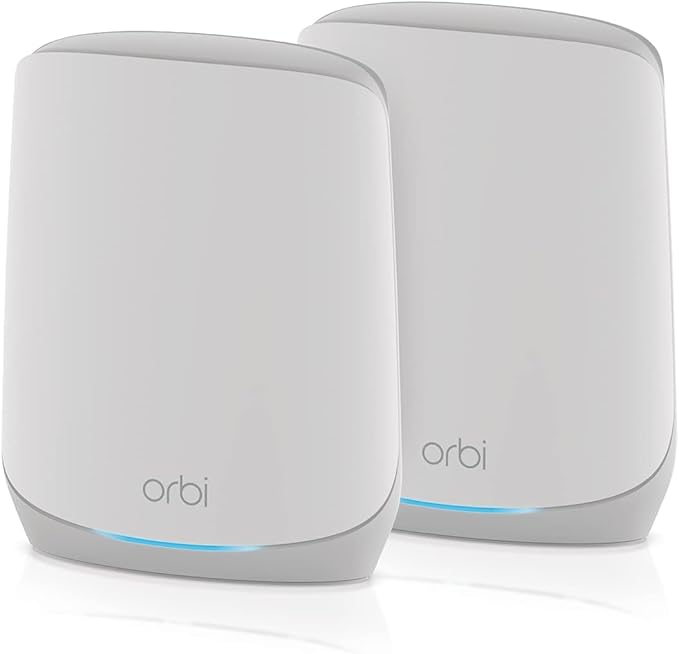
With Nighthawk Mesh WiFi 6 System you'll enjoy advanced whole home WiFi designed to deliver smooth video streaming and fast online gaming to more devices at the same time. Experience the next generation of WiFi 6, perfect for medium to large homes up to 4,500sq.ft. and Internet speeds over 100Mbps. The Nighthawk Mesh System comes with a high-power router and two satellites to provide you with broad WiFi coverage, so you can eliminate dead zones by easily placing satellites wherever needed. Set up in minutes and control your home's WiFi with the Nighthawk App. With NETGEAR Armor, you get complete cyber threat protection built into your router for an unlimited number of devices connected to your network, including IoT devices, tablets, computers, and smartphones. Experience the ease of managing your kids' time online across their connected devices and promote healthy habits anywhere they go with NETGEAR Smart Parental Controls.
With Nighthawk Mesh WiFi 6 System you'll enjoy advanced whole home WiFi designed to deliver smooth video streaming and fast online gaming to more devices at the same time. Experience the next generation of WiFi 6, perfect for medium to large homes up to 4,500sq.ft. and Internet speeds over 100Mbps. The Nighthawk Mesh System comes with a high-power router and two satellites to provide you with broad WiFi coverage, so you can eliminate dead zones by easily placing satellites wherever needed. Set up in minutes and control your home's WiFi with the Nighthawk App. With NETGEAR Armor, you get complete cyber threat protection built into your router for an unlimited number of devices connected to your network, including IoT devices, tablets, computers, and smartphones. Experience the ease of managing your kids' time online across their connected devices and promote healthy habits anywhere they go with NETGEAR Smart Parental Controls.
in 2 offers
The lowest price for NetGear Nighthawk MK6W Mesh WiFi 6 AX1500 Whole Home System right now is $360.80 at desertcart.com.au, compared across 2 retailers.
The all-time low was $108.12 on 27 Feb 2026 — today's price is 234% above the lowest ever. It has been notably cheaper before — worth setting a price alert.
Prices last updated 6 Sept 2026.
NetGear Nighthawk MK6W Mesh WiFi 6 AX1500 Whole Home System
With Nighthawk Mesh WiFi 6 System you'll enjoy advanced whole home WiFi designed to deliver smooth video streaming and fast online gaming to more devices at the same time. Experience the next generation of WiFi 6, perfect for medium to large homes up to 4,500sq.ft. and Internet speeds over 100Mbps. The Nighthawk Mesh System comes with a high-power router and two satellites to provide you with broad WiFi coverage, so you can eliminate dead zones by easily placing satellites wherever needed. Set up in minutes and control your home's WiFi with the Nighthawk App. With NETGEAR Armor, you get complete cyber threat protection built into your router for an unlimited number of devices connected to your network, including IoT devices, tablets, computers, and smartphones. Experience the ease of managing your kids' time online across their connected devices and promote healthy habits anywhere they go with NETGEAR Smart Parental Controls.
With Nighthawk Mesh WiFi 6 System you'll enjoy advanced whole home WiFi designed to deliver smooth video streaming and fast online gaming to more devices at the same time. Experience the next generation of WiFi 6, perfect for medium to large homes up to 4,500sq.ft. and Internet speeds over 100Mbps. The Nighthawk Mesh System comes with a high-power router and two satellites to provide you with broad WiFi coverage, so you can eliminate dead zones by easily placing satellites wherever needed. Set up in minutes and control your home's WiFi with the Nighthawk App. With NETGEAR Armor, you get complete cyber threat protection built into your router for an unlimited number of devices connected to your network, including IoT devices, tablets, computers, and smartphones. Experience the ease of managing your kids' time online across their connected devices and promote healthy habits anywhere they go with NETGEAR Smart Parental Controls.
Last updated at 06/09/2026 17:08:49
Nighthawk Mesh WiFi 6 System (MK6W) Up to 4,500 sq. ft. Dual-Band Easy Mesh Compatible Internet Speeds Over 100Mbps
Delivery between 13–16 Sept $29
NETGEAR Nighthawk Dual-Band WiFi 6 AX1500 Mesh System 1.5 Gbps Router + 2 Satellites (MK6W-100NAS)
Delivery between 11–15 Sept $35.88
originally posted on walmart.com
Before I acquired this device, my downloads of 1.5GB were of 15-30 minutes on average now; they are about 5-10 minutes. Not only has this device improved my internet speed it has also improved my stability and security lets me know of malicious websites and the category of attack they are considered to be, for example, phishing, scam, malware, etc. Also, the coverage of this device it's fantastic. We didn't have coverage in our shelter room, and now we do. We used to struggle to have wi-fi all over our house. Now we have range in every single corner of the house. If you like to do gaming, this will help you a lot. I can play online games on my PS4, phone, and computer and have my kids on their devices and the TV's streaming Netflix, Youtube, Prime, HBOMax, or ... MoreBefore I acquired this device, my downloads of 1.5GB were of 15-30 minutes on average now; they are about 5-10 minutes. Not only has this device improved my internet speed it has also improved my stability and security lets me know of malicious websites and the category of attack they are considered to be, for example, phishing, scam, malware, etc. Also, the coverage of this device it's fantastic. We didn't have coverage in our shelter room, and now we do. We used to struggle to have wi-fi all over our house. Now we have range in every single corner of the house. If you like to do gaming, this will help you a lot. I can play online games on my PS4, phone, and computer and have my kids on their devices and the TV's streaming Netflix, Youtube, Prime, HBOMax, or whatever, and I don't have issues with connectivity. If you know about Networking, it also allows you to use different settings, such as Bridge connection, and the app provides you with a network map to see your devices.On top of that, it allows you to see what channels are the best options for your connection. I do recommend this device. It's a game-changer.
originally posted on walmart.com
Quite possibly the worst router I have ever come across. Set up was easy but then nothing worked right. I had to factory reset 2 times for the satellites to work properly. Anytime I lose power at the house, the system would quit working. I would have to factory reset. Now Its blocking all devices from using it. Its I when its working but the amount of time I've spent fixing it isn't worth the $150 I saved from buying the better model. Take my advice and don't buy this router.
originally posted on walmart.com
I wish I had understood what these were sooner. For real. I have had multiple dead zones in my 1000 square ft home for years. When I learned about mesh networks: one “mothership” router with “satellites” that you place around the home/grounds to expand the wifi signal, I didn’t have the confidence to set one up.These I bought out of desperation when my gateway modem/router combo was having problems. I bought them because they seemed like the best deal and were on sale. My only regret is that I didn’t buy them sooner. This device is a router. You need to also have separate modem that connects you to the internet.After setting this router and satellites up, there are no longer any dead ones on my entire property.Now the only issue I had with setup was on the ... MoreI wish I had understood what these were sooner. For real. I have had multiple dead zones in my 1000 square ft home for years. When I learned about mesh networks: one “mothership” router with “satellites” that you place around the home/grounds to expand the wifi signal, I didn’t have the confidence to set one up.These I bought out of desperation when my gateway modem/router combo was having problems. I bought them because they seemed like the best deal and were on sale. My only regret is that I didn’t buy them sooner. This device is a router. You need to also have separate modem that connects you to the internet.After setting this router and satellites up, there are no longer any dead ones on my entire property.Now the only issue I had with setup was on the cable company’s end. I had to communicate with them and they are a zero for customer service. However If you already understand your internet provider’s process for replacing devices you won’t have any problems. This product also connects to an app that allows you to run speed-checks, security audits and see which devices are connected and to which satellites they are connected to.This is a huge game changer for our family.
| Maximum LAN Data Rate | 1000 Mbps |
| Ports | Ethernet (RJ-45) |
| To Fit | 1 year |
| Maximum Wireless Data Rate | 1600 Mbps |
| Connectivity | Wireless |
Nighthawk Mesh WiFi 6 System (MK6W) Up to 4,500 sq. ft. Dual-Band Easy Mesh Compatible Internet Speeds Over 100Mbps
Delivery between 13–16 Sept $29
NETGEAR Nighthawk Dual-Band WiFi 6 AX1500 Mesh System 1.5 Gbps Router + 2 Satellites (MK6W-100NAS)
Delivery between 11–15 Sept $35.88
Before I acquired this device, my downloads of 1.5GB were of 15-30 minutes on average now; they are about 5-10 minutes. Not only has this device improved my internet speed it has also improved my stability and security lets me know of malicious websites and the category of attack they are considered to be, for example, phishing, scam, malware, etc. Also, the coverage of this device it's fantastic. We didn't have coverage in our shelter room, and now we do. We used to struggle to have wi-fi all over our house. Now we have range in every single corner of the house. If you like to do gaming, this will help you a lot. I can play online games on my PS4, phone, and computer and have my kids on their devices and the TV's streaming Netflix, Youtube, Prime, HBOMax, or ... MoreBefore I acquired this device, my downloads of 1.5GB were of 15-30 minutes on average now; they are about 5-10 minutes. Not only has this device improved my internet speed it has also improved my stability and security lets me know of malicious websites and the category of attack they are considered to be, for example, phishing, scam, malware, etc. Also, the coverage of this device it's fantastic. We didn't have coverage in our shelter room, and now we do. We used to struggle to have wi-fi all over our house. Now we have range in every single corner of the house. If you like to do gaming, this will help you a lot. I can play online games on my PS4, phone, and computer and have my kids on their devices and the TV's streaming Netflix, Youtube, Prime, HBOMax, or whatever, and I don't have issues with connectivity. If you know about Networking, it also allows you to use different settings, such as Bridge connection, and the app provides you with a network map to see your devices.On top of that, it allows you to see what channels are the best options for your connection. I do recommend this device. It's a game-changer.
Quite possibly the worst router I have ever come across. Set up was easy but then nothing worked right. I had to factory reset 2 times for the satellites to work properly. Anytime I lose power at the house, the system would quit working. I would have to factory reset. Now Its blocking all devices from using it. Its I when its working but the amount of time I've spent fixing it isn't worth the $150 I saved from buying the better model. Take my advice and don't buy this router.
I wish I had understood what these were sooner. For real. I have had multiple dead zones in my 1000 square ft home for years. When I learned about mesh networks: one “mothership” router with “satellites” that you place around the home/grounds to expand the wifi signal, I didn’t have the confidence to set one up.These I bought out of desperation when my gateway modem/router combo was having problems. I bought them because they seemed like the best deal and were on sale. My only regret is that I didn’t buy them sooner. This device is a router. You need to also have separate modem that connects you to the internet.After setting this router and satellites up, there are no longer any dead ones on my entire property.Now the only issue I had with setup was on the ... MoreI wish I had understood what these were sooner. For real. I have had multiple dead zones in my 1000 square ft home for years. When I learned about mesh networks: one “mothership” router with “satellites” that you place around the home/grounds to expand the wifi signal, I didn’t have the confidence to set one up.These I bought out of desperation when my gateway modem/router combo was having problems. I bought them because they seemed like the best deal and were on sale. My only regret is that I didn’t buy them sooner. This device is a router. You need to also have separate modem that connects you to the internet.After setting this router and satellites up, there are no longer any dead ones on my entire property.Now the only issue I had with setup was on the cable company’s end. I had to communicate with them and they are a zero for customer service. However If you already understand your internet provider’s process for replacing devices you won’t have any problems. This product also connects to an app that allows you to run speed-checks, security audits and see which devices are connected and to which satellites they are connected to.This is a huge game changer for our family.
The new Mesh WiFi 6 system from Netgear really extends the network for any home and provides added network security features which aren’t available in older generation gear. A few of these new features are the addition of WPA3 security, App alerts whenever a new device connects, vulnerability scanning of connected devices, and the ability to disconnect unwanted or unauthorized devices with the swipe of a control on your phone.The router and two additional satellites were very easy to set up using the Nighthawk App which is available for Android or iPhone. My setup was done using an iPhone, and I was able to get up and running by following the straight forward instructions presented in the App. In all, it took about 15-20 minutes to set up a basic configuration, ... MoreThe new Mesh WiFi 6 system from Netgear really extends the network for any home and provides added network security features which aren’t available in older generation gear. A few of these new features are the addition of WPA3 security, App alerts whenever a new device connects, vulnerability scanning of connected devices, and the ability to disconnect unwanted or unauthorized devices with the swipe of a control on your phone.The router and two additional satellites were very easy to set up using the Nighthawk App which is available for Android or iPhone. My setup was done using an iPhone, and I was able to get up and running by following the straight forward instructions presented in the App. In all, it took about 15-20 minutes to set up a basic configuration, and just a little more time for me to move the satellites around to different locations to test signal strength and conduct speed tests.The Nighthawk App is proactive in keeping the router and satellite firmware up to date and checks to see if a new version is available during setup. This is a good thing, as it is very common for new firmware to be released periodically to add features, or to install security patches as new security vulnerabilities are reported. My router had an update waiting for it right out of the box, and the process was nearly automatic and took no longer than 5 minutes. It is really nice to know the Nighthawk is focused on security, and is working for you behind the scenes to stay ahead of the “bad” actors on the Internet.Two of my newer laptops instantly recognized the WiFi 6 upgrade from my older WiFi system, and the location upstairs where we previously had a weak signal and slow speeds, now has a much stronger signal and much quicker downloads.I have a fiber Internet connection to the house with 500/500Mbps service. The speed test conveniently built into the Nighthawk App tested the connection of my ISP and returned results of 512 down and 505 up. So, there are definitely no bottlenecks between the router and the ISP.Netgear’s Armor security protection is provided as a 30 day trial, with the option to install Bit Defender on your connected devices if you so desire. Nice that I can try before I subscribe.For tech savvy folks, the traditional method of setting up the router is still available via a web interface which is accessible through a browser pointing to the router’s internal IP address. You'll definitely want to check it out, if you are into configuring the more advanced features. For example, I adhere to the practice of disabling the SSID broadcast on a private network, and that task requires accessing the advanced tab in the web interface of the router. A second broadcasted guest network is available as an option to turn on for visitors, so you won’t have to disclose your hidden SSID and password for your private WiFi network.Overall: a fast, customizable, whole-home-covering Wifi system at a solid value.
Not difficult to set up and an instant upgrade over my old wifi. I swapped out an AC 1750 wifi router and an extender (which left me with two differentwifi names) for this AX1500 mesh unit and saw wifi speeds climb from 353 mbps down / 251 mbps upload to 628 mbps /620 mbps, almost double. (Obviously, your download and upload speeds will depend very much on your ISP and your monthly plan. I obviously was not getting the speed I was paying for with my old router.) Better yet, every area of the house now has a really strong signal, including an outdoor wireless security cam, with just one SSID name! A week after setup and I have no complaints, no dropped coverage, no need for resets, etc., though I will caution that initial setup is more than a 10-minute affair. ... MoreNot difficult to set up and an instant upgrade over my old wifi. I swapped out an AC 1750 wifi router and an extender (which left me with two differentwifi names) for this AX1500 mesh unit and saw wifi speeds climb from 353 mbps down / 251 mbps upload to 628 mbps /620 mbps, almost double. (Obviously, your download and upload speeds will depend very much on your ISP and your monthly plan. I obviously was not getting the speed I was paying for with my old router.) Better yet, every area of the house now has a really strong signal, including an outdoor wireless security cam, with just one SSID name! A week after setup and I have no complaints, no dropped coverage, no need for resets, etc., though I will caution that initial setup is more than a 10-minute affair. Factor in at least an hour when you account for the registration, firmware updates, finding the right placement for the satellites, etc.I ended up moving one of the satellites several times to find the perfect spot. The phone app allows you to see which devices are hooked up to which satellites, the wifi band (2.4 ghz or 5 ghz) and the strength of each signal so you can move things around until you are happy you are getting the strongest signals.I purchased my unit on sale for $99 bucks and would buy again at that price. However, prices are coming down on AX1800 and AX3000 mesh units so you might want to spring for the extra possible speed, even if your current internet plan wouldn't benefit right away. The need for two versus three satellites really seems to depend on where the internet enters your house, not just the size of your house. In a perfect world it would be right in the center but that wasn't the case with my home, where the internet enters on the far side.
These things are junk. After setting these up, all of the APPLE devices in my house would randomly get kicked off, even if sitting within 10' of one of the AP's. Now, it refuses to allow any new devices to connect, even though there are still over 100 IP's left available in the DHCP pool. I currently cannot connect wired or wireless devices. I have 44 connected, my DHCP range is .2 through .200; which leaves plenty of available ip's. Currently it's reporting over 800mbps down and 600mbps up, but I have a FireStick that will connect wirelessly (very good - as it should since it's 10' away), but say there is no internet connection which makes it useless. Save your money and buy something that works. NOTE: I am on the latest available firmware and yes, I have tried ... MoreThese things are junk. After setting these up, all of the APPLE devices in my house would randomly get kicked off, even if sitting within 10' of one of the AP's. Now, it refuses to allow any new devices to connect, even though there are still over 100 IP's left available in the DHCP pool. I currently cannot connect wired or wireless devices. I have 44 connected, my DHCP range is .2 through .200; which leaves plenty of available ip's. Currently it's reporting over 800mbps down and 600mbps up, but I have a FireStick that will connect wirelessly (very good - as it should since it's 10' away), but say there is no internet connection which makes it useless. Save your money and buy something that works. NOTE: I am on the latest available firmware and yes, I have tried rebooting and power-cycling everything, multiple times. I expect network equipment to last longer than six months, but I guess this is why Netgear only offers 90 days of support.
Worked perfectly the first month, since then has been of no use. Internet service with Verizon was going out on a regular basis and I had to call customer service to see why and they couldn’t tell me just we would reset and start back up to get back working and I would leave the netgear device disconnected. So I would connect back and a few days later I would have same issue. So we repeat and same thing happens, so I had decided last time to leave it disconnected and for the last two weeks no issue, then today I connected back up and internet has gone down again. So as of today I will keep my original router connected and permanently remove this, don’t know why it’s giving this problem but it’s too consistent and and a headache not worth it and will be trying to get ... MoreWorked perfectly the first month, since then has been of no use. Internet service with Verizon was going out on a regular basis and I had to call customer service to see why and they couldn’t tell me just we would reset and start back up to get back working and I would leave the netgear device disconnected. So I would connect back and a few days later I would have same issue. So we repeat and same thing happens, so I had decided last time to leave it disconnected and for the last two weeks no issue, then today I connected back up and internet has gone down again. So as of today I will keep my original router connected and permanently remove this, don’t know why it’s giving this problem but it’s too consistent and and a headache not worth it and will be trying to get rid of it
Network speed has been subpar, satellites drop connection more frequently than I can mention, and their troubleshooting is sub par in the app.For the technical folks, satellites would drop connection all the time, and anything not wired into the main router experienced slow speeds. I read on some netgear forums that assigning the satellites static IPs would help, but it did not. Also took me 2 hours to get the satellites synced up after setting their MACs to static IPs in the reserved IP table from the 192.168.1.1 interface. For years, I had one of the original nighthawk routers but flashed the firmware to make it more bulletproof. Not really an option with these. Mesh is pretty garbage as when you walk around the house it’ll drop the WiFi connection and then ... MoreNetwork speed has been subpar, satellites drop connection more frequently than I can mention, and their troubleshooting is sub par in the app.For the technical folks, satellites would drop connection all the time, and anything not wired into the main router experienced slow speeds. I read on some netgear forums that assigning the satellites static IPs would help, but it did not. Also took me 2 hours to get the satellites synced up after setting their MACs to static IPs in the reserved IP table from the 192.168.1.1 interface. For years, I had one of the original nighthawk routers but flashed the firmware to make it more bulletproof. Not really an option with these. Mesh is pretty garbage as when you walk around the house it’ll drop the WiFi connection and then reestablish it 5-10 seconds later (likely switching between satellites. Didn’t matter how close the satellites were to the router.I refuse to deal with technical customer support since resetting my modem, router, and then having it blamed on the ISP has been such a fun experience in the past. I don’t need to be talking to someone I barely understand who has not a single clue how networking or wireless routers work.Never buy this product as I think they had interns program the interfaces. I used to be a netgear die hard, but this is the final straw. I hope they go out of business trying to sell products like these. Absolute trash…and I really didn’t want to have to go with an Amazon product. Going to look into more expensive and resilient mesh systems.
The range of these are great. The speed was pretty remarkable too. They were just what I was looking for..........for about 6 months. The main router then quit working. It would power on but wouldn't let you connect a device to even set it up. I found a replacement on eBay. It worked with the rest of the satellites for less than a month and did the same thing the previous router did. Like many others I was able to reset it several times before it finally gave out. Be warned, any power fluctuation or little ISP hiccup, you'll be resetting this router. I never had any issues with the satellites. My system had a total of three satellites (MS60) and the main router (MR60). I thought I got a good deal on this system for only $99 when walmart.com was running an after ... MoreThe range of these are great. The speed was pretty remarkable too. They were just what I was looking for..........for about 6 months. The main router then quit working. It would power on but wouldn't let you connect a device to even set it up. I found a replacement on eBay. It worked with the rest of the satellites for less than a month and did the same thing the previous router did. Like many others I was able to reset it several times before it finally gave out. Be warned, any power fluctuation or little ISP hiccup, you'll be resetting this router. I never had any issues with the satellites. My system had a total of three satellites (MS60) and the main router (MR60). I thought I got a good deal on this system for only $99 when walmart.com was running an after thanksgiving sale. Anyone looking for an option for reliability should probably look elsewhere.
Wanted to strengthen our wifi signal in our home, as we have dead spots in the back bedrooms and regular extenders didn't work. We heard good things about Mesh networks, so we took a chance on this unit. We trust the Netgear/Nighthawk name, and we purchased this on sale for the early Black Friday. Worth the $100 we spent on it.This was easy to setup with the Nighthawk app and connected with no problems. If you have Centurylink like I do, and have one of their modem/router combos, I believe you will have to disable your wifi setting on your modem. Plug in your computer/laptop to your modem and type in 192.168.0.1 in any of your web browsers. This will take you to the Centurylink admin login for your modem. Login to your Centurylink modem admin account, click on ... MoreWanted to strengthen our wifi signal in our home, as we have dead spots in the back bedrooms and regular extenders didn't work. We heard good things about Mesh networks, so we took a chance on this unit. We trust the Netgear/Nighthawk name, and we purchased this on sale for the early Black Friday. Worth the $100 we spent on it.This was easy to setup with the Nighthawk app and connected with no problems. If you have Centurylink like I do, and have one of their modem/router combos, I believe you will have to disable your wifi setting on your modem. Plug in your computer/laptop to your modem and type in 192.168.0.1 in any of your web browsers. This will take you to the Centurylink admin login for your modem. Login to your Centurylink modem admin account, click on wifi settings, and disable wifi from your modem. Don't know if this was necessary, but doing my research and running two different routers at the same time could cause problems setting up your Mesh wifi .Overall setup took me maybe 30 minutes or less. Spent more time setting up devices to the new network. The Nighthawk app guides you step by step through the setup process. So follow the instructions carefully on your phone.You will have to keep your satellites somewhat close to the router for it to connect. The range on the satellites from the router is not as far as I was hoping but it does the job when they are connected and covers upto 4500 SF, but I would probably say close to 2500 SF is more ideal.I was trying to keep the satellites on the opposite ends of the house but had to move them a little closer than I wanted for them to sync up. Once linked up, signal strength jumped up to 100% anywhere in the house and the speeds were pretty close to as of you're right next to the router.The only drawbacks to this unit is that the satellites and router are bigger than many of the other units out there and you only have one hardwire connection on each satellite or the router. You will have to invest in a switch if you want more hardwire connections. If you have high speed internet and can connect through wifi, it shouldn't be much of a problem for your average households. If you're a hardcore gamer, you will probably want to invest in a higher rated unit in the Nighthawk lineup.Overall, I am happy with this purchase and came at a great price. I would recommend this for the average user.
| Maximum LAN Data Rate | 1000 Mbps |
| Ports | Ethernet (RJ-45) |
| To Fit | 1 year |
| Maximum Wireless Data Rate | 1600 Mbps |
| Connectivity | Wireless |