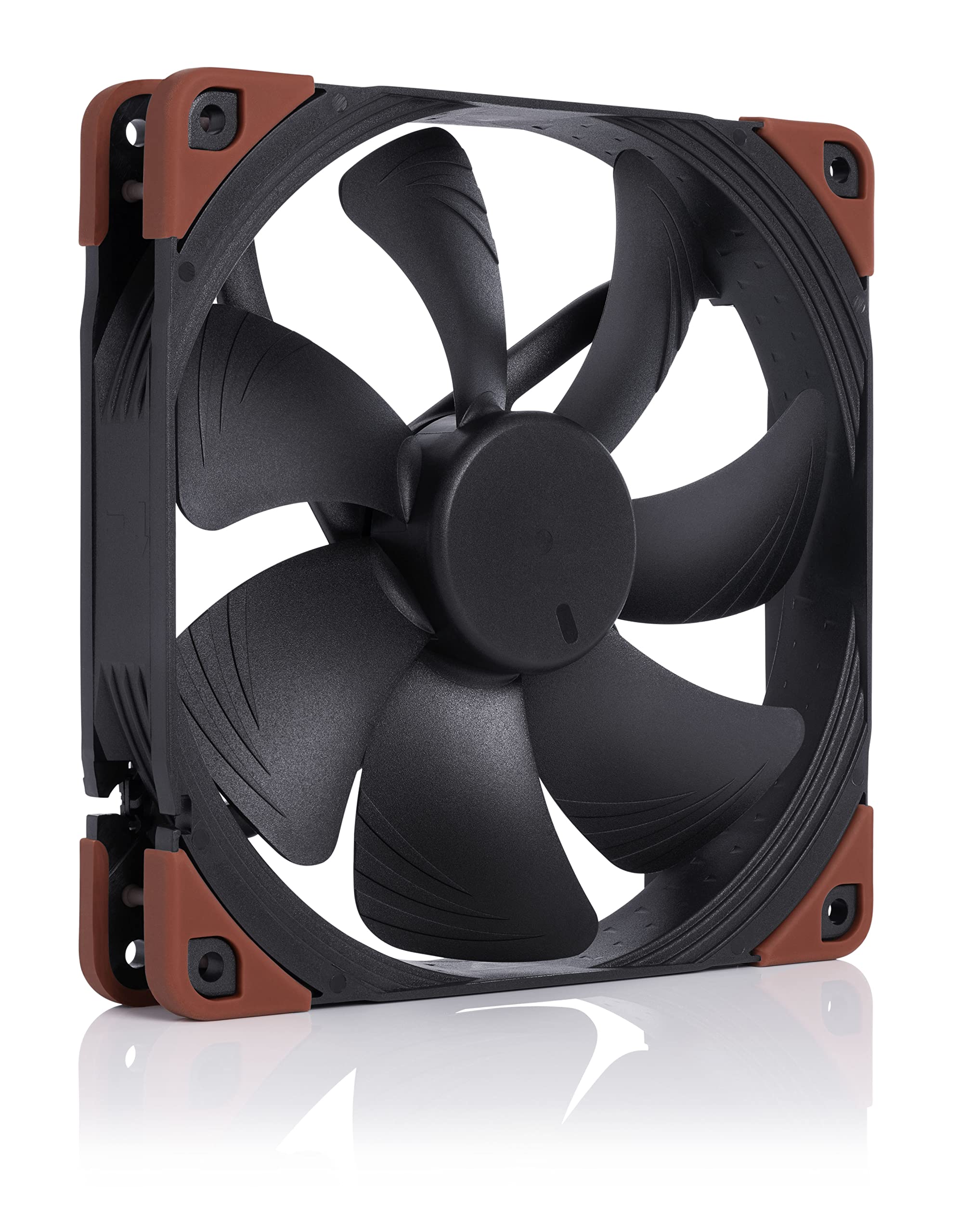
Noctua NF-A14 Industrial PPC 140mm 4-Pin PWM Fan
The NF-A14 is one of Noctua's renowned and popular fans. Its square frame makes it ideal for use on water cooling radiators or as a case fan. The chromax.black.swap edition combines the NF-A14's signature quiet cooling performance with an attractive design and a bundle of swappable anti-vibration pads, that allow the color-customization of the fan to match individual build color schemes. Topped off with Noctua's trusted premium-grade SSO2 bearing and long hours MTTF, the NF-A14 PWM chromax.black.swap is the perfect choice for all users, who value individual, focused build aesthetics just as much as high quality and performance.
The NF-A14 is one of Noctua's renowned and popular fans. Its square frame makes it ideal for use on water cooling radiators or as a case fan. The chromax.black.swap edition combines the NF-A14's signature quiet cooling performance with an attractive design and a bundle of swappable anti-vibration pads, that allow the color-customization of the fan to match individual build color schemes. Topped off with Noctua's trusted premium-grade SSO2 bearing and long hours MTTF, the NF-A14 PWM chromax.black.swap is the perfect choice for all users, who value individual, focused build aesthetics just as much as high quality and performance.
The NF-A14 is one of Noctua's renowned and popular fans. Its square frame makes it ideal for use on water cooling radiators or as a case fan. The chromax.black.swap edition combines the NF-A14's signature quiet cooling performance with an attractive design and a bundle of swappable anti-vibration pads, that allow the color-customization of the fan to match individual build color schemes. Topped off with Noctua's trusted premium-grade SSO2 bearing and long hours MTTF, the NF-A14 PWM chromax.black.swap is the perfect choice for all users, who value individual, focused build aesthetics just as much as high quality and performance.
The NF-A14 is one of Noctua's renowned and popular fans. Its square frame makes it ideal for use on water cooling radiators or as a case fan. The chromax.black.swap edition combines the NF-A14's signature quiet cooling performance with an attractive design and a bundle of swappable anti-vibration pads, that allow the color-customization of the fan to match individual build color schemes. Topped off with Noctua's trusted premium-grade SSO2 bearing and long hours MTTF, the NF-A14 PWM chromax.black.swap is the perfect choice for all users, who value individual, focused build aesthetics just as much as high quality and performance.
in 15 offers
The lowest price for Noctua NF-A14 Industrial PPC 140mm 4-Pin PWM Fan right now is $59.00 at Umart, compared across 7 retailers.
The all-time low was $36.30 on 7 Mar 2026 — today's price is 63% above the lowest ever. It has been notably cheaper before — worth setting a price alert.
Prices last updated 1 July 2026.
Last updated at 01/07/2026 10:34:19
Noctua NF-A14 Industrial PPC 140mm 4-Pin PWM Fan
Affiliate Disclosure: We may receive a small commission for purchases made through this link at no extra cost to you. This helps support our site. Thank you!
Noctua 140mm IndustrialPPC IP52 PWM Fan Max 3000RPM NF A14 iPPC 3000 PWM - 140mm Case Fans
Delivery $12.69
Noctua NF-A14 iPPC-3000 PWM, Heavy Duty Cooling Fan, 4-Pin, 3000 RPM
Delivery $25.22
Noctua NF-A14 iPPC-3000 PWM, Heavy Duty Cooling Fan, 4-Pin, 3000 RPM
Delivery $29.88
Noctua NF-A14 iPPC-3000 PWM, Heavy Duty Cooling Fan, 4-Pin, 3000 RPM
Delivery $16.41
Noctua NF-A14 iPPC-3000 PWM, Heavy Duty Cooling Fan, 4-Pin, 3000 RPM
Delivery $32.90
Noctua NF-A14 iPPC-3000 PWM, Heavy Duty Cooling Fan, 4-Pin, 3000 RPM
Delivery $25.54
Noctua NF-A14 iPPC-3000 PWM, Heavy Duty Cooling Fan, 4-Pin, 3000 RPM
Delivery $16.52
Noctua NF-A14 iPPC-3000 PWM, Heavy Duty Cooling Fan, 4-Pin, 3000 RPM
Delivery $16.62
Noctua NF-A14 iPPC-3000 PWM, Heavy Duty Cooling Fan, 4-Pin, 3000 RPM
Delivery $33.68
originally posted on ebay.com
If you replace the regular Noctua 140mm fans, you get around triple the airflow, but over 2000 RPM it can be heard. The noise at 3000 Rpm isn't that bad at all, but noticeable. The stock fan runs around 1400RPM max., while the iPPC-3000 at the same speed is every bit as quiet while using less power. At 2000 Rpm it's still silent while doubling airflow. Anyone who tells you these fans are loud knows very little about setting fan control. My ambient is never below 78 and my FX-8350 never hits 55 no matter what game I'm playing (while watching a movie on the other monitor), what size or quality video I'm editing, and most of the time it's under 50. My rig has the 8350 OC to 4.6 (1.36v) with an NH-D14 cooler, one of these 140mm iPPC-3000 in the center and a 120mm ... MoreIf you replace the regular Noctua 140mm fans, you get around triple the airflow, but over 2000 RPM it can be heard. The noise at 3000 Rpm isn't that bad at all, but noticeable. The stock fan runs around 1400RPM max., while the iPPC-3000 at the same speed is every bit as quiet while using less power. At 2000 Rpm it's still silent while doubling airflow. Anyone who tells you these fans are loud knows very little about setting fan control. My ambient is never below 78 and my FX-8350 never hits 55 no matter what game I'm playing (while watching a movie on the other monitor), what size or quality video I'm editing, and most of the time it's under 50. My rig has the 8350 OC to 4.6 (1.36v) with an NH-D14 cooler, one of these 140mm iPPC-3000 in the center and a 120mm version (also iPPC-3000) in front. My computer is silent until I stress it majorly and it goes over 51. I highly recommend this fan along with it's 120mm twin.
originally posted on neweggbusiness.com
Have 2 of these as front intake fans in a Cooler Master Haf XB. Yes you can get them in the front of the Haf XB case in the same spot the factory fans are in. They just do fit and are not touching anything. They provide great airflow. With just these 2 fans I dropped temps in my case by 4c avg. They are also not as loud as others make them out to be. In other more restrictive cases volume may go up but in the Haf XB they are not that bad. Also can not get 3000rpm out of them. It will let me go to 2800 max which after trying multiple things to get around it I believe it is limited by the MB and not the fans. For the price vs flow these fans can't be beat!
originally posted on newegg.com
I bought this fan to move more air and to cool the inside of my computer case. This is an expensive fan but is worth every penny. I would suggest for cooling along with a water cooler so that all of the components will stay cool. This is an industrial fan so it will produce more noise but will also push more air. I would like to say my fan arrived before scheduled time with great shipping from FedEx. I want to say this Noctua fan was shipped from Houston, Texas during the time of the hurricane and flooding and am very impressed with all of the people there and for the company to ship to me. I have ordered 3 more of these fans today. My prayers are with all of the victims in Texas. My hat is off to all of those brave people. I would like to thank Newegg for their ... MoreI bought this fan to move more air and to cool the inside of my computer case. This is an expensive fan but is worth every penny. I would suggest for cooling along with a water cooler so that all of the components will stay cool. This is an industrial fan so it will produce more noise but will also push more air. I would like to say my fan arrived before scheduled time with great shipping from FedEx. I want to say this Noctua fan was shipped from Houston, Texas during the time of the hurricane and flooding and am very impressed with all of the people there and for the company to ship to me. I have ordered 3 more of these fans today. My prayers are with all of the victims in Texas. My hat is off to all of those brave people. I would like to thank Newegg for their great service.
| General | |
| Product Type | Case fan |
| Product Material | Fibreglass-reinforced polyamide |
| Width | 14 cm |
| Depth | 14 cm |
Noctua NF-A14 Industrial PPC 140mm 4-Pin PWM Fan
Affiliate Disclosure: We may receive a small commission for purchases made through this link at no extra cost to you. This helps support our site. Thank you!
Noctua 140mm IndustrialPPC IP52 PWM Fan Max 3000RPM NF A14 iPPC 3000 PWM - 140mm Case Fans
Delivery $12.69
Noctua NF-A14 iPPC-3000 PWM, Heavy Duty Cooling Fan, 4-Pin, 3000 RPM
Delivery $25.22
Noctua NF-A14 iPPC-3000 PWM, Heavy Duty Cooling Fan, 4-Pin, 3000 RPM
Delivery $29.88
Noctua NF-A14 iPPC-3000 PWM, Heavy Duty Cooling Fan, 4-Pin, 3000 RPM
Delivery $16.41
If you replace the regular Noctua 140mm fans, you get around triple the airflow, but over 2000 RPM it can be heard. The noise at 3000 Rpm isn't that bad at all, but noticeable. The stock fan runs around 1400RPM max., while the iPPC-3000 at the same speed is every bit as quiet while using less power. At 2000 Rpm it's still silent while doubling airflow. Anyone who tells you these fans are loud knows very little about setting fan control. My ambient is never below 78 and my FX-8350 never hits 55 no matter what game I'm playing (while watching a movie on the other monitor), what size or quality video I'm editing, and most of the time it's under 50. My rig has the 8350 OC to 4.6 (1.36v) with an NH-D14 cooler, one of these 140mm iPPC-3000 in the center and a 120mm ... MoreIf you replace the regular Noctua 140mm fans, you get around triple the airflow, but over 2000 RPM it can be heard. The noise at 3000 Rpm isn't that bad at all, but noticeable. The stock fan runs around 1400RPM max., while the iPPC-3000 at the same speed is every bit as quiet while using less power. At 2000 Rpm it's still silent while doubling airflow. Anyone who tells you these fans are loud knows very little about setting fan control. My ambient is never below 78 and my FX-8350 never hits 55 no matter what game I'm playing (while watching a movie on the other monitor), what size or quality video I'm editing, and most of the time it's under 50. My rig has the 8350 OC to 4.6 (1.36v) with an NH-D14 cooler, one of these 140mm iPPC-3000 in the center and a 120mm version (also iPPC-3000) in front. My computer is silent until I stress it majorly and it goes over 51. I highly recommend this fan along with it's 120mm twin.
Have 2 of these as front intake fans in a Cooler Master Haf XB. Yes you can get them in the front of the Haf XB case in the same spot the factory fans are in. They just do fit and are not touching anything. They provide great airflow. With just these 2 fans I dropped temps in my case by 4c avg. They are also not as loud as others make them out to be. In other more restrictive cases volume may go up but in the Haf XB they are not that bad. Also can not get 3000rpm out of them. It will let me go to 2800 max which after trying multiple things to get around it I believe it is limited by the MB and not the fans. For the price vs flow these fans can't be beat!
I bought this fan to move more air and to cool the inside of my computer case. This is an expensive fan but is worth every penny. I would suggest for cooling along with a water cooler so that all of the components will stay cool. This is an industrial fan so it will produce more noise but will also push more air. I would like to say my fan arrived before scheduled time with great shipping from FedEx. I want to say this Noctua fan was shipped from Houston, Texas during the time of the hurricane and flooding and am very impressed with all of the people there and for the company to ship to me. I have ordered 3 more of these fans today. My prayers are with all of the victims in Texas. My hat is off to all of those brave people. I would like to thank Newegg for their ... MoreI bought this fan to move more air and to cool the inside of my computer case. This is an expensive fan but is worth every penny. I would suggest for cooling along with a water cooler so that all of the components will stay cool. This is an industrial fan so it will produce more noise but will also push more air. I would like to say my fan arrived before scheduled time with great shipping from FedEx. I want to say this Noctua fan was shipped from Houston, Texas during the time of the hurricane and flooding and am very impressed with all of the people there and for the company to ship to me. I have ordered 3 more of these fans today. My prayers are with all of the victims in Texas. My hat is off to all of those brave people. I would like to thank Newegg for their great service.
Other Thoughts: -3000 RPM is obviously a lot more noisier than 2000 RPM fans. Besides, I have tested CPU temperature and I was not too surprised that it only made 1-2 degrees celsius difference which is not impressive at all. Also, it didn't come with fan clips out of the box, and enticed me to use my fan clips from my Noctua NH-D15 stock fans. So therefore, 2000 RPM PWM fans are less noisy and quiet and ideal for installing multiple fans for front, side, rear or top exhaust except for CPU cooling which is absolutely fine with regular stock Noctua fans and it does pretty good job with noise level, temperature wise, and thermal performance, and very efficient too. All in all, I don't recommend 3000 RPM Noctua fans, and go with 2000 RPM fans instead for rear, front, ... MoreOther Thoughts: -3000 RPM is obviously a lot more noisier than 2000 RPM fans. Besides, I have tested CPU temperature and I was not too surprised that it only made 1-2 degrees celsius difference which is not impressive at all. Also, it didn't come with fan clips out of the box, and enticed me to use my fan clips from my Noctua NH-D15 stock fans. So therefore, 2000 RPM PWM fans are less noisy and quiet and ideal for installing multiple fans for front, side, rear or top exhaust except for CPU cooling which is absolutely fine with regular stock Noctua fans and it does pretty good job with noise level, temperature wise, and thermal performance, and very efficient too. All in all, I don't recommend 3000 RPM Noctua fans, and go with 2000 RPM fans instead for rear, front, side, and top exhaust except for CPU cooling solution.
- no, I wouldn't buy this again I really liked the CFM when I installed it. I installed it in a case with a high/low switch for all case fans, so I didn't mind that it was extremely loud on high; on low, it was not much louder than all the other fans. But it started to get slower and slower about 6 weeks after install and speed was not steady. Finally it stopped spinning altogether about 8 or 9 weeks after install. MTTF was 150,000 hr, which seems like a lot, but is in fact less than 3.5 months! At this price, I expected to be able to keep it when I replace the case.
It's an industrial fan, so I didn't expect it to be silent. But man, are these fans LOUD when they're going full speed. Keep this in mind before you decide to buy. Aside from that, they're very nicely made. Typically solid Noctua quality. Best for very heavy-duty applications where fan noise is not an issue.
Somehow, the Noctua fan is the only one in my rig that does not default to a decent RPM in Windows, so I use a program called SpeedFan to slow it down to 45% RPM, where it's still audible but not very loud. I assume that you could control it with a fan controller as well. It's possible you don't run into this issue, but I do with an Asus M5a99FX Pro R2.0 motherboard, running Windows 10. If you run a server and extreme airflow is a must, I suppose you could do worse, but I assume you don't have 140mm mounts for a fan in that case. Despite it's performance and *gasp* not the ugly brown Noctua is known for, the extreme noise at high RPM, and the fact that it'll run at full RPM if not slowed down with great effort, makes it so that I would not recommend this. You could ... MoreSomehow, the Noctua fan is the only one in my rig that does not default to a decent RPM in Windows, so I use a program called SpeedFan to slow it down to 45% RPM, where it's still audible but not very loud. I assume that you could control it with a fan controller as well. It's possible you don't run into this issue, but I do with an Asus M5a99FX Pro R2.0 motherboard, running Windows 10. If you run a server and extreme airflow is a must, I suppose you could do worse, but I assume you don't have 140mm mounts for a fan in that case. Despite it's performance and *gasp* not the ugly brown Noctua is known for, the extreme noise at high RPM, and the fact that it'll run at full RPM if not slowed down with great effort, makes it so that I would not recommend this. You could get a way better alternative that's quieter and still has impressive airflow, even from Noctua themselves.
No two ways about it, these fans are loud, maybe too loud for some. But that is the only negative thing I can say about them but even then this problem is almost unnoticeable if you're using headphones. The cooling power of these are impressive; under stress my low-range PC just couldn't keep up with the fan that came with my case, sometimes reaching over 90C, according to my bios. After installing just the one fan, my sensors are telling me that at its peak my PC wasnt going over 75C. Overall, these fans move air like you wouldn't believe and I would recommend them to anyone who is having trouble finding the right fans.
I have a Corsair 450D and attempted to replace the two front case fans with this model from Noctua. I thought 'industrial' was referring to it's reliability. No, they are referring to super-high spin rates to move industrial amounts of air! The Noctua NF-A14 is the fan I needed. It's $6 cheaper, includes rubber anti-vibration mounts, an extension cable (fan cable is very short), a splitter and a low-noise adapter (which runs the fan at a fixed speed of 1200rpm or to cap the maximum speed when using automatic PWM control.) Furthermore, when I removed the long machine screws that hold in the front case fans of my Corsair 450D, they proved to be too short for mounting these Noctua fans. I had to use the extra fan screws from my Kraken x62 AIO liquid cooler. Once again, ... MoreI have a Corsair 450D and attempted to replace the two front case fans with this model from Noctua. I thought 'industrial' was referring to it's reliability. No, they are referring to super-high spin rates to move industrial amounts of air! The Noctua NF-A14 is the fan I needed. It's $6 cheaper, includes rubber anti-vibration mounts, an extension cable (fan cable is very short), a splitter and a low-noise adapter (which runs the fan at a fixed speed of 1200rpm or to cap the maximum speed when using automatic PWM control.) Furthermore, when I removed the long machine screws that hold in the front case fans of my Corsair 450D, they proved to be too short for mounting these Noctua fans. I had to use the extra fan screws from my Kraken x62 AIO liquid cooler. Once again, this is not an issue with the Noctua NF-A14 fans. No idea who Noctua is making these for, but it sure would be nice to have an entirely different name brand for them. Differentiating one Noctua fan from another is getting more complicated than it should be. So, watch out for that little 'i' in Noctua's naming scheme. The 'i' stands for INDUSTRIAL!
-Would highly recommend to anyone just remove the Vibration Dampeners or look for a Noctua Chromax kit if you hate the brown color like I do! -One of the best CPU Cooling fans for a heatsink or radiator PERIOD! -Finally a Noctua that actually moves a decent amount of air. (I am not a fan of Noctua's silent fans as they mean more heat and less air moved and I would rather have my computer be noisy then overheat!) -Is industrial so for those who can't stand the noise what did you think with it being listed as an industrial fan? That it was going to be quiet?
| General | |
| Product Type | Case fan |
| Product Material | Fibreglass-reinforced polyamide |
| Width | 14 cm |
| Depth | 14 cm |

