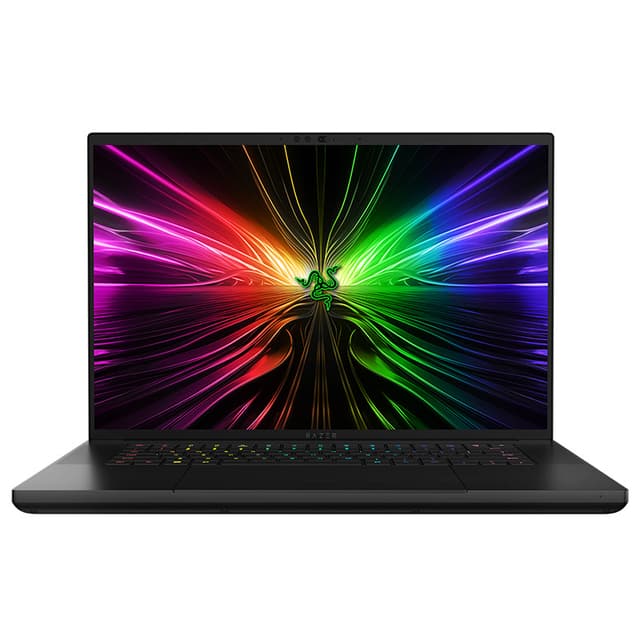
Experience incredible visual clarity and depth of color with the Razer Blade 16—featuring the world’s first OLED 240 Hz 16” display.
Experience incredible visual clarity and depth of color with the Razer Blade 16—featuring the world’s first OLED 240 Hz 16” display.
in 2 offers
last seen 11 May 2026
The lowest price we last saw for Razer Blade 16 UHD+ FHD+ Mini-LED i9-14900HX Rtx4090 64G 4T Gaming Laptop RZ09-05102EJ9-R3B1 was $7,899.00 at Umart, compared across 2 retailers (last seen 11 May 2026). Prices may have changed since.
The all-time low we recorded was $5,999.00 on 11 June 2024.
Prices last updated 11 May 2026.
Razer Blade 16 UHD+ FHD+ Mini-LED i9-14900HX Rtx4090 64G 4T Gaming Laptop RZ09-05102EJ9-R3B1
Experience incredible visual clarity and depth of color with the Razer Blade 16—featuring the world’s first OLED 240 Hz 16” display.
Experience incredible visual clarity and depth of color with the Razer Blade 16—featuring the world’s first OLED 240 Hz 16” display.
Last updated at 11/05/2026 20:09:51
Razer Blade 16 16in Dual UHD+FHD i9-14900HX RTX 4090 4TB SSD 64GB RAM W11H Gaming Laptop (RZ09-05102EJ9-R3B1)
30-day returns
Razer Blade 16 16" UHD+FHD+ mini-LED Laptop, i9-14900HX, 64GB RAM, 4TB SSD, RTX 4090, Windows 11 Home
7-day returns
originally posted on bestbuy.com
I am a VERY picky owner and have tried and returned Razer's in the past but this one is a keeper. I absolutely love this machine. I have previously had a Macbook Pro that was my "go to" but now six weeks of owning this one and I haven't even picked it up once. The screen is incredible, the heat and nose are tolerable, and the performance is amazing. This is a 5/5 laptop (especially with a skin to hide fingerprints and a lap pad if you want to game in your lap).
originally posted on bestbuy.com
First off, I would like to tell you, I really like this laptop. It’s rocking the new Intel Core i9 14900HX CPU, NVIDIA 4090 GPU, 32GB of 5600 ram and a 2TB hard drive from Samsung. It is way expensive, I know, and I heard a lot of bad reviews on it. I loved the look, took a chance, and it paid off.Where shall I start? I guess my main concern; “Is it as hot as the one I felt at the razer store (2023 model year),” the answer is no. It does get warm sometimes around the left palm rest when playing Fortnite (I know, don’t judge me) but not hot at all. When doing regular tasks, it never even gets warm. At first, I thought something was wrong with mine as it is always cool. I will say below the screen it does get hot but not like it would burn you. I did run a few ... MoreFirst off, I would like to tell you, I really like this laptop. It’s rocking the new Intel Core i9 14900HX CPU, NVIDIA 4090 GPU, 32GB of 5600 ram and a 2TB hard drive from Samsung. It is way expensive, I know, and I heard a lot of bad reviews on it. I loved the look, took a chance, and it paid off.Where shall I start? I guess my main concern; “Is it as hot as the one I felt at the razer store (2023 model year),” the answer is no. It does get warm sometimes around the left palm rest when playing Fortnite (I know, don’t judge me) but not hot at all. When doing regular tasks, it never even gets warm. At first, I thought something was wrong with mine as it is always cool. I will say below the screen it does get hot but not like it would burn you. I did run a few benchmarks on different settings to see if it would overheat. I did see it spike in Time Spy to 99 degrees before coming back down on turbo mode. I don’t know if this is good. In actual games though I see 82-84 (CPU), 72-74 (GPU) in balanced mode. 87-90 (CPU), 77-79 (GPU) in Turbo mode. All this is adjustable in synapse with the fan speed though. My fan speed is set to auto.That leads me into my next concern, “Fan Speed.” Is it loud? I would say yes in turbo, can be in Balanced but not usually in Silent. I do see myself always switching due to the task (FN+P). It is simple to switch. If I am watching YouTube or shopping on Amazon, I just leave it in Silent mode. If I am gaming, I usually leave it in Balanced mode (I don’t wear ear plugs or headphones). If I want more power then I will use Turbo, however, to be honest, I don’t really use Turbo mode much as the fans can get loud. Balanced mode seems to deliver enough performance on the QHD+ OLED display with Ultra Settings enabled.Speaking of not wearing headphones, the speakers are quite good on this laptop. I can clearly hear the audio over the fan speed, even on Turbo mode. I don’t have anything to compare it to, but I find the sound acceptable to me so far.The one thing overshadowing everything else is the display though. Man, this thing is nice. The only thing I wish for is it to be brighter. I am no display afficionado, but I think most individuals will find this display spectacular and without the screen wobble of other brands. I love that when It’s dark it’s not glowing some weird grey color. One thing everyone is talking about is the reflections and I will comment that they are indeed there under certain conditions. Is it a deal breaker? Not for me and under most circumstances, I don’t even notice it.Now the bad stuff, and I get it, even the Mona Lisa has its flaws. The Keyboard? It’s not great. It works fine but feels kind of flat. I am not a great typer or anything, but I get a bit lost. The Presses are superb, but the “Huge Trackpad” gets in the way and sometimes I randomly end up palm pressing somewhere else on the page. Quite frankly it’s annoying. It is not a deal breaker as most other laptops have adopted this same huge design. These brands could reduce the trackpad by 15-20% and they would still be big enough while giving a more comfortable typing experience.So, in closing I would like to say I am super satisfied will my pricy purchase, however, there are Improvements to be made. This is especially true from a useability standpoint mostly stemming from the huge trackpad. Would I buy another laptop brand if I could do it all again? Probably not as I think this laptop checks all the marks I could ask for (Powerful, stylish, cool running, great display, superb keyboard lighting etc.). I would recommend it to anyone that has the extra money to spend and wants something more powerful than the ASUS G16.
originally posted on digitec.ch
An incredible piece of kit:Really fast.Well built.Great screen.Although the KB is German, it is responsive - easily fixed with an external KB.Can be used as a business laptop as it is tasteful (not over the top lights).Generally a well built, tasteful, laptop. Very happy with this piece of kit.
| Camera | Windows Hello built-in IR FHD w/ Shutter |
| Card Reader | UHS-II SD Card Reader |
| Storage Type | PCIe 4.0 NVMe M.2 SSD |
| Dimensions | 21.99 mm x 244 mm x 355 mm / 0.87 x 9.61 x 13.98 |
| Touch Screen | No |
Razer Blade 16 16in Dual UHD+FHD i9-14900HX RTX 4090 4TB SSD 64GB RAM W11H Gaming Laptop (RZ09-05102EJ9-R3B1)
30-day returns
Razer Blade 16 16" UHD+FHD+ mini-LED Laptop, i9-14900HX, 64GB RAM, 4TB SSD, RTX 4090, Windows 11 Home
7-day returns
I am a VERY picky owner and have tried and returned Razer's in the past but this one is a keeper. I absolutely love this machine. I have previously had a Macbook Pro that was my "go to" but now six weeks of owning this one and I haven't even picked it up once. The screen is incredible, the heat and nose are tolerable, and the performance is amazing. This is a 5/5 laptop (especially with a skin to hide fingerprints and a lap pad if you want to game in your lap).
First off, I would like to tell you, I really like this laptop. It’s rocking the new Intel Core i9 14900HX CPU, NVIDIA 4090 GPU, 32GB of 5600 ram and a 2TB hard drive from Samsung. It is way expensive, I know, and I heard a lot of bad reviews on it. I loved the look, took a chance, and it paid off.Where shall I start? I guess my main concern; “Is it as hot as the one I felt at the razer store (2023 model year),” the answer is no. It does get warm sometimes around the left palm rest when playing Fortnite (I know, don’t judge me) but not hot at all. When doing regular tasks, it never even gets warm. At first, I thought something was wrong with mine as it is always cool. I will say below the screen it does get hot but not like it would burn you. I did run a few ... MoreFirst off, I would like to tell you, I really like this laptop. It’s rocking the new Intel Core i9 14900HX CPU, NVIDIA 4090 GPU, 32GB of 5600 ram and a 2TB hard drive from Samsung. It is way expensive, I know, and I heard a lot of bad reviews on it. I loved the look, took a chance, and it paid off.Where shall I start? I guess my main concern; “Is it as hot as the one I felt at the razer store (2023 model year),” the answer is no. It does get warm sometimes around the left palm rest when playing Fortnite (I know, don’t judge me) but not hot at all. When doing regular tasks, it never even gets warm. At first, I thought something was wrong with mine as it is always cool. I will say below the screen it does get hot but not like it would burn you. I did run a few benchmarks on different settings to see if it would overheat. I did see it spike in Time Spy to 99 degrees before coming back down on turbo mode. I don’t know if this is good. In actual games though I see 82-84 (CPU), 72-74 (GPU) in balanced mode. 87-90 (CPU), 77-79 (GPU) in Turbo mode. All this is adjustable in synapse with the fan speed though. My fan speed is set to auto.That leads me into my next concern, “Fan Speed.” Is it loud? I would say yes in turbo, can be in Balanced but not usually in Silent. I do see myself always switching due to the task (FN+P). It is simple to switch. If I am watching YouTube or shopping on Amazon, I just leave it in Silent mode. If I am gaming, I usually leave it in Balanced mode (I don’t wear ear plugs or headphones). If I want more power then I will use Turbo, however, to be honest, I don’t really use Turbo mode much as the fans can get loud. Balanced mode seems to deliver enough performance on the QHD+ OLED display with Ultra Settings enabled.Speaking of not wearing headphones, the speakers are quite good on this laptop. I can clearly hear the audio over the fan speed, even on Turbo mode. I don’t have anything to compare it to, but I find the sound acceptable to me so far.The one thing overshadowing everything else is the display though. Man, this thing is nice. The only thing I wish for is it to be brighter. I am no display afficionado, but I think most individuals will find this display spectacular and without the screen wobble of other brands. I love that when It’s dark it’s not glowing some weird grey color. One thing everyone is talking about is the reflections and I will comment that they are indeed there under certain conditions. Is it a deal breaker? Not for me and under most circumstances, I don’t even notice it.Now the bad stuff, and I get it, even the Mona Lisa has its flaws. The Keyboard? It’s not great. It works fine but feels kind of flat. I am not a great typer or anything, but I get a bit lost. The Presses are superb, but the “Huge Trackpad” gets in the way and sometimes I randomly end up palm pressing somewhere else on the page. Quite frankly it’s annoying. It is not a deal breaker as most other laptops have adopted this same huge design. These brands could reduce the trackpad by 15-20% and they would still be big enough while giving a more comfortable typing experience.So, in closing I would like to say I am super satisfied will my pricy purchase, however, there are Improvements to be made. This is especially true from a useability standpoint mostly stemming from the huge trackpad. Would I buy another laptop brand if I could do it all again? Probably not as I think this laptop checks all the marks I could ask for (Powerful, stylish, cool running, great display, superb keyboard lighting etc.). I would recommend it to anyone that has the extra money to spend and wants something more powerful than the ASUS G16.
An incredible piece of kit:Really fast.Well built.Great screen.Although the KB is German, it is responsive - easily fixed with an external KB.Can be used as a business laptop as it is tasteful (not over the top lights).Generally a well built, tasteful, laptop. Very happy with this piece of kit.
I wanted to love this but ended up returning it due to the trackpad and surface heat temps. The trackpad was extremely wobbly, supposedly because of my Apple Watch’s proximity to the computer. Which is dumb. The mouse cursor jumped around all over the screen, and made using it impossible. Secondly, the palm rest (left hand) was so hot I draped a microfiber towel over it when using for extended periods. Quite uncomfortable. The performance was great, excellent build quality.
30% gamer 70% worker. Im a doc so this is the best laptop for me. Can game competitively when I want, but also do a ton of work on here- high res screen, low latency. I bought some gel palm rests if it gets too warm and its perfect with my viper v2. Also, the stand helps bring temps down around 8 degrees- looks good too-
This is a fantastic laptop! I was considering returning this at first because when I put it under load the processor would consistently get up to 105-106 degrees Celsius (dangerously high!), but I learned about undervolting the processor and after I did that and adjusted the turbo multipliers down (doesn't run as fast but thermal throttling wouldn't allow it to get to the 5.8GHz anyway), the temps went WAY down. On Balanced mode, which has slower fan speeds so it's a lot quieter, it never gets above the mid-80's. For normal browsing, videos, etc., it never gets above the low 60's! Performance is fantastic and I couldn't be happier so far. The screen is amazing. Overall, I'm a happy customer.Also, make sure you are REALLY careful if you buy one of these and want to ... MoreThis is a fantastic laptop! I was considering returning this at first because when I put it under load the processor would consistently get up to 105-106 degrees Celsius (dangerously high!), but I learned about undervolting the processor and after I did that and adjusted the turbo multipliers down (doesn't run as fast but thermal throttling wouldn't allow it to get to the 5.8GHz anyway), the temps went WAY down. On Balanced mode, which has slower fan speeds so it's a lot quieter, it never gets above the mid-80's. For normal browsing, videos, etc., it never gets above the low 60's! Performance is fantastic and I couldn't be happier so far. The screen is amazing. Overall, I'm a happy customer.Also, make sure you are REALLY careful if you buy one of these and want to expand storage or memory. It's easy to do once you're in, but the screws strip incredibly easily on the bottom of the case. I stripped two and was lucky to get them out. Had to buy some replacement screws on Amazon but all good now.
I have serious backlight bleeding on this new MiniLED laptop, and the black colors look gray. I don't see any dimming zone separation, and the backlight is always ON in areas where it should be off, like in dark sections of an image. This display looks more like a regular LED and not a Mini LED.I purchased another brand new Blade 16 same model and specs. And it shows the same behavior with the backlight out of the box. I think the issue is either the BIOS or panel firmware.
Best gaming laptop on the market. Upgraded from the 2023 Blade 16. The 4k mini-led was good, but the oled is far superior in my opinion. The lower resolution and higher refresh rate over the 2023 model is a perfect match for the laptop. Games are buttery smooth. Thermal performance has also been improved. Far less thermal throttling vs the 2023 model.Screen:Pros- Amazing picture quality and fast response time. Best laptop screen in my opinion. Lower resolutions look sharper than 2023 model. Color accuracy is phenomenal and color profiles are well calibrated.Cons- Glossy screen does not handle ambient lighting well. Doesn't use the same glass as the new Zephyrus G16, which offers better performance in brighter environments. However, blacks are inkier and colors ... MoreBest gaming laptop on the market. Upgraded from the 2023 Blade 16. The 4k mini-led was good, but the oled is far superior in my opinion. The lower resolution and higher refresh rate over the 2023 model is a perfect match for the laptop. Games are buttery smooth. Thermal performance has also been improved. Far less thermal throttling vs the 2023 model.Screen:Pros- Amazing picture quality and fast response time. Best laptop screen in my opinion. Lower resolutions look sharper than 2023 model. Color accuracy is phenomenal and color profiles are well calibrated.Cons- Glossy screen does not handle ambient lighting well. Doesn't use the same glass as the new Zephyrus G16, which offers better performance in brighter environments. However, blacks are inkier and colors pop more than competition in light controlled environments. Only 400 nits brightness. Wish it was a bit higher, but it is still bright enough.Speakers:Pros- Very loud and clear. Loud enough to drown out fan noise.Cons: Bass performance is poor. Lacks any real lower end, especially compared to other laptops. Slight distortion at max volume for some contentKeyboard/TrackpadPros- Accurate and responsive trackpad. Best rgb keyboard lighting on the market. No light bleed and an ample amount of customization options.Cons- Not as satisfying of a typing experience as some of the competion offering mechanical switch keys.Overall, the pros far outweigh the cons. No laptop is perfect, but the 2024 Blade 16 strikes a balance that provides an amazing gaming experience. I have a 4090 desktop, and I still tend to game on my Blade 16 the majority of the time.Ps: get a skin for the laptop, so you dont have to worry about fingerprints and smudges. Its a fingerprint magnet.
Amazing laptop with top notch tech that is future proof for many years to come. The OLED screen is silky smooth at 240hz and the CPU and GPU produce some of the most beautiful pictures I’ve ever seen. This thing is a desktop in a very small package. I would absolutely recommend this laptop for anyone wanting the top dog in laptop technology.
While the most expensive in terms of price, the components are above average and work flawlessly. Has all the hardware necessary to complete normal/game relate taskings. Case is well milled and although a fingerprint magnet{not bad} plus has easy access to the inner hardware for upgrade, as long as you have a T5(torx} driver. Be careful with T5 not to strip the screw. Vapor chamber and new use of Honeywell thermal paste is advantage in keeping this powerhouse cool. Fans work relatively within specs and not loud. Razer rework of Synapse software well improved. Nvidia 4080 at full 175 TPM super. OLED screen is a big hit on visibility regardless of task employed. Fantastic viewing all around, no blur. Do highly recommend use of a quality chill mat device as it will ... MoreWhile the most expensive in terms of price, the components are above average and work flawlessly. Has all the hardware necessary to complete normal/game relate taskings. Case is well milled and although a fingerprint magnet{not bad} plus has easy access to the inner hardware for upgrade, as long as you have a T5(torx} driver. Be careful with T5 not to strip the screw. Vapor chamber and new use of Honeywell thermal paste is advantage in keeping this powerhouse cool. Fans work relatively within specs and not loud. Razer rework of Synapse software well improved. Nvidia 4080 at full 175 TPM super. OLED screen is a big hit on visibility regardless of task employed. Fantastic viewing all around, no blur. Do highly recommend use of a quality chill mat device as it will prolong longevity and give more cooling aspect to the Blade 16. Ports are sufficient, add Dock if needed. WIFI7 compatibile when available. Great Touchpad, with option turn off in games. Setup a breeze. Battery getting near 4/5 hrs normal internet, with gaming near 3 hrs {depends on game status} with best to use Charger for gaming or video scene. Like no bloatware condition.
| Camera | Windows Hello built-in IR FHD w/ Shutter |
| Card Reader | UHS-II SD Card Reader |
| Storage Type | PCIe 4.0 NVMe M.2 SSD |
| Dimensions | 21.99 mm x 244 mm x 355 mm / 0.87 x 9.61 x 13.98 |
| Touch Screen | No |

