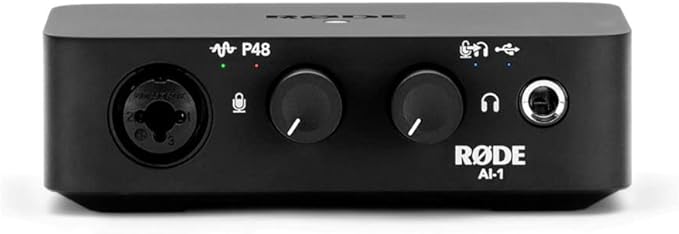
Rode AI-1 USB Audio Interface
The AI-1 USB Audio Interface adds studio-quality Input and Output capabilities to your PC or Mac, turning your recording software into a full recording setup. With its high quality Neutrik XLR-1/4” Combo Jack combined input and discrete Class-A preamp, the AI-1 allows you to connect a microphone or instrument or line level audio signal to your Mac/Windows computer for recording. The AI-1 provides the necessary A/D conversion at up to 24 bit/96kHz. The AI-1 also allows playback and monitoring of audio either direct from the microphone or via playback from the recording software. This is done via a high-quality discrete headphone ampli er and outputs via either the ¼’’ headphone output on the front of the unit or the balanced ¼’’ outputs on the rear of the unit.
The AI-1 USB Audio Interface adds studio-quality Input and Output capabilities to your PC or Mac, turning your recording software into a full recording setup. With its high quality Neutrik XLR-1/4” Combo Jack combined input and discrete Class-A preamp, the AI-1 allows you to connect a microphone or instrument or line level audio signal to your Mac/Windows computer for recording. The AI-1 provides the necessary A/D conversion at up to 24 bit/96kHz. The AI-1 also allows playback and monitoring of audio either direct from the microphone or via playback from the recording software. This is done via a high-quality discrete headphone ampli er and outputs via either the ¼’’ headphone output on the front of the unit or the balanced ¼’’ outputs on the rear of the unit.
The AI-1 USB Audio Interface adds studio-quality Input and Output capabilities to your PC or Mac, turning your recording software into a full recording setup. With its high quality Neutrik XLR-1/4” Combo Jack combined input and discrete Class-A preamp, the AI-1 allows you to connect a microphone or instrument or line level audio signal to your Mac/Windows computer for recording. The AI-1 provides the necessary A/D conversion at up to 24 bit/96kHz. The AI-1 also allows playback and monitoring of audio either direct from the microphone or via playback from the recording software. This is done via a high-quality discrete headphone ampli er and outputs via either the ¼’’ headphone output on the front of the unit or the balanced ¼’’ outputs on the rear of the unit.
The AI-1 USB Audio Interface adds studio-quality Input and Output capabilities to your PC or Mac, turning your recording software into a full recording setup. With its high quality Neutrik XLR-1/4” Combo Jack combined input and discrete Class-A preamp, the AI-1 allows you to connect a microphone or instrument or line level audio signal to your Mac/Windows computer for recording. The AI-1 provides the necessary A/D conversion at up to 24 bit/96kHz. The AI-1 also allows playback and monitoring of audio either direct from the microphone or via playback from the recording software. This is done via a high-quality discrete headphone ampli er and outputs via either the ¼’’ headphone output on the front of the unit or the balanced ¼’’ outputs on the rear of the unit.
in 158 offers
The lowest price for Rode AI-1 USB Audio Interface right now is $154.00 at Music On Stage, compared across 48 retailers.
The all-time low was $57.24 on 28 Apr 2026 — today's price is 169% above the lowest ever. It has been notably cheaper before — worth setting a price alert.
Prices last updated 12 Oct 2026.
Last updated at 12/10/2026 04:44:58
RØDE AI-1 Studio-grade Single-channel USB Audio Interface with Neutrik Combi-jack for Music Production, Streaming and Podcasting
Affiliate Disclosure: We may receive a small commission for purchases made through this link at no extra cost to you. This helps support our site. Thank you!
RODE AI-1 XLR USB Audio Interface
Delivery $20.65
Rode AI1 Studio-Quality Audio Interface & Headphone Amplifier
Delivery between Wed – Fri $15
Rode AI-1 Interface
Delivery $78.67
Rode AI1 USB Audio Interface
Delivery $12.50
RODE AI-1 Audio Interface Single Channel USB
Rode AI-1 Studio-Quality USB Audio Interface
Free delivery
Rode AI-1 Audio Interface
Free delivery
Rode Ai-1 Studio-quality 96 Khz / 24-bit Premium Usb Audio Interface
Delivery $11
Affiliate Disclosure: We may receive a small commission for purchases made through this link at no extra cost to you. This helps support our site. Thank you!
RODE AI-1 USB Audio Interface
Delivery $12
originally posted on pbtech.co.nz
Build quality and looks are both excellent. Looks very nice in the desk. Gain range is 45ish db, and enough for most microphones but is a bit low for gain hungry dynamic mics like Shure SM7/RodePodmic. Will need to pair this with an in-line amp like a Fethead or Cloudlifter for that, but the built in amps are very low noise and do the job nicely. Headphone output has monitoring which is excellent and capable of driving decent high impedance headphones.
originally posted on pbtech.co.nz
I am currently looking to BIN any USB Powered Interfaces, including my RODE AI-1 to go back in time to when DC power was provided in which provided stable power which in turn, means the Gain works correctly. usb-C power is rubbish and unreliable. DONT WASTE YOUR MONEY unless you want the same fate as Kurt...(to go insane, and decide that the world isnt good enough) o.O. Again, unreliable device - send it back to the Manufacturers via a Cannon!
originally posted on rubbermonkey.co.nz
Fantastic interface if you just need one mono mike input like me. Pre amp has crazy low noise floor and plenty of gain with firmware update. Well built, small footprint. Powered via USB connection so no wall worts and no special software required - truly plug and play. Also works on iPad Pro as a mic input and headphone output. A+++
| Audio Bit Depth | 24-bit |
| Max Sampling Rate | 96 kHz |
| Instrument Inputs | 1 |
| Line Inputs | 1 |
| Monitor Outputs | 2 |

RØDE AI-1 Studio-grade Single-channel USB Audio Interface with Neutrik Combi-jack for Music Production, Streaming and Podcasting
Affiliate Disclosure: We may receive a small commission for purchases made through this link at no extra cost to you. This helps support our site. Thank you!
RODE AI-1 XLR USB Audio Interface
Delivery $20.65
Rode AI1 Studio-Quality Audio Interface & Headphone Amplifier
Delivery between Wed – Fri $15
Rode AI-1 Interface
Delivery $78.67
Rode AI1 USB Audio Interface
Delivery $12.50
Build quality and looks are both excellent. Looks very nice in the desk. Gain range is 45ish db, and enough for most microphones but is a bit low for gain hungry dynamic mics like Shure SM7/RodePodmic. Will need to pair this with an in-line amp like a Fethead or Cloudlifter for that, but the built in amps are very low noise and do the job nicely. Headphone output has monitoring which is excellent and capable of driving decent high impedance headphones.
I am currently looking to BIN any USB Powered Interfaces, including my RODE AI-1 to go back in time to when DC power was provided in which provided stable power which in turn, means the Gain works correctly. usb-C power is rubbish and unreliable. DONT WASTE YOUR MONEY unless you want the same fate as Kurt...(to go insane, and decide that the world isnt good enough) o.O. Again, unreliable device - send it back to the Manufacturers via a Cannon!
Fantastic interface if you just need one mono mike input like me. Pre amp has crazy low noise floor and plenty of gain with firmware update. Well built, small footprint. Powered via USB connection so no wall worts and no special software required - truly plug and play. Also works on iPad Pro as a mic input and headphone output. A+++
I bought this with a specific use case in mind - I wanted to integrate remote guests into my podcast setup using an iPhone and Apple's camera adapter. In other words, I wanted to use this as a separate audio interface to send a mono mix minus from my mixer to the guest on a Zoom call, and get the guest's audio into my recorder. It turns out it will work for this purpose, but I can't really recommend it, as I'll explain below.First off: this thing comes with no real manual to speak of and there is not real manual available on the web site, so I had to experiment to figure out how some things work. Also, you will want to update the firmware using the Rode Central app on Windows or MacOS before trying to use it with an iOS device.It makes a really good ... MoreI bought this with a specific use case in mind - I wanted to integrate remote guests into my podcast setup using an iPhone and Apple's camera adapter. In other words, I wanted to use this as a separate audio interface to send a mono mix minus from my mixer to the guest on a Zoom call, and get the guest's audio into my recorder. It turns out it will work for this purpose, but I can't really recommend it, as I'll explain below.First off: this thing comes with no real manual to speak of and there is not real manual available on the web site, so I had to experiment to figure out how some things work. Also, you will want to update the firmware using the Rode Central app on Windows or MacOS before trying to use it with an iOS device.It makes a really good DAC/headphone amp. The DAC is very clean and crisp and the built-in headphone amp is very powerful and should drive anything you have around. So if you just want to use it to listen to your music collection I highly recommend it for that. I'm actually going to use one for that purpose.It also has a very good mic preamp in it for the one input, with enough gain to use even with dynamic mics like the Heil PR-40. So if you want to use it to get one microphone into your computer for recording, I recommend it for that, too. You can turn on phantom power by pushing the knob in. I didn't try it with a condenser mic but given the general quality I would assume that would also work well.The TRS in on the combo jack input also works fine with an electric guitar and its sounds quite clean, with plenty of gain. I did not try it with something like a drum machine or synthesizer output.If you want to monitor the input directly, rather than hearing what your connected computer or phone is sending, you push in the right knob and turn on direct monitoring. So far, so good.You can use the mic/instrument input and turn on direct monitoring, and _also_ listen to the audio your computer or phone is playing. If you turn on the direct monitoring, you have a little mixer. So you can, for example, play guitar over a backing track to practice and it will sound very good through your headphones.Things get strange when you want to use the rear pair of TRS outputs. This thing will drive _either_ the rear outputs or the headphone jack, but not both. If you plug in headphones, you'll get nothing out of the TRS outputs.When you have TRS cables plugged into the rear outputs, the output level is controlled with the right knob on the front panel. This is a strange choice, because let's say you have the knob all the way up, and then plug in a pair of headphones, forgetting to turn the knob down. What happens? You'll blow your headphones up. Or your ears. So, that's a design choice I really disapprove of. I know there's not much space on this device, but a separate knob that is always dedicated to headphone volume would be a better design choice.If you have cables plugged into the rear TRS outputs, and the direct monitoring engaged, you'll get your microphone or instrument input out the back, so you can record your live mic or instrument into your computer or phone. That's all well and good.Now, for some strangeness. The rear outputs have very low gain when play the output from your computer or phone. So, let's say you wanted to play audio from your computer or phone directly into a set of powered speakers with balanced inputs. You're going to have to turn the speakers way up to get a normal volume level, adding noise. That's not good.I compared two devices side by side, a phone driving the outputs of a Focusrite Clarett+ 2pre, and another phone driving this device, both playing test tones such as a pink noise and a sine wave at -20dB. Running this into an SSL SiX, it was obvious that even with the right knob all the way up, the output from the AI-1 is not at all full scale. I also tried it into a Sound Devices MixPre 6 II. To get the levels to match, I had to add about 12 or 13dB of gain on the inputs.The situation on the input is much worse, though. If you want to use the combo jack with a TRS input, it's problematic. Sending the alt monitor mix output of the SSL SiX, with the mono switch engaged, using a TRS cable, into the AI-1, even with the left knob turned all the way down, the input gain was too high and my signal would severely clip the input, indicated by a red light (you get red, yellow, and green to give you a sense of how hot your input is). I had to turn down the monitor mix level down to about 3/4 to avoid the clipping.Worse, even when the input via a TRS cable is low enough to avoid clipping, there is, as some other reviewers have noted, nasty digital noise on the input. If I record the input to my phone it is present on the playback, which means my remote Zoom guest will get this noise. Since Zoom is not known for its audio quality to begin with, I can probably live with this. Note that the digital noise isn't present on the AI-1 _outputs_, just the input, and only when using a TRS cable, not an XLR cable or TS instrument cable.Thinking that maybe I had a bad unit, I wound up ordering a second one from the other company that sends you candy with music gear thrown in as a bonus. So I actually tested two units. Both needed the firmware update, but both behaved identically.Oh, also, the front knobs on both units feel just a little bit loose. There's a bit of play in them. That's a minor annoyance but unexpected.I'm hoping maybe a future firmware update might fix the output level. I'd be much happier if I could get full-scale output from the rear TRS sockets. I don't think they can fix the TRS input with a firmware update. I think that's a circuit design issue.If they make a Mark II, I'd suggest:- Adding a line/inst button on the front panel to change the characteristics of the TRS/TS input for instrument or line level - basically, turn off the high impedance that is desirable for something like an electric guitar and change the gain staging.- Break out the headphone volume control/rear output volume control into separate knobs, with pass through behavior you can turn on, on _each_ of them.Some of these features could be added in software, but at present there doesn't seem to be any way to control things like the rear output gain using software. The Rode Central app will only update the device firmware. But if there was a Windows, Mac, and Phone app that would control some of these parameters and they were persistent after power-cycling the device, that would be great, and I could live without some hardware knobs and buttons.
Sound quality for this price and overall build quality is great, no need for drivers or specific software, but...When you turn on your computer it can just go offline right on log on screen, triyng to switch sample rate? You will get the device randomly turned off instead, rofl. On every sampling rate different then 44.1 in my case when you listening music or playing games you can get sound distortion for 1-5 second long during somebody's just call you thru the discord or message via social network. And the most important: I got constant hissing noise in my Beyerdynamic Custom Studio, I have tried to replace PSU, different USB ports, cables - doesnt matter (firmware updated to latest 1.2.3).
Taking the product out of its packaging, I was immediately impressed by how dense a lump it is. It feels very solid and well made. I bought this to have a high quality headphone output with manual volume control, plus the ability to hook up the XLR microphones I already have to my computer. At both of these functions it works perfectly. Very happy with this purchase.
I have had very good experience with Rode mics so I was excited when they introduced this USB audio interface, the AI-1. Since my Apogee One died , I have been looking for something in a small footprint to use primarily with my iMac as a DAC for headphones and powered speakers -- but I also wanted the option to record with as well. And I didn't want to spend hundreds of dollars. At $129 this is just what I was hoping for. The unit is solid and looks sleek -- sound is very respectable and does not disappoint with my Sennheiser HD 280 Pro headphones and Yamaha MSP3 powered monitors. Setup is super easy -- you don't even need the Quickstart Guide but it is very nicely laid out in a cool little booklet. I haven't had the chance to record yet with on my MacBook Pro in ... MoreI have had very good experience with Rode mics so I was excited when they introduced this USB audio interface, the AI-1. Since my Apogee One died , I have been looking for something in a small footprint to use primarily with my iMac as a DAC for headphones and powered speakers -- but I also wanted the option to record with as well. And I didn't want to spend hundreds of dollars. At $129 this is just what I was hoping for. The unit is solid and looks sleek -- sound is very respectable and does not disappoint with my Sennheiser HD 280 Pro headphones and Yamaha MSP3 powered monitors. Setup is super easy -- you don't even need the Quickstart Guide but it is very nicely laid out in a cool little booklet. I haven't had the chance to record yet with on my MacBook Pro in Logic, but I will get to that soon enough.
I bought it a few months ago with a pair of studio monitors.When I turn my computer on most of the time the audio interface does not turn on.Sometimes it turns on and off constantly, I need to unplug it for a few minutes and replug it. But not always.It will go to sleep randomly if there is no sound playing for a few minutes, it would be good if waking up was working well, often I need to wait for a few minutes for it to wake up.It also pick up some electrical noise from my computer, it gets worst if my GPU is active. I had to add a filter to remove the noise.Get the one that is red instead.
The AI-1 integrated with my Mac set up seamlessly. Unlike some older devices (such as the FastTrack Pro I upgraded from), the AI-1 can be control with the Mac OS X audio controls on your keyboard. The headphone amplifier works really well and the mic/quarter inch input delivers really high quality sound for home music recordings (using Logic Pro), podcast recordings and more recently Zoom calls.I don't like desk clutter and this device is about the size of an Apple TV and connects through one cable which I run through my external monitor. One issue that the upgrade to Mac OS X Catalina fixed was that I would have to unplug and plug back in the audio interface, so my computer didn't automatically use my external monitor's audio. However, that is no longer an ... MoreThe AI-1 integrated with my Mac set up seamlessly. Unlike some older devices (such as the FastTrack Pro I upgraded from), the AI-1 can be control with the Mac OS X audio controls on your keyboard. The headphone amplifier works really well and the mic/quarter inch input delivers really high quality sound for home music recordings (using Logic Pro), podcast recordings and more recently Zoom calls.I don't like desk clutter and this device is about the size of an Apple TV and connects through one cable which I run through my external monitor. One issue that the upgrade to Mac OS X Catalina fixed was that I would have to unplug and plug back in the audio interface, so my computer didn't automatically use my external monitor's audio. However, that is no longer an issue.Another small issue, that seemed to be fixed with the upgrade to Catalina, was that I would hear a very faint radio signal in my headphones, but it didn't impact my recordings at all.Finally, I have this AI-1 connected to a pair of JBL monitor speakers through the balanced line outs on the back of the unit. The audio output is incredible.If you're looking for a minimalist, high-quality USB audio interface, the AI-1 is an excellent choice.
I bought the Rode AI-1 for my mic setup about a year ago. I was surprised at how well built (Materials and overall feel) the unit was for the price. It's a simple piece that in my opinion is a great long term investment from a trusty brand. I'm pretty tough on products I buy and I wish I could give it some sort of negative feedback but genuinely, it's so simple and well built I can't. I've paired it with the RODE Procaster Broadcast Quality Dynamic Microphone and a mixer. Great setup with pristine sound.
| Audio Bit Depth | 24-bit |
| Max Sampling Rate | 96 kHz |
| Instrument Inputs | 1 |
| Line Inputs | 1 |
| Monitor Outputs | 2 |



