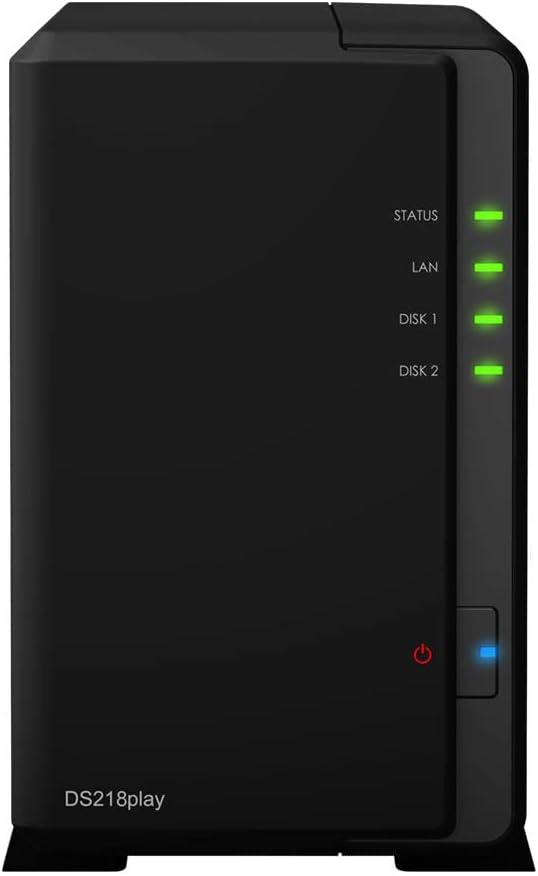
Synology DS220J DiskStation 2 Bay NAS
Synology DS220j 6TB 2 Bay Desktop NAS Solution | Installed with 2 x 3TB Seagate IronWolf Drives 24/7 file server for your household to store, share, and backup personal data Award-winning DiskStation Manager (DSM) brings intuitive operation flow and reduces learning curve Access and share data with any Windows, macOS, and Linux computers or mobile devices Integrated media server to support multimedia content streaming Freely access private cloud files on-the-go and back up mobile photos with iOS and Android apps Safeguard digital assets with cross-platform computer backup applications Synology DiskStation DS220j is an entry-level network-attached storage for your household to store and share photos, videos, documents, and all types of personal data. The 2-bay private cloud solution provides complete and intuitive data protection approaches for you to easily back up computer data and mobile photos, with just a few clicks.
Synology DS220j 6TB 2 Bay Desktop NAS Solution | Installed with 2 x 3TB Seagate IronWolf Drives 24/7 file server for your household to store, share, and backup personal data Award-winning DiskStation Manager (DSM) brings intuitive operation flow and reduces learning curve Access and share data with any Windows, macOS, and Linux computers or mobile devices Integrated media server to support multimedia content streaming Freely access private cloud files on-the-go and back up mobile photos with iOS and Android apps Safeguard digital assets with cross-platform computer backup applications Synology DiskStation DS220j is an entry-level network-attached storage for your household to store and share photos, videos, documents, and all types of personal data. The 2-bay private cloud solution provides complete and intuitive data protection approaches for you to easily back up computer data and mobile photos, with just a few clicks.
Synology DS220j 6TB 2 Bay Desktop NAS Solution | Installed with 2 x 3TB Seagate IronWolf Drives 24/7 file server for your household to store, share, and backup personal data Award-winning DiskStation Manager (DSM) brings intuitive operation flow and reduces learning curve Access and share data with any Windows, macOS, and Linux computers or mobile devices Integrated media server to support multimedia content streaming Freely access private cloud files on-the-go and back up mobile photos with iOS and Android apps Safeguard digital assets with cross-platform computer backup applications Synology DiskStation DS220j is an entry-level network-attached storage for your household to store and share photos, videos, documents, and all types of personal data. The 2-bay private cloud solution provides complete and intuitive data protection approaches for you to easily back up computer data and mobile photos, with just a few clicks.
Synology DS220j 6TB 2 Bay Desktop NAS Solution | Installed with 2 x 3TB Seagate IronWolf Drives 24/7 file server for your household to store, share, and backup personal data Award-winning DiskStation Manager (DSM) brings intuitive operation flow and reduces learning curve Access and share data with any Windows, macOS, and Linux computers or mobile devices Integrated media server to support multimedia content streaming Freely access private cloud files on-the-go and back up mobile photos with iOS and Android apps Safeguard digital assets with cross-platform computer backup applications Synology DiskStation DS220j is an entry-level network-attached storage for your household to store and share photos, videos, documents, and all types of personal data. The 2-bay private cloud solution provides complete and intuitive data protection approaches for you to easily back up computer data and mobile photos, with just a few clicks.
in 5 offers
The lowest price for Synology DS220J DiskStation 2 Bay NAS right now is $263.00 at Device Deal, compared across 4 retailers.
The all-time low was $196.04 on 7 Feb 2026 — today's price is 34% above the lowest ever. It has been notably cheaper before — worth setting a price alert.
Prices last updated 1 Oct 2026.
Last updated at 01/10/2026 07:00:51
Synology DiskStation DS220j 2-Bay Diskless NAS Quad Core CPU 512MB RAM
Delivery $11.99
Synology DiskStation DS220J 2-Bay 3.5' Diskless 1xGbE NAS (Tower) , Realtek RTD 1.4GHz, 512MB RAM DDR4, 2 x USB3.0, 2 Yr Wty ~BASY-DS218J freeshipping
Free delivery
Synology Diskstation Ds220j 2-bay Nas 512mb Ddr4 Diskless Brand
Delivery $15
Affiliate Disclosure: We may receive a small commission for purchases made through this link at no extra cost to you. This helps support our site. Thank you!
Synology DS220j 2-Bay NAS - Never Used (Diskless)
Delivery between 6–10 Oct $41
originally posted on pbtech.co.nz
I have owned this product for about a month.Pros-*This was the perfect solution instead of paying neverending monthly fees for cloud storage.*Has alot of built in software that is useful and free.*Can be accessed remotely and admin can add users ifneeded and control what they can edit or access.*Good price.Cons-*Takes a little bit of effort to set up and get the hang of.*Can seem a bit slow when accessing through wifi vsdirect ethernet cable.*Make sure the hard drives are compatible beforepurchasing...I accidentally ordered the wrong hard drives but realisedbefore i opened them.(Pbtech had excellent customer service and refundedthem without any issues.)Super happy with this product and with the customer service :)
originally posted on bhphotovideo.com
The DS220j 2-Bay NAS Enclosure is a well thought out network-based multi-user hardware and software solution with good performance. Basic setup through my iPad was simple, automatically finding the DS220j, loading DSM and the supporting modules for basic file and print. Once I created a volume, I was ready to go. I plugged in two external USB drives and they show up as part of the DS220j file system. If you want a web server (Apache), media server, email server, etc., no-cost packages are available through the Control Panel in DSM. (Note the more services you run, the more memory and CPU are utilized--the step-up 2-bay enclosure includes more RAM and a faster CPU). Security is effective and highly granular, covering the NAS and the external drives. If you have ... MoreThe DS220j 2-Bay NAS Enclosure is a well thought out network-based multi-user hardware and software solution with good performance. Basic setup through my iPad was simple, automatically finding the DS220j, loading DSM and the supporting modules for basic file and print. Once I created a volume, I was ready to go. I plugged in two external USB drives and they show up as part of the DS220j file system. If you want a web server (Apache), media server, email server, etc., no-cost packages are available through the Control Panel in DSM. (Note the more services you run, the more memory and CPU are utilized--the step-up 2-bay enclosure includes more RAM and a faster CPU). Security is effective and highly granular, covering the NAS and the external drives. If you have experience setting up and managing servers, you'll appreciate the level of control that's available. For me, discovering iDrive is supported sealed the deal. I can remove my laptop and know backups will complete wherever I go. While setup may intimidate some, it's worth the effort. Excellent product at and excellent price!
originally posted on newegg.com
The Synology DS220j is my first NAS. I am a computer-savvy millennial, but I am NOT an IT person and I have never built a computer. I waited a long time to purchase this NAS because I was afraid it would be too complicated for me to use. All I can say is that I should have purchased it sooner! I've had my NAS for about 6 months now and I am SO happy with it. I wanted to buy a NAS to have a more secure way to backup certain personal files that I did not want to store on a cloud, to "wirelessly" perform Time Machine backups, and to store my music library which no longer fits on my computer. My NAS has done all of these things for me so far. If you've never owned a Synology NAS before, there is a bit of a learning curve. There are plenty of resources for learning how ... MoreThe Synology DS220j is my first NAS. I am a computer-savvy millennial, but I am NOT an IT person and I have never built a computer. I waited a long time to purchase this NAS because I was afraid it would be too complicated for me to use. All I can say is that I should have purchased it sooner! I've had my NAS for about 6 months now and I am SO happy with it. I wanted to buy a NAS to have a more secure way to backup certain personal files that I did not want to store on a cloud, to "wirelessly" perform Time Machine backups, and to store my music library which no longer fits on my computer. My NAS has done all of these things for me so far. If you've never owned a Synology NAS before, there is a bit of a learning curve. There are plenty of resources for learning how to use it though. Synology has a youtube channel with a lot of simple and straight forward video tutorials. You can also find plenty video reviews and tutorials on youtube made by Synology customers. If you're brand new to NAS (and not an IT person, like me), I recommend SpaceRex's videos for some plain language tutorials. Synology also has a ton of written tutorials in their knowledge center (https://kb.synology.com/). When I purchased my Synology DS220j NAS, I only purchased one 4TB hard drive. I wish I had purchased two hard drives and set it up this way, so that the first hard drive is backed up. I plan to purchase a second hard drive soon. Note: Make sure you buy a hard drive made for a NAS, not just any desktop internal hard drive.
| General | |
| Device Type | NAS server |
| Host Connectivity | Gigabit Ethernet |
| Total Storage Capacity | 0 GB |
| Installed Devices / Modules Qty | 0 (installed) / 2 (max) |
Synology DiskStation DS220j 2-Bay Diskless NAS Quad Core CPU 512MB RAM
Delivery $11.99
Synology DiskStation DS220J 2-Bay 3.5' Diskless 1xGbE NAS (Tower) , Realtek RTD 1.4GHz, 512MB RAM DDR4, 2 x USB3.0, 2 Yr Wty ~BASY-DS218J freeshipping
Free delivery
Synology Diskstation Ds220j 2-bay Nas 512mb Ddr4 Diskless Brand
Delivery $15
Affiliate Disclosure: We may receive a small commission for purchases made through this link at no extra cost to you. This helps support our site. Thank you!
Synology DS220j 2-Bay NAS - Never Used (Diskless)
Delivery between 6–10 Oct $41
I have owned this product for about a month.Pros-*This was the perfect solution instead of paying neverending monthly fees for cloud storage.*Has alot of built in software that is useful and free.*Can be accessed remotely and admin can add users ifneeded and control what they can edit or access.*Good price.Cons-*Takes a little bit of effort to set up and get the hang of.*Can seem a bit slow when accessing through wifi vsdirect ethernet cable.*Make sure the hard drives are compatible beforepurchasing...I accidentally ordered the wrong hard drives but realisedbefore i opened them.(Pbtech had excellent customer service and refundedthem without any issues.)Super happy with this product and with the customer service :)
The DS220j 2-Bay NAS Enclosure is a well thought out network-based multi-user hardware and software solution with good performance. Basic setup through my iPad was simple, automatically finding the DS220j, loading DSM and the supporting modules for basic file and print. Once I created a volume, I was ready to go. I plugged in two external USB drives and they show up as part of the DS220j file system. If you want a web server (Apache), media server, email server, etc., no-cost packages are available through the Control Panel in DSM. (Note the more services you run, the more memory and CPU are utilized--the step-up 2-bay enclosure includes more RAM and a faster CPU). Security is effective and highly granular, covering the NAS and the external drives. If you have ... MoreThe DS220j 2-Bay NAS Enclosure is a well thought out network-based multi-user hardware and software solution with good performance. Basic setup through my iPad was simple, automatically finding the DS220j, loading DSM and the supporting modules for basic file and print. Once I created a volume, I was ready to go. I plugged in two external USB drives and they show up as part of the DS220j file system. If you want a web server (Apache), media server, email server, etc., no-cost packages are available through the Control Panel in DSM. (Note the more services you run, the more memory and CPU are utilized--the step-up 2-bay enclosure includes more RAM and a faster CPU). Security is effective and highly granular, covering the NAS and the external drives. If you have experience setting up and managing servers, you'll appreciate the level of control that's available. For me, discovering iDrive is supported sealed the deal. I can remove my laptop and know backups will complete wherever I go. While setup may intimidate some, it's worth the effort. Excellent product at and excellent price!
The Synology DS220j is my first NAS. I am a computer-savvy millennial, but I am NOT an IT person and I have never built a computer. I waited a long time to purchase this NAS because I was afraid it would be too complicated for me to use. All I can say is that I should have purchased it sooner! I've had my NAS for about 6 months now and I am SO happy with it. I wanted to buy a NAS to have a more secure way to backup certain personal files that I did not want to store on a cloud, to "wirelessly" perform Time Machine backups, and to store my music library which no longer fits on my computer. My NAS has done all of these things for me so far. If you've never owned a Synology NAS before, there is a bit of a learning curve. There are plenty of resources for learning how ... MoreThe Synology DS220j is my first NAS. I am a computer-savvy millennial, but I am NOT an IT person and I have never built a computer. I waited a long time to purchase this NAS because I was afraid it would be too complicated for me to use. All I can say is that I should have purchased it sooner! I've had my NAS for about 6 months now and I am SO happy with it. I wanted to buy a NAS to have a more secure way to backup certain personal files that I did not want to store on a cloud, to "wirelessly" perform Time Machine backups, and to store my music library which no longer fits on my computer. My NAS has done all of these things for me so far. If you've never owned a Synology NAS before, there is a bit of a learning curve. There are plenty of resources for learning how to use it though. Synology has a youtube channel with a lot of simple and straight forward video tutorials. You can also find plenty video reviews and tutorials on youtube made by Synology customers. If you're brand new to NAS (and not an IT person, like me), I recommend SpaceRex's videos for some plain language tutorials. Synology also has a ton of written tutorials in their knowledge center (https://kb.synology.com/). When I purchased my Synology DS220j NAS, I only purchased one 4TB hard drive. I wish I had purchased two hard drives and set it up this way, so that the first hard drive is backed up. I plan to purchase a second hard drive soon. Note: Make sure you buy a hard drive made for a NAS, not just any desktop internal hard drive.
I just received my Synology DS220j Network Storage package today, along with the Seagate IronWolf NAS drive I ordered specifically to be used with this Synology product. Following the instructions, I opened the Synology DS220J box. It mentioned that for 2.5" drives, it would need a separate disk holder that you have to buy separately. The spec listed on Newegg's site didn't say that. I wish they do to just make it clear. Since I didn't order a 2.5" drive for this, that's not really an issue for me. But I think that's something nice for others to know. My real issue with with 3.5" NAS drive. I ordered a Seagate IronWolf 8TB NAS Hard Drive. I expect this drive should work perfectly with the Synology DS220J box. Nope, it did not. The Seagate IronWolf 8TB NAS drive only ... MoreI just received my Synology DS220j Network Storage package today, along with the Seagate IronWolf NAS drive I ordered specifically to be used with this Synology product. Following the instructions, I opened the Synology DS220J box. It mentioned that for 2.5" drives, it would need a separate disk holder that you have to buy separately. The spec listed on Newegg's site didn't say that. I wish they do to just make it clear. Since I didn't order a 2.5" drive for this, that's not really an issue for me. But I think that's something nice for others to know. My real issue with with 3.5" NAS drive. I ordered a Seagate IronWolf 8TB NAS Hard Drive. I expect this drive should work perfectly with the Synology DS220J box. Nope, it did not. The Seagate IronWolf 8TB NAS drive only has 4 holes for screw on the side. Unfortunately, the Synology DS220J box drive housing only has one matching screw hole on each side of the drive. So basically there's no way I can mount the 3.5" drive tight. With two screws, one on each side of the mount, the drive would still move. I guess one can argue this is a poor design from Seagate, they should've had at least 3 holes on each side. That's true from most of the HDD setup. You can see from the photos I uploaded. There is no middle hole on the side for the Seagate IronWolf NAS drive. The "2" hole labelled on the photo cannot be used to hole the drive. There is a hole on "3", but the Synology design doesn't have anything that allows using it to hold the drive in place. I can also argue that this is a poor design from Synology. They should have taken into account that HDD can have just two holes (without the middle one) on each side. Clearly, they can use the "3" hole to secure the HDD. They just need to make that metal piece longer. Or ship an extra mounting bracket that would work for 3.5" drives None of the two bays would work for a 3.5" HDD. At this point, I am thinking of returning the Synology DS220j. Or maybe they can send me a different HDD mount bracket that would work with 3.5" NAS drives.
- During setup when creating the drive volume it went into an infinite loop on the dialog and wouldn't let me finish creating the volume. I exited the volume creation and tried again, but it then claimed that 100% of the drive was already used and that I couldn't create a volume. It said that since there was no volume I couldn't use the drive, but it stated that all drive space was used in a volume that wasn't actually there. I had to power the unit off and on and redo the volume creation twice before it finally worked. - During login it goes into a continual loop asking me to log in over and over again a random number of times until it finally logs in, I typically get the login screen three to four times in a row before it will finally go to the desktop. - The Main ... More- During setup when creating the drive volume it went into an infinite loop on the dialog and wouldn't let me finish creating the volume. I exited the volume creation and tried again, but it then claimed that 100% of the drive was already used and that I couldn't create a volume. It said that since there was no volume I couldn't use the drive, but it stated that all drive space was used in a volume that wasn't actually there. I had to power the unit off and on and redo the volume creation twice before it finally worked. - During login it goes into a continual loop asking me to log in over and over again a random number of times until it finally logs in, I typically get the login screen three to four times in a row before it will finally go to the desktop. - The Main Menu icons don't render on the page half of the time. - Using any of the apps like the Resource Monitor actually slows down the performance of the drive transfers. - I have zero confidence in this unit for the long term. I did hours of research before buying it, and I thought that it would be the best brand buy since the other brands continually get worse reviews, but if this is the best, I would hate to see the worst. - I am using this unit with two 16TB drives as a file archive in my small personal business. I don't work directly on the NAS, I just use it for a set of network file shares that I Robocopy Mirror my computer system data files to.
Only bought the enclosure: using WD RED PLUS 4TB drivesSo far this NAS is terrible. Lengthy setup and a little complicated for first time home users. After reading a bunch of articles on setup and watching youtube videos got the NAS setup with RAID 1 config then tried to backup my iphone pics using synology photos. Its been almost 12 hours and and its backed up 3000 out of 14000 pics/videos from my iphone.IT IS SLOW AS molasses. setting up shared images and folders was a little tricky but eventually got the hang of it.Too many options on mobile apps for backup is confusing. I just need to back my stuff and access it once in a while.And now for the last 2 hours can't sign into the drive. Went to synology's website to troubleshoot and still not working. One of ... MoreOnly bought the enclosure: using WD RED PLUS 4TB drivesSo far this NAS is terrible. Lengthy setup and a little complicated for first time home users. After reading a bunch of articles on setup and watching youtube videos got the NAS setup with RAID 1 config then tried to backup my iphone pics using synology photos. Its been almost 12 hours and and its backed up 3000 out of 14000 pics/videos from my iphone.IT IS SLOW AS molasses. setting up shared images and folders was a little tricky but eventually got the hang of it.Too many options on mobile apps for backup is confusing. I just need to back my stuff and access it once in a while.And now for the last 2 hours can't sign into the drive. Went to synology's website to troubleshoot and still not working. One of their options is to directly connect drive to my pc thru ethernet cable. Can't try that right now because my new surface pro doesnt come with an ethernet port.OVerall really bad experience withe the product. Will keep trying to get it to work but am considering returning it because won't do what I need it to to do, it's too slow and right now inaccessible.2 stars because customer service was very helpful when I had questions about the product before buying and for price matching.
Hardware is ok but the software requires work. I would have liked to give a 3.5 star rating but of course this is impossible. It's straightforward enough to fit the hard drives and to set the unit up, the problems start when you begin to upload files. The upload speeds are painfully slow, I was getting 4mb/sec which meant it would have taken me days, if not a couple of weeks to get all my files uploaded. There's no manual but there's a lot of information on YouTube with various video instructions. After doing various searches and reading online forums I finally found out how to set it up to be recognised as an external hard drive. I can now upload at speeds of around 100mb/sec. This information should be more clearly marked in the basic setup instructions, it would ... MoreHardware is ok but the software requires work. I would have liked to give a 3.5 star rating but of course this is impossible. It's straightforward enough to fit the hard drives and to set the unit up, the problems start when you begin to upload files. The upload speeds are painfully slow, I was getting 4mb/sec which meant it would have taken me days, if not a couple of weeks to get all my files uploaded. There's no manual but there's a lot of information on YouTube with various video instructions. After doing various searches and reading online forums I finally found out how to set it up to be recognised as an external hard drive. I can now upload at speeds of around 100mb/sec. This information should be more clearly marked in the basic setup instructions, it would make life easier. This is designed as being a home solution so can't be expected to be very computer savvy. This is the only NAS system that I've had experience with, perhaps they're all like this. I would suggest watching the online tutorials before buying to fully understand what's needed to get this system working
This is my first NAS and its been about eight months. Easy setup out of the box. Warning: the screws are trial and error. I bought one HDD and that was a mistake. Start with two HDD (same size) or you will have to redo everything. Setup RAID 1 (mirror). You lose 50% of your storage but you shouldn't loose data if one drive fails. I did a WD Red and an Ironwolf. Some say to get identical drives but I don't like having all of my eggs in one basket. Watch the videos on YouTube to learn what to do and not do. I would also setup port forwarding instead of using the QuickConnect feature. Install the apps you want and create your users and groups. Mine is used for central data storage, backup server, DVR for my security cameras and media server. Warning: Plex is a pain to ... MoreThis is my first NAS and its been about eight months. Easy setup out of the box. Warning: the screws are trial and error. I bought one HDD and that was a mistake. Start with two HDD (same size) or you will have to redo everything. Setup RAID 1 (mirror). You lose 50% of your storage but you shouldn't loose data if one drive fails. I did a WD Red and an Ironwolf. Some say to get identical drives but I don't like having all of my eggs in one basket. Watch the videos on YouTube to learn what to do and not do. I would also setup port forwarding instead of using the QuickConnect feature. Install the apps you want and create your users and groups. Mine is used for central data storage, backup server, DVR for my security cameras and media server. Warning: Plex is a pain to get setup but works great once you get it running. I also have all pictures and videos on my family's devices automatically backup to the NAS. This might be my favorite thing about having a NAS. I would also suggest you get a external HDD to backup the data on the NAS. You can get 8TB for under $100.
Bought this to replace my now obsolete WD Mycloud. I do like it, but the learning curve is obscene and the instructions are non existent. Downloaded the manual, but it was unhelpful to say the least. I had to set off on a random adventure to figure out how to make the backup and how to use the many and various apps. Come on guys, get your act together - you are making products for real people! (I'm a retired electronics engineer and physicist) My backup took 24 hours - still don't know why. However, it is nice that you can drag and drop files and make a manual backup. Not many options like this for a NAS system at a reasonable cost. So once you figure it out it is a nice backup system.
purchased to replace my hacked WD Mybook which was remotely destroyed. This is a lot more machine, I use it to backup photos and documents from the four computers in our household. Relatively easy to setup considering the features available. Took all of ten minutes to install the two drives. They give extra screws - took me a while to realize i wasn't missing anything! I run two NAS drives for secure backup. Web access and automatic download of photos from the multiple tablets and smart phones works great. I had no real problems downloading the synology software and getting it all configured. The capability far exceeds what i need, but still a secure place for our files. Runs cool and quiet, I suspect this will do me for some time. Waited a couple months before ... Morepurchased to replace my hacked WD Mybook which was remotely destroyed. This is a lot more machine, I use it to backup photos and documents from the four computers in our household. Relatively easy to setup considering the features available. Took all of ten minutes to install the two drives. They give extra screws - took me a while to realize i wasn't missing anything! I run two NAS drives for secure backup. Web access and automatic download of photos from the multiple tablets and smart phones works great. I had no real problems downloading the synology software and getting it all configured. The capability far exceeds what i need, but still a secure place for our files. Runs cool and quiet, I suspect this will do me for some time. Waited a couple months before reviewing to see if it all worked out - so far it just sits there and does its thing.
| General | |
| Device Type | NAS server |
| Host Connectivity | Gigabit Ethernet |
| Total Storage Capacity | 0 GB |
| Installed Devices / Modules Qty | 0 (installed) / 2 (max) |