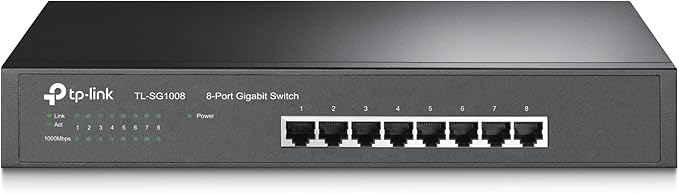
TP-Link TL-SG1008 8 Port Gigabit Switch
TL-SG1008 | 8-Port Gigabit Desktop/Rackmount Switch
TL-SG1008 | 8-Port Gigabit Desktop/Rackmount Switch
TL-SG1008 | 8-Port Gigabit Desktop/Rackmount Switch
TL-SG1008 | 8-Port Gigabit Desktop/Rackmount Switch
in 24 offers
The lowest price for TP-Link TL-SG1008 8 Port Gigabit Switch right now is $65.27 at 友和 Yoho, compared across 24 retailers.
The all-time low was $45.00 on 4 Apr 2025 — today's price is 45% above the lowest ever. It has been notably cheaper before — worth setting a price alert.
Prices last updated 21 Oct 2026.
Last updated at 21/10/2026 00:48:13
Switch TP-Link TL-SG1008-switch 8xTP 10/100 / 1000Mbit / 19" s - rack, 10/100 / 1000Mbps, Schalter, Seile Active
Affiliate Disclosure: We may receive a small commission for purchases made through this link at no extra cost to you. This helps support our site. Thank you!
Mastercard $100 OFF | TP-Link TL-SG1008 8-Port Gigabit Desktop/Rackmount Switch
Delivery $40.00
TP Link 8 Port Gigabit Switch TL SG1008 - Switches
Delivery $15.75
TP-Link TL-SG1008 8-Port 13inch Gigabit Desktop/Rackmount Unmanaged Switch
Delivery between 26–28 Oct $16.65
TP Link 8 Port Gigabit Switch TL SG1008 - Switches
Delivery $15
TP-Link TL-SG1008 8-Port Gigabit Unmanaged Switch 13' Desktop Rackmountable Steel Case Fanless Supports MAC address 802.1p/DSCP QoS
Delivery $11.99
8 Port TP-Link TL-SG1008 Gigabit Switch | Best Online Computer Store
Delivery between 27 Oct – 3 Nov $12.12
TP-Link TL-SG1008 8-Port Gigabit Unmanaged Switch for Desktop/Rackmount, Steel Case, Fanless, MAC Address, QoS
Delivery between Thu – Mon $11
TP-Link TL-SG1008 8-Port Gigabit Unmanaged Switch 13' Desktop Rackmountable Steel Case Fanless Supports MAC address 802.1p/DSCP QoS
Free delivery between Fri – Sat
TP-Link TL-SG1008 8 Port Gigabit Desktop Switch | Network Switch
Free delivery between 23–30 Oct
originally posted on neweggbusiness.com
If you're looking to upgrade your home or other small-to-medium network switch from fastEthernet to Gigabit like I was -- and you need a multiport switch -- look no further, your search is at an end! I was not familiar at all with TP-Link prior to getting this switch, but after trying it for a few weeks I was so thoroughly impressed with its performance and value, I also went with a TP-Link WiFi/Gigabit router (TL-WR1043ND) and 5-port Gigabit switch (TL-SG1008D) to complete my upgrade. This switch is literally as plug-n-play as it gets, simply connect your network segment Cat 5e/6 cables in your desired configuration, plug it in and it just switches packets all day and night, day in and day out. I had to really think hard to come up with some Cons for this unit -- ... MoreIf you're looking to upgrade your home or other small-to-medium network switch from fastEthernet to Gigabit like I was -- and you need a multiport switch -- look no further, your search is at an end! I was not familiar at all with TP-Link prior to getting this switch, but after trying it for a few weeks I was so thoroughly impressed with its performance and value, I also went with a TP-Link WiFi/Gigabit router (TL-WR1043ND) and 5-port Gigabit switch (TL-SG1008D) to complete my upgrade. This switch is literally as plug-n-play as it gets, simply connect your network segment Cat 5e/6 cables in your desired configuration, plug it in and it just switches packets all day and night, day in and day out. I had to really think hard to come up with some Cons for this unit -- as I always try to review as objectively as possible and no device is perfect -- but this one comes as close as anything I've reviewed here on Newegg. I don't give out a lot of 5-stars, but this one is deserved. I ran a few informal data transfer tests with some ~1-3GB media files, I was getting sustained transfers on the 10/100 net of ~9-10MB/sec. With this new switch (and the other new TP-Link gear, of course,) transfers were beginning at ~75-80MB/sec and settling down to the ~36-40MB/sec sustained range. Gigabit Ethernet has a ""theoretical"" upper-limit of 125MB/sec, but you have to take into consideration things like HDD transfer rates, NIC adapter lags, network congestion, etc. Based on what I've also read about other brands/types of small-network Gigabit switches, ~30-45MB/sec sustained is fairly typical, so I'm more than happy. Based on what I've experienced so far, I would have no qualms with installing this switch for a customer. You can pay more, but you can't get much more out of an umanaged switch than this unit will deliver.
originally posted on neweggbusiness.com
NETWORK SETUP - Network setup/topology used during testing consisted of the following: (NOTE: All connected devices were capable of gigabit communication, except for the LCD TV; all cabling used was Category 5e; the switch has remained connected to a 550VA UPS since it was initially installed; all computers were running Windows 7; server OS was Windows Server 2008 R2 x64.) - TESTING CONDITION 1: two computers with integrated gigabit NICs connected directly to the switch; no other devices connected. - TESTING CONDITION 2: normal network operation on my SOHO network, consisting of 3 wired desktop computers and 1 server, 1 gigabit router, 1 802.11n access point, 1 LCD TV, and 1 BluRay player. A networked color laser printer was connected directly to the gigabit router. ... MoreNETWORK SETUP - Network setup/topology used during testing consisted of the following: (NOTE: All connected devices were capable of gigabit communication, except for the LCD TV; all cabling used was Category 5e; the switch has remained connected to a 550VA UPS since it was initially installed; all computers were running Windows 7; server OS was Windows Server 2008 R2 x64.) - TESTING CONDITION 1: two computers with integrated gigabit NICs connected directly to the switch; no other devices connected. - TESTING CONDITION 2: normal network operation on my SOHO network, consisting of 3 wired desktop computers and 1 server, 1 gigabit router, 1 802.11n access point, 1 LCD TV, and 1 BluRay player. A networked color laser printer was connected directly to the gigabit router. - TESTING CONDITION 3: two computers connected to TP-Link switch and patched to router; another 8-port gigabit desktop switch connected to router with all of the remaining aforementioned devices connected to this second switch. Variations in how devices were connected in this topology were made to ensure testing was as thorough as possible. TESTING RESULTS (NOTE: 802.3ab/Gigabit theoretical maximum is 125MB/s) - Synthetic tests were performed using traffic simulators such as LAN Speed Test, and copying between RAM drives on two systems. These revealed that during large transfers, the switch performed as advertised at full gigabit speeds, minus overhead costs of a few MB/s. On average, synthetic tests revealed between 100MB/s and 108MB/s, close to the 112MB/s ceiling on gigabit networks once you factor in overhead costs. - Real-world tests were performed by copying large files (single or group), and large groups of small files from one system to another. Results here showed what one could expect: average transfer rates of 87MB/s for large files; much lower for the groups of small files. - Performance of this switch was as advertised, minus acceptable network overhead of about 15MB/s, in all cases where endpoint devices could actually handle the data transfers (only some of the connected computers and the server were capable of reading/writing faster than 125MB/s). - As could be expected, adding another segment (see condition 3 above) seemed to affect the real-world file copy tests slightly to the negative (overall differences were negligible and somewhat inconsistent, likely due to the number of variables in this setup). ADDENDUM - It is interesting that the switch locked up during testing, requiring a power cycle. It is worth noting that if anything, this was likely due to the sheer volume of traffic on the network, and not the varying types of traffic, as this is an unmanaged Layer 2 device. RECOMMENDATION I would recommend this switch to anyone specifically needing an affordable 8-port gigabit switch that needs to be rack- or wall-mounted. For other applications, I would probably recommend a standard desktop switch.
originally posted on neweggbusiness.com
It's very difficult to tell in such a short review how well a switch will perform. Time is usually the factor with switches, determining how long the average lifespan of the device is. I've had very few issues with the TP-LINK TL-SG1008, and in all cases it's surpassed previous switches I've used in my home, so in its current state it's a top notch switch. Many reviews here on Newegg also complain about the size of this switch. I've seen 4-port rack-mount switches come in chassis this large, so please do not be turned off by the size. Often manufacturers use the same chassis for multiple models of switches to cut costs, which also brings down the cost for the end user. There was also a complaint for this switch being only 220v at 50Hz. The switch I received was ... MoreIt's very difficult to tell in such a short review how well a switch will perform. Time is usually the factor with switches, determining how long the average lifespan of the device is. I've had very few issues with the TP-LINK TL-SG1008, and in all cases it's surpassed previous switches I've used in my home, so in its current state it's a top notch switch. Many reviews here on Newegg also complain about the size of this switch. I've seen 4-port rack-mount switches come in chassis this large, so please do not be turned off by the size. Often manufacturers use the same chassis for multiple models of switches to cut costs, which also brings down the cost for the end user. There was also a complaint for this switch being only 220v at 50Hz. The switch I received was rated for 100-240VAC at 50/60Hz, which means it is compatible with standard NEMA 5-20 receptacles found in North American homes. I had no issues with power requirements when running this switch on either NEMA 5-20 plugs or IEC60320-C14 PDU plugs. In an environment where latency is an issue, this may not be as elegant as much more expensive enterprise-level switches, but for homes looking to upgrade the network this is perfect. I've been using this switch as the backbone to my home network. I stream HDTV and perform system backups across this switch and I have yet to hit any snags, which is more than I can say for past switches.
| Certification | FCC, CE, RoHS |
| LED indicators | Yes |
| Form factor | 1U |
| Rack mounting | Yes |
| Switch type | Unmanaged |

Switch TP-Link TL-SG1008-switch 8xTP 10/100 / 1000Mbit / 19" s - rack, 10/100 / 1000Mbps, Schalter, Seile Active
Affiliate Disclosure: We may receive a small commission for purchases made through this link at no extra cost to you. This helps support our site. Thank you!
Mastercard $100 OFF | TP-Link TL-SG1008 8-Port Gigabit Desktop/Rackmount Switch
Delivery $40.00
TP Link 8 Port Gigabit Switch TL SG1008 - Switches
Delivery $15.75
TP-Link TL-SG1008 8-Port 13inch Gigabit Desktop/Rackmount Unmanaged Switch
Delivery between 26–28 Oct $16.65
TP Link 8 Port Gigabit Switch TL SG1008 - Switches
Delivery $15
If you're looking to upgrade your home or other small-to-medium network switch from fastEthernet to Gigabit like I was -- and you need a multiport switch -- look no further, your search is at an end! I was not familiar at all with TP-Link prior to getting this switch, but after trying it for a few weeks I was so thoroughly impressed with its performance and value, I also went with a TP-Link WiFi/Gigabit router (TL-WR1043ND) and 5-port Gigabit switch (TL-SG1008D) to complete my upgrade. This switch is literally as plug-n-play as it gets, simply connect your network segment Cat 5e/6 cables in your desired configuration, plug it in and it just switches packets all day and night, day in and day out. I had to really think hard to come up with some Cons for this unit -- ... MoreIf you're looking to upgrade your home or other small-to-medium network switch from fastEthernet to Gigabit like I was -- and you need a multiport switch -- look no further, your search is at an end! I was not familiar at all with TP-Link prior to getting this switch, but after trying it for a few weeks I was so thoroughly impressed with its performance and value, I also went with a TP-Link WiFi/Gigabit router (TL-WR1043ND) and 5-port Gigabit switch (TL-SG1008D) to complete my upgrade. This switch is literally as plug-n-play as it gets, simply connect your network segment Cat 5e/6 cables in your desired configuration, plug it in and it just switches packets all day and night, day in and day out. I had to really think hard to come up with some Cons for this unit -- as I always try to review as objectively as possible and no device is perfect -- but this one comes as close as anything I've reviewed here on Newegg. I don't give out a lot of 5-stars, but this one is deserved. I ran a few informal data transfer tests with some ~1-3GB media files, I was getting sustained transfers on the 10/100 net of ~9-10MB/sec. With this new switch (and the other new TP-Link gear, of course,) transfers were beginning at ~75-80MB/sec and settling down to the ~36-40MB/sec sustained range. Gigabit Ethernet has a ""theoretical"" upper-limit of 125MB/sec, but you have to take into consideration things like HDD transfer rates, NIC adapter lags, network congestion, etc. Based on what I've also read about other brands/types of small-network Gigabit switches, ~30-45MB/sec sustained is fairly typical, so I'm more than happy. Based on what I've experienced so far, I would have no qualms with installing this switch for a customer. You can pay more, but you can't get much more out of an umanaged switch than this unit will deliver.
NETWORK SETUP - Network setup/topology used during testing consisted of the following: (NOTE: All connected devices were capable of gigabit communication, except for the LCD TV; all cabling used was Category 5e; the switch has remained connected to a 550VA UPS since it was initially installed; all computers were running Windows 7; server OS was Windows Server 2008 R2 x64.) - TESTING CONDITION 1: two computers with integrated gigabit NICs connected directly to the switch; no other devices connected. - TESTING CONDITION 2: normal network operation on my SOHO network, consisting of 3 wired desktop computers and 1 server, 1 gigabit router, 1 802.11n access point, 1 LCD TV, and 1 BluRay player. A networked color laser printer was connected directly to the gigabit router. ... MoreNETWORK SETUP - Network setup/topology used during testing consisted of the following: (NOTE: All connected devices were capable of gigabit communication, except for the LCD TV; all cabling used was Category 5e; the switch has remained connected to a 550VA UPS since it was initially installed; all computers were running Windows 7; server OS was Windows Server 2008 R2 x64.) - TESTING CONDITION 1: two computers with integrated gigabit NICs connected directly to the switch; no other devices connected. - TESTING CONDITION 2: normal network operation on my SOHO network, consisting of 3 wired desktop computers and 1 server, 1 gigabit router, 1 802.11n access point, 1 LCD TV, and 1 BluRay player. A networked color laser printer was connected directly to the gigabit router. - TESTING CONDITION 3: two computers connected to TP-Link switch and patched to router; another 8-port gigabit desktop switch connected to router with all of the remaining aforementioned devices connected to this second switch. Variations in how devices were connected in this topology were made to ensure testing was as thorough as possible. TESTING RESULTS (NOTE: 802.3ab/Gigabit theoretical maximum is 125MB/s) - Synthetic tests were performed using traffic simulators such as LAN Speed Test, and copying between RAM drives on two systems. These revealed that during large transfers, the switch performed as advertised at full gigabit speeds, minus overhead costs of a few MB/s. On average, synthetic tests revealed between 100MB/s and 108MB/s, close to the 112MB/s ceiling on gigabit networks once you factor in overhead costs. - Real-world tests were performed by copying large files (single or group), and large groups of small files from one system to another. Results here showed what one could expect: average transfer rates of 87MB/s for large files; much lower for the groups of small files. - Performance of this switch was as advertised, minus acceptable network overhead of about 15MB/s, in all cases where endpoint devices could actually handle the data transfers (only some of the connected computers and the server were capable of reading/writing faster than 125MB/s). - As could be expected, adding another segment (see condition 3 above) seemed to affect the real-world file copy tests slightly to the negative (overall differences were negligible and somewhat inconsistent, likely due to the number of variables in this setup). ADDENDUM - It is interesting that the switch locked up during testing, requiring a power cycle. It is worth noting that if anything, this was likely due to the sheer volume of traffic on the network, and not the varying types of traffic, as this is an unmanaged Layer 2 device. RECOMMENDATION I would recommend this switch to anyone specifically needing an affordable 8-port gigabit switch that needs to be rack- or wall-mounted. For other applications, I would probably recommend a standard desktop switch.
It's very difficult to tell in such a short review how well a switch will perform. Time is usually the factor with switches, determining how long the average lifespan of the device is. I've had very few issues with the TP-LINK TL-SG1008, and in all cases it's surpassed previous switches I've used in my home, so in its current state it's a top notch switch. Many reviews here on Newegg also complain about the size of this switch. I've seen 4-port rack-mount switches come in chassis this large, so please do not be turned off by the size. Often manufacturers use the same chassis for multiple models of switches to cut costs, which also brings down the cost for the end user. There was also a complaint for this switch being only 220v at 50Hz. The switch I received was ... MoreIt's very difficult to tell in such a short review how well a switch will perform. Time is usually the factor with switches, determining how long the average lifespan of the device is. I've had very few issues with the TP-LINK TL-SG1008, and in all cases it's surpassed previous switches I've used in my home, so in its current state it's a top notch switch. Many reviews here on Newegg also complain about the size of this switch. I've seen 4-port rack-mount switches come in chassis this large, so please do not be turned off by the size. Often manufacturers use the same chassis for multiple models of switches to cut costs, which also brings down the cost for the end user. There was also a complaint for this switch being only 220v at 50Hz. The switch I received was rated for 100-240VAC at 50/60Hz, which means it is compatible with standard NEMA 5-20 receptacles found in North American homes. I had no issues with power requirements when running this switch on either NEMA 5-20 plugs or IEC60320-C14 PDU plugs. In an environment where latency is an issue, this may not be as elegant as much more expensive enterprise-level switches, but for homes looking to upgrade the network this is perfect. I've been using this switch as the backbone to my home network. I stream HDTV and perform system backups across this switch and I have yet to hit any snags, which is more than I can say for past switches.
IF you are on a very tight budget, this company and some others make 8 port switches that are similar in actions they do, but cost about a third less. I would not recommend them, but they do work for a while anyway, stick with brand names you trust. They don't have the long term dependability this one seems to have, they are usually plastic cases and very lightweight so the CAT cables weight slide them off the shelfs backwards, heh. Even bedrooms nowadays can end up with a lot of internet traffic, especially with streaming videos, gaming on line, transfering picture files for Facebook or whatever the latest social site is. So if you can afford this quality level, I would recommend this class of switches. These are handy in case you want to run internet connections ... MoreIF you are on a very tight budget, this company and some others make 8 port switches that are similar in actions they do, but cost about a third less. I would not recommend them, but they do work for a while anyway, stick with brand names you trust. They don't have the long term dependability this one seems to have, they are usually plastic cases and very lightweight so the CAT cables weight slide them off the shelfs backwards, heh. Even bedrooms nowadays can end up with a lot of internet traffic, especially with streaming videos, gaming on line, transfering picture files for Facebook or whatever the latest social site is. So if you can afford this quality level, I would recommend this class of switches. These are handy in case you want to run internet connections to another section of the house or office and it is a ways off, you don't want to have to run say 4 lines with one for each computer, you just put this switch in at the destination, run one CAT cable (if buying, go for the 1000Mbps ones) the long distance and then hook up all the computers (up to seven) to this switch and it will feed them all at the same speed. If you needed more ports at the terminus, you just plug another switch into the original one. Hubs are only good if you are going to use only one computer at a time of those hooked up. Switches are also used anytime there are a large number of computers needing access to the internet and the Local Area Network (LAN). They organize things so the packets don't run into each other and get corrupted and have to be resent, which takes time and lowers speed. I have ran up to four computers on a similar switch, each running a player in an online game like Battlefield 2, with no affect on the ping that we could measure with the server browser or playing feel.
This unit is a unmanaged unit which makes it a true plug and play device. The unit also comes with a installation guide that is as thorough as a users manual. The manual is very well written and easy to read, but the installation is so easy that it really isn't necessary. Although, I was surprised by what information was in the installation guide. It includes much more than a standard installation guides such as grounding, lightning arresting, cable lengths, etc. The switch ports are all autosensing and I tried a combination of straight and crossover cables and they all worked great. One nice feature is the ability of the switch to adjust the power level depending on the cable length or powering down the port if it is idle. If you need to expand your gigabit network ... MoreThis unit is a unmanaged unit which makes it a true plug and play device. The unit also comes with a installation guide that is as thorough as a users manual. The manual is very well written and easy to read, but the installation is so easy that it really isn't necessary. Although, I was surprised by what information was in the installation guide. It includes much more than a standard installation guides such as grounding, lightning arresting, cable lengths, etc. The switch ports are all autosensing and I tried a combination of straight and crossover cables and they all worked great. One nice feature is the ability of the switch to adjust the power level depending on the cable length or powering down the port if it is idle. If you need to expand your gigabit network you won't be disappointed purchasing this switch. It may cost a little more than the bargain basement switches, but the ones I have seen do not compare in quality or the performance of this switch and it is certainly worth the small difference in price. I had never considered TP-Link products before, but after using this product I will in the future.
It's important to note that gigabit Ethernet speeds can only be achieved with networked devices that support 1000BASE-T and are connected via Cat5, Cat5e, Cat6, or Cat7 cable - 100m or less. It's also quite nice that the power cable for this switch is a standard PC power connector (3 prong grounded), so finding a replacement cord if needed is simple. Again, since this is an unmanaged switch you cannot perform QoS services, remote administration, or related web-services that are generally offered on more pricey managed switches. Overall though, this a great solution for networked switching in SOHO environments. Testing on several gigabit enabled devices achieved real-world throughput. The legacy 100BASE-T devices operated at real-world throughput with the indicator ... MoreIt's important to note that gigabit Ethernet speeds can only be achieved with networked devices that support 1000BASE-T and are connected via Cat5, Cat5e, Cat6, or Cat7 cable - 100m or less. It's also quite nice that the power cable for this switch is a standard PC power connector (3 prong grounded), so finding a replacement cord if needed is simple. Again, since this is an unmanaged switch you cannot perform QoS services, remote administration, or related web-services that are generally offered on more pricey managed switches. Overall though, this a great solution for networked switching in SOHO environments. Testing on several gigabit enabled devices achieved real-world throughput. The legacy 100BASE-T devices operated at real-world throughput with the indicator lights on the front of the switch displaying the link speed accordingly (1000BASE-T links show both the top and bottom LEDs per port, 100BASE-T LEDs only have the top LED illuminated - quick visual aid to show link speed).
The first thing I noticed when this was delivered is its weight. It is solidly built in a metal case. It uses very little power. The label says .3 Amps but my “Kill A Watt” meter indicates only 10 mA (1.2W) when operating so it won’t run up the electric bill. Some switches I have bought are so lightweight that the cables will pull them off the table if not bent just right. This switch is heavy enough to hold its own against the cables. I don’t have much room on my desk for new equipment but I just bought a new TV and BluRay player that both connect to the internet so I need more than the five ports of my old switch. I routed the cables from the living room into my basement office so I could connect them to my switch since my router is at the other end of the house. ... MoreThe first thing I noticed when this was delivered is its weight. It is solidly built in a metal case. It uses very little power. The label says .3 Amps but my “Kill A Watt” meter indicates only 10 mA (1.2W) when operating so it won’t run up the electric bill. Some switches I have bought are so lightweight that the cables will pull them off the table if not bent just right. This switch is heavy enough to hold its own against the cables. I don’t have much room on my desk for new equipment but I just bought a new TV and BluRay player that both connect to the internet so I need more than the five ports of my old switch. I routed the cables from the living room into my basement office so I could connect them to my switch since my router is at the other end of the house. Instead of setting the switch on the desk or on the shelf above the desk, I was able to wall mount the unit by turning the rack mount brackets 90 degrees. I could only get two of the screws on the case to line up but it is solid enough, easy to access and the cables lie flat against the wall. I could easily install this switch into my rack since it has two elongated holes on each side with standard hole spacing of approximately 18 ¼ X 1 ¼ inches but I don’t need an additional switch in the server rack at this time. This switch has given me no trouble at all, no need to reset or configure it, if the power goes out it comes right back online without a hitch.
This is the first TP-Link product that I have ever used. I was so impressed by this unit, that I bought one of their PCI WIFI cards to test in a new customer system build that I am working on. I will review that unit ASAP. TP-Link is a privately held company, located in Shenzsen, China, with one billion dollars of sales in 2011. They employ over 14,000 people. After using the switch for over two weeks now, we have not noticed any networking issues whatsoever. While this is highly subjective, my wife commented that our home network seemed snappier to her, with the new switch installed. I have often wondered about the ""green"" claims made by so many different switch manufacturers, that I decided to attach the power cord for the TP-Link to my trusty Kill-A-Watt power ... MoreThis is the first TP-Link product that I have ever used. I was so impressed by this unit, that I bought one of their PCI WIFI cards to test in a new customer system build that I am working on. I will review that unit ASAP. TP-Link is a privately held company, located in Shenzsen, China, with one billion dollars of sales in 2011. They employ over 14,000 people. After using the switch for over two weeks now, we have not noticed any networking issues whatsoever. While this is highly subjective, my wife commented that our home network seemed snappier to her, with the new switch installed. I have often wondered about the ""green"" claims made by so many different switch manufacturers, that I decided to attach the power cord for the TP-Link to my trusty Kill-A-Watt power meter. The TP-Link draws 1 Watt continuously. Transferring large files over my LAN made no difference in the amount of power being drawn from the AC receptacle. The top of the unit barely gets warm, this is a nice improvement over my previous switch, which drew 3 Watts idling and ran quite hot to the touch. I would not hesitate to recommend this switch to my computer consulting clients. Thanks to NewEgg for the opportunity to test this fine product!
I have used the TP Link SG 1008 for a couple of weeks , running it connected in my LAN right after my 4port gigabit router. I have a 30MB internet connection with a 5mb 'boost'. I used 4 different test sites, over the course of 2 weeks, back to back: directly from modem to each computer, through the gigabit wired router and through the switch, to check it out and the switch was never any factor in either slowing or speeding up any tests. Not a thorough evaluation but useful as anecdotal information, at least. I ran all 4 computers w/digital tuner/PVRs, Network webcast LCD TV, Network webcast BD Player, and AVR all having internet/streaming through 2 paid video subscription *not mentioning names* capacity through the switch and never had any issues at all with HD ... MoreI have used the TP Link SG 1008 for a couple of weeks , running it connected in my LAN right after my 4port gigabit router. I have a 30MB internet connection with a 5mb 'boost'. I used 4 different test sites, over the course of 2 weeks, back to back: directly from modem to each computer, through the gigabit wired router and through the switch, to check it out and the switch was never any factor in either slowing or speeding up any tests. Not a thorough evaluation but useful as anecdotal information, at least. I ran all 4 computers w/digital tuner/PVRs, Network webcast LCD TV, Network webcast BD Player, and AVR all having internet/streaming through 2 paid video subscription *not mentioning names* capacity through the switch and never had any issues at all with HD movies from any of the streaming video sources nor from streaming new BD movies from one room to another from DLNA servers. I did leave it alone for some times, but had to do more than most would in order to test its capacity to endure some mixing and matching. It operated as advertised, unmanaged and silent. This is a layer 2 device, it handles MAC addresses and leaves IP addresses to the routers, the v6 protocol is supported and worked as seamlessly as any of the other things it does. The TP Link SG1008 has many applications for people with small home networks or as an addition to other larger home office/ home network or small business, or to set up a separate network within a larger network joined to a larger switch etc. The prices of switches for consumer use is very affordable and should be investigated for those with appropriate needs. I can recommend this unmanaged TP Link SG 1008 8port gigabit switch, for sure.
| Certification | FCC, CE, RoHS |
| LED indicators | Yes |
| Form factor | 1U |
| Rack mounting | Yes |
| Switch type | Unmanaged |


