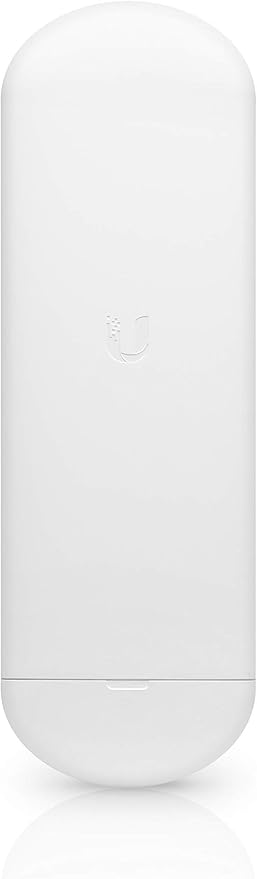
Ubiquiti Nanostation Loco AC 5GHz
The NanoStation 5ACL can be used as a client in a PtMP (Point-to-Multi-Point) network or together with another NanoStation as a PtP (Point-to-Point) link. The 13-dBi antenna is integrated directly into the transmitter to create a compact and efficient device. The housing is weatherproof, making it suitable for outdoor installation. The NanoStation 5ACL features a dedicated Wi-Fi for quick and easy setup. Use your mobile device to connect and make all settings through the UNMS app on your smartphone or tablet. Ubiquiti's exclusive airMAX TDMA (Time Division Multiple Access) protocol allows each client to send and receive data in designated time slots via the AP controller. This eliminates hidden node collisions and maximizes airtime efficiency, ensuring speed and network scalability over long distances. With the Ubiquiti Network Management System (UNMS), you have a handy software solution that allows you to centrally manage all your Ubiquiti devices from anywhere. Configuration, upgrading, and creating backups of your network infrastructure become efficient and intuitive. UNMS is also available as a mobile app in the App Store or on Google Play.
The NanoStation 5ACL can be used as a client in a PtMP (Point-to-Multi-Point) network or together with another NanoStation as a PtP (Point-to-Point) link. The 13-dBi antenna is integrated directly into the transmitter to create a compact and efficient device. The housing is weatherproof, making it suitable for outdoor installation. The NanoStation 5ACL features a dedicated Wi-Fi for quick and easy setup. Use your mobile device to connect and make all settings through the UNMS app on your smartphone or tablet. Ubiquiti's exclusive airMAX TDMA (Time Division Multiple Access) protocol allows each client to send and receive data in designated time slots via the AP controller. This eliminates hidden node collisions and maximizes airtime efficiency, ensuring speed and network scalability over long distances. With the Ubiquiti Network Management System (UNMS), you have a handy software solution that allows you to centrally manage all your Ubiquiti devices from anywhere. Configuration, upgrading, and creating backups of your network infrastructure become efficient and intuitive. UNMS is also available as a mobile app in the App Store or on Google Play.
The NanoStation 5ACL can be used as a client in a PtMP (Point-to-Multi-Point) network or together with another NanoStation as a PtP (Point-to-Point) link. The 13-dBi antenna is integrated directly into the transmitter to create a compact and efficient device. The housing is weatherproof, making it suitable for outdoor installation. The NanoStation 5ACL features a dedicated Wi-Fi for quick and easy setup. Use your mobile device to connect and make all settings through the UNMS app on your smartphone or tablet. Ubiquiti's exclusive airMAX TDMA (Time Division Multiple Access) protocol allows each client to send and receive data in designated time slots via the AP controller. This eliminates hidden node collisions and maximizes airtime efficiency, ensuring speed and network scalability over long distances. With the Ubiquiti Network Management System (UNMS), you have a handy software solution that allows you to centrally manage all your Ubiquiti devices from anywhere. Configuration, upgrading, and creating backups of your network infrastructure become efficient and intuitive. UNMS is also available as a mobile app in the App Store or on Google Play.
The NanoStation 5ACL can be used as a client in a PtMP (Point-to-Multi-Point) network or together with another NanoStation as a PtP (Point-to-Point) link. The 13-dBi antenna is integrated directly into the transmitter to create a compact and efficient device. The housing is weatherproof, making it suitable for outdoor installation. The NanoStation 5ACL features a dedicated Wi-Fi for quick and easy setup. Use your mobile device to connect and make all settings through the UNMS app on your smartphone or tablet. Ubiquiti's exclusive airMAX TDMA (Time Division Multiple Access) protocol allows each client to send and receive data in designated time slots via the AP controller. This eliminates hidden node collisions and maximizes airtime efficiency, ensuring speed and network scalability over long distances. With the Ubiquiti Network Management System (UNMS), you have a handy software solution that allows you to centrally manage all your Ubiquiti devices from anywhere. Configuration, upgrading, and creating backups of your network infrastructure become efficient and intuitive. UNMS is also available as a mobile app in the App Store or on Google Play.
in 54 offers
The lowest price for Ubiquiti Nanostation Loco AC 5GHz right now is $84.99 at Techinn.com, compared across 38 retailers.
The all-time low was $63.43 on 16 June 2023 — today's price is 34% above the lowest ever. It has been notably cheaper before — worth setting a price alert.
Prices last updated 17 Sept 2026.
Last updated at 17/09/2026 04:05:52
Ubiquity airMAX NanoStation Loco AC Antenna, 5GHz
Free delivery
Affiliate Disclosure: We may receive a small commission for purchases made through this link at no extra cost to you. This helps support our site. Thank you!
Ubiquiti Nanostation Loco 5 Wifi Access Point White EU Plug 220V
Delivery $19.49
Ubiquiti LOCO5AC NanoStation AC 5 GHz airMAX Radio
Delivery $15.99
Ubiquiti airMAX NanoStation 5AC Loco
Delivery between 22–30 Sept $19
Ubiquiti Loco5AC airMAX NanoStation 5AC Loco Radio Single Unit
Delivery between 22–30 Sept $17.55
Ubiquiti NHU-NS-5ACL UISP airMAX NanoStation 5AC Loco
Delivery between Fri – Wed $11.64
Ubiquiti Nanostation Loco AC 5GHz LOCO5AC - Wireless Access Points (WAP)
Delivery $12.94
Ubiquiti Loco5AC 5GHz Nanostation CPE Airmax | Best Online Computer Store
Delivery between 24–30 Sept $12.12
Ubiquiti airMAX NanoStation AC Loco Indoor/Outdoor CPE
Delivery between Fri – Tue $15
NanoStation AC Loco 5GHz Radio — 10km Range 450Mbps
Delivery between Fri – Tue $14.95
originally posted on pbtech.co.nz
Used a pair of those to "extend" wifi to a rural chalet. As the distance is only about 300m couldn't test the full range. If you want to minimise number of wires consider getting NS 5AC (non loco) with 2 PoE ports which allows to power remote camera off the 2nd PoE port.
originally posted on bhphotovideo.com
More than 6 years I set up an Ubiquiti Outdoor AP+ on an upstairs deck of my house to provide wifi to 2 small cabins about 400 feet down the mountain. Each cabin has a Nanostation loco m2 to receive the signal and an airGateway to provide wifi inside the cabins.Recently a work-from-home relative moved into a 3rd cabin on the property and needed internet. Our local dsl provider has maxed out all lines in my rural, mountainous area. The only option for the new tenant was to get satellite internet or attempt to work using my slow, very unreliable dsl internet provided by Frontier Communications. When the satellite installer came, he could not install the satellite receiver on the roof 0f the cabin because he could not get a line of sight. So, the dish was mounted on ... MoreMore than 6 years I set up an Ubiquiti Outdoor AP+ on an upstairs deck of my house to provide wifi to 2 small cabins about 400 feet down the mountain. Each cabin has a Nanostation loco m2 to receive the signal and an airGateway to provide wifi inside the cabins.Recently a work-from-home relative moved into a 3rd cabin on the property and needed internet. Our local dsl provider has maxed out all lines in my rural, mountainous area. The only option for the new tenant was to get satellite internet or attempt to work using my slow, very unreliable dsl internet provided by Frontier Communications. When the satellite installer came, he could not install the satellite receiver on the roof 0f the cabin because he could not get a line of sight. So, the dish was mounted on the roof of my house, about 125 feet up the mountain. Because of my good luck with the Outdoor AP+ and NS loco M2’s, I purchased 2 Nanostation M5’s and an airCube. Used the Nanostations to set up a bridge between the house and the cabin and the airCube to provide wifi inside. Turned off the satellite modem wireless signal at my house. The house Nanostation M5 and the 2ghz OutdoorAP+ are only feet apart, but both systems are working just fine. Although the distance of the bridge is not very far, there are many very leafy trees and bushes between the two buildings. The cabin is receiving a strong signal. I am not a network person but there are others online willing to share their knowledge.
originally posted on bhphotovideo.com
Data transfer, range, etc. are fine, but DO NOT expect to set up the system with what comes in the box. I had bought an earlier version of these more than 3 years ago and each unit came with a window mount, short ethernet cable, and power adapter. Quite a bit more expense to set them up. Don't be caught unaware. VERY satisfied with the system once set up - range is impressive.
| General | |
| Device Type | Radio access point |
| Ruggedized Design | Outdoor, indoor |
| Width | 7.75 cm |
| Depth | 5.91 cm |

Ubiquity airMAX NanoStation Loco AC Antenna, 5GHz
Free delivery
Affiliate Disclosure: We may receive a small commission for purchases made through this link at no extra cost to you. This helps support our site. Thank you!
Ubiquiti Nanostation Loco 5 Wifi Access Point White EU Plug 220V
Delivery $19.49
Ubiquiti LOCO5AC NanoStation AC 5 GHz airMAX Radio
Delivery $15.99
Ubiquiti airMAX NanoStation 5AC Loco
Delivery between 22–30 Sept $19
Ubiquiti Loco5AC airMAX NanoStation 5AC Loco Radio Single Unit
Delivery between 22–30 Sept $17.55
Used a pair of those to "extend" wifi to a rural chalet. As the distance is only about 300m couldn't test the full range. If you want to minimise number of wires consider getting NS 5AC (non loco) with 2 PoE ports which allows to power remote camera off the 2nd PoE port.
More than 6 years I set up an Ubiquiti Outdoor AP+ on an upstairs deck of my house to provide wifi to 2 small cabins about 400 feet down the mountain. Each cabin has a Nanostation loco m2 to receive the signal and an airGateway to provide wifi inside the cabins.Recently a work-from-home relative moved into a 3rd cabin on the property and needed internet. Our local dsl provider has maxed out all lines in my rural, mountainous area. The only option for the new tenant was to get satellite internet or attempt to work using my slow, very unreliable dsl internet provided by Frontier Communications. When the satellite installer came, he could not install the satellite receiver on the roof 0f the cabin because he could not get a line of sight. So, the dish was mounted on ... MoreMore than 6 years I set up an Ubiquiti Outdoor AP+ on an upstairs deck of my house to provide wifi to 2 small cabins about 400 feet down the mountain. Each cabin has a Nanostation loco m2 to receive the signal and an airGateway to provide wifi inside the cabins.Recently a work-from-home relative moved into a 3rd cabin on the property and needed internet. Our local dsl provider has maxed out all lines in my rural, mountainous area. The only option for the new tenant was to get satellite internet or attempt to work using my slow, very unreliable dsl internet provided by Frontier Communications. When the satellite installer came, he could not install the satellite receiver on the roof 0f the cabin because he could not get a line of sight. So, the dish was mounted on the roof of my house, about 125 feet up the mountain. Because of my good luck with the Outdoor AP+ and NS loco M2’s, I purchased 2 Nanostation M5’s and an airCube. Used the Nanostations to set up a bridge between the house and the cabin and the airCube to provide wifi inside. Turned off the satellite modem wireless signal at my house. The house Nanostation M5 and the 2ghz OutdoorAP+ are only feet apart, but both systems are working just fine. Although the distance of the bridge is not very far, there are many very leafy trees and bushes between the two buildings. The cabin is receiving a strong signal. I am not a network person but there are others online willing to share their knowledge.
Data transfer, range, etc. are fine, but DO NOT expect to set up the system with what comes in the box. I had bought an earlier version of these more than 3 years ago and each unit came with a window mount, short ethernet cable, and power adapter. Quite a bit more expense to set them up. Don't be caught unaware. VERY satisfied with the system once set up - range is impressive.
Nanostation loco is cheap for a reason. Ubiquiti will nickel and dime you for a wall mount and a power supply for the locos. They do NOT work with PoE nor PoE+ switches at all. You have to buy a separate passive injector (INS-3AF-I-G or INS-3AF-O-G) for an additional $19-$21 each. The Ubiquiti Quick-Mount to attach these locos to a wall are another $19 each. Youre lucky they threw in the one plastic tie wrap for free.
I had a pair of these deployed across a 30 foot gap between buildings on my property and the connection was rock solid for the two years they were in service. The app used to set them up makes alignment a breeze. The PoE requirements require some accessories if your switches aren't capable of 24V POE, which mine werent, but these are inexpensive, as are the devices themselves. The throughput was enough for the two 4K and three HD cameras I have on the remote building to stream continuously, plus some spare bandwidth available for the computer and IOT devices to function just fine. Ultimately I upgraded to a 60 GHz gigabit link, but for the price you cannot do better if your throughput needs are met by this device.
These devices are a great little tool for making a fast or even permanent link for your network. Super easy to configure and setup on the fly. My life is so much better now that I have a collection of these.
I've installed a few sets of these to replace older M5 or M2 Loco Nanostations. These have the same great Ubiquiti reliability but support Gigabit speeds. They are also a bit sleeker looking - less blocky. I don't know if it actually helps, but it seems like they are more aerodynamic for higher-wind environment than their older cousins. Keep in mind that these AC models usually don't include a PoE injector in the box, while a lot of the older M5 or M2 models did.They now are setup & monitored using Ubiquiti's UNMS system, which has potential but still doesn't seem as user friendly or smooth as their UniFi system. The newer AirOS it uses does seem like an improvement over the older versions, though.I did have a weird quirk with the last set of these that I ... MoreI've installed a few sets of these to replace older M5 or M2 Loco Nanostations. These have the same great Ubiquiti reliability but support Gigabit speeds. They are also a bit sleeker looking - less blocky. I don't know if it actually helps, but it seems like they are more aerodynamic for higher-wind environment than their older cousins. Keep in mind that these AC models usually don't include a PoE injector in the box, while a lot of the older M5 or M2 models did.They now are setup & monitored using Ubiquiti's UNMS system, which has potential but still doesn't seem as user friendly or smooth as their UniFi system. The newer AirOS it uses does seem like an improvement over the older versions, though.I did have a weird quirk with the last set of these that I purchased and installed. They were running a slightly older v8.4.2 firmware out of the box and for some reason they would not stay connected to each other, but updating to v8.6.2 fixed the issue.
It began as a curiosity and a way to stimulate my aging brain. It has grown into an obsession. I look for excuses to add more Ubiquiti products to my network. And each time I add an element, such as the NanoStation AC loco 5 GHz, I solve another piece of the wireless networking puzzle. A year ago it began with a simple point to point wireless bridge for a UVC-G-3-AF camera. Several sleepless nights later I figured it out. Its a year later and I have 9 Ubiquiti cameras and 2 more wireless bridges. With remote access I might add. Ubiquiti products are rock solid. And if you need some cerebral stimulation youll find that too.
Picks up a very strong signal from 802.11ac wi-fi, however, the device uses Ubiquiti's proprietary "airMAX" technology and will refuse to connect to any other device. Unfortunately, the spec sheet and documentation does not explicitly state that you must have Ubiquiti equipment at the other end.I have used airMAX, and it's perfect for the LiteBeam AC product line where you're spanning great distances with identical equipment on both ends. But for CPE (Customer Premise Equipment) gear, I was disappointed with the NanoStation AC as it is entirely useless for me.
I used these radios for a remote HIK POE camera to my existing HIK NVR system. I am not an IT guy. The instructions are terrible, but the end product performance is good. Online videos are done by IT guys and difficult to follow because they go fast and use a PC connection via LAN instead of the phone app. Their software is slightly different from what the phone will have. I spent about three hours setting up my radios. Now I could do it in about 15 minutes. Hopefully this information save somebody a few hours.A few lessons learned by a novice at IT work:1. These radios use 24vdc POE. HIK cameras use 48vdc POE. So, that means you will need POE injectors at both ends. Would be nice if these would had accepted 48vdc.2. Do not mount the radios and then try to set ... MoreI used these radios for a remote HIK POE camera to my existing HIK NVR system. I am not an IT guy. The instructions are terrible, but the end product performance is good. Online videos are done by IT guys and difficult to follow because they go fast and use a PC connection via LAN instead of the phone app. Their software is slightly different from what the phone will have. I spent about three hours setting up my radios. Now I could do it in about 15 minutes. Hopefully this information save somebody a few hours.A few lessons learned by a novice at IT work:1. These radios use 24vdc POE. HIK cameras use 48vdc POE. So, that means you will need POE injectors at both ends. Would be nice if these would had accepted 48vdc.2. Do not mount the radios and then try to set them up. Set them up on a bench, next to each other to avoid aiming problems and walking back and forth about 100 times. I did this on a bench to start with, you should also.3. Radio setup phone app is actually called USIP. App works ok. Since these come individually sold, you need to introduce them to each other using the app. The app uses a wifi connection to the radios, one at a time. So, you have to plug POE cable into radio, connect to the radio's wifi network on your phone, then go to app and select the radio that you want to program.4. Put a sticker or something on each radio to help you easily see the last three digits of serial number. The numbers on the back of the radios are ridiculously small and hard to read.5. One challenge is that when you use your phone to connect to the radio setup wifi, you have only a few minutes from when you connect power to the radio, then the radio wifi times out. Also, it took about a minute for my phone to find the radio wifi, so that ate up some of the time. You will get to unplug/replug POE cable to radio several times if you are like me.6. When setting up the radios, start with the base station, also known as the access point.7. I have the radios about 300' apart. The base station is in my attic and the remote station is outdoors. It works fine thru my asphalt shingle roof. I could not find any evidence that it could do that before I tried, but it works.Good luck. Hopefully this helps.
| General | |
| Device Type | Radio access point |
| Ruggedized Design | Outdoor, indoor |
| Width | 7.75 cm |
| Depth | 5.91 cm |