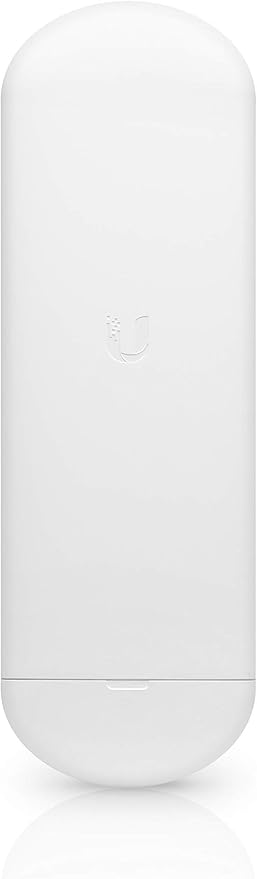
Ubiquiti Ns5Ac 5 GHz Nanostation AC
airMAX NanoStation 5AC Radio
airMAX NanoStation 5AC Radio
airMAX NanoStation 5AC Radio
airMAX NanoStation 5AC Radio
in 14 offers
The lowest price for Ubiquiti Ns5Ac 5 GHz Nanostation AC right now is $204.67 at microless.com, compared across 12 retailers.
The all-time low was $188.06 on 13 Aug 2023 — today's price is 9% above the lowest ever. That's a little above the best price we've seen.
Prices last updated 1 Nov 2026.
Last updated at 01/11/2026 15:48:49
Ubiquiti NanoStation 5AC NS-5AC, MIMO TDMA protocol, WiFi Wireless Outdoor CPE, 5GHz, Up to 450+ Mbps, 15+ km range | NS-5AC
Delivery between 4–10 Nov $37.21
Ubiquiti NanoStation NS-5AC Outdoor airMAX ac CPE 5GHz, 450+ Mbps, 15+ km, 2 x Gigabit Ethernet Ports, 802.3af/24V Passive PoE,
Delivery between 6–11 Nov $9
Ubiquiti NS-5AC-AU - 5 GHz NanoStation ac Radio -Up to 450+ Mbps Real TCP/IP Throughput
Delivery between 4–12 Nov $10
Ubiquiti Nanostation 5 Ghz Ac Radio Outdoor Ns-5ac 802.11a/c Mimo
Free delivery
Affiliate Disclosure: We may receive a small commission for purchases made through this link at no extra cost to you. This helps support our site. Thank you!
Ubiquiti 5 GHz NanoStation ac Radio -Up to 450+ Mbps Real TCP/IP Throughput, 15+ km Link Range
Delivery between 5–10 Nov $16
Ubiquiti 5 GHz NanoStation AC Radio - NS-5AC
Delivery by 10 Nov $15
Ubiquiti Ns5Ac 5 Ghz Nanostation Ac
Free delivery between Tue – Wed
Ubiquiti NanoStation AC Wireless Outdoor Access Point (NS-5AC)
Free delivery
Ubiquiti NanoStation AC Wireless Outdoor Access Point (NS-5AC)
Free delivery
Ubiquiti Ns5Ac 5 Ghz Nanostation Ac by SimplyWholesale.com.au
Free delivery
originally posted on pbtech.co.nz
Works well, but severely lacking in documentation, so had to watch a few you tube videos and finally managed to get it working using tips from all of them. Tip: turning off the management radio caused us grief as couldn't get back into the device and had to factory reset on them both. We also couldn't set up on our laptops as they couldn't find the devices. So had to do the whole thing on the app on our mobile.
originally posted on pbtech.co.nz
Works well over long distances, and is easy to configureDownside is, that this new case has very little space between the ethernet socket and the inner edge of the case, which makes it really hard to insert an ethernet cable.
originally posted on bhphotovideo.com
Short and sweet:pros:-Management radio (really easy to set up)-2 ports (It will pass passive poe or 802.3af. AWESOME!)-Airmax 8 is solidCons:- No mount? Really? How are you supposed to aim them at all with just a zip tie? The nanostation mount doesnt fit these.I don't believe these can act as an AP to say something like your phone. I'll update this if I try but pretty sure Airmax stuff only works together and cant be turned off on this model.Other comments: Ubiquiti's own Nanoswitch needs 802.3at so I could get another couple ports and not start mixing in odd equipment. But thats just something I wish I could use with this.
| General | |
| Device Type | Radio access point |
| Ruggedized Design | Outdoor, indoor |
| Width | 8.4 cm |
| Depth | 3 cm |
Ubiquiti NanoStation 5AC NS-5AC, MIMO TDMA protocol, WiFi Wireless Outdoor CPE, 5GHz, Up to 450+ Mbps, 15+ km range | NS-5AC
Delivery between 4–10 Nov $37.21
Ubiquiti NanoStation NS-5AC Outdoor airMAX ac CPE 5GHz, 450+ Mbps, 15+ km, 2 x Gigabit Ethernet Ports, 802.3af/24V Passive PoE,
Delivery between 6–11 Nov $9
Ubiquiti NS-5AC-AU - 5 GHz NanoStation ac Radio -Up to 450+ Mbps Real TCP/IP Throughput
Delivery between 4–12 Nov $10
Ubiquiti Nanostation 5 Ghz Ac Radio Outdoor Ns-5ac 802.11a/c Mimo
Free delivery
Affiliate Disclosure: We may receive a small commission for purchases made through this link at no extra cost to you. This helps support our site. Thank you!
Ubiquiti 5 GHz NanoStation ac Radio -Up to 450+ Mbps Real TCP/IP Throughput, 15+ km Link Range
Delivery between 5–10 Nov $16
Works well, but severely lacking in documentation, so had to watch a few you tube videos and finally managed to get it working using tips from all of them. Tip: turning off the management radio caused us grief as couldn't get back into the device and had to factory reset on them both. We also couldn't set up on our laptops as they couldn't find the devices. So had to do the whole thing on the app on our mobile.
Works well over long distances, and is easy to configureDownside is, that this new case has very little space between the ethernet socket and the inner edge of the case, which makes it really hard to insert an ethernet cable.
Short and sweet:pros:-Management radio (really easy to set up)-2 ports (It will pass passive poe or 802.3af. AWESOME!)-Airmax 8 is solidCons:- No mount? Really? How are you supposed to aim them at all with just a zip tie? The nanostation mount doesnt fit these.I don't believe these can act as an AP to say something like your phone. I'll update this if I try but pretty sure Airmax stuff only works together and cant be turned off on this model.Other comments: Ubiquiti's own Nanoswitch needs 802.3at so I could get another couple ports and not start mixing in odd equipment. But thats just something I wish I could use with this.
Needed to set up a point to point radio link as Cat 5 distance was too long. Never implemented a point to point radio link before. Very much enjoyed the learning process, watched videos on YouTube. Set up was easy, one big advantage of the Nanostation AC is PoE passthrough to the secondary port, however wasted a few hours wondering why the remote camera was not working - Ubiquiti provide a 24V PoE power supply with the unit, the camera requires 48V PoE. The Nanostation AC works with either 24v or 48V PoE. I purchased a 48V PoE installed it and thereafter everything worked well. Very pleased with the product.
I have been testing several ways to improve my network speeds to a building about 300 feet away (Tried network router bridges, extenders and wireless AP uplink from Ubiquiti) The Wireless Uplink method from Ubiquiti was not bad but soon as I installed Nanostations up high, I began receiving full speeds close to the AP I connected to the Nano Station and about 80% of the speeds in nearby areas further which is MAJOR improvement from previous ways of bridging the network. Easy to setup, recommend getting the PoE surge protectors as well for these in areas that experience thunderstorms. Overall, I think I solved the problem for stable and reliable speeds without the option of getting a wired connecting to the building. Highly recommend, just ensure during installation ... MoreI have been testing several ways to improve my network speeds to a building about 300 feet away (Tried network router bridges, extenders and wireless AP uplink from Ubiquiti) The Wireless Uplink method from Ubiquiti was not bad but soon as I installed Nanostations up high, I began receiving full speeds close to the AP I connected to the Nano Station and about 80% of the speeds in nearby areas further which is MAJOR improvement from previous ways of bridging the network. Easy to setup, recommend getting the PoE surge protectors as well for these in areas that experience thunderstorms. Overall, I think I solved the problem for stable and reliable speeds without the option of getting a wired connecting to the building. Highly recommend, just ensure during installation that you test to ensure the locations are optimal for the link before permanently installing it.
Upgraded from the M5 loco, they were overheating in our climate. This unit is faster, easier to set up, and doesn't overhead. Plan on adding cameras to the second port.
B&H saved the day, received the equipment exactly when needed. Fast dependable service.
Haven't installed yet.
These were the first Airmax products I was setting up and after having them running for over a week, I have to say, they work GREAT! The setup was a bit tedious to understand but their are great tutorial setups and documentation online for Airmax by Ubiquiti you should follow. I have these setup between 2 buildings that are about 350ft apart. Getting wire was very costly and disruptive to the area that it made sense to set these up. I was hesitant at first but was amazed. The station side (remote) Nanostation setup consists of a 8-Port Ubiquiti PoE Switch 8-60W and a U6-LR connected to the switch via a PoE Injector. The connection is stable and works really well. Very cheap way to get the connection setup without having to stress about running cable/conduit.
| General | |
| Device Type | Radio access point |
| Ruggedized Design | Outdoor, indoor |
| Width | 8.4 cm |
| Depth | 3 cm |

