Last updated at 07/09/2026 03:09:15
Viewsonic Vx3276-mhd 32" Full Hd Led Backlit Display
Delivery $198.00
Affiliate Disclosure: We may receive a small commission for purchases made through this link at no extra cost to you. This helps support our site. Thank you!
ViewSonic 32in FHD 75Hz IPS Ultra Slim Monitor (VX3276-MHD-3)
30-day returns
ViewSonic VX3276-MHD 32 Inch 1080p Frameless Widescreen IPS Monitor with Screen Split Capability HDMI and DisplayPort
Delivery $221.86
ViewSonic VX3276-MHD-3 32" 75Hz FHD Frameless IPS Entertainment Monitor
Free delivery between 9–16 Sept
ViewSonic 32” Office Professional Stylish Elegant Ultra Thin bezel, SuperClear IPS 4ms, FHD,HDMI,DP,VGA,Speakers,Low Energy 26w,V100,Monitor,3YARW
Delivery between 9–14 Sept $27.55
[VX3276-mhd-3] ViewSonic 32" Office Professional Stylish Elegant Ultra Thin bezel, SuperClear IPS 4ms, FHD,HDMI,DP,VGA,Speakers,Low Energy 26w,V100,
7-day returns
ViewSonic VX3276-MHD 32 Inch 1080p Widescreen IPS Monitor, HDMI, PC Display
Delivery $27.77
VX3276-MHD 32 Inch 1080p Widescreen IPS Monitor, HDMI, PC Display | Ultra-Thin Bezels, Screen Split Capability, DisplayPort, Entertainment, Office Wor
Delivery between 13–16 Sept $29
VIEWSONIC 32' MNV-VX3276-MHD-3 1080 FHD SuperClear IPS, Frameless, HDMI, DP, VGA, Speakers x 2, Low Energy Consumption, Stylish Ultra slim Monitor
Delivery between 9–17 Sept $10
ViewSonic VX3276-MHD 32-inch 1920 x 1080 Full HD LCD IPS Monitor, 2-Pack Bundle with Eye-Care, HDMI, DisplayPort, Speakers, Desk Mount Dual Monitor
Delivery between 11–15 Sept $35.88
originally posted on Target
For the price, this is so much better than the 27” screen that I had previously. Sitting at a work desk, this seems huge. Clarity is exceptional. It makes everything easier to work with and plenty of room for 2 windows (unfortunately MacBooks don’t support the split screen function.
originally posted on ebay.com
I am using this screen as a computer monitor, together with a 24 inch screen and my laptop screen. I have a number of complaints with this screen: - the initial white colour was very red compared to the other screens. I have largely corrected that by selecting a different screen mode and upping the brilliance to max. - the text on screen is not as sharp as my other screens. I found the sharpness setting and raised it to maximum and it is now almost as good as the other screens, but I can still tell the difference. - I have been unable to achieve the recommended screen resolution of 2560x1440. This is still unresolved. Having made those adjustments, the screen is working well. I note that the screen is "edge to edge", that is the glass is edge to edge but the picture ... MoreI am using this screen as a computer monitor, together with a 24 inch screen and my laptop screen. I have a number of complaints with this screen: - the initial white colour was very red compared to the other screens. I have largely corrected that by selecting a different screen mode and upping the brilliance to max. - the text on screen is not as sharp as my other screens. I found the sharpness setting and raised it to maximum and it is now almost as good as the other screens, but I can still tell the difference. - I have been unable to achieve the recommended screen resolution of 2560x1440. This is still unresolved. Having made those adjustments, the screen is working well. I note that the screen is "edge to edge", that is the glass is edge to edge but the picture is not. There is a 5mm black edge to the glass. It's still quite thin and doesn't impede sticking screens next to each other. Would I still buy it if I knew all these things? Not sure.
originally posted on bestbuy.com
Cheapest 32 inch monitor out there, can't complain too much as long as it works. Perfect for testing computers, one of each input except dvi, integrated speakers. It's pretty reflective, but again, it's the cheapest of its size. If you want a main monitor, then maybe pay more for better features
| General | |
| Display Type | LED-backlit LCD monitor / TFT active matrix |
| Energy Class | Class G |
| Energy Class (HDR) | Class G |
| Diagonal Size | 32" |
Viewsonic Vx3276-mhd 32" Full Hd Led Backlit Display
Delivery $198.00
Affiliate Disclosure: We may receive a small commission for purchases made through this link at no extra cost to you. This helps support our site. Thank you!
ViewSonic 32in FHD 75Hz IPS Ultra Slim Monitor (VX3276-MHD-3)
30-day returns
ViewSonic VX3276-MHD 32 Inch 1080p Frameless Widescreen IPS Monitor with Screen Split Capability HDMI and DisplayPort
Delivery $221.86
ViewSonic VX3276-MHD-3 32" 75Hz FHD Frameless IPS Entertainment Monitor
Free delivery between 9–16 Sept
ViewSonic 32” Office Professional Stylish Elegant Ultra Thin bezel, SuperClear IPS 4ms, FHD,HDMI,DP,VGA,Speakers,Low Energy 26w,V100,Monitor,3YARW
Delivery between 9–14 Sept $27.55
For the price, this is so much better than the 27” screen that I had previously. Sitting at a work desk, this seems huge. Clarity is exceptional. It makes everything easier to work with and plenty of room for 2 windows (unfortunately MacBooks don’t support the split screen function.
I am using this screen as a computer monitor, together with a 24 inch screen and my laptop screen. I have a number of complaints with this screen: - the initial white colour was very red compared to the other screens. I have largely corrected that by selecting a different screen mode and upping the brilliance to max. - the text on screen is not as sharp as my other screens. I found the sharpness setting and raised it to maximum and it is now almost as good as the other screens, but I can still tell the difference. - I have been unable to achieve the recommended screen resolution of 2560x1440. This is still unresolved. Having made those adjustments, the screen is working well. I note that the screen is "edge to edge", that is the glass is edge to edge but the picture ... MoreI am using this screen as a computer monitor, together with a 24 inch screen and my laptop screen. I have a number of complaints with this screen: - the initial white colour was very red compared to the other screens. I have largely corrected that by selecting a different screen mode and upping the brilliance to max. - the text on screen is not as sharp as my other screens. I found the sharpness setting and raised it to maximum and it is now almost as good as the other screens, but I can still tell the difference. - I have been unable to achieve the recommended screen resolution of 2560x1440. This is still unresolved. Having made those adjustments, the screen is working well. I note that the screen is "edge to edge", that is the glass is edge to edge but the picture is not. There is a 5mm black edge to the glass. It's still quite thin and doesn't impede sticking screens next to each other. Would I still buy it if I knew all these things? Not sure.
Cheapest 32 inch monitor out there, can't complain too much as long as it works. Perfect for testing computers, one of each input except dvi, integrated speakers. It's pretty reflective, but again, it's the cheapest of its size. If you want a main monitor, then maybe pay more for better features
Great value! I would definitely suggest these to anyone wanting a multiple monitor setup. My setup has (3) monitors. The only negative (and only if I have to give a con) the monitors have a very small difference in the clarity between the set. But honestly after the first day using them, I do not notice it anymore.
I bought a Samsung monitor and within 2 hours I took it back to buy the monitor that I should have purchased. The ViewSonic monitors are by far the best monitors that I have purchased, and I have bought a lot of different monitors. This monitor has awesome response times, colors, and clarity. It is super easy to install and operate. The controls on the monitor are great and easy to use, they make changing the setting easy and very straight forward which is so much better than the control on the Samsung monitors I tried. If you want quality and a great buy for your money, then look no further than ViewSonic monitors -- all their monitors that I have owned have lasted for years and the picture quality never changes. The only thing that I have changed is the size of ... MoreI bought a Samsung monitor and within 2 hours I took it back to buy the monitor that I should have purchased. The ViewSonic monitors are by far the best monitors that I have purchased, and I have bought a lot of different monitors. This monitor has awesome response times, colors, and clarity. It is super easy to install and operate. The controls on the monitor are great and easy to use, they make changing the setting easy and very straight forward which is so much better than the control on the Samsung monitors I tried. If you want quality and a great buy for your money, then look no further than ViewSonic monitors -- all their monitors that I have owned have lasted for years and the picture quality never changes. The only thing that I have changed is the size of the monitors as I have gotten older and needed to work on more documents simultaneously.
I am very impressed with the quality of this monitor and also with how great it looks. I was reading online for weeks trying to decide which monitor to buy. When I found this one it took me a while to make up my mind as this brand wasn't well known by me. Well, let me tell you that I am extremely pleased I selected this monitor. The picture is excellent, it is very thin, and it looks amazing. Now I am totally in love with my desk and can work from home with no issues. Ah, one feature I really enjoy is VIEWSPLIT. The latter is a feature of ViewSonic which allows you to split your view on these monitors. It is basically like having multiple monitors within a single one. If you have a moment, search for that feature online and watch a video. If you still not sure ... MoreI am very impressed with the quality of this monitor and also with how great it looks. I was reading online for weeks trying to decide which monitor to buy. When I found this one it took me a while to make up my mind as this brand wasn't well known by me. Well, let me tell you that I am extremely pleased I selected this monitor. The picture is excellent, it is very thin, and it looks amazing. Now I am totally in love with my desk and can work from home with no issues. Ah, one feature I really enjoy is VIEWSPLIT. The latter is a feature of ViewSonic which allows you to split your view on these monitors. It is basically like having multiple monitors within a single one. If you have a moment, search for that feature online and watch a video. If you still not sure whether to buy this or not, let me tell you that you will not regret it. GO FOR IT! :)
I actually own 3 of these monitors and they are perfect. No complaints. Setup is quick and easy - just plug everything in. The monitor is very thin so doesn't take a lot of space. Resolution is crisp with no glare. The price is amazing!
If you're looking for a decently sized cheap monitor, this is it. I was looking for an upgrade to one of my smaller monitors as I wanted some more screen real estate. I asked one of the associates, Jimmy, who was around the area for the best options at my budget. He showed me several decent options under my budget with this monitor sticking out as what seemed to be the best bang for the buck. The large screen is excellent for keeping multiple windows open and I can't complain about the quality of the display. It took some adjusting in the monitor settings to get the picture I wanted, but that's to be expected with any monitor. It may not be the best refresh rates or be decked out with features as more expensive monitors, but if you want a large screen on a tight ... MoreIf you're looking for a decently sized cheap monitor, this is it. I was looking for an upgrade to one of my smaller monitors as I wanted some more screen real estate. I asked one of the associates, Jimmy, who was around the area for the best options at my budget. He showed me several decent options under my budget with this monitor sticking out as what seemed to be the best bang for the buck. The large screen is excellent for keeping multiple windows open and I can't complain about the quality of the display. It took some adjusting in the monitor settings to get the picture I wanted, but that's to be expected with any monitor. It may not be the best refresh rates or be decked out with features as more expensive monitors, but if you want a large screen on a tight budget, this is the monitor for you.
This is a review of the 32 4K monitor with an MVA panel. This is a good monitor considering how little it costs (for a 32 4K monitor that is). It has no obvious quality control issues Ive been able to discern. If you get something for a low price like this, and it works exactly the way its intended to work, then you should consider yourself lucky that you got a good deal. Before I bought this monitor, I imagined that a 32 4K monitor would make my computer life so much better. But I now feel that 32 is just TOO BIG for typical desktop usage. A 27 1440p (aka QHD) monitor is the sweet spot for a desktop monitor. Most people buying this monitor would be better off with that and youd save yourself some money or, for the same price, get a monitor that has better features ... MoreThis is a review of the 32 4K monitor with an MVA panel. This is a good monitor considering how little it costs (for a 32 4K monitor that is). It has no obvious quality control issues Ive been able to discern. If you get something for a low price like this, and it works exactly the way its intended to work, then you should consider yourself lucky that you got a good deal. Before I bought this monitor, I imagined that a 32 4K monitor would make my computer life so much better. But I now feel that 32 is just TOO BIG for typical desktop usage. A 27 1440p (aka QHD) monitor is the sweet spot for a desktop monitor. Most people buying this monitor would be better off with that and youd save yourself some money or, for the same price, get a monitor that has better features and maybe better color quality and accuracy. However, I am not holding its size against the monitor, it is what youre buying. Just advice for anyone reading this. As an MVA panel, I had high hopes that the blacks would be jet black and not have the glow of IPS monitors. I was wrong about that, this panel definitely has an MVA glow, I guess you would call it. Are the blacks a little bit darker than a typical IPS panel? I dont know for sure, I only have one other monitor to judge it against, a Samsung PLS monitor that I bought 8 years ago for $800. That much more expensive monitor annoyed me for 8 years with its corner glow that ruined the experience of watching fullscreen movies or videos. I am happy to say that this Viewsonic monitor does not have any corner glow and its much better for watching movies. Yay! But still not jet-black blacks. The downside of this monitor having an MVA panel is that theres a loss of contrast when viewing the corners or edges of the monitor. I would not recommend this as an office monitor (where IPS glow doesn't matter), or for color-critical photo/video editing. But for a home monitor where you would use it in a dimly lit room and use it a lot for watching movies/TV/YouTube/Netflix etc., I think a VA type of panel makes sense. The viewing angle issue is barely noticeable most of the time, and this monitor certainly has a much better viewing angle than a TN monitor, but the issue is there. Theres nothing horribly wrong with the panel, but the colors seem to lack punch. Also, the monitor has a really weird gamma curve that I dont like. It seems to work better with a Mac, but when I hook a PC up to it, it looks all wrong. Hint: theres a setting in the menu system called black stabilization thats by default set to 50. Lowering it may improve the look on a PC and give you darker darks and less of a washed-out look. Other than this black stabilization setting, I dont see any other way to adjust the gamma in the monitors menu system. Before I bash the monitor, let me tell you whats good about it: It has a lot of input ports, two HDMI and two DisplayPort (but I have no idea why one of the DP inputs is MDP; if you happen to have an old MacBook with an MDP port, you can just buy an MDP to DP cable which you probably already have anyway), it has an output for sound, it even has built in speakers, but the built-in speakers are pretty bad so they are mostly useless. The monitor also looks really nice. Its very slim and has hardly any bezel at all. OK, lets get to the bad. The monitor has no height adjustment, and this monitor definitely needs a height adjustment because its so huge; the default height is too high, I wish I could lower it as much as possible so I dont have to strain my neck to see the topmost part of the monitor. The control system for this monitor is awful. The control buttons are on the back, and even basic tasks like changing the brightness or changing the input requires fumbling with a bunch of different buttons. In the future, I will definitely favor any monitor that has a remote control, or at least a d-pad on the front. Theres very little documentation about what all the functions do or how to use them. I downloaded the user manual from the web in PDF format, but it doesnt tell you that much about what all of the mysterious functions do. What you cant do in the menus is change the gamma or set an exact color temperature that you specify with a K value or change the color saturation. But the bottom line is that, despite the bad and the mediocre, there are no defects and it cost very little money. You can easily spend three times as much money for a 4K 32" monitor that, at the end of the day, is still just a big high resolution monitor. UPDATE A FEW MONTHS LATER The image quality on this monitor is very good. I realize now that when I wrote the original review, I was getting washed out colors with PC because the settings were wrong in Nvida control app. It was set to "RGB Limited" when it should have been "RGB Full". Maybe this happened because I was using an HDMI cable instead of a DisplayPort cable to connect the monitor? I stand by in hating the controls for the monitor on the back/right. ...
… which is what it's replacing. I'm on a Mac, so Windows users' mileage may vary. First, boot time: the monitor boots as fast as my Mac Pro 2013, if not faster. Time from power on to login screen is just under 30 seconds. For the LG this is replacing, time was 45-60 seconds, sometimes longer when the monitor didn't detect the signal from the computer. I've done ten full shut downs and startups with this monitor so far, it never failed to detect the video signal. Image quality is adequate for graphics work. Very clear, crisp screen image. My eyes thank me. Setup: Plug and play. HOWEVER: You should read the manual's instructions, especially with respect to the controls, which are not prominently marked. My unit did not come with a manual, so I downloaded it from the ... More… which is what it's replacing. I'm on a Mac, so Windows users' mileage may vary. First, boot time: the monitor boots as fast as my Mac Pro 2013, if not faster. Time from power on to login screen is just under 30 seconds. For the LG this is replacing, time was 45-60 seconds, sometimes longer when the monitor didn't detect the signal from the computer. I've done ten full shut downs and startups with this monitor so far, it never failed to detect the video signal. Image quality is adequate for graphics work. Very clear, crisp screen image. My eyes thank me. Setup: Plug and play. HOWEVER: You should read the manual's instructions, especially with respect to the controls, which are not prominently marked. My unit did not come with a manual, so I downloaded it from the ViewSonic site. Apparently it is important to turn the monitor on before booting the computer. I didn't know that. I recall some reviewers didn't like the stand. I love it—no wobble at all. Gaming: It has settings for gaming, but since I don't do much gaming, I can't speak to the monitor's use for that purpose. Cons: Control icons are tiny and hard to see. This is really no big deal. Once the easy-to-read on-screen menus pop up, they show you what button to press. Finally, the reason I chose ViewSonic as a brand: Every medical practice and establishment I've seen in the last five years uses them, including for display of medical images (x-ray, MRI, CT scans, etc.) If the screen image is clear enough for medical diagnosis, the monitors must be more than adequate for my purposes, which include graphics applications, both CG and photo.
| General | |
| Display Type | LED-backlit LCD monitor / TFT active matrix |
| Energy Class | Class G |
| Energy Class (HDR) | Class G |
| Diagonal Size | 32" |
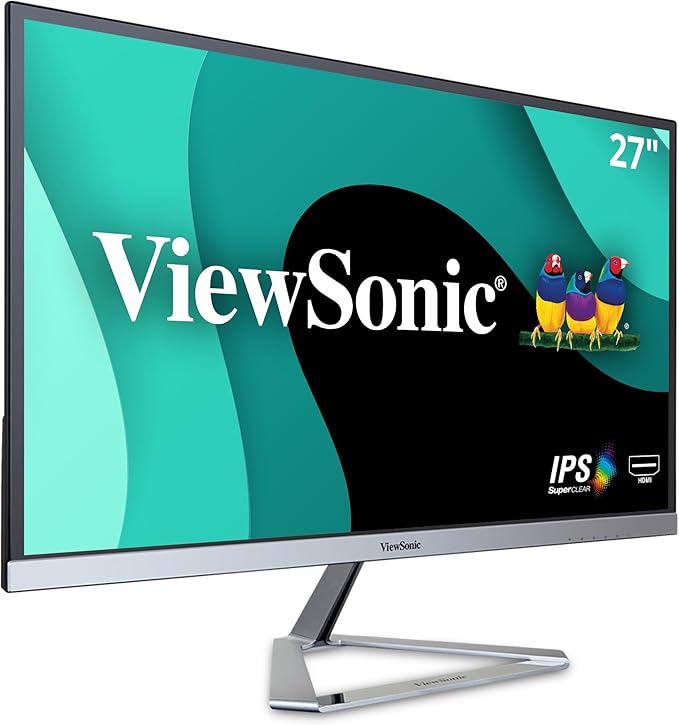
ViewSonic VX3276-MHD 32in Full HD IPS Monitor
ViewSonic VX3276-2K-mhd-2 32" IPS QHD Entertainment Monitor
ViewSonic VX3276-2K-mhd-2 32" IPS QHD Entertainment Monitor
ViewSonic VX3276-2K-mhd-2 32" IPS QHD Entertainment Monitor
ViewSonic VX3276-2K-mhd-2 32" IPS QHD Entertainment Monitor
in 10 offers
The lowest price for ViewSonic VX3276-MHD 32in Full HD IPS Monitor right now is $259.72 at eBay.com.au, compared across 10 retailers.
The all-time low was $259.72 on 7 Sept 2026. That's the lowest price we've ever tracked — a great time to buy.
Prices last updated 7 Sept 2026.

