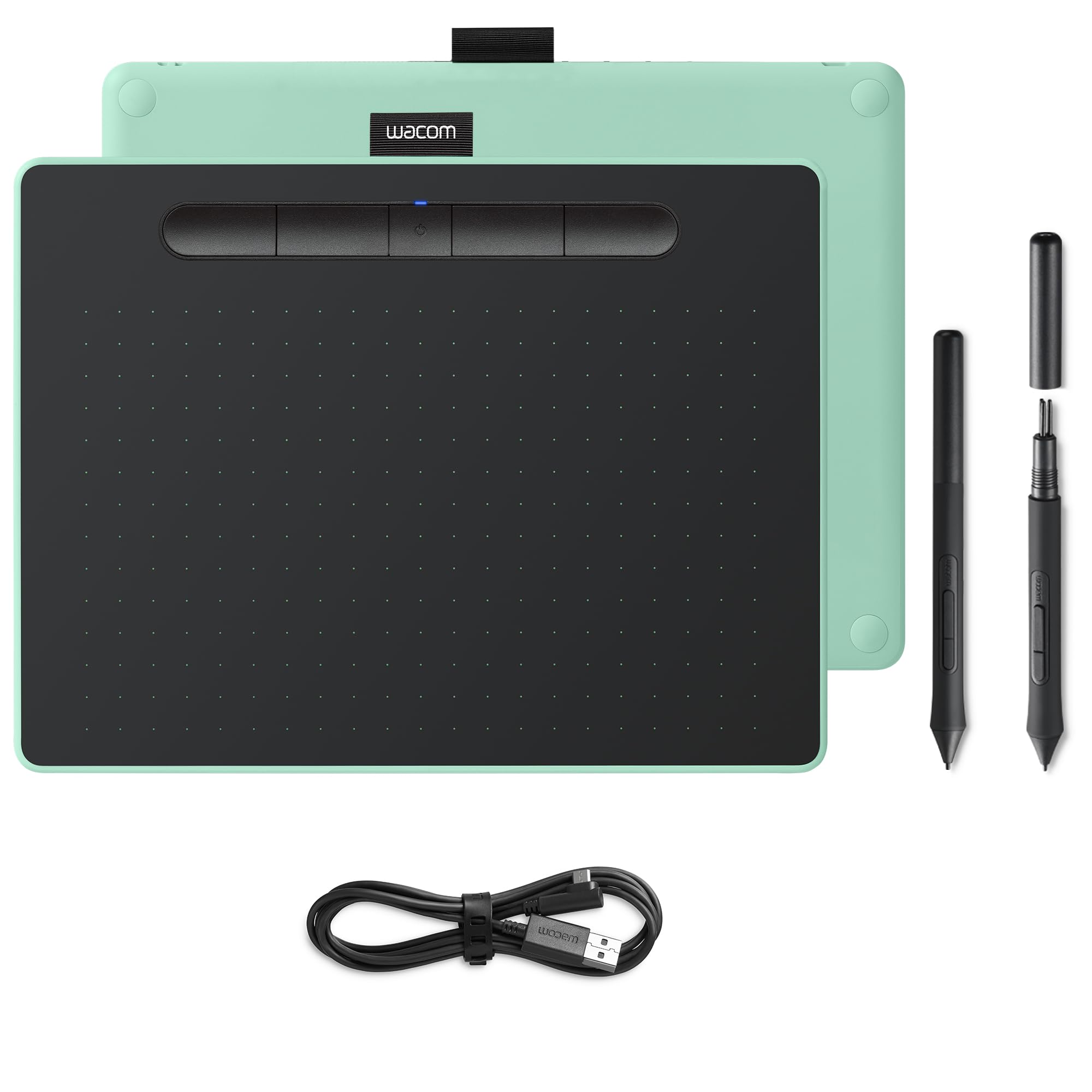
Cable problems are in the past with this wireless Wacom Intuos S Bluetooth. Unlike its predecessor, you can use this Intuos with both a USB cable and wirelessly via Bluetooth. The active area of 21.6 by 13.5 centimeters gives you a bit more space to work on than the S version. You can accurately determine how thick or thin you want the lines to be with the included pen, because 4096 pressure points transfer your movements just like on paper. The pen includes 3 extra tips and a tool to remove the tips. You have full control over your workflow thanks to the 4 programmable ExpressKeys at the top of the tablet.
Cable problems are in the past with this wireless Wacom Intuos S Bluetooth. Unlike its predecessor, you can use this Intuos with both a USB cable and wirelessly via Bluetooth. The active area of 21.6 by 13.5 centimeters gives you a bit more space to work on than the S version. You can accurately determine how thick or thin you want the lines to be with the included pen, because 4096 pressure points transfer your movements just like on paper. The pen includes 3 extra tips and a tool to remove the tips. You have full control over your workflow thanks to the 4 programmable ExpressKeys at the top of the tablet.
in 1 offers
The lowest price for Graphics Tablets and Pens Wacom M Bluetooth right now is $461.33 at Amazon.com.au.
The all-time low was $80.00 on 29 May 2024 — today's price is 477% above the lowest ever. It has been notably cheaper before — worth setting a price alert.
Prices last updated 19 Mar 2026.
Graphics Tablets and Pens Wacom M Bluetooth
Cable problems are in the past with this wireless Wacom Intuos S Bluetooth. Unlike its predecessor, you can use this Intuos with both a USB cable and wirelessly via Bluetooth. The active area of 21.6 by 13.5 centimeters gives you a bit more space to work on than the S version. You can accurately determine how thick or thin you want the lines to be with the included pen, because 4096 pressure points transfer your movements just like on paper. The pen includes 3 extra tips and a tool to remove the tips. You have full control over your workflow thanks to the 4 programmable ExpressKeys at the top of the tablet.
Cable problems are in the past with this wireless Wacom Intuos S Bluetooth. Unlike its predecessor, you can use this Intuos with both a USB cable and wirelessly via Bluetooth. The active area of 21.6 by 13.5 centimeters gives you a bit more space to work on than the S version. You can accurately determine how thick or thin you want the lines to be with the included pen, because 4096 pressure points transfer your movements just like on paper. The pen includes 3 extra tips and a tool to remove the tips. You have full control over your workflow thanks to the 4 programmable ExpressKeys at the top of the tablet.
Last updated at 19/03/2026 00:04:02
Wacom tavoletta con penna intuos m bluetooth pistachio ctl-6100wle-s
Affiliate Disclosure: We may receive a small commission for purchases made through this link at no extra cost to you. This helps support our site. Thank you!
originally posted on bhphotovideo.com
I wanted an inexpensive way to get into Wacom, but this may have been a little too inexpensive - the pencil is so lightweight that it has little feel and the color of the casing is a weird light lime green that I wasn't expecting. The B&H photos are usually excellent but the dark surface probably made the green look darker than it is in reality. I see this as being likely a donation to a school in the near future.
originally posted on bestbuy.com
great product. easy to use, but fragile. BE CAREFUL!! do not step on, throw, drop, toss, or yeet at anything.do not spill on or near, do not press down hard with the pen, do not place anything on top of it, also absolutely no blowing vape onto or inside of wacom drawing tablet.now for the serious review. i absolutely love this drawing tablet. it paired with my computer flawlessly and the applications that go with it are amazing! ive learned so much since ive gotten it and have a blast creating things.i wish there was a bit more customer support for this wacom company but overall i would recommend to digital artists and creators.thanks!
originally posted on bhphotovideo.com
My Intuos 4 finally stopped working after many years, so I decided to replace it with this Intuos BT-M.Setup was easy, and and the tablet works well, as expected.There are a couple of minor differences that I will need to get used to. The first is that my palm frequently rests half on the surface, and half off. There's not really a border around the edges. Just personal preference, but it would be nice to have a little more room on the bottom for the wrist.The other difference is that the stylus is much thinner and lighter than the Intuos 4 stylus. This is not necessarily a bad thing, depending on preferences, but I kind of miss the more substantial feel of the previous stylus. I may try to find a grip that might help the feel/weight. Of note though, I'm quite ... MoreMy Intuos 4 finally stopped working after many years, so I decided to replace it with this Intuos BT-M.Setup was easy, and and the tablet works well, as expected.There are a couple of minor differences that I will need to get used to. The first is that my palm frequently rests half on the surface, and half off. There's not really a border around the edges. Just personal preference, but it would be nice to have a little more room on the bottom for the wrist.The other difference is that the stylus is much thinner and lighter than the Intuos 4 stylus. This is not necessarily a bad thing, depending on preferences, but I kind of miss the more substantial feel of the previous stylus. I may try to find a grip that might help the feel/weight. Of note though, I'm quite sure I'll get used to this one soon enough.But, I still give it 5 stars, because these I'll get accustomed to the differences, and the tablet works great. Stylish, too!

Wacom tavoletta con penna intuos m bluetooth pistachio ctl-6100wle-s
Affiliate Disclosure: We may receive a small commission for purchases made through this link at no extra cost to you. This helps support our site. Thank you!
I wanted an inexpensive way to get into Wacom, but this may have been a little too inexpensive - the pencil is so lightweight that it has little feel and the color of the casing is a weird light lime green that I wasn't expecting. The B&H photos are usually excellent but the dark surface probably made the green look darker than it is in reality. I see this as being likely a donation to a school in the near future.
great product. easy to use, but fragile. BE CAREFUL!! do not step on, throw, drop, toss, or yeet at anything.do not spill on or near, do not press down hard with the pen, do not place anything on top of it, also absolutely no blowing vape onto or inside of wacom drawing tablet.now for the serious review. i absolutely love this drawing tablet. it paired with my computer flawlessly and the applications that go with it are amazing! ive learned so much since ive gotten it and have a blast creating things.i wish there was a bit more customer support for this wacom company but overall i would recommend to digital artists and creators.thanks!
My Intuos 4 finally stopped working after many years, so I decided to replace it with this Intuos BT-M.Setup was easy, and and the tablet works well, as expected.There are a couple of minor differences that I will need to get used to. The first is that my palm frequently rests half on the surface, and half off. There's not really a border around the edges. Just personal preference, but it would be nice to have a little more room on the bottom for the wrist.The other difference is that the stylus is much thinner and lighter than the Intuos 4 stylus. This is not necessarily a bad thing, depending on preferences, but I kind of miss the more substantial feel of the previous stylus. I may try to find a grip that might help the feel/weight. Of note though, I'm quite ... MoreMy Intuos 4 finally stopped working after many years, so I decided to replace it with this Intuos BT-M.Setup was easy, and and the tablet works well, as expected.There are a couple of minor differences that I will need to get used to. The first is that my palm frequently rests half on the surface, and half off. There's not really a border around the edges. Just personal preference, but it would be nice to have a little more room on the bottom for the wrist.The other difference is that the stylus is much thinner and lighter than the Intuos 4 stylus. This is not necessarily a bad thing, depending on preferences, but I kind of miss the more substantial feel of the previous stylus. I may try to find a grip that might help the feel/weight. Of note though, I'm quite sure I'll get used to this one soon enough.But, I still give it 5 stars, because these I'll get accustomed to the differences, and the tablet works great. Stylish, too!
Works great, the only bad thing is that you have to charge it when the battery is around 10-20%. Charging is fast, though.When it's a few minutes since you don't touch it, the tablet disconnects to save battery. You click its button and then it reconnects again. Good.
I bought this tablet in 2018 for Christmas when I was 13 years old and have been using it since. It takes a bit of time to adjust to drawing without looking at the screen, and you generally need an online tutorial to set up, but one you get the hang of it, everything's pretty smooth. It doesn't feel anything "like paper" how others say, but the texture is enjoyable compared to a smooth screen. Pen is comfortable, and tablet is small enough where I can draw anywhere - on my lap, on my keyboard, in bed, on aeroplanes, etc. Its shape is perfect for travel, though you need to put it in a cloth so it doesn't get scratched up; Scratches fortunately don't affect your performance, they can just be an eyesore sometimes depending on how bad it is. I really like the express ... MoreI bought this tablet in 2018 for Christmas when I was 13 years old and have been using it since. It takes a bit of time to adjust to drawing without looking at the screen, and you generally need an online tutorial to set up, but one you get the hang of it, everything's pretty smooth. It doesn't feel anything "like paper" how others say, but the texture is enjoyable compared to a smooth screen. Pen is comfortable, and tablet is small enough where I can draw anywhere - on my lap, on my keyboard, in bed, on aeroplanes, etc. Its shape is perfect for travel, though you need to put it in a cloth so it doesn't get scratched up; Scratches fortunately don't affect your performance, they can just be an eyesore sometimes depending on how bad it is. I really like the express keys (buttons at the top), I use them to "undo" "redo" "zoom in" "zoom out", but they're entirely customisable. Pen comes with replacement nibs, but I have never once needed to use them even though I draw with a very heavy hand and don't give the poor screen mercy haha. The little cloth at the top is for storing your pen, which is something I didn't figure out until 2 years later lol. All 4 of the small grips at the corner of my tablet have fallen off over time, but we don't talk about that.. (but if we do, I like to save them and chew on them for fun.) Software includes CSP Pro, which is a popular and excellent drawing program for both hobbyists and professionals. I love the brushes, though there is a learning curve to this as well. I've had ongoing issues with glitches, but it always fixes itself once i troubleshoot / restart / redownload either my laptop, drawing program (Medibang Paint Pro), or tablet itself; It does become bothersome at times, but this tablet has been going strong and is still working. I've noticed that those who didn't enjoy this tablet are just people who aren't willing to work with a screenless graphics tablet haha. If it doesn't suit you, fine, but that doesn't mean it isn't good for others. BTW don't mind how dirty it is- I have absolutely filthy hands and sometimes use my tablet as a plate.
Great tablet at a great price. if you are looking into getting into digital art a d want the option to not be tethered, this is a great place to start. Be it Photoshop, Zbrush, need to paint weights in Maya, draw and animate in ToonBoom or Adobe Animate, yes this is a great place to start.
This upgrade for my pen tablet was a long time coming. My Wacom Bamboo finally died. Its a little different bc there was more surface area on the bamboo. Almost the entire surface is usable space on the Intuos. Not a hard transition though and I like the extra space on my desk. One of the other reviews complained about the lack of surface area, that there needed to be space for your hand to rest (which there was on the bamboo... sort of), but the thin, sleek tablet design makes this issue a non- issue for me. I like the thin tablet. The pen is also different. The Bamboo pen had a larger diameter which was easier to grip. Intuos pen is much thinner and is definitely an adjustment for me, especially when retouching for long periods of time. But again, this is new and ... MoreThis upgrade for my pen tablet was a long time coming. My Wacom Bamboo finally died. Its a little different bc there was more surface area on the bamboo. Almost the entire surface is usable space on the Intuos. Not a hard transition though and I like the extra space on my desk. One of the other reviews complained about the lack of surface area, that there needed to be space for your hand to rest (which there was on the bamboo... sort of), but the thin, sleek tablet design makes this issue a non- issue for me. I like the thin tablet. The pen is also different. The Bamboo pen had a larger diameter which was easier to grip. Intuos pen is much thinner and is definitely an adjustment for me, especially when retouching for long periods of time. But again, this is new and I think I'll get used to that quickly. Very easy set up. Nice and responsive to touch and pressure. Also the pistachio green makes me smile : ) Overall very happy and would recommend.
I was so excited about it, but now I just have contempt towards it.I bought the tablet so that I could mask images and zoom at the same time. I imagined using the pen for brushwork/masking/healing and using my fingers to pinch + zoom and move the image around. I can't do that with this tablet.It's a decent tool, but it doesn't serve the purpose for which I bought it. You CAN customize the buttons to zoom in and out, but you still have to use the mouse (or touchscreen) to move your image around.It is very much unlike the touchpads on laptops, which is more what I was expecting, but with a fancy pen. lolThe way this tablet works is it is NOT reactive to touch which allows you to rest your hand on it, I guess, for more precise penwork.Unlike the way you can ... MoreI was so excited about it, but now I just have contempt towards it.I bought the tablet so that I could mask images and zoom at the same time. I imagined using the pen for brushwork/masking/healing and using my fingers to pinch + zoom and move the image around. I can't do that with this tablet.It's a decent tool, but it doesn't serve the purpose for which I bought it. You CAN customize the buttons to zoom in and out, but you still have to use the mouse (or touchscreen) to move your image around.It is very much unlike the touchpads on laptops, which is more what I was expecting, but with a fancy pen. lolThe way this tablet works is it is NOT reactive to touch which allows you to rest your hand on it, I guess, for more precise penwork.Unlike the way you can pick up a mouse so you're not running off the edge of your desk while working on the computer, you cannot move the space in which you are working on the tablet. You end up on the edges of the tablet when you're on the edges of your screen which is uncomfortable for me. (There is a way to narrow-in the active part of the tablet to help with this.)In short, this tablet did not meet my expectations.I did not return it because I was hoping it was something I could adapt to or get used to. NOPE. If it's not your cup of tea, don't expect to get used to it. I was so excited about it, but now I just have contempt towards it.
I've had several Wacom tablets over the years, but wanted a very small, wireless one, for my laptop. This filled that bill.Unfortunately, it's not as consistent in response as their next level up Intuos tablets, and has a sort of scratchy feel to the pen input. Also, the pen is fairly cheap feeling, but that was not unexpected, given the price point.Overall, I would rate this as a handy tool for portability, but less useful for precision drawing or photo editing than their next level tablets.
Works really well. I use this for drawing and as a mouse/trackpad. I enable windows ink so I can write in search fields and don't need a keyboard most the time. There are some instances I do but I simply created a shortcut that pinned to the taskbar so I can quickly navigate to it when needed. I also use this with a dual monitor setup which basically divides the surface area in half one for each screen so you lose a bit of space if trying to draw in that mode; which I don't usually do. I like dual setup when I want my main site or task open and using the smaller screen for other searches or to keep email and other notifications more visible my linked phone messages and so on. This is a great solution if you are trying to save some money but want to tap into digital ... MoreWorks really well. I use this for drawing and as a mouse/trackpad. I enable windows ink so I can write in search fields and don't need a keyboard most the time. There are some instances I do but I simply created a shortcut that pinned to the taskbar so I can quickly navigate to it when needed. I also use this with a dual monitor setup which basically divides the surface area in half one for each screen so you lose a bit of space if trying to draw in that mode; which I don't usually do. I like dual setup when I want my main site or task open and using the smaller screen for other searches or to keep email and other notifications more visible my linked phone messages and so on. This is a great solution if you are trying to save some money but want to tap into digital art to see if its a fit. I love it because in real life there is no undo feature and sometimes one wrong stroke ruins what you are creating and that turns into a waste of time, money, and resources which mankind will run out of eventually. And each point on the tablet stays locked too a fixed position on your screen so you could actually create marks on the tablet if you wanted to make navigation a bit easier. You get familiar with it quicker than you may think so its not really necessary but something you could do. I have been using mine about a month so far and I have not had to replace a nib yet. I am wondering how long one will last as its seems there is a fair amount wear so far and I wouldn't say I am heavy handed when it comes to the pressure I apply as I try to stay aware that pressure beyond the sensitivity its designed to register only works to shorten the lifespan of the nibs and product overall. I opted for a cheaper laptop instead of a 2 in 1 that would have tablet mode so I could draw directly on the screen which is nice but not when I need to save money. I returned the 1st laptop I had purchased and saved about $700 and I don't regret that decision whatsoever. One day I will opt for an actual pen display when I can splurge. Hope this helps you make an informed purchase !!