Last updated at 22/06/2026 08:56:10
WD Elements Desktop 10TB USB 3.0 3.5" External Hard Drive
Delivery between 24–29 June $20
originally posted on westerndigital.com
This product lasted all of 45 minutes. It was plugged into a Mac, formatted, and then used to back up customer and project data. I then plugged it into a second device to archive more data only for the device to start clicking and whirring its inevitable demise. Try as I might, it wouldn't start again. I am now left with a $280 dollar brick that I cannot return to the seller for repairs or a replacement as it contains customer data that cannot be shared for legal reasons. And to be clear, there is nothing wrong with my devices, or the USB ports I am using. This is not the first time a WD product has failed on me. But I can say with confidence it is the very last time I buy a WD product.
originally posted on westerndigital.com
As usual with WD drives, the hardware is solid. I just hate the archaic lock software on PC. You have no easy way to toggle different computers to auto unlock without password. It's been YEARS and still doesn't work right. You have to remove the password and can only autounlock 1 computer, usually. It should be a simple toggle after typing in the password, and then possible ask for the password again or some second measure per computer. The software needs to be updated. I NEVER buy a WD drive without hardware encryption, but the software behind it lacks, always. WD, HIRE some good people to refresh this and make more options and make it user friendly.
originally posted on homeessentialsdirect.com
I have an embarrassingly large number of backup drives. Part of it is as a commercial photographer it’s a necessity – at last count I have something approaching a quarter of a million photos in my lifetime file. The other reason is I’ve learned the hard way to back up all of my work, then back it up again, and then make sure to make another backup to take off premises for safety. This is my third WD MyBook. There’s no real reason this product exists, there are cheaper ways to get a backup drive and use it with a computer, but these are convenient, dependable and reasonably priced. I bought this one to do a mega consolidation of everything I have on many different media, except for my photography. WHAT I LIKE The form factor is simple, just a plastic monolith case ... MoreI have an embarrassingly large number of backup drives. Part of it is as a commercial photographer it’s a necessity – at last count I have something approaching a quarter of a million photos in my lifetime file. The other reason is I’ve learned the hard way to back up all of my work, then back it up again, and then make sure to make another backup to take off premises for safety. This is my third WD MyBook. There’s no real reason this product exists, there are cheaper ways to get a backup drive and use it with a computer, but these are convenient, dependable and reasonably priced. I bought this one to do a mega consolidation of everything I have on many different media, except for my photography. WHAT I LIKE The form factor is simple, just a plastic monolith case that can be used either horizontal or vertical. I choose to use it vertical to take up a minimal amount of desk space. I like to keep it right there in front of me as a visual reminder to be sure to do a daily backup. IMPROVEMENTS WD seems to have this product line down pat, it’s old technology that has proven itself and there’s not a lot they can do to make it better. The most positive thing I can say about it is that they wisely don’t load it with a lot of useless bloatware to try to make it look more important to you. There are just two relatively small apps, one for PC and one for Mac for those who like to use backup software. Both files are easily deleted in seconds if you don’t want them. I choose not to use automated backup software, I simply copy entire files and folders from one drive to another so there’s no guessing where they are or what they’re named. OPINION I find it unfortunate that here we are deep into the twenty-first century and there are still reviews about how noisy or slow these drives are. Your’re not saying anything new by bringing that up, yes they are, if that bothers you don’t buy a hard drive with a spinning platter. There are those who will say, and count me in on that, mechanical hard drives continue to be used because they are the safest media we can use, the chances of recovering a corrupt or lost data file is highest with these than any other media. The method being used to use a moving recording head back and forth on a revolving disk is going to cause some noise and it’s also going to be a bit on the slow side. I find that the speed is only a factor when I first get a drive and I’m copying huge amounts of data to it, and yes that can take hours. After that most backups are cumulative and how long they take has never been an issue for me. And like I said, I keep my WD right in front of me on my desk and they’ve reduced the vibration and noise to the point that it is almost imperceptible. Because this product does exactly what I expect it to do and because of my positive experience with the MyBook product line I believe this earns a full five stars.
WD Elements Desktop 10TB USB 3.0 3.5" External Hard Drive
Delivery between 24–29 June $20
This product lasted all of 45 minutes. It was plugged into a Mac, formatted, and then used to back up customer and project data. I then plugged it into a second device to archive more data only for the device to start clicking and whirring its inevitable demise. Try as I might, it wouldn't start again. I am now left with a $280 dollar brick that I cannot return to the seller for repairs or a replacement as it contains customer data that cannot be shared for legal reasons. And to be clear, there is nothing wrong with my devices, or the USB ports I am using. This is not the first time a WD product has failed on me. But I can say with confidence it is the very last time I buy a WD product.
As usual with WD drives, the hardware is solid. I just hate the archaic lock software on PC. You have no easy way to toggle different computers to auto unlock without password. It's been YEARS and still doesn't work right. You have to remove the password and can only autounlock 1 computer, usually. It should be a simple toggle after typing in the password, and then possible ask for the password again or some second measure per computer. The software needs to be updated. I NEVER buy a WD drive without hardware encryption, but the software behind it lacks, always. WD, HIRE some good people to refresh this and make more options and make it user friendly.
I have an embarrassingly large number of backup drives. Part of it is as a commercial photographer it’s a necessity – at last count I have something approaching a quarter of a million photos in my lifetime file. The other reason is I’ve learned the hard way to back up all of my work, then back it up again, and then make sure to make another backup to take off premises for safety. This is my third WD MyBook. There’s no real reason this product exists, there are cheaper ways to get a backup drive and use it with a computer, but these are convenient, dependable and reasonably priced. I bought this one to do a mega consolidation of everything I have on many different media, except for my photography. WHAT I LIKE The form factor is simple, just a plastic monolith case ... MoreI have an embarrassingly large number of backup drives. Part of it is as a commercial photographer it’s a necessity – at last count I have something approaching a quarter of a million photos in my lifetime file. The other reason is I’ve learned the hard way to back up all of my work, then back it up again, and then make sure to make another backup to take off premises for safety. This is my third WD MyBook. There’s no real reason this product exists, there are cheaper ways to get a backup drive and use it with a computer, but these are convenient, dependable and reasonably priced. I bought this one to do a mega consolidation of everything I have on many different media, except for my photography. WHAT I LIKE The form factor is simple, just a plastic monolith case that can be used either horizontal or vertical. I choose to use it vertical to take up a minimal amount of desk space. I like to keep it right there in front of me as a visual reminder to be sure to do a daily backup. IMPROVEMENTS WD seems to have this product line down pat, it’s old technology that has proven itself and there’s not a lot they can do to make it better. The most positive thing I can say about it is that they wisely don’t load it with a lot of useless bloatware to try to make it look more important to you. There are just two relatively small apps, one for PC and one for Mac for those who like to use backup software. Both files are easily deleted in seconds if you don’t want them. I choose not to use automated backup software, I simply copy entire files and folders from one drive to another so there’s no guessing where they are or what they’re named. OPINION I find it unfortunate that here we are deep into the twenty-first century and there are still reviews about how noisy or slow these drives are. Your’re not saying anything new by bringing that up, yes they are, if that bothers you don’t buy a hard drive with a spinning platter. There are those who will say, and count me in on that, mechanical hard drives continue to be used because they are the safest media we can use, the chances of recovering a corrupt or lost data file is highest with these than any other media. The method being used to use a moving recording head back and forth on a revolving disk is going to cause some noise and it’s also going to be a bit on the slow side. I find that the speed is only a factor when I first get a drive and I’m copying huge amounts of data to it, and yes that can take hours. After that most backups are cumulative and how long they take has never been an issue for me. And like I said, I keep my WD right in front of me on my desk and they’ve reduced the vibration and noise to the point that it is almost imperceptible. Because this product does exactly what I expect it to do and because of my positive experience with the MyBook product line I believe this earns a full five stars.
Easy to plug in and operate. Has it's own ac power source, so no drain on computer. However, I didn't realize, that every time I did a back up, it duplicated data , rather than only saving new data. Bummer. The external HDD filled up faster than expected. Then, one day, in the middle of a back up, it just stopped working. I had a chat with a tech on the WD website who suggested a new USB cord. That didn't help. Then I tried The scan diagnostics software that came with the HDD. It failed the first scan which meant the HDD was garbage. I checked in disc management, and the entire HDD disc was full. After speaking with a tech at a computer store, he suggested this was most likely the reason the HDD failed. I plan on checking to be sure that the next external HDD I buy ... MoreEasy to plug in and operate. Has it's own ac power source, so no drain on computer. However, I didn't realize, that every time I did a back up, it duplicated data , rather than only saving new data. Bummer. The external HDD filled up faster than expected. Then, one day, in the middle of a back up, it just stopped working. I had a chat with a tech on the WD website who suggested a new USB cord. That didn't help. Then I tried The scan diagnostics software that came with the HDD. It failed the first scan which meant the HDD was garbage. I checked in disc management, and the entire HDD disc was full. After speaking with a tech at a computer store, he suggested this was most likely the reason the HDD failed. I plan on checking to be sure that the next external HDD I buy does not duplicate data every time I back up my computer!
I just wanted to drop a note about the Western Digital MyBook 4 TB drive. I’m going to purchase a new MyBook, even though my 13 yr old one is still going strong. The drive has backed up our old PC and our IMac. I have never had any issues with this drive. It does what it’s supposed to do. It sits next to the IMac, quietly backing up our data. I looked at other brands, but Western Digital did not let us down. I will stick with the brand. I hope the new one lasts just as long!
I read a lot of reviews about this particular hard drive and felt comfortable about my purchase. I am REALLY starting to regret it, though. This hard drive is incredibly slow. It seems like it goes to sleep. When I click to go into it, for some reason it takes several seconds for it to react. And even when I do get in, if I click another folder, it also takes a few seconds to react. I use this for my business (sometimes with clients right next to me), and it is embarassing to have to sit there and wait for this thing to react. :-/
My Book Desktop 4TB HDD Certified Refurbished from Western Digital store works very well. Shipping was fast. Goes to sleep a bit too often and is sometimes slow to wake, but I found an application that keeps external HDDs awake and spinning and thank the maker of that software for his work on it and his sharing it. I don't use the software that comes with the My Book but it's there if you want to use it. It is quieter than other desktop hard drive disks. I've seen this model that people one person said has a 2.5" disk and more that say it has a 3.5" disk. I haven't opened it to see so as not to break the warranty. I guess I'll weigh it and a confirmed 3.5" external HDD. Good capacity HDD for general photo enthusiasts that use high resolution cameras.
Overall, everything was really good. The only problem is that the WalMart online website very often does not provide enough information about the products they sell. For example, there was no information about what computer operating systems were compatible with this product. I did not discover that information until I opened the product box and read the info sheet. I've encountered this problem with a lot of WalMart online products. This has, on several occasions, prompted me to purchase the product from other stores that provided full information about the product. It would seem to me that it would be easy to include that info if the person uploading the product on the WalMart website simply pretended to be the prospective buyer and asked themselves what info they ... MoreOverall, everything was really good. The only problem is that the WalMart online website very often does not provide enough information about the products they sell. For example, there was no information about what computer operating systems were compatible with this product. I did not discover that information until I opened the product box and read the info sheet. I've encountered this problem with a lot of WalMart online products. This has, on several occasions, prompted me to purchase the product from other stores that provided full information about the product. It would seem to me that it would be easy to include that info if the person uploading the product on the WalMart website simply pretended to be the prospective buyer and asked themselves what info they would need to know before deciding to buy the product. I know there are buyers in the real world that can come up with some strange questions. But most buyers know what info about a product they need.
Needed a big HD to back up (with SuperDuper!) large photo archives. So far (three weeks) it is working well. Partitioned for Mac. B&H's My Book 22TB price was reasonable and three year warranty was important. I've had pretty good luck with WD HDs, and make multiple back ups in case of the rare failure. Transfer speed is not fast, of course, but it is doable. B&H shipped promptly. Packaging was not very robust, but I tested the drive with the WD utility and Mac Disk Utility and so far so good.
i bought the 18tb one. it works very well for the price.it does have some issues, but they're all mitigated by the relatively inexpensive price and huge storage size.the main issue is a 'clicking' noise that occurs every few seconds. at first i thought the unit was defective, but after some research it seems it's a normal noise for this hdd.this hdd transfers large files (ie raw video) decently fast for an hdd - averaging about 170-180MB/s.it still uses a usb3 port which is significantly less convenient than a usb-c port, but that does not affect performance at all.overall, for the price and storage size it is a great external hdd!
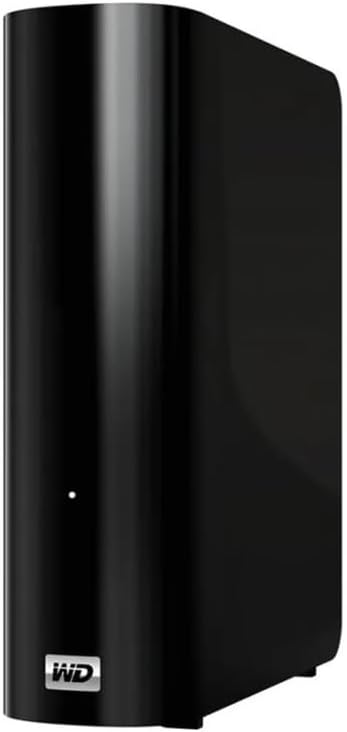

My Book desktop storage comes equipped with WD Backup software for Windows and Apple Time Machine compatibility to help make sure your photos, videos, music and documents don’t get lost. You can set it to run automatically to your schedule. Just pick the time and frequency to back up important files from your system. The My Book desktop hard drive also works great with AcronisTrue Image WD Edition software to schedule full system backups.
My Book desktop storage comes equipped with WD Backup software for Windows and Apple Time Machine compatibility to help make sure your photos, videos, music and documents don’t get lost. You can set it to run automatically to your schedule. Just pick the time and frequency to back up important files from your system. The My Book desktop hard drive also works great with AcronisTrue Image WD Edition software to schedule full system backups.
in 1 offers
The lowest price for WD My Book Desktop External Hard Drive 10TB right now is $535.00 at Technotronics Business Systems.
The all-time low was $282.00 on 8 Feb 2026 — today's price is 90% above the lowest ever. It has been notably cheaper before — worth setting a price alert.
Prices last updated 22 June 2026.
WD My Book Desktop External Hard Drive 10TB
My Book desktop storage comes equipped with WD Backup software for Windows and Apple Time Machine compatibility to help make sure your photos, videos, music and documents don’t get lost. You can set it to run automatically to your schedule. Just pick the time and frequency to back up important files from your system. The My Book desktop hard drive also works great with AcronisTrue Image WD Edition software to schedule full system backups.
My Book desktop storage comes equipped with WD Backup software for Windows and Apple Time Machine compatibility to help make sure your photos, videos, music and documents don’t get lost. You can set it to run automatically to your schedule. Just pick the time and frequency to back up important files from your system. The My Book desktop hard drive also works great with AcronisTrue Image WD Edition software to schedule full system backups.

