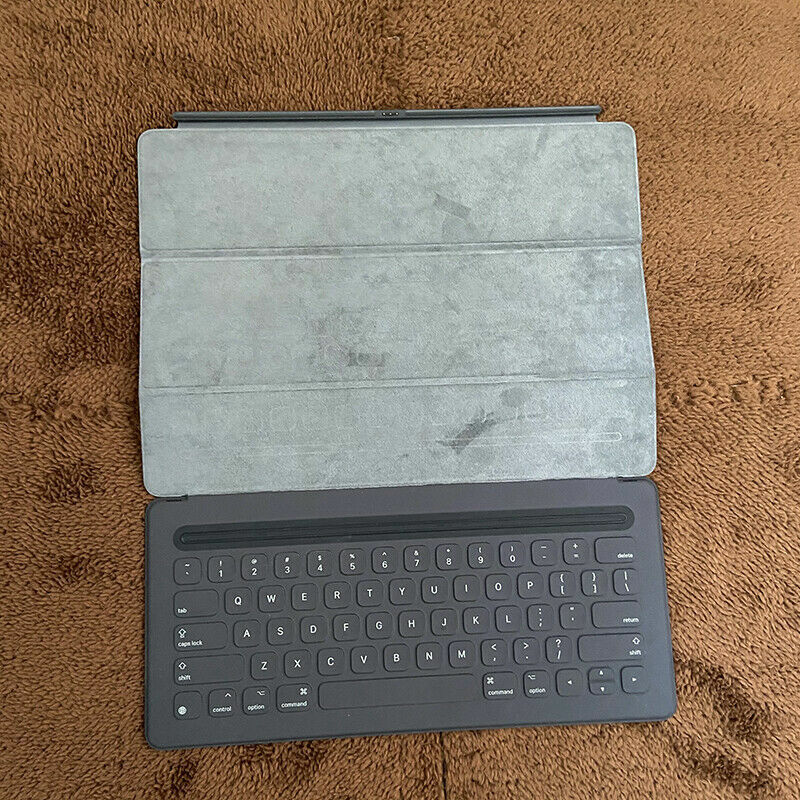
Apple Magic Keyboard For iPad Pro | Black | 12.9 in
The new Smart Keyboard for iPad Pro combines advanced technologies to create a keyboard like no other. It’s a full-size keyboard that’s fully portable, and it connects to iPad Pro with the Smart Connector. Just attach the Smart Keyboard and start typing. And when you’re done, it folds to create a slim, lightweight cover. This keyboard has all the utility of an ordinary full-size keyboard, but its technology is far from conventional. The entire keyboard is draped with a custom-woven fabric that has been laser ablated to precisely define each key and ensure a satisfyingly fast and natural key feel. Below the surface of the Smart Keyboard is a new conductive material. At just 0.1mm, it is nearly as thin as a piece of paper, yet strong enough to withstand a lifetime of folding. And you won't find any batteries, cord or on/off switches with this Smart Keyboard.
The new Smart Keyboard for iPad Pro combines advanced technologies to create a keyboard like no other. It’s a full-size keyboard that’s fully portable, and it connects to iPad Pro with the Smart Connector. Just attach the Smart Keyboard and start typing. And when you’re done, it folds to create a slim, lightweight cover. This keyboard has all the utility of an ordinary full-size keyboard, but its technology is far from conventional. The entire keyboard is draped with a custom-woven fabric that has been laser ablated to precisely define each key and ensure a satisfyingly fast and natural key feel. Below the surface of the Smart Keyboard is a new conductive material. At just 0.1mm, it is nearly as thin as a piece of paper, yet strong enough to withstand a lifetime of folding. And you won't find any batteries, cord or on/off switches with this Smart Keyboard.
The new Smart Keyboard for iPad Pro combines advanced technologies to create a keyboard like no other. It’s a full-size keyboard that’s fully portable, and it connects to iPad Pro with the Smart Connector. Just attach the Smart Keyboard and start typing. And when you’re done, it folds to create a slim, lightweight cover. This keyboard has all the utility of an ordinary full-size keyboard, but its technology is far from conventional. The entire keyboard is draped with a custom-woven fabric that has been laser ablated to precisely define each key and ensure a satisfyingly fast and natural key feel. Below the surface of the Smart Keyboard is a new conductive material. At just 0.1mm, it is nearly as thin as a piece of paper, yet strong enough to withstand a lifetime of folding. And you won't find any batteries, cord or on/off switches with this Smart Keyboard.
The new Smart Keyboard for iPad Pro combines advanced technologies to create a keyboard like no other. It’s a full-size keyboard that’s fully portable, and it connects to iPad Pro with the Smart Connector. Just attach the Smart Keyboard and start typing. And when you’re done, it folds to create a slim, lightweight cover. This keyboard has all the utility of an ordinary full-size keyboard, but its technology is far from conventional. The entire keyboard is draped with a custom-woven fabric that has been laser ablated to precisely define each key and ensure a satisfyingly fast and natural key feel. Below the surface of the Smart Keyboard is a new conductive material. At just 0.1mm, it is nearly as thin as a piece of paper, yet strong enough to withstand a lifetime of folding. And you won't find any batteries, cord or on/off switches with this Smart Keyboard.
in 5 offers
The lowest price for Apple Magic Keyboard For iPad Pro | Black | 12.9 in right now is $91.36 at eBay.com.au, compared across 4 retailers.
The all-time low was $77.75 on 30 Sept 2024 — today's price is 18% above the lowest ever. That's a little above the best price we've seen.
Prices last updated 13 Sept 2026.
Last updated at 13/09/2026 02:09:36
Apple Magic Keyboard for 12.9-inch iPad Pro 4th and 3rd Gen. - US English
Affiliate Disclosure: We may receive a small commission for purchases made through this link at no extra cost to you. This helps support our site. Thank you!
Apple Magic Keyboard for iPad Pro 12.9\
Affiliate Disclosure: We may receive a small commission for purchases made through this link at no extra cost to you. This helps support our site. Thank you!
Apple Magic Keyboard for 12.9" 3rd & 4th Gen iPad Pro - Black, B
Free delivery
Apple MXQU2 Magic Keyboard for 12.9 inches iPad Pro (2nd Generation)
Delivery $240
Apple Magic Keyboard for 12.9-inch iPad Pro 3rd /4th/5th/6th Generation Black
Free delivery
originally posted on bestbuy.com
Magic Keyboard + iPad Pro, wow where do I begin...this accessory brought new ways to the iPad experience that I never could imagine. Firstly, the packaging it came in, as with all Apple Products you get attention to detail on the packaging, as well as when you crack into the box after pulling the handy pull tab that is on the corner. The only thing you’ll find in the box is some paperwork, plastic, and your keyboard itself, so don’t be looking around for any cables or anything. Once out you can connect the iPad to the magic keyboard, which is just a couple of strong magnets on the back of the Magic Keyboard and Integrated into the iPad itself, so it gives itself a secure grip once connected into place, so do not worry your iPad will not fall out of the case once its ... MoreMagic Keyboard + iPad Pro, wow where do I begin...this accessory brought new ways to the iPad experience that I never could imagine. Firstly, the packaging it came in, as with all Apple Products you get attention to detail on the packaging, as well as when you crack into the box after pulling the handy pull tab that is on the corner. The only thing you’ll find in the box is some paperwork, plastic, and your keyboard itself, so don’t be looking around for any cables or anything. Once out you can connect the iPad to the magic keyboard, which is just a couple of strong magnets on the back of the Magic Keyboard and Integrated into the iPad itself, so it gives itself a secure grip once connected into place, so do not worry your iPad will not fall out of the case once its in, but if you wish to take it off do not worry either as with a nice tug your iPad will be set free for you can enjoy tablet mode once again. Unlike other keyboards, this one is a direct connection with the iPad itself, and of course since it is made by Apple you get the full intentions of what Apple wished the iPad to be, like a computer....well sort of. The keyboard does add a little bit of weight on the iPad itself, so be prepared for that, but I did not notice a drastic increase as I am used to using a MacBook Pro. The keyboard itself is backlit, so working at night is a breeze, and the actual keys itself are pretty clicky and super responsive. Also embedded in the keyboard is some shortcut keys, if you are used to MacOS they kind of follow to an extent in iPadOS. (Speaking of the keyboard, if you don’t wish to have the backlight on in the day time, simply go to settings-general-keyboard-hardware keyboard then simply change the brightness to your desired level.) The trackpad, however is a different, but very useful experience for the iPad. It brings a new light to it, and makes it really comparable to a modern laptop, or even a lower model MacBook. The trackpad is responsive as well, and allows you to click anywhere on the screen. Also on the keyboard itself, there is an additional USB-C port, which allows you to do pass through charging on the iPad to leave the main USB-C port on your iPad freed up for anything you wish to use it for. My only downside of the keyboard is that it doesn’t protect the sides of the iPad, so i suggest getting a tablet sleeve, or even a laptop sleeve that’ll fit it if you plan on carrying it around places that might ding the sides. Other than that, if you get Apple Care Plus for your iPad (which i highly recommend) it will also cover the Magic Keyboard that you buy for the length of your protection on your ipad! (Each subject to a 29 dollar service fee for the keyboard itself of course) Some people may think the price is too high for what it is, yes its a 350 dollar keyboard, but its more than a keyboard its an amazing accessory for your iPad especially if you use it on the daily. Plus with price being mentioned, you can always apply for the credit card that BestBuy offers, and if you get approved you can finance this keyboard interest free for either 12 months or 6 months which is amazing I think, I chose the 12 month financing! Anyway, I love this keyboard...and I think any other iPad Pro user will to!
originally posted on bestbuy.com
I recently bought this because it was on sale. Otherwise, I don't know if I would have bought it due to cost. I already owned a cheaper third party keyboard which I liked for the most part but always wanted to give this try since it's an actual apple product and because it has a trackpad (my other one didn't).Pros:Contacts easily without any issues to ipad.Charge port on track pad allows you to charge ipad while using charging port on ipad for peripherals.Keyboard works great and feels good for the most part.Trackpad works great especially if you know how to use the trackpad gestures.Build Quality is goodCons:The hinge that adjusts your viewing is limited and feels like it will go out with time as you adjust it numerous timesKeyboard feels good overall ... MoreI recently bought this because it was on sale. Otherwise, I don't know if I would have bought it due to cost. I already owned a cheaper third party keyboard which I liked for the most part but always wanted to give this try since it's an actual apple product and because it has a trackpad (my other one didn't).Pros:Contacts easily without any issues to ipad.Charge port on track pad allows you to charge ipad while using charging port on ipad for peripherals.Keyboard works great and feels good for the most part.Trackpad works great especially if you know how to use the trackpad gestures.Build Quality is goodCons:The hinge that adjusts your viewing is limited and feels like it will go out with time as you adjust it numerous timesKeyboard feels good overall but wished it felt more like the keys on the older macbooks (maybe more of a preference than a con)Material used on outside of keyboard attracts oil easily, especially the natural oil in your fingers.Overall I'm pretty happy with my purchase especially since I bought it on sale.
originally posted on bestbuy.com
Very overpriced keyboard and I picked it up at $200.. cant believe some people actually payed double that. RiP.The pass through charging is sadly NOT w/data and is only on one side of the case. Another huge miss step straight out the apple playbook. Gotta sell them disgusting dongles. This 'case', which has no real protection by the way, also doesn't have artist in mind as there's not even a drawing posture for it. Some flip it over with the keyboard hanging over their experience and that just makes me sad.The track pad with its gestures is godlike. The lights use almost no extra battery (efficiency far exceeding any of their competitors). However I think keyboard cases as a whole take away from the overall value of a tablet. They distance it from your face, and ... MoreVery overpriced keyboard and I picked it up at $200.. cant believe some people actually payed double that. RiP.The pass through charging is sadly NOT w/data and is only on one side of the case. Another huge miss step straight out the apple playbook. Gotta sell them disgusting dongles. This 'case', which has no real protection by the way, also doesn't have artist in mind as there's not even a drawing posture for it. Some flip it over with the keyboard hanging over their experience and that just makes me sad.The track pad with its gestures is godlike. The lights use almost no extra battery (efficiency far exceeding any of their competitors). However I think keyboard cases as a whole take away from the overall value of a tablet. They distance it from your face, and they add bulk defeating their own purposes. You can get a whole laptop for $350 with a 16 inch screen...This is for very specific people with a fetish for making their ipad not be an ipad. If you hate the tablet experience than this is for you.
| Compatible Devices | iPad Pro 4th Generation |
| Connector Type | USB-C |
| Keyboard description | QWERTY |
| Special feature | Backlit, Trackpad |
| Number of keys | 64 |
Apple Magic Keyboard for 12.9-inch iPad Pro 4th and 3rd Gen. - US English
Affiliate Disclosure: We may receive a small commission for purchases made through this link at no extra cost to you. This helps support our site. Thank you!
Apple Magic Keyboard for iPad Pro 12.9\
Affiliate Disclosure: We may receive a small commission for purchases made through this link at no extra cost to you. This helps support our site. Thank you!
Apple Magic Keyboard for 12.9" 3rd & 4th Gen iPad Pro - Black, B
Free delivery
Apple MXQU2 Magic Keyboard for 12.9 inches iPad Pro (2nd Generation)
Delivery $240
Apple Magic Keyboard for 12.9-inch iPad Pro 3rd /4th/5th/6th Generation Black
Free delivery
Magic Keyboard + iPad Pro, wow where do I begin...this accessory brought new ways to the iPad experience that I never could imagine. Firstly, the packaging it came in, as with all Apple Products you get attention to detail on the packaging, as well as when you crack into the box after pulling the handy pull tab that is on the corner. The only thing you’ll find in the box is some paperwork, plastic, and your keyboard itself, so don’t be looking around for any cables or anything. Once out you can connect the iPad to the magic keyboard, which is just a couple of strong magnets on the back of the Magic Keyboard and Integrated into the iPad itself, so it gives itself a secure grip once connected into place, so do not worry your iPad will not fall out of the case once its ... MoreMagic Keyboard + iPad Pro, wow where do I begin...this accessory brought new ways to the iPad experience that I never could imagine. Firstly, the packaging it came in, as with all Apple Products you get attention to detail on the packaging, as well as when you crack into the box after pulling the handy pull tab that is on the corner. The only thing you’ll find in the box is some paperwork, plastic, and your keyboard itself, so don’t be looking around for any cables or anything. Once out you can connect the iPad to the magic keyboard, which is just a couple of strong magnets on the back of the Magic Keyboard and Integrated into the iPad itself, so it gives itself a secure grip once connected into place, so do not worry your iPad will not fall out of the case once its in, but if you wish to take it off do not worry either as with a nice tug your iPad will be set free for you can enjoy tablet mode once again. Unlike other keyboards, this one is a direct connection with the iPad itself, and of course since it is made by Apple you get the full intentions of what Apple wished the iPad to be, like a computer....well sort of. The keyboard does add a little bit of weight on the iPad itself, so be prepared for that, but I did not notice a drastic increase as I am used to using a MacBook Pro. The keyboard itself is backlit, so working at night is a breeze, and the actual keys itself are pretty clicky and super responsive. Also embedded in the keyboard is some shortcut keys, if you are used to MacOS they kind of follow to an extent in iPadOS. (Speaking of the keyboard, if you don’t wish to have the backlight on in the day time, simply go to settings-general-keyboard-hardware keyboard then simply change the brightness to your desired level.) The trackpad, however is a different, but very useful experience for the iPad. It brings a new light to it, and makes it really comparable to a modern laptop, or even a lower model MacBook. The trackpad is responsive as well, and allows you to click anywhere on the screen. Also on the keyboard itself, there is an additional USB-C port, which allows you to do pass through charging on the iPad to leave the main USB-C port on your iPad freed up for anything you wish to use it for. My only downside of the keyboard is that it doesn’t protect the sides of the iPad, so i suggest getting a tablet sleeve, or even a laptop sleeve that’ll fit it if you plan on carrying it around places that might ding the sides. Other than that, if you get Apple Care Plus for your iPad (which i highly recommend) it will also cover the Magic Keyboard that you buy for the length of your protection on your ipad! (Each subject to a 29 dollar service fee for the keyboard itself of course) Some people may think the price is too high for what it is, yes its a 350 dollar keyboard, but its more than a keyboard its an amazing accessory for your iPad especially if you use it on the daily. Plus with price being mentioned, you can always apply for the credit card that BestBuy offers, and if you get approved you can finance this keyboard interest free for either 12 months or 6 months which is amazing I think, I chose the 12 month financing! Anyway, I love this keyboard...and I think any other iPad Pro user will to!
I recently bought this because it was on sale. Otherwise, I don't know if I would have bought it due to cost. I already owned a cheaper third party keyboard which I liked for the most part but always wanted to give this try since it's an actual apple product and because it has a trackpad (my other one didn't).Pros:Contacts easily without any issues to ipad.Charge port on track pad allows you to charge ipad while using charging port on ipad for peripherals.Keyboard works great and feels good for the most part.Trackpad works great especially if you know how to use the trackpad gestures.Build Quality is goodCons:The hinge that adjusts your viewing is limited and feels like it will go out with time as you adjust it numerous timesKeyboard feels good overall ... MoreI recently bought this because it was on sale. Otherwise, I don't know if I would have bought it due to cost. I already owned a cheaper third party keyboard which I liked for the most part but always wanted to give this try since it's an actual apple product and because it has a trackpad (my other one didn't).Pros:Contacts easily without any issues to ipad.Charge port on track pad allows you to charge ipad while using charging port on ipad for peripherals.Keyboard works great and feels good for the most part.Trackpad works great especially if you know how to use the trackpad gestures.Build Quality is goodCons:The hinge that adjusts your viewing is limited and feels like it will go out with time as you adjust it numerous timesKeyboard feels good overall but wished it felt more like the keys on the older macbooks (maybe more of a preference than a con)Material used on outside of keyboard attracts oil easily, especially the natural oil in your fingers.Overall I'm pretty happy with my purchase especially since I bought it on sale.
Very overpriced keyboard and I picked it up at $200.. cant believe some people actually payed double that. RiP.The pass through charging is sadly NOT w/data and is only on one side of the case. Another huge miss step straight out the apple playbook. Gotta sell them disgusting dongles. This 'case', which has no real protection by the way, also doesn't have artist in mind as there's not even a drawing posture for it. Some flip it over with the keyboard hanging over their experience and that just makes me sad.The track pad with its gestures is godlike. The lights use almost no extra battery (efficiency far exceeding any of their competitors). However I think keyboard cases as a whole take away from the overall value of a tablet. They distance it from your face, and ... MoreVery overpriced keyboard and I picked it up at $200.. cant believe some people actually payed double that. RiP.The pass through charging is sadly NOT w/data and is only on one side of the case. Another huge miss step straight out the apple playbook. Gotta sell them disgusting dongles. This 'case', which has no real protection by the way, also doesn't have artist in mind as there's not even a drawing posture for it. Some flip it over with the keyboard hanging over their experience and that just makes me sad.The track pad with its gestures is godlike. The lights use almost no extra battery (efficiency far exceeding any of their competitors). However I think keyboard cases as a whole take away from the overall value of a tablet. They distance it from your face, and they add bulk defeating their own purposes. You can get a whole laptop for $350 with a 16 inch screen...This is for very specific people with a fetish for making their ipad not be an ipad. If you hate the tablet experience than this is for you.
I'll admit, I was hesitant to purchase the Apple Magic Keyboard at first when I saw its list price. I thought that it would end up being an over-engineered, overpriced Apple product that looked cool but did much of the same things as a lower priced alternative.That was my mindset when I started to look for a new keyboard for my iPad Pro 12.9" since my old Logitech keyboard that worked with my 1st gen iPad Pro 12.9" was not compatible with the 4th gen version I upgraded to recently.However, after finding the Magic Keyboard on sale at Best Buy for 40+% off the original list price and comparing it to some other options, I decided to bite the bullet and buy one.Looking back on my decision, I'm glad I did but, honestly, I'm also equally glad I waited until I could ... MoreI'll admit, I was hesitant to purchase the Apple Magic Keyboard at first when I saw its list price. I thought that it would end up being an over-engineered, overpriced Apple product that looked cool but did much of the same things as a lower priced alternative.That was my mindset when I started to look for a new keyboard for my iPad Pro 12.9" since my old Logitech keyboard that worked with my 1st gen iPad Pro 12.9" was not compatible with the 4th gen version I upgraded to recently.However, after finding the Magic Keyboard on sale at Best Buy for 40+% off the original list price and comparing it to some other options, I decided to bite the bullet and buy one.Looking back on my decision, I'm glad I did but, honestly, I'm also equally glad I waited until I could purchase it at what I viewed as a much more reasonable price. As much as I like the Magic Keyboard, I still wouldn't pay the list price since it's possible to buy a brand new, entry level iPad for a lower price than the list price for the Magic Keyboard.I've found the Magic Keyboard to be a solid, well-engineered product. While it's not the lightest keyboard option available, it definitely has a solid feel and weight to it that makes me think I'll be able to use it for years (like I did with my original Logitech keyboard for my 1st gen iPad Pro) but, this time, without small pieces falling off of it as it aged as was the unfortunate case with my old Logitech keyboard in the last two years I owned it.In my view, the Magic Keyboard would be perfect if there was a way for the user to rotate the iPad back and forth between a horizontal and portrait orientation. Although when the day does come when Apple's engineers design a keyboard with that capability, I imagine it will likely come with a $600 list price. ;-)
Bought this open box product through Alberta Gadget Source. Very good support and contact from the seller. Package was well wrapped and arrived on time.I would recommend this seller again. As for the product itself, I use the ipad Pro for artwork and this keyboard is a real gamechanger. I like the responsive keyboard that have a nice tactile feel. I like that the keyboard lifts the ipad above the keyboard, it feels more ergonomic. The trackpad could use a little more friction but its not any way a hinderance. The backlit keyboard is also a nice addition and makes for it worth the cost. If you have an iPad Pro M1 or M2 I would definitely recommend this product.
This is the best keyboard on the market. I literally use this every day to type and use the trackpad on my iPad. It has literally transformed the way I use the iPad.Previously the iPad was a tablet that hold with my hand and rest on my lap or table. This keyboard dock makes it feel and function like a laptop. Previous versions of older iPad/keyboard combos was just a keyboard and had no trackpad. The trackpad changed everything. I rarely use the touchscreen of the iPad anymore and prefer the precision of the trackpad.The typing is the best with a real keyboard. Typing on an iPad was always a tedious affair with no tactile feel. The keyboard is great, it feels and looks like a regular MacBook keyboard with actual chiclet keys, not just a plastic membrane top. The ... MoreThis is the best keyboard on the market. I literally use this every day to type and use the trackpad on my iPad. It has literally transformed the way I use the iPad.Previously the iPad was a tablet that hold with my hand and rest on my lap or table. This keyboard dock makes it feel and function like a laptop. Previous versions of older iPad/keyboard combos was just a keyboard and had no trackpad. The trackpad changed everything. I rarely use the touchscreen of the iPad anymore and prefer the precision of the trackpad.The typing is the best with a real keyboard. Typing on an iPad was always a tedious affair with no tactile feel. The keyboard is great, it feels and looks like a regular MacBook keyboard with actual chiclet keys, not just a plastic membrane top. The backlight and power also adds to the premium laptop feel of the keyboard. Finally the additional USB C charging port on the left adds a location to charge where you most need it. The one issue with the port is that it is not thunderbolt compatible. It is not a data port at all, rather it is only useful for charging. Certain USB-C charging adapters like the one fro my Dell XPS laptop simply doesn’t’ work with the left port. I am not sure why.Overall this is a must have accessory for your iPad, if you don’t own one, i strongly suggest you get it!
I'm a little surprised about the quality (and thought-process) of this product both for it being Apple and having the price tag it has. When the keyboard/iPad is shut closed, it's extremely difficult to "open" it. You need two hands to wedge it apart and then open the case, if you're expecting an effortless flip open like you would a laptop, this will not provide you that. The edges feel quite cheap for how heavy it is. The keyboard is "clicky," if that bothers you, you likely will not like this. Additionally, this isn't really suitable for anyone that wants to take their iPad off their desk. You either use the iPad (protected) in the keyboard case or you take it off and use it (unprotected) without the keyboard. The viewing angles are EXTREMELY limited... as in ... MoreI'm a little surprised about the quality (and thought-process) of this product both for it being Apple and having the price tag it has. When the keyboard/iPad is shut closed, it's extremely difficult to "open" it. You need two hands to wedge it apart and then open the case, if you're expecting an effortless flip open like you would a laptop, this will not provide you that. The edges feel quite cheap for how heavy it is. The keyboard is "clicky," if that bothers you, you likely will not like this. Additionally, this isn't really suitable for anyone that wants to take their iPad off their desk. You either use the iPad (protected) in the keyboard case or you take it off and use it (unprotected) without the keyboard. The viewing angles are EXTREMELY limited... as in essentially only one angle... again, more suited to the desk user. If you're looking for another alternative (and cheaper) I refunded this one for Logitech Combo Touch and have found it to be much more practical.The only pro of this case is the charging port, which leaves the iPad charging port open for SSDs or other dongle uses.
I got this hoping to be able to replace my MacBook Pro with an iPad Pro and spend less time using my phone for apps as well.The keyboard definitely makes the iPad more useful for productivity. Having the stand and ability to use either the trackpad or the touchscreen was game changing for me. Using the physical keyboard rather than onscreen keyboard definitely increased my productivity and comfort.They main con is that if you need to use it in tablet mode, you need to remove the device as it doesn’t fold flat like the folio keyboard covers. Since the device no longer has any protection, this means putting another case on it for extended tablet use.The keyboard itself is okay. I would compare it to what’s found on low end notebooks and not what you would find on a ... MoreI got this hoping to be able to replace my MacBook Pro with an iPad Pro and spend less time using my phone for apps as well.The keyboard definitely makes the iPad more useful for productivity. Having the stand and ability to use either the trackpad or the touchscreen was game changing for me. Using the physical keyboard rather than onscreen keyboard definitely increased my productivity and comfort.They main con is that if you need to use it in tablet mode, you need to remove the device as it doesn’t fold flat like the folio keyboard covers. Since the device no longer has any protection, this means putting another case on it for extended tablet use.The keyboard itself is okay. I would compare it to what’s found on low end notebooks and not what you would find on a MacBook.Unfortunately after a year of delicate use and not much travel with this, the nylon is starting to peel on one of the corners. Definitely would consider this wear and tear and doesn’t effect usage but still disappointing for how little this travels and how little abuse it sees.
The Apple Magic Keyboard on the iPad Pro is really expensive, but it delivers on everything this product category can deliver on. I decided to purchase it and I’ve never regretted it even once.The built quality has withstand a little bit of water falling on it it has been treated for the most part with a lot of care, but people have put heavy stuff on and while the iPad is in and they have accidentally dropped my iPad with this case on it and it has protected both from damage just minor wear and tear.I really like the responsiveness of the keyboard itself and the fact that it looks so cool like nothing out there floating in the air plugs detaching and attaching the iPad Pro is literally plug-and-play levels of difficulty.And if you can afford this just fired ... MoreThe Apple Magic Keyboard on the iPad Pro is really expensive, but it delivers on everything this product category can deliver on. I decided to purchase it and I’ve never regretted it even once.The built quality has withstand a little bit of water falling on it it has been treated for the most part with a lot of care, but people have put heavy stuff on and while the iPad is in and they have accidentally dropped my iPad with this case on it and it has protected both from damage just minor wear and tear.I really like the responsiveness of the keyboard itself and the fact that it looks so cool like nothing out there floating in the air plugs detaching and attaching the iPad Pro is literally plug-and-play levels of difficulty.And if you can afford this just fired don’t think too much about it because once you get it you will know there is no better alternatives out there.
After waiting years for a sale I nearly returned this when I purchased it at significant discount for Black Friday.Why return it? Because the case doesn't open all the way, can't be flipped into tablet mode, can't be used in portrait mode, can't be adjusted at all. The only thing that is movable is the tilt of the iPad.Why keep it? My $$$$ iPad has accidentally slipped or been knocked to the ground more than once after getting up from my seat. I had a different iPad case each of those times but they didn't make the iPad less likely to fall, just less likely to be damaged. This new case is hefty and stable, I've bumped to it a few times and it hasn't gone flying.What about the keyboard and touchpad? My other Apple case has a keyboard, this one improves on it ... MoreAfter waiting years for a sale I nearly returned this when I purchased it at significant discount for Black Friday.Why return it? Because the case doesn't open all the way, can't be flipped into tablet mode, can't be used in portrait mode, can't be adjusted at all. The only thing that is movable is the tilt of the iPad.Why keep it? My $$$$ iPad has accidentally slipped or been knocked to the ground more than once after getting up from my seat. I had a different iPad case each of those times but they didn't make the iPad less likely to fall, just less likely to be damaged. This new case is hefty and stable, I've bumped to it a few times and it hasn't gone flying.What about the keyboard and touchpad? My other Apple case has a keyboard, this one improves on it slightly with backlit keys but can't replace a laptop or even a separate bluetooth keyboard for the simple fact it has no top row of buttons. No Esc, no volume, no play/pause, no brightness etc.The touchpad is responsive but sensitive to accidental clicks. I haven't used it much because it doesn't support 2-finger tap for right-click which has been my default for 10+ years.I've included a couple pictures to show the maximum and minimum tilt of the screen. The case itself does not open any further than what is shown.
| Compatible Devices | iPad Pro 4th Generation |
| Connector Type | USB-C |
| Keyboard description | QWERTY |
| Special feature | Backlit, Trackpad |
| Number of keys | 64 |

