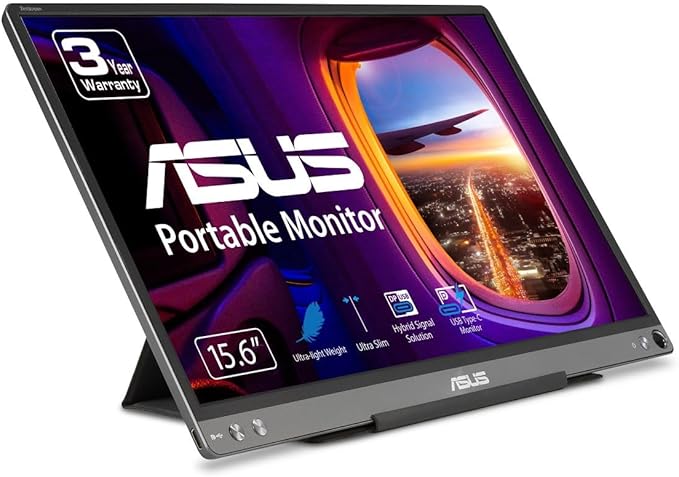
Asus ZenScreen MB16ACE 15.6 Portable USB Monitor
It only needs a single USB connector cable to be fully compatible with almost any laptop. With a super slim 8mm profile, and weighing just 0.71 kg, ZenScreen MB16ACE is also the lightest 15.6 inch companion display monitor.
It only needs a single USB connector cable to be fully compatible with almost any laptop. With a super slim 8mm profile, and weighing just 0.71 kg, ZenScreen MB16ACE is also the lightest 15.6 inch companion display monitor.
It only needs a single USB connector cable to be fully compatible with almost any laptop. With a super slim 8mm profile, and weighing just 0.71 kg, ZenScreen MB16ACE is also the lightest 15.6 inch companion display monitor.
It only needs a single USB connector cable to be fully compatible with almost any laptop. With a super slim 8mm profile, and weighing just 0.71 kg, ZenScreen MB16ACE is also the lightest 15.6 inch companion display monitor.
in 18 offers
The lowest price for Asus ZenScreen MB16ACE 15.6 Portable USB Monitor right now is $126.13 at eBay.com.au, compared across 8 retailers.
The all-time low was $97.00 on 9 Jan 2025 — today's price is 30% above the lowest ever. It has been notably cheaper before — worth setting a price alert.
Prices last updated 18 Oct 2026.
Last updated at 18/10/2026 21:31:47
Asus Zenscreen MB16ACE Portable USB Monitor- 15.6 Inch Full HD, Hybrid Signal Solution, USB Type-C, Flicker Free, Blue Light Filter, Anti-Glare
Free delivery
Affiliate Disclosure: We may receive a small commission for purchases made through this link at no extra cost to you. This helps support our site. Thank you!
Asus Zenscreen Mb16ace 15.6" 1920x1080 Fullhd Portable Usb-c Monitor
Delivery $133.69
Affiliate Disclosure: We may receive a small commission for purchases made through this link at no extra cost to you. This helps support our site. Thank you!
ASUS ZenScreen MB16ACE 15.6" Full HD 1920 x 1080 IPS USB Type-C Portable USB Monitor, Hybrid Signal Solution, USB Type-C, Flicker Free, Blue Light Fil
Delivery $91
Asus Zenscreen MB16ACE Portable USB Monitor 15.6" | Used
Free delivery
Asus Zenscreen MB16ACE Portable USB Monitor 15.6" | Used
Free delivery
ASUS Asus ZenScreen MB16ACE 15.6" 16:9 Full HD USB Type-C IPS LED Monitor
Delivery between 23–27 Oct $41
ZenScreen 15.6 1080P Portable USB Monitor (MB16ACE) - Full HD (1920 x 1080), IPS, USB Type-C, Eye Care, Anti-Glare Surface, Lite Smart Case, External
Delivery between 25–28 Oct $29
ASUS ZenScreen MB16ACE 15.6" Full HD Portable Monitor
Delivery $14.95
originally posted on bestbuy.com
I’ve used other portable monitors in the past and while this one is NOT perfect, it beats the others. I use it mostly for my work-issued laptop but lately I have been using it more for my phone and other devices. I have an older Samsung Galaxy phone and this thing was literally plug and play. I've tried it on multiple different devices using both the USB -C cable by itself and with the USB converter and came out with good results. Only device i had problems with was my Lenovo Surface knockoff from about 4 years ago. It refused to work with the USB-C cable by itself but worked fine when used with the USB converter. (Important: If you plan on using the USB converter, make sure to download and install the Displaylink drivers beforehand) The best part about this monitor ... MoreI’ve used other portable monitors in the past and while this one is NOT perfect, it beats the others. I use it mostly for my work-issued laptop but lately I have been using it more for my phone and other devices. I have an older Samsung Galaxy phone and this thing was literally plug and play. I've tried it on multiple different devices using both the USB -C cable by itself and with the USB converter and came out with good results. Only device i had problems with was my Lenovo Surface knockoff from about 4 years ago. It refused to work with the USB-C cable by itself but worked fine when used with the USB converter. (Important: If you plan on using the USB converter, make sure to download and install the Displaylink drivers beforehand) The best part about this monitor is the fact that it doesn't need a separate power cord. All it takes is just one USB cable. Again it's not the cheapest portable monitor available but this one uses a USB-C connector on both ends and it's not some unknown generic brand you find flooding other major retail sites. Also the cheaper portable monitors out there typically use cheap and/or outdated connectors and tend to lose connectivity with the slightest bump or touch. They can be very delicate if you ask anyone who has used one. This one is not. It’s been over a month and the connectors still feel good and most of all, not loose. I thought about returning it for a cheaper model but after experiencing virtually no issues for over a month, I decided I’m not only going to keep it but start recommending it to all my colleagues and friends.
originally posted on bestbuy.com
I now have a third monitor which helps my productivity. My only tip is to make sure your laptop or desktop monitor settings allows external monitors to have a vertical view. I didn't know initially so i was wondering why the monitor would not shift the display when it was mounted vertically. Once I made the adjustment, the vertical feature worked immediately. The cover that also serves as the monitor stand is awesome. To add the necessary height, I placed the monitor on top of a yoga block. To use the monitor stand properly, place the stand flat with the illustrations facing up. Fold the cover/stand towards the two dotted parallel lines. The key is to fold the narrow flap that has the round peg at the end. Fold it so the flat black smooth plastic is showing. That ... MoreI now have a third monitor which helps my productivity. My only tip is to make sure your laptop or desktop monitor settings allows external monitors to have a vertical view. I didn't know initially so i was wondering why the monitor would not shift the display when it was mounted vertically. Once I made the adjustment, the vertical feature worked immediately. The cover that also serves as the monitor stand is awesome. To add the necessary height, I placed the monitor on top of a yoga block. To use the monitor stand properly, place the stand flat with the illustrations facing up. Fold the cover/stand towards the two dotted parallel lines. The key is to fold the narrow flap that has the round peg at the end. Fold it so the flat black smooth plastic is showing. That narrow strip contains magnet. Align the flap within the two parallel lines. Once done a narrow space is created to securely slide in/insert the monitor. The monitor is fairly easy to figure out. The right button is the Power button. The two left buttons are used to set the display features. I do like the round hole where one can insert a pen to act as a stand. I don't think a stylus comes with the monitor but any sturdy pen that fits the hole should work. My only complaint is that it took nearly 3 weeks to have the monitor delivered to the store for pick up. I complained and I appreciate Best Buy Customer Service for resolving the issue.
originally posted on bestbuy.com
LOVE! I previously purchased a Lepow portable that continued to have issues with power connection. I love that this Asus does not require a separate power connection, it powers through the computer. That means one less cord and one less hassle. It connected very easily to my imac and works horizontally and vertically. Takes a little effort to figure out the case stand but once I got the hang of it it wa sno problem. I saw comments about color but for my day to day work that's not an issue, I just wanted a lightweight, no fuss monitor to extend my PC and for travel, and this works great for that purpose.
| Resolution | 1920 x 1080 |
| HD Format | Full HD |
| Horizontal Resolution | 1920 pixels |
| Vertical Resolution | 1080 pixels |
| Response Time | 5 ms |

Asus Zenscreen MB16ACE Portable USB Monitor- 15.6 Inch Full HD, Hybrid Signal Solution, USB Type-C, Flicker Free, Blue Light Filter, Anti-Glare
Free delivery
Affiliate Disclosure: We may receive a small commission for purchases made through this link at no extra cost to you. This helps support our site. Thank you!
Asus Zenscreen Mb16ace 15.6" 1920x1080 Fullhd Portable Usb-c Monitor
Delivery $133.69
Affiliate Disclosure: We may receive a small commission for purchases made through this link at no extra cost to you. This helps support our site. Thank you!
ASUS ZenScreen MB16ACE 15.6" Full HD 1920 x 1080 IPS USB Type-C Portable USB Monitor, Hybrid Signal Solution, USB Type-C, Flicker Free, Blue Light Fil
Delivery $91
Asus Zenscreen MB16ACE Portable USB Monitor 15.6" | Used
Free delivery
Asus Zenscreen MB16ACE Portable USB Monitor 15.6" | Used
Free delivery
I’ve used other portable monitors in the past and while this one is NOT perfect, it beats the others. I use it mostly for my work-issued laptop but lately I have been using it more for my phone and other devices. I have an older Samsung Galaxy phone and this thing was literally plug and play. I've tried it on multiple different devices using both the USB -C cable by itself and with the USB converter and came out with good results. Only device i had problems with was my Lenovo Surface knockoff from about 4 years ago. It refused to work with the USB-C cable by itself but worked fine when used with the USB converter. (Important: If you plan on using the USB converter, make sure to download and install the Displaylink drivers beforehand) The best part about this monitor ... MoreI’ve used other portable monitors in the past and while this one is NOT perfect, it beats the others. I use it mostly for my work-issued laptop but lately I have been using it more for my phone and other devices. I have an older Samsung Galaxy phone and this thing was literally plug and play. I've tried it on multiple different devices using both the USB -C cable by itself and with the USB converter and came out with good results. Only device i had problems with was my Lenovo Surface knockoff from about 4 years ago. It refused to work with the USB-C cable by itself but worked fine when used with the USB converter. (Important: If you plan on using the USB converter, make sure to download and install the Displaylink drivers beforehand) The best part about this monitor is the fact that it doesn't need a separate power cord. All it takes is just one USB cable. Again it's not the cheapest portable monitor available but this one uses a USB-C connector on both ends and it's not some unknown generic brand you find flooding other major retail sites. Also the cheaper portable monitors out there typically use cheap and/or outdated connectors and tend to lose connectivity with the slightest bump or touch. They can be very delicate if you ask anyone who has used one. This one is not. It’s been over a month and the connectors still feel good and most of all, not loose. I thought about returning it for a cheaper model but after experiencing virtually no issues for over a month, I decided I’m not only going to keep it but start recommending it to all my colleagues and friends.
I now have a third monitor which helps my productivity. My only tip is to make sure your laptop or desktop monitor settings allows external monitors to have a vertical view. I didn't know initially so i was wondering why the monitor would not shift the display when it was mounted vertically. Once I made the adjustment, the vertical feature worked immediately. The cover that also serves as the monitor stand is awesome. To add the necessary height, I placed the monitor on top of a yoga block. To use the monitor stand properly, place the stand flat with the illustrations facing up. Fold the cover/stand towards the two dotted parallel lines. The key is to fold the narrow flap that has the round peg at the end. Fold it so the flat black smooth plastic is showing. That ... MoreI now have a third monitor which helps my productivity. My only tip is to make sure your laptop or desktop monitor settings allows external monitors to have a vertical view. I didn't know initially so i was wondering why the monitor would not shift the display when it was mounted vertically. Once I made the adjustment, the vertical feature worked immediately. The cover that also serves as the monitor stand is awesome. To add the necessary height, I placed the monitor on top of a yoga block. To use the monitor stand properly, place the stand flat with the illustrations facing up. Fold the cover/stand towards the two dotted parallel lines. The key is to fold the narrow flap that has the round peg at the end. Fold it so the flat black smooth plastic is showing. That narrow strip contains magnet. Align the flap within the two parallel lines. Once done a narrow space is created to securely slide in/insert the monitor. The monitor is fairly easy to figure out. The right button is the Power button. The two left buttons are used to set the display features. I do like the round hole where one can insert a pen to act as a stand. I don't think a stylus comes with the monitor but any sturdy pen that fits the hole should work. My only complaint is that it took nearly 3 weeks to have the monitor delivered to the store for pick up. I complained and I appreciate Best Buy Customer Service for resolving the issue.
LOVE! I previously purchased a Lepow portable that continued to have issues with power connection. I love that this Asus does not require a separate power connection, it powers through the computer. That means one less cord and one less hassle. It connected very easily to my imac and works horizontally and vertically. Takes a little effort to figure out the case stand but once I got the hang of it it wa sno problem. I saw comments about color but for my day to day work that's not an issue, I just wanted a lightweight, no fuss monitor to extend my PC and for travel, and this works great for that purpose.
The monitor is a lovely design, modern and clean. The picture quality is ok, not brilliant with some colours looking washed out but if you are only going to be viewing files such as documents then this is not an issue. On the other hand, if you are a creator, maybe working with video or still images then I would not advise this monitor as there as others, although more costly, that are best suited to that task. For what it is, it is a little too expensive but I went for it as it is from a well know brand - ASUS. The one issue I have, and I want to make clear that this is not Scans fault, is in two parts. 1. When I registered the monitor on the ASUS website on the same day it was delivered, it came up as "Out of warranty". When I contacted ASUS they told me that ... MoreThe monitor is a lovely design, modern and clean. The picture quality is ok, not brilliant with some colours looking washed out but if you are only going to be viewing files such as documents then this is not an issue. On the other hand, if you are a creator, maybe working with video or still images then I would not advise this monitor as there as others, although more costly, that are best suited to that task. For what it is, it is a little too expensive but I went for it as it is from a well know brand - ASUS. The one issue I have, and I want to make clear that this is not Scans fault, is in two parts. 1. When I registered the monitor on the ASUS website on the same day it was delivered, it came up as "Out of warranty". When I contacted ASUS they told me that there start thier manufacturers warranty on the date the monitor left the production line. This is despite there being a Warrenty booklet inside the monitors case that states otherwise. When I raised this with Scan they told me that this seems to be an increasing issue with ASUS and that they (Scan) would provide me with the warranty which is very much to Scans credit. 2. The drivers provided by ASUS via a download from thier website (which you have to install inorder for the monitor to be able to draw power via USB) can currupt the file system on some computers as it did to Scan 3XS Audio Workstation Laptop. The curruption causes an intermitant blue screen of death, some times it hhappens and some times it does not. If I switch the monitor off while my computer is booted then that also causes the blue screen of death and any work is lost if you did not save it before turning the monitor off. After this had happend twice to me, I raised a ticket with ASUS tech support who acknowledged that the issue had occured and thier reply was to save all personal files on to a seperate drive such as a USB and then, and I quote "reset my operating system". This is not possible as my laptop is configured for Audio production and is in daily use by myself and clients and as it was thier drivers that cause the issue, as they admitted, why dont they provide new drivers that cure the issue. Their reply was to follow what that had told me in the previous email (reset my OS). I want to say again that NONE of this is SCAN's fault what so ever but I am writing this in my product review as a warning to potential buyers of this monitor. In summary: Nice and sleak modern design. Very light weight Perfect for everday use such as documents, web browsing and the like A bit too expenisve for what is it No good for creators or watching/editing videos where accurate colours are important Some colours washed out When registered with the Manufacturer (ASUS) it is shown as "Out of Warranty" despite being a brand new factory sealed item. When there was quite a serious technical issue out of the box (the drivers cause Blue Screen of Death), ASUS's tech support were usless and did not seem to want to know.
Sooo, I bought this as an “open box” excellent and there’s a sticker outside the huge shipping box saying all this and noted it was a store display model.. oh kayyy…. And When I opened the shipping box (UPS delivered by the way), well there is lots of bubble wrap and then A thick styrofoam piece at the bottom and The screen and the screen cover that wasn’t really on there, was sandwiched between that styrofoam plate and the numerous bubble wrap… and the molding of the top middle of the monitor was undone, but, I did snap it back and place and the monitor looks flawless.. like still like open box new.. the usb corded was wrapped with a twist tie, and there was a ziplock back with the instructions and maybe warranty info. Simply put no original Asus box was included. ... MoreSooo, I bought this as an “open box” excellent and there’s a sticker outside the huge shipping box saying all this and noted it was a store display model.. oh kayyy…. And When I opened the shipping box (UPS delivered by the way), well there is lots of bubble wrap and then A thick styrofoam piece at the bottom and The screen and the screen cover that wasn’t really on there, was sandwiched between that styrofoam plate and the numerous bubble wrap… and the molding of the top middle of the monitor was undone, but, I did snap it back and place and the monitor looks flawless.. like still like open box new.. the usb corded was wrapped with a twist tie, and there was a ziplock back with the instructions and maybe warranty info. Simply put no original Asus box was included. I’d want to argue that maybe this should have been an open box “fair condition” because it was noted a floor display and I guess they tossed the original box and couldn’t improvise any better but, thankfully it wasn’t abused much as a store model. Everything works ok as I connected this to my MacBook Air m2, flawlessly. Like I think it’s great regarding compatibility and the monitor turns on when it’s plugged to the usb c port of a computer. But this undone mold is what kind of got me and I think our UPS driver chucks packages over the fence and we’re in a bad neighborhood and always lock out our fence, which could be the result of that but transportation wise I think it was still intact.
Exactly what I was looking for! The weight is fantastic and the foldable stand/screen protector is genius. This goes into my laptop case and I barely notice it's there. Great quality for viewing the monitor outside, although I didn't look into this specifically. The stand is a little weird to figure out, but once figured out, it's such a nice design. I haven't noticed unplugged laptop power much affected, in any case I can use outside or where ever without the laptop being plugged in for a good long while. Not a touch screen but OK with that. This was cheaper on Amazon but who knows where you are getting it from there, plus I have BestBuy protection which made the extra cost worth it. The GeekSquad is always there for me, and any problems, I know there is a great ... MoreExactly what I was looking for! The weight is fantastic and the foldable stand/screen protector is genius. This goes into my laptop case and I barely notice it's there. Great quality for viewing the monitor outside, although I didn't look into this specifically. The stand is a little weird to figure out, but once figured out, it's such a nice design. I haven't noticed unplugged laptop power much affected, in any case I can use outside or where ever without the laptop being plugged in for a good long while. Not a touch screen but OK with that. This was cheaper on Amazon but who knows where you are getting it from there, plus I have BestBuy protection which made the extra cost worth it. The GeekSquad is always there for me, and any problems, I know there is a great warranty. Thanks Best Buy!
Perfect for working away from home when you need a second monitor for traveling. There is no power cord. Just has a cord that plugs into my USB-C port on my laptop into the USB-C on the monitor. I know a few reviews had said that the stand is no good but I think that person(s) that said that in their review didn't realize that if you slide the stand back a bit more, there is like a light magnet that will keep the stand from collapsing causing your monitor to fall backwards. Also there is a small bump on the corner of the screen protector/stand that will keep the monitor from sliding. If you feel the monitor is too tilted back, I put something small behind the monitor between the monitor and the stand and it made it stand a bit more upright. The graphics seemed ... MorePerfect for working away from home when you need a second monitor for traveling. There is no power cord. Just has a cord that plugs into my USB-C port on my laptop into the USB-C on the monitor. I know a few reviews had said that the stand is no good but I think that person(s) that said that in their review didn't realize that if you slide the stand back a bit more, there is like a light magnet that will keep the stand from collapsing causing your monitor to fall backwards. Also there is a small bump on the corner of the screen protector/stand that will keep the monitor from sliding. If you feel the monitor is too tilted back, I put something small behind the monitor between the monitor and the stand and it made it stand a bit more upright. The graphics seemed perfect for what I needed it for. Work, checking emails, watching regular movies. I can't say I would recommend it for gaming and anyways if you are a gamer, you know the monitor would not be this low of a price. If you need a second monitor for work, this is it!
I needed a portable screen for a while. Every time I'm on the road it takes me longer to get things done due to the lack of real estate on my laptop screen. I purchased this one because it was the only one available and the price was right. I like almost everything about it, the ease of setup, the weight, and the brightness are all great. There is one thing that I should have caught before purchasing this monitor, it was the resolution. It's 1920 x 1080. It's fine but the resolution is lower than my laptop so I have to do more scrolling. That being said I would still purchase this item. It really works well.
I use this screen with my MacBook Air M1 running Monterey OS. I had to download a driver onto the computer in order to use this monitor. When the screen works, it is nice. I don't have any complaints about the quality of the display. Trying to get the screen to connect to the display driver though, is a nightmare. I have to plug and unplug and close the laptop over and over again sometimes. Sometime I even have to restart the computer to avoid getting the "DisplayPort NO SIGNAL" message. The monitor is lightweight and the stand works fine, but I am always scared that The screen will snap in half. It is not very rigid and the base unfold to provide minimal protection from scratching the screen. Its not a major deal, but it does drain the battery of the computer much ... MoreI use this screen with my MacBook Air M1 running Monterey OS. I had to download a driver onto the computer in order to use this monitor. When the screen works, it is nice. I don't have any complaints about the quality of the display. Trying to get the screen to connect to the display driver though, is a nightmare. I have to plug and unplug and close the laptop over and over again sometimes. Sometime I even have to restart the computer to avoid getting the "DisplayPort NO SIGNAL" message. The monitor is lightweight and the stand works fine, but I am always scared that The screen will snap in half. It is not very rigid and the base unfold to provide minimal protection from scratching the screen. Its not a major deal, but it does drain the battery of the computer much quicker when it's connected, and you cannot power the screen directly because there's only 1 port. Overall, this unit is not worth price or the hassle of trying to keep it safe while carrying it around. Oh, it does look nice.
It tasted good! Review your product. Hi Michael, you’re getting 25 My Best Buy® points for this review!1See Disclaimer 1 Not you? Sign in here. ASUS - ZenScreen 15.6” IPS FHD USB Type-C Portable Monitor with Foldable Smart Case - Dark Gray-Front_Standard Overall rating* Excellent Star rating 1. Poor Star rating 2. Fair Star rating 3. Average Star rating 4. Good Star rating 5. Excellent Your review* Review guidelines It tasted good! Minimum 50 characters (35 remaining) Add a title* Please enter a title. Add up to 6 photosOptional Get 25 more My Best Buy® points when you add photos Help us break it downOptional Value: Value rating 1. Poor Value rating 2. Fair Value rating 3. Average Value rating 4. Good Value rating 5. Excellent Quality: Quality rating 1. Poor Quality ... MoreIt tasted good! Review your product. Hi Michael, you’re getting 25 My Best Buy® points for this review!1See Disclaimer 1 Not you? Sign in here. ASUS - ZenScreen 15.6” IPS FHD USB Type-C Portable Monitor with Foldable Smart Case - Dark Gray-Front_Standard Overall rating* Excellent Star rating 1. Poor Star rating 2. Fair Star rating 3. Average Star rating 4. Good Star rating 5. Excellent Your review* Review guidelines It tasted good! Minimum 50 characters (35 remaining) Add a title* Please enter a title. Add up to 6 photosOptional Get 25 more My Best Buy® points when you add photos Help us break it downOptional Value: Value rating 1. Poor Value rating 2. Fair Value rating 3. Average Value rating 4. Good Value rating 5. Excellent Quality: Quality rating 1. Poor Quality rating 2. Fair Quality rating 3. Average Quality rating 4. Good Quality rating 5. Excellent Ease of use: Ease of use rating 1. Poor Ease of use rating 2. Fair Ease of use rating 3. Average Ease of use rating 4. Good Ease of use rating 5. Excellent Would you recommend this item?* Yes No Please make a selection. Create a display name* Flavtown Terms & Conditions Disclaimers 1. My Best Buy program members will get at least 25 points for each published review when a program member provides a valid My Best Buy member number. Receive points for up to eight 25-point reviews per calendar year. Some point offers expire, so act quickly. Please allow up to 20 days for points to appear in your account. Subject to My Best Buy Program Terms. Subject to change without notice. Best Buy may withdraw offer prior to expiration. 2. We will email you to notify you that your review had been posted or if someone replies to your review. Submit Review Visit our Support Center Check your Order Status Shipping, Delivery & Store Pickup Returns & Exchanges Order & Purchases Payment Options Support & Services Rewards & Membership Partnerships About Best Buy Accessibility Survey Sign in or Create Account Get the latest deals and more. Email Address Enter email address Sign Up Best Buy app Learn more › Forums, blogs & more How was your experience? Give feedback about our website Desktop Site Best Buy Canada Legal & Privacy In-store pricing may vary. Prices and offers are subject to change. © 2023 Best Buy. All rights reserved. BEST BUY, the BEST BUY logo, the tag design, and MY BEST BUY are trademarks of Best Buy and its affiliated companies.
| Resolution | 1920 x 1080 |
| HD Format | Full HD |
| Horizontal Resolution | 1920 pixels |
| Vertical Resolution | 1080 pixels |
| Response Time | 5 ms |