Last updated at 05/09/2026 07:09:47
Wholesale ASUS ProArt Display PA278QEV ASUS 27'' Monitor ASUS Flat Monitor,1 Unit
Delivery $38.15
ASUS ProArt 27 inch WQHD 2K 1440P 75Hz IPS Computer Monitor with Height Adjustable, Tilt, Pivot & Swivel Stand Ideal for Graphics Works and Editing Pr
Delivery $209
ASUS ProArt PA278QV 27" WQHD IPS Professional Monitor | 75Hz-90LM05L1-B01370
ASUS ProArt Display PA278QV 27 WQHD (2560 x 1440) Monitor, 100% sRGB/Rec. 709 DE < 2, IPS, DisplayPort HDMI DVI-D Mini DP, Calman Verified, Eye Care,
Delivery between 9–13 Sept $35.88
ProArt 27" QHD Monitor, 1440P IPS Display, 100% sRGB|Rec. 709, Delta E < 2 Color Accuracy, Calman Verified, DP HDMI Mini DP DVI USB Hub, Ergonomic Til
Delivery between 11–14 Sept $29
ASUS ProArt Display PA278QV 27” WQHD (2560 x 1440) Monitor, 100% sRGB/Rec. 709 ΔE < 2, IPS, DisplayPort HDMI DVI-D Mini DP, Calman Verified, Eye Care,
Free delivery
ASUS ProArt Display PA278QV 27” WQHD (2560 x 1440) Monitor, 100% sRGB/Rec. 709 ΔE < 2, IPS, DisplayPort HDMI DVI-D Mini DP, Calman Verified, Eye Care,
Free delivery
Asus Proart Pa278qv 27" Class Wqhd Led Monitor - 16:9 - Black | Sku
Free delivery
Affiliate Disclosure: We may receive a small commission for purchases made through this link at no extra cost to you. This helps support our site. Thank you!
ProArt 27" QHD Monitor, 1440P IPS Display, 100% sRGB|Rec. 709, Delta E < 2 Color Accuracy, Calman Verified, DP HDMI Mini DP DVI USB Hub, Ergonomic Til
Free delivery between 15–18 Sept
ASUS ProArt Display PA278QV 27
originally posted on pbtech.co.nz
I purchased this monitor for my Mac Studio Max. It is good (the monitor), but it is not fantastic. The USB-C port does nothing - not working and customer support for ASUS is close to usless. The colour adjustment is random. Other than that - I can live with it. I just wish I had paid a little more and got something better. It is true that I have just steped away from my old iMac late 2013 model - the monitir was simple fantastic. Buyin online without having the ability to test monitors next to eachother is hard. It is not the best way to buy anything this expensive. If this monitor was cheaper - I might buy it again - for graphics and video editing it is not the best.. As far as PBTech are concerned - there service is good - pleasant staff and proactive. . They have ... MoreI purchased this monitor for my Mac Studio Max. It is good (the monitor), but it is not fantastic. The USB-C port does nothing - not working and customer support for ASUS is close to usless. The colour adjustment is random. Other than that - I can live with it. I just wish I had paid a little more and got something better. It is true that I have just steped away from my old iMac late 2013 model - the monitir was simple fantastic. Buyin online without having the ability to test monitors next to eachother is hard. It is not the best way to buy anything this expensive. If this monitor was cheaper - I might buy it again - for graphics and video editing it is not the best.. As far as PBTech are concerned - there service is good - pleasant staff and proactive. . They have many items, so it might be dificult for all staff members to know everything about all their merchandise, but it would be good to have someone we can talk to that specialises in monitors and understands our need. I hesitated between 3 and 4 stars, and I like giving 5 starts - that means that I would suggest you stay away from this monitor, especially if you are used to better quality. I did not get a Mac monitor becouse they are very dificult to get hold of and I needed a monitor - my old Mac could not be used as a monitor - I wish!
originally posted on bhphotovideo.com
Like the other reviews you see here say, the USB-c port won't work for Mac users. I tried calling, emailing, online chatting, and the result is that there's just a compatibility issue with macs that ASUS decided not to mention anywhere. There is a firmware update that supposably helps with USB-c compatibility but you can only run the update on a windows computer, lol. I gave it two stars because the display is quite beautiful. Rich, accurate, sharp.The HDMI works fine, but it's a huge bummer to not have access to the capabilities of the USB-c charging/data streaming that ASUS promises. Definitely still usable as a monitor, but it's disappointing to spend this much and still miss out on key features Do better ASUS.
originally posted on bhphotovideo.com
My 2012 27 iMac was becoming increasingly obsolete. It was time for a big change.Fortunately, I inherited a nearly new Mac Book Pro: a little machine far more powerful and up to date than my dated desktop.Still, I wanted that big screen. The New York Times WIRECUTTER section recommended this Asus monitor, and so instead of spending around $2000 for a new iMac, I simply coupled the MacBook with the monitor, got a cooling fan for the laptop, et VOILA!The Times was right! This is a spectacular monitor especially at this price. The images are crystal clear, the colors are brilliant and vivid, and setup was quick and relatively easy.I would recommend the Asus ProArt PA278CV to anyone needing a great value in a big screen.
| General | |
| Display Type | LED-backlit LCD monitor / TFT active matrix |
| Energy Class | Class G |
| Diagonal Size | 27" |
| Built-in Devices | USB 3.0 hub |
Wholesale ASUS ProArt Display PA278QEV ASUS 27'' Monitor ASUS Flat Monitor,1 Unit
Delivery $38.15
ASUS ProArt 27 inch WQHD 2K 1440P 75Hz IPS Computer Monitor with Height Adjustable, Tilt, Pivot & Swivel Stand Ideal for Graphics Works and Editing Pr
Delivery $209
ASUS ProArt PA278QV 27" WQHD IPS Professional Monitor | 75Hz-90LM05L1-B01370
ASUS ProArt Display PA278QV 27 WQHD (2560 x 1440) Monitor, 100% sRGB/Rec. 709 DE < 2, IPS, DisplayPort HDMI DVI-D Mini DP, Calman Verified, Eye Care,
Delivery between 9–13 Sept $35.88
ProArt 27" QHD Monitor, 1440P IPS Display, 100% sRGB|Rec. 709, Delta E < 2 Color Accuracy, Calman Verified, DP HDMI Mini DP DVI USB Hub, Ergonomic Til
Delivery between 11–14 Sept $29
I purchased this monitor for my Mac Studio Max. It is good (the monitor), but it is not fantastic. The USB-C port does nothing - not working and customer support for ASUS is close to usless. The colour adjustment is random. Other than that - I can live with it. I just wish I had paid a little more and got something better. It is true that I have just steped away from my old iMac late 2013 model - the monitir was simple fantastic. Buyin online without having the ability to test monitors next to eachother is hard. It is not the best way to buy anything this expensive. If this monitor was cheaper - I might buy it again - for graphics and video editing it is not the best.. As far as PBTech are concerned - there service is good - pleasant staff and proactive. . They have ... MoreI purchased this monitor for my Mac Studio Max. It is good (the monitor), but it is not fantastic. The USB-C port does nothing - not working and customer support for ASUS is close to usless. The colour adjustment is random. Other than that - I can live with it. I just wish I had paid a little more and got something better. It is true that I have just steped away from my old iMac late 2013 model - the monitir was simple fantastic. Buyin online without having the ability to test monitors next to eachother is hard. It is not the best way to buy anything this expensive. If this monitor was cheaper - I might buy it again - for graphics and video editing it is not the best.. As far as PBTech are concerned - there service is good - pleasant staff and proactive. . They have many items, so it might be dificult for all staff members to know everything about all their merchandise, but it would be good to have someone we can talk to that specialises in monitors and understands our need. I hesitated between 3 and 4 stars, and I like giving 5 starts - that means that I would suggest you stay away from this monitor, especially if you are used to better quality. I did not get a Mac monitor becouse they are very dificult to get hold of and I needed a monitor - my old Mac could not be used as a monitor - I wish!
Like the other reviews you see here say, the USB-c port won't work for Mac users. I tried calling, emailing, online chatting, and the result is that there's just a compatibility issue with macs that ASUS decided not to mention anywhere. There is a firmware update that supposably helps with USB-c compatibility but you can only run the update on a windows computer, lol. I gave it two stars because the display is quite beautiful. Rich, accurate, sharp.The HDMI works fine, but it's a huge bummer to not have access to the capabilities of the USB-c charging/data streaming that ASUS promises. Definitely still usable as a monitor, but it's disappointing to spend this much and still miss out on key features Do better ASUS.
My 2012 27 iMac was becoming increasingly obsolete. It was time for a big change.Fortunately, I inherited a nearly new Mac Book Pro: a little machine far more powerful and up to date than my dated desktop.Still, I wanted that big screen. The New York Times WIRECUTTER section recommended this Asus monitor, and so instead of spending around $2000 for a new iMac, I simply coupled the MacBook with the monitor, got a cooling fan for the laptop, et VOILA!The Times was right! This is a spectacular monitor especially at this price. The images are crystal clear, the colors are brilliant and vivid, and setup was quick and relatively easy.I would recommend the Asus ProArt PA278CV to anyone needing a great value in a big screen.
Truthfully, I bought this monitor after looking at monitors for two hours online. I was looking for a reasonably priced, large monitor that could hook up to my MacBook so I could code on a larger screen than my 13” laptop. I was a bit taken aback by how large 27” truly was. I’m extremely happy with my new monitor because there aren’t any red flag issues. The only downsides to this monitor is that it requires a large enough space to be placed on, as well as enough distance between your eyes and the screen. The only problem I have with this monitor is the lack of display/volume range. Obviously these are because I come from using Apple products, so it might not be an issue for others, but the display’s “night modes” are nowhere dark enough at night so it feels a bit ... MoreTruthfully, I bought this monitor after looking at monitors for two hours online. I was looking for a reasonably priced, large monitor that could hook up to my MacBook so I could code on a larger screen than my 13” laptop. I was a bit taken aback by how large 27” truly was. I’m extremely happy with my new monitor because there aren’t any red flag issues. The only downsides to this monitor is that it requires a large enough space to be placed on, as well as enough distance between your eyes and the screen. The only problem I have with this monitor is the lack of display/volume range. Obviously these are because I come from using Apple products, so it might not be an issue for others, but the display’s “night modes” are nowhere dark enough at night so it feels a bit stressful on my eyes. The sound is also a lot more mechanical sounding than what I’m used to. Besides that, I’m absolutely in love with the fact that I can rotate the monitor in all sorts of different ways and I can code vertically with ease. I highly recommend this monitor for people who need to program, as well as those who love a large monitor to split screen two windows to be able to see more information faster.
I purchased the PA 278CV because my iMac, at 10-years old, wasn't as responsive to the graphic design software I use. I was a little nervous about investing in a non-Apple monitor, but I combined with the 3-month free Creative Cloud software offer (about $230 CAD), I couldn't find a better priced monitor. By and large, the reviews I read were positive. I have a MacBook Pro, running the latest OS software. Plugged the USB into the monitor and didn't have issues. The MacBook gets power via the monitor. Currently running a dual monitor setup with the MacBook, but I have another secondary monitor that I used with my iMac, which I may try to daisy chain off this monitor. That was a selling feature for me. One point on the CC offer – you need to register for the offer by ... MoreI purchased the PA 278CV because my iMac, at 10-years old, wasn't as responsive to the graphic design software I use. I was a little nervous about investing in a non-Apple monitor, but I combined with the 3-month free Creative Cloud software offer (about $230 CAD), I couldn't find a better priced monitor. By and large, the reviews I read were positive. I have a MacBook Pro, running the latest OS software. Plugged the USB into the monitor and didn't have issues. The MacBook gets power via the monitor. Currently running a dual monitor setup with the MacBook, but I have another secondary monitor that I used with my iMac, which I may try to daisy chain off this monitor. That was a selling feature for me. One point on the CC offer – you need to register for the offer by mid-September (unless they extend it). Delivery of the monitor was within 24-hours.
Upgrading from my thirteen year old 19 Dell monitor was a long time coming but I tend to keep my belongings until they no longer function, which is what finally happened with the Dell monitor. I really appreciate the size of this 27 ASUS ProArt Display, and the positioning versatility, height, tilt, rotation to portrait orientation, andswivel. Working with two programs or browsers side-by-side is much better on my eyes now. Size does matter in this case.I decided to re-calibrate the monitor using the Spyder4Pro that I have been using for years. I initially used the HMDI connection but found that the highest native resolution option I was given was 2048 x 1152 for some reason. I had to create a custom resolution of 2560 x 1440. Also when using the HMDI connection ... MoreUpgrading from my thirteen year old 19 Dell monitor was a long time coming but I tend to keep my belongings until they no longer function, which is what finally happened with the Dell monitor. I really appreciate the size of this 27 ASUS ProArt Display, and the positioning versatility, height, tilt, rotation to portrait orientation, andswivel. Working with two programs or browsers side-by-side is much better on my eyes now. Size does matter in this case.I decided to re-calibrate the monitor using the Spyder4Pro that I have been using for years. I initially used the HMDI connection but found that the highest native resolution option I was given was 2048 x 1152 for some reason. I had to create a custom resolution of 2560 x 1440. Also when using the HMDI connection the calibration I created with the Spyder4Pro would not automatically load when I boot my PC. I don't know if those two issues are directly caused by the HMDI connection but once I switched to using the DVI connection, 2560 x 1440 was automatically recognized as the highest resolution so I was able to delete the custom one I created, and my calibration now loads without issue after the PC boots.The primary reason I gave 4-stars is because of a missing pixel that was missing from the moment I powered on the monitor for the very first time on Aug. 25, 2021. (See attached image) The missing pixel is very noticeable against dark backgrounds. I know this is a deal breaker for some but not for me. Going through the hassle of returning the monitor and waiting for a replacement monitor that might also have imperfections, which appears to sometimes happen based on reviews I read prior to my purchase, was not worth it to me so I decided to train my brain to ignore the missing pixel.
This is a beautiful monitor with accurate color calibration for editing photos and videos, a screen wide enough that you can have two documents open side by side for editing, blue light filter adjustments to reduce eye strain (don't use this while you're editing photos for color accuracy), four USB ports, HDMI, display port, USB-C port, and an Ethernet port. The monitor adjusts up and down, swivels 90 degrees in either direction, pivots 90 degrees vertically, and tilts. It's compatible with both Mac and Windows. Seriously, what more do you want? For it to get up and dance for you? I spent hours researching monitors before I bought this one and have no regrets. Just buy it already!
I should preface the review by saying I by no means a professional in digital color work or graphic design. Mostly a long-time hobbyist:I debated and sifted through the details of several monitors before picking the Pro-Art QHD model, and I very happy I chose the Pro-Art. First thing you notice is the build itself. No corners were cut on this monitor's frame work. The steel base is very sturdy (surprisingly heavy) and easily assembled. Just turn one screw and you are done.The color on this monitor is fantastic very nice whites and black with rich color in between. While the color was great, I was really impressed by the depth it gave black and white photography. I all the details in color reproduction and performance listed in the advertising is all there. I ... MoreI should preface the review by saying I by no means a professional in digital color work or graphic design. Mostly a long-time hobbyist:I debated and sifted through the details of several monitors before picking the Pro-Art QHD model, and I very happy I chose the Pro-Art. First thing you notice is the build itself. No corners were cut on this monitor's frame work. The steel base is very sturdy (surprisingly heavy) and easily assembled. Just turn one screw and you are done.The color on this monitor is fantastic very nice whites and black with rich color in between. While the color was great, I was really impressed by the depth it gave black and white photography. I all the details in color reproduction and performance listed in the advertising is all there. I like that the menu buttons are on the front of the monitor and the menu is very easy to navigate.And yes, you can do a little gaming this monitor. Maybe not the best choice fora serious gamer, but games look and perform quite well. Photoshop and movies are great. I found the 27 at QHD to be a nice combination that produces the best result. I looked at monitors by BenQ and Dell that made the same claims as the ProArt but, if you are tryingto stay below the $400 mark, I think this is the monitor you want.Also: hats off to B&H for great delivery on time and the product arrived in great shape
I'm used to have "okay" quality monitors and I think this one (PA278QV) is very good. Best monitor I have ever owned. Nice vivid colors, clean an crisp image, very bright so it's nice to work in a well lit environment. I did a bit of gaming (Battlefield 4) at 1440p 75hz resolution it's an improvement over my other 1080p 60hz monitor. It's sharper and smoother.The only drawback for me, and it's really a personal preference, is that while 27" at 1440p gives very good PPI (pixel per inch), it does make everything on screen very (too) small and it's hard on my eyes and neck. I need to sit too close to the monitor and lean forward. Sure you can use the display scaling in your OS, but I don't like relying on this. Not all apps manage it correctly and using scaling, I'm ... MoreI'm used to have "okay" quality monitors and I think this one (PA278QV) is very good. Best monitor I have ever owned. Nice vivid colors, clean an crisp image, very bright so it's nice to work in a well lit environment. I did a bit of gaming (Battlefield 4) at 1440p 75hz resolution it's an improvement over my other 1080p 60hz monitor. It's sharper and smoother.The only drawback for me, and it's really a personal preference, is that while 27" at 1440p gives very good PPI (pixel per inch), it does make everything on screen very (too) small and it's hard on my eyes and neck. I need to sit too close to the monitor and lean forward. Sure you can use the display scaling in your OS, but I don't like relying on this. Not all apps manage it correctly and using scaling, I'm back at the same "real estate" on screen than with a 1080p and that's the whole point of getting a 1440p instead of a 1080p.I will return the 27" and will get the 31.5" version instead. 1440p at 31.5" has the same PPI than a 24" 1080p which is a sweet spot for me between PPI and visibility.
This Asus ProArt 27in 2K 75hz monitor is just what i wanted as a secondary monitor. It is color accurate, fairly bright, and has decent picture settings adjust ability. Flat stand, a requirement for my setup, very stable and durable, can not stand those "stick" style stands.Sadly, Asus does not have full software settings support, at least on this ProArt line. The only thing they offer is "Asus ProArt Chroma Tune" which simply allows you to change the display preset mode. So, you have to use the monitor itself menus to adjust your settings for each preset mode, but can toggle what mode the monitor is in via right click context menu on your desktop.(My main monitor is a 32in 2K MSI Creator. That one is a brighter, and MSI has full on PC software control of all ... MoreThis Asus ProArt 27in 2K 75hz monitor is just what i wanted as a secondary monitor. It is color accurate, fairly bright, and has decent picture settings adjust ability. Flat stand, a requirement for my setup, very stable and durable, can not stand those "stick" style stands.Sadly, Asus does not have full software settings support, at least on this ProArt line. The only thing they offer is "Asus ProArt Chroma Tune" which simply allows you to change the display preset mode. So, you have to use the monitor itself menus to adjust your settings for each preset mode, but can toggle what mode the monitor is in via right click context menu on your desktop.(My main monitor is a 32in 2K MSI Creator. That one is a brighter, and MSI has full on PC software control of all the settings (Windows only), no need to use the physical buttons on the monitor it self. They also support keyboard shortcuts, to change most settings or switch profiles. This very handy for me as i often change input device, to also stream movies/tv via a Apple Tv, and need several different picture modes.)The only other negative i have with this, is that, when it goes to sleep, ie, you shutdown your pc, the screen lights up at 100% brightness, a full screen blue "death-beam" background, with their "HDMI No signal" message box in the center. It is quite blinding if you are in a dark room. It ignores any preset mode or set brightness level. Kinda negates the "Low blue light" mode/protection they advertise, if it just blasts you with blinding blue light when ever it has no signal.Overall, this Asus is very good for the price. The display is not as sharp as my MSI Creator, even with the Asus Sharpness and Vivid Pixel settings maxed out, but it is much sharper than most other monitors at this size and price range i compared to. Colors and black level also very very good. Built in speakers, are trash, like a cheap laptop level.
| General | |
| Display Type | LED-backlit LCD monitor / TFT active matrix |
| Energy Class | Class G |
| Diagonal Size | 27" |
| Built-in Devices | USB 3.0 hub |
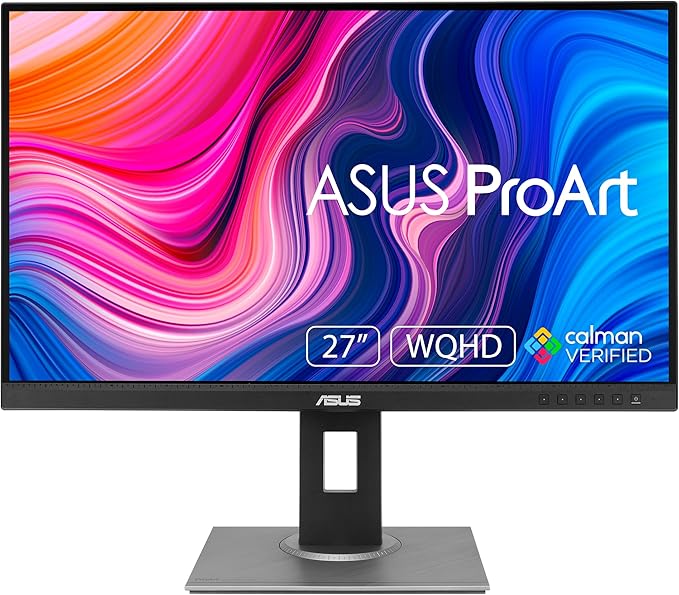
Asus PA278QV ProArt 27" WQHD - IPS - HDMI Monitor
ProArt Display PA278QV|Monitors|ASUS Australia
ProArt Display PA278QV|Monitors|ASUS Australia
ProArt Display PA278QV|Monitors|ASUS Australia
ProArt Display PA278QV|Monitors|ASUS Australia
in 13 offers
The lowest price for Asus PA278QV ProArt 27" WQHD - IPS - HDMI Monitor right now is $339.22 at Alibaba.com, compared across 10 retailers.
The all-time low was $290.80 on 27 Aug 2026 — today's price is 17% above the lowest ever. That's a little above the best price we've seen.
Prices last updated 5 Sept 2026.

