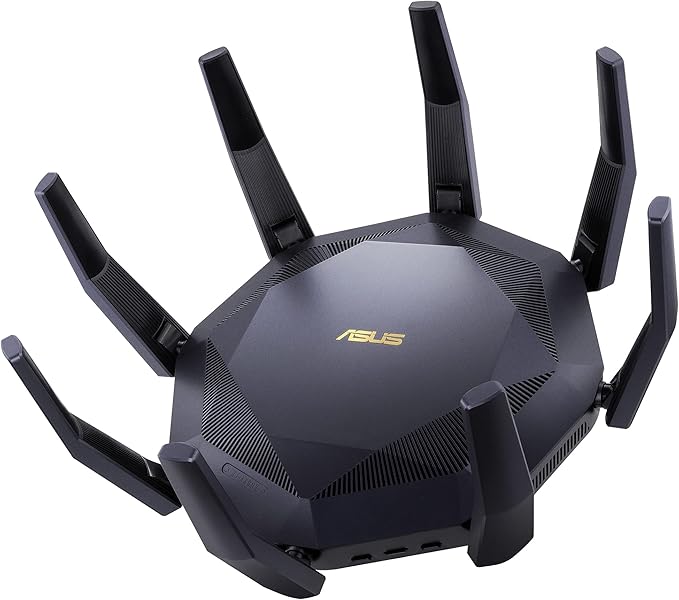
Asus RT-AX89X - Wireless Router
Introducing the ASUS WLAN Router RT-AX89X, a powerful networking device designed to elevate your internet experience to new heights. With a maximum speed of 6000 Mbit/s, this router ensures lightning-fast connections for all your devices. Whether you're streaming HD videos, gaming online, or working on bandwidth-intensive tasks, the RT-AX89X delivers exceptional performance. Equipped with advanced Wi-Fi 6 technology, this router provides faster speeds, increased network capacity, and improved efficiency. Say goodbye to lag and buffering with its dual-band capability, allowing you to prioritize bandwidth-hungry applications for a seamless online experience. The RT-AX89X also features multiple antennas and beamforming technology, extending coverage throughout your home or office. Experience ultimate security and control with ASUS AiProtection Pro, which safeguards your network from external threats and ensures your data remains private. Additionally, the router supports multiple devices simultaneously, making it ideal for busy households or small businesses. With its sleek design and easy setup, the ASUS WLAN Router RT-AX89X combines exceptional performance with user-friendly features. Upgrade your network today and enjoy the benefits of lightning-fast speeds and reliable connectivity.
Introducing the ASUS WLAN Router RT-AX89X, a powerful networking device designed to elevate your internet experience to new heights. With a maximum speed of 6000 Mbit/s, this router ensures lightning-fast connections for all your devices. Whether you're streaming HD videos, gaming online, or working on bandwidth-intensive tasks, the RT-AX89X delivers exceptional performance. Equipped with advanced Wi-Fi 6 technology, this router provides faster speeds, increased network capacity, and improved efficiency. Say goodbye to lag and buffering with its dual-band capability, allowing you to prioritize bandwidth-hungry applications for a seamless online experience. The RT-AX89X also features multiple antennas and beamforming technology, extending coverage throughout your home or office. Experience ultimate security and control with ASUS AiProtection Pro, which safeguards your network from external threats and ensures your data remains private. Additionally, the router supports multiple devices simultaneously, making it ideal for busy households or small businesses. With its sleek design and easy setup, the ASUS WLAN Router RT-AX89X combines exceptional performance with user-friendly features. Upgrade your network today and enjoy the benefits of lightning-fast speeds and reliable connectivity.
Introducing the ASUS WLAN Router RT-AX89X, a powerful networking device designed to elevate your internet experience to new heights. With a maximum speed of 6000 Mbit/s, this router ensures lightning-fast connections for all your devices. Whether you're streaming HD videos, gaming online, or working on bandwidth-intensive tasks, the RT-AX89X delivers exceptional performance. Equipped with advanced Wi-Fi 6 technology, this router provides faster speeds, increased network capacity, and improved efficiency. Say goodbye to lag and buffering with its dual-band capability, allowing you to prioritize bandwidth-hungry applications for a seamless online experience. The RT-AX89X also features multiple antennas and beamforming technology, extending coverage throughout your home or office. Experience ultimate security and control with ASUS AiProtection Pro, which safeguards your network from external threats and ensures your data remains private. Additionally, the router supports multiple devices simultaneously, making it ideal for busy households or small businesses. With its sleek design and easy setup, the ASUS WLAN Router RT-AX89X combines exceptional performance with user-friendly features. Upgrade your network today and enjoy the benefits of lightning-fast speeds and reliable connectivity.
Introducing the ASUS WLAN Router RT-AX89X, a powerful networking device designed to elevate your internet experience to new heights. With a maximum speed of 6000 Mbit/s, this router ensures lightning-fast connections for all your devices. Whether you're streaming HD videos, gaming online, or working on bandwidth-intensive tasks, the RT-AX89X delivers exceptional performance. Equipped with advanced Wi-Fi 6 technology, this router provides faster speeds, increased network capacity, and improved efficiency. Say goodbye to lag and buffering with its dual-band capability, allowing you to prioritize bandwidth-hungry applications for a seamless online experience. The RT-AX89X also features multiple antennas and beamforming technology, extending coverage throughout your home or office. Experience ultimate security and control with ASUS AiProtection Pro, which safeguards your network from external threats and ensures your data remains private. Additionally, the router supports multiple devices simultaneously, making it ideal for busy households or small businesses. With its sleek design and easy setup, the ASUS WLAN Router RT-AX89X combines exceptional performance with user-friendly features. Upgrade your network today and enjoy the benefits of lightning-fast speeds and reliable connectivity.
in 10 offers
The lowest price for Asus RT-AX89X - Wireless Router right now is $452.41 at Playthek.com, compared across 5 retailers.
The all-time low was $56.54 on 14 May 2026 — today's price is 700% above the lowest ever. It has been notably cheaper before — worth setting a price alert.
Prices last updated 15 Oct 2026.
Last updated at 15/10/2026 19:36:34
ASUS RT-AX89X Wireless AX6000 Dual Band Wi-Fi 6 Router
Affiliate Disclosure: We may receive a small commission for purchases made through this link at no extra cost to you. This helps support our site. Thank you!
Asus RT-AX89X AX6000 AiMesh
Free delivery
Asus Rt-ax89x Dual Band Router Black EU Plug 220V
Delivery $88.99
Asus Rt-ax89x Wireless Ax6000 Dual Band Wi-fi 6 Router, Ai Mesh Wlan
Free delivery
Affiliate Disclosure: We may receive a small commission for purchases made through this link at no extra cost to you. This helps support our site. Thank you!
ASUS RT-AX89X (AX6000) Dual Band 12-stream WiFi 6 Extendable Gaming Router, Dual 10G Ports, Gaming Port, Mobile Game Mode, Subscription-free Network S
Delivery between 22–25 Oct $29
originally posted on digitec.ch
It's a great router but beware of the loose RJ45 for 10Gbps BaseT port.I agree that you're not supposed to touch the cable but still, once secured, the cable shall not lose its connection.See here the symptoms: https://youtu.be/u4NGFK35d7UI'm using a good CAT 8 ethernet cable and I tried with other cables but it's the same behaviour.I tried with 2 routers and I confirm that it still happen so it's not an isolated issue...For the 5GHz access point that disappeared after firmware update, I've found that I needed to disable the option "Auto select channel including DFS channels" selected by default. Then it magically appeared again.Side note: make sure you get a C5 power cable with it, not a C7 that I got delivered with it...Sadly the fan became noisy after ... MoreIt's a great router but beware of the loose RJ45 for 10Gbps BaseT port.I agree that you're not supposed to touch the cable but still, once secured, the cable shall not lose its connection.See here the symptoms: https://youtu.be/u4NGFK35d7UI'm using a good CAT 8 ethernet cable and I tried with other cables but it's the same behaviour.I tried with 2 routers and I confirm that it still happen so it's not an isolated issue...For the 5GHz access point that disappeared after firmware update, I've found that I needed to disable the option "Auto select channel including DFS channels" selected by default. Then it magically appeared again.Side note: make sure you get a C5 power cable with it, not a C7 that I got delivered with it...Sadly the fan became noisy after 4 months of use. Not even used it in heavy load, fan is usually at minimum speed.
originally posted on box.co.uk
Pros: Interesting & unique design. 8-ports. Great Wi-Fi coverage. Plenty of tweakable settings.Cons: Bigger than I thought it would be. Potential buyer should have a careful thought of where to place it.
originally posted on very.co.uk
This is a beast .I’m on virgin 1gb. Was getting around 350 Wi-Fi download , it doubled it instantly and the range is fantastic . Easy to set up, done in 30 min . Wired pc was around 750 download, now added another 100mb to that also .coming in at around 860
| Max Transfer Rate | Up to 600 Mbps (WiFi 4 (802.11n)), Up to 1000 Mbps (WiFi 5 (802.11ac)), Up to 1148 Mbps (WiFi 6 (802.11ax) (2.4GHz)) |
| Wireless Speed Rating | AX6000 |
| Wireless Standard | Wi-Fi 6 |
| Wireless Band Count | Dual-Band |
| Wireless Highlights | Wi-Fi Protected Setup (WPS), AiMesh, MU-MIMO technology |

ASUS RT-AX89X Wireless AX6000 Dual Band Wi-Fi 6 Router
Affiliate Disclosure: We may receive a small commission for purchases made through this link at no extra cost to you. This helps support our site. Thank you!
Asus RT-AX89X AX6000 AiMesh
Free delivery
Asus Rt-ax89x Dual Band Router Black EU Plug 220V
Delivery $88.99
Asus Rt-ax89x Wireless Ax6000 Dual Band Wi-fi 6 Router, Ai Mesh Wlan
Free delivery
Affiliate Disclosure: We may receive a small commission for purchases made through this link at no extra cost to you. This helps support our site. Thank you!
ASUS RT-AX89X (AX6000) Dual Band 12-stream WiFi 6 Extendable Gaming Router, Dual 10G Ports, Gaming Port, Mobile Game Mode, Subscription-free Network S
Delivery between 22–25 Oct $29
It's a great router but beware of the loose RJ45 for 10Gbps BaseT port.I agree that you're not supposed to touch the cable but still, once secured, the cable shall not lose its connection.See here the symptoms: https://youtu.be/u4NGFK35d7UI'm using a good CAT 8 ethernet cable and I tried with other cables but it's the same behaviour.I tried with 2 routers and I confirm that it still happen so it's not an isolated issue...For the 5GHz access point that disappeared after firmware update, I've found that I needed to disable the option "Auto select channel including DFS channels" selected by default. Then it magically appeared again.Side note: make sure you get a C5 power cable with it, not a C7 that I got delivered with it...Sadly the fan became noisy after ... MoreIt's a great router but beware of the loose RJ45 for 10Gbps BaseT port.I agree that you're not supposed to touch the cable but still, once secured, the cable shall not lose its connection.See here the symptoms: https://youtu.be/u4NGFK35d7UI'm using a good CAT 8 ethernet cable and I tried with other cables but it's the same behaviour.I tried with 2 routers and I confirm that it still happen so it's not an isolated issue...For the 5GHz access point that disappeared after firmware update, I've found that I needed to disable the option "Auto select channel including DFS channels" selected by default. Then it magically appeared again.Side note: make sure you get a C5 power cable with it, not a C7 that I got delivered with it...Sadly the fan became noisy after 4 months of use. Not even used it in heavy load, fan is usually at minimum speed.
Pros: Interesting & unique design. 8-ports. Great Wi-Fi coverage. Plenty of tweakable settings.Cons: Bigger than I thought it would be. Potential buyer should have a careful thought of where to place it.
This is a beast .I’m on virgin 1gb. Was getting around 350 Wi-Fi download , it doubled it instantly and the range is fantastic . Easy to set up, done in 30 min . Wired pc was around 750 download, now added another 100mb to that also .coming in at around 860
Fast, easy to setup, great wireless range and speed!
This is a great router. Offers a vast amount of features and is fairly easy to set up. WiFi coverage is great even in a fairly large property with thick walls. The only downside is the price but Very's price is very competetive with most online retailers and you can use the buy now pay later to get it interest free.
Pros: Excellent range, relatively straightforward to set up and add to my Mesh system as the master router. Very powerful signal and the WiFi has definitely sped up, we’ve gained an extra 10-15mb from somewhere.Cons: It’s huge and can’t be wall mounted, so a shelf is required.
I upgraded from an Asus RT AC3200 to this monster. What a difference in WI-FI, download on the 3200 was 300mbs on a 1GB connection but now 954mbs with the X89X and that on my laptop. Easy setup via the WAN port and just plug your pc in to the 10G port if you have more than 1G on board and your done. Normal Asus features very easy setup, yes it is a bit expensive but well worth the upgrade and I would highly recommend it. Ideal for a mesh set up as the main router.
Pros: Great speed everywhere Supports lots of devices at the same time.Cons: It is huge, but probably needs to be.
I am currently using the router in access point mode, due to missing bride-mode functionality of my main modem/router.The install procress was fast and easy for the access point mode and i was able to connect to the asus router app without any issues.The router works great so far and delivers very good wifi speeds (around 400-500 mbit/s on WIFI 5) in the same floor. For good connection in the 2. floor i will need to buy some Asus APs/Repeaters because the wifi signal got some issues with our reinforced concrete.My old AVM repeaters are not working with this router, but i am fully blaming AVM for that.The main reason for me to buy this router, was the support of an SFP+ module, because i was upgrading my home network to 10 gigabit fiber networking and the ... MoreI am currently using the router in access point mode, due to missing bride-mode functionality of my main modem/router.The install procress was fast and easy for the access point mode and i was able to connect to the asus router app without any issues.The router works great so far and delivers very good wifi speeds (around 400-500 mbit/s on WIFI 5) in the same floor. For good connection in the 2. floor i will need to buy some Asus APs/Repeaters because the wifi signal got some issues with our reinforced concrete.My old AVM repeaters are not working with this router, but i am fully blaming AVM for that.The main reason for me to buy this router, was the support of an SFP+ module, because i was upgrading my home network to 10 gigabit fiber networking and the 10GBASE-T port for my 2.5 gigabit wan connection. The SFP+ port supported my module directly (10Gtek AXS85-192-M3-Cisco2).The 10GBASE-T port seems to have some issues with cat 8.1 cables: when i was trying to remove it, the connector got stuck in the port and had to be somewhat forcefully removed. (-1 star, it should not have such basic issues) The delivered RJ45 cable works fine, but is only cat 6A.
| Max Transfer Rate | Up to 600 Mbps (WiFi 4 (802.11n)), Up to 1000 Mbps (WiFi 5 (802.11ac)), Up to 1148 Mbps (WiFi 6 (802.11ax) (2.4GHz)) |
| Wireless Speed Rating | AX6000 |
| Wireless Standard | Wi-Fi 6 |
| Wireless Band Count | Dual-Band |
| Wireless Highlights | Wi-Fi Protected Setup (WPS), AiMesh, MU-MIMO technology |


