Asus USB-AC53 Nano AC1200
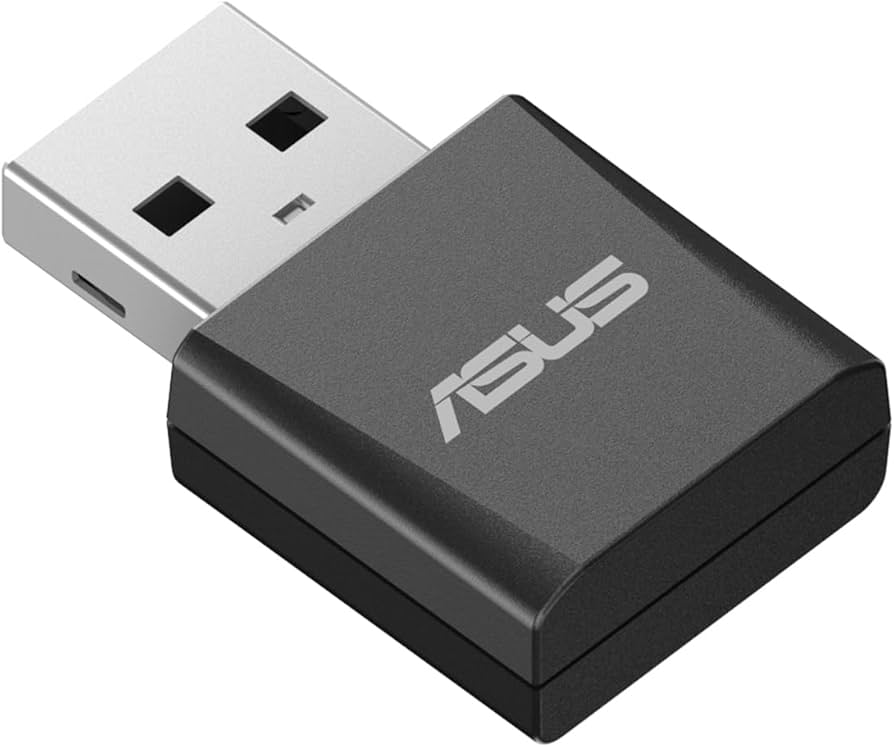
The ASUS USB-AC53 Nano is a compact and powerful wireless adapter designed to enhance your connectivity experience. With its dual-band capabilities, this device operates on both 2.4 GHz and 5 GHz frequencies, allowing for flexible and efficient network performance. The Wi-Fi 5 (802.11ac) standard ensures that you can enjoy high-speed internet access, making it an ideal choice for streaming, gaming, and browsing. Featuring a maximum data transfer rate of 867 Mbit/s, the ASUS USB-AC53 Nano provides a reliable and fast connection for all your wireless needs. Its USB interface allows for easy plug-and-play installation, making it compatible with a wide range of devices. The sleek black design, complemented by stainless steel accents, ensures that this adapter not only performs well but also looks good while doing so. This wireless adapter is perfect for users who require a stable and high-speed connection without the hassle of bulky equipment. Whether you are working from home, enjoying online gaming, or streaming your favorite shows, the ASUS USB-AC53 Nano delivers exceptional performance. Its compact size makes it easy to carry, making it an excellent choice for those on the go. In summary, the ASUS USB-AC53 Nano is a versatile and efficient solution for enhancing your wireless connectivity. With its advanced features, including dual-band support, Wi-Fi 5 (802.11ac) standard, and impressive data transfer rates, this adapter is designed to meet the demands of modern users. Experience seamless internet access with the reliability and performance that ASUS is known for.
The ASUS USB-AC53 Nano is a compact and powerful wireless adapter designed to enhance your connectivity experience. With its dual-band capabilities, this device operates on both 2.4 GHz and 5 GHz frequencies, allowing for flexible and efficient network performance. The Wi-Fi 5 (802.11ac) standard ensures that you can enjoy high-speed internet access, making it an ideal choice for streaming, gaming, and browsing. Featuring a maximum data transfer rate of 867 Mbit/s, the ASUS USB-AC53 Nano provides a reliable and fast connection for all your wireless needs. Its USB interface allows for easy plug-and-play installation, making it compatible with a wide range of devices. The sleek black design, complemented by stainless steel accents, ensures that this adapter not only performs well but also looks good while doing so. This wireless adapter is perfect for users who require a stable and high-speed connection without the hassle of bulky equipment. Whether you are working from home, enjoying online gaming, or streaming your favorite shows, the ASUS USB-AC53 Nano delivers exceptional performance. Its compact size makes it easy to carry, making it an excellent choice for those on the go. In summary, the ASUS USB-AC53 Nano is a versatile and efficient solution for enhancing your wireless connectivity. With its advanced features, including dual-band support, Wi-Fi 5 (802.11ac) standard, and impressive data transfer rates, this adapter is designed to meet the demands of modern users. Experience seamless internet access with the reliability and performance that ASUS is known for.
The ASUS USB-AC53 Nano is a compact and powerful wireless adapter designed to enhance your connectivity experience. With its dual-band capabilities, this device operates on both 2.4 GHz and 5 GHz frequencies, allowing for flexible and efficient network performance. The Wi-Fi 5 (802.11ac) standard ensures that you can enjoy high-speed internet access, making it an ideal choice for streaming, gaming, and browsing. Featuring a maximum data transfer rate of 867 Mbit/s, the ASUS USB-AC53 Nano provides a reliable and fast connection for all your wireless needs. Its USB interface allows for easy plug-and-play installation, making it compatible with a wide range of devices. The sleek black design, complemented by stainless steel accents, ensures that this adapter not only performs well but also looks good while doing so. This wireless adapter is perfect for users who require a stable and high-speed connection without the hassle of bulky equipment. Whether you are working from home, enjoying online gaming, or streaming your favorite shows, the ASUS USB-AC53 Nano delivers exceptional performance. Its compact size makes it easy to carry, making it an excellent choice for those on the go. In summary, the ASUS USB-AC53 Nano is a versatile and efficient solution for enhancing your wireless connectivity. With its advanced features, including dual-band support, Wi-Fi 5 (802.11ac) standard, and impressive data transfer rates, this adapter is designed to meet the demands of modern users. Experience seamless internet access with the reliability and performance that ASUS is known for.
The ASUS USB-AC53 Nano is a compact and powerful wireless adapter designed to enhance your connectivity experience. With its dual-band capabilities, this device operates on both 2.4 GHz and 5 GHz frequencies, allowing for flexible and efficient network performance. The Wi-Fi 5 (802.11ac) standard ensures that you can enjoy high-speed internet access, making it an ideal choice for streaming, gaming, and browsing. Featuring a maximum data transfer rate of 867 Mbit/s, the ASUS USB-AC53 Nano provides a reliable and fast connection for all your wireless needs. Its USB interface allows for easy plug-and-play installation, making it compatible with a wide range of devices. The sleek black design, complemented by stainless steel accents, ensures that this adapter not only performs well but also looks good while doing so. This wireless adapter is perfect for users who require a stable and high-speed connection without the hassle of bulky equipment. Whether you are working from home, enjoying online gaming, or streaming your favorite shows, the ASUS USB-AC53 Nano delivers exceptional performance. Its compact size makes it easy to carry, making it an excellent choice for those on the go. In summary, the ASUS USB-AC53 Nano is a versatile and efficient solution for enhancing your wireless connectivity. With its advanced features, including dual-band support, Wi-Fi 5 (802.11ac) standard, and impressive data transfer rates, this adapter is designed to meet the demands of modern users. Experience seamless internet access with the reliability and performance that ASUS is known for.
in 3 offers
The lowest price for Asus USB-AC53 Nano AC1200 right now is $15.00 at Umart, compared across 3 retailers.
The all-time low was $10.69 on 1 May 2026 — today's price is 40% above the lowest ever. It has been notably cheaper before — worth setting a price alert.
Prices last updated 10 June 2026.
Last updated at 10/06/2026 11:25:44
Asus AC1200 Wireless USB Adapter (USB-AC53-NANO)
30-day returns
Asus AC1200 Wireless USB Adapter (USB-AC53-NANO)
30-day returns
Asus Usb-ac53 Nano Usb Adapter Black
Delivery $19.99
originally posted on walmart.com
Wow... I bought for my son an Asus gaming laptop for Christmas last year. He uses a wifi connection, and it's been kind of okay until recently. It just stopped connecting to both 2.4Ghz and 5Ghz access points, or it would connect and drop. We have 100Mbps throughput with our internet provider, and he'd often get between 70-80Mbps when connected, but it was picky with access in different areas of our home. When his wifi connection started dying, I thought perhaps his internal wifi adapter was failing.I was right.After researching different USB adapters, I settled on the TechKey adapter. One thing we weren't very happy with was the USB stick came with the driver on a tiny CD. His laptop doesn't have a CD drive, and without internet, it makes it a little ... MoreWow... I bought for my son an Asus gaming laptop for Christmas last year. He uses a wifi connection, and it's been kind of okay until recently. It just stopped connecting to both 2.4Ghz and 5Ghz access points, or it would connect and drop. We have 100Mbps throughput with our internet provider, and he'd often get between 70-80Mbps when connected, but it was picky with access in different areas of our home. When his wifi connection started dying, I thought perhaps his internal wifi adapter was failing.I was right.After researching different USB adapters, I settled on the TechKey adapter. One thing we weren't very happy with was the USB stick came with the driver on a tiny CD. His laptop doesn't have a CD drive, and without internet, it makes it a little complicated finding, downloading, and installing the driver. I thought we should just plug it in and see if Windows 10 knows what driver to load. We plugged it in, and in about 15 seconds we had internet! OMG! We didn't have to do anything.The best part is the throughput. We went on a SpeedTest website and ran different tests throughout the house. Before, if he went upstairs, he'd often lose wifi. The router is downstairs, up by the ceiling to provide coverage upstairs as well. All our devices work fine throughout the house, except his laptop--until now. Now, his throughput is crazy fast everywhere in the house, even the most remote locations. He gets anywhere from 85Mbps to 140 Mbps downstream and 6Mbps to 9Mbps upstream, which is outrageously fast!This little USB wifi adapter is fantastic for the price. Fast and zippy and, best of all, it really is plug-and-play with Windows 10. Just plug it in and go! No messing around with any downloads or configuration.If you're thinking of getting this, we very highly recommend it. Thumbs up and five solid stars!
originally posted on newegg.com
I'm sure this is more a problem with RealTek than with Asus, though I did - and continue to - have some issues, predominantly with drivers. I have an old Toshiba Satellite that has an embedded RealTek WiFi controller. The chip is old enough that it doesn't support anything more recent than the 802.11n specification. Recent Windows 10 updates have rendered this embedded controller completely non-functional. The last RealTek drivers supporting this card were released 8 years ago. In Windows 10, I've disabled the embedded controller in Device Manager (I cannot do that in BIOS). The RealTek drivers installed - sort of. The Asus adapter is recognized, yet it only supports 2.4GHz networks in Windows. (My wireless network has 2.4GHz and 5GHz capability.) In Ubuntu - yes, ... MoreI'm sure this is more a problem with RealTek than with Asus, though I did - and continue to - have some issues, predominantly with drivers. I have an old Toshiba Satellite that has an embedded RealTek WiFi controller. The chip is old enough that it doesn't support anything more recent than the 802.11n specification. Recent Windows 10 updates have rendered this embedded controller completely non-functional. The last RealTek drivers supporting this card were released 8 years ago. In Windows 10, I've disabled the embedded controller in Device Manager (I cannot do that in BIOS). The RealTek drivers installed - sort of. The Asus adapter is recognized, yet it only supports 2.4GHz networks in Windows. (My wireless network has 2.4GHz and 5GHz capability.) In Ubuntu - yes, my machine dual-boots - the OS doesn't even see the Asus adapter. Ironically, Ubuntu has no problem with connecting to my home 2.4GHz network with the embedded controller. I spent an hour or two trying to get the Windows drivers figured out, and gave up in frustration. It seems as though the old RealTek driver and the new RealTek driver are fighting each other. I have not tried to remove the embedded wireless controller - I'm not sure if that is even possible with an older Toshiba laptop, and it's low on my priority list. I have wireless connectivity in Windows 10. Could be better. What more can I say?
originally posted on bestbuy.com
I bought this product:ASUS - Dual-Band AC1700 USBNetwork Adapter - Black.I was hired by a customer Sarah C. whofound me on an IT Contractor Worker Platform.I responded back to her met her at her house a few days later. After being at her house a short time I resolved her neglected laptop issues.Next she said she had a Desktop that she uses for work which was listed on my work order and explained to her that since her desk was builtto use LAN not WiFi but told her that I know atrick to convert her Desktop into a wireless machine at a very low price and when she asked how much? I told her ruffly $40-$50and she said if I could pick it up and installit she would pay me for it.I was able to get her SSID and installed it,connected to her desktop to Spectrum ... MoreI bought this product:ASUS - Dual-Band AC1700 USBNetwork Adapter - Black.I was hired by a customer Sarah C. whofound me on an IT Contractor Worker Platform.I responded back to her met her at her house a few days later. After being at her house a short time I resolved her neglected laptop issues.Next she said she had a Desktop that she uses for work which was listed on my work order and explained to her that since her desk was builtto use LAN not WiFi but told her that I know atrick to convert her Desktop into a wireless machine at a very low price and when she asked how much? I told her ruffly $40-$50and she said if I could pick it up and installit she would pay me for it.I was able to get her SSID and installed it,connected to her desktop to Spectrum WiFI, changed her New Spectrum WiFi router SSID and her desktop was connected just like her laptop does.Walls!
| Ports & interfaces | |
| Interface | WLAN |
| Host interface | USB |
| Internal | N |
| Connectivity technology | Wireless |
Asus AC1200 Wireless USB Adapter (USB-AC53-NANO)
30-day returns
Asus AC1200 Wireless USB Adapter (USB-AC53-NANO)
30-day returns
Asus Usb-ac53 Nano Usb Adapter Black
Delivery $19.99
Wow... I bought for my son an Asus gaming laptop for Christmas last year. He uses a wifi connection, and it's been kind of okay until recently. It just stopped connecting to both 2.4Ghz and 5Ghz access points, or it would connect and drop. We have 100Mbps throughput with our internet provider, and he'd often get between 70-80Mbps when connected, but it was picky with access in different areas of our home. When his wifi connection started dying, I thought perhaps his internal wifi adapter was failing.I was right.After researching different USB adapters, I settled on the TechKey adapter. One thing we weren't very happy with was the USB stick came with the driver on a tiny CD. His laptop doesn't have a CD drive, and without internet, it makes it a little ... MoreWow... I bought for my son an Asus gaming laptop for Christmas last year. He uses a wifi connection, and it's been kind of okay until recently. It just stopped connecting to both 2.4Ghz and 5Ghz access points, or it would connect and drop. We have 100Mbps throughput with our internet provider, and he'd often get between 70-80Mbps when connected, but it was picky with access in different areas of our home. When his wifi connection started dying, I thought perhaps his internal wifi adapter was failing.I was right.After researching different USB adapters, I settled on the TechKey adapter. One thing we weren't very happy with was the USB stick came with the driver on a tiny CD. His laptop doesn't have a CD drive, and without internet, it makes it a little complicated finding, downloading, and installing the driver. I thought we should just plug it in and see if Windows 10 knows what driver to load. We plugged it in, and in about 15 seconds we had internet! OMG! We didn't have to do anything.The best part is the throughput. We went on a SpeedTest website and ran different tests throughout the house. Before, if he went upstairs, he'd often lose wifi. The router is downstairs, up by the ceiling to provide coverage upstairs as well. All our devices work fine throughout the house, except his laptop--until now. Now, his throughput is crazy fast everywhere in the house, even the most remote locations. He gets anywhere from 85Mbps to 140 Mbps downstream and 6Mbps to 9Mbps upstream, which is outrageously fast!This little USB wifi adapter is fantastic for the price. Fast and zippy and, best of all, it really is plug-and-play with Windows 10. Just plug it in and go! No messing around with any downloads or configuration.If you're thinking of getting this, we very highly recommend it. Thumbs up and five solid stars!
I'm sure this is more a problem with RealTek than with Asus, though I did - and continue to - have some issues, predominantly with drivers. I have an old Toshiba Satellite that has an embedded RealTek WiFi controller. The chip is old enough that it doesn't support anything more recent than the 802.11n specification. Recent Windows 10 updates have rendered this embedded controller completely non-functional. The last RealTek drivers supporting this card were released 8 years ago. In Windows 10, I've disabled the embedded controller in Device Manager (I cannot do that in BIOS). The RealTek drivers installed - sort of. The Asus adapter is recognized, yet it only supports 2.4GHz networks in Windows. (My wireless network has 2.4GHz and 5GHz capability.) In Ubuntu - yes, ... MoreI'm sure this is more a problem with RealTek than with Asus, though I did - and continue to - have some issues, predominantly with drivers. I have an old Toshiba Satellite that has an embedded RealTek WiFi controller. The chip is old enough that it doesn't support anything more recent than the 802.11n specification. Recent Windows 10 updates have rendered this embedded controller completely non-functional. The last RealTek drivers supporting this card were released 8 years ago. In Windows 10, I've disabled the embedded controller in Device Manager (I cannot do that in BIOS). The RealTek drivers installed - sort of. The Asus adapter is recognized, yet it only supports 2.4GHz networks in Windows. (My wireless network has 2.4GHz and 5GHz capability.) In Ubuntu - yes, my machine dual-boots - the OS doesn't even see the Asus adapter. Ironically, Ubuntu has no problem with connecting to my home 2.4GHz network with the embedded controller. I spent an hour or two trying to get the Windows drivers figured out, and gave up in frustration. It seems as though the old RealTek driver and the new RealTek driver are fighting each other. I have not tried to remove the embedded wireless controller - I'm not sure if that is even possible with an older Toshiba laptop, and it's low on my priority list. I have wireless connectivity in Windows 10. Could be better. What more can I say?
I bought this product:ASUS - Dual-Band AC1700 USBNetwork Adapter - Black.I was hired by a customer Sarah C. whofound me on an IT Contractor Worker Platform.I responded back to her met her at her house a few days later. After being at her house a short time I resolved her neglected laptop issues.Next she said she had a Desktop that she uses for work which was listed on my work order and explained to her that since her desk was builtto use LAN not WiFi but told her that I know atrick to convert her Desktop into a wireless machine at a very low price and when she asked how much? I told her ruffly $40-$50and she said if I could pick it up and installit she would pay me for it.I was able to get her SSID and installed it,connected to her desktop to Spectrum ... MoreI bought this product:ASUS - Dual-Band AC1700 USBNetwork Adapter - Black.I was hired by a customer Sarah C. whofound me on an IT Contractor Worker Platform.I responded back to her met her at her house a few days later. After being at her house a short time I resolved her neglected laptop issues.Next she said she had a Desktop that she uses for work which was listed on my work order and explained to her that since her desk was builtto use LAN not WiFi but told her that I know atrick to convert her Desktop into a wireless machine at a very low price and when she asked how much? I told her ruffly $40-$50and she said if I could pick it up and installit she would pay me for it.I was able to get her SSID and installed it,connected to her desktop to Spectrum WiFI, changed her New Spectrum WiFi router SSID and her desktop was connected just like her laptop does.Walls!
I get reasonable download speeds with this adapter. I play online games and the internet connection latency has often been left wanting.However, my biggest frustration with this adapter is the disk drive installation. At the time of purchase, I had a disk drive that was not connected to power (don't ask). I did not know why it was not working, but I could not install the drivers without the disk drive or internet which was frustrating because I needed the adapter to connect to the internet. This seems like an oversight.Overall, solid. Easier installation would have been a plus. In the future I would get a M.2 or PCIe wifi card.
I bought this product in hopes that it will be able to give a strong Wi-Fi connection to my newly built pc. However, this USB is not at all how it is advertised. I put this USB in my USB-3 slot and was able to use wireless Wi-Fi. Soon after, I noticed multiple problems with this device. Firstly, download speeds are VERY slow. I tried to install a few games on my PC using this product and was only able to get about 1-10 mbps download speed, a speed which is incredibly slow in todays standards. Another problem I have run into is that my router is supposed to be 5Ghz, but when I connect this it only shows up as 2.4! And there is no option to fix this in the drivers menu, I can only disconnect this and reconnect it and hope that it will connect to 5Ghz. But the worst of ... MoreI bought this product in hopes that it will be able to give a strong Wi-Fi connection to my newly built pc. However, this USB is not at all how it is advertised. I put this USB in my USB-3 slot and was able to use wireless Wi-Fi. Soon after, I noticed multiple problems with this device. Firstly, download speeds are VERY slow. I tried to install a few games on my PC using this product and was only able to get about 1-10 mbps download speed, a speed which is incredibly slow in todays standards. Another problem I have run into is that my router is supposed to be 5Ghz, but when I connect this it only shows up as 2.4! And there is no option to fix this in the drivers menu, I can only disconnect this and reconnect it and hope that it will connect to 5Ghz. But the worst of it all is when I try to play games on this. In online games, you can expect your ping to jump up to even 5000MS! When this USB actually works, it will show up as 40ms, but it doesn't matter, since you'll often experience massive lag spikes and sometimes even be kicked out of games because of how terrible the signal on this USB is. Sometimes, it'll even stop being connected to the Wi-Fi all together! If you recently got a new PC for Christmas, I recommend you completely skip this product and to instead buy a PCIE Wi-Fi card, you'll no doubt have a better experience with one of those instead.
I got this on sale for only 1999. I was expecting an extension cord. The only thing this came with was the tiny little USB dongle and a mini CD with drivers on it. I expected a USB cable with a female and to plug it into, as it is a little bit wide and sometimes prevents other devices for being plugged into the USB port next to it.I upgraded the internal hard drive on my MacBook Pro to an SSD, and in the process, damage the cable to the Wi-Fi card internally. In the meantime while I am waiting for the replacement cable to arrive, I bought this. In the past when I have used these types of products, I have noticed a difference in speed, and very often with Mac OS X, there are no official drivers, and you have to discover what the chipset is and then go on that ... MoreI got this on sale for only 1999. I was expecting an extension cord. The only thing this came with was the tiny little USB dongle and a mini CD with drivers on it. I expected a USB cable with a female and to plug it into, as it is a little bit wide and sometimes prevents other devices for being plugged into the USB port next to it.I upgraded the internal hard drive on my MacBook Pro to an SSD, and in the process, damage the cable to the Wi-Fi card internally. In the meantime while I am waiting for the replacement cable to arrive, I bought this. In the past when I have used these types of products, I have noticed a difference in speed, and very often with Mac OS X, there are no official drivers, and you have to discover what the chipset is and then go on that manufacturers website to try to match up drivers that may or may not work. The disc that it came with included drivers for windows, Mac, and Lijux. It also included Mac OS X drivers going all the way back to 10.8, which I was psyched about because I have dual partitions and run an older version of iOS X because of software that is still good.Luckily, this dongle is very short and does not jet out very far from the USB port. I have had others in the past they did, that were made a very cheap plastic. They always broke very quickly. I think the manufacturer should consider including a cable extension. As much as I think putting a CD in with a product is a waste, and a stupid way to increase carbon footprint, in this case I was grateful considering I did not have Internet access on my laptop due to the internal Wi-Fi card not working.I think $20, even on sale, is a little steep for this tiny little unit. I bet I could’ve ordered the same thing online and paid about 40% less. But I needed it in a pinch and they had it there. Again, I would never have considered paying the normal $30 retail price, but on sale, it was acceptable.
This dongle was very easy to set up. I used the supplied CD to install the driver, and after the installation and a computer reboot, my wireless network was automatically detected. I don't have the most Mbps for my internet connection, but the desktop computer I'm using, an older little Dell Optiplex, is pretty quick on the internet, and the computer is in the opposite end of the house from my wireless router. I would say this product is working very well. The price was good, and I would purchase it again.
If you desperately need wifi, for basic tasks, and you're in the same room as your router? This little guy is great. Basically plug-and-play, the only trouble is needing to download the drivers for installation. But otherwise it is exactly what you'd expect. It's a little USB dongle, you plug it in, you can connect to wi-fi.Here's why I only give 2 stars: the connection was terrible and the speeds were not at all what were advertised. Now! I do admit: I use my PC for gaming and watching live-stream videos, in a separate part of the house than the router. I had already been having issues with connectivity with my PC's built-in wifi adapter, and this was a quick potential fix. It DID get me immediately online, but the download speeds were *abysmal* and over the ... MoreIf you desperately need wifi, for basic tasks, and you're in the same room as your router? This little guy is great. Basically plug-and-play, the only trouble is needing to download the drivers for installation. But otherwise it is exactly what you'd expect. It's a little USB dongle, you plug it in, you can connect to wi-fi.Here's why I only give 2 stars: the connection was terrible and the speeds were not at all what were advertised. Now! I do admit: I use my PC for gaming and watching live-stream videos, in a separate part of the house than the router. I had already been having issues with connectivity with my PC's built-in wifi adapter, and this was a quick potential fix. It DID get me immediately online, but the download speeds were *abysmal* and over the course of a week of testing this device, I had more and more disconnects and lag. Websites taking a while to load, gifs not displaying, videos CONSTANTLY freezing. My internet one day was disconnecting every 2-3 minutes to the extent I barely had internet at all.I've since bought and installed an actual new wi-fi adapter card inside my PC and it's infinitely better thanks to the two antennae and just stronger hardware overall.So this little guy will work in a pinch, and for a casual user who is looking for the easiest setup and is located close to their router? This probably would be perfect. But if you're a heavy user and/or located farther from your router, this may not be what you need.
We just could not believe how poorly this device performed when we tried using it. Windows installed the driver automatically, but we also downloaded the latest driver for Windows 10 64-bit from the ASUS support website (latest version is from 2020). It did not really make much of a difference as the speeds were absolutely horrible. We started out only getting up to 3 Mbps speeds using USB 2.0 port and about 2 Mbps with USB 3.0 ports. Once we downloaded the drivers instead of using the Windows drivers, it improved to an incredible top speed of 27 Mbps, which is slower than the standard 54 Mbps speeds for slower WiFi from years ago. The user had fiber optic connection at home and her laptop was getting up to 300 Mbps using the laptop's built-in wireless adapter. I ... MoreWe just could not believe how poorly this device performed when we tried using it. Windows installed the driver automatically, but we also downloaded the latest driver for Windows 10 64-bit from the ASUS support website (latest version is from 2020). It did not really make much of a difference as the speeds were absolutely horrible. We started out only getting up to 3 Mbps speeds using USB 2.0 port and about 2 Mbps with USB 3.0 ports. Once we downloaded the drivers instead of using the Windows drivers, it improved to an incredible top speed of 27 Mbps, which is slower than the standard 54 Mbps speeds for slower WiFi from years ago. The user had fiber optic connection at home and her laptop was getting up to 300 Mbps using the laptop's built-in wireless adapter. I also took the device to my office at work and tried it there. Pretty much the same results with a top speed of just about 30 Mpbs on USB 2.0 and only 10 Mbps using USB 3.0! I used to think that ASUS adapters were trustworthy but I no longer believe that. Atrocious performance and the fact that the drivers are 3 years old and that's the best we could get out of it pretty much tells me all that I need to know. I do not recommend purchasing this unless you don't mind the slow speeds and it just fits your budget needs. From what I read, this is supposed to get much much better speeds but it didn't seem to happen. Sorry ASUS, you just lost a customer. I included photos of speed tests for this adapter and another that I will actually be keeping. One photo is USB 2.0 speed, then the even slower USB 3.0 speed, followed by the Linksys adapter which was great.
Simple set up on a laptop w/Win 7 - was getting the error message to use an ethernet connection even though I had been using wi fi. Seems the mother board dropped the drivers for the built in wi fi adapter so I bought this external one.Don't have a CD drive so I down loaded the drivers fromhttps://www.asus.com/us/Networking-IoT-Servers/Adapters/All-series/USB-AC53-Nano/HelpDesk_Download/ to a USB stick and followed the directions for installing them. All went as smooth as butter - a couple of minutes later after finding my wi fi device I was back online.
| Ports & interfaces | |
| Interface | WLAN |
| Host interface | USB |
| Internal | N |
| Connectivity technology | Wireless |