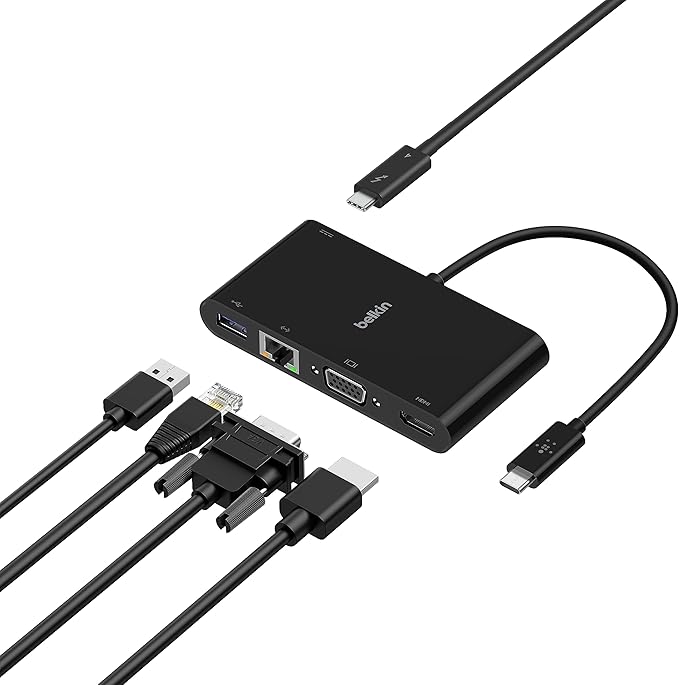
Belkin USB-C to VGA Charge Adapter
A platform into which you can install a portable computer. The docking station typically contains slots for expansion cards, bays for storage devices, and I/O connectors for peripheral devices, such as printers and monitors. Once inserted in a docking station, the portable computer essentially becomes a desktop model computer. Most importantly, the same data is accessible in both modes because it resides on the portable computer's drives. The idea behind docking stations is to let you simultaneously enjoy the expansion possibilities of desktop model computers with the portability of notebook computers. In addition, the docking station enables you to use a full-size keyboard and monitor when you're not traveling.
A platform into which you can install a portable computer. The docking station typically contains slots for expansion cards, bays for storage devices, and I/O connectors for peripheral devices, such as printers and monitors. Once inserted in a docking station, the portable computer essentially becomes a desktop model computer. Most importantly, the same data is accessible in both modes because it resides on the portable computer's drives. The idea behind docking stations is to let you simultaneously enjoy the expansion possibilities of desktop model computers with the portability of notebook computers. In addition, the docking station enables you to use a full-size keyboard and monitor when you're not traveling.
A platform into which you can install a portable computer. The docking station typically contains slots for expansion cards, bays for storage devices, and I/O connectors for peripheral devices, such as printers and monitors. Once inserted in a docking station, the portable computer essentially becomes a desktop model computer. Most importantly, the same data is accessible in both modes because it resides on the portable computer's drives. The idea behind docking stations is to let you simultaneously enjoy the expansion possibilities of desktop model computers with the portability of notebook computers. In addition, the docking station enables you to use a full-size keyboard and monitor when you're not traveling.
A platform into which you can install a portable computer. The docking station typically contains slots for expansion cards, bays for storage devices, and I/O connectors for peripheral devices, such as printers and monitors. Once inserted in a docking station, the portable computer essentially becomes a desktop model computer. Most importantly, the same data is accessible in both modes because it resides on the portable computer's drives. The idea behind docking stations is to let you simultaneously enjoy the expansion possibilities of desktop model computers with the portability of notebook computers. In addition, the docking station enables you to use a full-size keyboard and monitor when you're not traveling.
in 36 offers
The lowest price for Belkin USB-C to VGA Charge Adapter right now is $18.00 at Harvey Norman, compared across 14 retailers.
The all-time low was $9.18 on 7 July 2025 — today's price is 96% above the lowest ever. It has been notably cheaper before — worth setting a price alert.
Prices last updated 7 Oct 2026.
Last updated at 07/10/2026 23:05:25
Belkin USB-C to VGA + Charge Adapter
Delivery between 13–20 Oct $7.95
Belkin Usb-c To Vga & Charge Adapter 60w Power For Macbook & Ipad
Free delivery
Affiliate Disclosure: We may receive a small commission for purchases made through this link at no extra cost to you. This helps support our site. Thank you!
USB-C to VGA Adapter with Charging
Free delivery between 19–22 Oct
Belkin USB-C to VGA + Charge Adapter - Universally compatible - Black
Delivery $12.99
Belkin USB-C to VGA + Charge Adapter - Black(AVC001btBK),USB-C to VGA adapter with up to 60W of Power Delivery,It offers portable flexibility
Delivery $7.95
Belkin USB
Belkin Usb-c To Vga + Charge Adapter Black
Delivery $19.99
Usb C To Vga
Delivery between 14–17 Oct $29
Usb C To Vga
Free delivery between 19–22 Oct
Belkin USB-C to VGA + Charge Adapter - Black(AVC001btBK),USB-C to VGA adapter with up to 60W of Power Delivery,It offers portable flexibility
Free delivery between Sat – Wed
originally posted on bestbuy.com
This Belkin adapter let you connect to a VGA display or projector from a USB-C or Thunderbolt 3 port on your PC. Using it is intuitive, plug the VGA cable into the adapter, then plug the short USB-C cable into your computer. There are NO drivers or software to install, and NO switches to set.The Belkin also has a USB-C port for POWER pass-through to your laptop if needed. Plug your AC Adapter into the Belkin to run off AC power. Be warned the adapter only supports up to 60 Watts as noted on the packaging. Enough for a Chromebooks and low power laptops. But not powerful PC’s. For example a 15” Surface Book 3 with i7 AC Adapter is 127 watts.As Belkin notes on the packaging, this USB-C port on the Belkin adapter supports up to 60 Watts of power. Pictures of the box ... MoreThis Belkin adapter let you connect to a VGA display or projector from a USB-C or Thunderbolt 3 port on your PC. Using it is intuitive, plug the VGA cable into the adapter, then plug the short USB-C cable into your computer. There are NO drivers or software to install, and NO switches to set.The Belkin also has a USB-C port for POWER pass-through to your laptop if needed. Plug your AC Adapter into the Belkin to run off AC power. Be warned the adapter only supports up to 60 Watts as noted on the packaging. Enough for a Chromebooks and low power laptops. But not powerful PC’s. For example a 15” Surface Book 3 with i7 AC Adapter is 127 watts.As Belkin notes on the packaging, this USB-C port on the Belkin adapter supports up to 60 Watts of power. Pictures of the box are included with my review. Why 60? The USB-C port supports either 3 or 5 amps. Check with your laptop vendor’s specs to see which one your model supports. The maximum voltage permitted by the current USB Specification is 20 Volts. Converted to watts and you get 60W over a 3A cable or 100W over a 5A cable. So Belkin is going with 3 Amps, which may save a 3 Amp USB-C port on a laptop from being damaged.I’m not sure what would happen if you plugged a power adapter in that supplies more than 60 watts and if the laptop drew more than 60. Would the adapter limit it to 60 watts, would something be damaged? I don’t have a high power adapter to test that, nor would I with my gear. I found nothing on this on their web site. I would not use a power adapter larger than 60 watts until I found out for sure.There are no directions or documentation to explain this with the adapter. Judging from other reviews, there should be as many seem to miss this.There are no directions or documentation to explain this with the adapter. Judging from other reviews, there should be as many seem to miss this.You CAN NOT use this port for any other peripherals such as a memory stick, drive, wired Ethernet cable, or other adapters. Nowhere does Belkin state these are supported. But just to verify that peripherals wouldn’t work via some undocumented or unsupported feature, I tried plugging an Anker USB C to Ethernet Adapter and a SanDisk - Ultra 128GB USB 3.1, USB Type-C Flash Drive into the Belkin USB-C port on my Chromebook and Surface. Nothing happened at all on my PC, they did not show up as even an unknown device.If you need to plug a USB-C peripheral in and you have no other ports on your laptop, such as on a Surface Book 3, then look for a USB-C hub that will support all the adapters and memory sticks you will need to plug in. Make sure the hub on your PC will also support the power requirements of all your peripherals.I tested the Belin adapter with my HP Chromebook model 14-ca061dx and by default it added the external monitor as a second display. This can be changed in the Chromebook System Settings to mirror your laptop display if you wish. I plugged my Chromebooks 45 W AC power adapter into the Belkin adapter and my Chromebook showed as charging. It works as advertised.I also tested with my Surface Book 3. The Belkin adapter worked perfectly here as well. I plugged my 45 watt Chromebook USB-C power adapter in the Belkin and it supplied power to my laptop. Maybe not as fast as it was using it, but it would help extend the run time. The 102 Watt Surface power supply does not use a USB-C connector, it’s a proprietary connector.Belkin provides a solid plug and play solution with this adapter. It has the excellent build quality you expect from Belkin and comes with a 2 year warranty.My only suggested improvement for Belkin is to emboss or label the adapter with a note that that the USB-C port is for power ONLY and limited to 60 Watts. I’m not going to carry the box in my laptop bag and I may not remember this a year or two from now. A very minor gripe and my only one. I’d ding this .1 point for a score of 4.9 stars, which rounds to 5. Being as guy, I of course have a label maker and put a label on it with this. Now it’s perfect.I received this PC due to my affiliation with the Tech Insider Network Program. Reviewers in this invitation-only program are provided products for the purpose of writing honest, unbiased reviews.
originally posted on stationerypacks.co.uk
This adapter does exactly what its supposed to do. It lets me connect some older USB typeA accessories to my laptop that has limited USB ports. I can now convert my USB typeC port to work with any accessory. Ive been using it with my external hard drive and its working with no issues. I personally love how snug the connections on both ends are. It feels like a rugged and high quality cable.
originally posted on bestbuy.com
Since newer Mac laptops only include USB-C ports, users are forced to live a world of dongles. This is mostly because most of the devices we want to connect to they use some other type of connector.VGA is an older type of connector, but it's still common to find it on monitors you can buy in the store now. I personally have two computers connected to the same monitor, one by HDMI, the other by VGA. All I have to do is press a button on the monitor to change "channels" and switch computers.This device makes it possible to attach my newer devices that include USB-C to this monitor. It's much less common to see a VGA connector on a device that includes USB-C because USB-C is a small connector and allows the overall device to be much thinner, but only if the VGA ... MoreSince newer Mac laptops only include USB-C ports, users are forced to live a world of dongles. This is mostly because most of the devices we want to connect to they use some other type of connector.VGA is an older type of connector, but it's still common to find it on monitors you can buy in the store now. I personally have two computers connected to the same monitor, one by HDMI, the other by VGA. All I have to do is press a button on the monitor to change "channels" and switch computers.This device makes it possible to attach my newer devices that include USB-C to this monitor. It's much less common to see a VGA connector on a device that includes USB-C because USB-C is a small connector and allows the overall device to be much thinner, but only if the VGA connector is removed.I first connected this Belkin USB-C to VGA connector to my Chromebook. It's a low-end model but has HDMI and USB-C. The monitor on this device is not great, but it was inexpensive. The Chromebook recognized it quickly and my monitor lit up quickly. The picture is actually better than the Chromebook display itself. The connection is solid - no flickering, no artifacts.I then tried the USB-C to VGA connector to my MacBook Pro 16, a relatively new device at the time of this writing. The great thing about this connector is that it has a USB-C pass-through for another USB-C connector, which allows for the power cable to be plugged in, so you truly don't lose a port by using this device (power only - another USB-C device would not work plugged into this port). Since my MacBook Pro has 4 ports, this is not as big of an issue, but for for some of the older MacBook models that have 1-2 ports, this is a lifesaver!The one downside to this is that the MacBook did not charge as quickly when the power cable was connected to the device. As soon as I moved the power cable to another port, the laptop began to charge much faster. However, if your USB-C ports are at a premium, this is a minor inconvenience.The device itself seems to be of good quality. It is made of plastic, and I thing the casing would crack if enough pressure was applied. However, the connector feels solid and plugs into a computer with a reasonable amount of resistance, but not too much. The VGA cable connect to the VGA port squarely and securely - it definitely is not going to fall out from being moved around during use.Overall, this is great connector for VGA connections, and it should hold up through a lot of plugging in and removing from devices.
| Manufacturer | Belkin |
| Output Resolution | 1920x1200 (1080p) at 60Hz |
| Power Connectors | USB-C Power Delivery port (up to 60W) |
| Display Output Type | VGA |
| Max Display Resolution | 1920x1200 (1080p) at 60Hz |
Belkin USB-C to VGA + Charge Adapter
Delivery between 13–20 Oct $7.95
Belkin Usb-c To Vga & Charge Adapter 60w Power For Macbook & Ipad
Free delivery
Affiliate Disclosure: We may receive a small commission for purchases made through this link at no extra cost to you. This helps support our site. Thank you!
USB-C to VGA Adapter with Charging
Free delivery between 19–22 Oct
Belkin USB-C to VGA + Charge Adapter - Universally compatible - Black
Delivery $12.99
Belkin USB-C to VGA + Charge Adapter - Black(AVC001btBK),USB-C to VGA adapter with up to 60W of Power Delivery,It offers portable flexibility
Delivery $7.95
This Belkin adapter let you connect to a VGA display or projector from a USB-C or Thunderbolt 3 port on your PC. Using it is intuitive, plug the VGA cable into the adapter, then plug the short USB-C cable into your computer. There are NO drivers or software to install, and NO switches to set.The Belkin also has a USB-C port for POWER pass-through to your laptop if needed. Plug your AC Adapter into the Belkin to run off AC power. Be warned the adapter only supports up to 60 Watts as noted on the packaging. Enough for a Chromebooks and low power laptops. But not powerful PC’s. For example a 15” Surface Book 3 with i7 AC Adapter is 127 watts.As Belkin notes on the packaging, this USB-C port on the Belkin adapter supports up to 60 Watts of power. Pictures of the box ... MoreThis Belkin adapter let you connect to a VGA display or projector from a USB-C or Thunderbolt 3 port on your PC. Using it is intuitive, plug the VGA cable into the adapter, then plug the short USB-C cable into your computer. There are NO drivers or software to install, and NO switches to set.The Belkin also has a USB-C port for POWER pass-through to your laptop if needed. Plug your AC Adapter into the Belkin to run off AC power. Be warned the adapter only supports up to 60 Watts as noted on the packaging. Enough for a Chromebooks and low power laptops. But not powerful PC’s. For example a 15” Surface Book 3 with i7 AC Adapter is 127 watts.As Belkin notes on the packaging, this USB-C port on the Belkin adapter supports up to 60 Watts of power. Pictures of the box are included with my review. Why 60? The USB-C port supports either 3 or 5 amps. Check with your laptop vendor’s specs to see which one your model supports. The maximum voltage permitted by the current USB Specification is 20 Volts. Converted to watts and you get 60W over a 3A cable or 100W over a 5A cable. So Belkin is going with 3 Amps, which may save a 3 Amp USB-C port on a laptop from being damaged.I’m not sure what would happen if you plugged a power adapter in that supplies more than 60 watts and if the laptop drew more than 60. Would the adapter limit it to 60 watts, would something be damaged? I don’t have a high power adapter to test that, nor would I with my gear. I found nothing on this on their web site. I would not use a power adapter larger than 60 watts until I found out for sure.There are no directions or documentation to explain this with the adapter. Judging from other reviews, there should be as many seem to miss this.There are no directions or documentation to explain this with the adapter. Judging from other reviews, there should be as many seem to miss this.You CAN NOT use this port for any other peripherals such as a memory stick, drive, wired Ethernet cable, or other adapters. Nowhere does Belkin state these are supported. But just to verify that peripherals wouldn’t work via some undocumented or unsupported feature, I tried plugging an Anker USB C to Ethernet Adapter and a SanDisk - Ultra 128GB USB 3.1, USB Type-C Flash Drive into the Belkin USB-C port on my Chromebook and Surface. Nothing happened at all on my PC, they did not show up as even an unknown device.If you need to plug a USB-C peripheral in and you have no other ports on your laptop, such as on a Surface Book 3, then look for a USB-C hub that will support all the adapters and memory sticks you will need to plug in. Make sure the hub on your PC will also support the power requirements of all your peripherals.I tested the Belin adapter with my HP Chromebook model 14-ca061dx and by default it added the external monitor as a second display. This can be changed in the Chromebook System Settings to mirror your laptop display if you wish. I plugged my Chromebooks 45 W AC power adapter into the Belkin adapter and my Chromebook showed as charging. It works as advertised.I also tested with my Surface Book 3. The Belkin adapter worked perfectly here as well. I plugged my 45 watt Chromebook USB-C power adapter in the Belkin and it supplied power to my laptop. Maybe not as fast as it was using it, but it would help extend the run time. The 102 Watt Surface power supply does not use a USB-C connector, it’s a proprietary connector.Belkin provides a solid plug and play solution with this adapter. It has the excellent build quality you expect from Belkin and comes with a 2 year warranty.My only suggested improvement for Belkin is to emboss or label the adapter with a note that that the USB-C port is for power ONLY and limited to 60 Watts. I’m not going to carry the box in my laptop bag and I may not remember this a year or two from now. A very minor gripe and my only one. I’d ding this .1 point for a score of 4.9 stars, which rounds to 5. Being as guy, I of course have a label maker and put a label on it with this. Now it’s perfect.I received this PC due to my affiliation with the Tech Insider Network Program. Reviewers in this invitation-only program are provided products for the purpose of writing honest, unbiased reviews.
This adapter does exactly what its supposed to do. It lets me connect some older USB typeA accessories to my laptop that has limited USB ports. I can now convert my USB typeC port to work with any accessory. Ive been using it with my external hard drive and its working with no issues. I personally love how snug the connections on both ends are. It feels like a rugged and high quality cable.
Since newer Mac laptops only include USB-C ports, users are forced to live a world of dongles. This is mostly because most of the devices we want to connect to they use some other type of connector.VGA is an older type of connector, but it's still common to find it on monitors you can buy in the store now. I personally have two computers connected to the same monitor, one by HDMI, the other by VGA. All I have to do is press a button on the monitor to change "channels" and switch computers.This device makes it possible to attach my newer devices that include USB-C to this monitor. It's much less common to see a VGA connector on a device that includes USB-C because USB-C is a small connector and allows the overall device to be much thinner, but only if the VGA ... MoreSince newer Mac laptops only include USB-C ports, users are forced to live a world of dongles. This is mostly because most of the devices we want to connect to they use some other type of connector.VGA is an older type of connector, but it's still common to find it on monitors you can buy in the store now. I personally have two computers connected to the same monitor, one by HDMI, the other by VGA. All I have to do is press a button on the monitor to change "channels" and switch computers.This device makes it possible to attach my newer devices that include USB-C to this monitor. It's much less common to see a VGA connector on a device that includes USB-C because USB-C is a small connector and allows the overall device to be much thinner, but only if the VGA connector is removed.I first connected this Belkin USB-C to VGA connector to my Chromebook. It's a low-end model but has HDMI and USB-C. The monitor on this device is not great, but it was inexpensive. The Chromebook recognized it quickly and my monitor lit up quickly. The picture is actually better than the Chromebook display itself. The connection is solid - no flickering, no artifacts.I then tried the USB-C to VGA connector to my MacBook Pro 16, a relatively new device at the time of this writing. The great thing about this connector is that it has a USB-C pass-through for another USB-C connector, which allows for the power cable to be plugged in, so you truly don't lose a port by using this device (power only - another USB-C device would not work plugged into this port). Since my MacBook Pro has 4 ports, this is not as big of an issue, but for for some of the older MacBook models that have 1-2 ports, this is a lifesaver!The one downside to this is that the MacBook did not charge as quickly when the power cable was connected to the device. As soon as I moved the power cable to another port, the laptop began to charge much faster. However, if your USB-C ports are at a premium, this is a minor inconvenience.The device itself seems to be of good quality. It is made of plastic, and I thing the casing would crack if enough pressure was applied. However, the connector feels solid and plugs into a computer with a reasonable amount of resistance, but not too much. The VGA cable connect to the VGA port squarely and securely - it definitely is not going to fall out from being moved around during use.Overall, this is great connector for VGA connections, and it should hold up through a lot of plugging in and removing from devices.
GREAT FOR LEGACY VGA DEVICES (via USB-C)REVIEW: Belkin - USB Type C-to-HD D-Sub/USB Type C Cable - BlackBest Buy Tech Insider NetworkIf like me you have monitors and projectors laying around that just won’t die. Eventually, you need a way to connect to them with a standard VGA cable (DE-HD15). The problem is that almost no modern systems have VGA output any more. As soon as I retire a VGA monitor, a few weeks later I find another use for it. When I travel for business it is still a 50/50 chance that the customer’s conference room only has a VGA connector.If I only had way to convert a modern standard like USB-C to VGA that would be great.The Belkin USB-C to VGA adapter works exactly as it should. Plug in one end to your computer (must have Video Enabled ... MoreGREAT FOR LEGACY VGA DEVICES (via USB-C)REVIEW: Belkin - USB Type C-to-HD D-Sub/USB Type C Cable - BlackBest Buy Tech Insider NetworkIf like me you have monitors and projectors laying around that just won’t die. Eventually, you need a way to connect to them with a standard VGA cable (DE-HD15). The problem is that almost no modern systems have VGA output any more. As soon as I retire a VGA monitor, a few weeks later I find another use for it. When I travel for business it is still a 50/50 chance that the customer’s conference room only has a VGA connector.If I only had way to convert a modern standard like USB-C to VGA that would be great.The Belkin USB-C to VGA adapter works exactly as it should. Plug in one end to your computer (must have Video Enabled USB-C Port) and the other end to a VGA device (monitor or projector) and you are off and running.I tested it on a Dell Laptop < 1 year old that has a USB-C, Thunderbolt enabled port. The VGA monitor was instantly recognized and configured with Windows 10.TIP:At first Windows Cloned my primary 4K laptop screen to my 1080P VGA monitor. Is was trying to do some sort of downsizing / resampling, as both screens reported they were 4K. I had a strange wavy image on my VGA monitor as it was trying to deal with the input. Once I went into settings and told it to extend not duplicate, it properly recognized the VGA monitor as 1080p. I have no idea if this has to do with the adapter or just a glitch in windows (I assume windows). Anyway, once I made the change everything worked perfect.TESTING:I put the adapter through a variety of test, including running Doom at 60FPS. It worked perfectly fine without any issues.I don’t have a computer that charges through USB-C so I could not test the “pass through charging” capability of the adapter.So now I am happy to add one more of a growing number of “emergency” adapters to cover myself and my co-worker when we encounter VGA devices. I like to be prepared at meetings when someone asks if anyone has a particular cable. I dig around in my computer bag and like magic I find the right thing.I would recommend this to anyone who need an easy to use VGA adapter for a modern computer.
This Belkin adapter is excellent for transmitting video from a laptop or mobile to a projector or screen monitor via VGA connection. I have been using it almost daily to connect my laptop and mobile phone to a projector with a VGA connection. The device transmitting the video must have a video-enabled USB-C port. The adapter is Thunderbolt 3 port compatible. I use it with my laptop and Galaxy Note 10+ phone, and the video quality is perfect. Projecting my phone to a projector using the adaptor is like using a desktop, and the phone screen acts as a mouse touchpad. I really enjoy this option of using this adapter to project my phone screen to a VGA projector. The VGA cable pins align properly with the adapter, and the connection screws lock the connection securely. ... MoreThis Belkin adapter is excellent for transmitting video from a laptop or mobile to a projector or screen monitor via VGA connection. I have been using it almost daily to connect my laptop and mobile phone to a projector with a VGA connection. The device transmitting the video must have a video-enabled USB-C port. The adapter is Thunderbolt 3 port compatible. I use it with my laptop and Galaxy Note 10+ phone, and the video quality is perfect. Projecting my phone to a projector using the adaptor is like using a desktop, and the phone screen acts as a mouse touchpad. I really enjoy this option of using this adapter to project my phone screen to a VGA projector. The VGA cable pins align properly with the adapter, and the connection screws lock the connection securely. Note that for a VGA cable used for a temporary connection, it is always wise to protect the pins with a cover or a VGA turnaround. The pass-through charging power works fine. This adapter is a great product, easy to use, fits easily in a small pocket, and works with no issues.
I am so disappointed because I got an adapter with faulty power connection right out of the box. Only the VGA component of the adapter works, but that defeats the purpose of this also being able to charge smaller devices simultaneously. I love Belkin products, but this was a miss for me. I tried connecting my compatible devices per instruction, such as surface laptop, iPad, iPhone, and AirPods. None of these devices received any type of charge when plugged into the adapter using a lightning usb c charge cable. I tested different charging cables with the adapter, and no devices received any power. I made sure all the cables could receive power, so I knew it has to be this Belkin usb c to VGA plus charge that was not functioning well. The vga functionality works, but ... MoreI am so disappointed because I got an adapter with faulty power connection right out of the box. Only the VGA component of the adapter works, but that defeats the purpose of this also being able to charge smaller devices simultaneously. I love Belkin products, but this was a miss for me. I tried connecting my compatible devices per instruction, such as surface laptop, iPad, iPhone, and AirPods. None of these devices received any type of charge when plugged into the adapter using a lightning usb c charge cable. I tested different charging cables with the adapter, and no devices received any power. I made sure all the cables could receive power, so I knew it has to be this Belkin usb c to VGA plus charge that was not functioning well. The vga functionality works, but I’m disappointed overall.
Since receiving this adapter I've tried it with just about every USB-C device I can get my hands on and I can say that it, without a doubt, performs admirably.I was able to work on my 11" iPad Pro's main screen whilst having a video playing externally on my 14" portable monitor. I was able to use it with my 12" Macbook hooked up to a monitor used as an extended screen as well. Then I closed the lid to my Macbook, hooked up an external keyboard/mouse as well and used the monitor hooked up to the adapter as my primary screen. I got the fully expected resolution and refresh rate doing so.Hooking up the adapter to my Windows 10 computer for use with an external monitor performed exactly as well as with my Macbook too. As did using the same computer with the adapter ... MoreSince receiving this adapter I've tried it with just about every USB-C device I can get my hands on and I can say that it, without a doubt, performs admirably.I was able to work on my 11" iPad Pro's main screen whilst having a video playing externally on my 14" portable monitor. I was able to use it with my 12" Macbook hooked up to a monitor used as an extended screen as well. Then I closed the lid to my Macbook, hooked up an external keyboard/mouse as well and used the monitor hooked up to the adapter as my primary screen. I got the fully expected resolution and refresh rate doing so.Hooking up the adapter to my Windows 10 computer for use with an external monitor performed exactly as well as with my Macbook too. As did using the same computer with the adapter hooked up to my projector. Nice clear and crisp image.Through all of the uses, and I did use it quite a bit, the unit stayed nice and cool, even passing through power over USB-C. I also really like that Belkin provided the screw holes to secure the VGA connector to the adapter. Not all adapters have that and it is a huge pain. So bravo there as well.My reason for 4 stars instead of 5 has to do with the build quality of the product. It feels a bit on the cheap side. The plastic is rather thin and brittle and the cable attached would, in my opinion, be prone to getting worn out pretty quickly with less than careful treatment. If you're one like me that treats your gear with kid gloves, by all means pick up and enjoy this wonderful unit. If not, I'd hold out for a model with a nice braided cable and aluminum body casing.
I kept asking NL support and getting passed around their different customer service departments and no one had an answer. 4 weeks later, sick of following up I purchased the product in hopes of getting 2 monitors on extended mode with a Surface Laptop 4.LO, behold, it works for the VGA monitor! I only plugged it in to see if it'll connect, which it did, but the Usb-C monitor did not. Only later I found out on the official Belkin website that this adapter only supports 1 monitor, and the Usb-c is a charge through only.Currently I'm waiting on the Manukau Branch to process a return via post.And still looking for a solution to connect 2 monitors on extended mode - 1 VGA/DVI monitor, and one modern DVI/DP/HDMI monitor.
So I'll start off by saying I cannot tell if my varied experiences were because the Belkin adapter was the problem or if it's the multitude of implementations of USB-C by every different manufacturer. I'd guess it's the latter and the adapter works fine when the USB-C port is built correctly. I used a Platinum 95w USB-C PD charger to test the power pass-through.Every laptop I tested the picture on the monitor looked just as good as when plugged into the laptop. This adapter does not seem to have any loss of quality or distortion.The adapter works perfectly on my 2018 HP x360 Envy 15.6" laptop. It plugged right in and everything worked. The monitor came through and the laptop was charging at the same time.My 2019 Dell Inspiron 15.6" 7000 series laptop will work ... MoreSo I'll start off by saying I cannot tell if my varied experiences were because the Belkin adapter was the problem or if it's the multitude of implementations of USB-C by every different manufacturer. I'd guess it's the latter and the adapter works fine when the USB-C port is built correctly. I used a Platinum 95w USB-C PD charger to test the power pass-through.Every laptop I tested the picture on the monitor looked just as good as when plugged into the laptop. This adapter does not seem to have any loss of quality or distortion.The adapter works perfectly on my 2018 HP x360 Envy 15.6" laptop. It plugged right in and everything worked. The monitor came through and the laptop was charging at the same time.My 2019 Dell Inspiron 15.6" 7000 series laptop will work with one or the other. It will pass through charging but only if the VGA port is not used. And if the VGA port is in use it will not pass through charge. Also if the charger is plugged in the adapter first then you plug the adapter into the laptop it will recognize charger over monitor.Third laptop I tested was a 2020 Samsung Galaxy Book Flex Alpha 13". It would recognize the monitor but not the USB-C charger. My caveat to this though is the laptop itself will not recognize the charger directly either because Samsung is a pain with outside chargers. So my guess would be if the USB-C charger works with the laptop it would work through this adapter also.The cool thing with this adapter is with all 3 laptops I tested I was able to set up a 3 monitor array by using the built-in display, a monitor plugged into the built-in HDMI port and a monitor connected to this adapter. If you want a 3 monitor setup, don't mind plugging in an extra cable and don't want to spend hundreds on a multi-monitor docking station this is a great alternative.
I have tried several DVI adapters and had consistent problems of a slow input and a flickering screen. Since Apple does not offer an official DVI adapter, I believe that they agrology that the new USB-C connection is not easily compatible for DVI connection. If you have an older monitor with DVI or VGA, this seems to be the best solution. This is a cheaper solution than trying to buy a new monitor that can be supported for the new MacBook Pro via USB-C.
| Manufacturer | Belkin |
| Output Resolution | 1920x1200 (1080p) at 60Hz |
| Power Connectors | USB-C Power Delivery port (up to 60W) |
| Display Output Type | VGA |
| Max Display Resolution | 1920x1200 (1080p) at 60Hz |