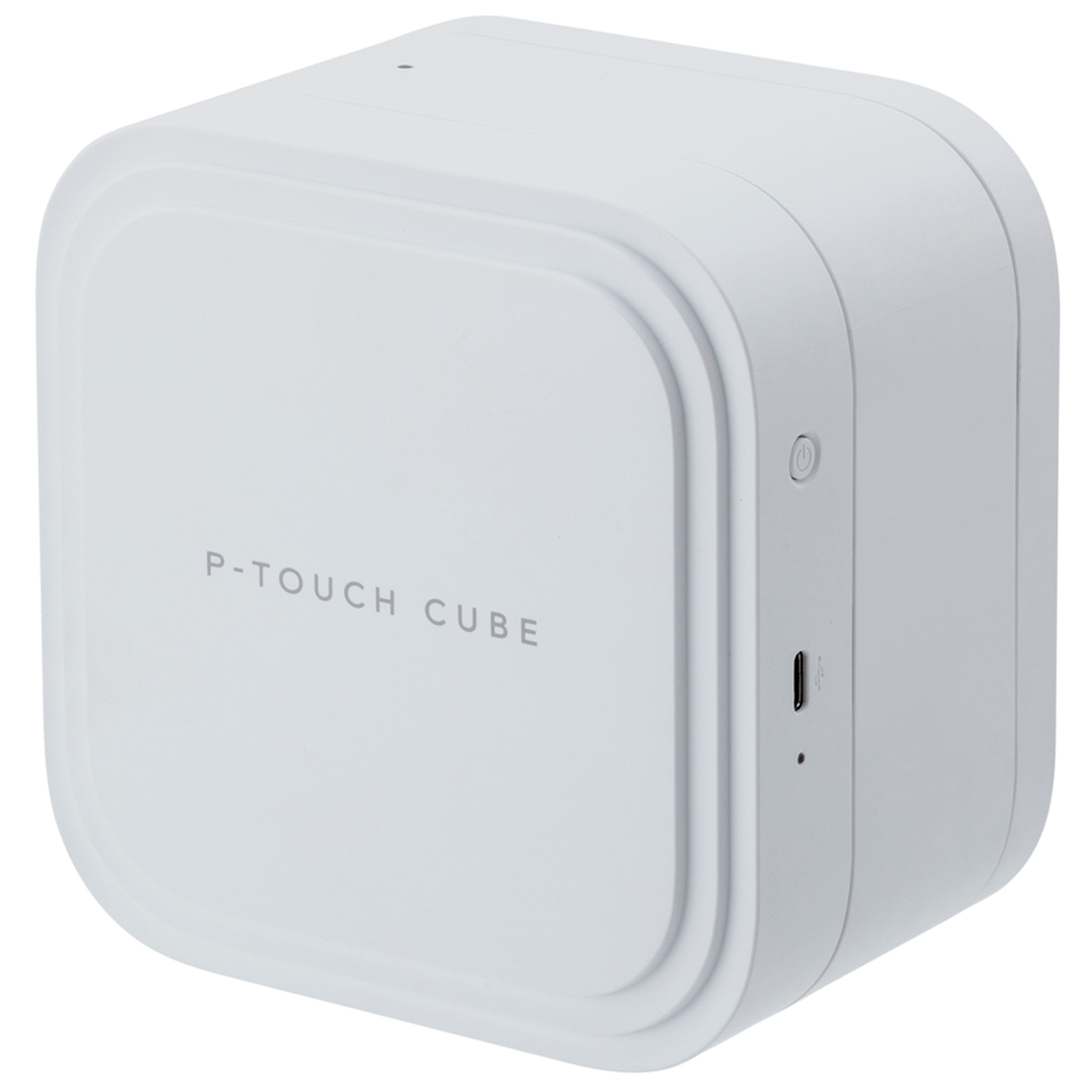
Brother P-Touch PT-P910BT Label Printer
The Brother PT-P910BT is a versatile and efficient labeling solution designed for both personal and professional use. This product, identified by the code PTP910BTZ1, utilizes TZe tape technology, ensuring high-quality and durable labels for various applications. With its advanced thermal transfer printing technology, it delivers a maximum resolution of 360 x 360 DPI, providing crisp and clear text and graphics that stand out. Equipped with both wired and wireless connectivity, the Brother PT-P910BT offers seamless integration with your devices, making it easy to create and print labels from smartphones, tablets, or computers. The built-in lithium-ion battery ensures that you can print on the go without the hassle of constant recharging, providing convenience and flexibility in various environments. This feature sets it apart from many competitors, making it an ideal choice for users who require mobility and efficiency. In addition to its impressive technical specifications, the Brother PT-P910BT is designed with user-friendliness in mind. Its sleek white finish not only enhances its aesthetic appeal but also ensures that it fits seamlessly into any workspace. The combination of high-quality printing, versatile connectivity options, and a reliable power source makes this model a standout in the labeling market, catering to the needs of both home and office users alike.
The Brother PT-P910BT is a versatile and efficient labeling solution designed for both personal and professional use. This product, identified by the code PTP910BTZ1, utilizes TZe tape technology, ensuring high-quality and durable labels for various applications. With its advanced thermal transfer printing technology, it delivers a maximum resolution of 360 x 360 DPI, providing crisp and clear text and graphics that stand out. Equipped with both wired and wireless connectivity, the Brother PT-P910BT offers seamless integration with your devices, making it easy to create and print labels from smartphones, tablets, or computers. The built-in lithium-ion battery ensures that you can print on the go without the hassle of constant recharging, providing convenience and flexibility in various environments. This feature sets it apart from many competitors, making it an ideal choice for users who require mobility and efficiency. In addition to its impressive technical specifications, the Brother PT-P910BT is designed with user-friendliness in mind. Its sleek white finish not only enhances its aesthetic appeal but also ensures that it fits seamlessly into any workspace. The combination of high-quality printing, versatile connectivity options, and a reliable power source makes this model a standout in the labeling market, catering to the needs of both home and office users alike.
The Brother PT-P910BT is a versatile and efficient labeling solution designed for both personal and professional use. This product, identified by the code PTP910BTZ1, utilizes TZe tape technology, ensuring high-quality and durable labels for various applications. With its advanced thermal transfer printing technology, it delivers a maximum resolution of 360 x 360 DPI, providing crisp and clear text and graphics that stand out. Equipped with both wired and wireless connectivity, the Brother PT-P910BT offers seamless integration with your devices, making it easy to create and print labels from smartphones, tablets, or computers. The built-in lithium-ion battery ensures that you can print on the go without the hassle of constant recharging, providing convenience and flexibility in various environments. This feature sets it apart from many competitors, making it an ideal choice for users who require mobility and efficiency. In addition to its impressive technical specifications, the Brother PT-P910BT is designed with user-friendliness in mind. Its sleek white finish not only enhances its aesthetic appeal but also ensures that it fits seamlessly into any workspace. The combination of high-quality printing, versatile connectivity options, and a reliable power source makes this model a standout in the labeling market, catering to the needs of both home and office users alike.
The Brother PT-P910BT is a versatile and efficient labeling solution designed for both personal and professional use. This product, identified by the code PTP910BTZ1, utilizes TZe tape technology, ensuring high-quality and durable labels for various applications. With its advanced thermal transfer printing technology, it delivers a maximum resolution of 360 x 360 DPI, providing crisp and clear text and graphics that stand out. Equipped with both wired and wireless connectivity, the Brother PT-P910BT offers seamless integration with your devices, making it easy to create and print labels from smartphones, tablets, or computers. The built-in lithium-ion battery ensures that you can print on the go without the hassle of constant recharging, providing convenience and flexibility in various environments. This feature sets it apart from many competitors, making it an ideal choice for users who require mobility and efficiency. In addition to its impressive technical specifications, the Brother PT-P910BT is designed with user-friendliness in mind. Its sleek white finish not only enhances its aesthetic appeal but also ensures that it fits seamlessly into any workspace. The combination of high-quality printing, versatile connectivity options, and a reliable power source makes this model a standout in the labeling market, catering to the needs of both home and office users alike.
in 55 offers
The lowest price for Brother P-Touch PT-P910BT Label Printer right now is $339.12 at eBay.com.au, compared across 39 retailers.
The all-time low was $19.95 on 10 June 2026 — today's price is 1600% above the lowest ever. It has been notably cheaper before — worth setting a price alert.
Prices last updated 15 Oct 2026.
Last updated at 15/10/2026 21:59:20
Brother PT-P910BT Label Printer P-Touch Cube Pro, Up to 36mm Labels
Free delivery
Affiliate Disclosure: We may receive a small commission for purchases made through this link at no extra cost to you. This helps support our site. Thank you!
Brother P-touch Cube Label Maker Pt-p910bt Smartphone/pc Compatible
Free delivery
Affiliate Disclosure: We may receive a small commission for purchases made through this link at no extra cost to you. This helps support our site. Thank you!
Brother PTP910BT P-Touch Cube - Desktop Thermal Transfer Printer - Monochrome - Label Print - USB - Bluetooth - 20 mm/s Mono - 360 dpi - 36 mm Label
Free delivery between Sat – Tue
Brother P-touch Cube Pro Pt-p910bt Thermal Printer White EU Plug 220V
Delivery $47.99
Brother P-touch CUBE Pro (PT-P910BT) | Custom Label Printer with Wireless Printing
Delivery between 20–23 Oct $19.25
Brother P-touch CUBE Pro PT-P910BT 36mm Label Printer USB Bluetooth
Delivery $12.99
Brother P-Touch PT-P910BT Label Printer
Delivery $12.50
BPTP910BT - Brother P910BT P Touch Machine
Delivery $16.50
Brother P910BT P Touch Machine
14-day returns
Brother P-Touch Cube Pro PT-P910BT Label Printer PT-P910BT
Free delivery between Fri – Tue
originally posted on brother-usa.com
I received this product for free from Brother in exchange for my honest opinion/review of the product. The P-touch CUBE XP Label Maker is certainly the most "advanced" label maker I`ve ever used! With the accompanying app (which is the only way to use the label maker it seems), it`s simple to make everything from traditional labels to gift tags to QR codes to ID badges. The label maker app is fairly intuitive, and the customization options are pretty extensive, making it a breeze to design whatever type of label you may need. On the downside, it is a bit frustrating that the label maker can`t be used without the app and a stable Bluetooth connection. It`s great for craft projects and complex labels, but as a simple label maker that I can use quickly, there is ... MoreI received this product for free from Brother in exchange for my honest opinion/review of the product. The P-touch CUBE XP Label Maker is certainly the most "advanced" label maker I`ve ever used! With the accompanying app (which is the only way to use the label maker it seems), it`s simple to make everything from traditional labels to gift tags to QR codes to ID badges. The label maker app is fairly intuitive, and the customization options are pretty extensive, making it a breeze to design whatever type of label you may need. On the downside, it is a bit frustrating that the label maker can`t be used without the app and a stable Bluetooth connection. It`s great for craft projects and complex labels, but as a simple label maker that I can use quickly, there is limited functionality - you just can`t do anything without the app.
originally posted on brother-usa.com
I received this product for free from Brother in exchange for my honest opinion/review of the product. The Brother Cube is a very useful product because it helps me with organization and it makes things easier to find. I am an organized person and i need to be able to find what i need around my room/house as easily as possible in order to do things quicker and more efficiently. Because of the Brother Cube, i was able to find things on my desk easier due to labeling each category of paperwork that`s in my letter trays, as well as being able to find the wifi information in my house easier by printing a label with the info onto my computer. My favorite feature has to be the fact that i can print shipping labels. I feel like it saves me time compared to printing a label ... MoreI received this product for free from Brother in exchange for my honest opinion/review of the product. The Brother Cube is a very useful product because it helps me with organization and it makes things easier to find. I am an organized person and i need to be able to find what i need around my room/house as easily as possible in order to do things quicker and more efficiently. Because of the Brother Cube, i was able to find things on my desk easier due to labeling each category of paperwork that`s in my letter trays, as well as being able to find the wifi information in my house easier by printing a label with the info onto my computer. My favorite feature has to be the fact that i can print shipping labels. I feel like it saves me time compared to printing a label at the post office. This was a very easy product to use, it was easy to put together and figure out how to print through the app. This compares as a much more easily accessible, better working product than other similar products. The Brother Cube met my expectations and even more than that. My overall impression is that this is a great product i would gladly buy one.
originally posted on brother-usa.com
I received this product for free from Brother in exchange for my honest opinion/review of the product. I haven`t had a label maker in years. This thing is amazing. I started by making all these great fancy labels for spice jars and ended up printing photo stickers. Amazing. Easy to use along with the app. I`m still learning the app. I don`t know if it`s been around a while or if it`s new but I think I need to learn more about navigating it to its fullest potential. That`s not to say it`s not effective that`s just where you get your usage direction. It comes with set up instructions but you have to depend on the app. The P-Touch is really just a printer. An amazing label printer that surprised me by the quick printing and quality of the graphics.
| General | |
| Printer Type | Label printer - thermal transfer - monochrome |
| Printer | |
| Connectivity Technology | Wireless |
| Interface | USB, Bluetooth |

Brother PT-P910BT Label Printer P-Touch Cube Pro, Up to 36mm Labels
Free delivery
Affiliate Disclosure: We may receive a small commission for purchases made through this link at no extra cost to you. This helps support our site. Thank you!
Brother P-touch Cube Label Maker Pt-p910bt Smartphone/pc Compatible
Free delivery
Affiliate Disclosure: We may receive a small commission for purchases made through this link at no extra cost to you. This helps support our site. Thank you!
Brother PTP910BT P-Touch Cube - Desktop Thermal Transfer Printer - Monochrome - Label Print - USB - Bluetooth - 20 mm/s Mono - 360 dpi - 36 mm Label
Free delivery between Sat – Tue
Brother P-touch Cube Pro Pt-p910bt Thermal Printer White EU Plug 220V
Delivery $47.99
Brother P-touch CUBE Pro (PT-P910BT) | Custom Label Printer with Wireless Printing
Delivery between 20–23 Oct $19.25
I received this product for free from Brother in exchange for my honest opinion/review of the product. The P-touch CUBE XP Label Maker is certainly the most "advanced" label maker I`ve ever used! With the accompanying app (which is the only way to use the label maker it seems), it`s simple to make everything from traditional labels to gift tags to QR codes to ID badges. The label maker app is fairly intuitive, and the customization options are pretty extensive, making it a breeze to design whatever type of label you may need. On the downside, it is a bit frustrating that the label maker can`t be used without the app and a stable Bluetooth connection. It`s great for craft projects and complex labels, but as a simple label maker that I can use quickly, there is ... MoreI received this product for free from Brother in exchange for my honest opinion/review of the product. The P-touch CUBE XP Label Maker is certainly the most "advanced" label maker I`ve ever used! With the accompanying app (which is the only way to use the label maker it seems), it`s simple to make everything from traditional labels to gift tags to QR codes to ID badges. The label maker app is fairly intuitive, and the customization options are pretty extensive, making it a breeze to design whatever type of label you may need. On the downside, it is a bit frustrating that the label maker can`t be used without the app and a stable Bluetooth connection. It`s great for craft projects and complex labels, but as a simple label maker that I can use quickly, there is limited functionality - you just can`t do anything without the app.
I received this product for free from Brother in exchange for my honest opinion/review of the product. The Brother Cube is a very useful product because it helps me with organization and it makes things easier to find. I am an organized person and i need to be able to find what i need around my room/house as easily as possible in order to do things quicker and more efficiently. Because of the Brother Cube, i was able to find things on my desk easier due to labeling each category of paperwork that`s in my letter trays, as well as being able to find the wifi information in my house easier by printing a label with the info onto my computer. My favorite feature has to be the fact that i can print shipping labels. I feel like it saves me time compared to printing a label ... MoreI received this product for free from Brother in exchange for my honest opinion/review of the product. The Brother Cube is a very useful product because it helps me with organization and it makes things easier to find. I am an organized person and i need to be able to find what i need around my room/house as easily as possible in order to do things quicker and more efficiently. Because of the Brother Cube, i was able to find things on my desk easier due to labeling each category of paperwork that`s in my letter trays, as well as being able to find the wifi information in my house easier by printing a label with the info onto my computer. My favorite feature has to be the fact that i can print shipping labels. I feel like it saves me time compared to printing a label at the post office. This was a very easy product to use, it was easy to put together and figure out how to print through the app. This compares as a much more easily accessible, better working product than other similar products. The Brother Cube met my expectations and even more than that. My overall impression is that this is a great product i would gladly buy one.
I received this product for free from Brother in exchange for my honest opinion/review of the product. I haven`t had a label maker in years. This thing is amazing. I started by making all these great fancy labels for spice jars and ended up printing photo stickers. Amazing. Easy to use along with the app. I`m still learning the app. I don`t know if it`s been around a while or if it`s new but I think I need to learn more about navigating it to its fullest potential. That`s not to say it`s not effective that`s just where you get your usage direction. It comes with set up instructions but you have to depend on the app. The P-Touch is really just a printer. An amazing label printer that surprised me by the quick printing and quality of the graphics.
I received this product for free from Brother in exchange for my honest opinion/review of the product. Excited to start using P-touch Cube. My current labeler is hand held and only prints one line. Unboxing I quickly found instructions. Took only a few minutes to read and set up. Instructions did not specify how long I had to charge the unit and some of the drawinga were printed so faintly it was hard to figure them out. I let it charge 2 hrs. The cube is larger than I thought it would be and does not have any handles or indentions to make it easy to grab onto when moving. I almost dropped it once. Ergonomically it needs improvement.Once charged I proceeded to download the app to my android phone. Easy. I them followed the instructions on how to create and print a ... MoreI received this product for free from Brother in exchange for my honest opinion/review of the product. Excited to start using P-touch Cube. My current labeler is hand held and only prints one line. Unboxing I quickly found instructions. Took only a few minutes to read and set up. Instructions did not specify how long I had to charge the unit and some of the drawinga were printed so faintly it was hard to figure them out. I let it charge 2 hrs. The cube is larger than I thought it would be and does not have any handles or indentions to make it easy to grab onto when moving. I almost dropped it once. Ergonomically it needs improvement.Once charged I proceeded to download the app to my android phone. Easy. I them followed the instructions on how to create and print a label. 1st few attempts did not work so I uninstalled app and then reinstalled. Trouble was getting the bluetooth to work. I decided to make labels for my tax files. I used 1 1/4 inch tape and I noticed that when I changed the size of the font it would frequently reset itself back to the default size. I had to keep resetting it. A little annoying. I liked being able to print multiple lines on my labels. Also your last label stays in the printer so you have to create an extra one to get your last label. It also prints borders around labels and has an additional app that includes graphics if desired. Overall I liked being able to create labels from my phone and wirelessly print them. The cube has some quirks but the quality of the labels and convenience make up for it. I would give it a must Buy.
I received this product for free from Brother in exchange for my honest opinion/review of the product. I recieved this product in exchange for my unbiased opinion. First impression of this label maker, there is a learning curve before you can really maximize its potential. It is not the easiest to plug and use. There is a manual, but the manual isnt printed as "normal" manuals. No, this is one of the manuals that starts as a booklet, then opens up into a poster when you want to flip to the next page. So you have to flip front to back several times before you get all the information. Realize the label maker needs to be charged for several hours before use, but there is no charging adapter provided, only usb cord. The manual recommends using a specific usb adapter ... MoreI received this product for free from Brother in exchange for my honest opinion/review of the product. I recieved this product in exchange for my unbiased opinion. First impression of this label maker, there is a learning curve before you can really maximize its potential. It is not the easiest to plug and use. There is a manual, but the manual isnt printed as "normal" manuals. No, this is one of the manuals that starts as a booklet, then opens up into a poster when you want to flip to the next page. So you have to flip front to back several times before you get all the information. Realize the label maker needs to be charged for several hours before use, but there is no charging adapter provided, only usb cord. The manual recommends using a specific usb adapter that is not provided, so we have to figure out how to give it the safest multiple-hour charge, so it can be used. The next learning curve is figuring out how to connect it to your device. The options are made for Windows, Mac, & mobile devices. However, I had a Chromebook and could not download the links. Even though my Chromebook has google play, it took me about 30 mins to realize the label maker was not connecting to my laptop, and the app I had downloaded was an older version. Yes, there seems to be multiple versions of the label maker app in the play store, so be sure to pick the right one. So i just said forget the laptop im just using my phone, and Presto! it connects. Another question I have while using the label maker is How come I need to use "Location Services" with this app?? Normally my gps is off while at home, and I am normally still able to coonect through bluetooth with all my devices. This device, however, not only requires bluetooth connection, but also require gps to be on and location activated. Is All of that absolutely neccessary to print a label? No way.So after going through all that, we finally get to the part we`ve been trying to get to for the past 17 hours... printing a label!! The aspect I liked after going through this is how simple the process could be. Simply pressing a button on my phone, and having a label print. There is still a learning curve here also as there are numerous layout and the ability to upload photos and logos etc. Much trial and error involved. Some images I printed were too small for the printer. Sometimes I wanted the label to print bigger, other times I wanted the machine to print more in the center. Also I realize some colors work better for certain labels. While other colors work better for other labels. There is more of a learning curve here before I can fully know with confidence that I am getting the exact label shown on the app`s preview. With that being said, you could turn this on as a complete novice, choose a template on the app, and have a "formatted" label within seconds. Adds professional touch to labels with very little effort. Overall I can see the benefit of using this label maker, especially for a small business.Furthermore, the label maker it seems to auto-shutoff if left idle for a short period of time (10-15 mins). However the auto-shutoff is more a "sleep mode" because there is still a blinking light. I am not a fan of this feature, because it requires turning back on the device and reconnecting my device if i still want to use it OR turning back on the label maker to try to turn it all the way off. Storage may be a concern as well. The label maker itself is a decent size, not THAT big. But if I wanted to order a variety of colors for the printing material (there seems to be 7+ colors), each printing cartridge has to be stored, and seems sort of delicate/sensitive. The paper cartridges could easily stack up and turn into a pile of tripping material, or get lost in a crevice.Overall:I see the potential. It has to be used several times over before we fully understand how to maximize the dozens of templates/themes. It creates an ease for making a decent label within minutes. The main drawback for me is the gps location needed to use the device, missing adapter, and the auto-shut off feature
I received this product for free from Brother in exchange for my honest opinion/review of the product. I enjoy organizing and labeling things in my home, so this label maker was a great addition to my toolkit. It is very sleek, compact, and portable. Set up was straightforward, although i got a little confused about how to add the label tape cartridge. It did not come with the adapter for the charger, which would have been helpful. However, I had one I was able to use. The label maker was fully charged within an hour or so. It is so convenient to be able to do everything from my smartphone. The apps connected to the label maker with ease via Bluetooth. I was able to design a new label for my mail box and print within a few minutes. However, it would be nice if the ... MoreI received this product for free from Brother in exchange for my honest opinion/review of the product. I enjoy organizing and labeling things in my home, so this label maker was a great addition to my toolkit. It is very sleek, compact, and portable. Set up was straightforward, although i got a little confused about how to add the label tape cartridge. It did not come with the adapter for the charger, which would have been helpful. However, I had one I was able to use. The label maker was fully charged within an hour or so. It is so convenient to be able to do everything from my smartphone. The apps connected to the label maker with ease via Bluetooth. I was able to design a new label for my mail box and print within a few minutes. However, it would be nice if the apps were combined into one to make everything one seamless process. Overall I am very satisfied with the label maker and am looking forward to using it for all of my future labeling projects.
I received this product for free from Brother in exchange for my honest opinion/review of the product. The label maker is much larger than I`d expected. However it`s still a good size and can be easily stowed when not in use. It was easy to assemble and the charging time was quick. It was extremely difficult to set up on my computer. It took quite a while to go through all the steps. The instructions that came with the label maker were not very helpful so I pretty much had to try and figure it out on my own. After several tries I finally had it installed and ready to use. Printing was even more confusing than than connecting it. It took me quite some time and another family member to figure it out. The labels I printed were nice but smaller than I`d like it to have ... MoreI received this product for free from Brother in exchange for my honest opinion/review of the product. The label maker is much larger than I`d expected. However it`s still a good size and can be easily stowed when not in use. It was easy to assemble and the charging time was quick. It was extremely difficult to set up on my computer. It took quite a while to go through all the steps. The instructions that came with the label maker were not very helpful so I pretty much had to try and figure it out on my own. After several tries I finally had it installed and ready to use. Printing was even more confusing than than connecting it. It took me quite some time and another family member to figure it out. The labels I printed were nice but smaller than I`d like it to have been. I couldn`t quite figure out how to change the settings either to make the text larger. I will continue to try and figure this label maker out, but I am not sure how much I will use it with all the difficulties I`m having so far.
I received this product for free from Brother in exchange for my honest opinion/review of the product. Item: P-touch CUBE XP Label MakerDESIGN: I think this label maker has a very sleek and modernized look. The unit is condensed and fits nicely on my office desk. It is a little on the heavier side (~ 2 lbs.) but I did not see that as a problem.SETUP: The setup is overall very easy. The setup guide that is provide with the label maker is straight forward. I followed the guide and was able to setup the label maker without any hiccups. The label maker can be connected using Bluetooth technology, which enables easy connection to smartphones, tablets, and laptops. USE: After an easy setup experience, using the label maker followed seamlessly. There are three free apps ... MoreI received this product for free from Brother in exchange for my honest opinion/review of the product. Item: P-touch CUBE XP Label MakerDESIGN: I think this label maker has a very sleek and modernized look. The unit is condensed and fits nicely on my office desk. It is a little on the heavier side (~ 2 lbs.) but I did not see that as a problem.SETUP: The setup is overall very easy. The setup guide that is provide with the label maker is straight forward. I followed the guide and was able to setup the label maker without any hiccups. The label maker can be connected using Bluetooth technology, which enables easy connection to smartphones, tablets, and laptops. USE: After an easy setup experience, using the label maker followed seamlessly. There are three free apps that you can choose from that allows for customization in which you are looking to do. The usage of the apps are smooth. What I liked most while using this device is that I could design my labels at my own convenience using my mobile device. This unit`s technology allowed for easy accessibility. ISSUES: I did not come across any major issues. The only thing that I had trouble with was figuring out the half-cut verse full cut feature.PRICE: Although the price is on the higher side compared to most label makers out on the market, you get what you pay for. The technology and features built into this label marker justifies the price in my opinion.
I received this product for free from Brother in exchange for my honest opinion/review of the product. Upon receiving this product, it was nicely packaged in a box to ensure no damage. The set up process was extremely simple and the labels come in a cartridge container that easily slips into the device line a cassette tape. Upon powering the device on, the screen was bright and fairly intuitive. I simply downloaded the APP and was off to the races. The App was really easy and you were able to change the size of the fonts, type of fonts and the best part pictures. You can input pictures and it will print pretty nice quality. Once the labels printed, they were easy to peel the back off and have stuck on various surfacesPROS:- Easy Set Up- Ability to print pictures- ... MoreI received this product for free from Brother in exchange for my honest opinion/review of the product. Upon receiving this product, it was nicely packaged in a box to ensure no damage. The set up process was extremely simple and the labels come in a cartridge container that easily slips into the device line a cassette tape. Upon powering the device on, the screen was bright and fairly intuitive. I simply downloaded the APP and was off to the races. The App was really easy and you were able to change the size of the fonts, type of fonts and the best part pictures. You can input pictures and it will print pretty nice quality. Once the labels printed, they were easy to peel the back off and have stuck on various surfacesPROS:- Easy Set Up- Ability to print pictures- App was user friendlyCons:- Bluetooth connection took a bit of time to establish- A bit bulky for a label maker
i choose this printer for work, and it was a let down because there is no support behind it, and some bugs could be easily resolve.first one:PRINTING ISSUEthe print is not vertically center, there is more space above text than below...why? I can fill the whole tape with ink, so why can't I center my words? (Again vertically, since we can horizontally)Second:Limitation of number of images I can print in one goThere is absolutely no reason for that, i can't put more than 2 image per print? this is not 1990, I have a phone that could power all of Nasa when then ship the entire Apollo program, and yet you tell me I can't use more than 2 images… this is madnessthird one:no QR code or BAR CODE maker,In 2022 you still haven't implemented a way to make ... Morei choose this printer for work, and it was a let down because there is no support behind it, and some bugs could be easily resolve.first one:PRINTING ISSUEthe print is not vertically center, there is more space above text than below...why? I can fill the whole tape with ink, so why can't I center my words? (Again vertically, since we can horizontally)Second:Limitation of number of images I can print in one goThere is absolutely no reason for that, i can't put more than 2 image per print? this is not 1990, I have a phone that could power all of Nasa when then ship the entire Apollo program, and yet you tell me I can't use more than 2 images… this is madnessthird one:no QR code or BAR CODE maker,In 2022 you still haven't implemented a way to make those code? i have to use another app, save it as an image, then use that image...and again i am limited with 2 images…this is nerve-racking.fourth :there is no folder on my phone where my designs are saved, so when i had to do a factory setting on my phone, even with data being backup i lost everything.five :still no touch screen to place the element where i want them to beAgain, it is 2022, you got a good product but you app was made for windows 3.1, it is like someone took “office words” and decided that the image feature where when you move it it mess everything should be the foundation of this app.six:multiple cuts,You should have an option when we make more than 5 label to have a cut between our label if we want to, why wasn't this implemented, i have to use a scissor every time between labels.seven:you decided to remove the volontary cut feature from the app, where i could choose by clicking twice on the power button to cut my tape
| General | |
| Printer Type | Label printer - thermal transfer - monochrome |
| Printer | |
| Connectivity Technology | Wireless |
| Interface | USB, Bluetooth |


