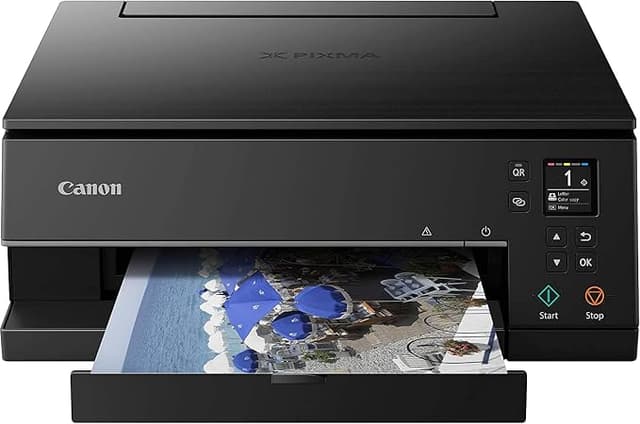
Canon TS6360 PIXMA Home Printer
Create vivid photographs and images with this Canon printer's inkjet technology. It has a built-in copier, so you can copy documents quickly and easily. Plus, the Canon TS6360BK's 4800 x 1200 dpi print resolution enables you to publish highly detailed documents. Finish print jobs very quickly with its 15 ipm print speed. The Canon printer features a 1200 x 2400 dpi scan resolution. It has two-sided printing, allowing you to stretch your dollars. You can create pristine professional-looking outputs with this Canon printer.
Create vivid photographs and images with this Canon printer's inkjet technology. It has a built-in copier, so you can copy documents quickly and easily. Plus, the Canon TS6360BK's 4800 x 1200 dpi print resolution enables you to publish highly detailed documents. Finish print jobs very quickly with its 15 ipm print speed. The Canon printer features a 1200 x 2400 dpi scan resolution. It has two-sided printing, allowing you to stretch your dollars. You can create pristine professional-looking outputs with this Canon printer.
Create vivid photographs and images with this Canon printer's inkjet technology. It has a built-in copier, so you can copy documents quickly and easily. Plus, the Canon TS6360BK's 4800 x 1200 dpi print resolution enables you to publish highly detailed documents. Finish print jobs very quickly with its 15 ipm print speed. The Canon printer features a 1200 x 2400 dpi scan resolution. It has two-sided printing, allowing you to stretch your dollars. You can create pristine professional-looking outputs with this Canon printer.
Create vivid photographs and images with this Canon printer's inkjet technology. It has a built-in copier, so you can copy documents quickly and easily. Plus, the Canon TS6360BK's 4800 x 1200 dpi print resolution enables you to publish highly detailed documents. Finish print jobs very quickly with its 15 ipm print speed. The Canon printer features a 1200 x 2400 dpi scan resolution. It has two-sided printing, allowing you to stretch your dollars. You can create pristine professional-looking outputs with this Canon printer.
in 12 offers
The lowest price for Canon TS6360 PIXMA Home Printer right now is $138.60 at Hot Toner, compared across 10 retailers.
The all-time low was $30.00 on 8 Aug 2026 — today's price is 362% above the lowest ever. It has been notably cheaper before — worth setting a price alert.
Prices last updated 17 Oct 2026.
Last updated at 17/10/2026 22:37:01
Canon TS6360 Black Printer TS6360
Free delivery between Mon – Thu
Canon Inkjet Wifi Printer Pixma Home Ts6360 | Print, Copy, Scan
Delivery between 22–26 Oct $9.95
Canon Pixma TS6360 Home Printer Bluetooth and WiFi
Free delivery between 20–27 Oct
Canon Pixma TS6360 Home Printer Bluetooth and WiFi
Free delivery between 21–26 Oct
Canon TS6360 Black Printer
Free delivery
Canon TS6360 Black Printer
Canon TS6360 Black Printer
Free delivery
Canon Pixma Home Ts7760 Mfp
Delivery $25
Affiliate Disclosure: We may receive a small commission for purchases made through this link at no extra cost to you. This helps support our site. Thank you!
Canon PIXMA Home TS6360 3-in-1 Wi-Fi A4 MFP Inkjet Printer+PGI680/CLI681 BLACK
Delivery between 21–26 Oct $26.15
XXL Canon TS6360A Black Printer A4 - Print, Copy, Scan
Delivery $29.95
originally posted on pbtech.co.nz
Haven't had long enough to test the ink efficiency but quality is unbelievable for the price. Tried to match a professional print from endemic world and the blacks came amazingly close. The artwork had a big section of black and there was very little and unnoticeable banding on the print. Almost flawless blacks using canon ink. no touchscreen but for the price, I couldn't be happier.
originally posted on pbtech.co.nz
I'm really pleased with this purchase about 4 weeks ago. I was going to go with a cheaper printer as I don't print frequently but I have a pile of photos that needed scanning into the computer so I opted for this printer with the better scanner quality. The set up was really easy. Picked up easily by all the devices in my home including an ancient iMac. Really happy with the scan quality and I did print a photo on normal printer paper and the print quality was really impressive and the page came out really dry (compared to my old printer where everything came out damp). The paper tray is slightly less convenient to refill (you have to pull it right out and make sure the paper is lined up with the guides in the tray correctly), which is largely only a bother because ... MoreI'm really pleased with this purchase about 4 weeks ago. I was going to go with a cheaper printer as I don't print frequently but I have a pile of photos that needed scanning into the computer so I opted for this printer with the better scanner quality. The set up was really easy. Picked up easily by all the devices in my home including an ancient iMac. Really happy with the scan quality and I did print a photo on normal printer paper and the print quality was really impressive and the page came out really dry (compared to my old printer where everything came out damp). The paper tray is slightly less convenient to refill (you have to pull it right out and make sure the paper is lined up with the guides in the tray correctly), which is largely only a bother because my kids always want to steal paper out of the tray for drawing on. The one other thing I didn't like (though maybe I just couldn't figure it out) is that you can't choose what size to print your image from the app on my mobile phone. You can choose the paper size and type, but for example if I selected 6 x 4" but only had a4 paper, the printer would say there's no paper.
originally posted on binglee.com.au
This compact, no-nonsense wireless printer is good value for money. I found that it was very easy to set up and connect - and I'm no technical expert! This is a no-frills machine that performs basic functions such as scanning, copying and printing with ease. I was impressed by the quality of the photos it printed, and I really like the fact that there are few buttons or complicated features to master with this machine. The printer is also able to print on both sides of paper - an economical feature. Another advantage is that there are three separate coloured ink cartridges, enabling one to replace individual ones as required. It has, admittedly, been a relatively short time since I bought the machine, but to date it has presented no problems and has been really easy ... MoreThis compact, no-nonsense wireless printer is good value for money. I found that it was very easy to set up and connect - and I'm no technical expert! This is a no-frills machine that performs basic functions such as scanning, copying and printing with ease. I was impressed by the quality of the photos it printed, and I really like the fact that there are few buttons or complicated features to master with this machine. The printer is also able to print on both sides of paper - an economical feature. Another advantage is that there are three separate coloured ink cartridges, enabling one to replace individual ones as required. It has, admittedly, been a relatively short time since I bought the machine, but to date it has presented no problems and has been really easy to operate. My only possible criticism is that the printer takes quite a long time to warm up before printing and is fairly noisy in the process of printing. However, this is a small quibble on my part, and I have no hesitation in recommending this printer to anyone who is looking for a sturdy, user-friendly printer to perform basic tasks.
| Wireless | Yes |
| Yes | |
| Scan | Yes |
| Copy | Yes |
| Automatic Double Sided Printing | Yes |
Canon TS6360 Black Printer TS6360
Free delivery between Mon – Thu
Canon Inkjet Wifi Printer Pixma Home Ts6360 | Print, Copy, Scan
Delivery between 22–26 Oct $9.95
Canon Pixma TS6360 Home Printer Bluetooth and WiFi
Free delivery between 20–27 Oct
Canon Pixma TS6360 Home Printer Bluetooth and WiFi
Free delivery between 21–26 Oct
Canon TS6360 Black Printer
Free delivery
Haven't had long enough to test the ink efficiency but quality is unbelievable for the price. Tried to match a professional print from endemic world and the blacks came amazingly close. The artwork had a big section of black and there was very little and unnoticeable banding on the print. Almost flawless blacks using canon ink. no touchscreen but for the price, I couldn't be happier.
I'm really pleased with this purchase about 4 weeks ago. I was going to go with a cheaper printer as I don't print frequently but I have a pile of photos that needed scanning into the computer so I opted for this printer with the better scanner quality. The set up was really easy. Picked up easily by all the devices in my home including an ancient iMac. Really happy with the scan quality and I did print a photo on normal printer paper and the print quality was really impressive and the page came out really dry (compared to my old printer where everything came out damp). The paper tray is slightly less convenient to refill (you have to pull it right out and make sure the paper is lined up with the guides in the tray correctly), which is largely only a bother because ... MoreI'm really pleased with this purchase about 4 weeks ago. I was going to go with a cheaper printer as I don't print frequently but I have a pile of photos that needed scanning into the computer so I opted for this printer with the better scanner quality. The set up was really easy. Picked up easily by all the devices in my home including an ancient iMac. Really happy with the scan quality and I did print a photo on normal printer paper and the print quality was really impressive and the page came out really dry (compared to my old printer where everything came out damp). The paper tray is slightly less convenient to refill (you have to pull it right out and make sure the paper is lined up with the guides in the tray correctly), which is largely only a bother because my kids always want to steal paper out of the tray for drawing on. The one other thing I didn't like (though maybe I just couldn't figure it out) is that you can't choose what size to print your image from the app on my mobile phone. You can choose the paper size and type, but for example if I selected 6 x 4" but only had a4 paper, the printer would say there's no paper.
This compact, no-nonsense wireless printer is good value for money. I found that it was very easy to set up and connect - and I'm no technical expert! This is a no-frills machine that performs basic functions such as scanning, copying and printing with ease. I was impressed by the quality of the photos it printed, and I really like the fact that there are few buttons or complicated features to master with this machine. The printer is also able to print on both sides of paper - an economical feature. Another advantage is that there are three separate coloured ink cartridges, enabling one to replace individual ones as required. It has, admittedly, been a relatively short time since I bought the machine, but to date it has presented no problems and has been really easy ... MoreThis compact, no-nonsense wireless printer is good value for money. I found that it was very easy to set up and connect - and I'm no technical expert! This is a no-frills machine that performs basic functions such as scanning, copying and printing with ease. I was impressed by the quality of the photos it printed, and I really like the fact that there are few buttons or complicated features to master with this machine. The printer is also able to print on both sides of paper - an economical feature. Another advantage is that there are three separate coloured ink cartridges, enabling one to replace individual ones as required. It has, admittedly, been a relatively short time since I bought the machine, but to date it has presented no problems and has been really easy to operate. My only possible criticism is that the printer takes quite a long time to warm up before printing and is fairly noisy in the process of printing. However, this is a small quibble on my part, and I have no hesitation in recommending this printer to anyone who is looking for a sturdy, user-friendly printer to perform basic tasks.
A very good fast printer for home use. Seems to start to print quickly whan required. So far is good on the 5 inks. But replacement inks are expensive, (The ink tank printers from canon seem to be very troublesom and need to be used a lot to keep them clear and not clogging, which is more use that I needed or wanted.) So far ok. Colours print exactly the same as my previous Canon 6 ink printer, so quality is good. I only print documents etc with a bit of colour but never photos, so I cannot comment on photo print quality. Seems reloiable at the moment. My old Canon lasted over 5 yrs before dying, And I used generic inks and refilled the cartridges myself. . But this new one seems to be hard to get sround to use cheaper generic cartridges. Canon is NOT a green ... MoreA very good fast printer for home use. Seems to start to print quickly whan required. So far is good on the 5 inks. But replacement inks are expensive, (The ink tank printers from canon seem to be very troublesom and need to be used a lot to keep them clear and not clogging, which is more use that I needed or wanted.) So far ok. Colours print exactly the same as my previous Canon 6 ink printer, so quality is good. I only print documents etc with a bit of colour but never photos, so I cannot comment on photo print quality. Seems reloiable at the moment. My old Canon lasted over 5 yrs before dying, And I used generic inks and refilled the cartridges myself. . But this new one seems to be hard to get sround to use cheaper generic cartridges. Canon is NOT a green company, as you cant re use the ink cartridges. This is BAD for the environment. So be aware.
The Pixma TS6360a is a great printer at a very affordable price. It is easy to set up with Apple Mac computers and has good printing, copying and scanning features. Some of its capabilities are not so easily found but use of the on-line operation manual enables these features, such as two-sided copying, to be accessed. As it is early in its use I cannot comment on ink usage but documents in colour and B&W are good quality
This printer is great & suits my needs perfectly. It was easy to set-up, fits on my desk perfectly. Scan program is the same as my old Canon so I had no problem understanding that. Really good printing quality. I was a bit dubious when I saw it in store as I thought it looked a little cheap however once I got it home & set it up in my home office my reservations were removed. Great price at Good Guys as I bought at the time of a sale - which I wasn't aware of until I got to the checkout)So far this printer has exceeded my expectations.
Holy moly does it print. It smashes out a 6x4 photo in like no time. We print stuff all the time off our phones and stick them up on the wall. It almost takes no time to print a whole A4 full colour photo. It probably prints black and white pages on plain A4 pages, but who needs an inkjet for that Not us! We just want to print glorious photos. And unlike other printers that we have returned to the store, this one takes photo paper at the back, not a tray - which means the photo paper does not need to bend 180 degrees to print out. THAT means that you can use proper quality thick photo paper. This printer has made me happier than a 4yo with a pack of cheezels. Get one! Get two, one as a backup.
I started with a connectivity issue where the printer refused to recognise the laptop's SSID. After trying every trick in the manual, and in the process becoming very familiar with the menu options), as well as contacting Canon for help a number of times, I took the printer back to the retailers, The Good Guys, after a week. They listened to my tale of woe, and called for the resident techie.That was the best move ever! The young techie rose to the occasion and left nothing to chance. He fiddled, poked, pushed and tested with dizzying aplomb. He announced the printer to be in perfect working order. He finally ran a connectivity test which indicated the problem to be a missing laptop driver. I left very happy and I sorted out the driver issue with Canon on-line when ... MoreI started with a connectivity issue where the printer refused to recognise the laptop's SSID. After trying every trick in the manual, and in the process becoming very familiar with the menu options), as well as contacting Canon for help a number of times, I took the printer back to the retailers, The Good Guys, after a week. They listened to my tale of woe, and called for the resident techie.That was the best move ever! The young techie rose to the occasion and left nothing to chance. He fiddled, poked, pushed and tested with dizzying aplomb. He announced the printer to be in perfect working order. He finally ran a connectivity test which indicated the problem to be a missing laptop driver. I left very happy and I sorted out the driver issue with Canon on-line when I got home. Canon were also very helpful in all of this.Memo Good Guys Hang on to that young techie at all costs!!! As the printer doesn't come with a USB cable, I would suggest this be purchased with the printer as a back-up.
This printer prints fast and with amazing clarity, having the ink tanks separated means i can replace a colour as needed rather than having to change the whole thing. The machine is also quite slim compared to most canon printers and looks really nice.This printer also comes with full ink tanks as opposed to the half tanks most new printers come with and price wise is really good. Perfect use for our household with a business, uni student and high school student
I will never buy Canon again. I wasted my money. Its a nightmare to try & set up & online support is minimal. I looked for my model as did our work IT guy & its not even listed. There seems to be no PC app or dashboard to use so I bought it for scanning to my computer & you cant do it. I could probably spend time on chat channels & phones & find someone at Canon but I dont have that much time in my life. Warning to anyone thinking of buying a CanonDONT.
| Wireless | Yes |
| Yes | |
| Scan | Yes |
| Copy | Yes |
| Automatic Double Sided Printing | Yes |

