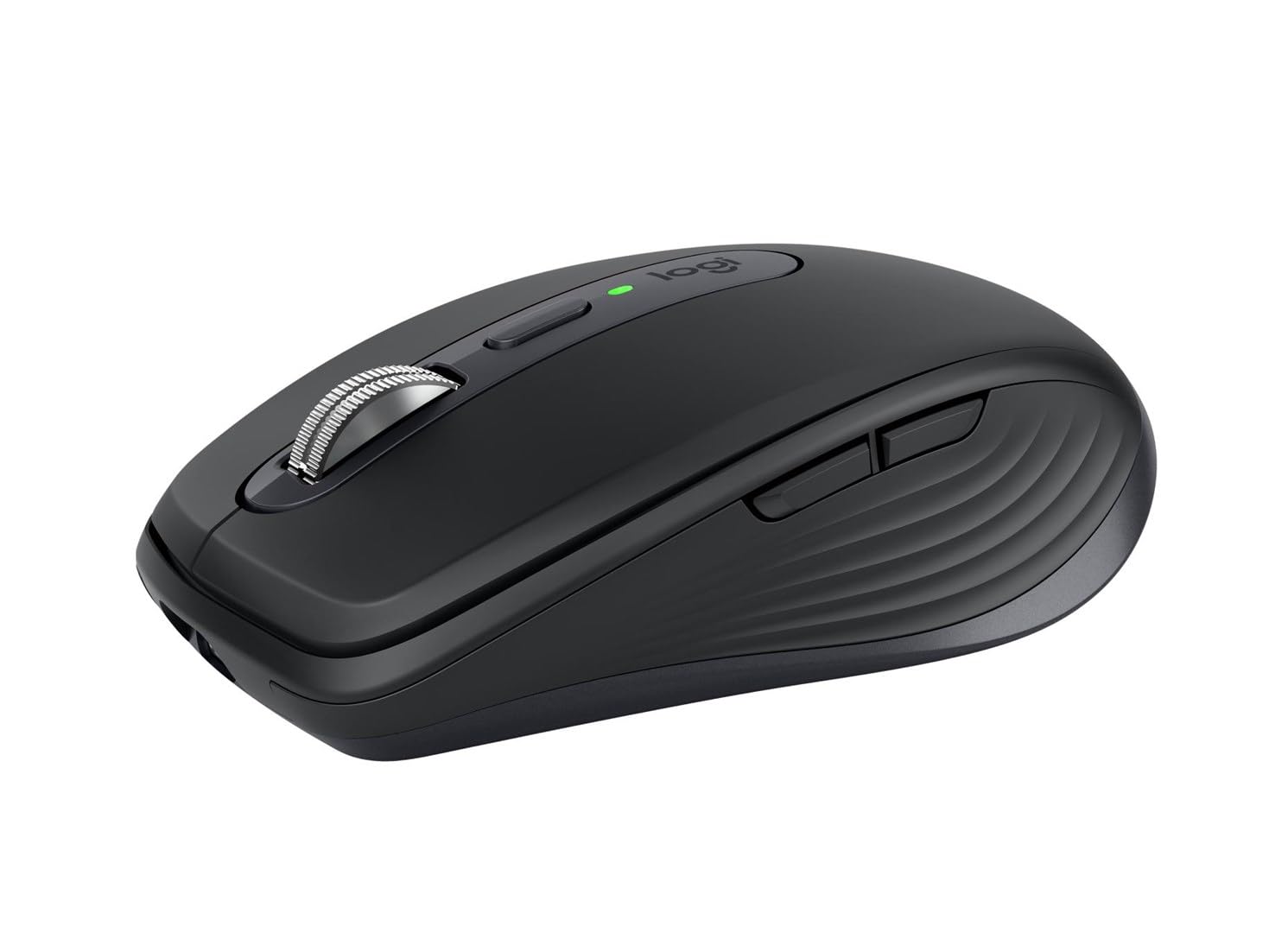
Citi Card off | Logitech MX Anywhere 3S Wireless Mouse Graphite 910-006935
Logitech MX Anywhere 3S Wireless Mouse, experience ultimate versatility with remarkable performance. An advanced compact mouse that lets you work wherever the work takes you. Now with next-level precision and responsiveness.
Logitech MX Anywhere 3S Wireless Mouse, experience ultimate versatility with remarkable performance. An advanced compact mouse that lets you work wherever the work takes you. Now with next-level precision and responsiveness.
Logitech MX Anywhere 3S Wireless Mouse, experience ultimate versatility with remarkable performance. An advanced compact mouse that lets you work wherever the work takes you. Now with next-level precision and responsiveness.
Logitech MX Anywhere 3S Wireless Mouse, experience ultimate versatility with remarkable performance. An advanced compact mouse that lets you work wherever the work takes you. Now with next-level precision and responsiveness.
in 97 offers
The lowest price for Citi Card off | Logitech MX Anywhere 3S Wireless Mouse Graphite 910-006935 right now is $59.00 at cashsavvyaus, compared across 54 retailers.
The all-time low was $59.00 on 17 Oct 2026. That's the lowest price we've ever tracked — a great time to buy.
Prices last updated 17 Oct 2026.
Last updated at 17/10/2026 22:29:55
Logitech MX Anywhere 3S Compact Wireless Mouse, Rose
Free delivery
Affiliate Disclosure: We may receive a small commission for purchases made through this link at no extra cost to you. This helps support our site. Thank you!
Logitech MX Anywhere 3S Bluetooth Mouse for Black (LN)
Delivery $20
Logitech MX Anywhere 3S Wireless 8000 DPI Mouse - Rose
Delivery between Tue – Fri $11.64
Logitech MX anywhere 3S Black
Free delivery
Logitech MX Anywhere Wireless Mouse 3S - Graphite
Delivery between 22–26 Oct $13.25
Logitech Mx Anywhere 3s Bluetooth Usb Optical Mouse 8000 Dpi Black
Delivery $12.95
Affiliate Disclosure: We may receive a small commission for purchases made through this link at no extra cost to you. This helps support our site. Thank you!
Logitech MX Anywhere 3S Compact Wireless Performance Mouse Graphite 910 006932 - Mouse
Delivery $12.96
Logitech MX Anywhere 3S Compact Wireless Performance Mouse Graphite 910 006932 - Mouse
Delivery $12
Logitech MX Anywhere 3S Compact Wireless Performance Mouse (Graphite)
Logitech MX Anywhere 3S Wireless Mouse 8000 DPI
Delivery between 21–26 Oct $15
originally posted on pbtech.co.nz
I purchased this as a replacement for a worn out M590 which I used on my two laptops. The M590 has a button on top of the mouse that allows you to switch between the two machines, and while it was meant to support Logitech's FLOW software I could not make that work with the M590. The MX Anywhere 3S can be used on multiple machines but the button that swaps between up to three computers is on the bottom of the mouse, which makes quick switching rather difficult. (There are many comments online about this decision by Logitech - few, if any are complimentary. I tend to agree as the first thing I did when I discovered this 'feature' was to order another M590 via Amazon.) While I managed to get FLOW to work with the 3S, and it is very useful, I also find that if you move ... MoreI purchased this as a replacement for a worn out M590 which I used on my two laptops. The M590 has a button on top of the mouse that allows you to switch between the two machines, and while it was meant to support Logitech's FLOW software I could not make that work with the M590. The MX Anywhere 3S can be used on multiple machines but the button that swaps between up to three computers is on the bottom of the mouse, which makes quick switching rather difficult. (There are many comments online about this decision by Logitech - few, if any are complimentary. I tend to agree as the first thing I did when I discovered this 'feature' was to order another M590 via Amazon.) While I managed to get FLOW to work with the 3S, and it is very useful, I also find that if you move too close to the edge of a screen it will tend to swap across to the other machine when you don't want that to happen. When you are using two laptops, one with another three screens attached as the desktop, 'finding' the cursor again when you bring it back to the machine you are working on can be time consuming and rather frustrating. However inspite of these drawbacks it is generally good to use with a very smooth operation and has the advantage of being rechargeable, so no more batteries. If you want to be able to swap quickly between PCs I would think carefully before purchasing the 3S, or at least understand where the 'button' is. (I didn't.) FLOW is certainly a very useful tool, and can be disabled if not required, but it would be good to be able to adjust the sensitivity so that it does not swap machines so easily. (Perhaps that is why the M590 had that button on the top...)
originally posted on bestbuy.com
Logitech’s MX series is my go-to favorite for both keyboards and mice. I use the MX Keys keyboard and the MX Master mouse on my desktop every day. I also have the MX Anywhere 3 that I use with my laptops. With this in mind, I was interested in finding out what might have improved with the just-released MX Anywhere 3S. The answer is that the only real change is the improved 8K DPI sensor which has about double the resolution of its predecessor. That said, this is one great mouse made a bit better.The Anywhere 3S mouse is compact with excellent build quality. It’s dark grey rather than black like the previous version. As with the rest of the MX line, it’s wireless and can either connect by Bluetooth or by using a Logitech Unifying Receiver. Battery life is super ... MoreLogitech’s MX series is my go-to favorite for both keyboards and mice. I use the MX Keys keyboard and the MX Master mouse on my desktop every day. I also have the MX Anywhere 3 that I use with my laptops. With this in mind, I was interested in finding out what might have improved with the just-released MX Anywhere 3S. The answer is that the only real change is the improved 8K DPI sensor which has about double the resolution of its predecessor. That said, this is one great mouse made a bit better.The Anywhere 3S mouse is compact with excellent build quality. It’s dark grey rather than black like the previous version. As with the rest of the MX line, it’s wireless and can either connect by Bluetooth or by using a Logitech Unifying Receiver. Battery life is super with up to 70 days on a charge, and it charges using a standard USB-C connection. As with many products, there is no charging block included, but there is a short USB-A to C cable. Interestingly, there was no Unifying Receiver included, but I find that with laptops I prefer a Bluetooth connection.What sets this mouse apart is that it can pair with 3 different computers and switch between them using the button on the bottom. This combined with the Logitech Options software provides a flexibility that’s unique. You can program the middle button, the scroll wheel, and the additional three buttons to do just about anything you wish. Even better is that the programable functions can be set differently for different programs. When a program is launched, the mouse automatically shifts to the settings specific to that program. But wait, there’s more! The Options software also has a function called Flow. When enabled, you can be connected to two or three devices, and the cursor flows from one to the next just like an extended desktop setup with multiple monitors. You can even drag and drop between devices. The one restriction is that they must all be connected to the same WIFI network.As said, this is a great mouse with a bunch of extra features. I highly recommend it to anyone wanting a first-class pointer. It’s solid, with a very long-lasting battery, and can work on any surface … even glass.
originally posted on bestbuy.com
Logitech MX Anywhere 3SWhile being on the small side (since it is designed as a mobile mouse) it has a great feel. I like the ability to switch between click and smooth scrolling like some of the other Logitech products by clicking the small button just behind the scroll wheel, on top of the mouse. This mouse has the familiar Logitech satin finish, side buttons for moving back and forth in a webpage and has a nice contrast with the weighted, metal scroll wheel.I am using this mouse to replace my daily driver - an older MX Master mouse - that is getting kind of worn out. The movement is very smooth and the buttons have a very positive “click” to them without being hard to press. The laser reads on every surface I have tried it on. The button on the bottom allows ... MoreLogitech MX Anywhere 3SWhile being on the small side (since it is designed as a mobile mouse) it has a great feel. I like the ability to switch between click and smooth scrolling like some of the other Logitech products by clicking the small button just behind the scroll wheel, on top of the mouse. This mouse has the familiar Logitech satin finish, side buttons for moving back and forth in a webpage and has a nice contrast with the weighted, metal scroll wheel.I am using this mouse to replace my daily driver - an older MX Master mouse - that is getting kind of worn out. The movement is very smooth and the buttons have a very positive “click” to them without being hard to press. The laser reads on every surface I have tried it on. The button on the bottom allows it to b e configured for three different devices and can switch between them with a simple press of the button. It uses either Bluetooth or the new Bolt receiver. I do not have one of the receivers (non is supplied in the box) so I cannot say how well it works, but the new sensors work very well to give the user a solid, precise feel to every movement.Because of the size, it actually fits my space better than the very comfortable mouse it is replacing. I might miss the shape that fit my hand so well, but the precision of the new mouse is so great that I am happy with my swap! I can once again select multiple items with a simple swipe instead of losing the first few as it reset itself halfway through the motion.Logitech has proven itself with quality products for decades. This new version in their Anywhere line is a fitting example of the continual evolution of their designs. I look forward to many years of use for this mouse, as I have had from so many other Logitech mice, since the 90’s.
| Sensor Type | Optical sensor |
| Polling Rate | 88,133 Hz |
| Switches | Quiet Click buttons |
| Connectivity Type | Wireless |
| Interface | USB-C (for charging) |

Logitech MX Anywhere 3S Compact Wireless Mouse, Rose
Free delivery
Affiliate Disclosure: We may receive a small commission for purchases made through this link at no extra cost to you. This helps support our site. Thank you!
Logitech MX Anywhere 3S Bluetooth Mouse for Black (LN)
Delivery $20
Logitech MX Anywhere 3S Wireless 8000 DPI Mouse - Rose
Delivery between Tue – Fri $11.64
Logitech MX anywhere 3S Black
Free delivery
Logitech MX Anywhere Wireless Mouse 3S - Graphite
Delivery between 22–26 Oct $13.25
I purchased this as a replacement for a worn out M590 which I used on my two laptops. The M590 has a button on top of the mouse that allows you to switch between the two machines, and while it was meant to support Logitech's FLOW software I could not make that work with the M590. The MX Anywhere 3S can be used on multiple machines but the button that swaps between up to three computers is on the bottom of the mouse, which makes quick switching rather difficult. (There are many comments online about this decision by Logitech - few, if any are complimentary. I tend to agree as the first thing I did when I discovered this 'feature' was to order another M590 via Amazon.) While I managed to get FLOW to work with the 3S, and it is very useful, I also find that if you move ... MoreI purchased this as a replacement for a worn out M590 which I used on my two laptops. The M590 has a button on top of the mouse that allows you to switch between the two machines, and while it was meant to support Logitech's FLOW software I could not make that work with the M590. The MX Anywhere 3S can be used on multiple machines but the button that swaps between up to three computers is on the bottom of the mouse, which makes quick switching rather difficult. (There are many comments online about this decision by Logitech - few, if any are complimentary. I tend to agree as the first thing I did when I discovered this 'feature' was to order another M590 via Amazon.) While I managed to get FLOW to work with the 3S, and it is very useful, I also find that if you move too close to the edge of a screen it will tend to swap across to the other machine when you don't want that to happen. When you are using two laptops, one with another three screens attached as the desktop, 'finding' the cursor again when you bring it back to the machine you are working on can be time consuming and rather frustrating. However inspite of these drawbacks it is generally good to use with a very smooth operation and has the advantage of being rechargeable, so no more batteries. If you want to be able to swap quickly between PCs I would think carefully before purchasing the 3S, or at least understand where the 'button' is. (I didn't.) FLOW is certainly a very useful tool, and can be disabled if not required, but it would be good to be able to adjust the sensitivity so that it does not swap machines so easily. (Perhaps that is why the M590 had that button on the top...)
Logitech’s MX series is my go-to favorite for both keyboards and mice. I use the MX Keys keyboard and the MX Master mouse on my desktop every day. I also have the MX Anywhere 3 that I use with my laptops. With this in mind, I was interested in finding out what might have improved with the just-released MX Anywhere 3S. The answer is that the only real change is the improved 8K DPI sensor which has about double the resolution of its predecessor. That said, this is one great mouse made a bit better.The Anywhere 3S mouse is compact with excellent build quality. It’s dark grey rather than black like the previous version. As with the rest of the MX line, it’s wireless and can either connect by Bluetooth or by using a Logitech Unifying Receiver. Battery life is super ... MoreLogitech’s MX series is my go-to favorite for both keyboards and mice. I use the MX Keys keyboard and the MX Master mouse on my desktop every day. I also have the MX Anywhere 3 that I use with my laptops. With this in mind, I was interested in finding out what might have improved with the just-released MX Anywhere 3S. The answer is that the only real change is the improved 8K DPI sensor which has about double the resolution of its predecessor. That said, this is one great mouse made a bit better.The Anywhere 3S mouse is compact with excellent build quality. It’s dark grey rather than black like the previous version. As with the rest of the MX line, it’s wireless and can either connect by Bluetooth or by using a Logitech Unifying Receiver. Battery life is super with up to 70 days on a charge, and it charges using a standard USB-C connection. As with many products, there is no charging block included, but there is a short USB-A to C cable. Interestingly, there was no Unifying Receiver included, but I find that with laptops I prefer a Bluetooth connection.What sets this mouse apart is that it can pair with 3 different computers and switch between them using the button on the bottom. This combined with the Logitech Options software provides a flexibility that’s unique. You can program the middle button, the scroll wheel, and the additional three buttons to do just about anything you wish. Even better is that the programable functions can be set differently for different programs. When a program is launched, the mouse automatically shifts to the settings specific to that program. But wait, there’s more! The Options software also has a function called Flow. When enabled, you can be connected to two or three devices, and the cursor flows from one to the next just like an extended desktop setup with multiple monitors. You can even drag and drop between devices. The one restriction is that they must all be connected to the same WIFI network.As said, this is a great mouse with a bunch of extra features. I highly recommend it to anyone wanting a first-class pointer. It’s solid, with a very long-lasting battery, and can work on any surface … even glass.
Logitech MX Anywhere 3SWhile being on the small side (since it is designed as a mobile mouse) it has a great feel. I like the ability to switch between click and smooth scrolling like some of the other Logitech products by clicking the small button just behind the scroll wheel, on top of the mouse. This mouse has the familiar Logitech satin finish, side buttons for moving back and forth in a webpage and has a nice contrast with the weighted, metal scroll wheel.I am using this mouse to replace my daily driver - an older MX Master mouse - that is getting kind of worn out. The movement is very smooth and the buttons have a very positive “click” to them without being hard to press. The laser reads on every surface I have tried it on. The button on the bottom allows ... MoreLogitech MX Anywhere 3SWhile being on the small side (since it is designed as a mobile mouse) it has a great feel. I like the ability to switch between click and smooth scrolling like some of the other Logitech products by clicking the small button just behind the scroll wheel, on top of the mouse. This mouse has the familiar Logitech satin finish, side buttons for moving back and forth in a webpage and has a nice contrast with the weighted, metal scroll wheel.I am using this mouse to replace my daily driver - an older MX Master mouse - that is getting kind of worn out. The movement is very smooth and the buttons have a very positive “click” to them without being hard to press. The laser reads on every surface I have tried it on. The button on the bottom allows it to b e configured for three different devices and can switch between them with a simple press of the button. It uses either Bluetooth or the new Bolt receiver. I do not have one of the receivers (non is supplied in the box) so I cannot say how well it works, but the new sensors work very well to give the user a solid, precise feel to every movement.Because of the size, it actually fits my space better than the very comfortable mouse it is replacing. I might miss the shape that fit my hand so well, but the precision of the new mouse is so great that I am happy with my swap! I can once again select multiple items with a simple swipe instead of losing the first few as it reset itself halfway through the motion.Logitech has proven itself with quality products for decades. This new version in their Anywhere line is a fitting example of the continual evolution of their designs. I look forward to many years of use for this mouse, as I have had from so many other Logitech mice, since the 90’s.
I work from home as a Windows software engineer so most of my work happens on the keyboard, with lots of text on the screen. I bought the MX Anywhere 3 ("Pale Grey") because I noticed that I often "borrowed" my other mouse which is it's predecessor (MX Anywhere 2S). The scroll wheel of the MX Anywhere 3 works a bit different from the old one. But it didn't take long to realize that it works much BETTER!On the MX Anywhere 3, the metal scroll wheel lets you accurately scroll line-by-line, and you feel each line as you move the wheel because of the ribs that engage with (probably) a little plastic or rubber wheel inside the mouse. What's new is that by giving the wheel a quick spin, the mechanism disengages the ribs and the scroll wheel starts acting like a flywheel ... MoreI work from home as a Windows software engineer so most of my work happens on the keyboard, with lots of text on the screen. I bought the MX Anywhere 3 ("Pale Grey") because I noticed that I often "borrowed" my other mouse which is it's predecessor (MX Anywhere 2S). The scroll wheel of the MX Anywhere 3 works a bit different from the old one. But it didn't take long to realize that it works much BETTER!On the MX Anywhere 3, the metal scroll wheel lets you accurately scroll line-by-line, and you feel each line as you move the wheel because of the ribs that engage with (probably) a little plastic or rubber wheel inside the mouse. What's new is that by giving the wheel a quick spin, the mechanism disengages the ribs and the scroll wheel starts acting like a flywheel that keeps coasting and coasting until you put you finger back onto it. I had no idea how useful this feature would be to scroll through long listings of code quickly!The scroll wheel mechanism has been improved from from the previous model. The old mechanical way of toggling between line-by-line and smooth scrolling is gone, but you can now use the button beneath the scroll wheel to electronically toggle smooth scrolling on and off. The wheel itself serves as middle mouse button for those that use it. You can't push the wheel sideways to scroll horizontally, however by holding one of the side buttons while turning or spinning the scroll wheel, you can scroll horizontally and that actually works better than pushing the scroll wheel left and right on other mice, because now you can scroll horizontally across e.g. a wide spreadsheet, just as fast as you can scroll vertically.I didn't make any changes to the default settings because the default settings are pretty much exactly the way I like it. If you disagree, you can customize the buttons and the scroll wheel in many ways with the Logitech OptionsPlus application. Swapping the left and right main buttons is possible for left-handed users of course, but if you would like to swap the functions of the scroll wheel button and the center button, you can. You can let it scroll in reverse direction if you prefer "touch screen style" scrolling. You can change the scroll speed and the sensitivity of the "SmartShift" feature that senses how fast the wheel is spinning to disengage the ribs on the wheel. You can change what the side buttons do; the default (when not scrolling horizontally) is the usual "Back" and "Forward" for web browsers and similar programs. You can even use different customizations for different applications. Though the OptionsPlus application is not strictly necessary if you don't need customized settings, however I recommend installing it. Not all buttons may work without the application. When you pair the mouse to the computer for the first time, you have to be on the Internet to download the driver. The driver installer shows a pop-up window that where you can click a button to download OptionsPlus from the Windows App Store, for free of couse.The MX series of Logitech keyboards and mice let you use the awesome "Flow" feature which is also part of OptionsPlus. With Flow, you can control multiple computers at the same time, and switch between computers by simply moving the mouse to the edge of the screen, or by hitting one of the host selection keys on an MX keyboard. This works with Bluetooth as well as with the wireless dongle that's included with the Windows version of the MX Anywhere 3 mouse. And if you log in to your Logitech account in the OptionsPlus program, all your customization settings are shared between all your computers so you only have to do your customizations once.The MX Anywhere 3 has a built-in rechargeable battery that can be charged with the included cable that plugs into the USB type C port in the mouse. I've used this mouse for longer than a month and it still hasn't needed a recharge, so I can't tell how long a charge lasts. Based on my experience with the old mouse, a full charge can last for several months, even with daily use and leaving the power switch on while not in use (You probably only need to switch the power off while traveling). The mouse will tell you it's running out of power by lighting up the LED in red instead of green. Also, the OptionsPlus program will pop up a message on your screen when the mouse runs out of battery. Just a few minutes of charging will put enough "juice" back into the battery to work for hours, or if you're not bothered with the very flexible cable, you can leave it plugged in to charge it while you use it.The cable in the box for the Windows version of the mouse is USB A to USB C, but you can use any USB type C cable if you wish. By the way, the Apple version of this mouse is the same price but it comes with a USB C to USB C cable instead of a USB A to USB C cable, and the Apple version also has no "Unifying" Dongle included, because most Apples don't have any USB type A ports anyway. As far as I understand, the mouse in the "for Apple" package is exactly identical to the Windows version, and can be used with Windows too. And of course the Windows version can be used with Apple computers.
The Logitech MX Anywhere 3S is a compact mouse that features accurate, precise tracking, good battery life, and can be connected to up to three devices. As someone who travels with both my work and personal computers, this is a great addition to my bag.I will note right up front that the MX Anywhere 3S is small. I find it comfortable to use with my “fingertip” mouse grip, but those with larger hands, or who prefer a “palm” grip might find it less comfortable.The next thing I’ll mention is the precise tracking. I like being able to move the cursor quite a bit with relatively small movements of the mouse, and the MX Anywhere 3S works great for that.I also want to comment on the scroll wheel. Like many others, there’s a haptic “clicky” feeling to give you ... MoreThe Logitech MX Anywhere 3S is a compact mouse that features accurate, precise tracking, good battery life, and can be connected to up to three devices. As someone who travels with both my work and personal computers, this is a great addition to my bag.I will note right up front that the MX Anywhere 3S is small. I find it comfortable to use with my “fingertip” mouse grip, but those with larger hands, or who prefer a “palm” grip might find it less comfortable.The next thing I’ll mention is the precise tracking. I like being able to move the cursor quite a bit with relatively small movements of the mouse, and the MX Anywhere 3S works great for that.I also want to comment on the scroll wheel. Like many others, there’s a haptic “clicky” feeling to give you feedback as you scroll with the wheel. However, instead of a mechanical implementation, the MX Anywhere 3S takes some sort of electromagnetic approach. That means the clicky feedback can be turned on or off quickly using the button on top of the mouse, it can be made more or less intense using the Options+ software, and it automatically disappears once you begin to scroll quickly, allowing for smoother, faster movement along many pages. It’s very intuitive to use.As far as connectivity goes, I was able to get the MX Anywhere 3S working with both computers right away, out of the box. There’s a small button on the bottom to toggle between paired devices. Also, I’ve only had it a few days, but the battery life seems great, and charging via USB-C port right up front seems very convenient.Overall, I like the MX Anywhere 3S, and would recommend it to anyone who doesn’t mind a fairly compact form factor in their mouse.
I wanted to love this mouse; I really did. It's clearly very well made in terms of build quality and engineering - especially of the control surfaces.The satin finish and rubberized plastics feel really nice to the touch, like a high-end luxury car from 15-20 years ago.It (and by extension the screen cursor) moves smoothly and cleanly, with excellent precision, on all my obvious test surfaces of desk veneer; mousepad; palm; pant leg; even the computer monitor itself - though with some minor difficulty on the "palm" and "leg" test cases owing to their uneven contours. (I kid, but those surfaces genuinely do offer topographic challenges.) I did not attempt to test it on glass as in their marketing literature claims, as I lack a suitable flat glass surface within ... MoreI wanted to love this mouse; I really did. It's clearly very well made in terms of build quality and engineering - especially of the control surfaces.The satin finish and rubberized plastics feel really nice to the touch, like a high-end luxury car from 15-20 years ago.It (and by extension the screen cursor) moves smoothly and cleanly, with excellent precision, on all my obvious test surfaces of desk veneer; mousepad; palm; pant leg; even the computer monitor itself - though with some minor difficulty on the "palm" and "leg" test cases owing to their uneven contours. (I kid, but those surfaces genuinely do offer topographic challenges.) I did not attempt to test it on glass as in their marketing literature claims, as I lack a suitable flat glass surface within practical range of the computer.Clicks are crisp, and are as quiet as the manufacturer's marketing literature claims - which seems a really odd thing specifically to point out (no pun intended), but is actually surprisingly noticeable once you're listening for it. The scroll wheel is *buttery* smooth and a genuine joy to use.It's relatively straightforward to pair via Bluetooth, with only a minor hiccup of pairing with multiple devices requiring an extra non-intuitive step (which also comes up if you need to *re*pair it with a device with which it already has been paired, but that device has forgotten it for whatever reason).The manufacturer claims the battery is good for something like 70 days of use (whatever a "day of use" means, specifically) off a single full charge that took somewhere between 1-3 hours (I wasn't watching it closely) on my 1 amp charger, and something like 2-3 hours off only a couple of minutes of charge (which I didn't test). I've only had it now for a little over 8 full days, so I haven't been (and likely won't be) able to probe the depths of its battery life during this review horizon. For whatever it's worth, I've deliberately not turned it off since my initial pairing tests, so it's technically been "on" for basically that entire time regardless of my actual usage patterns.But dang if it isn't just too blasted small for me, personally, to be comfortable using it as an "everyday" mouse.At a hair over 6" stem-to-stern (from heel of palm to tip of middle finger) and basically only 2" of thumb, I have *extremely* small hands for an adult of either gender (male and female averages respectively are 7.6" and 6.8" for hands, and 2.74" and 2.49" for thumbs). Flagship smartphones for the last 5 or so years have been too large for me to comfortably use one-handed without having to juggle them around awkwardly to reach the far side (let alone top corner) with my thumb. I'm generally perfectly comfortable with "short" watch straps, and actually have to worry about certain things larger than a "regular" length falling off over my hand. All that being said, I still feel like this mouse is uncomfortably small for me. The entire mouse is only about an inch longer than my fingers, leading to some form of awkward discomfort no matter how I hold it. If I "choke up" so that my palm rests on its "body," then I can't use the buttons or scroll wheel without sharply curling my fingers like I'm desperately trying to hold onto the rail of a helicopter in an '80s action movie. If I "choke down" so that I can easily use the buttons and wheel, then my wrist (along with something like ¾ of my palm) is resting on the desk surface in open invitation to carpal tunnel. The other Logitech mouse I've used literally every day for the last 5+ years before I started testing this one is quite literally twice the size of this one by volume (with an ergonomic design contoured to the natural asymmetrical shape of the human hand at rest, to boot), and I personally strongly prefer that larger ergonomic form factor for comfort.Bottom line? For me, personally, this is a 3-star product at best for the issues I have with its size, but I'm rounding up to the extra star out of the benefit of the doubt for its obvious quality; it's not the mouse's fault that I personally find it too small. Heck, a lot of people clearly love teensy little mice given how prevalent these compact models are on the market, and I suppose this would be roughly comparable to complaining that a Mini Cooper doesn't have the cargo space to haul a sofa or some such. The fact of the matter is, for someone who spends well over 8 hours per day using a computer as I do, the extra comfort and ergonomics afforded by a larger product is an absolute necessity, and the lack thereof in this model is a deal-breaker. I'm willing to concede that it would make a fine "emergency" replacement, or be useful for travel where space is at an extreme premium, but I simply cannot use it as a regular everyday mouse.
Logitech has once again outdone itself with the release of the MX Anywhere 3S Bluetooth Mouse, a high-performance mouse that redefines the boundaries of portability and functionality. Boasting an impressive 8K DPI sensor, it provides precise control and flawless operation on any surface, even glass. This feature deserves the full five stars!The MX Anywhere 3S truly shines in its emphasis on user comfort and focus. The introduction of Quiet Clicks is a major leap forward, offering the same tactile satisfaction without the distracting click noise. The result is a deeper, more immersive workflow that will surely be appreciated by professionals and casual users alike.The MagSpeed scroll wheel adds an element of lightning-fast precision that's simply awe-inspiring. ... MoreLogitech has once again outdone itself with the release of the MX Anywhere 3S Bluetooth Mouse, a high-performance mouse that redefines the boundaries of portability and functionality. Boasting an impressive 8K DPI sensor, it provides precise control and flawless operation on any surface, even glass. This feature deserves the full five stars!The MX Anywhere 3S truly shines in its emphasis on user comfort and focus. The introduction of Quiet Clicks is a major leap forward, offering the same tactile satisfaction without the distracting click noise. The result is a deeper, more immersive workflow that will surely be appreciated by professionals and casual users alike.The MagSpeed scroll wheel adds an element of lightning-fast precision that's simply awe-inspiring. The capability to scroll through a whopping 1000 lines per second is a testament to Logitech's commitment to delivering top-tier performance.Multi-device and multi-OS compatibility is another game-changer. Whether you're using Windows, macOS, Chrome OS, or Linux, the MX Anywhere 3S can effortlessly connect to up to three devices via Bluetooth. The hassle-free connectivity, further enhanced by its engineering for Intel Evo, ensures a seamless and smooth experience.Customization is made easy with the Logi Options+ app, enabling users to tweak settings for optimal workflow. The long-lasting battery life, offering up to 70 days on a full charge and up to 3 hours from a 1-minute quick charge, is another thoughtful inclusion.Furthermore, Logitech's commitment to the environment is commendable, with a significant proportion of the mouse's plastic components made from certified post-consumer recycled plastic.In conclusion, the MX Anywhere 3S Bluetooth Mouse offers unbeatable precision, silent operation, speedy scrolling, and unparalleled compatibility. It's a perfect fusion of innovative technology and eco-conscious design, earning it a solid 5-star rating.
and.... as everything in life has caveats... and with the new bolt supported mouse there is no Mac options version for Mac Mojave that supports back and forward mouse buttons. You have to keep all of the option installer versions for different Mac OS. What is the problem you say? just upgrade to the latest Mac OS... well the latest Mac OS doesn't support Adobe Photoshop CS6.1 so I have to keep one MacBook at Mojave OS. The latest Logitech Options for the MX Anywhere 3S doesn't install on Mojave. I can pair the MX Anywhere 3S Mouse with a bolt receiver using the old Bolt app or even pair them on a new OS Mac and move the bolt receiver over to the older OS Mac but the back and forward side buttons don't work. Looked everywhere for a fix, mouse mapping app but the fact ... Moreand.... as everything in life has caveats... and with the new bolt supported mouse there is no Mac options version for Mac Mojave that supports back and forward mouse buttons. You have to keep all of the option installer versions for different Mac OS. What is the problem you say? just upgrade to the latest Mac OS... well the latest Mac OS doesn't support Adobe Photoshop CS6.1 so I have to keep one MacBook at Mojave OS. The latest Logitech Options for the MX Anywhere 3S doesn't install on Mojave. I can pair the MX Anywhere 3S Mouse with a bolt receiver using the old Bolt app or even pair them on a new OS Mac and move the bolt receiver over to the older OS Mac but the back and forward side buttons don't work. Looked everywhere for a fix, mouse mapping app but the fact is mouse button 4 and 5 which are the side buttons for forward and back don't actually send a message in bolt. So I fetch my MX Anywhere 3 from the garbage can and reinstalled my old mouse with the unisys receiver and the old unisys receiver is supported by the Logitech options 8.54. What this means is that for users like myself is that I have to buy up a supply of MX Anywhere 3 mouses that uses the old unisys receiver before they retires because ALL Logitech mouses now have that fatal double click problem and this happens just after the warranty runs out in a year, plus even if it happens within the year time period there is no place on Logitech site to get your mouse replaced; at least the last time I looked when trying to get my double clicking mouse button replaced. SOOO if you are using an older Mac OS, there is NO Logitech option support for your side mouse buttons.
If you are looking for a mouse that works flawlessly on any surface, especially woody surfaces (which most mice have problems with), and is fully responsive, quiet, and easy to move, the Logi MX Anywhere 3S Wireless Bluetooth mouse might just be one of the best. You can use the light and compact mouse on up to three different computers/laptops, Windows and MacOS, and once it is paired on all of them, easily switch among them using the "Easy-Switch" button on the bottom side of the mouse.Though this mouse is designed for mobile use, and is, as such, compact, I have used this mouse extensively with my desktop and laptop systems as my main mouse for three weeks, and am as excited as on day-1. And the battery level shows an 80% charge, wow, and, it is using a USB-C ... MoreIf you are looking for a mouse that works flawlessly on any surface, especially woody surfaces (which most mice have problems with), and is fully responsive, quiet, and easy to move, the Logi MX Anywhere 3S Wireless Bluetooth mouse might just be one of the best. You can use the light and compact mouse on up to three different computers/laptops, Windows and MacOS, and once it is paired on all of them, easily switch among them using the "Easy-Switch" button on the bottom side of the mouse.Though this mouse is designed for mobile use, and is, as such, compact, I have used this mouse extensively with my desktop and laptop systems as my main mouse for three weeks, and am as excited as on day-1. And the battery level shows an 80% charge, wow, and, it is using a USB-C port for charging (cable is provided) and you can use the mouse while charging! It will fit nicely in the palm of smaller hands.Connecting the mouse via Bluetooth is quite easy as you have two options:- Use the Windows 10/11 Bluetooth settings menu to pair the mouse with your system (which is what I chose to do; [press [Windows-key and x] - select "Settings" from the pull-up menu - select Bluetooth & devices from the left navigation menu - select "Add device"]- Use the downloadable "Logi Options+" software from the Logitech website and go through the "Add Device" stepsThe "Logi Options+" software also enables you to "fine-tune" your mouse's behavior, such as pointer speed, extend sensor range to 8K DPI, the wheel's scrolling and direction (highly recommend turning "smooth scrolling" to "on" to enjoy a better website experience when you scroll through content), what the middle, forward, and back button do, etc. Getting to know and fine-tune your mouse is so enjoyable when using the "Launch Feature Tour" feature from the Settings menu.The most intriguing feature, which I didn't get to test, is the "Logi Flow" option in Logi Options+, which is to enable easy computer switching by moving the mouse cursor to the edge of the screen, and even transferring text, files, and images between them, how cool is that?! Only pre-requisite for this to work: The computers need to be on the same network.In summary, I am giving this mouse an overall, 5 stars out of 5, even though I experienced a few Logi Options+ software issues, which may have already been fixed by the time you read this review. I would definitely recommend the mouse to my friends and family for sure.
I’ve been using Logitech mice and keyboards for as long as I can remember, as far back as the Logitech C7 3 button DB9 serial mouse. They simply make great peripherals that have been helping me game, then college, then earn a living ever since my first PC XT. I’ve owned a little bit of everything Logitech has made over the years and they’ve (almost) never let me down.The Logitech MX Anywhere 3S then is the next entry for me in what has been a long pedigree of Logitech products. There have been a few Logitech missteps along the way, few and far between, but the Logitech MX Anywhere 3S isn’t one of them. I love this mouse, it’s a very natural ergonomic and functional step in the MX Anywhere series of mice of which I have owned at least one of each step of the ... MoreI’ve been using Logitech mice and keyboards for as long as I can remember, as far back as the Logitech C7 3 button DB9 serial mouse. They simply make great peripherals that have been helping me game, then college, then earn a living ever since my first PC XT. I’ve owned a little bit of everything Logitech has made over the years and they’ve (almost) never let me down.The Logitech MX Anywhere 3S then is the next entry for me in what has been a long pedigree of Logitech products. There have been a few Logitech missteps along the way, few and far between, but the Logitech MX Anywhere 3S isn’t one of them. I love this mouse, it’s a very natural ergonomic and functional step in the MX Anywhere series of mice of which I have owned at least one of each step of the way.The fit in the hand is a minor update of the classic MX Anywhere mouse, which is a good thing. The most notable changes to me are 1) that the 3S is subtly more rounded, 2) the texture on the side of the mouse is more grip-y, and 3) that the 2 main buttons meet in the middle instead of being separated by a small non-clickable strip. This adds up to a more natural, slightly less angular overall look and feel.Another minor change is the distinct middle button (not the wheel button). In the 3S this distinct middle button serves as a toggle for the roller to be click-y or smooth, whereas on the 2 and 2S you do that by clicking the wheel itself. Alternately, the 3S also dynamically senses if you spin the wheel and will, all on its own, switch from click to smooth if you flick it. This is a small but excellent feature evolution because it’s exactly the kind of thing you’d do, and want to do, on the fly without thinking about it while scanning through a large web page or document. Also changed is that the 3S wheel doesn’t have side-to-side clicks for horizontal scrolling, though you can easily depress the wheel and lock the mouse into pan/scroll mode for panning around images and documents in all available directions.Technologically the 3S continues to use “Darkfield” technology which means it works on glass and other shiny surfaces that used to be the bane of optical mice. Also nice is to see the charging port updated to USB-C, one step closer to having one USB port for everything. It also supports pairing to 3 different devices, and switching between them as simply as cycling through the 1-3 selector on the bottom of the mouse, clearly helpful when want to use the same mouse for personal and work laptops, or even pair to your phone or tablet. The 3S also supports Logitech’s BOLT USB receiver though this model doesn’t come with one.All-in-all it’s an excellent next step and natural evolution of the MX Anywhere line of mice.
| Sensor Type | Optical sensor |
| Polling Rate | 88,133 Hz |
| Switches | Quiet Click buttons |
| Connectivity Type | Wireless |
| Interface | USB-C (for charging) |