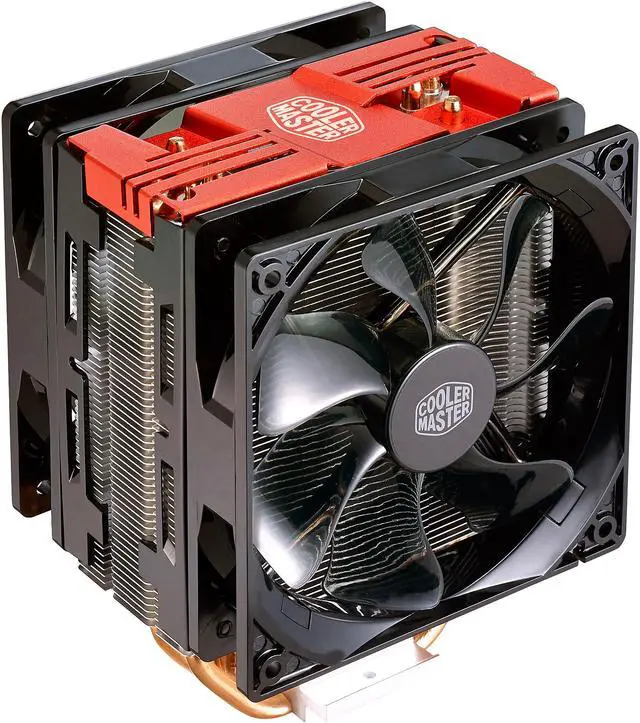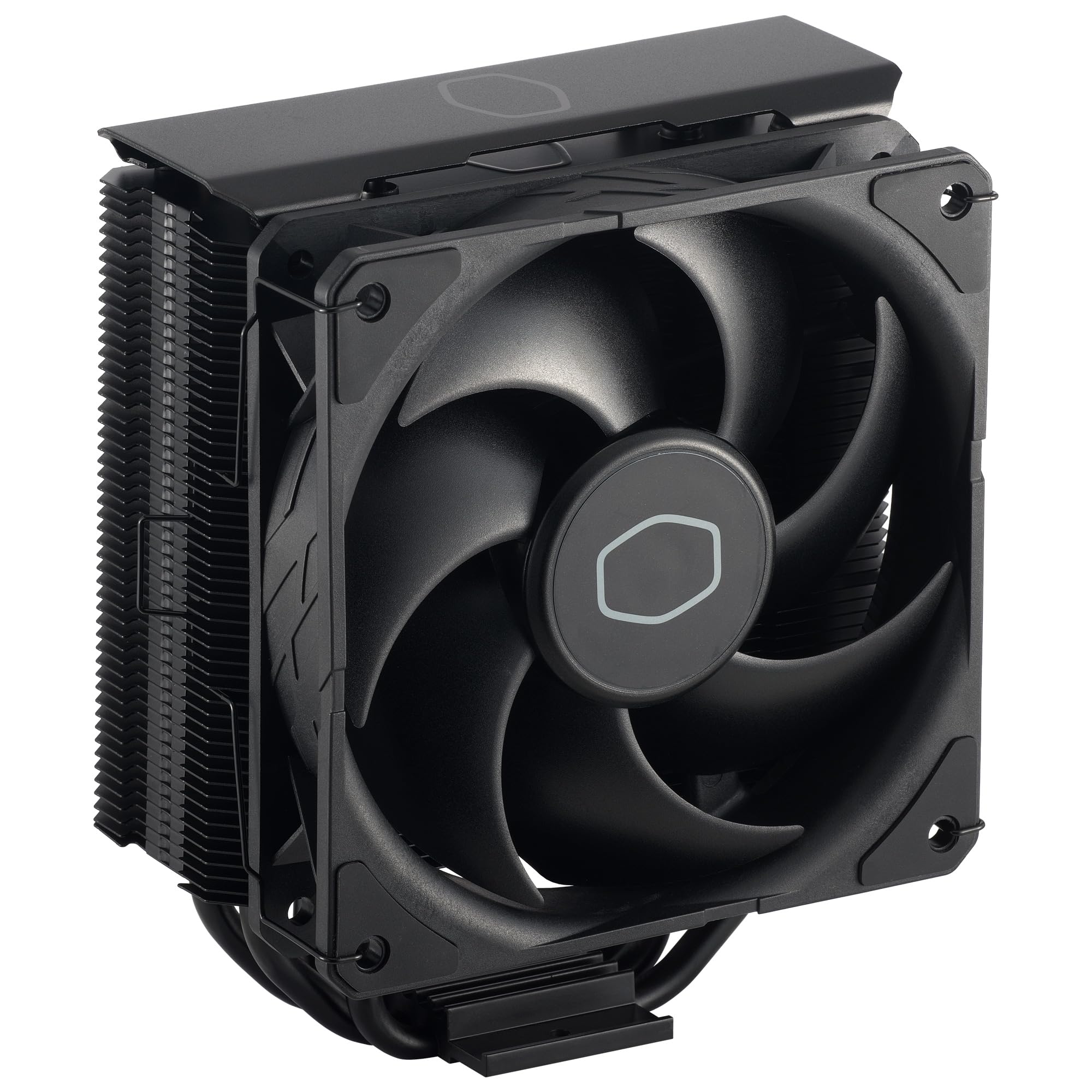
Cooler Master Hyper 212 Black CPU Cooler
A classic, revitalized A Classic, Revitalized Cooler Master's iconic Hyper 212 series is back and revitalized with the Hyper 212 Black. This latest iteration features a recharged, minimalist aesthetic. The included SickleFlow 120 Edge fan comes with enhanced blades that provide previously unseen levels of cooling performance. The included CryoFuze Thermal Paste relies on nanoparticles for exceptionally high performance, while compatibility is guaranteed with the latest AMD and Intel sockets. Ensure you never slow down and never miss a shot with the Hyper 212 Black. Refreshed Aesthetic Design A recharged aesthetic offers new vibes while keeping it minimalistic. SickleFlow 120 Edge Fan Our in-house designed and manufactured premium fan comes with enhanced blades for next-level airflow and cooling performance. SickleFlow 120 Edge Fan CryoFuze Thermal Paste Included high-performance thermal paste relies on nanoparticles for maximal heat transfer. AMD & Intel Compatibility Features compatibility with all the latest AMD and Intel CPU sockets.
A classic, revitalized A Classic, Revitalized Cooler Master's iconic Hyper 212 series is back and revitalized with the Hyper 212 Black. This latest iteration features a recharged, minimalist aesthetic. The included SickleFlow 120 Edge fan comes with enhanced blades that provide previously unseen levels of cooling performance. The included CryoFuze Thermal Paste relies on nanoparticles for exceptionally high performance, while compatibility is guaranteed with the latest AMD and Intel sockets. Ensure you never slow down and never miss a shot with the Hyper 212 Black. Refreshed Aesthetic Design A recharged aesthetic offers new vibes while keeping it minimalistic. SickleFlow 120 Edge Fan Our in-house designed and manufactured premium fan comes with enhanced blades for next-level airflow and cooling performance. SickleFlow 120 Edge Fan CryoFuze Thermal Paste Included high-performance thermal paste relies on nanoparticles for maximal heat transfer. AMD & Intel Compatibility Features compatibility with all the latest AMD and Intel CPU sockets.
A classic, revitalized A Classic, Revitalized Cooler Master's iconic Hyper 212 series is back and revitalized with the Hyper 212 Black. This latest iteration features a recharged, minimalist aesthetic. The included SickleFlow 120 Edge fan comes with enhanced blades that provide previously unseen levels of cooling performance. The included CryoFuze Thermal Paste relies on nanoparticles for exceptionally high performance, while compatibility is guaranteed with the latest AMD and Intel sockets. Ensure you never slow down and never miss a shot with the Hyper 212 Black. Refreshed Aesthetic Design A recharged aesthetic offers new vibes while keeping it minimalistic. SickleFlow 120 Edge Fan Our in-house designed and manufactured premium fan comes with enhanced blades for next-level airflow and cooling performance. SickleFlow 120 Edge Fan CryoFuze Thermal Paste Included high-performance thermal paste relies on nanoparticles for maximal heat transfer. AMD & Intel Compatibility Features compatibility with all the latest AMD and Intel CPU sockets.
A classic, revitalized A Classic, Revitalized Cooler Master's iconic Hyper 212 series is back and revitalized with the Hyper 212 Black. This latest iteration features a recharged, minimalist aesthetic. The included SickleFlow 120 Edge fan comes with enhanced blades that provide previously unseen levels of cooling performance. The included CryoFuze Thermal Paste relies on nanoparticles for exceptionally high performance, while compatibility is guaranteed with the latest AMD and Intel sockets. Ensure you never slow down and never miss a shot with the Hyper 212 Black. Refreshed Aesthetic Design A recharged aesthetic offers new vibes while keeping it minimalistic. SickleFlow 120 Edge Fan Our in-house designed and manufactured premium fan comes with enhanced blades for next-level airflow and cooling performance. SickleFlow 120 Edge Fan CryoFuze Thermal Paste Included high-performance thermal paste relies on nanoparticles for maximal heat transfer. AMD & Intel Compatibility Features compatibility with all the latest AMD and Intel CPU sockets.
in 13 offers
The lowest price for Cooler Master Hyper 212 Black CPU Cooler right now is $45.00 at Mwave Australia, compared across 12 retailers.
The all-time low was $11.48 on 17 Feb 2026 — today's price is 292% above the lowest ever. It has been notably cheaper before — worth setting a price alert.
Prices last updated 24 Oct 2026.
Last updated at 24/10/2026 05:19:17
Cooler Master Hyper 212 CPU Air Cooler - Black
Free delivery between 28 Oct – 4 Nov
Cooler Master Hyper 212 CPU Cooler (Black)
Delivery between 27 Oct – 5 Nov $15.90
Coolermaster Hyper 212 Black
Delivery $30
Cooler Master Hyper 212 Black CPU Cooler | PHOTECH
Cooler Master CPU Air Cooler Hyper 212 Black (RR-S4KK-25SN-R1) LGA1700/1200/115x, AM5/AM4, 1×120mm PWM fan, 690-2500 RPM, 70.7 CFM, 32.8 dB(A), 4 heat
Delivery between 29 Oct – 7 Nov $12
CM Hyper 212 Black CPU Cooler (RR-S4KK-25SN-R1)
Delivery between Tue – Thu $9.99
Cooler Master Hyper 212 CPU Cooler, 2500 RPM Fan Speed, 70.7CFM Airflow, 32.8 dBA Noise Level, Loop Dynamic Bearing, 4-Pin (PWM) Connector, 4 Heat Pip
Delivery between 28 Oct – 3 Nov $37.20
CM Hyper 212 Black CPU Cooler RR-S4KK-25SN-R1
Delivery $13.95
Cooler Master RR-S4KK-25SN-R1 Hyper 212 Black CPU Cooler
Delivery between 28 Oct – 2 Nov $14.50
Coolermaster Hyper 212 Black Cpu Cooler (rr-s4kk-25sn-r1)
Free delivery
Affiliate Disclosure: We may receive a small commission for purchases made through this link at no extra cost to you. This helps support our site. Thank you!
originally posted on bhphotovideo.com
My previous case and CPU cooler was a Lian Li A4-H2O and a Corsair H100i RGB Elite 240 AIO. The AIO pump was annoyingly audible and didn't do much to cool the rest of that hot box. After moving my components to the NR200 and ditching the AIO for the Hyper 212 BE, even after ASUS fan tuning and enabling Q-Fan Control, all my temps are 15-20 degrees C lower. I am running it with 1 additional Cooler Master SickleFlow 120 as a second top exhaust.Despite it being a bit bigger, the extra volume is appreciated for more airflow and running CPU tower coolers like the Hyper 212 BE. It still fits in my desk cabinet, has more internal storage expandability, and looks fantastic. I especially love how easy it is to get into for quick servicing and cleaning the magnetic dust ... MoreMy previous case and CPU cooler was a Lian Li A4-H2O and a Corsair H100i RGB Elite 240 AIO. The AIO pump was annoyingly audible and didn't do much to cool the rest of that hot box. After moving my components to the NR200 and ditching the AIO for the Hyper 212 BE, even after ASUS fan tuning and enabling Q-Fan Control, all my temps are 15-20 degrees C lower. I am running it with 1 additional Cooler Master SickleFlow 120 as a second top exhaust.Despite it being a bit bigger, the extra volume is appreciated for more airflow and running CPU tower coolers like the Hyper 212 BE. It still fits in my desk cabinet, has more internal storage expandability, and looks fantastic. I especially love how easy it is to get into for quick servicing and cleaning the magnetic dust filters. The side bracket can't be used with the Hyper 212 BE; I was initially planning to add another intake fan but frankly isn't needed.Major kudos to B&H for the phenomenal shipping. The NR200 branded shipping box was packed inside an unbranded shipping box with additional packaging and the branded box was immaculate upon arrival. Most other retailers would have just shipped it in the branded shipping box. I'm running the NR200 and Hyper 212 BE with the components below.Motherboard: ASUS ROG Strix B550-I GamingGPU: ASUS ROG Strix Radeon RX 6700 XT OC Edition 12GB GDDR6CPU: AMD Ryzen 7 5700X3DRAM: Corsair Vengeance LPX 32GB DDR4 3600MHzPSU: Corsair SFX Platinum 750WSSD: Samsung 990 Pro 2TB M.2 NVMe
originally posted on neweggbusiness.com
I've pretty much used Cooler Master HSF's exclusively for as long as I've known of them (around 20ish years). My previous System used an Hyper N520 which performed reliably for 10 years. So It was a no brainer to go with the evolutionary design for my new 10700K. While the Hyper 212 is highly compatible with numerous sockets, it requires a whole bunch of various and small component parts which are both a little confusing to assemble, and not to mention easy to damage or lose if you're not careful. What I really don't like about this thing though, is the metal fan clips. It comes with one fan preinstalled, which you do need to remove to put the socket mounting parts on. it was a little annoying getting it lined back up right before installing it into the case, but ... MoreI've pretty much used Cooler Master HSF's exclusively for as long as I've known of them (around 20ish years). My previous System used an Hyper N520 which performed reliably for 10 years. So It was a no brainer to go with the evolutionary design for my new 10700K. While the Hyper 212 is highly compatible with numerous sockets, it requires a whole bunch of various and small component parts which are both a little confusing to assemble, and not to mention easy to damage or lose if you're not careful. What I really don't like about this thing though, is the metal fan clips. It comes with one fan preinstalled, which you do need to remove to put the socket mounting parts on. it was a little annoying getting it lined back up right before installing it into the case, but then adding/replacing fans once inside the case proved to be very, very annoying (Esp because I have huge hands). I replaced the stock fan with 2 Bgears b-PWM's (Red and Blue), and getting the clips to fit snugly was just....a trial in frustration, to put it mildly. They just wouldn't fit snugly till I made a couple of bends (outward, not inward). I didn't break out the micrometer, but while they are both standard 25mm total width, this is likely a result of slightly different design Dimensions between the Silencio Fan it came with and the BGears b-PWM's I installed in it's place which are much higher max flow rate (110CFM), but also seem to be more lightly constructed. This is NOT a negative on the Silencio fan at all, it's just that airflow capacity was more of a priority for my needs then silence (My system has sound matting installed inside to deaden the roar from the 3X140MM&1X4X120MM b-Blaster intake & exhaust fans. Yes, they are massive overkill, but for my needs it's calculated overkill. You'll just have to trust me on this trhough, because this is about the Hyper 212, not my "ode to excess" of a PC). Given a choice, I would have preferred to more b-Blasters to the Hyper 212, but they are 38mm wide, and just wouldn't fit between it and both the memory DIMM's or the VRM heatsink on the Asus Z-590 Prime board I'm using. So the b-PWM seemed like my next best option, but other brand/model's of fans may not run into the same problem I did. It depends on the exact manufactured dimensions. The good and bad news about the metal clips is that they only seem to be used on the 212 BE, while the RGB BE and other versions of it use plastic clips that screw into the fan instead. You COULD replace them with the plastic ones, which are listed on CM's webstore, but always seem to be out of stock, and can't be gotten anywhere else. Why they even use the metal clips on this model I can only conjecture (Cost savings, probably), but I suppose you could figure another way to rig them in using Wire tires or maybe even fashioning your own metal clips, or even printing your own plastic ones if you have the ability to do that. But that's probably something everyone will need to figure out for themselves.
originally posted on ebay.com
I enjoy Cooler Master Hyper 212; no complaints of noise level, and they are very effective for "normal" moderate usage. Untested in any arena of online gaming , or over clocking! Never any "normal"usage problems or complaint other than the complete CPU cooler, and Fan's if you use dual fans option. It is a definite "Heavy" cooler so care must be taken to insure the computer case is properly stabilised at all times.
| Socket Compatibility | Nearly every current Intel and AMD desktop processor socket (except for Threadripper) |
| Material | Aluminum (heatsink) |
| Cooling Capacity | 60C over ambient (thermal measurement) |
| Depth | 4.9 in |
| Height | 6'' |
Cooler Master Hyper 212 CPU Air Cooler - Black
Free delivery between 28 Oct – 4 Nov
Cooler Master Hyper 212 CPU Cooler (Black)
Delivery between 27 Oct – 5 Nov $15.90
Coolermaster Hyper 212 Black
Delivery $30
Cooler Master Hyper 212 Black CPU Cooler | PHOTECH
Cooler Master CPU Air Cooler Hyper 212 Black (RR-S4KK-25SN-R1) LGA1700/1200/115x, AM5/AM4, 1×120mm PWM fan, 690-2500 RPM, 70.7 CFM, 32.8 dB(A), 4 heat
Delivery between 29 Oct – 7 Nov $12
My previous case and CPU cooler was a Lian Li A4-H2O and a Corsair H100i RGB Elite 240 AIO. The AIO pump was annoyingly audible and didn't do much to cool the rest of that hot box. After moving my components to the NR200 and ditching the AIO for the Hyper 212 BE, even after ASUS fan tuning and enabling Q-Fan Control, all my temps are 15-20 degrees C lower. I am running it with 1 additional Cooler Master SickleFlow 120 as a second top exhaust.Despite it being a bit bigger, the extra volume is appreciated for more airflow and running CPU tower coolers like the Hyper 212 BE. It still fits in my desk cabinet, has more internal storage expandability, and looks fantastic. I especially love how easy it is to get into for quick servicing and cleaning the magnetic dust ... MoreMy previous case and CPU cooler was a Lian Li A4-H2O and a Corsair H100i RGB Elite 240 AIO. The AIO pump was annoyingly audible and didn't do much to cool the rest of that hot box. After moving my components to the NR200 and ditching the AIO for the Hyper 212 BE, even after ASUS fan tuning and enabling Q-Fan Control, all my temps are 15-20 degrees C lower. I am running it with 1 additional Cooler Master SickleFlow 120 as a second top exhaust.Despite it being a bit bigger, the extra volume is appreciated for more airflow and running CPU tower coolers like the Hyper 212 BE. It still fits in my desk cabinet, has more internal storage expandability, and looks fantastic. I especially love how easy it is to get into for quick servicing and cleaning the magnetic dust filters. The side bracket can't be used with the Hyper 212 BE; I was initially planning to add another intake fan but frankly isn't needed.Major kudos to B&H for the phenomenal shipping. The NR200 branded shipping box was packed inside an unbranded shipping box with additional packaging and the branded box was immaculate upon arrival. Most other retailers would have just shipped it in the branded shipping box. I'm running the NR200 and Hyper 212 BE with the components below.Motherboard: ASUS ROG Strix B550-I GamingGPU: ASUS ROG Strix Radeon RX 6700 XT OC Edition 12GB GDDR6CPU: AMD Ryzen 7 5700X3DRAM: Corsair Vengeance LPX 32GB DDR4 3600MHzPSU: Corsair SFX Platinum 750WSSD: Samsung 990 Pro 2TB M.2 NVMe
I've pretty much used Cooler Master HSF's exclusively for as long as I've known of them (around 20ish years). My previous System used an Hyper N520 which performed reliably for 10 years. So It was a no brainer to go with the evolutionary design for my new 10700K. While the Hyper 212 is highly compatible with numerous sockets, it requires a whole bunch of various and small component parts which are both a little confusing to assemble, and not to mention easy to damage or lose if you're not careful. What I really don't like about this thing though, is the metal fan clips. It comes with one fan preinstalled, which you do need to remove to put the socket mounting parts on. it was a little annoying getting it lined back up right before installing it into the case, but ... MoreI've pretty much used Cooler Master HSF's exclusively for as long as I've known of them (around 20ish years). My previous System used an Hyper N520 which performed reliably for 10 years. So It was a no brainer to go with the evolutionary design for my new 10700K. While the Hyper 212 is highly compatible with numerous sockets, it requires a whole bunch of various and small component parts which are both a little confusing to assemble, and not to mention easy to damage or lose if you're not careful. What I really don't like about this thing though, is the metal fan clips. It comes with one fan preinstalled, which you do need to remove to put the socket mounting parts on. it was a little annoying getting it lined back up right before installing it into the case, but then adding/replacing fans once inside the case proved to be very, very annoying (Esp because I have huge hands). I replaced the stock fan with 2 Bgears b-PWM's (Red and Blue), and getting the clips to fit snugly was just....a trial in frustration, to put it mildly. They just wouldn't fit snugly till I made a couple of bends (outward, not inward). I didn't break out the micrometer, but while they are both standard 25mm total width, this is likely a result of slightly different design Dimensions between the Silencio Fan it came with and the BGears b-PWM's I installed in it's place which are much higher max flow rate (110CFM), but also seem to be more lightly constructed. This is NOT a negative on the Silencio fan at all, it's just that airflow capacity was more of a priority for my needs then silence (My system has sound matting installed inside to deaden the roar from the 3X140MM&1X4X120MM b-Blaster intake & exhaust fans. Yes, they are massive overkill, but for my needs it's calculated overkill. You'll just have to trust me on this trhough, because this is about the Hyper 212, not my "ode to excess" of a PC). Given a choice, I would have preferred to more b-Blasters to the Hyper 212, but they are 38mm wide, and just wouldn't fit between it and both the memory DIMM's or the VRM heatsink on the Asus Z-590 Prime board I'm using. So the b-PWM seemed like my next best option, but other brand/model's of fans may not run into the same problem I did. It depends on the exact manufactured dimensions. The good and bad news about the metal clips is that they only seem to be used on the 212 BE, while the RGB BE and other versions of it use plastic clips that screw into the fan instead. You COULD replace them with the plastic ones, which are listed on CM's webstore, but always seem to be out of stock, and can't be gotten anywhere else. Why they even use the metal clips on this model I can only conjecture (Cost savings, probably), but I suppose you could figure another way to rig them in using Wire tires or maybe even fashioning your own metal clips, or even printing your own plastic ones if you have the ability to do that. But that's probably something everyone will need to figure out for themselves.
I enjoy Cooler Master Hyper 212; no complaints of noise level, and they are very effective for "normal" moderate usage. Untested in any arena of online gaming , or over clocking! Never any "normal"usage problems or complaint other than the complete CPU cooler, and Fan's if you use dual fans option. It is a definite "Heavy" cooler so care must be taken to insure the computer case is properly stabilised at all times.
Stay a while and listen....So in early 2018 I bought a CyperPowerPC system from BestBuy.com picked up at my local Best Buy brick and mortar store for my son. That system was equipped with a Ryzen 5 1400. Fast Forward to 2021 and except for the case, motherboard and internal cabling, I have pretty much replaced every other component in this thing. Not that anything failed, just upgrades for better performance.So in mid 2019, I swapped out the original Ryzen 5 1400 CPU for a Ryzen 5 2600. The first gen Ryzen 1000 CPU's did not ship with a stock cooler from AMD so my assumption is that the Cooler Master branded cooler in this system used by CyberPowerPC was the equivalent of what is the Wraith Spire that is included in the Ryzen 2000 and Ryzen 3000 series mid tier ... MoreStay a while and listen....So in early 2018 I bought a CyperPowerPC system from BestBuy.com picked up at my local Best Buy brick and mortar store for my son. That system was equipped with a Ryzen 5 1400. Fast Forward to 2021 and except for the case, motherboard and internal cabling, I have pretty much replaced every other component in this thing. Not that anything failed, just upgrades for better performance.So in mid 2019, I swapped out the original Ryzen 5 1400 CPU for a Ryzen 5 2600. The first gen Ryzen 1000 CPU's did not ship with a stock cooler from AMD so my assumption is that the Cooler Master branded cooler in this system used by CyberPowerPC was the equivalent of what is the Wraith Spire that is included in the Ryzen 2000 and Ryzen 3000 series mid tier CPU's. Matter of fact, I upgraded from the Ryzen 5 1400 to the Ryzen 5 2600 and re used the included Cooler Master cooler. I even bought a tube of premium Thermaltake heat sink compound from the same brick and mortal Best Buy I picked up this machine from. Since Ryzen 5 2600 and Ryzen 5 1400 are both TDP 65W CPU's I figured the same cooling solution should work and it did.Now again here in 2021, I upgraded my PC from a Ryzen 9 3900X to a Ryzen 9 5950X and I figured I would once again pass a CPU down to my son in the aforementioned PC. So the 3900X is a 105W TDP and I knew the existing Cooler Master cooler would not work. So after some research, it looks like the Hyper 212 BE is rated for 150W TDP CPU's.So I replaced the Ryzen 5 2600 with the Ryzen 3900X in his PC. I then used the Hyper 212 BE as the new cooler.So my son's CyberPowerPC from Best Buy had a rebranded Cooler Master Masterbox 5 and the motherboard they used was a MSI Bazooka B350M micro ATX board. Yep, let's put a 3900X on an entry level B350 board.So assembling the Hyper 212 BE was not bad. The biggest gripe I had was getting the plastic clips they include for their new backplate to go onto their backplate. I watched several videos of how to assemble the Hyper 212 BE on Youtube so I felt good going into this upgrade. The packed in instructions are good and well marked from a documentation perspective but the commentary and videos on Youtube made me feel more confident.Nevertheless, I struggled to get their clips onto their backplate.Also, the clips that hold the included 120mm fan onto the tower heatsink are a bit touchy. This unit comes with the fan already mounted to the tower but you have to remove it to get clearance to attach the appropriate brackets for your CPU socket to the cooler and also have adequate leverage to get a screw driver to come straight down onto the scrws that secure the cooler tower to the backplate.Mounting the backplate to the motherboard was not a problem and also attaching the tower to the backplate and screwing it down tightly was a decent experience. Unlike the stock AMD clip method that just sucks and I think requires too much pressure to mount a cooler, Once I applied my thermal compound and lined up the tower onto the backplate and started the criss cross pattern to screw this down, once it was all tightened up, it swas solid secure and mounted well.Firing up the system post upgrade, everything works well. Temps are higher than I would like but they are within stock. Again, i am running a 3900X up from a 2600 on a B350 micro ATX board.I did disable PBO in the bios and I do not have any overlclocks applied. Temps according to the MSI Command Center bounce between high 30's to mid 50s C while idling. If I use something like CPU-Z to stress the CPU, I do see that it can get up around 83C under a full 24 thread load.My son basically plays games so a full stress test does not represent a realistic work load so take this with a grain of salt. Also, I am not a professional. The fact the PC still runs after its 3rd CPU is amazing.My son probably sits on his PC too much as it is but he has not complained about anything. To him, the PC still pretty much feels like it did when it was on the 1400 CPU. Which is a good thing.Time will tell if this will fry his VRMs. Looks like there are 4 of them on ths particular board. I did see videos on Youtube of folks trying 3900X in B350 boards as a proof of concept. I think Hot Hardware said that if you shut off PBO and don't overclock, that things do get warm but stay within spec. Of course they were using the included Wraith Prism that come withthe 3900X however, I do not have one of those as my machine came with an AIO closed loop 120mm cooler so that is why I grabbed the Hyper 212 BE.Maybe the Prism would be better since it is a downward cooler. Again time will tell.Anyway, this thing is really nice looking when mounted in his PC case. Sorry to not include a picture.I would recommend this unit. Overall, it seems good quality. Hopefully, I did not do my son a dis service and bite off more than his motherboard can handle.
I recently upgraded my CPU cooling solution to the Cooler Master Hyper 212 RGB Black Edition, and it has been nothing short of impressive. The sleek jet black design not only adds a touch of style to my rig but also delivers exceptional cooling performance.Installation was a breeze, thanks to the user-friendly design and clear instructions. The 120mm fan efficiently dissipates heat, keeping my CPU at optimal temperatures even during intense gaming sessions or resource-heavy tasks. The RGB lighting adds a vibrant and customizable touch, allowing me to match it seamlessly with the rest of my setup.What stands out is the near-silent operation. The Hyper 212 RGB Black Edition manages to keep temperatures low without sacrificing peace and quiet. Whether I'm working ... MoreI recently upgraded my CPU cooling solution to the Cooler Master Hyper 212 RGB Black Edition, and it has been nothing short of impressive. The sleek jet black design not only adds a touch of style to my rig but also delivers exceptional cooling performance.Installation was a breeze, thanks to the user-friendly design and clear instructions. The 120mm fan efficiently dissipates heat, keeping my CPU at optimal temperatures even during intense gaming sessions or resource-heavy tasks. The RGB lighting adds a vibrant and customizable touch, allowing me to match it seamlessly with the rest of my setup.What stands out is the near-silent operation. The Hyper 212 RGB Black Edition manages to keep temperatures low without sacrificing peace and quiet. Whether I'm working or gaming, I can focus without being distracted by fan noise.Overall, the Cooler Master Hyper 212 RGB Black Edition combines style and substance. It's a reliable and visually appealing cooling solution that enhances both the aesthetics and performance of any system. I highly recommend it to fellow enthusiasts looking for an excellent CPU cooling fan.
You know who you are. You built a system with a 4690k and GTX 980 in 2014. I helped you choose between 8GB and 16GB in dual channel at 1600mhz. I also helped you decide between the 120GB and 240GB SSD. Now you're moving onto a new platform and you're curious if this does a good job.Well, as a status-report, it does. But remember how bad that included fan was? As tradition, that's still true, but it's not the end of the world.I have mine strapped with two Noctua NF-P12's using the (luckily) included two fan mounts and 8 fan dampeners that allow me to run them silently. They are in push->pull. I have a very rare setup, an Intel Xeon E5-1660V3 at 4.3ghz on a very hard-to-get motherboard. But this chip runs over 175 watts at peak load.Peak (hwmonitor): 82 degrees ... MoreYou know who you are. You built a system with a 4690k and GTX 980 in 2014. I helped you choose between 8GB and 16GB in dual channel at 1600mhz. I also helped you decide between the 120GB and 240GB SSD. Now you're moving onto a new platform and you're curious if this does a good job.Well, as a status-report, it does. But remember how bad that included fan was? As tradition, that's still true, but it's not the end of the world.I have mine strapped with two Noctua NF-P12's using the (luckily) included two fan mounts and 8 fan dampeners that allow me to run them silently. They are in push->pull. I have a very rare setup, an Intel Xeon E5-1660V3 at 4.3ghz on a very hard-to-get motherboard. But this chip runs over 175 watts at peak load.Peak (hwmonitor): 82 degrees on Core 3 after 7hrs, 15mins.Peak (hwmonitor): 85 degrees package after 9hrs, 10mins.This chip, again, is drawing *175* watts. Your 13700k won't do this.When the fans are replaced, the tradition of the Hyper 212 becomes true to form. Way, *way* too effective for what it costs. Just get that "Silencio" fan in the trash as soon as possible. It's a garbage fan. But honestly, the platform for the fan and fin stack has definitely improved. Especially for LGA-2011 V3 support.
Super reputable company, this was a relatively simple install in comparison to the leading brands. This is a very effective cooling solution that isn’t hard on the wallet, and has been for over a decade! Pairing this with another brand proprietary fan would be absolute overkill. I went from roughly 40-50c at idle on a 5600x to about 30c at idle and maximum of 65c while gaming and such. However it’s going to get 4 out 5 stars for one reason: the mounting process & the difficulty reading the manual. There are parts that look extremely similar to one another (especially in grayscale) that makes it hard to understand how to assemble specific configuration for your chipset. I mitigated this by watching a YouTube tutorial that allowed me to see the parts in the manual in ... MoreSuper reputable company, this was a relatively simple install in comparison to the leading brands. This is a very effective cooling solution that isn’t hard on the wallet, and has been for over a decade! Pairing this with another brand proprietary fan would be absolute overkill. I went from roughly 40-50c at idle on a 5600x to about 30c at idle and maximum of 65c while gaming and such. However it’s going to get 4 out 5 stars for one reason: the mounting process & the difficulty reading the manual. There are parts that look extremely similar to one another (especially in grayscale) that makes it hard to understand how to assemble specific configuration for your chipset. I mitigated this by watching a YouTube tutorial that allowed me to see the parts in the manual in higher definition and with more contextual angles than the manual provides. Once it seemed like how my configuration and the manuals matched it was time to mount. This is the most strenuous part of the entire process, much more than assembling the mounting brackets and such. The reason is the placement of the screws force you to remove the fan from the heatsink tighten your mount onto your motherboard and then put the fan back on the now mounted heatsink. The reason for this is because two of the 4 screws are directly below the fan and it’s recommended you screw the mount in progressing around your mount until each screw is tight. This would be easy if they provided some sort of tool that lets you tighten the screws from such a crazy angle but that would probably cut into the costs of manufacturing. The clips that fix the fans onto the heatsink need to be clipped in the exact position they where in when you opened the box or the fan will be either too high or too low with very little clearance for your memory. Other than that, they provide a plethora of solutions as well as included thermal compound, brackets and mount configurations and an extra power cable for two fans. I would for sure recommend this as its a great solution but the process of installation could use some aid.
Runs quiet but is a bit of a pain getting clips to lock in on both sides if you remove the fan or it falls off the heatsink. Works with AM5 socket but is not RGB fan so not sure why it was being sold as such. i can still freely move the ram from all slots on mobo(MSI MAG B650 Tomahawk) if choose to add more later.Never had liquid cooler so cannot compare how temps are kept in control. Idle temp is around 35c and with playing starfield on mid-setting runs about 50c. I only have two stock fans in system from when bought tower a few years back so do not know size but think they're 120mm.
I bought a new PC and heat is your enemy, this CPU cooler is a major upgrade from the OEM setup.Cooler Master make great radiator coolers and they are relatively easy to install. all the required hardware is in the box and thermal paste. On a new PC the CPU has thermal paste on it when you pull the OEM cooler. As long as you have coverage you don't need the paste in the kit. I just added a small drop to what was there so there wouldn't be a problem.Even if you are new to computers, this is an easy upgrade. you are really going to screw in 4 screws and clip on the fan with the spring clamps provided. Bing Bang Boop... you're done.I added memory and this cooler to the system I bought before I even used the PC because those are the two most affordable and easiest ... MoreI bought a new PC and heat is your enemy, this CPU cooler is a major upgrade from the OEM setup.Cooler Master make great radiator coolers and they are relatively easy to install. all the required hardware is in the box and thermal paste. On a new PC the CPU has thermal paste on it when you pull the OEM cooler. As long as you have coverage you don't need the paste in the kit. I just added a small drop to what was there so there wouldn't be a problem.Even if you are new to computers, this is an easy upgrade. you are really going to screw in 4 screws and clip on the fan with the spring clamps provided. Bing Bang Boop... you're done.I added memory and this cooler to the system I bought before I even used the PC because those are the two most affordable and easiest upgrades you can do. The enemy is system heat and memory capacity on any system. If you never run hot, you will have a long and happy relationship with your computer.Cool Master is a reliable brand that has been around forever. You can't go wrong using this cooler.
I recently purchased the Cooler Master Hyper 212 RGB Black Edition 120mm CPU Cooling Fan, and I must say it exceeded my expectations in every way. This cooler not only looks fantastic with its sleek jet black design and RGB lighting, but it also performs exceptionally well.Installation was a breeze, thanks to the clear and concise instructions provided. The included thermal paste made the process even smoother. Once installed, this cooler kept my CPU running at optimal temperatures, even under heavy loads. It significantly improved the overall performance and stability of my system.The RGB lighting is a fantastic bonus, allowing me to customize the look of my PC to match my preferences or mood. It adds a vibrant and visually appealing element to my setup, making ... MoreI recently purchased the Cooler Master Hyper 212 RGB Black Edition 120mm CPU Cooling Fan, and I must say it exceeded my expectations in every way. This cooler not only looks fantastic with its sleek jet black design and RGB lighting, but it also performs exceptionally well.Installation was a breeze, thanks to the clear and concise instructions provided. The included thermal paste made the process even smoother. Once installed, this cooler kept my CPU running at optimal temperatures, even under heavy loads. It significantly improved the overall performance and stability of my system.The RGB lighting is a fantastic bonus, allowing me to customize the look of my PC to match my preferences or mood. It adds a vibrant and visually appealing element to my setup, making it stand out.What truly impressed me, though, was how quiet this cooler is. Even under load, it operates almost silently, ensuring a peaceful computing experience. No more annoying fan noise during intense gaming sessions or content creation tasks.Overall, the Cooler Master Hyper 212 RGB Black Edition is an outstanding CPU cooler that not only enhances the aesthetics of your PC but also delivers exceptional cooling performance. I couldn't be happier with my purchase, and I highly recommend it to anyone looking to upgrade their CPU cooling solution while adding some style to their rig.
| Socket Compatibility | Nearly every current Intel and AMD desktop processor socket (except for Threadripper) |
| Material | Aluminum (heatsink) |
| Cooling Capacity | 60C over ambient (thermal measurement) |
| Depth | 4.9 in |
| Height | 6'' |