Last updated at 10/06/2026 15:01:57
Corsair Dominator RGB 32GB (2x16GB) 3200MHz CL16 DDR4
60-day returns
Corsair Dominator - 32 GB 2 x 16 GB DDR5 5600 MHz memory module
Corsair Dominator Platinum RGB 32GB (2x16GB) DDR4 3600MHz C18 - CMT32GX4M2Z3600C18 - As New Condition
Free delivery
Corsair Dominator Platinum RGB 32GB (2x16GB) DDR4 3600MHz C18 - CMT32GX4M2Z3600C18 - As New Condition
Free delivery between 13–19 June
Corsair Dominator Platinum RGB 32GB (2x 16GB) DDR5 5200MHz Desktop Memory White
Corsair Dominator Platinum RGB 32GB (2x 16GB) DDR5 5600MHz Desktop Memory White
DDR4 32GB RAM Corsair Dominator Platinum RGB 3200MHz
Delivery between 15–18 June $15
Corsair Dominator Platinum RGB 32GB Kit (2x16GB) DDR4 3200MHz C16 Black Desktop Gaming Memory
Free delivery between 15–18 June
Corsair Dominator Platinum RGB 32GB Kit (2x16GB) DDR4 3200MHz C16 Black Desktop Gaming Memory
Free delivery between 15–18 June
Corsair Dominator Platinum RGB 32GB Kit (2x16GB) DDR4 4000MHz C19 White Desktop Gaming Memory
Free delivery between 15–18 June
originally posted on bestbuy.com
You are buying this because you want the best of the best. The capellix RGB leds are beautiful and the heatspreader is sizable. The speeds and timings of the ram are good, but not the best. For example I bought 3600 MHz with cas latency of 18. I can get 3600 with cas latency 16 for even cheaper than this. But I am paying for the brand and the looks and the slightly slower timings translates into 1% fps at most anyway. Just know that you are buying this product because you like the way it looks and matches the rest of your build, do not buy this if you are looking for ultimate bang for the buck.
originally posted on bestbuy.com
Corsair Dominator is good memory and I'm sure this memory is just fine in an Intel system but in a Ryzen system it does not work well. I'm using an Asus ROG STRIX X570-E GAMING WIFI II motherboard and Ryzen 5900X. I was using Vengeance Pro model CMW16GX4M2C3200C16 and it worked perfectly. When I first put this memory in the computer would not boot. It took several combinations of moving modules to different slots to get the computer to boot. I was able to set the XMP profile in the bios but it was not stable in games. Usually it would crash after a few minutes. I turned off XMP and my PC is stable but now the memory is not running at full speed. Unfortunately this will have to go back.
originally posted on bestbuy.com
Very fast memory. Nice looking RGBs. Tall modules - make sure you have enough space if using air CPU cooler. If PC won't boot with 4 modules installed or boot with memory speed 2133 (ASRock MB) - remove 2 modules - it will boot - in BIOS change voltage mode to "OC mode" from "Stable". Install modules back - problem solved.
| General | |
| Capacity | 32 GB: 2 x 16 GB |
| Upgrade Type | Generic |
| Width | 135 mm |
| Depth | 8 mm |
Corsair Dominator RGB 32GB (2x16GB) 3200MHz CL16 DDR4
60-day returns
Corsair Dominator - 32 GB 2 x 16 GB DDR5 5600 MHz memory module
Corsair Dominator Platinum RGB 32GB (2x16GB) DDR4 3600MHz C18 - CMT32GX4M2Z3600C18 - As New Condition
Free delivery
Corsair Dominator Platinum RGB 32GB (2x16GB) DDR4 3600MHz C18 - CMT32GX4M2Z3600C18 - As New Condition
Free delivery between 13–19 June
Corsair Dominator Platinum RGB 32GB (2x 16GB) DDR5 5200MHz Desktop Memory White
You are buying this because you want the best of the best. The capellix RGB leds are beautiful and the heatspreader is sizable. The speeds and timings of the ram are good, but not the best. For example I bought 3600 MHz with cas latency of 18. I can get 3600 with cas latency 16 for even cheaper than this. But I am paying for the brand and the looks and the slightly slower timings translates into 1% fps at most anyway. Just know that you are buying this product because you like the way it looks and matches the rest of your build, do not buy this if you are looking for ultimate bang for the buck.
Corsair Dominator is good memory and I'm sure this memory is just fine in an Intel system but in a Ryzen system it does not work well. I'm using an Asus ROG STRIX X570-E GAMING WIFI II motherboard and Ryzen 5900X. I was using Vengeance Pro model CMW16GX4M2C3200C16 and it worked perfectly. When I first put this memory in the computer would not boot. It took several combinations of moving modules to different slots to get the computer to boot. I was able to set the XMP profile in the bios but it was not stable in games. Usually it would crash after a few minutes. I turned off XMP and my PC is stable but now the memory is not running at full speed. Unfortunately this will have to go back.
Very fast memory. Nice looking RGBs. Tall modules - make sure you have enough space if using air CPU cooler. If PC won't boot with 4 modules installed or boot with memory speed 2133 (ASRock MB) - remove 2 modules - it will boot - in BIOS change voltage mode to "OC mode" from "Stable". Install modules back - problem solved.
I upgraded my ram from 32GB 3200 CL 16 to these 32GB 3600 CL14 and couldn't be happier. The first thing that you will notice is that these sticks are beefy and noticeably heavier and more substantial than other ram sticks which is a good thing. They definitely feel very premium. If you're using them in a Corsair ecosystem they'll fit in perfectly. I've got the lighting set up with my 9 Corsair QL fans and they look fantastic! I set the XMP profile in BIOS and it booted up right away. Very pleased with the purchase! One of the reason that I purchased the kit is because my 3080 produces so much heat that my RAM was overheating. I was running Vengeance 32GB 3200 CL16 and they were hitting 53 degrees and causing stability issues. These stick run cooler at 48-49 without ... MoreI upgraded my ram from 32GB 3200 CL 16 to these 32GB 3600 CL14 and couldn't be happier. The first thing that you will notice is that these sticks are beefy and noticeably heavier and more substantial than other ram sticks which is a good thing. They definitely feel very premium. If you're using them in a Corsair ecosystem they'll fit in perfectly. I've got the lighting set up with my 9 Corsair QL fans and they look fantastic! I set the XMP profile in BIOS and it booted up right away. Very pleased with the purchase! One of the reason that I purchased the kit is because my 3080 produces so much heat that my RAM was overheating. I was running Vengeance 32GB 3200 CL16 and they were hitting 53 degrees and causing stability issues. These stick run cooler at 48-49 without any additional cooling and no issues so far.
This corsair memory is awesome. I popped it in and the XMP profile set itself up with no intervention from me. I could go into the memory timings and tinker around with them with my ASUS motherboard BIOS settings but i always like to not mess with those if they are being set my the motherboard. I figure the XMP settings are made to run the memory at the best and most stable clock speeds and if i go in and start changing things it will probably make it unstable and so better left alone.The memory looks great with the double RGB lighting on top and the sides. You can rest easy because depending on the software you are using for the settings you have a ton of selections you can make for different lighting. I use iCUE for most all my lighting because its just easy. The ... MoreThis corsair memory is awesome. I popped it in and the XMP profile set itself up with no intervention from me. I could go into the memory timings and tinker around with them with my ASUS motherboard BIOS settings but i always like to not mess with those if they are being set my the motherboard. I figure the XMP settings are made to run the memory at the best and most stable clock speeds and if i go in and start changing things it will probably make it unstable and so better left alone.The memory looks great with the double RGB lighting on top and the sides. You can rest easy because depending on the software you are using for the settings you have a ton of selections you can make for different lighting. I use iCUE for most all my lighting because its just easy. The memory is top notch very fast and best buy had it in stock with 2 16 gig sticks for a total of 32 gig awesome.Sorry picture is pretty bright but best of the bunch.
I decided to splurge and get the dominator for my PC build. To my dismay the original pair had an issue where one of the sticks RGB would not turn on unless I went into the setting and did a force update. After troubleshooting and trying different things, I finally gave up and returned it for another set. So far I have had zero issues with the second set.Pros:-Best looking Ram on the market in my opinion-Very customizable to multiple patterns and colors-3600mhz is lightning fastCons:-expensive
The two things that I really love about this ram are the awesome lights and how easy they are to configure and play with in Corsair’s iCUE program and the high quality, sturdy, hefty, feeling of the ram with those outstandingly effective heat sinks. This RAM ran (after XMP was enabled) at 3200mhz 16-18-18-36 timings as advertised but the big letdown was the low overclocking potential. My specific RAM couldn’t overclock any higher than 3333mhz regardless of timings or voltage which is pretty disappointing considering Corsair advertises these as being “handpicked” for performance & quality as well as having “plenty of overclocking headroom” but 3200 MHz to 3333 MHz seems pretty weak to me. As “Dominator Platinum” sticks are supposed to be “the best of the best” I ... MoreThe two things that I really love about this ram are the awesome lights and how easy they are to configure and play with in Corsair’s iCUE program and the high quality, sturdy, hefty, feeling of the ram with those outstandingly effective heat sinks. This RAM ran (after XMP was enabled) at 3200mhz 16-18-18-36 timings as advertised but the big letdown was the low overclocking potential. My specific RAM couldn’t overclock any higher than 3333mhz regardless of timings or voltage which is pretty disappointing considering Corsair advertises these as being “handpicked” for performance & quality as well as having “plenty of overclocking headroom” but 3200 MHz to 3333 MHz seems pretty weak to me. As “Dominator Platinum” sticks are supposed to be “the best of the best” I expected they would at LEAST overclock to 3600. The heat sinks that come with this RAM just seem like a giant waste of money since they are paired with RAM that aren’t worth such high quality heat sinks. Maybe I just got bad sticks but I feel like the RAM I got would’ve been better suited for Corsair’s more budget oriented & lower performance ram than they are for the “Dominator Platinum” name associated with high quality & high performance. Conclusion: Unless you’re REALLY determined to have the “BEST RGB” lightning system in town I would recommend going with the much cheaper 3200 (or even 3600!) 32GB ram models out there. It’s just not worth twice the price for less performance with fancy lighting and overkill heat sinks for RAM sticks that, quite frankly, don’t deserve either.
TLDR; Dual Rank, Tight timings, C-die, supports high voltage. Perfect mate for Ryzen CPU's. The dies are Samsung K4A8G085WC-BCTD Extremely high bin. My PC: Ryzen 5800x MSI MAG B550m Mortar EVGA 650w SFX PSU Gigabyte Aorus Master 3080 rev1.00 To start, I used to own CJR 32gb kit that couldn't run anywhere near its rated speed of 3600 c18. In fact I had downclocked them to 3200 20-20-20-32!! They also hated voltage. I got the worst binned chips lol. That is where my ddr4 ram tuning rabbit hole began. I initially thought my motherboard was bad so I went and replaced my ASUS TUF B550m to MSI B550m mortar. IMO much better MicroATX motherboard stability wise. The MSI could boot into the bios after a failed ram OC as opposed to the ASUS which needed a clear cmos. This ... MoreTLDR; Dual Rank, Tight timings, C-die, supports high voltage. Perfect mate for Ryzen CPU's. The dies are Samsung K4A8G085WC-BCTD Extremely high bin. My PC: Ryzen 5800x MSI MAG B550m Mortar EVGA 650w SFX PSU Gigabyte Aorus Master 3080 rev1.00 To start, I used to own CJR 32gb kit that couldn't run anywhere near its rated speed of 3600 c18. In fact I had downclocked them to 3200 20-20-20-32!! They also hated voltage. I got the worst binned chips lol. That is where my ddr4 ram tuning rabbit hole began. I initially thought my motherboard was bad so I went and replaced my ASUS TUF B550m to MSI B550m mortar. IMO much better MicroATX motherboard stability wise. The MSI could boot into the bios after a failed ram OC as opposed to the ASUS which needed a clear cmos. This kit's IC's don't show up in thaiphoon burner. So I took the heatsink apart chips were Samsung C-Die, not the B-die that I was expecting! I was very hesitant to start tuning, but decided to try it any ways before returning it for a known b-die like: OLOy Blade RGB 32GB ND4U1636144BRADE I was blown away at the performance! DO NOT COPY PASTE; Silicon lottery does exist... I set it to: 1T Gear-down-mode enabled 14-16-14-14-30-44 (Read online that Dual-Rank needs TRCDRD to be higher for stability) 3200MHz 1.45(stock Voltage) V-SOC 1.15V V-CCD 1.1V V-IOD 1.1V Saved the BIOS profile and booted and tested. Then increased the frequency until the system crashed... Which it didn't!! The System kept booting until 3800MHZ but was unstable in windows so I increased voltage from 1.45V to 1.48V and BAM 300% memtest on all 32gb! I want stability so I wont push it further. All in all, happy with the purchase. It solved all my instability and stuttering in games and apps.
DRAM Manufacturer is Samsung, the version I got is 4.32. Put them in dual channel mode in DIMM slots A2 and B2 in the Z390 AORUS Master-CF Motherboard. Enabled XMP in the BIOS, operating system is Windows 10 Pro 64-bit version 2004. Windows 10 Task Manager and CPUID 1.93 shows speed at 3200MHz. LED lights are bright and the latest Corsair iCUE Software works well and lots of options for the LED lighting configurations/patterns and also the option to dim or disable the LED lights. I am using a Noctua NH-U12 heatsink and there is enough clearance between the fan and DIMM slot A2 but if I was to get another set of this Memory the DIMM slot A1 is too tight too close to the fan for my liking, they are quite high memory modules. Don't know enough about manual overclocking ... MoreDRAM Manufacturer is Samsung, the version I got is 4.32. Put them in dual channel mode in DIMM slots A2 and B2 in the Z390 AORUS Master-CF Motherboard. Enabled XMP in the BIOS, operating system is Windows 10 Pro 64-bit version 2004. Windows 10 Task Manager and CPUID 1.93 shows speed at 3200MHz. LED lights are bright and the latest Corsair iCUE Software works well and lots of options for the LED lighting configurations/patterns and also the option to dim or disable the LED lights. I am using a Noctua NH-U12 heatsink and there is enough clearance between the fan and DIMM slot A2 but if I was to get another set of this Memory the DIMM slot A1 is too tight too close to the fan for my liking, they are quite high memory modules. Don't know enough about manual overclocking memory modules but XMP works well although CPUID HWMonitor 1.42 is reporting the voltage at 1.356v and 1.368v in idle desktop mode, there appears to be no stability issues since I got them roughly two weeks ago.
I'm not a fan of RGB. I had planned on building my PC without any lighting but discovered that the illuminated logo on my GPU cannot be turned off. So I decided to embrace subtle lighting. Corsair iCue is reasonably decent and allows a variety of static lighting options. I decided to mirror the green GPU lighting on all other text and have white for the rest - I really like it. The lighting options on the DIMMs is actually very impressive - it actually looks great rain bowing through the spectrum but that's not what I wanted. I think it looks pretty good even static. It is really bright but dimmable through iCue - I have mine at 10% and that is plenty bright enough. Oh, and as RAM it works perfectly - I haven't tried manually OC but XMP profile works perfectly.
| General | |
| Capacity | 32 GB: 2 x 16 GB |
| Upgrade Type | Generic |
| Width | 135 mm |
| Depth | 8 mm |
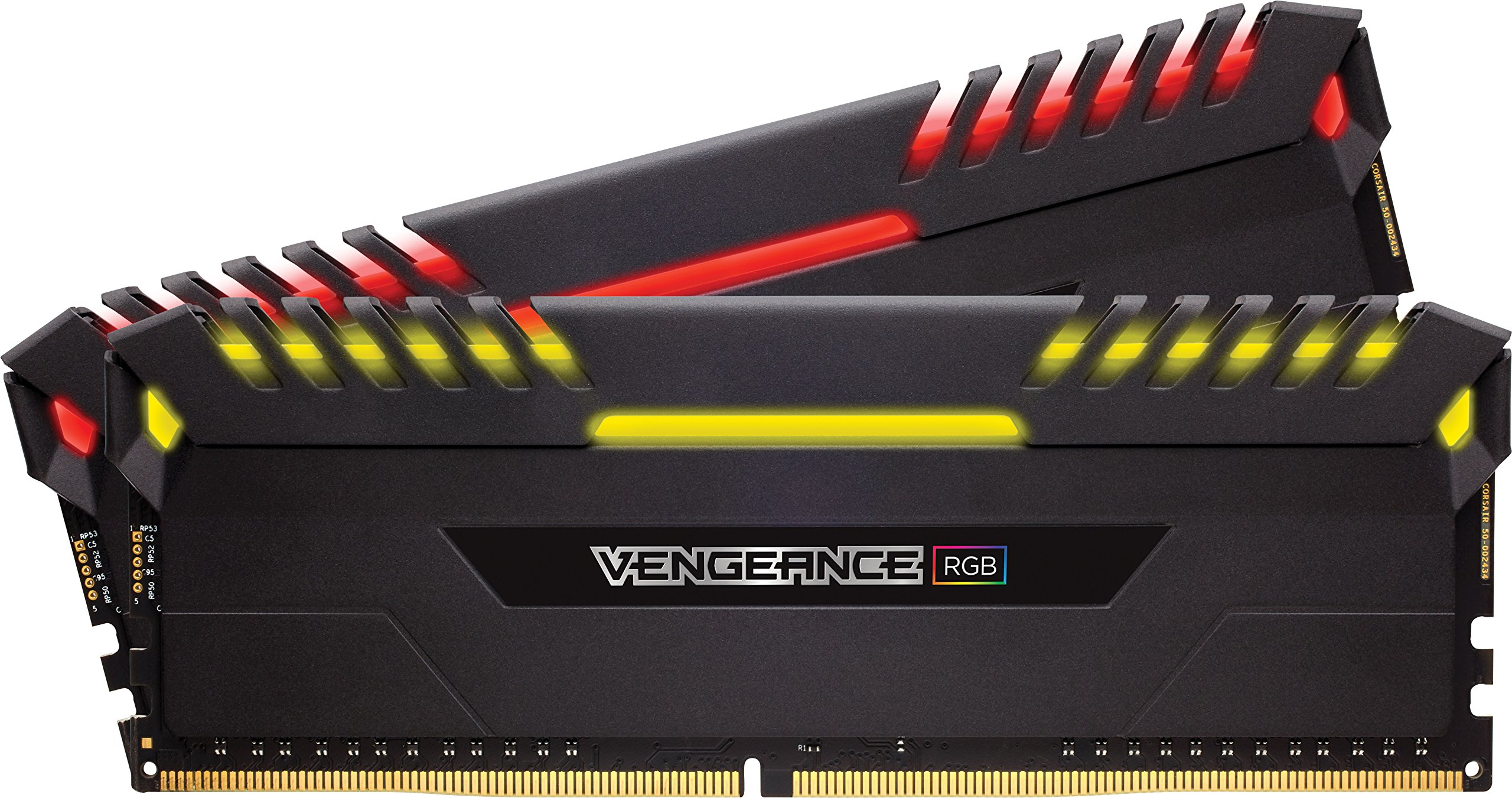

Corsair 32GB (2x16GB) Dominator Platinum RGB DDR4 3200MHz (Black)
The Corsair Dominator Platinum RGB memory module offers 32 GB of DDR4 RAM with a speed of 3200 MHz. It features a layout of 4 x 8 GB modules, ensuring high performance for PC and server applications. With a CAS latency of 16 and a 288-pin DIMM form factor, this memory is designed for stability and efficiency. The RGB lighting adds a stylish touch to your build, making it not only powerful but also visually appealing.
The Corsair Dominator Platinum RGB memory module offers 32 GB of DDR4 RAM with a speed of 3200 MHz. It features a layout of 4 x 8 GB modules, ensuring high performance for PC and server applications. With a CAS latency of 16 and a 288-pin DIMM form factor, this memory is designed for stability and efficiency. The RGB lighting adds a stylish touch to your build, making it not only powerful but also visually appealing.
The Corsair Dominator Platinum RGB memory module offers 32 GB of DDR4 RAM with a speed of 3200 MHz. It features a layout of 4 x 8 GB modules, ensuring high performance for PC and server applications. With a CAS latency of 16 and a 288-pin DIMM form factor, this memory is designed for stability and efficiency. The RGB lighting adds a stylish touch to your build, making it not only powerful but also visually appealing.
The Corsair Dominator Platinum RGB memory module offers 32 GB of DDR4 RAM with a speed of 3200 MHz. It features a layout of 4 x 8 GB modules, ensuring high performance for PC and server applications. With a CAS latency of 16 and a 288-pin DIMM form factor, this memory is designed for stability and efficiency. The RGB lighting adds a stylish touch to your build, making it not only powerful but also visually appealing.
in 27 offers
The lowest price for Corsair 32GB (2x16GB) Dominator Platinum RGB DDR4 3200MHz (Black) right now is $189.00 at PC Case Gear, compared across 20 retailers.
The all-time low was $149.00 on 8 June 2026 — today's price is 27% above the lowest ever. It has been notably cheaper before — worth setting a price alert.
Prices last updated 10 June 2026.

