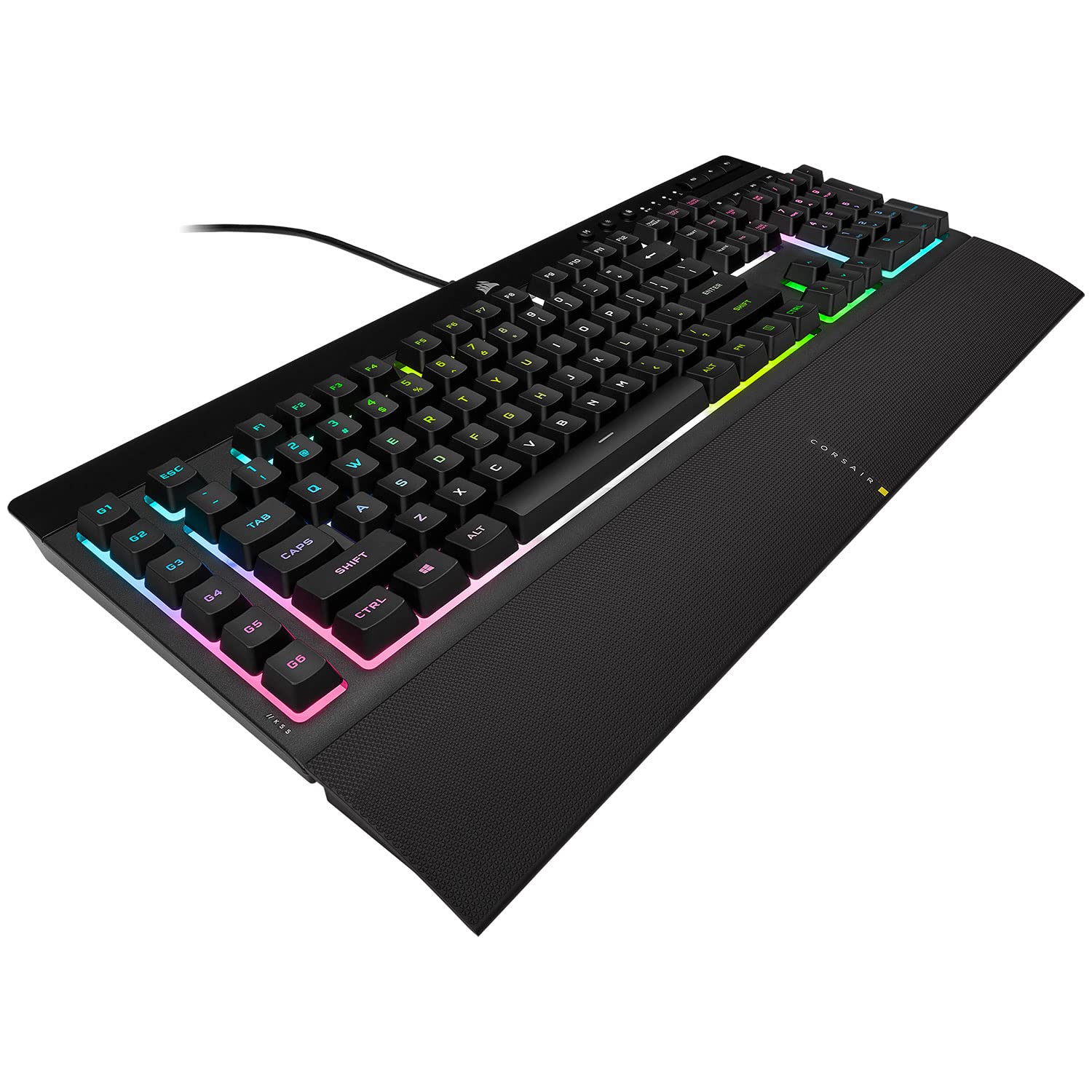
Corsair K55 RGB Pro Wired Membrane Gaming Keyboard - Black
The keyboard is the main input peripheral used by all computers. The keyboard allows for user input and interaction with the computer. Much like many typewriters the keyboard has all the letters of the alphabet, numbers 0 – 9 and additional special operational keys, e.g. for adjusting the volume or going to your inbox directly. There are three different connection types: – USB is the most modern. You can recognize it by the rectangular connector. – PS/2 connectors are round. This type of connection is fairly commonly used by PC’s. – Bluetooth is another modern (wireless) connection method.
The keyboard is the main input peripheral used by all computers. The keyboard allows for user input and interaction with the computer. Much like many typewriters the keyboard has all the letters of the alphabet, numbers 0 – 9 and additional special operational keys, e.g. for adjusting the volume or going to your inbox directly. There are three different connection types: – USB is the most modern. You can recognize it by the rectangular connector. – PS/2 connectors are round. This type of connection is fairly commonly used by PC’s. – Bluetooth is another modern (wireless) connection method.
The keyboard is the main input peripheral used by all computers. The keyboard allows for user input and interaction with the computer. Much like many typewriters the keyboard has all the letters of the alphabet, numbers 0 – 9 and additional special operational keys, e.g. for adjusting the volume or going to your inbox directly. There are three different connection types: – USB is the most modern. You can recognize it by the rectangular connector. – PS/2 connectors are round. This type of connection is fairly commonly used by PC’s. – Bluetooth is another modern (wireless) connection method.
The keyboard is the main input peripheral used by all computers. The keyboard allows for user input and interaction with the computer. Much like many typewriters the keyboard has all the letters of the alphabet, numbers 0 – 9 and additional special operational keys, e.g. for adjusting the volume or going to your inbox directly. There are three different connection types: – USB is the most modern. You can recognize it by the rectangular connector. – PS/2 connectors are round. This type of connection is fairly commonly used by PC’s. – Bluetooth is another modern (wireless) connection method.
in 18 offers
The lowest price for Corsair K55 RGB Pro Wired Membrane Gaming Keyboard - Black right now is $5.69 at eBay.com.au, compared across 13 retailers.
The all-time low was $5.69 on 4 Oct 2026. That's the lowest price we've ever tracked — a great time to buy.
Prices last updated 4 Oct 2026.
Last updated at 04/10/2026 05:54:12
Corsair K55 RGB PRO Membrane Wired Gaming Keyboard – IP42 Dust and Spill-Resistant – 6 Macro Keys with Elgato Integration – iCUE Compatible – QWERTY
Affiliate Disclosure: We may receive a small commission for purchases made through this link at no extra cost to you. This helps support our site. Thank you!
Corsair K55 RGB Pro Gaming Keyboard
Affiliate Disclosure: We may receive a small commission for purchases made through this link at no extra cost to you. This helps support our site. Thank you!
Corsair K55 CORE RGB Wired Membrane Gaming Keyboard Black CH 9226C65 NA - Keyboards
Delivery $15.76
Corsair K55 CORE RGB Wired Membrane Gaming Keyboard Black CH 9226C65 NA - Keyboards
Delivery $15
Corsair K55 CORE RGB Gaming Keyboard
Delivery between 8–13 Oct $7.74
Corsair K55 Gaming Keyboard - Rubber Dome, NA Extended, 5-Zone RGB, Wired USB-A 1000Hz, 12-key selective (12KRO), 6 dedicated macro keys, Dedicated
Delivery $12
Corsair CH-9226C65-JP K55 CORE RGB Gaming Keyboard, Supports iCUE, 10 Zones, RGB, 4
Delivery $49.20
Corsair K55 CORE RGB Gaming Keyboard
Delivery $10
Corsair K55 CORE RGB Gaming Keyboard
Delivery $10
Corsair K55 Core RGB Gaming Wired Keyboard, Rubber Dome Switches, 6 Macro Keys, 110 Keys, 12-KLey Selective (12KRO) Rollover, English Keyboard, Tangle
Delivery between 8–15 Oct $36.39
originally posted on scan.co.uk
I bought this keyboard specifcally for the extra G1-G6 keys. The keyboard itself works well and the ergonomic extension on the front fits extremely well. My only reservation is that I would prefer a different placement of the G1-G6 keys. There are so many keyboard short cuts where we automatically reach for the ESC, CTRL and TAB keys without looking at the keyboard and I find myself pressing a G key instead of the usual shortcut keys. A larger gap between the G keys or placing them above the function keys would be more useful.If it weren't for the G-key placement, I'd have rated 5 stars. It's otherwise a very good keyboard.
originally posted on bestbuy.com
Bought this keyboard last night. Previously I had a high quality Logitech keyboard that lasted around 10 years (the G910). This keyboard has a nice touch, I like how it is not too loud and typing on this is nice (I enjoy typing, my wpm is 130). Gaming is nice, it has the hotkeys. I especially like this keyboard for the volume keys and the media control keys, for I enjoy listening to music and watching Youtube while playing certain games. You can download the software on Corsair's website, haven't tested it much but it seems to work well enough. To finish off on the pros of the keyboard, the hand rest has a nice texture and it is easily removable. The only problem with this keyboard, and the reason for my 4 star, is that it is a little "flimsy," as in you can flex ... MoreBought this keyboard last night. Previously I had a high quality Logitech keyboard that lasted around 10 years (the G910). This keyboard has a nice touch, I like how it is not too loud and typing on this is nice (I enjoy typing, my wpm is 130). Gaming is nice, it has the hotkeys. I especially like this keyboard for the volume keys and the media control keys, for I enjoy listening to music and watching Youtube while playing certain games. You can download the software on Corsair's website, haven't tested it much but it seems to work well enough. To finish off on the pros of the keyboard, the hand rest has a nice texture and it is easily removable. The only problem with this keyboard, and the reason for my 4 star, is that it is a little "flimsy," as in you can flex the entire keyboard while putting little pressure on it. For the price I expected something to be amiss, but this problem does not seem to be major. This keyboard probably has less durability than my previous one, but again, my last keyboard was almost four times more expensive at the time. I would definitely recommend this keyboard to anyone.
originally posted on bestbuy.com
ok, for starters i usually game around 60 hours/week with work, email, shopping on top of that. I am an adult gamer, so I have never hit/slammed this keyboard and I generally like to take care of my things. I have had this keyboard for over a year and it still feels brand new. very nice and smooth key strokes. the over all feel of the keyboard is very smooth. The keys literally feel smooth to the touch and it is very comfortable. I do use the.... wrist rest? the part that attaches to the bottom of the keyboard and it makes it quite comfortable. The rest is grippy so it keeps your hands in place and I feel it does quite well at keeping off fatigue on long hours of gaming. Other keyboards I have recently (within 5 years) used, have all had their space bars break. I ... Moreok, for starters i usually game around 60 hours/week with work, email, shopping on top of that. I am an adult gamer, so I have never hit/slammed this keyboard and I generally like to take care of my things. I have had this keyboard for over a year and it still feels brand new. very nice and smooth key strokes. the over all feel of the keyboard is very smooth. The keys literally feel smooth to the touch and it is very comfortable. I do use the.... wrist rest? the part that attaches to the bottom of the keyboard and it makes it quite comfortable. The rest is grippy so it keeps your hands in place and I feel it does quite well at keeping off fatigue on long hours of gaming. Other keyboards I have recently (within 5 years) used, have all had their space bars break. I guess that I either hit the space button a lot not just while typing but jumping etc in games or i just hit it extra hard. The space bar on this keyboard however is in great shape, has not developed any dead spots, and it has no cracks on the face or the under carriage which is very rare for my keyboard usage. I am usually a Logitec user but after putting thousands of hours into this keyboard and seeing how well it has withstood my usage, Corsair has made a believer out of me and will probably be my go-to keyboard foreseeably, for the rest of my life. I would highly recommend and dont think you will be dissapointed.

Corsair K55 RGB PRO Membrane Wired Gaming Keyboard – IP42 Dust and Spill-Resistant – 6 Macro Keys with Elgato Integration – iCUE Compatible – QWERTY
Affiliate Disclosure: We may receive a small commission for purchases made through this link at no extra cost to you. This helps support our site. Thank you!
Corsair K55 RGB Pro Gaming Keyboard
Affiliate Disclosure: We may receive a small commission for purchases made through this link at no extra cost to you. This helps support our site. Thank you!
Corsair K55 CORE RGB Wired Membrane Gaming Keyboard Black CH 9226C65 NA - Keyboards
Delivery $15.76
Corsair K55 CORE RGB Wired Membrane Gaming Keyboard Black CH 9226C65 NA - Keyboards
Delivery $15
Corsair K55 CORE RGB Gaming Keyboard
Delivery between 8–13 Oct $7.74
I bought this keyboard specifcally for the extra G1-G6 keys. The keyboard itself works well and the ergonomic extension on the front fits extremely well. My only reservation is that I would prefer a different placement of the G1-G6 keys. There are so many keyboard short cuts where we automatically reach for the ESC, CTRL and TAB keys without looking at the keyboard and I find myself pressing a G key instead of the usual shortcut keys. A larger gap between the G keys or placing them above the function keys would be more useful.If it weren't for the G-key placement, I'd have rated 5 stars. It's otherwise a very good keyboard.
Bought this keyboard last night. Previously I had a high quality Logitech keyboard that lasted around 10 years (the G910). This keyboard has a nice touch, I like how it is not too loud and typing on this is nice (I enjoy typing, my wpm is 130). Gaming is nice, it has the hotkeys. I especially like this keyboard for the volume keys and the media control keys, for I enjoy listening to music and watching Youtube while playing certain games. You can download the software on Corsair's website, haven't tested it much but it seems to work well enough. To finish off on the pros of the keyboard, the hand rest has a nice texture and it is easily removable. The only problem with this keyboard, and the reason for my 4 star, is that it is a little "flimsy," as in you can flex ... MoreBought this keyboard last night. Previously I had a high quality Logitech keyboard that lasted around 10 years (the G910). This keyboard has a nice touch, I like how it is not too loud and typing on this is nice (I enjoy typing, my wpm is 130). Gaming is nice, it has the hotkeys. I especially like this keyboard for the volume keys and the media control keys, for I enjoy listening to music and watching Youtube while playing certain games. You can download the software on Corsair's website, haven't tested it much but it seems to work well enough. To finish off on the pros of the keyboard, the hand rest has a nice texture and it is easily removable. The only problem with this keyboard, and the reason for my 4 star, is that it is a little "flimsy," as in you can flex the entire keyboard while putting little pressure on it. For the price I expected something to be amiss, but this problem does not seem to be major. This keyboard probably has less durability than my previous one, but again, my last keyboard was almost four times more expensive at the time. I would definitely recommend this keyboard to anyone.
ok, for starters i usually game around 60 hours/week with work, email, shopping on top of that. I am an adult gamer, so I have never hit/slammed this keyboard and I generally like to take care of my things. I have had this keyboard for over a year and it still feels brand new. very nice and smooth key strokes. the over all feel of the keyboard is very smooth. The keys literally feel smooth to the touch and it is very comfortable. I do use the.... wrist rest? the part that attaches to the bottom of the keyboard and it makes it quite comfortable. The rest is grippy so it keeps your hands in place and I feel it does quite well at keeping off fatigue on long hours of gaming. Other keyboards I have recently (within 5 years) used, have all had their space bars break. I ... Moreok, for starters i usually game around 60 hours/week with work, email, shopping on top of that. I am an adult gamer, so I have never hit/slammed this keyboard and I generally like to take care of my things. I have had this keyboard for over a year and it still feels brand new. very nice and smooth key strokes. the over all feel of the keyboard is very smooth. The keys literally feel smooth to the touch and it is very comfortable. I do use the.... wrist rest? the part that attaches to the bottom of the keyboard and it makes it quite comfortable. The rest is grippy so it keeps your hands in place and I feel it does quite well at keeping off fatigue on long hours of gaming. Other keyboards I have recently (within 5 years) used, have all had their space bars break. I guess that I either hit the space button a lot not just while typing but jumping etc in games or i just hit it extra hard. The space bar on this keyboard however is in great shape, has not developed any dead spots, and it has no cracks on the face or the under carriage which is very rare for my keyboard usage. I am usually a Logitec user but after putting thousands of hours into this keyboard and seeing how well it has withstood my usage, Corsair has made a believer out of me and will probably be my go-to keyboard foreseeably, for the rest of my life. I would highly recommend and dont think you will be dissapointed.
I can't believe the Best Buy employee recommended me this keyboard. And I can't believe people make reviews saying this is a decent keyboard.To start, I used to be a fan of Logitech, but the pricing doesn't match the quality, so I figured I'd give Corsair a try.Even typing this review, it's so annoying.It's loud, and 5 months down the line, I'm experiencing ghost inputs,and typing issues.How casual, is casual for this keyboard. Maybe 1-2 hour use max per day?For an office job, this keyboard and casual gaming that is not fast paced, this would be a good keyboard. Just not a right fit for me that has heavy use.It's so hard to find a good quality keyboard nowadays.
After building a new computer i decided to try a new keyboard with it, so i picked up the Corsair K55. My previous Keyboard was the renowned SteelSeries.With that being said these Keyboards are EXTREMELY similar. I like the magnetic handrest on the steelseries, where the corsair's is attached by two pressure indentations. However the corsair one i find slightly nore comfortable. The keynoise is about the same on both of them. Corsair has the same quickkeys that the steelseries has minus the SS volume roller which is also a push key on the CA which is its one downfall in comparison. What it lacks in the roller it makes up for in its sidebar "G Keys" that can easily be programmed for scene switches or whatever your heart desires which i rather enjoy having directly ... MoreAfter building a new computer i decided to try a new keyboard with it, so i picked up the Corsair K55. My previous Keyboard was the renowned SteelSeries.With that being said these Keyboards are EXTREMELY similar. I like the magnetic handrest on the steelseries, where the corsair's is attached by two pressure indentations. However the corsair one i find slightly nore comfortable. The keynoise is about the same on both of them. Corsair has the same quickkeys that the steelseries has minus the SS volume roller which is also a push key on the CA which is its one downfall in comparison. What it lacks in the roller it makes up for in its sidebar "G Keys" that can easily be programmed for scene switches or whatever your heart desires which i rather enjoy having directly on the keyboard freeing my elgato up for other things.In conclusion a buyer would be happy with either keyboard and although they are both fantastic i think the corsair will be my go to especially since its biggest pro is the much lower price tag compared to the SS.
We recently purchased a Corsair Vengeance i7300 for our daughter when we discovered her 8 yr old PC was beginning to fail. As I set up the Corsair PC to take to her in a couple of weeks, I was using an old keyboard and mouse to get things going and it was time for something new.I checked and most keyboards of this type are expensive and seemed to be similar to this one. I was pleasantly surprised when I took it out of the box and set it up for her PC. It does almost everything the high end keyboards do except control lighting for individual keys, unless you really want wireless and more options.You can do regions, colors, color cycles and program the 6 G keys on the left side for for different functions or keys. I set it up for 6 different shortcuts while ... MoreWe recently purchased a Corsair Vengeance i7300 for our daughter when we discovered her 8 yr old PC was beginning to fail. As I set up the Corsair PC to take to her in a couple of weeks, I was using an old keyboard and mouse to get things going and it was time for something new.I checked and most keyboards of this type are expensive and seemed to be similar to this one. I was pleasantly surprised when I took it out of the box and set it up for her PC. It does almost everything the high end keyboards do except control lighting for individual keys, unless you really want wireless and more options.You can do regions, colors, color cycles and program the 6 G keys on the left side for for different functions or keys. I set it up for 6 different shortcuts while playing Witcher 3.It is well built, the USB connector has an ample length wire to reach the PC and the colors are very nice. Keys have a nice feel and the size is perfect.
I gave it 3 stars but it's by no means a BAD keyboard, it's just meh. I prefer lower profile keys and wanted the mechanical feel. This keyboard has membrane keys so the touch feels like your basic sort of cheaper keyboard. The RGB is split into 5 sections so you won't get individual keys to work.If you have Hardware Monitor on your computer, expect that to not work once you install the iCue software to control RGB. THe attachable write rest is nice.The main complaint is that this keyboard stopped working CONSTANTLY. In order to fix it, you have to unplug the USB from the PC, hold the ESC key, then plug it back in and continue holding the ESC key for 2-3 seconds then release and it will work again.That's ridiculous to have to do every single day.
This thing is sik! I don't really need to see the temperature and other stats of my keyboard, but I love the customization of the colors. 5 different zones. Flowing patterns. Customized patterns. Static colors. You can have keys light with each keystroke if you want. And in different patterns if you want. My nightlight colors are blue with a green flow traveling left to right. I wish I could get my company to buy one for work. The cost is decent considering some of the prices out there.
corsair has the absolute worst app I have ever used and it is necessary to use it in order to control the rgb functions of the keyboard. Every second time i turn my pc off the keyboard forgets what lighting option I previously chose and goes into a flashing rainbow mode. The app is so horrible that you cannot even scroll down on the screen without enlarging the window and using the slider on the right hand side. The grab box for the slider is overlapped with the edge of the window which causes me to grab the window adjustment instead of the slider every time. The wrist pad at the bottom of the keyboard disconnects if you even look at it wrong. The keys are fairly mushy and the entire keyboard is flimsy. Buy anything else.
This is my first Corsair set up build. Spent like $200 on it all with a mouse, keyboard, and xl mousepad... mouse and pad, phenomenal. Love em. But thia keyboard does retain its color settings and must be manually reset each time I log in (requires a button push).. not the end of the world but not as good as just retaining my settings (which are simply just STATIC BLUE. Thats it). Additionally, come home from a long day at work, wanna game for a bit... oh weird, its back to spectrum rainbow... ugh, fine. I'll just reclick the profile in the app.Come to find out the Corsair App will delete itself from your computer at various update points. Best i can tell based on reddit posts is that this has been ongoing for at least 4 years, killing any allegiance i had for ... MoreThis is my first Corsair set up build. Spent like $200 on it all with a mouse, keyboard, and xl mousepad... mouse and pad, phenomenal. Love em. But thia keyboard does retain its color settings and must be manually reset each time I log in (requires a button push).. not the end of the world but not as good as just retaining my settings (which are simply just STATIC BLUE. Thats it). Additionally, come home from a long day at work, wanna game for a bit... oh weird, its back to spectrum rainbow... ugh, fine. I'll just reclick the profile in the app.Come to find out the Corsair App will delete itself from your computer at various update points. Best i can tell based on reddit posts is that this has been ongoing for at least 4 years, killing any allegiance i had for Corsair and now, ushering me back to Razer which I wanted to get away from. This keyboard alone sparked this rage... unfortunate.