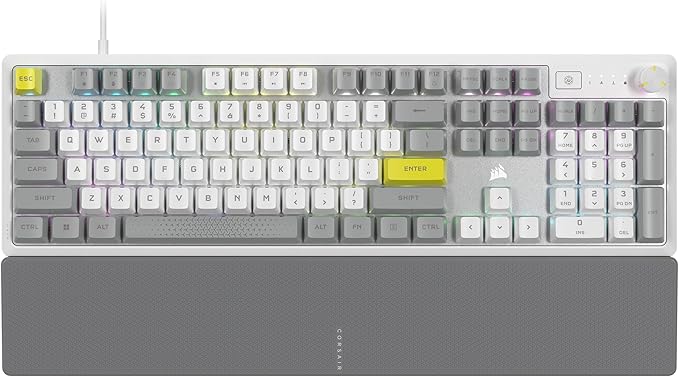
Corsair K70 Core RGB Mechanical Gaming Keyboard Red Switch (Black)
The CORSAIR K70 CORE gaming keyboard empowers your best play and makes gaming and typing amazing. With silky smooth CORSAIR Red linear mechanical switches and two layers of sound dampening foam for a superior typing sound and feel, this is premier CORSAIR performance. Take control effortlessly with a multi-function rotary dial and programmable media button.
The CORSAIR K70 CORE gaming keyboard empowers your best play and makes gaming and typing amazing. With silky smooth CORSAIR Red linear mechanical switches and two layers of sound dampening foam for a superior typing sound and feel, this is premier CORSAIR performance. Take control effortlessly with a multi-function rotary dial and programmable media button.
The CORSAIR K70 CORE gaming keyboard empowers your best play and makes gaming and typing amazing. With silky smooth CORSAIR Red linear mechanical switches and two layers of sound dampening foam for a superior typing sound and feel, this is premier CORSAIR performance. Take control effortlessly with a multi-function rotary dial and programmable media button.
The CORSAIR K70 CORE gaming keyboard empowers your best play and makes gaming and typing amazing. With silky smooth CORSAIR Red linear mechanical switches and two layers of sound dampening foam for a superior typing sound and feel, this is premier CORSAIR performance. Take control effortlessly with a multi-function rotary dial and programmable media button.
in 8 offers
The lowest price for Corsair K70 Core RGB Mechanical Gaming Keyboard Red Switch (Black) right now is $113.00 at Amazon.com.au, compared across 6 retailers.
The all-time low was $99.00 on 31 Dec 2025 — today's price is 14% above the lowest ever. That's a little above the best price we've seen.
Prices last updated 2 July 2026.
Last updated at 02/07/2026 01:11:42
CORSAIR K70 CORE RGB Mechanical Gaming Keyboard - CORSAIR Red Linear Keyswitches - Sound Dampening - Media Control Dial - iCUE Compatible - QWERTY NA
Affiliate Disclosure: We may receive a small commission for purchases made through this link at no extra cost to you. This helps support our site. Thank you!
Corsair K70 CORE RGB Mechanical Gaming Keyboard
Free delivery between 3–13 July
Corsair K70 CORE RGB Black Mechanical Keyboard, Red SW
Delivery $12.99
Corsair K70 CORE RGB Mechanical Gaming Keyboard- Black, Full-size, MLX Red switches, NKRO, 1,000Hz, USB wired, iCUE, media controls, PC/Mac compatible
Corsair K70 RGB PBT Double Shot Keycaps MLX Red Switches Keyboard [CH-910971E-NA]
Delivery between Sat – Wed $10
CORSAIR K70 Core RGB PBT Double Shot Keycaps. Corsair MLX Red Switches, Media Control, Bright LED, Aluminum Top Plate, ICUE, Keyboard
Free delivery between Sat – Wed
CORSAIR K70 Core RGB PBT Double Shot Keycaps. Corsair MLX Red Switches, Media Control, Bright LED, Aluminum Top Plate, ICUE, Keyboard
Delivery $10
Corsair K70 CORE RGB Mechanical Gaming Keyboard- Black Full-size MLX Red
Delivery $10
originally posted on Target
Overall this keyboard is a very good option for those that enjoy using full sized keyboards. There is a lot of customizability for different shortcuts and hotkeys as well as changing the lighting settings through the iCUE app from Corsair. From an entry level gamer to an avid player, the K70 hits all the notes that a person could need when gaming. The Corsair red switches are responsive and sound amazing for those that have that itch for satisfying sounds. It doesn't have that mechanical switch click that some other keyboards have which feels better in the keys for some people, myself included. I do wish that the media controls had their own dedicated buttons like some other keyboards have, in some "high octane" scenarios having to hit both the "fn" key and one of ... MoreOverall this keyboard is a very good option for those that enjoy using full sized keyboards. There is a lot of customizability for different shortcuts and hotkeys as well as changing the lighting settings through the iCUE app from Corsair. From an entry level gamer to an avid player, the K70 hits all the notes that a person could need when gaming. The Corsair red switches are responsive and sound amazing for those that have that itch for satisfying sounds. It doesn't have that mechanical switch click that some other keyboards have which feels better in the keys for some people, myself included. I do wish that the media controls had their own dedicated buttons like some other keyboards have, in some "high octane" scenarios having to hit both the "fn" key and one of the "F#" keys can cause you to lose focus if you need to adjust something. However, sacrificing those keys and opting for function buttons instead has allowed the K70 to have a smaller footprint than some other full size keyboards which could come in handy with limited desk space. The slick design of the base and raised keys with full RGB also provide a sharp look that can improve a desk's appeal from those that explore a minimalistic aesthetic or those that have a more noisy approach. The keyboard has a plethora of different customizable settings that are available through the integrated iCUE app and if you are using other Corsair products, all of them can be linked together within the app to give you the ability to share light patterns and other settings across all your devices, which is very nice for someone who likes to keep their setup organized. With the K70, not only am I able to use the app to change the lights, I can choose several different reactive modes including sound and keypresses to have a fully immersive feeling with the keyboard. You can even change the zones with the ability to create your own for an insane amount of freedom. An example would be I can have the entire keyboard flash red except for the "G" key which I can make a steady green. Any possibility of keys and lights can be achieved with this program. My favorite feature of this keyboard would have to be the customizability. There is so much that can be changed and made your own that in reality, it can be made so unique that there are no other keyboards out there that have all the same options as yours, and that is a really exciting prospect. Comfortability - I prefer a key board with a rest.
originally posted on Target
What I often look for in a gaming keyboard is ease of use, reliability and durability. It's crucial to have a keyboard that can handle extensive usage over an extended period, all the while delivering a seamless and comfortable typing experience, and this is precisely where the Corsair K70 truly excels. The first thing to consider is that firstly Corsair is a well-known company that primarily specializes in producing high-performance computer hardware and accessories so with this in mind you know you're going to be getting a solid product with good support behind it as well as a 2-year warranty on the product. Out of the box, the keyboard looks slick and has a good heft to it. It's got an aluminum top-plate which is a nice touch. The key's have a very nice sound - ... MoreWhat I often look for in a gaming keyboard is ease of use, reliability and durability. It's crucial to have a keyboard that can handle extensive usage over an extended period, all the while delivering a seamless and comfortable typing experience, and this is precisely where the Corsair K70 truly excels. The first thing to consider is that firstly Corsair is a well-known company that primarily specializes in producing high-performance computer hardware and accessories so with this in mind you know you're going to be getting a solid product with good support behind it as well as a 2-year warranty on the product. Out of the box, the keyboard looks slick and has a good heft to it. It's got an aluminum top-plate which is a nice touch. The key's have a very nice sound - relatively quiet and yet still satisfying. Those two sound dampening layers are awesome and whoever else might be living with you will be thankful for them as well. Setting it up was a breeze—simply plug it in, and watch the keyboard awaken in a dazzling display of colors, as if it were a spacecraft gliding through the cosmos. The color change is so fluid too and the light pattern can be customized using the Corsair iCue software which can be downloaded from their website if you're using a PC. Typing on this keyboard is an absolute delight, though I did come across an occasional hiccup where keys would occasionally register double presses. Fortunately, this issue was a known one after a brief internet search, and it was effectively resolved by installing the iCue software and updating the keyboard's firmware. Aside from that minor quirk, the typing experience is seamless and enjoyable, to the point where it feels like you can effortlessly increase your typing speed. In addition, you'll find convenient shortcuts integrated into the F-Keys. By simply holding down the 'Fn' key and tapping the corresponding F-Key, you can seamlessly perform actions like switching keyboard profiles, adjusting brightness levels, controlling media playback (pause, stop, play), and more. What's even more nifty is the presence of a volume dial right on the keyboard, allowing you to instantly mute audio with a quick press. Overall, this keyboard has been a delight to game with and I look forward to its many years of service. Special thanks to the Stellar Product Testing Panel for giving me the opportunity to experience this outstanding gaming keyboard.
originally posted on Target
As a PC game enthusiast and an engineer who uses my PC daily for work, I take great care in picking out a keyboard. The Corsair K70 CORE Black keyboard checks the majority of the boxes for me and is a great option for those who want a high performance keyboard with quiet, smooth key switches for a work environment. Design and Build (5/5): The K70 CORE Black boasts a sleek and minimalistic design, perfect for any setup. It’s relatively light given its size, which has an extended numpad and comfortable spacing on the keys. The customizable LED backlighting offers a subtle yet striking look that fits well with any gaming or professional environment. The keyboard is also robustly built and feels durable. Performance (4/5): In the past, I’ve typically gone with brown ... MoreAs a PC game enthusiast and an engineer who uses my PC daily for work, I take great care in picking out a keyboard. The Corsair K70 CORE Black keyboard checks the majority of the boxes for me and is a great option for those who want a high performance keyboard with quiet, smooth key switches for a work environment. Design and Build (5/5): The K70 CORE Black boasts a sleek and minimalistic design, perfect for any setup. It’s relatively light given its size, which has an extended numpad and comfortable spacing on the keys. The customizable LED backlighting offers a subtle yet striking look that fits well with any gaming or professional environment. The keyboard is also robustly built and feels durable. Performance (4/5): In the past, I’ve typically gone with brown switches for my PC for tactical feedback but have recently run into issues with the clicking sound from the brown switches getting picked up in virtual meetings at work. The red switches also offer a quieter typing experience compared to some other mechanical switches, which is a nice bonus for those who share their workspace. So, although I wish there was a little more tactical feedback, the red mechanical key switches are a great compromise for someone balancing gaming and typing in their lives. The low actuation force makes for an incredibly responsive and fast typing experience and each keypress feels smooth and consistent. Customization and Software (5/5): Corsair's iCUE software is a gem when it comes to customizing the K70 CORE Black. You can easily create and save macros, reprogram keys, and set up dynamic lighting effects to match your preference. I am a big fan of the dedicated media controls and volume wheel. They add a touch of convenience, allowing me to adjust settings without interrupting my workflow or gaming experience. The iCUE software is also very user-friendly. Final Thoughts: In summary, I think the Corsair K70 CORE Black with red mechanical key switches is a fantastic piece of gaming hardware, especially if you are looking to balance performance and low noise. If you're a fan of mechanical keyboards with red switches, the Corsair K70 CORE Black should be at the top of your list. Thanks to the Stellar Product Testing Panel for providing me with this gaming keyboard.
| Compatible devices | Laptop, PC, Gaming Console |
| Connectivity technology | USB-A |
| Keyboard description | Mechanical |
| Recommended uses for product | Gaming |
| Hardware Platform | Laptop, Gaming Console, PC |
CORSAIR K70 CORE RGB Mechanical Gaming Keyboard - CORSAIR Red Linear Keyswitches - Sound Dampening - Media Control Dial - iCUE Compatible - QWERTY NA
Affiliate Disclosure: We may receive a small commission for purchases made through this link at no extra cost to you. This helps support our site. Thank you!
Corsair K70 CORE RGB Mechanical Gaming Keyboard
Free delivery between 3–13 July
Corsair K70 CORE RGB Black Mechanical Keyboard, Red SW
Delivery $12.99
Corsair K70 CORE RGB Mechanical Gaming Keyboard- Black, Full-size, MLX Red switches, NKRO, 1,000Hz, USB wired, iCUE, media controls, PC/Mac compatible
Corsair K70 RGB PBT Double Shot Keycaps MLX Red Switches Keyboard [CH-910971E-NA]
Delivery between Sat – Wed $10
Overall this keyboard is a very good option for those that enjoy using full sized keyboards. There is a lot of customizability for different shortcuts and hotkeys as well as changing the lighting settings through the iCUE app from Corsair. From an entry level gamer to an avid player, the K70 hits all the notes that a person could need when gaming. The Corsair red switches are responsive and sound amazing for those that have that itch for satisfying sounds. It doesn't have that mechanical switch click that some other keyboards have which feels better in the keys for some people, myself included. I do wish that the media controls had their own dedicated buttons like some other keyboards have, in some "high octane" scenarios having to hit both the "fn" key and one of ... MoreOverall this keyboard is a very good option for those that enjoy using full sized keyboards. There is a lot of customizability for different shortcuts and hotkeys as well as changing the lighting settings through the iCUE app from Corsair. From an entry level gamer to an avid player, the K70 hits all the notes that a person could need when gaming. The Corsair red switches are responsive and sound amazing for those that have that itch for satisfying sounds. It doesn't have that mechanical switch click that some other keyboards have which feels better in the keys for some people, myself included. I do wish that the media controls had their own dedicated buttons like some other keyboards have, in some "high octane" scenarios having to hit both the "fn" key and one of the "F#" keys can cause you to lose focus if you need to adjust something. However, sacrificing those keys and opting for function buttons instead has allowed the K70 to have a smaller footprint than some other full size keyboards which could come in handy with limited desk space. The slick design of the base and raised keys with full RGB also provide a sharp look that can improve a desk's appeal from those that explore a minimalistic aesthetic or those that have a more noisy approach. The keyboard has a plethora of different customizable settings that are available through the integrated iCUE app and if you are using other Corsair products, all of them can be linked together within the app to give you the ability to share light patterns and other settings across all your devices, which is very nice for someone who likes to keep their setup organized. With the K70, not only am I able to use the app to change the lights, I can choose several different reactive modes including sound and keypresses to have a fully immersive feeling with the keyboard. You can even change the zones with the ability to create your own for an insane amount of freedom. An example would be I can have the entire keyboard flash red except for the "G" key which I can make a steady green. Any possibility of keys and lights can be achieved with this program. My favorite feature of this keyboard would have to be the customizability. There is so much that can be changed and made your own that in reality, it can be made so unique that there are no other keyboards out there that have all the same options as yours, and that is a really exciting prospect. Comfortability - I prefer a key board with a rest.
What I often look for in a gaming keyboard is ease of use, reliability and durability. It's crucial to have a keyboard that can handle extensive usage over an extended period, all the while delivering a seamless and comfortable typing experience, and this is precisely where the Corsair K70 truly excels. The first thing to consider is that firstly Corsair is a well-known company that primarily specializes in producing high-performance computer hardware and accessories so with this in mind you know you're going to be getting a solid product with good support behind it as well as a 2-year warranty on the product. Out of the box, the keyboard looks slick and has a good heft to it. It's got an aluminum top-plate which is a nice touch. The key's have a very nice sound - ... MoreWhat I often look for in a gaming keyboard is ease of use, reliability and durability. It's crucial to have a keyboard that can handle extensive usage over an extended period, all the while delivering a seamless and comfortable typing experience, and this is precisely where the Corsair K70 truly excels. The first thing to consider is that firstly Corsair is a well-known company that primarily specializes in producing high-performance computer hardware and accessories so with this in mind you know you're going to be getting a solid product with good support behind it as well as a 2-year warranty on the product. Out of the box, the keyboard looks slick and has a good heft to it. It's got an aluminum top-plate which is a nice touch. The key's have a very nice sound - relatively quiet and yet still satisfying. Those two sound dampening layers are awesome and whoever else might be living with you will be thankful for them as well. Setting it up was a breeze—simply plug it in, and watch the keyboard awaken in a dazzling display of colors, as if it were a spacecraft gliding through the cosmos. The color change is so fluid too and the light pattern can be customized using the Corsair iCue software which can be downloaded from their website if you're using a PC. Typing on this keyboard is an absolute delight, though I did come across an occasional hiccup where keys would occasionally register double presses. Fortunately, this issue was a known one after a brief internet search, and it was effectively resolved by installing the iCue software and updating the keyboard's firmware. Aside from that minor quirk, the typing experience is seamless and enjoyable, to the point where it feels like you can effortlessly increase your typing speed. In addition, you'll find convenient shortcuts integrated into the F-Keys. By simply holding down the 'Fn' key and tapping the corresponding F-Key, you can seamlessly perform actions like switching keyboard profiles, adjusting brightness levels, controlling media playback (pause, stop, play), and more. What's even more nifty is the presence of a volume dial right on the keyboard, allowing you to instantly mute audio with a quick press. Overall, this keyboard has been a delight to game with and I look forward to its many years of service. Special thanks to the Stellar Product Testing Panel for giving me the opportunity to experience this outstanding gaming keyboard.
As a PC game enthusiast and an engineer who uses my PC daily for work, I take great care in picking out a keyboard. The Corsair K70 CORE Black keyboard checks the majority of the boxes for me and is a great option for those who want a high performance keyboard with quiet, smooth key switches for a work environment. Design and Build (5/5): The K70 CORE Black boasts a sleek and minimalistic design, perfect for any setup. It’s relatively light given its size, which has an extended numpad and comfortable spacing on the keys. The customizable LED backlighting offers a subtle yet striking look that fits well with any gaming or professional environment. The keyboard is also robustly built and feels durable. Performance (4/5): In the past, I’ve typically gone with brown ... MoreAs a PC game enthusiast and an engineer who uses my PC daily for work, I take great care in picking out a keyboard. The Corsair K70 CORE Black keyboard checks the majority of the boxes for me and is a great option for those who want a high performance keyboard with quiet, smooth key switches for a work environment. Design and Build (5/5): The K70 CORE Black boasts a sleek and minimalistic design, perfect for any setup. It’s relatively light given its size, which has an extended numpad and comfortable spacing on the keys. The customizable LED backlighting offers a subtle yet striking look that fits well with any gaming or professional environment. The keyboard is also robustly built and feels durable. Performance (4/5): In the past, I’ve typically gone with brown switches for my PC for tactical feedback but have recently run into issues with the clicking sound from the brown switches getting picked up in virtual meetings at work. The red switches also offer a quieter typing experience compared to some other mechanical switches, which is a nice bonus for those who share their workspace. So, although I wish there was a little more tactical feedback, the red mechanical key switches are a great compromise for someone balancing gaming and typing in their lives. The low actuation force makes for an incredibly responsive and fast typing experience and each keypress feels smooth and consistent. Customization and Software (5/5): Corsair's iCUE software is a gem when it comes to customizing the K70 CORE Black. You can easily create and save macros, reprogram keys, and set up dynamic lighting effects to match your preference. I am a big fan of the dedicated media controls and volume wheel. They add a touch of convenience, allowing me to adjust settings without interrupting my workflow or gaming experience. The iCUE software is also very user-friendly. Final Thoughts: In summary, I think the Corsair K70 CORE Black with red mechanical key switches is a fantastic piece of gaming hardware, especially if you are looking to balance performance and low noise. If you're a fan of mechanical keyboards with red switches, the Corsair K70 CORE Black should be at the top of your list. Thanks to the Stellar Product Testing Panel for providing me with this gaming keyboard.
I was given this gaming keyboard to try as part of the Stellar Product Testing Panel. I'm not a hard-core gamer, but I was still excited to receive the K70 Core keyboard to test. I am picky about my keyboards and look for several features when purchasing. First, I do not like "pingy" keyboards that make a lot of mechanical noises, particularly the metallic "clacks" that you get from cheaper keyboards. The keys on the K70 Core make a bit of noise, but it's not clangy, and the high-profile keys have a smooth, easy feel when pressed. I think the soft noises are likely due to the pre-lubricated keys and switches and the two sound-dampening layers Corsair prominently advertises on the box. There's a nice weight to the keystrokes as well, which I appreciate because I do a ... MoreI was given this gaming keyboard to try as part of the Stellar Product Testing Panel. I'm not a hard-core gamer, but I was still excited to receive the K70 Core keyboard to test. I am picky about my keyboards and look for several features when purchasing. First, I do not like "pingy" keyboards that make a lot of mechanical noises, particularly the metallic "clacks" that you get from cheaper keyboards. The keys on the K70 Core make a bit of noise, but it's not clangy, and the high-profile keys have a smooth, easy feel when pressed. I think the soft noises are likely due to the pre-lubricated keys and switches and the two sound-dampening layers Corsair prominently advertises on the box. There's a nice weight to the keystrokes as well, which I appreciate because I do a lot of typing in my work. While this is a gaming keyboard, I actually prefer it for my word processing work than my old keyboard! Second, I want a full-size layout with good spacing between the keys and a number pad. The K70 Core is a great size and has a number pad. It also has a rotary multifunction dial to the upper right-hand side, which was a new feature for me and one that I really enjoyed having. On my previous keyboard, I had to press the "fn" key (Windows computer) and then hunt down the teeny-tiny print on the bottom of the function button to adjust the volume using my keyboard. The rotary dial is probably one of my favorite features of this keyboard because it makes changing the volume quickly a breeze. I was also happy with the RGB backlighting, which is colorful and attractive and also provides good lighting even in darker settings. It doesn't serve as much functionality for me as it would a more intense gamer, but I do find it very aesthetically pleasing, and it's a helpful feature to have when you're working at night in darker rooms. There are tons of customization settings, and the iCue software allows you to link into other devices that Corsair manufactures. I don't have any of those, but I would consider purchasing them if they are similar quality to this keyboard. The one downside to this keyboard, for me, is that it does have a fixed cable and isn't wireless. That makes sense given the heavy functionality and lighting of this keyboard, but it isn't something I prefer because it does make my desk feel more cluttered. This is a very minor issue, however, and overall, it doesn't significantly affect my day-to-day use. I've never had a gaming keyboard before, but I really enjoy using the Core K70 and would recommend it, especially if you are looking for a keyboard with higher-profile keys, fun lighting, and a multifunction wheel that allows for easy volume and other controls.
Let me explain. A few months back I spent well over $100 on a different mechanical RGB keyboard. It worked well enough and I enjoyed typing and gaming on it so when I was selected to receive this keyboard as part of the Stellar Product Testing Panel I was hoping I would actually hate it so I wouldn't feel bad about my previous purchase. But I definitely do not hate it. Quite the opposite in fact. When I plugged it in the RGB backlighting immediately lit up into a pleasing watercolor pattern and from my first few keystrokes I was hooked on the sound. This model has "Silent Red" Cherry MX switches which are different from others I've experienced. Instead of a loud and hollow sounding click they produce a very pleasing and solid sounding 'thunk'. I use this in my ... MoreLet me explain. A few months back I spent well over $100 on a different mechanical RGB keyboard. It worked well enough and I enjoyed typing and gaming on it so when I was selected to receive this keyboard as part of the Stellar Product Testing Panel I was hoping I would actually hate it so I wouldn't feel bad about my previous purchase. But I definitely do not hate it. Quite the opposite in fact. When I plugged it in the RGB backlighting immediately lit up into a pleasing watercolor pattern and from my first few keystrokes I was hooked on the sound. This model has "Silent Red" Cherry MX switches which are different from others I've experienced. Instead of a loud and hollow sounding click they produce a very pleasing and solid sounding 'thunk'. I use this in my office where I'm alone but wouldn't feel bad about being in a normal office environment with it. They are also linear switches instead of tactile so the button travel is very smooth and consistent rather than the distinct feeling you get from tactile switches where the button will sort of pop down after a point and then pop back up. I will admit it was odd at first but after a few days of using it I've gotten used to it. As far as the software goes the keyboard itself will work straight out of the box but using the iCue software from Corsair you can customize a LOT of things including the lighting and the rotary dial in the corner. I've purchased Corsair components for other parts of my PC so I was somewhat familiar with it already but this was my first experience with a peripheral like a keyboard. The walkthrough tutorials for each section were thorough enough to explain what each setting did without feeling like a chore. You can also set up multiple different key combinations and shortcuts for performing different tasks, cycling profiles, changing the lighting, etc. The materials feel high quality and from my previous experiences with Corsair I expect them to be very durable. I think my only wish is that the USB cable would be removable at the keyboard with something like a USB-C.
The CORSAIR K70 CORE RGB Mechanical Gaming Keyboard is a fantastic addition to any gamer's setup. With its sleek and durable design, it's a keyboard that not only looks great but also performs exceptionally well. The RGB lighting is a standout feature, allowing you to customize the keyboard to match your style and preferences.The key switches on the K70 CORE are Cherry MX, known for their reliability and responsiveness. Whether you're into fast-paced FPS games or precision-demanding strategy titles, these switches offer a satisfying tactile feedback and quick actuation, ensuring you never miss a keypress. Typing on this keyboard is also a delight for both work and play.The build quality of the K70 CORE is top-notch, featuring a brushed aluminum frame that feels ... MoreThe CORSAIR K70 CORE RGB Mechanical Gaming Keyboard is a fantastic addition to any gamer's setup. With its sleek and durable design, it's a keyboard that not only looks great but also performs exceptionally well. The RGB lighting is a standout feature, allowing you to customize the keyboard to match your style and preferences.The key switches on the K70 CORE are Cherry MX, known for their reliability and responsiveness. Whether you're into fast-paced FPS games or precision-demanding strategy titles, these switches offer a satisfying tactile feedback and quick actuation, ensuring you never miss a keypress. Typing on this keyboard is also a delight for both work and play.The build quality of the K70 CORE is top-notch, featuring a brushed aluminum frame that feels sturdy and robust. This not only enhances its durability but also gives it a premium look and feel. The detachable wrist rest is a thoughtful addition for extended gaming sessions, providing comfort and reducing strain.Customization is at the core of the K70 CORE. With CORSAIR's iCUE software, you can personalize the lighting to your heart's content, and even sync it with other CORSAIR peripherals for a cohesive setup. The dedicated media controls are convenient for adjusting volume, playback, and more, without leaving your game.One slight drawback could be the absence of dedicated macro keys, which some gamers find essential for certain titles. However, this is a minor concern, as the K70 CORE still offers full key rollover and anti-ghosting, ensuring your inputs are accurate and reliable.In conclusion, the CORSAIR K70 CORE RGB Mechanical Gaming Keyboard is an exceptional gaming peripheral that excels in both performance and aesthetics. Its customizable RGB lighting, robust build, and responsive Cherry MX switches make it a top choice for gamers and typists alike. While it may lack dedicated macro keys, it more than makes up for it with its overall quality and features. Whether you're a competitive gamer or simply looking for a reliable and stylish keyboard, the K70 CORE is a solid investment that won't disappoint.
I'm what you'd call the every-day keyboard enthusiast - I've dabbled in building a little bit and appreciate the differences that keycaps, switches, and form factors can bring to ones' experience. I'm also a gamer and have a job that requires a lot of typing, so I can appreciate the need for differences in form. So when I received the K70 Core Black Keyboard in the mail (courtesy of Stellar Reviews - thank you for choosing me to test this!), I was really excited to get to comparing how these run for my daily uses! As a point of comparison, I also have the K70 RGB Mk. 2, which uses Cherry Browns, and runs at a higher price point. Pros: - Build: The stock Cherry Red switches come as expected - pre-lubricated and smooth to type, with matte stock keycaps that are really ... MoreI'm what you'd call the every-day keyboard enthusiast - I've dabbled in building a little bit and appreciate the differences that keycaps, switches, and form factors can bring to ones' experience. I'm also a gamer and have a job that requires a lot of typing, so I can appreciate the need for differences in form. So when I received the K70 Core Black Keyboard in the mail (courtesy of Stellar Reviews - thank you for choosing me to test this!), I was really excited to get to comparing how these run for my daily uses! As a point of comparison, I also have the K70 RGB Mk. 2, which uses Cherry Browns, and runs at a higher price point. Pros: - Build: The stock Cherry Red switches come as expected - pre-lubricated and smooth to type, with matte stock keycaps that are really solid out of the box. This is different to the K70 RGB (which comes with a smoother finish on the caps). It may be a matter of preference, but the matte finish is really nice when flying across the keyboard to type. - Price: The price point is REALLY good - with no palm rest, $99.99 is a very solid price point for a starter-level mechanical keyboard, much less a full-size volume control. There's a few extra features I do like with the RGB Mk. 2, but if I had to go back in time, I'd definitely go for the K70 Core, and save $50 - Customizability: As expected of Corsair, the RGB customizability is always a fun thing to play with - different profiles for different games helps with the aesthetics, and there's built-in profile and brightness controls assigned to the F Keys Cons: - Volume Control: The function of the volume control isn't in question - each click of the knob raises/lowers volume by 2 and it's very responsive. My issue is with how awkward it is to adjust, along with how it feels to hit the pause/play button. Volume control is located close to the numpad (which have fairly high keycaps), and that makes reaching over to pause feel very awkward. As for the volume knob, having it positioned vertically makes it awkward to adjust, and puts the user at risk of smashing the numpad accidentally. This area is the only reason I don't love the keyboard as much as I could. - Lack of pass-through USB - this is a feature on the K70 RGB that I really like. It's not live-or-die, but it would've been nice to have - Cable location/material - The cable is tangle-free rubber, and is located left-adjacent, which makes it REALLY awkward for my computer located on the right side. I do wish the cable was centered instead and was made of a different material, but I am reminded that this is an entry-level keyboard. Summary: It might feel like I have a lot of gripes with the K70 Core, but most of it is only because my point of comparison is at a higher price point version. At $99.99, this is absolutely a steal. The volume controls are a SLIGHT annoyance, but part of it might be just on me needing to use this more (which I plan on doing). It's super smooth to type on and feels really responsive, and while it's not a 5/5, it gets pretty close!
I was given the Corsair Core K70 gaming keyboard to try as part of the Stellar Product Testing Panel. This keyboard is super slick right out of the box, with the key height standoff catching my eyes immediately. The aluminum shell gives it a solid feel, and the control knob and other accessory buttons offer just as good of tactile response as the keys are supposed to. The keys are very nice, however, this particular style (red, quiet) is ultra sensitive with a very short travel distance and low actuation force, and I've found this to be hard to get used to and extremely annoying. Because of how I rest my hands on the keyboard, I am accidentally pressing keys without trying to and this causes many unwanted commands to be sent to my computer. Normally, resting my ... MoreI was given the Corsair Core K70 gaming keyboard to try as part of the Stellar Product Testing Panel. This keyboard is super slick right out of the box, with the key height standoff catching my eyes immediately. The aluminum shell gives it a solid feel, and the control knob and other accessory buttons offer just as good of tactile response as the keys are supposed to. The keys are very nice, however, this particular style (red, quiet) is ultra sensitive with a very short travel distance and low actuation force, and I've found this to be hard to get used to and extremely annoying. Because of how I rest my hands on the keyboard, I am accidentally pressing keys without trying to and this causes many unwanted commands to be sent to my computer. Normally, resting my fingers on the keys would not actuate a key on a typical keyboard. While I can understand the benefits and understand I could get used to it, it was a struggle even after a lot of use and I found that the tactile response the keyboard offers had no indication that I pressed the key since the response only came with a full travel. This tactile response, since padded to be quiet, didn't seem appropriately timed to offer the satisfaction that I am looking for in a mechanical keyboard. However, since it is quiet and not bothersome to others hearing keystrokes, this tactile feedback is probably a worthwhile tradeoff. The lighting on the keyboard is very visually satisfying and fun. The RGB control looks complex and a lot of presets can be made for color patterns. I installed the Corsair iCue software and updated firmware on the keyboard, and the keyboard no longer automatically lights up upon plugging in, so the software is not super easy to get into out of the box and will take some time to learn. Before installing the software, I had no problem with the lights. The keyboard is very customizable aside from lights as well, and I like that the Function keys are by default, Function buttons without pressing Fn rather than them being media and settings keys by default. Lastly, I am a big fan of a full keyboard so the number pad is a must and glad to have it here. A keyboard greatly impacts my typing experience as it can help or hinder. In this case I was finding this keyboard to still be a hindrance after a week of use, but I understand other people may have style preferences that suit this keyboard perfectly. I will still be using this keyboard every now and then to enjoy the lighting experience and taller key feel.
I recently got my hands on the K70 core Black through the Stellar Product Testing Panel, and I have to say, it's a unique keyboard that truly stands out. This customizable powerhouse allows you to take control of your gaming and typing experience like never before, with a plethora of features to make it uniquely yours. Total customization Thanks to the user-friendly software, you can remap keys, create custom shortcuts, and program macros with ease. Whether you're a gamer or a productivity enthusiast, this keyboard adapts to your specific needs and preferences. Mechanical Keys its mechanical keys provide a satisfying tactile feedback and a distinct audible click, making every keypress feel precise and responsive. Whether you're typing out messages or in the heat of ... MoreI recently got my hands on the K70 core Black through the Stellar Product Testing Panel, and I have to say, it's a unique keyboard that truly stands out. This customizable powerhouse allows you to take control of your gaming and typing experience like never before, with a plethora of features to make it uniquely yours. Total customization Thanks to the user-friendly software, you can remap keys, create custom shortcuts, and program macros with ease. Whether you're a gamer or a productivity enthusiast, this keyboard adapts to your specific needs and preferences. Mechanical Keys its mechanical keys provide a satisfying tactile feedback and a distinct audible click, making every keypress feel precise and responsive. Whether you're typing out messages or in the heat of battle, you'll appreciate the reliability and consistency these keys offer. Gamer Aesthetics The all-black version screams 'gamer' from every angle. The angular and aggressive look, combined with the sleek design, gives your gaming setup an extra edge. And let's not forget those customizable RGB background lights, which not only add to the aesthetics but also allow you to set the mood for your gaming sessions Build Quality This keyboard feels like a tank on your desk, which is a testament to its quality. The construction is top-notch, and it can undoubtedly withstand some intense gaming sessions. No flex, no creaking – it's a solid piece of hardware. Downsides, While it's impressively sturdy, it can be a bit uncomfortable if you don't have the wrist rest. The angle and key positioning might cause some discomfort during prolonged gaming or typing sessions. In a world increasingly moving toward wireless peripherals, the absence of this feature can be a minor inconvenience. However, if you don't mind being tethered to your gaming rig, this won't be a deal-breaker.
I recently acquired the Corsair K70 CORE RGB Mechanical Gaming Keyboard, significantly improving my gaming and typing experience. Setting it up was a breeze; the keyboard had a straightforward setup process, and I was up and running quickly. The inclusion of two layers of sound-dampening foam truly makes a difference in the typing sound and feel. The Corsair Red linear mechanical switches are incredibly smooth, and the keyboard exhibits robust and reliable construction.One of the standout features of the K70 CORE is the multi-function rotary dial and programmable media button. It's incredibly convenient to control volume and media playback with a quick turn or press. What's even more impressive is the customization options offered by Corsair's iCUE software. The ... MoreI recently acquired the Corsair K70 CORE RGB Mechanical Gaming Keyboard, significantly improving my gaming and typing experience. Setting it up was a breeze; the keyboard had a straightforward setup process, and I was up and running quickly. The inclusion of two layers of sound-dampening foam truly makes a difference in the typing sound and feel. The Corsair Red linear mechanical switches are incredibly smooth, and the keyboard exhibits robust and reliable construction.One of the standout features of the K70 CORE is the multi-function rotary dial and programmable media button. It's incredibly convenient to control volume and media playback with a quick turn or press. What's even more impressive is the customization options offered by Corsair's iCUE software. The per-key RGB lighting is simply dazzling, and I created my own dynamic lighting effects, making my desktop a personalized work of art. For example, I could set specific keys to glow different colors when pressed or have a wave of color ripple across the keyboard with each keystroke. The ability to save RGB settings and macros on up to five onboard profiles is a huge plus, allowing seamless transitions between gaming and productivity tasks.In terms of performance, the Corsair K70 CORE has been a joy to use across different genres of music. Whether I'm typing away to some soothing jazz or engaging in intense gaming sessions with fast-paced electronic beats, the keyboard's responsiveness and tactile feedback enhance the overall experience. For instance, each key press registers instantly, with no noticeable lag, and the tactile feedback from the mechanical switches provides a satisfying sense of control. It's not without its cons, though. The keyboard's price point may be steep for some, and the added features might be overkill for those who prefer a more basic setup. Additionally, the RGB customization, while impressive, can be a bit overwhelming for users who want a simple, no-frills gaming keyboard.To conclude, the Corsair K70 CORE RGB Mechanical Gaming Keyboard is a top-notch choice for gamers and typists looking for an all-in-one solution. Its straightforward setup, satisfying mechanical switches, and customizable RGB lighting make it a versatile and enjoyable peripheral. While it may not be for everyone due to its price and feature set, it undoubtedly delivers on Corsair's promise of premier performance at its core. Your ambition in gaming and productivity truly starts with the K70 CORE.
| Compatible devices | Laptop, PC, Gaming Console |
| Connectivity technology | USB-A |
| Keyboard description | Mechanical |
| Recommended uses for product | Gaming |
| Hardware Platform | Laptop, Gaming Console, PC |