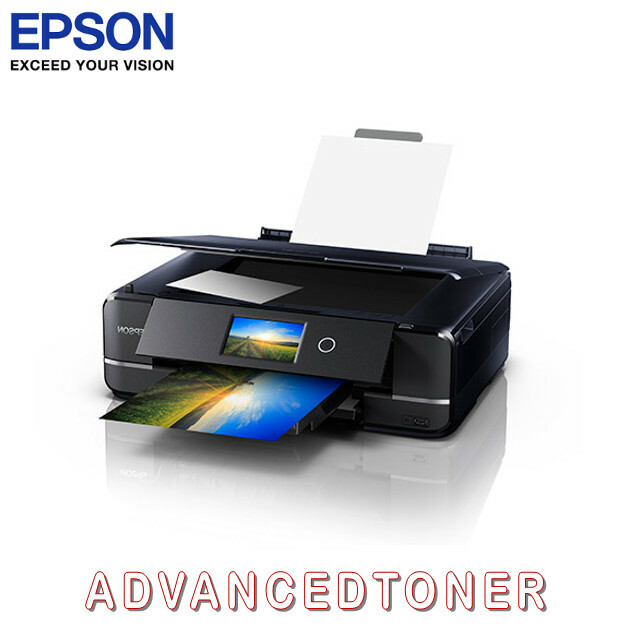
Epson Expression Photo HD XP-15000 Inkjet Printer
This innovative printer also includes features such as automatic 2-sided printing, Wi-Fi connectivity, and CD/DVD printing. Thanks to its compact size, it can easily fit on any desktop, making it convenient for printing your professional projects. With fast print speeds and a variety of wireless and wired connectivity options, this printer offers hassle-free printing and navigation. Additionally, its 2.4" colour LCD and auto open/close output tray add to its ease of use. With this printer, you can achieve brilliant borderless prints up to 13" x 19", ensuring your projects always look their best.
This innovative printer also includes features such as automatic 2-sided printing, Wi-Fi connectivity, and CD/DVD printing. Thanks to its compact size, it can easily fit on any desktop, making it convenient for printing your professional projects. With fast print speeds and a variety of wireless and wired connectivity options, this printer offers hassle-free printing and navigation. Additionally, its 2.4" colour LCD and auto open/close output tray add to its ease of use. With this printer, you can achieve brilliant borderless prints up to 13" x 19", ensuring your projects always look their best.
This innovative printer also includes features such as automatic 2-sided printing, Wi-Fi connectivity, and CD/DVD printing. Thanks to its compact size, it can easily fit on any desktop, making it convenient for printing your professional projects. With fast print speeds and a variety of wireless and wired connectivity options, this printer offers hassle-free printing and navigation. Additionally, its 2.4" colour LCD and auto open/close output tray add to its ease of use. With this printer, you can achieve brilliant borderless prints up to 13" x 19", ensuring your projects always look their best.
This innovative printer also includes features such as automatic 2-sided printing, Wi-Fi connectivity, and CD/DVD printing. Thanks to its compact size, it can easily fit on any desktop, making it convenient for printing your professional projects. With fast print speeds and a variety of wireless and wired connectivity options, this printer offers hassle-free printing and navigation. Additionally, its 2.4" colour LCD and auto open/close output tray add to its ease of use. With this printer, you can achieve brilliant borderless prints up to 13" x 19", ensuring your projects always look their best.
in 53 offers
The lowest price for Epson Expression Photo HD XP-15000 Inkjet Printer right now is $477.28 at itclearancecompany.com.au, compared across 47 retailers.
The all-time low was $62.74 on 21 July 2026 — today's price is 661% above the lowest ever. It has been notably cheaper before — worth setting a price alert.
Prices last updated 11 Oct 2026.
Last updated at 11/10/2026 05:18:49
Epson Expression Photo XP-15000 Multifunction Printer
Free delivery
Affiliate Disclosure: We may receive a small commission for purchases made through this link at no extra cost to you. This helps support our site. Thank you!
Epson Expression Photo HD XP-15000 inkjet printer Colour 5760 x 1440 DPI A3+ Wi-Fi
Delivery $19
Epson Expression Photo HD XP-15000 A3+ Colour Inkjet Printer Duplex WiFi Ethernet (C11CG43501)
Delivery $29.90
Epson Expression Photo HD XP-15000 A3, 6 Colour Inkjet Printer
Delivery $25
Epson Expression Photo Xp-15000 Multifunction Printer
Free delivery
Affiliate Disclosure: We may receive a small commission for purchases made through this link at no extra cost to you. This helps support our site. Thank you!
Epson XP15000 Photo Printer - C11CG43501
Delivery $32
Epson Expression XP-15000 Photo HD Printer [C11CG43501]
Epson Expression XP15000 Photo Printer
Free delivery between 13–19 Oct
Epson Expression Photo XP-15000 HD Printer
Free delivery between Mon – Fri
Epson Expression XP-15000 SFP 9.2ppm(B) 9 ISO 5760 x 1440dpi 7x Individual Claria Premium ink
Delivery $16.50
originally posted on epson.com
I bought this printer about a month ago and plan to use it for my business selling prints of my artwork. I spent about two weeks daily reading about printers and their reviews. This printer kept coming up as excellent. It prints professional quality while being a really reasonable cost. I am using Epson's Velvet Fine Art paper. My art prints look better than when I was taking them to a professional printer 20 minutes away. Now I can print from home, save time, and keep the cost of my prints lower. Give yourself 1.5 -2 hours minimum to remove packaging and set up. The printer comes packaged really well and shipped quickly. Be careful to really check to see that you remove all of the blue tape throughout the machine. I had to carefully unscrew one part on the bottom ... MoreI bought this printer about a month ago and plan to use it for my business selling prints of my artwork. I spent about two weeks daily reading about printers and their reviews. This printer kept coming up as excellent. It prints professional quality while being a really reasonable cost. I am using Epson's Velvet Fine Art paper. My art prints look better than when I was taking them to a professional printer 20 minutes away. Now I can print from home, save time, and keep the cost of my prints lower. Give yourself 1.5 -2 hours minimum to remove packaging and set up. The printer comes packaged really well and shipped quickly. Be careful to really check to see that you remove all of the blue tape throughout the machine. I had to carefully unscrew one part on the bottom of the printer in order to remove some of the blue tape and styrofoam packaging. Also, be sure NOT to try and manually pull out the front paper output tray. Once you plug it in, it will come out automatically when it prints. There is a button on the front panel to tap when you want it to retract. (See my photo where I point to this button.) I accidentally pulled it out manually and then couldn't get it to go back in. I though I had broken it. Fortunately, I had not. It took me a little while to figure out how to print from the rear try using my photo software. Again, take your time. Epson's online user's guide is very helpful. It is one of the few printers that takes heavy weight (140 pound) art paper which I needed. I do have to fee the paper one sheet at a time. The colors are super accurate to my original art, and like I said, much better than the laser prints from the professional printing company. I can't comment yet on ink usage and how often I'll need to purchase the cartridges. I accept that the ink will be pricey but plan to factor that in to the cost of my prints. This printer is amazing and I highly recommend it for artists.
originally posted on bhphotovideo.com
I'll start by saying that once its set up, this is a fabulous printer and excellent value for the money. It is a suitable replacement for my R1900 which gave up the ghost after 10 years. Setting it up was a challenge. Using the Epson installation wizard, the computer (current Windows 10) would recognize the printer and then stall and fail. This happened whether I set up using wireless or USB and after disabling firewalls and antivirus software. Finally I uninstalled everything and reinstalled. This time when it stalled I went to the Epson CD and searched the folders for an executable driver. The setup proceeded normally from there. Using wireless mode and the paper cartridge, the printer took about 8 minutes to print an 8x10 on ultra glossy paper. Unacceptable. I ... MoreI'll start by saying that once its set up, this is a fabulous printer and excellent value for the money. It is a suitable replacement for my R1900 which gave up the ghost after 10 years. Setting it up was a challenge. Using the Epson installation wizard, the computer (current Windows 10) would recognize the printer and then stall and fail. This happened whether I set up using wireless or USB and after disabling firewalls and antivirus software. Finally I uninstalled everything and reinstalled. This time when it stalled I went to the Epson CD and searched the folders for an executable driver. The setup proceeded normally from there. Using wireless mode and the paper cartridge, the printer took about 8 minutes to print an 8x10 on ultra glossy paper. Unacceptable. I uninstalled the printer and software and reinstalled it the same way, this time with a USB connection. Using the rear loader and high speed (no apparent loss of quality), the time to print an 8x10 dropped to 2 minutes and about 45 seconds for a 4x6, both printing through Photoshop Elements. When I exited Elements, a popup opened from Epson asking if I wanted to download additional software. I chose the ones I'd find useful, and now the printer is fully set up and operating beautifully. I don't know why the software wouldn't load normally, and Epson wasn't helpful in this regard. But with a little knowledge of computer operations, I was able to get running properly. And the quality of the prints I'm getting from this printer make it worth the while.
originally posted on staples.com
I bought this printer not having researched it much but I needed a printer quickly and so far it has been a great purchase. I like to print my own photographs in a larger format than normal. The XP-15000 allows up to 13”x19”, which is what my old printer did, but the XP-15000 prints much quicker. The print quality is excellent. So far I’ve used luster and matte finish photo paper and the XP-15000 has produced high quality prints on both types of paper. I also like the front loading paper tray and that it automatically prints double sided to save paper. For the price this has been a very good purchase: easy to use, great print quality and easy to connect to our WI-FI.
| General | |
| Printer Type | Workgroup printer - ink-jet - colour |
| Printer | |
| Inkjet Technology | Epson Micro Piezo |
| Ink Palette Supported (Colours) | 6-ink - cyan, magenta, yellow, black, red, grey |

Epson Expression Photo XP-15000 Multifunction Printer
Free delivery
Affiliate Disclosure: We may receive a small commission for purchases made through this link at no extra cost to you. This helps support our site. Thank you!
Epson Expression Photo HD XP-15000 inkjet printer Colour 5760 x 1440 DPI A3+ Wi-Fi
Delivery $19
Epson Expression Photo HD XP-15000 A3+ Colour Inkjet Printer Duplex WiFi Ethernet (C11CG43501)
Delivery $29.90
Epson Expression Photo HD XP-15000 A3, 6 Colour Inkjet Printer
Delivery $25
Epson Expression Photo Xp-15000 Multifunction Printer
Free delivery
Affiliate Disclosure: We may receive a small commission for purchases made through this link at no extra cost to you. This helps support our site. Thank you!
I bought this printer about a month ago and plan to use it for my business selling prints of my artwork. I spent about two weeks daily reading about printers and their reviews. This printer kept coming up as excellent. It prints professional quality while being a really reasonable cost. I am using Epson's Velvet Fine Art paper. My art prints look better than when I was taking them to a professional printer 20 minutes away. Now I can print from home, save time, and keep the cost of my prints lower. Give yourself 1.5 -2 hours minimum to remove packaging and set up. The printer comes packaged really well and shipped quickly. Be careful to really check to see that you remove all of the blue tape throughout the machine. I had to carefully unscrew one part on the bottom ... MoreI bought this printer about a month ago and plan to use it for my business selling prints of my artwork. I spent about two weeks daily reading about printers and their reviews. This printer kept coming up as excellent. It prints professional quality while being a really reasonable cost. I am using Epson's Velvet Fine Art paper. My art prints look better than when I was taking them to a professional printer 20 minutes away. Now I can print from home, save time, and keep the cost of my prints lower. Give yourself 1.5 -2 hours minimum to remove packaging and set up. The printer comes packaged really well and shipped quickly. Be careful to really check to see that you remove all of the blue tape throughout the machine. I had to carefully unscrew one part on the bottom of the printer in order to remove some of the blue tape and styrofoam packaging. Also, be sure NOT to try and manually pull out the front paper output tray. Once you plug it in, it will come out automatically when it prints. There is a button on the front panel to tap when you want it to retract. (See my photo where I point to this button.) I accidentally pulled it out manually and then couldn't get it to go back in. I though I had broken it. Fortunately, I had not. It took me a little while to figure out how to print from the rear try using my photo software. Again, take your time. Epson's online user's guide is very helpful. It is one of the few printers that takes heavy weight (140 pound) art paper which I needed. I do have to fee the paper one sheet at a time. The colors are super accurate to my original art, and like I said, much better than the laser prints from the professional printing company. I can't comment yet on ink usage and how often I'll need to purchase the cartridges. I accept that the ink will be pricey but plan to factor that in to the cost of my prints. This printer is amazing and I highly recommend it for artists.
I'll start by saying that once its set up, this is a fabulous printer and excellent value for the money. It is a suitable replacement for my R1900 which gave up the ghost after 10 years. Setting it up was a challenge. Using the Epson installation wizard, the computer (current Windows 10) would recognize the printer and then stall and fail. This happened whether I set up using wireless or USB and after disabling firewalls and antivirus software. Finally I uninstalled everything and reinstalled. This time when it stalled I went to the Epson CD and searched the folders for an executable driver. The setup proceeded normally from there. Using wireless mode and the paper cartridge, the printer took about 8 minutes to print an 8x10 on ultra glossy paper. Unacceptable. I ... MoreI'll start by saying that once its set up, this is a fabulous printer and excellent value for the money. It is a suitable replacement for my R1900 which gave up the ghost after 10 years. Setting it up was a challenge. Using the Epson installation wizard, the computer (current Windows 10) would recognize the printer and then stall and fail. This happened whether I set up using wireless or USB and after disabling firewalls and antivirus software. Finally I uninstalled everything and reinstalled. This time when it stalled I went to the Epson CD and searched the folders for an executable driver. The setup proceeded normally from there. Using wireless mode and the paper cartridge, the printer took about 8 minutes to print an 8x10 on ultra glossy paper. Unacceptable. I uninstalled the printer and software and reinstalled it the same way, this time with a USB connection. Using the rear loader and high speed (no apparent loss of quality), the time to print an 8x10 dropped to 2 minutes and about 45 seconds for a 4x6, both printing through Photoshop Elements. When I exited Elements, a popup opened from Epson asking if I wanted to download additional software. I chose the ones I'd find useful, and now the printer is fully set up and operating beautifully. I don't know why the software wouldn't load normally, and Epson wasn't helpful in this regard. But with a little knowledge of computer operations, I was able to get running properly. And the quality of the prints I'm getting from this printer make it worth the while.
I bought this printer not having researched it much but I needed a printer quickly and so far it has been a great purchase. I like to print my own photographs in a larger format than normal. The XP-15000 allows up to 13”x19”, which is what my old printer did, but the XP-15000 prints much quicker. The print quality is excellent. So far I’ve used luster and matte finish photo paper and the XP-15000 has produced high quality prints on both types of paper. I also like the front loading paper tray and that it automatically prints double sided to save paper. For the price this has been a very good purchase: easy to use, great print quality and easy to connect to our WI-FI.
Great printer at a really good price too. Arrived in absolutely perfect condition with no flaws on the box at all. Couldn t be happier in terms of what I received. Exactly as described no complaints or anything other than exactly what was expected. Was looking for a printer to use for my graphic design work and this was one that repeatedly appeared in my research so I m really happy to have found it here. Multiple inks allow for really good colours and the a3 function makes for amazing borderless prints. Quality feel and well designed no unnecessary extras or flimsy plastic pieces. Maintenance seems straight forward which a bonus. Overall 9 10 - I think a refillable ink tank would make this a 10 10
It's a workhorse of a printer and has been churning out high quality prints for a few months now. Fair warning, it isn't the most intuitive of products, but for what it complicates in screen/button management it makes up for in high quality printing. The front and read loading paper interfaces are easy to use, although the printer clearly has a preference for printing from the tray as opposed do the top feed method. Still, it is a larger format printer that delivers image clear prints on a relatively small price point. That being said, the printer is expensive, and the ink is expensive (it's a multitude of cartridges that are all individual colors and subsets), but it met the business needs I had for a great price. I wouldn't use it for your everyday printing, but ... MoreIt's a workhorse of a printer and has been churning out high quality prints for a few months now. Fair warning, it isn't the most intuitive of products, but for what it complicates in screen/button management it makes up for in high quality printing. The front and read loading paper interfaces are easy to use, although the printer clearly has a preference for printing from the tray as opposed do the top feed method. Still, it is a larger format printer that delivers image clear prints on a relatively small price point. That being said, the printer is expensive, and the ink is expensive (it's a multitude of cartridges that are all individual colors and subsets), but it met the business needs I had for a great price. I wouldn't use it for your everyday printing, but it's great for that special photo/image you want to print out.
I am a professional photographer. I spend so much money paying for prints. So, in order to increase my margin on smaller sized prints, I thought I would give this more entry level printer a try. I am not a big business, so I couldn't justify buying the P900 or better (though, if I could afford it, I would!). I read a lot of reviews before purchasing and some were mixed, most were good. So, I went ahead. I received it along with some ultra lustre premium epson paper and a full set of high capacity ink replacement cartridges. I ordered two sizes of the photo paper, 8.5 x 11 and 13 x 19. After following the direction for setup, I did waste some of the premium paper until I figured out, no real guidance from the directions, to get borderless, edge to edge prints. Then, ... MoreI am a professional photographer. I spend so much money paying for prints. So, in order to increase my margin on smaller sized prints, I thought I would give this more entry level printer a try. I am not a big business, so I couldn't justify buying the P900 or better (though, if I could afford it, I would!). I read a lot of reviews before purchasing and some were mixed, most were good. So, I went ahead. I received it along with some ultra lustre premium epson paper and a full set of high capacity ink replacement cartridges. I ordered two sizes of the photo paper, 8.5 x 11 and 13 x 19. After following the direction for setup, I did waste some of the premium paper until I figured out, no real guidance from the directions, to get borderless, edge to edge prints. Then, I managed to get two, one in each size, really lovely prints of one of my photographs. I was super excited and so happy. I also stopped that day. Then the holidays began and didn't get back to more testing until now. Well, despite having no issues with my test prints, the first attempt at printing now resulted in horrible banding and what looked like runny ink. I tried all the suggested trouble shooting. I wasted several pieces of costly photo paper. Then I thought, well, maybe I should try printing from another device (I had only used my MacBook pro for both setup and all initial images - both the good ones and now only bad ones). So, I tried sending a photo from my iPad pro, on regular copy paper. I printed perfect, borderless and lovely. No banding. So, I tried a few more, on both the 8.5 x 11 and 13 x 19 premium paper. They are great. What one earth is going on? I tried searching on epson's trouble shooting and on google. No insight. I just don't understand. And, of course, though the printing mishaps, I quickly emptied the first set up ink cartridges and already had to install the new ones. Also, what I didn't know is 13 x 19 is considered Super B+ paper. And, when feeding the large paper through the back (where you have to feed it), you get an error that it is out of paper when the print in partially through. If you hit cancel on that message, it cancels the entire print job, ruining the paper and wasting ink. So, just ignore that message until it finishes the print or put another piece of paper in carrier to clear that error. So, I am not entirely sure how I feel about the printer. When it works, which is a 50-50 question, it seems quite lovely. But, when it doesn't, it really doesn't. In an effort to save money by printing myself, I am not sure that I am actually succeeding. At the end of the day, with the losses of ink and paper from the mystery of 'will it or won't it print correctly', I may be better off continuing to support the print shops I have been going to. I really was hopeful, but am now disappointed and out approximately $1000 after buying the printer, extra ink and very expensive paper.
Purchased this printer several years ago. Loved the print quality, especially at this price point. Ink is pricey (6 separate cartridges) but knew that going in. However, after replacing the ink cartridges only a few times, it appears in this latest iteration a small piece in the cartridge receiving tray for an individual cartridge fractured and broke off. Ink cartridge is not recognized by printer and renders the printer completely useless. Part appears to be under-engineered for its purpose. Have owned multiple printers and never had issues replacing cartridges on any of them. Online customer service very un-helpful. They ask for pictures documenting the issue and after receiving them say sorry, online help cannot help, close the case and tell you to call them ... MorePurchased this printer several years ago. Loved the print quality, especially at this price point. Ink is pricey (6 separate cartridges) but knew that going in. However, after replacing the ink cartridges only a few times, it appears in this latest iteration a small piece in the cartridge receiving tray for an individual cartridge fractured and broke off. Ink cartridge is not recognized by printer and renders the printer completely useless. Part appears to be under-engineered for its purpose. Have owned multiple printers and never had issues replacing cartridges on any of them. Online customer service very un-helpful. They ask for pictures documenting the issue and after receiving them say sorry, online help cannot help, close the case and tell you to call them instead. Will not recommend this to other users based on my experience.
During the past year, our Epson 1430 developed a print head problem. To print with it we needed to print a full page of pure Yellow to clean Black ink out the Yellow nozzles. Eventually, we ordered a new print head online. After installing it, we could no longer turn the 1430 ON. Looking for a replacement for the 1430, we found the XP-15000, and ordered one from Staples. It was supposed to arrive overnight, but took a few days to get here. Setup with USB was quick and easy. The first nozzle check was not encouraging - it showed that a head cleaning was needed and puked a blob of Black ink at the bottom of the page. After the head cleaning, another nozzle check showed all nozzles working, and no ink spill, however, our first couple of print attempts showed spilled ... MoreDuring the past year, our Epson 1430 developed a print head problem. To print with it we needed to print a full page of pure Yellow to clean Black ink out the Yellow nozzles. Eventually, we ordered a new print head online. After installing it, we could no longer turn the 1430 ON. Looking for a replacement for the 1430, we found the XP-15000, and ordered one from Staples. It was supposed to arrive overnight, but took a few days to get here. Setup with USB was quick and easy. The first nozzle check was not encouraging - it showed that a head cleaning was needed and puked a blob of Black ink at the bottom of the page. After the head cleaning, another nozzle check showed all nozzles working, and no ink spill, however, our first couple of print attempts showed spilled Black ink on the page. Our prints, after that, came out fine! I've read complaints about the print-catch tray, but have not had any problems with it. Ink use seems to be about the same as the 1430; we are still on the cartridges that came with the printer. The prints look very good! In the "Advanced" section in the "More Options" tab of the print driver we use "Color Controls" for Color Management, "Adobe RGB" Color Mode, and Gamma 2.2 with no further correction. The settings screen on the printer takes a little getting used to, but it's no big deal. I see the printer has a "Quiet Mode", but without turning that ON the printer is already much quieter than the 1430. Paper feeding from the tray works well, as does feeding paper a sheet at a time from the rear. I have noticed that when printing a form I had scanned in, the letters and lines gained weight. I'll have to see about correcting that in the future, if possible. Printing one of our glossy Fireball XL5 sticker sets, which has small type, did not show this problem. The XP-15000 has a smaller footprint than the 1430, which is a good thing! All-in-all, I'm pretty happy with the performance of the printer. Getting the print driver to remember your preferred settings, from one program to another is a simple matter of opening the driver from the Printers section of the Windows START menu, and setting them, there. Hopefully, we'll get many trouble-free years use out of the XP-15000! You CAN use paper longer than 19 inches (cut from a roll), but you must remove any curl to avoid the print head hitting the paper and leaving a mark. Gently steaming the paper with a clothing steamer helps with that.
I've owned this printer for four years, using for a variety of papers. It's very reliable, making excellent borderless prints, printing cards, and all of the regular home prints for photos and text. The only two things I don't like are the paper feed tray is set too close to the output tray, and the rear feed doesn't hold many pages before it starts to affect the feed rollers. The paper feed tray is awkward to get to when the output tray is extended. It is set on nearly the same level as the table and directly below the output tray. Loading paper stocks means the output tray has to be stored before I can pull the paper feed tray out, and the feed tray has to be pulled completely out in order to load it. This is an issue when I'm printing front and back on stiffer ... MoreI've owned this printer for four years, using for a variety of papers. It's very reliable, making excellent borderless prints, printing cards, and all of the regular home prints for photos and text. The only two things I don't like are the paper feed tray is set too close to the output tray, and the rear feed doesn't hold many pages before it starts to affect the feed rollers. The paper feed tray is awkward to get to when the output tray is extended. It is set on nearly the same level as the table and directly below the output tray. Loading paper stocks means the output tray has to be stored before I can pull the paper feed tray out, and the feed tray has to be pulled completely out in order to load it. This is an issue when I'm printing front and back on stiffer paper stock, since pulling the tray out each time to reload it means waiting for the output tray to store each time. The rear paper feed is limited in the number of pages it holds. Too many pages and the pages don't feed. Could be a problem with the location of the feed rollers? However, I love the way the printer will feed the papers, checking whether they are advanced far enough so the top of the print is actually the top of the paper before it starts printing.
I did a good amount of research before settling on this photo printer and with B&H Photo's easy on-line ordering I purchased one on a Monday and had it on my front porch Wednesday afternoon. Set up was relatively easy with no problems encountered. Operating it is also very easy with really no learning curve. The prints that this puts out are absolutely incredible. I am getting super sharp prints from my Nikon D750 camera images with true colors thanks to the six color ink cartridges. I saw some people discussing what they thought were somewhat slow printing times, but it's fast enough to suit me and faster than the HP printer it replaced. Ink usage so far seems quite reasonable for prints on 8 1/2 x 11 photo paper. I had a lot of HP glossy photo paper left over and ... MoreI did a good amount of research before settling on this photo printer and with B&H Photo's easy on-line ordering I purchased one on a Monday and had it on my front porch Wednesday afternoon. Set up was relatively easy with no problems encountered. Operating it is also very easy with really no learning curve. The prints that this puts out are absolutely incredible. I am getting super sharp prints from my Nikon D750 camera images with true colors thanks to the six color ink cartridges. I saw some people discussing what they thought were somewhat slow printing times, but it's fast enough to suit me and faster than the HP printer it replaced. Ink usage so far seems quite reasonable for prints on 8 1/2 x 11 photo paper. I had a lot of HP glossy photo paper left over and it printed on that paper perfectly. Absolutely pleased with this purchase!
| General | |
| Printer Type | Workgroup printer - ink-jet - colour |
| Printer | |
| Inkjet Technology | Epson Micro Piezo |
| Ink Palette Supported (Colours) | 6-ink - cyan, magenta, yellow, black, red, grey |