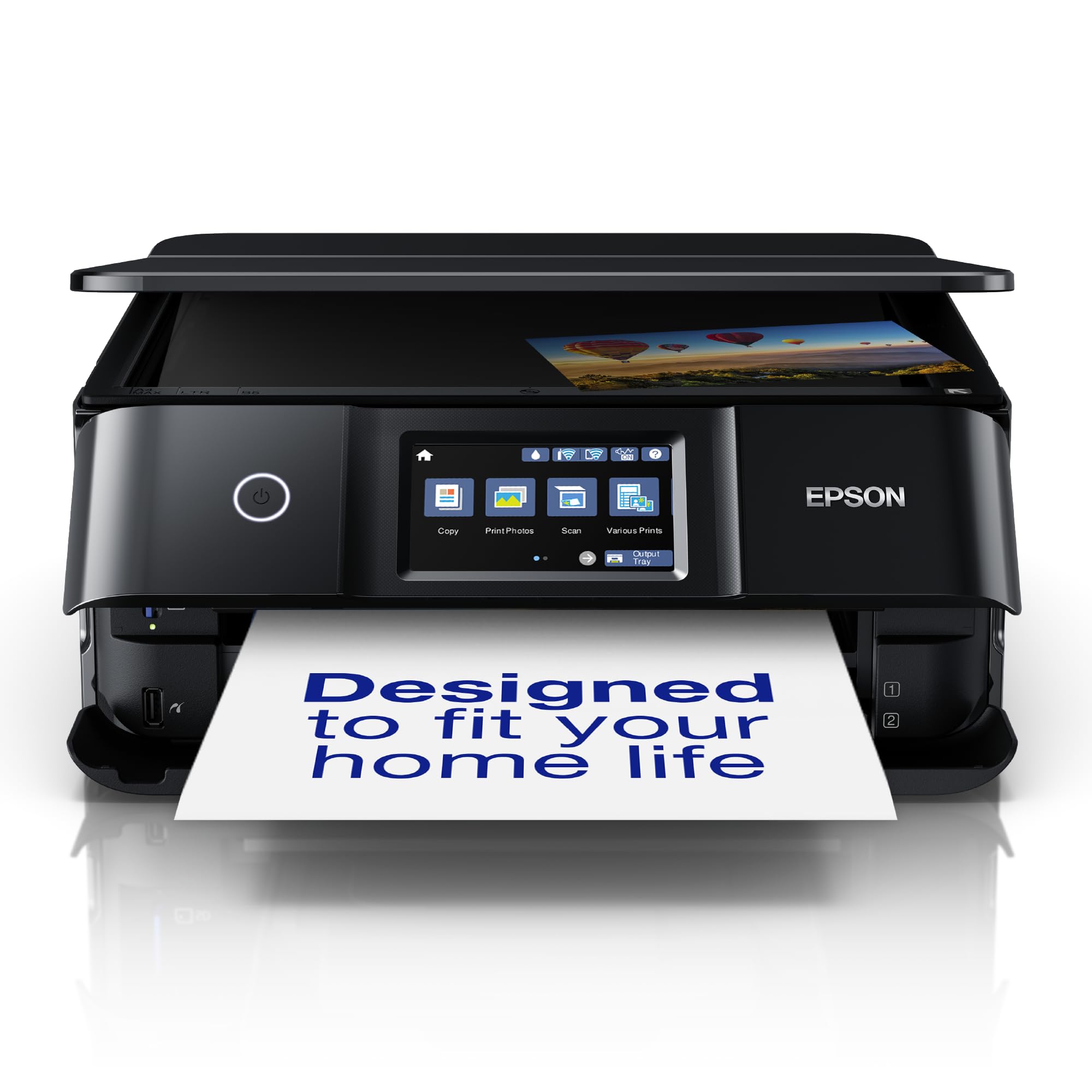
Epson Expression Photo XP-8700 Multifunction Inkjet Printer
A multifunctional is really an all-in-one device; it is both a scanner and a printer, and often even has a fax function. So effectively it’s a copier, but one that has the scanning and printing functions available separately. All this is a great advantage when you have limited office space. Moreover, you will be able to work faster and more efficiently by using the device’s convenient special functions.
A multifunctional is really an all-in-one device; it is both a scanner and a printer, and often even has a fax function. So effectively it’s a copier, but one that has the scanning and printing functions available separately. All this is a great advantage when you have limited office space. Moreover, you will be able to work faster and more efficiently by using the device’s convenient special functions.
A multifunctional is really an all-in-one device; it is both a scanner and a printer, and often even has a fax function. So effectively it’s a copier, but one that has the scanning and printing functions available separately. All this is a great advantage when you have limited office space. Moreover, you will be able to work faster and more efficiently by using the device’s convenient special functions.
A multifunctional is really an all-in-one device; it is both a scanner and a printer, and often even has a fax function. So effectively it’s a copier, but one that has the scanning and printing functions available separately. All this is a great advantage when you have limited office space. Moreover, you will be able to work faster and more efficiently by using the device’s convenient special functions.
in 36 offers
The lowest price for Epson Expression Photo XP-8700 Multifunction Inkjet Printer right now is $255.00 at JW Computers, compared across 24 retailers.
The all-time low was $114.00 on 12 Mar 2026 — today's price is 124% above the lowest ever. It has been notably cheaper before — worth setting a price alert.
Prices last updated 27 Aug 2026.
Last updated at 27/08/2026 10:33:25
Epson XP8700 Multi-Function Colour Inkjet Printer (Print/Copy/Scan/UHD Photo)
Delivery between 31 Aug – 3 Sept $21
Epson Expression Photo XP-8700 A4 Colour Inkjet Multifunction Printer WiFi (C11CK46501)
Delivery $19.99
Epson Experssion Photo XP-8700 6 Colour Multifunction Printer
Delivery between 31 Aug – 3 Sept $31.90
Epson XP8700 Inkjet MFP C11CK46501
Free delivery between Fri – Tue
Epson Expression Photo XP-8700
Delivery between Fri – Tue $7.95
Epson Expression A4 Wireless Photo Colour Multifunction Inkjet Printer, XP-8700 Inkjet Printers & Multifunctions
Free delivery between 31 Aug – 7 Sept
Epson XP8700 Inkjet MFP
Free delivery between 2–10 Sept
Epson XP8700 Inkjet MFP | TK Toners Australia
Delivery between 31 Aug – 3 Sept $13
Epson XP8700 Inkjet MFP
14-day returns
Epson XP8700 Inkjet MFP
14-day returns
originally posted on epson.com
This is a review for the Epson Expression Photo XP-8700 Wireless All-in-one Printer that I received free of charge to do a beta test and review. First the printers small size is perfect if you do not have a lot of desk space for it. But don’t be fooled by its size, it prints pictures that are so vibrant and colorful it almost looks like professional photos. This printer uses 6 ink cartridges instead of 4, so it can mix colors and makes photos look amazing. It prints documents very quickly and is also is very quiet. Since the printer is so compact it has a build in output drawer that automatically extends when you start to print so it does not need to be out all of the time. Once you are done printing just click on the output tray button and it automatically retracts ... MoreThis is a review for the Epson Expression Photo XP-8700 Wireless All-in-one Printer that I received free of charge to do a beta test and review. First the printers small size is perfect if you do not have a lot of desk space for it. But don’t be fooled by its size, it prints pictures that are so vibrant and colorful it almost looks like professional photos. This printer uses 6 ink cartridges instead of 4, so it can mix colors and makes photos look amazing. It prints documents very quickly and is also is very quiet. Since the printer is so compact it has a build in output drawer that automatically extends when you start to print so it does not need to be out all of the time. Once you are done printing just click on the output tray button and it automatically retracts into the printer. It has a very easy to understand and use control panel on the printer to setup and control all of the printer settings. It also uses EpsonConnect which allows you to send document attachments to the printer via email to print remotely. The printer setup takes about 20 minutes from start to finish using a cellphone and the Epson Smart Panel app. After the setup is complete you can easily add it to your computer using the software downloaded from Epson’s website. The setup is extremely easy as long as you read the instructions carefully on you cellphone/tablet. The Epson Smart Panel app is full featured and allows you to print photo directly from your phone, scan documents to you phone or computer. It even has the ability to scan ID cards. Epson has a creative print app that allows you to create collages, photo books, greeting cards, stationary, CD/DVD covers, and more. Overall this is a great printer for a small home office or a home user. It does not have an automatic paper feeder for the scanner or the ability to fax. But otherwise I would highly recommend this printer/scanner if you need a compact printer that does extremely good photo printing.
originally posted on epson.com
This is a review for the Epson Expression Photo XP-8700 Wireless All-in-one Printer that I received free of charge to do a beta test and review. Having owned several Epson photo printers over the years, I find the XP-8700 to be a solid contender to be the go-to photo printer for families and semi-pro photographers looking to print their smaller output. The color accuracy is spot on and the prints pop in sharpness and clarity. Printing on high-end Epson papers is relatively quick and the prints dry instantly. I've sent framed and matted photos to several friends and they've been exceptionally pleased. Six color inks are a definite plus in getting high-quality output. I think the XP-8700 will find a spot in many homes and studios for a wide array of photographers. ... MoreThis is a review for the Epson Expression Photo XP-8700 Wireless All-in-one Printer that I received free of charge to do a beta test and review. Having owned several Epson photo printers over the years, I find the XP-8700 to be a solid contender to be the go-to photo printer for families and semi-pro photographers looking to print their smaller output. The color accuracy is spot on and the prints pop in sharpness and clarity. Printing on high-end Epson papers is relatively quick and the prints dry instantly. I've sent framed and matted photos to several friends and they've been exceptionally pleased. Six color inks are a definite plus in getting high-quality output. I think the XP-8700 will find a spot in many homes and studios for a wide array of photographers. It's a great acquisition for anyone looking to upgrade to a new photo-centric
originally posted on epson.com
This is a review for the Epson Expression Photo XP-8700 Wireless All-in-one Printer that I received free of charge to do a beta test and review. Right out of the box, the Expression Photo XP-8700 Wireless All-in-One Printer that I received initially had a sensor issue and I was unable to get the cartridges installed. These printers have warranty-- if this happens to you, call Customer Service before just simply saying the printer is bad. Epson's Customer Service was great, handled the matter in a quick fashion, emailed me a return label, and sent me a replacement with 1-day shipping once they received it. The alternative would be to put a hold on a credit card and they could send me a printer first, but I chose to return first. Now the replacement worked perfectly. ... MoreThis is a review for the Epson Expression Photo XP-8700 Wireless All-in-one Printer that I received free of charge to do a beta test and review. Right out of the box, the Expression Photo XP-8700 Wireless All-in-One Printer that I received initially had a sensor issue and I was unable to get the cartridges installed. These printers have warranty-- if this happens to you, call Customer Service before just simply saying the printer is bad. Epson's Customer Service was great, handled the matter in a quick fashion, emailed me a return label, and sent me a replacement with 1-day shipping once they received it. The alternative would be to put a hold on a credit card and they could send me a printer first, but I chose to return first. Now the replacement worked perfectly. Setting up was a breeze, though it is easier to set up on the printer itself than the Epson Smart Panel App (I used the iOS version, and during the set up it disconnected and could not reconnect after I switched over iMessages to respond to a message). This is my first photo printer, and I found the whole calibration process quite fun-- it prints out boxes and you tell the printer which ones are have the least lines and then which one has no overlap. Then the real test came to actual color prints. I bought premium glossy photo paper to put this printer to the test as it comes with no paper. The printer was quite quiet and fast in printing and the colors are definitely better (more accurate) than any 4 cartridge kind of inkjet printer I've used for sure. I printed a couple photos and also some digital art and I was equally happy with both. I am not a professional photographer, but as a digital artist, I think this printer is more than enough for prints and stickers. Just a warning though, this printer is a fingerprint magnet due to the gloss finish. It has a scanner, so I'd assume people would be handling it, and if that bothers you, you may want to have a microfiber cloth near by to wipe it down after using.
| Duplex printing mode | Auto |
| Maximum resolution Maximum printing resolution | 5760 x 1440 DPI |
| Print speed (ISO/IEC 24734) black | 9.5 ppm |
| Print speed (ISO/IEC 24734) colour | 9 ppm |
| Scan to | Cloud |
Epson XP8700 Multi-Function Colour Inkjet Printer (Print/Copy/Scan/UHD Photo)
Delivery between 31 Aug – 3 Sept $21
Epson Expression Photo XP-8700 A4 Colour Inkjet Multifunction Printer WiFi (C11CK46501)
Delivery $19.99
Epson Experssion Photo XP-8700 6 Colour Multifunction Printer
Delivery between 31 Aug – 3 Sept $31.90
Epson XP8700 Inkjet MFP C11CK46501
Free delivery between Fri – Tue
Epson Expression Photo XP-8700
Delivery between Fri – Tue $7.95
This is a review for the Epson Expression Photo XP-8700 Wireless All-in-one Printer that I received free of charge to do a beta test and review. First the printers small size is perfect if you do not have a lot of desk space for it. But don’t be fooled by its size, it prints pictures that are so vibrant and colorful it almost looks like professional photos. This printer uses 6 ink cartridges instead of 4, so it can mix colors and makes photos look amazing. It prints documents very quickly and is also is very quiet. Since the printer is so compact it has a build in output drawer that automatically extends when you start to print so it does not need to be out all of the time. Once you are done printing just click on the output tray button and it automatically retracts ... MoreThis is a review for the Epson Expression Photo XP-8700 Wireless All-in-one Printer that I received free of charge to do a beta test and review. First the printers small size is perfect if you do not have a lot of desk space for it. But don’t be fooled by its size, it prints pictures that are so vibrant and colorful it almost looks like professional photos. This printer uses 6 ink cartridges instead of 4, so it can mix colors and makes photos look amazing. It prints documents very quickly and is also is very quiet. Since the printer is so compact it has a build in output drawer that automatically extends when you start to print so it does not need to be out all of the time. Once you are done printing just click on the output tray button and it automatically retracts into the printer. It has a very easy to understand and use control panel on the printer to setup and control all of the printer settings. It also uses EpsonConnect which allows you to send document attachments to the printer via email to print remotely. The printer setup takes about 20 minutes from start to finish using a cellphone and the Epson Smart Panel app. After the setup is complete you can easily add it to your computer using the software downloaded from Epson’s website. The setup is extremely easy as long as you read the instructions carefully on you cellphone/tablet. The Epson Smart Panel app is full featured and allows you to print photo directly from your phone, scan documents to you phone or computer. It even has the ability to scan ID cards. Epson has a creative print app that allows you to create collages, photo books, greeting cards, stationary, CD/DVD covers, and more. Overall this is a great printer for a small home office or a home user. It does not have an automatic paper feeder for the scanner or the ability to fax. But otherwise I would highly recommend this printer/scanner if you need a compact printer that does extremely good photo printing.
This is a review for the Epson Expression Photo XP-8700 Wireless All-in-one Printer that I received free of charge to do a beta test and review. Having owned several Epson photo printers over the years, I find the XP-8700 to be a solid contender to be the go-to photo printer for families and semi-pro photographers looking to print their smaller output. The color accuracy is spot on and the prints pop in sharpness and clarity. Printing on high-end Epson papers is relatively quick and the prints dry instantly. I've sent framed and matted photos to several friends and they've been exceptionally pleased. Six color inks are a definite plus in getting high-quality output. I think the XP-8700 will find a spot in many homes and studios for a wide array of photographers. ... MoreThis is a review for the Epson Expression Photo XP-8700 Wireless All-in-one Printer that I received free of charge to do a beta test and review. Having owned several Epson photo printers over the years, I find the XP-8700 to be a solid contender to be the go-to photo printer for families and semi-pro photographers looking to print their smaller output. The color accuracy is spot on and the prints pop in sharpness and clarity. Printing on high-end Epson papers is relatively quick and the prints dry instantly. I've sent framed and matted photos to several friends and they've been exceptionally pleased. Six color inks are a definite plus in getting high-quality output. I think the XP-8700 will find a spot in many homes and studios for a wide array of photographers. It's a great acquisition for anyone looking to upgrade to a new photo-centric
This is a review for the Epson Expression Photo XP-8700 Wireless All-in-one Printer that I received free of charge to do a beta test and review. Right out of the box, the Expression Photo XP-8700 Wireless All-in-One Printer that I received initially had a sensor issue and I was unable to get the cartridges installed. These printers have warranty-- if this happens to you, call Customer Service before just simply saying the printer is bad. Epson's Customer Service was great, handled the matter in a quick fashion, emailed me a return label, and sent me a replacement with 1-day shipping once they received it. The alternative would be to put a hold on a credit card and they could send me a printer first, but I chose to return first. Now the replacement worked perfectly. ... MoreThis is a review for the Epson Expression Photo XP-8700 Wireless All-in-one Printer that I received free of charge to do a beta test and review. Right out of the box, the Expression Photo XP-8700 Wireless All-in-One Printer that I received initially had a sensor issue and I was unable to get the cartridges installed. These printers have warranty-- if this happens to you, call Customer Service before just simply saying the printer is bad. Epson's Customer Service was great, handled the matter in a quick fashion, emailed me a return label, and sent me a replacement with 1-day shipping once they received it. The alternative would be to put a hold on a credit card and they could send me a printer first, but I chose to return first. Now the replacement worked perfectly. Setting up was a breeze, though it is easier to set up on the printer itself than the Epson Smart Panel App (I used the iOS version, and during the set up it disconnected and could not reconnect after I switched over iMessages to respond to a message). This is my first photo printer, and I found the whole calibration process quite fun-- it prints out boxes and you tell the printer which ones are have the least lines and then which one has no overlap. Then the real test came to actual color prints. I bought premium glossy photo paper to put this printer to the test as it comes with no paper. The printer was quite quiet and fast in printing and the colors are definitely better (more accurate) than any 4 cartridge kind of inkjet printer I've used for sure. I printed a couple photos and also some digital art and I was equally happy with both. I am not a professional photographer, but as a digital artist, I think this printer is more than enough for prints and stickers. Just a warning though, this printer is a fingerprint magnet due to the gloss finish. It has a scanner, so I'd assume people would be handling it, and if that bothers you, you may want to have a microfiber cloth near by to wipe it down after using.
“This is a review for the Epson Expression Photo XP-8700 Wireless All-in-one Printer that I received free of charge to do a beta test and review.” Greatly anticipated the reception of the Epson XP-8700 Wireless All-in-one Printer from Fedx shipping. Upon opening the box I found it was well maintained through the shipping process. After opening the box I found the printer to have a very professional polished black appearance. It has a small environmental footprint using very little space on the printing desk. It is quiet for all of the multiple parts sounds made by the parts of a printer. Set-up was a breeze when connecting to my wireless network. The unit has a wireless set-up wizard that handles wireless set-up automatically. The compact functionality of the copier ... More“This is a review for the Epson Expression Photo XP-8700 Wireless All-in-one Printer that I received free of charge to do a beta test and review.” Greatly anticipated the reception of the Epson XP-8700 Wireless All-in-one Printer from Fedx shipping. Upon opening the box I found it was well maintained through the shipping process. After opening the box I found the printer to have a very professional polished black appearance. It has a small environmental footprint using very little space on the printing desk. It is quiet for all of the multiple parts sounds made by the parts of a printer. Set-up was a breeze when connecting to my wireless network. The unit has a wireless set-up wizard that handles wireless set-up automatically. The compact functionality of the copier was good, the ink cartridges are small but the unit is efficient printing, scanning, copying regular prints and photos. The photo scanner is excellent at reprinting photos. I am pleasantly surprised that this little all-in-one machine performs such quality printing, scanning and photos. A picture is worth a thousand words so here you go…I’m pleased that it works as promised and it looks good on the desktop.
A great improvement on my previous Epson printer which had provided reasonably good quality B&W and colour printing for several years. The XP-8700 provides the essential services needed viz colour double sided printing, copying and scanning, and home network connectivity. Photo quality printing is excellent, albeit somewhat slow and there is a useful rear feed for thicker paper and card as well a second tray for different size paper. The printer proved to be very easy to set up. Appearance is non-cluttered with an automatically emerging print receiving tray and a fold down front panel containing the easy to use touch screen. Only downside is that the replacement ink cartridges are expensive - a set of high capacity cartridges is nearly as expensive as the printer! ... MoreA great improvement on my previous Epson printer which had provided reasonably good quality B&W and colour printing for several years. The XP-8700 provides the essential services needed viz colour double sided printing, copying and scanning, and home network connectivity. Photo quality printing is excellent, albeit somewhat slow and there is a useful rear feed for thicker paper and card as well a second tray for different size paper. The printer proved to be very easy to set up. Appearance is non-cluttered with an automatically emerging print receiving tray and a fold down front panel containing the easy to use touch screen. Only downside is that the replacement ink cartridges are expensive - a set of high capacity cartridges is nearly as expensive as the printer! Happily good alternatives are available at less than a third of the OEM price. Thoroughly recommended for home and, home-office use.
This is a review for the Epson Expression Photo XP-8700 Wireless All-in-one Printer that I received free of charge to so a beta test and review. Firstly the initial set up was fairly simple with easy to follow instructions. Setup the Wifi and connected with no issue the software update took a minute but not to long overall installation took maybe 10-15 minutes total. When I did begin to print I was very happy with the quality of the ink and with how swiftly it prints pages. We are a homeschool family with 8 kids and I print anywhere from 30-40 pages a day and this printer did the job. We also tried the printer with photo paper since I do photography on the side and I was quite impressed again with the ink (this printer uses 6 color inkjet technology) the photos were ... MoreThis is a review for the Epson Expression Photo XP-8700 Wireless All-in-one Printer that I received free of charge to so a beta test and review. Firstly the initial set up was fairly simple with easy to follow instructions. Setup the Wifi and connected with no issue the software update took a minute but not to long overall installation took maybe 10-15 minutes total. When I did begin to print I was very happy with the quality of the ink and with how swiftly it prints pages. We are a homeschool family with 8 kids and I print anywhere from 30-40 pages a day and this printer did the job. We also tried the printer with photo paper since I do photography on the side and I was quite impressed again with the ink (this printer uses 6 color inkjet technology) the photos were clean and bright. I am overall very happy with this printer I love the ease of the touch screen and how I can take a picture at the park or one of our "field trips" with the kids and send them off to print and when I get home they are ready for me to put into our scrapbook/ yearbook. I had never tried Epson brand printers but now this is my go to printer and have since donated our old printer that was used for homeschooling purposes. We are looking into purchasing 2 more Epson printers one for my home office and the other for my husband.
This is a review for the Epson Expression Photo XP-8700 Wireless All-in-one Printer that I received free of charge to do a beta test and review. The unboxing was as simple as it gets. No fighting with the packaging to get out of the box which was nice! Overall i would say its a nice printer with very good print results. The set up was a little complicated. First downloaded the Epson smart panel app to begin set up. Installing ink was a breeze. But then waiting 10 minutes for it to initialize seemed a little drastic. Then the printing tests amd selecting answers was fine until 2nd test on which the paper jammed and the directions on the screen did very little to help me unjam the paper. (The back is removable and thats how you access a jam.) Once that was removed, ... MoreThis is a review for the Epson Expression Photo XP-8700 Wireless All-in-one Printer that I received free of charge to do a beta test and review. The unboxing was as simple as it gets. No fighting with the packaging to get out of the box which was nice! Overall i would say its a nice printer with very good print results. The set up was a little complicated. First downloaded the Epson smart panel app to begin set up. Installing ink was a breeze. But then waiting 10 minutes for it to initialize seemed a little drastic. Then the printing tests amd selecting answers was fine until 2nd test on which the paper jammed and the directions on the screen did very little to help me unjam the paper. (The back is removable and thats how you access a jam.) Once that was removed, 2nd test was simple. And then it was up and running! Fairly easy. But the print quality is much better than any other printer I've owned in the past! Overall, it's a win.
This is a review for the Epson Expression Photo XP-8700 Wireless All-in-one Printer that I received free of charge to do a beta test and review. I have to start by saying how much I love this printer! I had Epson printers for different purposes but never had a photo printer. I used other inkjet printers to print photos, but it was never a good quality, while this photo printer, XP-8700, is excellent quality and I love it!!! You can see that the picture I attached was clear, and good photos have come out! Before setting up the printer, I purchased Epson Premium Ultra Photo Paper to print photos. This was a great choice as I love how the image turned out. Also, when I first opened it, it didn't seem sturdy enough, but once I started using it, it was sturdy and very ... MoreThis is a review for the Epson Expression Photo XP-8700 Wireless All-in-one Printer that I received free of charge to do a beta test and review. I have to start by saying how much I love this printer! I had Epson printers for different purposes but never had a photo printer. I used other inkjet printers to print photos, but it was never a good quality, while this photo printer, XP-8700, is excellent quality and I love it!!! You can see that the picture I attached was clear, and good photos have come out! Before setting up the printer, I purchased Epson Premium Ultra Photo Paper to print photos. This was a great choice as I love how the image turned out. Also, when I first opened it, it didn't seem sturdy enough, but once I started using it, it was sturdy and very strongly built to use many different sizes of paper. I have tried 4x6 and 8.5x11 size photo paper, and they both turned out great! However, just letting you know, use regular paper when setting up as you would need to print multiple times. You wouldn't want to waste photo paper. It was surprisingly quiet and fast than I thought when Epson XP-8700 printed the photo. I can't wait to start using this printer, Epson XP-8700, to print pictures to decorate houses!
“This is a review for the Epson Expression Photo XP-8700 Wireless All-in-one Printer that I received free of charge to do a beta test and review.” The printer arrived and had user friendly download guides. The ink was also an easy set up, I did expect I would need patience for this part lol. Very happy with the initial printer head test as there was no banding. I was surprised how easy it was to use the Epson Smart panel, on my android galaxy. My first sample print was an image of my daughter where I used a cartoon filter. I used Fine Art smooth gloss paper and WOW! very pleased!. I definitely loved how smooth the rollers were, as there were NO marks or indents on my photos. Very consistent outcome as well with the EPSON Photo+ program on my Mac laptop. I am most ... More“This is a review for the Epson Expression Photo XP-8700 Wireless All-in-one Printer that I received free of charge to do a beta test and review.” The printer arrived and had user friendly download guides. The ink was also an easy set up, I did expect I would need patience for this part lol. Very happy with the initial printer head test as there was no banding. I was surprised how easy it was to use the Epson Smart panel, on my android galaxy. My first sample print was an image of my daughter where I used a cartoon filter. I used Fine Art smooth gloss paper and WOW! very pleased!. I definitely loved how smooth the rollers were, as there were NO marks or indents on my photos. Very consistent outcome as well with the EPSON Photo+ program on my Mac laptop. I am most impressed with the color calibration. I can be a little OCD with the white balance and everything was right on. The colors were vibrant where expected and the quality of the overall image was edge to edge awesome with true borderless results. I ran 2 prints of each size for different images both on smooth gloss as well as a matte lustre. Everything has been on point. No misfeed errors and the printer responded in a very timely manner with my wireless requests. I liked having a larger touch screen to work with as well. The only thing I would change/add is the final layout option. Example: I printed a 5x7 and it auto printed up the middle of the page, as opposed to horizontal on one end of the paper.(However, I feel that’s more of my own preference). I would highly recommend this printer. It’s compact and mighty to say the least.
“This is a review for the Epson Expression Photo XP-8700 Wireless All-in-one Printer that I received free of charge to do a beta test and review.” This particular printer was very easy and straightforward to set up, very user friendly. You can use the provided app or set it up manually, but I found that setting it up manually worked put better for me. The Epson Smart Panel app seemed a bit glitchy when using it to set up the printer, but using it to print documents, I had no problems at all. The set up procedures are all written on the electronic display as you continue to the steps so using the paper manual wasn't very necessary. I love how the screen lifts up you can view and use the screen at any angle. Paper loading is also very easy (it has 2 trays to load ... More“This is a review for the Epson Expression Photo XP-8700 Wireless All-in-one Printer that I received free of charge to do a beta test and review.” This particular printer was very easy and straightforward to set up, very user friendly. You can use the provided app or set it up manually, but I found that setting it up manually worked put better for me. The Epson Smart Panel app seemed a bit glitchy when using it to set up the printer, but using it to print documents, I had no problems at all. The set up procedures are all written on the electronic display as you continue to the steps so using the paper manual wasn't very necessary. I love how the screen lifts up you can view and use the screen at any angle. Paper loading is also very easy (it has 2 trays to load different kinds of paper), and it is written on each tray where the paper would go. My personal devices (laptop, phone, tablets, etc.) found the new printer very easily and connected very fast. As for the print quality, it is good. You are able to adjust clarity and brightness, so you can play around with the settings to best suit your needs. As a student, I think this is a good printer to print out papers or projects.
| Duplex printing mode | Auto |
| Maximum resolution Maximum printing resolution | 5760 x 1440 DPI |
| Print speed (ISO/IEC 24734) black | 9.5 ppm |
| Print speed (ISO/IEC 24734) colour | 9 ppm |
| Scan to | Cloud |

