Last updated at 30/11/2025 10:54:37
originally posted on neweggbusiness.com
Bought as an upgrade to max out a few years-old laptop and stop Windows 10's constant thrashing to swap file on HDD. Never any issues. Really nice price. The capacity is overkill for most of my tasks, but it's so great to have applications open and re-open so fast with so much cached in the copious unused RAM. I've not done any over-clocking or other tweaks, so I can comment on how far you can actually push them. With this much RAM space, why bother though? The lifetime warranty for the cheapest available part is also a nice peace of mind to have, though I've never needed it as these have been solid since day one.
originally posted on neweggbusiness.com
The product i have not had any prob with, in 10 years. So just like anyone else, there must be some good testing and guidelines being gone threw. Unlike other places that are not iso regulated or otherwise for quality. I worked testing chips for other products. As for shipping and price, everyone knows how that is. No where near what it was. Make no mistake, I will mention the whole experience. The product being good or trash, the length of wait time and how the company selling has treated me in detail. There is no sugar coating or non-sense with me about that. Respect is earned not given, companies that produce trash do not deserve respect. Nor do companies that ruin other people property and try to blame them for it.
originally posted on ebay.com
I've used several brands of memory cards and G Skill Ripjaw is right up there with the best of them. Affordable without all the weird colors and plastic molding, simple basic design and they work great. Leave the sticker on as it's a heat sink and helps remove excess heat from the memory chips. A small external auxiliary fan always helps for serious computer nuts, I never understood all the colors and flashing lights with computer components when the actions on the display screen.
| Memory voltage | 1.2 V |
| CAS latency | 18 |
| Memory form factor | 260-pin SO-DIMM |
| Component for | Notebook |
| Memory clock speed | 2666 MHz |
Bought as an upgrade to max out a few years-old laptop and stop Windows 10's constant thrashing to swap file on HDD. Never any issues. Really nice price. The capacity is overkill for most of my tasks, but it's so great to have applications open and re-open so fast with so much cached in the copious unused RAM. I've not done any over-clocking or other tweaks, so I can comment on how far you can actually push them. With this much RAM space, why bother though? The lifetime warranty for the cheapest available part is also a nice peace of mind to have, though I've never needed it as these have been solid since day one.
The product i have not had any prob with, in 10 years. So just like anyone else, there must be some good testing and guidelines being gone threw. Unlike other places that are not iso regulated or otherwise for quality. I worked testing chips for other products. As for shipping and price, everyone knows how that is. No where near what it was. Make no mistake, I will mention the whole experience. The product being good or trash, the length of wait time and how the company selling has treated me in detail. There is no sugar coating or non-sense with me about that. Respect is earned not given, companies that produce trash do not deserve respect. Nor do companies that ruin other people property and try to blame them for it.
I've used several brands of memory cards and G Skill Ripjaw is right up there with the best of them. Affordable without all the weird colors and plastic molding, simple basic design and they work great. Leave the sticker on as it's a heat sink and helps remove excess heat from the memory chips. A small external auxiliary fan always helps for serious computer nuts, I never understood all the colors and flashing lights with computer components when the actions on the display screen.
Bought 32G stick to extend memory on freshly obtained ThinkPad T15, running Windows 10. For 2 months there was no problems then intermittently started to get BlueScreen which were getting worse overtime. After ensuring everything up to date software wise took the extra memory out. The BlueScreen crashes stopped. After 3 weeks of no crashes decided to put memory back in, thinking that maybe it was my fault of improper installation. After putting it in ThinkPad failed to boot altogether, including ability to get to BIOS. Took memory out - it works just fine.
Originally I left this review: "Installed these in my Dell Inspiron 5000 2-in-1 (model 5379). The laptop did the classic thing where you power it on with the new ram and it powers right off, and you go through this 2-3 times. But then it booted up to the BIOS, I confirmed the change in system memory, and now the thing flies." And the ram worked great for 6 months, yay. I then got a newer Dell 6-core G5 (G5587-7866BLK-PUS) a few weeks ago, and I pulled the ram from the 5379 and installed it in the new 5587 G5. Works great! I do realize I put 2400MHz ram in a 2666Mhz laptop, therefore not getting the full stock speed I could be, but considering the cost, I'll live with that. Having 32GB for MIDI Orchestration is pretty mandatory and this was a sort-of no-cost way to ... MoreOriginally I left this review: "Installed these in my Dell Inspiron 5000 2-in-1 (model 5379). The laptop did the classic thing where you power it on with the new ram and it powers right off, and you go through this 2-3 times. But then it booted up to the BIOS, I confirmed the change in system memory, and now the thing flies." And the ram worked great for 6 months, yay. I then got a newer Dell 6-core G5 (G5587-7866BLK-PUS) a few weeks ago, and I pulled the ram from the 5379 and installed it in the new 5587 G5. Works great! I do realize I put 2400MHz ram in a 2666Mhz laptop, therefore not getting the full stock speed I could be, but considering the cost, I'll live with that. Having 32GB for MIDI Orchestration is pretty mandatory and this was a sort-of no-cost way to do it. Anyway, those two Dell Laptops have no issues with this RAM.
Installed 32GB in my new ThinkPad E495. Due to recent negative reviews, I ran several hours of memory tests before clearing the laptop for service. No issues at all. I have used G.Skill in 2 of my last 3 builds, also without issues. Here is what I like about G.Skill: When I'm doing a build, I can look on the motherboard's QVL list and find a G.Skill part with the capacity, speed, and timings that I want. Then I get the part number and order it on Newegg. With other manufacturers, there is always something missing - I can't get the capacity I want, or the speed is lower, or the most maddening is when the part number doesn't match anything that is currently available. Kudos to G.Skill for making my life easier!
When I originally bought my Lenovo Legion 5, it came with a measly 8GB of DDR4 3200mHz ram. For my use, this wasn't enough so I decided to look for an upgrade. I came across this listing from G.SKILL, a brand I have previously purchased memory from before. I decided to stay within Lenovo's tested capacity of 16GB and proceeded with my purchase. After installation, tests, and months of use, I can say I am happy with my purchase. It works just as well as the memory that came stock and my Ryzen CPU has given no complaints. For a more budget-conscious friend, this is definitely a brand and product I would be comfortable recommending.
I would certainly recommend this RAM for anyone looking to upgrade their laptop. The chipset was immediately recognized by my machine, and no need to go into BIOS to make changes. I've not had any issues with them since they were installed. They are decent price IMHO, and I would definitely buy again. Side note - My sticks were shipped without any anti-static protection, but have worked flawlessly since installed. That's the only "gripe" I have, but I wouldn't let that you discourage you from buying this RAM. Have a great day and stay safe friends!
I would recommend these RAM cards when in search of the basic need of increasing your notebook's overall available RAM. This was a purchase of necessity, not exactly preference. *Be sure to know what RAM type your notebook needs! (DDR wise) I regularly play demanding video games on my notebook which originally came with 12gb of RAM. I would constantly hit this limit (obviously). Vast improvement with 32GB, "breathing room" if you will. I do not know enough about ram to effectively review how these cards compete with other comparable RAM cards and brands. Your in-dept review on card stats & performance is hopefully contained within another review. GLHF!
Purchasing this has caused me so much stress an agony. When I first installed the ram sticks, it all seemed fine at first and was functioning normally. The day afterward, for whatever reason, the ram stick malfunctioned, and my laptop just went black. When I tried to turn on the computer, it would just enter a loop of getting errors and automatically restarting over and over again. Switching out the ram sticks back to the old one didn't solve the issue either. Apparently, these ram sticks corrupted the data on my SSD. I then had to restore my laptop back to an old save state just so I can use my laptop again. This whole process of having issues and trying to search for answers took many days and its only now that I finally got my laptop to work again that I wrote ... MorePurchasing this has caused me so much stress an agony. When I first installed the ram sticks, it all seemed fine at first and was functioning normally. The day afterward, for whatever reason, the ram stick malfunctioned, and my laptop just went black. When I tried to turn on the computer, it would just enter a loop of getting errors and automatically restarting over and over again. Switching out the ram sticks back to the old one didn't solve the issue either. Apparently, these ram sticks corrupted the data on my SSD. I then had to restore my laptop back to an old save state just so I can use my laptop again. This whole process of having issues and trying to search for answers took many days and its only now that I finally got my laptop to work again that I wrote this review.
| Memory voltage | 1.2 V |
| CAS latency | 18 |
| Memory form factor | 260-pin SO-DIMM |
| Component for | Notebook |
| Memory clock speed | 2666 MHz |
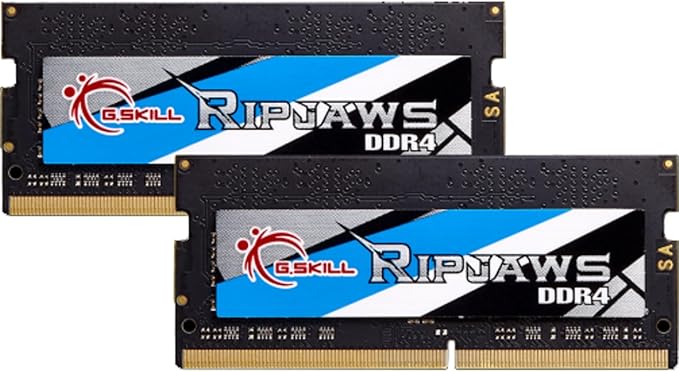
G.Skill Ripjaws DDR4 SO-DIMM kit is the ideal system upgrade and provides faster data transfer and higher energy efficiency than ever. Experience a new standard of speed with Ripjaws DDR4 SO-DIMM today.
G.Skill Ripjaws DDR4 SO-DIMM kit is the ideal system upgrade and provides faster data transfer and higher energy efficiency than ever. Experience a new standard of speed with Ripjaws DDR4 SO-DIMM today.
in 50 offers
The lowest price for G.SKILL Ripjaws So-dimm 32GB DDR4-2666MHz 32GB DDR4 2666MHz Memory Module right now is $36.30.
Prices last updated 30 Nov 2025.
G.SKILL Ripjaws So-dimm 32GB DDR4-2666MHz 32GB DDR4 2666MHz Memory Module
G.Skill Ripjaws DDR4 SO-DIMM kit is the ideal system upgrade and provides faster data transfer and higher energy efficiency than ever. Experience a new standard of speed with Ripjaws DDR4 SO-DIMM today.
G.Skill Ripjaws DDR4 SO-DIMM kit is the ideal system upgrade and provides faster data transfer and higher energy efficiency than ever. Experience a new standard of speed with Ripjaws DDR4 SO-DIMM today.

