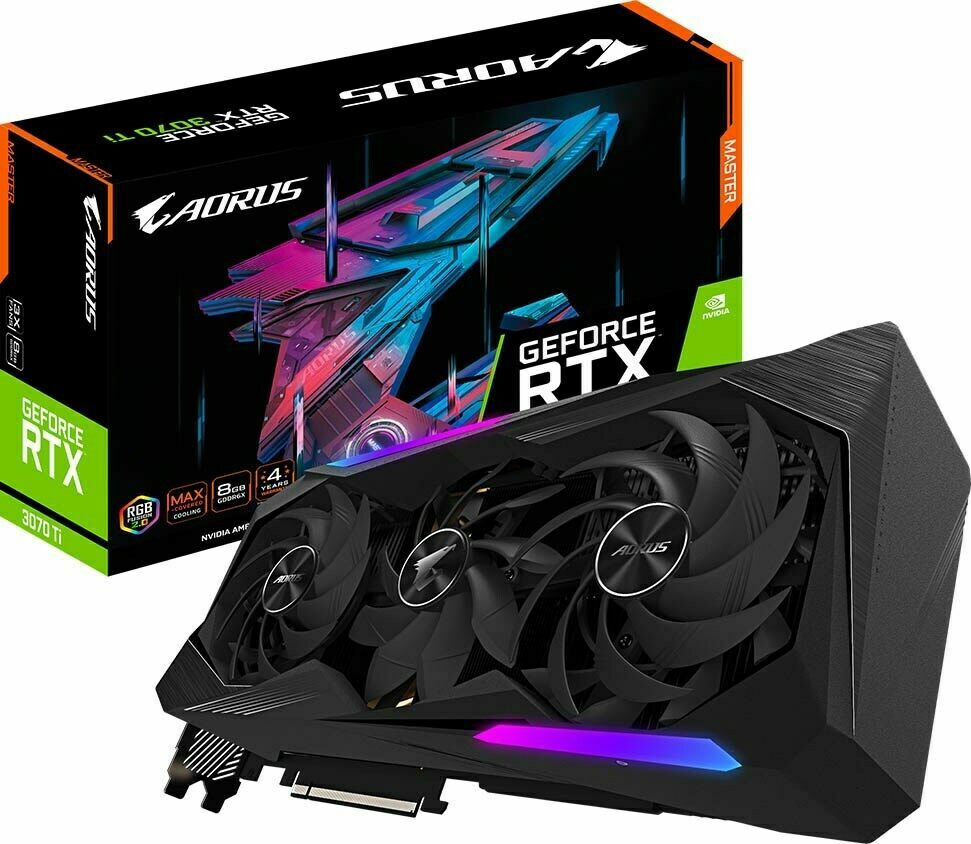
The Gigabyte Aorus GeForce RTX 3070 Master 8GB graphics card features a 1845MHz core clock, 8GB GDDR6 256-bit memory interface, 14000MHz memory clock, PCI-E 4.0, 3 x HDMI 2.1, 3 x DisplayPort 1.4a, OpenGL 4.6 and DirectX 12 Ultimate support, RGB lighting, and LCD edge display.
The Gigabyte Aorus GeForce RTX 3070 Master 8GB graphics card features a 1845MHz core clock, 8GB GDDR6 256-bit memory interface, 14000MHz memory clock, PCI-E 4.0, 3 x HDMI 2.1, 3 x DisplayPort 1.4a, OpenGL 4.6 and DirectX 12 Ultimate support, RGB lighting, and LCD edge display.
in 3 offers
The lowest price for Gigabyte GeForce RTX 3070 Master 8GB GDDR6 Graphics Card right now is $475.00 at CeX, compared across 3 retailers.
The all-time low was $403.54 on 23 Feb 2026 — today's price is 18% above the lowest ever. That's a little above the best price we've seen.
Prices last updated 17 Oct 2026.
Gigabyte GeForce RTX 3070 Master 8GB GDDR6 Graphics Card
The Gigabyte Aorus GeForce RTX 3070 Master 8GB graphics card features a 1845MHz core clock, 8GB GDDR6 256-bit memory interface, 14000MHz memory clock, PCI-E 4.0, 3 x HDMI 2.1, 3 x DisplayPort 1.4a, OpenGL 4.6 and DirectX 12 Ultimate support, RGB lighting, and LCD edge display.
The Gigabyte Aorus GeForce RTX 3070 Master 8GB graphics card features a 1845MHz core clock, 8GB GDDR6 256-bit memory interface, 14000MHz memory clock, PCI-E 4.0, 3 x HDMI 2.1, 3 x DisplayPort 1.4a, OpenGL 4.6 and DirectX 12 Ultimate support, RGB lighting, and LCD edge display.
Last updated at 17/10/2026 18:30:15
Gigabyte Aorus GeForce RTX 3070 Master 8GB GDDR6
Free delivery
GIGABYTE AORUS GeForce RTX 3070 MASTER 8GB GDDR6 Graphics Card
Delivery between 22–26 Oct $41
Gigabyte Aorus Ge Force Rtx 3070 Master 8 G Graphics Card, 3 X Windforce Fans, 8 Gb 256 Bit Gddr6, Gv N3070 Aorus M 8 Gd Video Card
Delivery between 24–27 Oct $29
originally posted on microcenter.com
So I have had some amazing luck with this gpu. First of all I’m not a huge gigabyte gpu fan but I was pleasantly surprised with the temps and overclocking headroom here. The screen is really awesome too but it does take 5-10 mins to upload the image to the gpu in software. (Not internet related)The fans work awesome cooking but they are a bit noticeable. Not bad though. Haven’t seen noticeable coil whine like you’d expect either. Honestly I’m getting better numbers than evga 3070 ti model with a modest overclock. At stock it beat the evga xc3 model by a good bit on furmark and a few other synthetic test. In games like modern warfare you can crank all the settings to the max and run 1440p at 144fps with ease. I know not all gigabyte products have the best rep but ... MoreSo I have had some amazing luck with this gpu. First of all I’m not a huge gigabyte gpu fan but I was pleasantly surprised with the temps and overclocking headroom here. The screen is really awesome too but it does take 5-10 mins to upload the image to the gpu in software. (Not internet related)The fans work awesome cooking but they are a bit noticeable. Not bad though. Haven’t seen noticeable coil whine like you’d expect either. Honestly I’m getting better numbers than evga 3070 ti model with a modest overclock. At stock it beat the evga xc3 model by a good bit on furmark and a few other synthetic test. In games like modern warfare you can crank all the settings to the max and run 1440p at 144fps with ease. I know not all gigabyte products have the best rep but this one by far is above and beyond what I expected. I’m glad I took a chance to test it out. Previously I had a 3090 ftw3 and it was overkill for 1440p at 144fps for modern warfare.
originally posted on neweggbusiness.com
I was lucky enough to win the Newegg shuffle last week and had the opportunity to purchase this card. It is my very first gigabyte card and Im honestly shocked with the craftsmanship. Not only is the Aorus master variation one of the most beautiful card on the market, but it runs smooth as butter and operates at lower temperatures than I remember my FE 2070S running at. As of right now, I have left the fan curve at default in the Aorus engine software and it has been more than adequate. I have not seen temps go above 68°c. My one and only gripe about this card is in regards to the instability of the RGB Fusion 2.0 software. Ive had the card for less than a week and have run into two situations where fusion 2.0 stopped detecting my card and could only see my ram and ... MoreI was lucky enough to win the Newegg shuffle last week and had the opportunity to purchase this card. It is my very first gigabyte card and Im honestly shocked with the craftsmanship. Not only is the Aorus master variation one of the most beautiful card on the market, but it runs smooth as butter and operates at lower temperatures than I remember my FE 2070S running at. As of right now, I have left the fan curve at default in the Aorus engine software and it has been more than adequate. I have not seen temps go above 68°c. My one and only gripe about this card is in regards to the instability of the RGB Fusion 2.0 software. Ive had the card for less than a week and have run into two situations where fusion 2.0 stopped detecting my card and could only see my ram and motherboard. I do however have a few tips that I uncovered from trial and error to fix this issue if you encounter it. To start I highly recommend using Aorus Engine for this card. RGB Fusion 2.0 is included within the download for Aorus engine. The download can be found directly from the Aorus Master 3070 page on gigabytes website. I found that when I installed RGB Fusion stand-alone it collided with my MSI afterburner and/or iCUE and had issues with not detecting my 3070 within the software. Also, when you initially launch the RGB Fusion 2.0 do NOT click no to the firmware update for the LCD panel. I was in the midst of installing my Nvidea driver and restarted my pc before I could select yes / no to the firmware update and it did not appear again after the reboot. My card was then unable to be detected within RGB Fusion. I had to delete all traces of RGB Fusion from my pc and start the download from scratch. It was then still not being detected, so I installed it via Aorus engine and it began to work again. Overall, I highly recommend this card from a quality and performance standpoint. The aesthetics are on point, but the RGB software could really use some overall improvement and help in the stability department. Thanks for the read and I hope I could help you make your decision if you have the opportunity to buy!
originally posted on very.co.uk
Awesome Graphics card not the absolute best because that would be an rtx 3080 with 12gb ram or rtx 3090 but they cost a lot lot more, but this graphics card really does pack a punch and I've been trying the games and it can not just ultra the games but it can extreme the graphics on your games and these are the latest games too. Forza Horizon 5 extreme graphics with 4xMSAA running at 60FPS and it looks amazing and smooth but it uses almost all the graphics card 8gb ram see photo, if you go to YouTube and watch the video graphics comparison for each setting on Forza Horizon 5 you will realise why you want to play it in extreme mode as there's a lot missing and cut down even on ultra mode. Far cry 6 with HD texture pack, again extreme graphics at 60FPS. Red Dead ... MoreAwesome Graphics card not the absolute best because that would be an rtx 3080 with 12gb ram or rtx 3090 but they cost a lot lot more, but this graphics card really does pack a punch and I've been trying the games and it can not just ultra the games but it can extreme the graphics on your games and these are the latest games too. Forza Horizon 5 extreme graphics with 4xMSAA running at 60FPS and it looks amazing and smooth but it uses almost all the graphics card 8gb ram see photo, if you go to YouTube and watch the video graphics comparison for each setting on Forza Horizon 5 you will realise why you want to play it in extreme mode as there's a lot missing and cut down even on ultra mode. Far cry 6 with HD texture pack, again extreme graphics at 60FPS. Red Dead Redemption 2 extreme graphics 60FPS Finally lol, I will play this all over again it's mental looking in the beautiful city's, really nice even the bricks all come out the walls in 3d it's beautiful it's really crisp looking and the lighting is amazing makes a big difference. GTA 5 Maxed out it's awesome 60FPS. Fallout 4 Maxed out 4k. I don't think it will have trouble playing any games on this card and for the price of this card it's very good for the money and what you get. Normaly I go for msi cards but this was a spare of a moment purchase and I'm glad I got it. In 4k extreme mode if you want to run MSAA anti analysing you might have to use the texture upscale technology for some games but to be fair apart from getting more frames per second you can't notice the difference in graphics really it's a good bit of technology that's built into the card and game settings. I played all games with V synch on and 4k as well. This card is made for 4k resolutions but not higher if you want 60FPS minimum. Very impressing graphics card and it looks very nice as well, even has an LCD colour screen built into the card which plays little videos, you can change all the colours with magic light as well, I have a glass side so I can see into the pc which makes it all the better it's nice. The card is big so make sure you got room for it, it's longer than my last card and only just fitted in my full tower I had millimetres left, it also uses two 8 pins power supply connections.I am very pleased with this card and it felt like Christmas especially when they sent me two cards by mistake with all the same order numbers, it was like buy one get one free lol as your see in the pictures but I'm a Christian of Yeshua Christ so I got send the other one back, the people at the warehouse will get the blame otherwise, and you don't make good use of other people's things :) but was nice lol.Overall it's a banging graphics card really good in every aspect and had no troubles with it over all the hours I played it for so highly recommended for big 4k resolution you can't go wrong very nice card and VERY happy customer with big smile.
| Video Memory Type | GDDR6 |
| Form Factor | Graphics card |
| Manufacturer | NVIDIA, GIGABYTE |
| Clock Speed | 1725 MHz (Reference Card) |
| Boost Clock Speed | 1845 MHz |
Gigabyte Aorus GeForce RTX 3070 Master 8GB GDDR6
Free delivery
GIGABYTE AORUS GeForce RTX 3070 MASTER 8GB GDDR6 Graphics Card
Delivery between 22–26 Oct $41
Gigabyte Aorus Ge Force Rtx 3070 Master 8 G Graphics Card, 3 X Windforce Fans, 8 Gb 256 Bit Gddr6, Gv N3070 Aorus M 8 Gd Video Card
Delivery between 24–27 Oct $29
So I have had some amazing luck with this gpu. First of all I’m not a huge gigabyte gpu fan but I was pleasantly surprised with the temps and overclocking headroom here. The screen is really awesome too but it does take 5-10 mins to upload the image to the gpu in software. (Not internet related)The fans work awesome cooking but they are a bit noticeable. Not bad though. Haven’t seen noticeable coil whine like you’d expect either. Honestly I’m getting better numbers than evga 3070 ti model with a modest overclock. At stock it beat the evga xc3 model by a good bit on furmark and a few other synthetic test. In games like modern warfare you can crank all the settings to the max and run 1440p at 144fps with ease. I know not all gigabyte products have the best rep but ... MoreSo I have had some amazing luck with this gpu. First of all I’m not a huge gigabyte gpu fan but I was pleasantly surprised with the temps and overclocking headroom here. The screen is really awesome too but it does take 5-10 mins to upload the image to the gpu in software. (Not internet related)The fans work awesome cooking but they are a bit noticeable. Not bad though. Haven’t seen noticeable coil whine like you’d expect either. Honestly I’m getting better numbers than evga 3070 ti model with a modest overclock. At stock it beat the evga xc3 model by a good bit on furmark and a few other synthetic test. In games like modern warfare you can crank all the settings to the max and run 1440p at 144fps with ease. I know not all gigabyte products have the best rep but this one by far is above and beyond what I expected. I’m glad I took a chance to test it out. Previously I had a 3090 ftw3 and it was overkill for 1440p at 144fps for modern warfare.
I was lucky enough to win the Newegg shuffle last week and had the opportunity to purchase this card. It is my very first gigabyte card and Im honestly shocked with the craftsmanship. Not only is the Aorus master variation one of the most beautiful card on the market, but it runs smooth as butter and operates at lower temperatures than I remember my FE 2070S running at. As of right now, I have left the fan curve at default in the Aorus engine software and it has been more than adequate. I have not seen temps go above 68°c. My one and only gripe about this card is in regards to the instability of the RGB Fusion 2.0 software. Ive had the card for less than a week and have run into two situations where fusion 2.0 stopped detecting my card and could only see my ram and ... MoreI was lucky enough to win the Newegg shuffle last week and had the opportunity to purchase this card. It is my very first gigabyte card and Im honestly shocked with the craftsmanship. Not only is the Aorus master variation one of the most beautiful card on the market, but it runs smooth as butter and operates at lower temperatures than I remember my FE 2070S running at. As of right now, I have left the fan curve at default in the Aorus engine software and it has been more than adequate. I have not seen temps go above 68°c. My one and only gripe about this card is in regards to the instability of the RGB Fusion 2.0 software. Ive had the card for less than a week and have run into two situations where fusion 2.0 stopped detecting my card and could only see my ram and motherboard. I do however have a few tips that I uncovered from trial and error to fix this issue if you encounter it. To start I highly recommend using Aorus Engine for this card. RGB Fusion 2.0 is included within the download for Aorus engine. The download can be found directly from the Aorus Master 3070 page on gigabytes website. I found that when I installed RGB Fusion stand-alone it collided with my MSI afterburner and/or iCUE and had issues with not detecting my 3070 within the software. Also, when you initially launch the RGB Fusion 2.0 do NOT click no to the firmware update for the LCD panel. I was in the midst of installing my Nvidea driver and restarted my pc before I could select yes / no to the firmware update and it did not appear again after the reboot. My card was then unable to be detected within RGB Fusion. I had to delete all traces of RGB Fusion from my pc and start the download from scratch. It was then still not being detected, so I installed it via Aorus engine and it began to work again. Overall, I highly recommend this card from a quality and performance standpoint. The aesthetics are on point, but the RGB software could really use some overall improvement and help in the stability department. Thanks for the read and I hope I could help you make your decision if you have the opportunity to buy!
Awesome Graphics card not the absolute best because that would be an rtx 3080 with 12gb ram or rtx 3090 but they cost a lot lot more, but this graphics card really does pack a punch and I've been trying the games and it can not just ultra the games but it can extreme the graphics on your games and these are the latest games too. Forza Horizon 5 extreme graphics with 4xMSAA running at 60FPS and it looks amazing and smooth but it uses almost all the graphics card 8gb ram see photo, if you go to YouTube and watch the video graphics comparison for each setting on Forza Horizon 5 you will realise why you want to play it in extreme mode as there's a lot missing and cut down even on ultra mode. Far cry 6 with HD texture pack, again extreme graphics at 60FPS. Red Dead ... MoreAwesome Graphics card not the absolute best because that would be an rtx 3080 with 12gb ram or rtx 3090 but they cost a lot lot more, but this graphics card really does pack a punch and I've been trying the games and it can not just ultra the games but it can extreme the graphics on your games and these are the latest games too. Forza Horizon 5 extreme graphics with 4xMSAA running at 60FPS and it looks amazing and smooth but it uses almost all the graphics card 8gb ram see photo, if you go to YouTube and watch the video graphics comparison for each setting on Forza Horizon 5 you will realise why you want to play it in extreme mode as there's a lot missing and cut down even on ultra mode. Far cry 6 with HD texture pack, again extreme graphics at 60FPS. Red Dead Redemption 2 extreme graphics 60FPS Finally lol, I will play this all over again it's mental looking in the beautiful city's, really nice even the bricks all come out the walls in 3d it's beautiful it's really crisp looking and the lighting is amazing makes a big difference. GTA 5 Maxed out it's awesome 60FPS. Fallout 4 Maxed out 4k. I don't think it will have trouble playing any games on this card and for the price of this card it's very good for the money and what you get. Normaly I go for msi cards but this was a spare of a moment purchase and I'm glad I got it. In 4k extreme mode if you want to run MSAA anti analysing you might have to use the texture upscale technology for some games but to be fair apart from getting more frames per second you can't notice the difference in graphics really it's a good bit of technology that's built into the card and game settings. I played all games with V synch on and 4k as well. This card is made for 4k resolutions but not higher if you want 60FPS minimum. Very impressing graphics card and it looks very nice as well, even has an LCD colour screen built into the card which plays little videos, you can change all the colours with magic light as well, I have a glass side so I can see into the pc which makes it all the better it's nice. The card is big so make sure you got room for it, it's longer than my last card and only just fitted in my full tower I had millimetres left, it also uses two 8 pins power supply connections.I am very pleased with this card and it felt like Christmas especially when they sent me two cards by mistake with all the same order numbers, it was like buy one get one free lol as your see in the pictures but I'm a Christian of Yeshua Christ so I got send the other one back, the people at the warehouse will get the blame otherwise, and you don't make good use of other people's things :) but was nice lol.Overall it's a banging graphics card really good in every aspect and had no troubles with it over all the hours I played it for so highly recommended for big 4k resolution you can't go wrong very nice card and VERY happy customer with big smile.
This card gives you better performance than a 3070 Founder's Edition and probably better performance than many of the other 3070 options, but is it enough to justify the $300+ extra? I would say no, but in today's market where you often have to take what you can get there are some upsides.Obviously, you get some RGB and an LCD screen which both look good if you have a glass panel case. My PC sits on my desk in easy view and being able to display a custom gif or picture is cool and you can also have it display framerate, fans speeds, clock speeds, GPU temp and more. These are nice extras and I personally prefer a card with some lights and these are good looking to me. You can set it to a lot of different colors and lighting patterns. The problem there is the ... MoreThis card gives you better performance than a 3070 Founder's Edition and probably better performance than many of the other 3070 options, but is it enough to justify the $300+ extra? I would say no, but in today's market where you often have to take what you can get there are some upsides.Obviously, you get some RGB and an LCD screen which both look good if you have a glass panel case. My PC sits on my desk in easy view and being able to display a custom gif or picture is cool and you can also have it display framerate, fans speeds, clock speeds, GPU temp and more. These are nice extras and I personally prefer a card with some lights and these are good looking to me. You can set it to a lot of different colors and lighting patterns. The problem there is the software. Gigabyte's RGB Fusion 2.0 software is just terrible. When it works it's fine, minimal, relatively easy to set up the way you want. The problem is that it just fails at random. Running a game and look over to see all the lights are off and the screen is running something other what I set. Fixing it can be complicated and range from a full restart all the way to uninstalling and cleaning your PCs registry then reinstalling to get it functioning correctly again and then it will definitely happen again. To me this is a glaring issue and Gigabyte has had plenty of time to address this and hasn't which leads me to believe they don't care and may never fix it.Now, onto the performance. This is actually where this card shines. You have two bios settings; a quiet setting and and OC (overclock) bios. I have not bothered with the quiet setting yet as it's pretty quiet on the OC setting, but having two bios available with a switch on the side of the card allows you to recover if you maybe overdid it manually overclocking and crash. I have not bothered overclocking yet, because it is demolishing everything I throw at it in 1440p and is not needed yet. However, this card has some overhead room to be overclocked above the stock overclock which is already pretty good. It clocks in the the low 2000MHz stock and runs about 60-64C and runs about 5fps above the FE card in a lot of games according to Youtube and about 20C cooler. The stock power limit of 270W can be raised to 300W for manual overclocking and reading other owners overclocking reports stays under 80C even when overclocked pretty hard. I feel this will allow this card to hang on an extra year or two as that extra performance will come in handy years on when newer games start really pushing it.Overall, I would say if you can wait to get a GPU, or manage to get a Founder's Edition 3070 for $500 then do that. If you can't wait and manage to get this in the cart then you'll have one of the top 3 performing 3070s on the market, but it's priced higher than the MSRP of a 3080 which I beleieve is around 30% faster. However, in the current market the 3080 is often just as inflated and who knows when, or if it will go back to normal. It's strange, but I simultaneously love this card for the performance and the look, yet I may not buy a Gigabyte product ever again if they don't fix the software. But if the price isn't an issue to you the build is solid and it absolutely wrecks 1440p, so you could do worse.
Ok, styling wise, with the included LCD screen and customizable RGB lights, the card is pretty great. Performance wise I am satisfied but did expect a bigger jump in performance. It is not a slouch or anything but could be better. If all out performance is your main interest perhaps a card with less focus on aesthetics will offer you better performance. But for me I am happy with the overall performance and aesthetics.Now for the bad. I am not sure if it is the card or the software but from my research thus far I believe the software it is a buggy mess and does not play well with others. The moment I installed this card and RGB Fusion software I started getting random crashes. The first crash was literally while using the software for the first time after ... MoreOk, styling wise, with the included LCD screen and customizable RGB lights, the card is pretty great. Performance wise I am satisfied but did expect a bigger jump in performance. It is not a slouch or anything but could be better. If all out performance is your main interest perhaps a card with less focus on aesthetics will offer you better performance. But for me I am happy with the overall performance and aesthetics.Now for the bad. I am not sure if it is the card or the software but from my research thus far I believe the software it is a buggy mess and does not play well with others. The moment I installed this card and RGB Fusion software I started getting random crashes. The first crash was literally while using the software for the first time after installing it. After a reboot I was able to start app and set up my LCD screen and colors and have not used the app again hoping it was an isolated incident. However, that was not the case. Occasionally when I shut down the PC it will crash during shut down and sometimes on boot up. The screen goes to blue and a reboot starts. It is not every time but it is a problem that I NEVER had with my PC. My PC has always been rock sold with absolutely no issues until installing this card and RGB Fusion software.You might be thinking just uninstall Fusion but, you must understand that one of the biggest selling points of this card is the RGB and LCD screen functions so not using the app makes those futures worthless.At this point I will see if the system stabilizes and if it doesn't then I will see how the system runs without Fusion. If the system does not stabilize or Fusion is the problem and can't be used then I will be returning this card as it or the app are defective. That will be a real shame :(
Came fast (less than 2 weeks), product was in perfect condition, as well as the box and all packaging inside. Easy to install, had no issues with BIOS or anything. Just plug and play. I know some people commented on the weight. Not like it's light as a feather or anything, but it weighs significantly less than what I was replacing (GTX 1070). Still got a GPU bracket just incase, but I don't think it's really needed. It is a chunky card, so just make sure you have room, and have a long enough cable (2 8x pins) Much more quiet than my last card, I think due to 3 fans working in tandem compared to my GTX 1070 which just had one fan doing all the work. Temps are good, not draining too much power. The LED on it is whatever - I don't care for it but was just the most ... MoreCame fast (less than 2 weeks), product was in perfect condition, as well as the box and all packaging inside. Easy to install, had no issues with BIOS or anything. Just plug and play. I know some people commented on the weight. Not like it's light as a feather or anything, but it weighs significantly less than what I was replacing (GTX 1070). Still got a GPU bracket just incase, but I don't think it's really needed. It is a chunky card, so just make sure you have room, and have a long enough cable (2 8x pins) Much more quiet than my last card, I think due to 3 fans working in tandem compared to my GTX 1070 which just had one fan doing all the work. Temps are good, not draining too much power. The LED on it is whatever - I don't care for it but was just the most affordable card for me on my budget. Cool and all, but I use other programs to monitor heat and fan speed. Just an added bonus if you're into that thing. Overall, incredibly happy with my purchase. Only negative thing is the price, but once again that's just the market right now. I decided to get what I could afford when I could cause sounds like it's only going to get worse.
I am heartily pleased with this upgrade from my GTX 1080ti. It does everything I was hoping for, even 70-100fps in Cyberpunk 2077 at 1440p. In my opinion, for most users looking for a great 1440p experience, this is great for under $1000, and easier to find than 3080s. The fans and massive heat sink cool well, the power supply allows for a little bit of overclocking headroom, and the RGB features do look good in the case.That said, it is a bit large, so make sure it will fit in your system. I also wish the RGB controls could integrate with other controllers. The LED screen is cool, but I think it has firmware issues as you have to re-apply the picture setting occasionally. Only convenience issue, no problems with performance.While I am not happy about the state ... MoreI am heartily pleased with this upgrade from my GTX 1080ti. It does everything I was hoping for, even 70-100fps in Cyberpunk 2077 at 1440p. In my opinion, for most users looking for a great 1440p experience, this is great for under $1000, and easier to find than 3080s. The fans and massive heat sink cool well, the power supply allows for a little bit of overclocking headroom, and the RGB features do look good in the case.That said, it is a bit large, so make sure it will fit in your system. I also wish the RGB controls could integrate with other controllers. The LED screen is cool, but I think it has firmware issues as you have to re-apply the picture setting occasionally. Only convenience issue, no problems with performance.While I am not happy about the state of GPU prices, the $850 I purchased it for is worth it in my eyes, as I was looking to spend about the same on a 3080 in 2020. Fortunately, Micro Center in Fairfax, VA had some ON THE SHELF, which alone is impressive, and the product itself delivers.
Aorus Master 3070 GPUs are, I believe one of the stronger RTX 3070 variants out there, which is part of the price tag. The rest of it is due to how many extras this specific RTX has. It has customisable LED's, which look great if you happen to have others in your build and match them together. It also has a status LCD screen that you can customise the image of, which is a minor but satisifying little feature. Performance-wise I'm running the likes of Metro Exodus at 120FPS with the maxed out everything default settings, so it's hard to fault the power of it either. I could easily make that 144+ by simply turning off the likes of Hair works or other high demand settings. It is a 3-fan brick of a GPU though, so make sure you have something of support to prevent the ... MoreAorus Master 3070 GPUs are, I believe one of the stronger RTX 3070 variants out there, which is part of the price tag. The rest of it is due to how many extras this specific RTX has. It has customisable LED's, which look great if you happen to have others in your build and match them together. It also has a status LCD screen that you can customise the image of, which is a minor but satisifying little feature. Performance-wise I'm running the likes of Metro Exodus at 120FPS with the maxed out everything default settings, so it's hard to fault the power of it either. I could easily make that 144+ by simply turning off the likes of Hair works or other high demand settings. It is a 3-fan brick of a GPU though, so make sure you have something of support to prevent the GPU sagging with your motherboard, which can over time lead to PCI-e slot or even GPU damage. You can good enough support braces for about 10 if you want something that looks like a brace, but some people even use basic things like pencils for the task too. As long as it props it up and doesn't cause issues, it should be fine.
I have had this video card for about a month now. Upgraded from a GTX FTW 1080. You can see the difference!! Huge improvement on graphics. Im a huge No Mans Sky and Elite Dangerous fan. On my old card the fans would be loud after about and hour of playing. The new Desktop sits up on my desk and I played both games for a good 4-5 hours straight on max graphic settings and this video card stays cool, quiet and getting 80-90 FPS and i haven't messed with any settings on the video card other than the cool little LCD screen on the edge of the card. You can set it to random video animations, have it say something custom. I have set to display all the performance stats. GPU temp, fan speed and FPS. It shows numerous other stats as well. I am super happy with this card. It ... MoreI have had this video card for about a month now. Upgraded from a GTX FTW 1080. You can see the difference!! Huge improvement on graphics. Im a huge No Mans Sky and Elite Dangerous fan. On my old card the fans would be loud after about and hour of playing. The new Desktop sits up on my desk and I played both games for a good 4-5 hours straight on max graphic settings and this video card stays cool, quiet and getting 80-90 FPS and i haven't messed with any settings on the video card other than the cool little LCD screen on the edge of the card. You can set it to random video animations, have it say something custom. I have set to display all the performance stats. GPU temp, fan speed and FPS. It shows numerous other stats as well. I am super happy with this card. It performs great out of the box and will recommend it to everyone.
I'm giving it 3 stars due to the fact that I've been getting constant BSOD's ever since I went from an Asus Phoenix RTX 3060 12gb to this. The geek squad installed it along with the new PSU I purchased for it. From what I found from the dump files it is caused by the GPU. My BSOD error said PFN List Corrupt. Then led me to ntkmlmp.exe which has to do from overclocking. I don't overclock anything. I'm going to either have to either bring it in and have the Geek Squad figure it out or just get a different card. The card performs great though.
| Video Memory Type | GDDR6 |
| Form Factor | Graphics card |
| Manufacturer | NVIDIA, GIGABYTE |
| Clock Speed | 1725 MHz (Reference Card) |
| Boost Clock Speed | 1845 MHz |