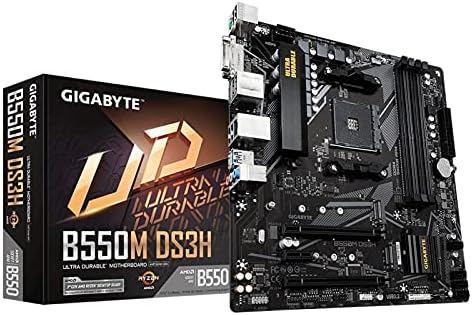
Gigabyte B550M DS3H AC AM4 Ryzen mATX Motherboard
The Gigabyte B550M DS3H AC is a motherboard for AMD Ryzen series processors with the AM4 socket. It supports DDR4 memory with speeds of up to 4733 MHz and features four DIMM slots for a maximum memory capacity of 128 GB. The motherboard is equipped with an AMD B550 chipset and offers a variety of connectivity options, including a PCIe 4.0 x16 slot, a PCIe 3.0 x16 slot (electrically x4), a PCIe 3.0 x1 slot, and two M.2 slots for fast SSDs. It also provides a range of USB ports, including USB 3.2 Gen 1 and Gen 2 Type-A and Type-C ports, as well as USB 2.0 ports. The Gigabyte B550M DS3H AC also offers various networking options, including an Intel GbE LAN port and an integrated Intel Wi-Fi 6 AX200 module that supports dual-band Wi-Fi and Bluetooth 5.0.
The Gigabyte B550M DS3H AC is a motherboard for AMD Ryzen series processors with the AM4 socket. It supports DDR4 memory with speeds of up to 4733 MHz and features four DIMM slots for a maximum memory capacity of 128 GB. The motherboard is equipped with an AMD B550 chipset and offers a variety of connectivity options, including a PCIe 4.0 x16 slot, a PCIe 3.0 x16 slot (electrically x4), a PCIe 3.0 x1 slot, and two M.2 slots for fast SSDs. It also provides a range of USB ports, including USB 3.2 Gen 1 and Gen 2 Type-A and Type-C ports, as well as USB 2.0 ports. The Gigabyte B550M DS3H AC also offers various networking options, including an Intel GbE LAN port and an integrated Intel Wi-Fi 6 AX200 module that supports dual-band Wi-Fi and Bluetooth 5.0.
The Gigabyte B550M DS3H AC is a motherboard for AMD Ryzen series processors with the AM4 socket. It supports DDR4 memory with speeds of up to 4733 MHz and features four DIMM slots for a maximum memory capacity of 128 GB. The motherboard is equipped with an AMD B550 chipset and offers a variety of connectivity options, including a PCIe 4.0 x16 slot, a PCIe 3.0 x16 slot (electrically x4), a PCIe 3.0 x1 slot, and two M.2 slots for fast SSDs. It also provides a range of USB ports, including USB 3.2 Gen 1 and Gen 2 Type-A and Type-C ports, as well as USB 2.0 ports. The Gigabyte B550M DS3H AC also offers various networking options, including an Intel GbE LAN port and an integrated Intel Wi-Fi 6 AX200 module that supports dual-band Wi-Fi and Bluetooth 5.0.
The Gigabyte B550M DS3H AC is a motherboard for AMD Ryzen series processors with the AM4 socket. It supports DDR4 memory with speeds of up to 4733 MHz and features four DIMM slots for a maximum memory capacity of 128 GB. The motherboard is equipped with an AMD B550 chipset and offers a variety of connectivity options, including a PCIe 4.0 x16 slot, a PCIe 3.0 x16 slot (electrically x4), a PCIe 3.0 x1 slot, and two M.2 slots for fast SSDs. It also provides a range of USB ports, including USB 3.2 Gen 1 and Gen 2 Type-A and Type-C ports, as well as USB 2.0 ports. The Gigabyte B550M DS3H AC also offers various networking options, including an Intel GbE LAN port and an integrated Intel Wi-Fi 6 AX200 module that supports dual-band Wi-Fi and Bluetooth 5.0.
in 47 offers
The lowest price for Gigabyte B550M DS3H AC AM4 Ryzen mATX Motherboard right now is $73.37 at Alibaba.com, compared across 31 retailers.
The all-time low was $73.37 on 9 Sept 2026. That's the lowest price we've ever tracked — a great time to buy.
Prices last updated 9 Sept 2026.
Last updated at 09/09/2026 15:53:52
Wholesale Whole GIGABYTE B550M DS3H Computer Micro-ATX Motherboard AMD B550 ocket AM4 DDR4 Four Channels upport Desktop Ryzen CPU,1 Piece
Delivery $16.65
Wholesale Whole GIGABYTE B550M DS3H Computer Micro-ATX Motherboard AMD B550 ocket AM4 DDR4 Four Channels upport Desktop Ryzen CPU,1 Piece
Delivery $83.22
Gigabyte b550m ds3h ac r2 wifi am4 ddr4 matx motherboard
Delivery between 11–17 Sept $17
Gigabyte AM4 MicroATX B550M DS3H AC R2 DDR4 Motherboard | Best Online Computer Store
Delivery between 17–23 Sept $12.12
Gigabyte B550M DS3H AC AM4 Ryzen mATX Motherboard
Delivery between 14–22 Sept $20
Gigabyte B550M DS3H AC Motherboard (DDR4 RAM support + WiFi/Bluetooth)
Free delivery between 16–21 Sept
Gigabyte B550M DS3H AC AM4 Ryzen mATX Motherboard, 4x DDR4, 3x PCI-e, 2x M.2, 4x SATA III, RAID 0/1/10, 4x USB 3.2, 4x USB 2.0
Delivery between Fri – Wed $16.65
Gigabyte B550M DS3H AC AM4 Ryzen mATX Motherboard, 4x DDR4, 3x PCI-e, 2x M.2, 4x SATA III, RAID 0/1/10, 4x USB 3.2, 4x USB 2.0
Delivery by 18 Sept $15
GIGABYTE NEW B550M K Motherboard Micro ATX AMD B550 AMD Socket AM4
Free delivery
GIGABYTE B550M K New Motherboard Micro ATX supports AMD Ryzen 5000 series AMD B550 AMD Socket AM4
Free delivery
originally posted on pbtech.co.nz
Spent days trying to figure out what was wrong with the system only to discover the bios was bad, as the system would not turn on sometimes.Should not have to pay to update a bios at pb tech they should have them all updated on the shelf ready to go.This cost me a lot of time.Other then the bios its working great.
originally posted on cclonline.com
Gigabyte never fail to deliver! The motherboard is great, looks good, UEFI is nice to use and I was surprised how well the built in WiFi connection worked.Only thing to note, the product I personally received was NOT out-of-the-box Ryzen 5000 series compatible and required a BIOS update. This was made very easy with the Q-FLASH button on the motherboard though, so an older CPU was not needed to update the BIOS.
originally posted on pbtech.co.nz
I have long been a fan of Gigabyte ultra durable motherboards; 2 previous computer builds have used them and they are still going strong after many years. The q-flash is handy as I was able to update the BIOS myself before installation following the instructions on the Gigabyte website. I installed an AMD 5600G CPU and it works fine. Love that it has the M.2 drive connectors. Motherboard contains all the features I needed for the modest PC build for a family member. Only slightly awkward thing is the 2 wifi paddle aerials as they can block access to some of the ports on the back and require you to position them at funny angles so the other bits can connect - I will probably stick to using the wired LAN connection.
| Number of memory slots | 4 |
| Memory channels | Dual-channel |
| Supported memory module capacities | 4GB, 8GB, 16GB, 32GB |
| Supported storage drive interfaces | M.2,NVMe,SATA III |
| USB 3.2 Gen 1 (3.1 Gen 1) Type-A ports quantity | 4 |
Wholesale Whole GIGABYTE B550M DS3H Computer Micro-ATX Motherboard AMD B550 ocket AM4 DDR4 Four Channels upport Desktop Ryzen CPU,1 Piece
Delivery $16.65
Wholesale Whole GIGABYTE B550M DS3H Computer Micro-ATX Motherboard AMD B550 ocket AM4 DDR4 Four Channels upport Desktop Ryzen CPU,1 Piece
Delivery $83.22
Gigabyte b550m ds3h ac r2 wifi am4 ddr4 matx motherboard
Delivery between 11–17 Sept $17
Gigabyte AM4 MicroATX B550M DS3H AC R2 DDR4 Motherboard | Best Online Computer Store
Delivery between 17–23 Sept $12.12
Gigabyte B550M DS3H AC AM4 Ryzen mATX Motherboard
Delivery between 14–22 Sept $20
Spent days trying to figure out what was wrong with the system only to discover the bios was bad, as the system would not turn on sometimes.Should not have to pay to update a bios at pb tech they should have them all updated on the shelf ready to go.This cost me a lot of time.Other then the bios its working great.
Gigabyte never fail to deliver! The motherboard is great, looks good, UEFI is nice to use and I was surprised how well the built in WiFi connection worked.Only thing to note, the product I personally received was NOT out-of-the-box Ryzen 5000 series compatible and required a BIOS update. This was made very easy with the Q-FLASH button on the motherboard though, so an older CPU was not needed to update the BIOS.
I have long been a fan of Gigabyte ultra durable motherboards; 2 previous computer builds have used them and they are still going strong after many years. The q-flash is handy as I was able to update the BIOS myself before installation following the instructions on the Gigabyte website. I installed an AMD 5600G CPU and it works fine. Love that it has the M.2 drive connectors. Motherboard contains all the features I needed for the modest PC build for a family member. Only slightly awkward thing is the 2 wifi paddle aerials as they can block access to some of the ports on the back and require you to position them at funny angles so the other bits can connect - I will probably stick to using the wired LAN connection.
This has everything, layout fits great with the deepcool matrexx55 openings. Comes with 2 sata cables, 1 is a 90 degree end. Heaps of USB, even PS2, built in HDMI, network and bluetooth adapter seem good so far. Stoked with this one!
Very easy to build with and also has integrated WiFi so didn't need an additional expansion card. The VRMs on this board is basic and definitely wouldn't handle a 16 core Ryzen 5950x, but that's to be expected for the price of the board (£97 at time of purchase).Highly recommended board for a Ryzen build with a budget of ~£800.Additional system specs: Ryzen 5600, 16GB 3200MHz RAM, RTX 3060ti, 1TB PCIE 4 SSD
An entry-level motherboard for DDR4 that's packed with a surprising amount of features considering its low price.Pros: It has good durability, comes with Wi-Fi connectivity, RGB support, and support for one PCIe Gen 4 SSD, which is great so you can fully utilise the fast speeds of Gen 4 SSDs. Considering its low price tag, this motherboard comes with a generous amount of good features that make it a very fair buy for PC builders on a budget.Cons: This is not the prettiest motherboard on the market, and it could have better cooling. While I don't care too much about the aesthetics of the card, its cooling for the VRM could be much better. I wouldn't buy this motherboard if you're using a high-end CPU that demands good cooling, especially if you plan to overclock ... MoreAn entry-level motherboard for DDR4 that's packed with a surprising amount of features considering its low price.Pros: It has good durability, comes with Wi-Fi connectivity, RGB support, and support for one PCIe Gen 4 SSD, which is great so you can fully utilise the fast speeds of Gen 4 SSDs. Considering its low price tag, this motherboard comes with a generous amount of good features that make it a very fair buy for PC builders on a budget.Cons: This is not the prettiest motherboard on the market, and it could have better cooling. While I don't care too much about the aesthetics of the card, its cooling for the VRM could be much better. I wouldn't buy this motherboard if you're using a high-end CPU that demands good cooling, especially if you plan to overclock it. Otherwise, it's ok for cheaper CPUs. I ran it with the 5700x, and it was fine.Overall, this might be one of the best B550 motherboards as it comes with a good amount of features for the price tag, making it perfect for budget gamers in my opinion. You do pay for what you get though, but if you can accept that this motherboard won't be winning any beauty contests and you don't plan to overclock your CPU, then this is a fair choice.
No, Gigabyte tech support is not helpful. I run a linux desktop and they wanted me to go through the time and expense of switching over to Windows for a few weeks and to make sure I was running the latest and greatest drivers. When Bluetooth stops functioning it is no longer detected by the computer at all. It as if it was just unplugged. I have re-seated the Bluetooth/wireless card to ensure that it was seated properly even though the fact that the 802.11 wireless continues to work would indicate that it isn't a seating problem. If it was related to my OS, a simple reboot would fix the issue. Obviously it doesn't or I wouldn't the following lengths in order to regain Bluetooth functionality. 1.) Remove power (turn off the power strip or unplug the computer). 2.) ... MoreNo, Gigabyte tech support is not helpful. I run a linux desktop and they wanted me to go through the time and expense of switching over to Windows for a few weeks and to make sure I was running the latest and greatest drivers. When Bluetooth stops functioning it is no longer detected by the computer at all. It as if it was just unplugged. I have re-seated the Bluetooth/wireless card to ensure that it was seated properly even though the fact that the 802.11 wireless continues to work would indicate that it isn't a seating problem. If it was related to my OS, a simple reboot would fix the issue. Obviously it doesn't or I wouldn't the following lengths in order to regain Bluetooth functionality. 1.) Remove power (turn off the power strip or unplug the computer). 2.) Press and hold the power button to discharge the motherboard (counting to 10 while doing so). 3.) Reapply power and boot the computer.Allow me to say again this is NOT a software issue.
Pros: wi-fi, 2 m.2 slots and 4 RAM slots, this is a great motherboard that i put into my PC as my first time ever building one and is doing great alongside the AMD ryzen 5 5500 and RX 580.Cons: The IO plate wasn't very good, and the instructions weren't very comprehensive. This is especially important for first time builders but i figured it out eventually.
I've been a long time computer nerd and used board from quite a few companies. Gigabyte has given me the least issues overall, so I decided with this board for my build to be my remote learner/worker computer. The only issues I have had with this board are wireless, of which I suspect the supplied antenna to be the culprits. I built my rig with intent to upgrade, this board in a 2002 Dell Dimension case, Ryzen 5 4650G, 32GB 3200MHz RAM, 1TB NVME, Noctua case fans and processor cooler, 650W power supply(again, for upgradeability). So far, it has not disappointed me in the slightest, I've even played a few games on it, and it handled them quite well(CIV6, 7 Days to Die, HL2, TES IV, oldies but goodies). My main gripe is that my wife and I can't pass the Elecom Relacon ... MoreI've been a long time computer nerd and used board from quite a few companies. Gigabyte has given me the least issues overall, so I decided with this board for my build to be my remote learner/worker computer. The only issues I have had with this board are wireless, of which I suspect the supplied antenna to be the culprits. I built my rig with intent to upgrade, this board in a 2002 Dell Dimension case, Ryzen 5 4650G, 32GB 3200MHz RAM, 1TB NVME, Noctua case fans and processor cooler, 650W power supply(again, for upgradeability). So far, it has not disappointed me in the slightest, I've even played a few games on it, and it handled them quite well(CIV6, 7 Days to Die, HL2, TES IV, oldies but goodies). My main gripe is that my wife and I can't pass the Elecom Relacon Bluetooth trackball back and forth when playing Civilization. The input device is constantly getting dropped and picked back up by the computer, and I have had this issue both on Windows 10 and Ubuntu 21.X. I will update after getting some better antenna of the problem is resolved. Overall, it's a great board with no RGB, it doesn't have all the bells and whistles that some do, but it is great for the price, especially if you don't use Bluetooth much.
highly recommend for budget pc builders, i was recommended it by a friend and don't regret it one bit. but if i do decide to upgrade it'll be when i get a higher end cpu an gpu for now this mobo is perfect!! well worth the money! oh and it has wifi and bluetooth !! no need for dongles to play your favorite titles with your console controllers!
| Number of memory slots | 4 |
| Memory channels | Dual-channel |
| Supported memory module capacities | 4GB, 8GB, 16GB, 32GB |
| Supported storage drive interfaces | M.2,NVMe,SATA III |
| USB 3.2 Gen 1 (3.1 Gen 1) Type-A ports quantity | 4 |

