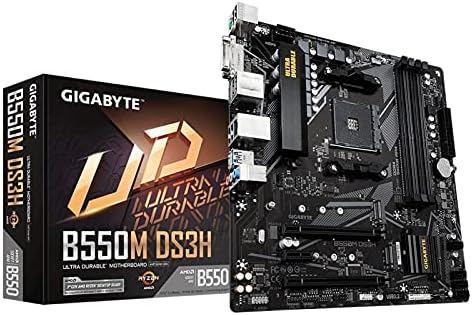
Gigabyte B450M DS3H AM4 Motherboard
AMD provides computing power for gaming needs with the latest Ryzen 2000 Series processors. The Gigabyte 400 Series motherboards perfectly match the latest processing power of AMD Ryzen 2000 processors with more functionality and control. The Gigabyte B450M DS3H maximises the potential of your PC with AMD StoreMI technology. StoreMI accelerates traditional storage devices to reduce boot times and improve overall usability. The easy-to-use utility combines the speed of SSDs with the high capacity of hard drives in a single drive, improving the device's read/write speed to SSDs and increasing data performance. Turn your everyday PC into a performance-oriented system. Realtek Gigabit LAN features cFOSSpeed. This is a network traffic management application that improves network latency and keeps ping times low, enabling better responsiveness in crowded LAN environments. The Gigabyte motherboards use ICs with up to 3x ESD resistance compared to conventional ICs. This helps protect the motherboards and their components from possible damage from static electricity. In addition, the motherboards are equipped with a special anti-overvoltage IC to protect your motherboard and PC from power failures. This ensures that your PC is equipped for potentially irregular and inconsistent power supplies. With Smart Fan 5, users can ensure that their gaming PC maintains its performance while staying cool. With Smart Fan 5 the fan heads can be exchanged to reflect different heat sensors at different places on the mainboard. The motherboard runs smoother and cooler thanks to Smart Fan 5 and hybrid fan heads that support both PWM and voltage mode fans. You can set your fans to stop completely when the temperature drops below a certain threshold using the many settings you can make. Which fan stops, based on the readings from which sensor and at which temperature - everything can be customized to your needs.
AMD provides computing power for gaming needs with the latest Ryzen 2000 Series processors. The Gigabyte 400 Series motherboards perfectly match the latest processing power of AMD Ryzen 2000 processors with more functionality and control. The Gigabyte B450M DS3H maximises the potential of your PC with AMD StoreMI technology. StoreMI accelerates traditional storage devices to reduce boot times and improve overall usability. The easy-to-use utility combines the speed of SSDs with the high capacity of hard drives in a single drive, improving the device's read/write speed to SSDs and increasing data performance. Turn your everyday PC into a performance-oriented system. Realtek Gigabit LAN features cFOSSpeed. This is a network traffic management application that improves network latency and keeps ping times low, enabling better responsiveness in crowded LAN environments. The Gigabyte motherboards use ICs with up to 3x ESD resistance compared to conventional ICs. This helps protect the motherboards and their components from possible damage from static electricity. In addition, the motherboards are equipped with a special anti-overvoltage IC to protect your motherboard and PC from power failures. This ensures that your PC is equipped for potentially irregular and inconsistent power supplies. With Smart Fan 5, users can ensure that their gaming PC maintains its performance while staying cool. With Smart Fan 5 the fan heads can be exchanged to reflect different heat sensors at different places on the mainboard. The motherboard runs smoother and cooler thanks to Smart Fan 5 and hybrid fan heads that support both PWM and voltage mode fans. You can set your fans to stop completely when the temperature drops below a certain threshold using the many settings you can make. Which fan stops, based on the readings from which sensor and at which temperature - everything can be customized to your needs.
AMD provides computing power for gaming needs with the latest Ryzen 2000 Series processors. The Gigabyte 400 Series motherboards perfectly match the latest processing power of AMD Ryzen 2000 processors with more functionality and control. The Gigabyte B450M DS3H maximises the potential of your PC with AMD StoreMI technology. StoreMI accelerates traditional storage devices to reduce boot times and improve overall usability. The easy-to-use utility combines the speed of SSDs with the high capacity of hard drives in a single drive, improving the device's read/write speed to SSDs and increasing data performance. Turn your everyday PC into a performance-oriented system. Realtek Gigabit LAN features cFOSSpeed. This is a network traffic management application that improves network latency and keeps ping times low, enabling better responsiveness in crowded LAN environments. The Gigabyte motherboards use ICs with up to 3x ESD resistance compared to conventional ICs. This helps protect the motherboards and their components from possible damage from static electricity. In addition, the motherboards are equipped with a special anti-overvoltage IC to protect your motherboard and PC from power failures. This ensures that your PC is equipped for potentially irregular and inconsistent power supplies. With Smart Fan 5, users can ensure that their gaming PC maintains its performance while staying cool. With Smart Fan 5 the fan heads can be exchanged to reflect different heat sensors at different places on the mainboard. The motherboard runs smoother and cooler thanks to Smart Fan 5 and hybrid fan heads that support both PWM and voltage mode fans. You can set your fans to stop completely when the temperature drops below a certain threshold using the many settings you can make. Which fan stops, based on the readings from which sensor and at which temperature - everything can be customized to your needs.
AMD provides computing power for gaming needs with the latest Ryzen 2000 Series processors. The Gigabyte 400 Series motherboards perfectly match the latest processing power of AMD Ryzen 2000 processors with more functionality and control. The Gigabyte B450M DS3H maximises the potential of your PC with AMD StoreMI technology. StoreMI accelerates traditional storage devices to reduce boot times and improve overall usability. The easy-to-use utility combines the speed of SSDs with the high capacity of hard drives in a single drive, improving the device's read/write speed to SSDs and increasing data performance. Turn your everyday PC into a performance-oriented system. Realtek Gigabit LAN features cFOSSpeed. This is a network traffic management application that improves network latency and keeps ping times low, enabling better responsiveness in crowded LAN environments. The Gigabyte motherboards use ICs with up to 3x ESD resistance compared to conventional ICs. This helps protect the motherboards and their components from possible damage from static electricity. In addition, the motherboards are equipped with a special anti-overvoltage IC to protect your motherboard and PC from power failures. This ensures that your PC is equipped for potentially irregular and inconsistent power supplies. With Smart Fan 5, users can ensure that their gaming PC maintains its performance while staying cool. With Smart Fan 5 the fan heads can be exchanged to reflect different heat sensors at different places on the mainboard. The motherboard runs smoother and cooler thanks to Smart Fan 5 and hybrid fan heads that support both PWM and voltage mode fans. You can set your fans to stop completely when the temperature drops below a certain threshold using the many settings you can make. Which fan stops, based on the readings from which sensor and at which temperature - everything can be customized to your needs.
in 9 offers
The lowest price for Gigabyte B450M DS3H AM4 Motherboard right now is $106.81 at AliExpress.com - AliExpress-226247430, compared across 4 retailers.
The all-time low was $88.65 on 11 Nov 2024 — today's price is 20% above the lowest ever. That's a little above the best price we've seen.
Prices last updated 10 Sept 2026.
Last updated at 10/09/2026 03:54:50
B450 Motherboard Fit for GIGABYTE B450M DS3H for AMD Socket AM4 with I/O Shield,Used
Affiliate Disclosure: We may receive a small commission for purchases made through this link at no extra cost to you. This helps support our site. Thank you!
GA-B450M DS3H AM4 3/5/7/9 1th.2th.3th. USB3.1 HDMI M.2 B450 Motherboard
Affiliate Disclosure: We may receive a small commission for purchases made through this link at no extra cost to you. This helps support our site. Thank you!
Gigabyte GA-B450M DS3H For AMD AM4 Ryzen 3/5/7/9 1th.2th.3th.Athlon USB3.1 HDMI M.2 B450 Micro-ATX
Free delivery
For GA-B450M DS3H AMD AM4 Ryzen 3/5/7/9 1th.2th.3th.Athlon USB3.1 M.2 B450 DS3H Micro-ATX Desktop
Free delivery
Gigabyte B450M DS3H AMD Ryzen Gen3 AM4 mATX Motherboard 4xDDR4 3xPCIE 1xM.2 DVI HDMI RAID GbE LAN 4xSATA 2xUSB3.1 8xUSB2.0 CF RGB
Delivery $18
Gigabyte B450m Ds3h Am4 Micro Atx Amd Motherboard
Free delivery
Affiliate Disclosure: We may receive a small commission for purchases made through this link at no extra cost to you. This helps support our site. Thank you!
Gigabyte B450m Ds3h Am4 Micro Atx Amd Motherboard
Free delivery
Affiliate Disclosure: We may receive a small commission for purchases made through this link at no extra cost to you. This helps support our site. Thank you!
Gigabyte B450m Ds3h Am4 Micro Atx Amd Motherboard
Free delivery
Affiliate Disclosure: We may receive a small commission for purchases made through this link at no extra cost to you. This helps support our site. Thank you!
Gigabyte B450m Ds3h Motherboard Socket Am4 Amd B450 Ddr4 Micro Atx
Delivery $3.19
Affiliate Disclosure: We may receive a small commission for purchases made through this link at no extra cost to you. This helps support our site. Thank you!
originally posted on bhphotovideo.com
First off, this board is updated to accept the Ryzen chips. Of course, check to be sure your chip will work with this board.I have had Gigabyte boards in a few of my builds, & along with the price, liked the features that come with this board. It's not a high end board, but it certainly does what it's supposed to. I certainly wanted a board that can use the M2 Intel 660 drive that I have (see review). I didn't want it blocked, though tucked out of the way wouldn't be bad.Airflow is important, & with the other pieces on this build being heaters, I certainly don't want any blocks or stops, either by the I/O ports, or along the front, up to the CPU. This doesn't have any of those shields.The board is the important thing in your build, but it doesn't need to ... MoreFirst off, this board is updated to accept the Ryzen chips. Of course, check to be sure your chip will work with this board.I have had Gigabyte boards in a few of my builds, & along with the price, liked the features that come with this board. It's not a high end board, but it certainly does what it's supposed to. I certainly wanted a board that can use the M2 Intel 660 drive that I have (see review). I didn't want it blocked, though tucked out of the way wouldn't be bad.Airflow is important, & with the other pieces on this build being heaters, I certainly don't want any blocks or stops, either by the I/O ports, or along the front, up to the CPU. This doesn't have any of those shields.The board is the important thing in your build, but it doesn't need to dominate the build. The pieces that are that, should be, the board should make sure they all look good doing their fancy work.There are a couple glowing light things it can do, but I didn't buy it for that, nor the on board video ability. Keep in mind that it has two fan ports. One for the CPU, one for the system. It also has one for your LED lighting if you want that. I have my case fans running, & control them myself (or by a program), but some people may want more.Fit, function & nice. I didn't have nay issues putting the board in, & the I/O face plate is like any other. I Just taped it in place, till I lined everything up, then removed the tape. Screwing the board in place, lined it up & it looks fine. Only maybe twice have I even had one stay on, with the tabs & hooks.There are quite a few USB ports on this board, which is one of the reasons I (again) leaned towards the DS3H. I have it hooked up to a KVM & want one port for each controller.Hooking this up to the case, was easy enough. I did need an extension for the ATX power, as the PSU sits on the bottom of my case. But all of the plugs, & ports are reachable, & work fine. Even the front ports & readers.The bios is easy to get to, & can be done in the traditional way, or via Gigabyte's great software through Windows. Once in there (it's on an optical disc) you can adjust fan speeds, lights & the usual bios & tweaking stuff. The disc also has the software for video cards. I only had to check box & get things installed.You can opt for just install stuff, or make paths, & control what goes on your drives.That's about it. I expect this board to hold up when I expand. The SATA headers are grouped together nicely, just keep in mind where your cards will fit. Some of them may be blocked. I don't know if using the M2 drive reduces the 1-3 SATA headers, I don't have any. I do have my hot swap SATA port hooked up on the case, & it's fine.As always. I expect B&H Photo to have the most up to date & current stock, which is one of the reasons I went with them, for this board. I knew it was going to work out of the box, with out needing any flashing.
originally posted on neweggbusiness.com
This board is a great value. The system this is going into is ultimately constrained by the overall system cost. I wasn't comparing boards for the perfect fit in this system, rather I was picking components that would work well together with an ultimate cost ceiling. To that end, while shopping I noted the board had RGB, but based on past experience I made assumptions that it would have lighting effects and more color options. Not a deal breaker, just a disappointment. (This system is for a 15 y/o girl, who would delight at that level of customization) I was legitimately disappointed that there is only one header for case fans. It wouldn't have made me choose another board, but I certainly would have ordered a splitter or hub of some sort to compensate. Aside from ... MoreThis board is a great value. The system this is going into is ultimately constrained by the overall system cost. I wasn't comparing boards for the perfect fit in this system, rather I was picking components that would work well together with an ultimate cost ceiling. To that end, while shopping I noted the board had RGB, but based on past experience I made assumptions that it would have lighting effects and more color options. Not a deal breaker, just a disappointment. (This system is for a 15 y/o girl, who would delight at that level of customization) I was legitimately disappointed that there is only one header for case fans. It wouldn't have made me choose another board, but I certainly would have ordered a splitter or hub of some sort to compensate. Aside from these nitpicks and surprises, the board has an exceptional build quality and aesthetic given it's price point. Despite the difficulty reading headers on the board, installation was very pain free. I would purchase this board for sure, and I would give it 5 eggs if it had even one more fan header. =) One last thing, if you plan on using this as a system to upgrade, for example using the onboard video until a Discreet graphics card can be installed, you MUST choose a CPU that supports it. The board itself has no graphic chip. In my case I used a Ryzen 5 2400G (the G indicates it has the Vega graphics, a thing I learned looking for these components, so if you're looking at this board and plan to use the onboard DVI or HDMI, make sure your CPU pairing actually has a graphics system to it).
originally posted on neweggbusiness.com
Overall I like this board - it's pretty basic, but it gets the job done for a budget build. Most everything installed/worked without much fuss, except for two things: First, the Ryzen 3 CPU I paired this with would not boot with more than two sticks of RAM installed, so I had to re-buy my RAM to get the right amount working with it. I think this is more of an issue with the Ryzen than the board, however. Second, when I went to install the CPU fan, I found that the plate that it mounts to had fallen off the back of the board (the glue that holds it on failed) and I had to fumble with things to get in it place again. This fumbling included me having to remove the fan and clean up a thermal paste mess just to figure out where the mounting holes had gone. I don't even ... MoreOverall I like this board - it's pretty basic, but it gets the job done for a budget build. Most everything installed/worked without much fuss, except for two things: First, the Ryzen 3 CPU I paired this with would not boot with more than two sticks of RAM installed, so I had to re-buy my RAM to get the right amount working with it. I think this is more of an issue with the Ryzen than the board, however. Second, when I went to install the CPU fan, I found that the plate that it mounts to had fallen off the back of the board (the glue that holds it on failed) and I had to fumble with things to get in it place again. This fumbling included me having to remove the fan and clean up a thermal paste mess just to figure out where the mounting holes had gone. I don't even understand how this could happen, but I'm at least glad that it wasn't missing any parts. My only other (minor) complaint is that you can't update the board's BIOS over the internet - I had to download and unzip the newest firmware onto an old thumbdrive. Other than these problems, the board worked just as intended, and I was happy with the build.
| General | |
| Product Type | Motherboard - micro ATX |
| Chipset Type | AMD B450 |
| Processor Socket | Socket AM4 |
| Max Processors Qty | 1 |

B450 Motherboard Fit for GIGABYTE B450M DS3H for AMD Socket AM4 with I/O Shield,Used
Affiliate Disclosure: We may receive a small commission for purchases made through this link at no extra cost to you. This helps support our site. Thank you!
GA-B450M DS3H AM4 3/5/7/9 1th.2th.3th. USB3.1 HDMI M.2 B450 Motherboard
Affiliate Disclosure: We may receive a small commission for purchases made through this link at no extra cost to you. This helps support our site. Thank you!
Gigabyte GA-B450M DS3H For AMD AM4 Ryzen 3/5/7/9 1th.2th.3th.Athlon USB3.1 HDMI M.2 B450 Micro-ATX
Free delivery
For GA-B450M DS3H AMD AM4 Ryzen 3/5/7/9 1th.2th.3th.Athlon USB3.1 M.2 B450 DS3H Micro-ATX Desktop
Free delivery
Gigabyte B450M DS3H AMD Ryzen Gen3 AM4 mATX Motherboard 4xDDR4 3xPCIE 1xM.2 DVI HDMI RAID GbE LAN 4xSATA 2xUSB3.1 8xUSB2.0 CF RGB
Delivery $18
First off, this board is updated to accept the Ryzen chips. Of course, check to be sure your chip will work with this board.I have had Gigabyte boards in a few of my builds, & along with the price, liked the features that come with this board. It's not a high end board, but it certainly does what it's supposed to. I certainly wanted a board that can use the M2 Intel 660 drive that I have (see review). I didn't want it blocked, though tucked out of the way wouldn't be bad.Airflow is important, & with the other pieces on this build being heaters, I certainly don't want any blocks or stops, either by the I/O ports, or along the front, up to the CPU. This doesn't have any of those shields.The board is the important thing in your build, but it doesn't need to ... MoreFirst off, this board is updated to accept the Ryzen chips. Of course, check to be sure your chip will work with this board.I have had Gigabyte boards in a few of my builds, & along with the price, liked the features that come with this board. It's not a high end board, but it certainly does what it's supposed to. I certainly wanted a board that can use the M2 Intel 660 drive that I have (see review). I didn't want it blocked, though tucked out of the way wouldn't be bad.Airflow is important, & with the other pieces on this build being heaters, I certainly don't want any blocks or stops, either by the I/O ports, or along the front, up to the CPU. This doesn't have any of those shields.The board is the important thing in your build, but it doesn't need to dominate the build. The pieces that are that, should be, the board should make sure they all look good doing their fancy work.There are a couple glowing light things it can do, but I didn't buy it for that, nor the on board video ability. Keep in mind that it has two fan ports. One for the CPU, one for the system. It also has one for your LED lighting if you want that. I have my case fans running, & control them myself (or by a program), but some people may want more.Fit, function & nice. I didn't have nay issues putting the board in, & the I/O face plate is like any other. I Just taped it in place, till I lined everything up, then removed the tape. Screwing the board in place, lined it up & it looks fine. Only maybe twice have I even had one stay on, with the tabs & hooks.There are quite a few USB ports on this board, which is one of the reasons I (again) leaned towards the DS3H. I have it hooked up to a KVM & want one port for each controller.Hooking this up to the case, was easy enough. I did need an extension for the ATX power, as the PSU sits on the bottom of my case. But all of the plugs, & ports are reachable, & work fine. Even the front ports & readers.The bios is easy to get to, & can be done in the traditional way, or via Gigabyte's great software through Windows. Once in there (it's on an optical disc) you can adjust fan speeds, lights & the usual bios & tweaking stuff. The disc also has the software for video cards. I only had to check box & get things installed.You can opt for just install stuff, or make paths, & control what goes on your drives.That's about it. I expect this board to hold up when I expand. The SATA headers are grouped together nicely, just keep in mind where your cards will fit. Some of them may be blocked. I don't know if using the M2 drive reduces the 1-3 SATA headers, I don't have any. I do have my hot swap SATA port hooked up on the case, & it's fine.As always. I expect B&H Photo to have the most up to date & current stock, which is one of the reasons I went with them, for this board. I knew it was going to work out of the box, with out needing any flashing.
This board is a great value. The system this is going into is ultimately constrained by the overall system cost. I wasn't comparing boards for the perfect fit in this system, rather I was picking components that would work well together with an ultimate cost ceiling. To that end, while shopping I noted the board had RGB, but based on past experience I made assumptions that it would have lighting effects and more color options. Not a deal breaker, just a disappointment. (This system is for a 15 y/o girl, who would delight at that level of customization) I was legitimately disappointed that there is only one header for case fans. It wouldn't have made me choose another board, but I certainly would have ordered a splitter or hub of some sort to compensate. Aside from ... MoreThis board is a great value. The system this is going into is ultimately constrained by the overall system cost. I wasn't comparing boards for the perfect fit in this system, rather I was picking components that would work well together with an ultimate cost ceiling. To that end, while shopping I noted the board had RGB, but based on past experience I made assumptions that it would have lighting effects and more color options. Not a deal breaker, just a disappointment. (This system is for a 15 y/o girl, who would delight at that level of customization) I was legitimately disappointed that there is only one header for case fans. It wouldn't have made me choose another board, but I certainly would have ordered a splitter or hub of some sort to compensate. Aside from these nitpicks and surprises, the board has an exceptional build quality and aesthetic given it's price point. Despite the difficulty reading headers on the board, installation was very pain free. I would purchase this board for sure, and I would give it 5 eggs if it had even one more fan header. =) One last thing, if you plan on using this as a system to upgrade, for example using the onboard video until a Discreet graphics card can be installed, you MUST choose a CPU that supports it. The board itself has no graphic chip. In my case I used a Ryzen 5 2400G (the G indicates it has the Vega graphics, a thing I learned looking for these components, so if you're looking at this board and plan to use the onboard DVI or HDMI, make sure your CPU pairing actually has a graphics system to it).
Overall I like this board - it's pretty basic, but it gets the job done for a budget build. Most everything installed/worked without much fuss, except for two things: First, the Ryzen 3 CPU I paired this with would not boot with more than two sticks of RAM installed, so I had to re-buy my RAM to get the right amount working with it. I think this is more of an issue with the Ryzen than the board, however. Second, when I went to install the CPU fan, I found that the plate that it mounts to had fallen off the back of the board (the glue that holds it on failed) and I had to fumble with things to get in it place again. This fumbling included me having to remove the fan and clean up a thermal paste mess just to figure out where the mounting holes had gone. I don't even ... MoreOverall I like this board - it's pretty basic, but it gets the job done for a budget build. Most everything installed/worked without much fuss, except for two things: First, the Ryzen 3 CPU I paired this with would not boot with more than two sticks of RAM installed, so I had to re-buy my RAM to get the right amount working with it. I think this is more of an issue with the Ryzen than the board, however. Second, when I went to install the CPU fan, I found that the plate that it mounts to had fallen off the back of the board (the glue that holds it on failed) and I had to fumble with things to get in it place again. This fumbling included me having to remove the fan and clean up a thermal paste mess just to figure out where the mounting holes had gone. I don't even understand how this could happen, but I'm at least glad that it wasn't missing any parts. My only other (minor) complaint is that you can't update the board's BIOS over the internet - I had to download and unzip the newest firmware onto an old thumbdrive. Other than these problems, the board worked just as intended, and I was happy with the build.
If you're looking for a simple build like mine, you're going to find this board perfectly functional. Ryzen 5 1600 "AF" 12nm 16 GB of G.skill Ripjaws 3600 500GB Samsung Evo 970 650w Seasonic Focus GX Asus TUF 1650 OC I was, however, quite disappointed when I couldn't fit the additional PCI card for an additional m.2 SSD. Mine did come with an outdated BIOS, but the updates only appeared to include additional support for Ryzen 3000/5000 CPUs, so I was good. I was also a bit disappointed that there was no option other than the native speed for RAM overclocking. I'm stuck with 2133 even though I have 3600, which is not supported by the 1600. Overall, this was a build for daily office use with the option to run light gaming if desired. Overall, it's hard to overlook ... MoreIf you're looking for a simple build like mine, you're going to find this board perfectly functional. Ryzen 5 1600 "AF" 12nm 16 GB of G.skill Ripjaws 3600 500GB Samsung Evo 970 650w Seasonic Focus GX Asus TUF 1650 OC I was, however, quite disappointed when I couldn't fit the additional PCI card for an additional m.2 SSD. Mine did come with an outdated BIOS, but the updates only appeared to include additional support for Ryzen 3000/5000 CPUs, so I was good. I was also a bit disappointed that there was no option other than the native speed for RAM overclocking. I'm stuck with 2133 even though I have 3600, which is not supported by the 1600. Overall, this was a build for daily office use with the option to run light gaming if desired. Overall, it's hard to overlook this mobo for the options if you want something budget and simple and I would still recommend it. Just know what you're getting when you purchase.
I've used Gigabyte boards since I built my first Athlon XP 1800+ rig in the early 2000s. The only time I didn't use a Gigabyte board in the last 10 years I regretted it. This board has a pretty full-featured BIOS for being such a cheap board. Other than that, it has all the basics, 4 RAM slots so I can add more later, enough SATA ports to get the job done, PCI-E, etc. One oddity I ran into also is that virtualization is disabled by default. I went to spin up a few VMs to make use of my 12 cores and 32GB of RAM and the hypervisor told me virtualization was disabled. It took a while to find this setting in the BIOS. It's on the M.I.T page under Advanced Frequency Settings > Advanced CPU Core Settings > SVM Mode. Enable that setting to enable virtualization. One word ... MoreI've used Gigabyte boards since I built my first Athlon XP 1800+ rig in the early 2000s. The only time I didn't use a Gigabyte board in the last 10 years I regretted it. This board has a pretty full-featured BIOS for being such a cheap board. Other than that, it has all the basics, 4 RAM slots so I can add more later, enough SATA ports to get the job done, PCI-E, etc. One oddity I ran into also is that virtualization is disabled by default. I went to spin up a few VMs to make use of my 12 cores and 32GB of RAM and the hypervisor told me virtualization was disabled. It took a while to find this setting in the BIOS. It's on the M.I.T page under Advanced Frequency Settings > Advanced CPU Core Settings > SVM Mode. Enable that setting to enable virtualization. One word of caution. I should have known better, but I blocked half the SATA ports on this board with my Radeon 590. I've used full ATX boards for my last few builds and SATA port location has never been a problem, even with huge video cards. This one, not so much. The Radeon 590 is so big it's basically blocking the regular PCI port too, so I don't know if I can even add a PCI SATA card. Again, this is totally my fault. I knew my card's size and I very easily could have measured and seen the problem. But, I didn't. I probably won't be the only one to make this mistake, so watch out for this.
I bought this motherboard in a bundle with the Ryzen 2600X which was a great value. The motherboard had everything I was looking for. I am using an M.2 drive for the boot drive and am getting great startup speeds. I am using 3200 Mhz GEIL ram with no issue after enabling the XMP profile in the bio even though it wasn't on the official support list.The motherboard has an led located near the audio out port which can be disabled using Gigabyte's RGB Fusion software. I was also able to control my RGB ram using their software.One downside of this board is that the M.2 drive location about the 16X slot is where a PCI 1X slot would normally go. This is where I had my wifi card installed in my old motherboard. Instead, on this board the additional PCI slots are all ... MoreI bought this motherboard in a bundle with the Ryzen 2600X which was a great value. The motherboard had everything I was looking for. I am using an M.2 drive for the boot drive and am getting great startup speeds. I am using 3200 Mhz GEIL ram with no issue after enabling the XMP profile in the bio even though it wasn't on the official support list.The motherboard has an led located near the audio out port which can be disabled using Gigabyte's RGB Fusion software. I was also able to control my RGB ram using their software.One downside of this board is that the M.2 drive location about the 16X slot is where a PCI 1X slot would normally go. This is where I had my wifi card installed in my old motherboard. Instead, on this board the additional PCI slots are all located below the 16X slot for the graphics card. My graphics card ended up being somewhat thick and blocks one of the additional slots which is to be expected. However, I don't feel comfortable using the lowest slot because I feel it would block the airflow to my graphics card.Another minor annoyance is that the sata ports all stick out straight from the board rather than 90 degrees. I was fortunate that I only needed to use one of these ports. Otherwise, my graphics card would block the rest of the ports.
This board is a staple in my arsenal for doing upgrades and budget builds for clients. Overclocking is easy, as are BIOS updates. The apps are mostly good, but RGB Fusion is absolute garbage. If you're building a rig that makes heat, then be prepared to use an aftermarket fan controller and/or splitters, because this only has one fan header besides the CPU fan. The vertical SATA ports are a pain if you have a video card, but fine if you're using an APU. I've used this board for several builds, and it has been rock solid for all, with no compatibility issues. It posts every time. Used it with 2200G, 3200G, 2600, and 3700X, and it's great. Some 3rd gen. Ryzen people gripe about BIOS out of the box, but when it says "Ryzen 3000 compatible" on the box, it has worked. If ... MoreThis board is a staple in my arsenal for doing upgrades and budget builds for clients. Overclocking is easy, as are BIOS updates. The apps are mostly good, but RGB Fusion is absolute garbage. If you're building a rig that makes heat, then be prepared to use an aftermarket fan controller and/or splitters, because this only has one fan header besides the CPU fan. The vertical SATA ports are a pain if you have a video card, but fine if you're using an APU. I've used this board for several builds, and it has been rock solid for all, with no compatibility issues. It posts every time. Used it with 2200G, 3200G, 2600, and 3700X, and it's great. Some 3rd gen. Ryzen people gripe about BIOS out of the box, but when it says "Ryzen 3000 compatible" on the box, it has worked. If you have an older one, then you will have to manually update the BIOS, but it's easy with the @BIOS app. All in all, a good value for basic and budget builds.
Overall good board. As of June 2022, it is shipping with bios version F40, introduced in 2019. I'm running an R5 5600G which requires a bios version of at least F63. There is no bios sync button on the board, so you will need to use an older CPU to update. I updated using an old R3 3100 chip, and it now runs the 5000 series flawlessly. If you want to run 5000+ series and don't have an old CPU for upgrading, you're out of luck. This MB being on sale for $60 makes the inconvenience of upgrading bios worth it.
| General | |
| Product Type | Motherboard - micro ATX |
| Chipset Type | AMD B450 |
| Processor Socket | Socket AM4 |
| Max Processors Qty | 1 |