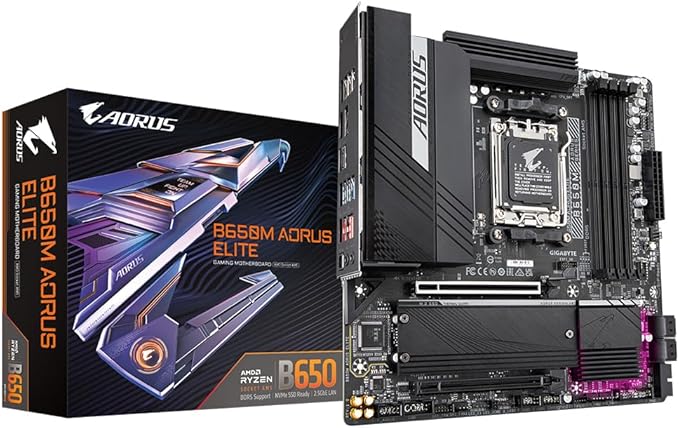
The motherboard or mainboard is the component that connects all the different parts of your computer. Often it has some integrated components like a sound card, enabling your computer to play sound, or a network card, to connect your computer to the network. The standard form factor (size) for motherboards is ATX, you need at least a midi-tower to fit one of those in. Micro-ATX motherboards are often more complete and have more onboard devices, like a video board and fit in smaller cases, but are generally less expandable.
The motherboard or mainboard is the component that connects all the different parts of your computer. Often it has some integrated components like a sound card, enabling your computer to play sound, or a network card, to connect your computer to the network. The standard form factor (size) for motherboards is ATX, you need at least a midi-tower to fit one of those in. Micro-ATX motherboards are often more complete and have more onboard devices, like a video board and fit in smaller cases, but are generally less expandable.
in 3 offers
The lowest price for Gigabyte B650M AORUS Elite AM5 M-ATX Motherboard right now is $321.33 at worldtechstore.com.au, compared across 3 retailers.
The all-time low was $189.00 on 5 Sept 2023 — today's price is 70% above the lowest ever. It has been notably cheaper before — worth setting a price alert.
Prices last updated 4 Sept 2026.
Gigabyte B650M AORUS Elite AM5 M-ATX Motherboard
The motherboard or mainboard is the component that connects all the different parts of your computer. Often it has some integrated components like a sound card, enabling your computer to play sound, or a network card, to connect your computer to the network. The standard form factor (size) for motherboards is ATX, you need at least a midi-tower to fit one of those in. Micro-ATX motherboards are often more complete and have more onboard devices, like a video board and fit in smaller cases, but are generally less expandable.
The motherboard or mainboard is the component that connects all the different parts of your computer. Often it has some integrated components like a sound card, enabling your computer to play sound, or a network card, to connect your computer to the network. The standard form factor (size) for motherboards is ATX, you need at least a midi-tower to fit one of those in. Micro-ATX motherboards are often more complete and have more onboard devices, like a video board and fit in smaller cases, but are generally less expandable.
Last updated at 04/09/2026 04:57:00
Gigabyte B650 M Aorus Elite 1.0 Amd Am5 Atx Motherboard 4x Ddr5~128 Gb,2x Pc Ie X16, 2x M.2, 4x Sata 6, 7x Usb 3.2, 1x Usb C, 4x Usb 2.0
Delivery $15
GIGABYTE B650M AORUS ELITE 1.0 AMD AM5 ATX Motherboard 4x DDR5~128GB,2x PCIe x16, 2x M.2, 4x SATA 6, 7x USB 3.2, 1x USB-C, 4x USB 2.0
Free delivery between 11–18 Sept
Gigabyte B850M A ELT WF6E AM5 board with B850 chipset DDR5 256GB 16x PCIe5 dual M.2 2.5GbE Wi-Fi 6E DP rich USB SATA 7.1 audio support
14-day returns
originally posted on bestbuy.com
Finishing up my build, everything was going great until installing my GPU (Red Devil 6750 XT). Gigabyte's "EZ Latch" to release the GPU is so unnecessarily large that it wouldn't allow my card to fit. It instead scratched my brand new GPU and now I have to settle for a smaller card or return this board... I'm definitely returning the board. How Gigabyte did not think of this when adding this "feature" is mind boggling to me, especially in this market of GPUs getting larger and larger. They don't even bother to mention anything about compatibility with certain graphic cards. If you have a large card, do yourself a favor and avoid this board unless you want to be stuck with fitment issues and scratching up your expensive card. No wonder why it's one of the cheapest ... MoreFinishing up my build, everything was going great until installing my GPU (Red Devil 6750 XT). Gigabyte's "EZ Latch" to release the GPU is so unnecessarily large that it wouldn't allow my card to fit. It instead scratched my brand new GPU and now I have to settle for a smaller card or return this board... I'm definitely returning the board. How Gigabyte did not think of this when adding this "feature" is mind boggling to me, especially in this market of GPUs getting larger and larger. They don't even bother to mention anything about compatibility with certain graphic cards. If you have a large card, do yourself a favor and avoid this board unless you want to be stuck with fitment issues and scratching up your expensive card. No wonder why it's one of the cheapest x670 boards out right now.
originally posted on scan.co.uk
Bought this on release. Had a few problems with Expo initially but BIOS updates seem to have fixed this. The board and BIOS are fine (the board is built like a tank), but the Windows software has a lot of missing functionality, for example the fan control has fewer options than the BIOS. It is also a buggy mess that repeatdly crashes when changing settings. There are several different bits with no clear explanation of most of them. For some reason keeps trying to install Norton Crapware as part of the tools suite. Expected much better from a fairly premium board.
originally posted on microcenter.com
I bought this on release day with new new ddr5 memory and 7900x, went a little over budget but haven't built a pc in 8 years so I thought what the heck. First I updated to latest bios without an issue. First POST took 5 min but I was expecting this as other boards with the new x670 had similar issues with first power on. However subsequent boots took around 1 minute which was better but for a $700 motherboard not good in the slightest. As new bios were released I flashed them due to the slow post times and it got better. The last bios I installed was f6b which got the time down to 35s. However other issues started popping up - drives were randomly connected and disconnected, same with USB devices and many crashes. These weren't bsods but rather the board restarting ... MoreI bought this on release day with new new ddr5 memory and 7900x, went a little over budget but haven't built a pc in 8 years so I thought what the heck. First I updated to latest bios without an issue. First POST took 5 min but I was expecting this as other boards with the new x670 had similar issues with first power on. However subsequent boots took around 1 minute which was better but for a $700 motherboard not good in the slightest. As new bios were released I flashed them due to the slow post times and it got better. The last bios I installed was f6b which got the time down to 35s. However other issues started popping up - drives were randomly connected and disconnected, same with USB devices and many crashes. These weren't bsods but rather the board restarting randomly. After one restart I could not boot into windows..I tried using the media creation tool, couldn't boot into that either. Verified that the boot drive worked on other pcs. Tried to roll back the bios update to the one before but the qflash app, the gigabyte bios flash app, couldn't be booted into neither. Went scorched earth and removed all components except cpu, cpu fan, and one stick of ram which I tried ik A2/B2 slots. This board will not boot into anything... of course this occurred 6 weeks after I bought it so I missed the microcenter return policy. Had a few back and forths with gigabyte and they finally issued a RMA. I still haven't sent it in since they still need to verify that I bought it from microcenter before I get the shipping label...I don't know if I'm more mad about this or the fact that after a few weeks amd lowered the price of all the components including and the ram became cheaper too. if I waited a month I would have save $600 and also have a working computer. I sold my last rig of 8 years a week before this occurred to help pay for this one so I'm without a computer now and about a 3k hole in my pocket.Fun times.
| CPU socket | Socket AM5 |
| Compatible devices | Personal Computer |
| RAM memory technology | DDR5 |
| Compatible processors | AMD 3rd Generation Ryzen |
| Chipset type | AMD B650 |
Gigabyte B650 M Aorus Elite 1.0 Amd Am5 Atx Motherboard 4x Ddr5~128 Gb,2x Pc Ie X16, 2x M.2, 4x Sata 6, 7x Usb 3.2, 1x Usb C, 4x Usb 2.0
Delivery $15
GIGABYTE B650M AORUS ELITE 1.0 AMD AM5 ATX Motherboard 4x DDR5~128GB,2x PCIe x16, 2x M.2, 4x SATA 6, 7x USB 3.2, 1x USB-C, 4x USB 2.0
Free delivery between 11–18 Sept
Gigabyte B850M A ELT WF6E AM5 board with B850 chipset DDR5 256GB 16x PCIe5 dual M.2 2.5GbE Wi-Fi 6E DP rich USB SATA 7.1 audio support
14-day returns
Finishing up my build, everything was going great until installing my GPU (Red Devil 6750 XT). Gigabyte's "EZ Latch" to release the GPU is so unnecessarily large that it wouldn't allow my card to fit. It instead scratched my brand new GPU and now I have to settle for a smaller card or return this board... I'm definitely returning the board. How Gigabyte did not think of this when adding this "feature" is mind boggling to me, especially in this market of GPUs getting larger and larger. They don't even bother to mention anything about compatibility with certain graphic cards. If you have a large card, do yourself a favor and avoid this board unless you want to be stuck with fitment issues and scratching up your expensive card. No wonder why it's one of the cheapest ... MoreFinishing up my build, everything was going great until installing my GPU (Red Devil 6750 XT). Gigabyte's "EZ Latch" to release the GPU is so unnecessarily large that it wouldn't allow my card to fit. It instead scratched my brand new GPU and now I have to settle for a smaller card or return this board... I'm definitely returning the board. How Gigabyte did not think of this when adding this "feature" is mind boggling to me, especially in this market of GPUs getting larger and larger. They don't even bother to mention anything about compatibility with certain graphic cards. If you have a large card, do yourself a favor and avoid this board unless you want to be stuck with fitment issues and scratching up your expensive card. No wonder why it's one of the cheapest x670 boards out right now.
Bought this on release. Had a few problems with Expo initially but BIOS updates seem to have fixed this. The board and BIOS are fine (the board is built like a tank), but the Windows software has a lot of missing functionality, for example the fan control has fewer options than the BIOS. It is also a buggy mess that repeatdly crashes when changing settings. There are several different bits with no clear explanation of most of them. For some reason keeps trying to install Norton Crapware as part of the tools suite. Expected much better from a fairly premium board.
I bought this on release day with new new ddr5 memory and 7900x, went a little over budget but haven't built a pc in 8 years so I thought what the heck. First I updated to latest bios without an issue. First POST took 5 min but I was expecting this as other boards with the new x670 had similar issues with first power on. However subsequent boots took around 1 minute which was better but for a $700 motherboard not good in the slightest. As new bios were released I flashed them due to the slow post times and it got better. The last bios I installed was f6b which got the time down to 35s. However other issues started popping up - drives were randomly connected and disconnected, same with USB devices and many crashes. These weren't bsods but rather the board restarting ... MoreI bought this on release day with new new ddr5 memory and 7900x, went a little over budget but haven't built a pc in 8 years so I thought what the heck. First I updated to latest bios without an issue. First POST took 5 min but I was expecting this as other boards with the new x670 had similar issues with first power on. However subsequent boots took around 1 minute which was better but for a $700 motherboard not good in the slightest. As new bios were released I flashed them due to the slow post times and it got better. The last bios I installed was f6b which got the time down to 35s. However other issues started popping up - drives were randomly connected and disconnected, same with USB devices and many crashes. These weren't bsods but rather the board restarting randomly. After one restart I could not boot into windows..I tried using the media creation tool, couldn't boot into that either. Verified that the boot drive worked on other pcs. Tried to roll back the bios update to the one before but the qflash app, the gigabyte bios flash app, couldn't be booted into neither. Went scorched earth and removed all components except cpu, cpu fan, and one stick of ram which I tried ik A2/B2 slots. This board will not boot into anything... of course this occurred 6 weeks after I bought it so I missed the microcenter return policy. Had a few back and forths with gigabyte and they finally issued a RMA. I still haven't sent it in since they still need to verify that I bought it from microcenter before I get the shipping label...I don't know if I'm more mad about this or the fact that after a few weeks amd lowered the price of all the components including and the ram became cheaper too. if I waited a month I would have save $600 and also have a working computer. I sold my last rig of 8 years a week before this occurred to help pay for this one so I'm without a computer now and about a 3k hole in my pocket.Fun times.
Contrary to several reviews I have read elsewhere, I have had no issues with the motherboard at all. I initially had a few hangs because I had mixed memory speeds: 32Gb of 6000 and 32GB of 6200 memory. I removed the slower memory and the system has been rock steady since I installed it.Processor: AMD Ryzen 9 7950X 16-Core ProcessorMotherboard: X670E AORUS MASTERBIOS: F8cMemory: 32GiBSpeed: 62004 x Samsung SSD 980 PRO 1TB & 2x Samsung SSD 870 EVO 2TBUbuntu 22.10I can highly recommend Overclockers !
I was upgrading to AM5 and I mainly game and stream from a single pc. This MB has everything that you would need and it performs exactly as it should. 3 M.2 slots, check. Built in wifi 6, check. Bios is simple and easy to navigate, as well Gigabyte makes it really easy to update your bios with their Qflash bios update feature. I didn't want to spend an arm and a leg on a motherboard where most of the features are overkill and a waste of money. This board gets you everything you need for a high end build and then some.Specs for my pc:CPU - Ryzen 7 7700XMB - Gigabyte b650 aorus pro axRAM - G.SKILL 32G (2 x 16G) DDR5 6000 C30GPU - Powercolor Red Devil 6900XTPSU - Seasonic 1000W
The first one would not post so I had to return. The second mobo fired up without any problems until I started updating the drivers. Internet connection would drop constantly no matter what I did online. This persisted even after the BIOS and drivers were updated. I've looked around online and found out that the culprit is the Intel Ethernet Controller I225-V. It seems to be known as very buggy, with recent driver releases failing to mitigate the ethernet controller issues.At this point, I have already reassembled the PC at least 4 times (3x first mobo and 1x second mobo) so I really didn't really feel like taking another trip to the store. I ended up installing a PCIe Network Card just so I could move on and end the frustration.Avoid mobos with Intel I225-V ... MoreThe first one would not post so I had to return. The second mobo fired up without any problems until I started updating the drivers. Internet connection would drop constantly no matter what I did online. This persisted even after the BIOS and drivers were updated. I've looked around online and found out that the culprit is the Intel Ethernet Controller I225-V. It seems to be known as very buggy, with recent driver releases failing to mitigate the ethernet controller issues.At this point, I have already reassembled the PC at least 4 times (3x first mobo and 1x second mobo) so I really didn't really feel like taking another trip to the store. I ended up installing a PCIe Network Card just so I could move on and end the frustration.Avoid mobos with Intel I225-V ethernet controllers if you can.
I decided to upgrade my AM4/5800X rig to AM5/7700X. I chose this motherboard as it was one of the few available at the time of release and it was the cheapest top dog option.Arrived next day but I just could not get it to work. I kept getting error code 21 and E5 readings. I figured either the RAM or mobo is faulty.Had to do step by step fault checking with the DIMM slots and RAM modules. Eventually got it to work with one Crucial RAM module in the default slot. Booted pc. Installed OS and then all mobo and gfx drivers.But mobo was unstable even in W10-64bit. USB kept crashing, getting black screens, etc. In the end I got fed up and requested RMA/refund.I purchased a replacement mobo (same brand and model) which arrived just over 4 weeks ago and it has been ... MoreI decided to upgrade my AM4/5800X rig to AM5/7700X. I chose this motherboard as it was one of the few available at the time of release and it was the cheapest top dog option.Arrived next day but I just could not get it to work. I kept getting error code 21 and E5 readings. I figured either the RAM or mobo is faulty.Had to do step by step fault checking with the DIMM slots and RAM modules. Eventually got it to work with one Crucial RAM module in the default slot. Booted pc. Installed OS and then all mobo and gfx drivers.But mobo was unstable even in W10-64bit. USB kept crashing, getting black screens, etc. In the end I got fed up and requested RMA/refund.I purchased a replacement mobo (same brand and model) which arrived just over 4 weeks ago and it has been working flawlessly.Not a good experience with the first mobo BUT the chaps at OCUK were really great. They went out of their way to help me trouble shoot and try to fix the problem. In the end, they agreed it was a faulty mobo BIOS. They issued hassle free RMA and full refund. Respect to the guys at OCUK.I knocked off one star for faulty mobo, but the four stars I am awarding purely for the help I got from the chaps at OCUK. One of the lads (Taryn) stayed behind till 5.20pm on a Friday evening helping me trouble shoot (when he should have finished for the day at 5pm).I now understand why OCUK gets fantastic reviews from their customers. These guys will go the extra mile to help us.
For me, this board was incredibly simple to deal with and setup. The first boot does take some time while it's testing out optimal memory settings. M2 drives are really easy to install because of the latching mechanism on the board; no tiny screws to lose. The board is very well constructed with some hefty heatsinks. Unless you need the I/O provided by the x670/e chipset, this board should serve anyone well for a long time. The vrm will easily handle any AMD chip currently out and in the future. Gigabyte also has a very generous 5 year warranty once you register .
Made build with 7600X and G.Skill Trident Z5 Neo 2x16GB DDR5-6000 CL30. Ram was not on official vendor list, but worked anyways. Had issue with first time trying to enable EXPO, but mobo displayed error and let me change it. I re-enabled it with no issues since. I had also updated to the most recent BIOS, non-beta version, (F5) before trying to enable EXPO. Came shipped with F4. I do have a 30s post time, but that seems to come with EXPO and XMP on DDR5. I don't even mind because old boot was 10s post 1.5m windows and now its 30s post, 10s windows.Plenty m.2, SATA, and USB ports. Very easy to install ram (some feel like you are breaking the board). No post number for errors but it does have lights to say what it is doing. Also has on board start and reset ... MoreMade build with 7600X and G.Skill Trident Z5 Neo 2x16GB DDR5-6000 CL30. Ram was not on official vendor list, but worked anyways. Had issue with first time trying to enable EXPO, but mobo displayed error and let me change it. I re-enabled it with no issues since. I had also updated to the most recent BIOS, non-beta version, (F5) before trying to enable EXPO. Came shipped with F4. I do have a 30s post time, but that seems to come with EXPO and XMP on DDR5. I don't even mind because old boot was 10s post 1.5m windows and now its 30s post, 10s windows.Plenty m.2, SATA, and USB ports. Very easy to install ram (some feel like you are breaking the board). No post number for errors but it does have lights to say what it is doing. Also has on board start and reset switches. Came with a godlike front panel connector adaptor that let you plug in wire and also keep them held in as you plugged it into the board. The extended GPU tab is convenient. No manual included, but was able to print one out.
Was expecting a decent motherboard and I got a defective one. At first I could not get it to boot so I flashed the bios. Finally got it to boot with one stick of RAM after that I tried to add more RAM. Was only able to get it taboo with two ram sticks in the A1 a2 slots. All the ram sticks or the exact same Corsair vengeance RGB 5600. After flashing the bios to every version they had I gave up. I returned it and got MSI. This was the first time I've ever had any trouble with a gigabyte item. And I've never had any trouble with MSI. Should have went with MSI from the start.
| CPU socket | Socket AM5 |
| Compatible devices | Personal Computer |
| RAM memory technology | DDR5 |
| Compatible processors | AMD 3rd Generation Ryzen |
| Chipset type | AMD B650 |

