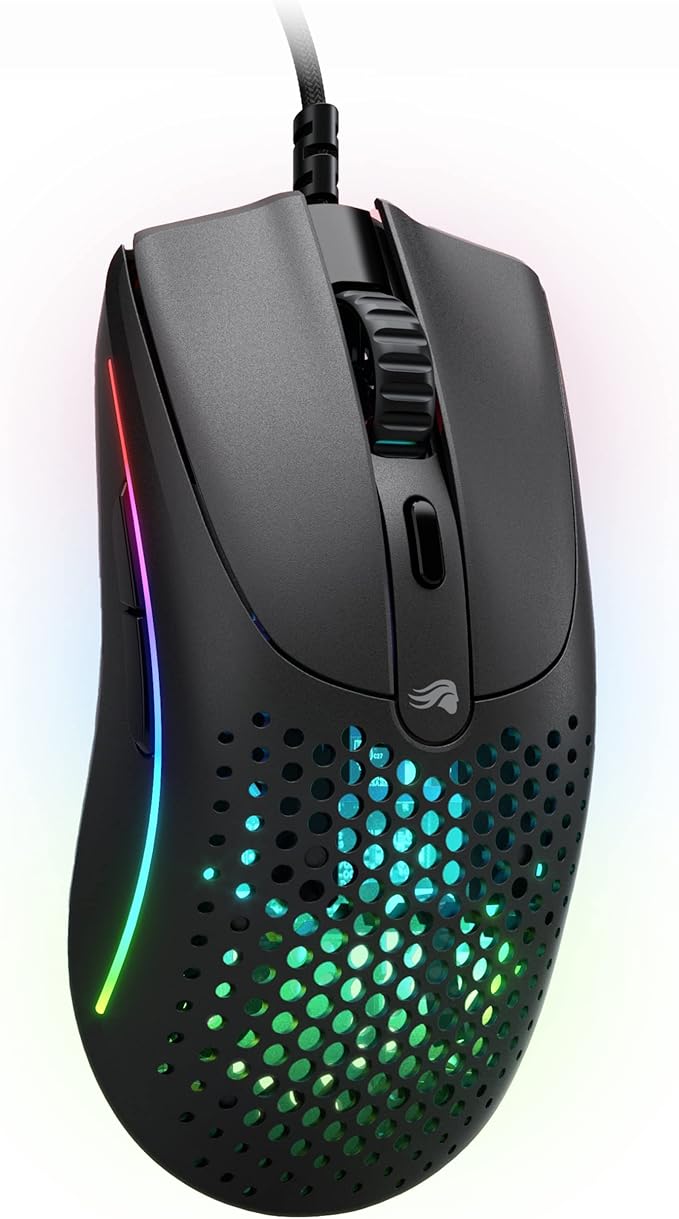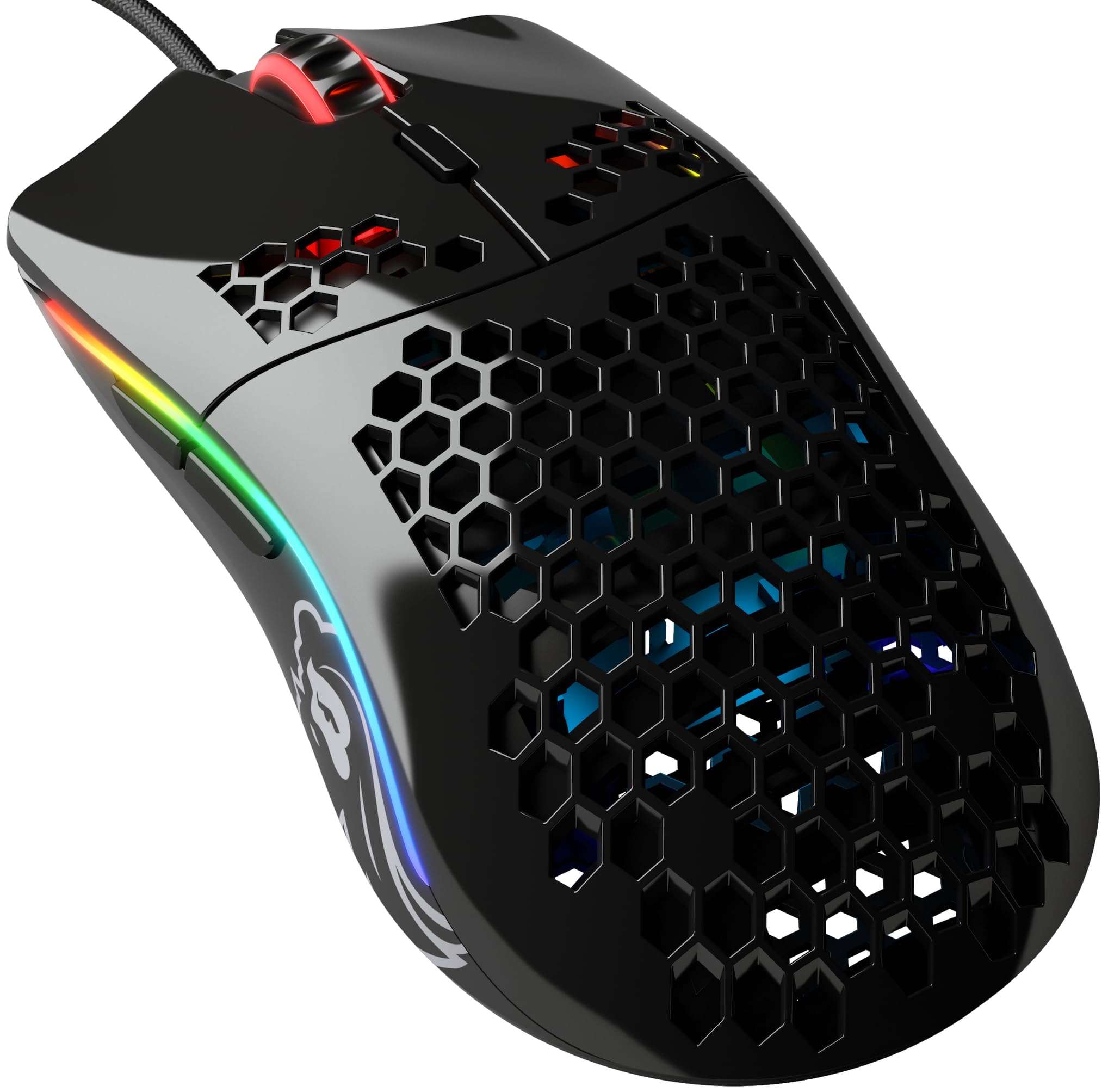
The Glorious PC Gaming Race Model O- gaming mouse is a gaming mouse equipped with a high-quality optical sensor from Pixart and six buttons. The sensor offers a very precise resolution of 12,000 DPI. Notably, the top of the professional gaming mouse features a honeycomb design, which significantly reduces the weight of the mouse to just 58 grams. Underneath, the stylish RGB lighting highlights the internal mechanics of the mouse. The durable Omron switches ensure the long lifespan of the Glorious PC Gaming Race Model O gaming mouse. Additionally, the mouse boasts excellent specifications, including an acceleration of 50G.
The Glorious PC Gaming Race Model O- gaming mouse is a gaming mouse equipped with a high-quality optical sensor from Pixart and six buttons. The sensor offers a very precise resolution of 12,000 DPI. Notably, the top of the professional gaming mouse features a honeycomb design, which significantly reduces the weight of the mouse to just 58 grams. Underneath, the stylish RGB lighting highlights the internal mechanics of the mouse. The durable Omron switches ensure the long lifespan of the Glorious PC Gaming Race Model O gaming mouse. Additionally, the mouse boasts excellent specifications, including an acceleration of 50G.
in 3 offers
The lowest price for Glorious PC Gaming Model O- Gaming Mouse (Glossy Black) right now is $60.90 at eBay.com.au, compared across 2 retailers.
The all-time low was $24.80 on 4 July 2025 — today's price is 146% above the lowest ever. It has been notably cheaper before — worth setting a price alert.
Prices last updated 15 Sept 2026.
Glorious PC Gaming Model O- Gaming Mouse (Glossy Black)
The Glorious PC Gaming Race Model O- gaming mouse is a gaming mouse equipped with a high-quality optical sensor from Pixart and six buttons. The sensor offers a very precise resolution of 12,000 DPI. Notably, the top of the professional gaming mouse features a honeycomb design, which significantly reduces the weight of the mouse to just 58 grams. Underneath, the stylish RGB lighting highlights the internal mechanics of the mouse. The durable Omron switches ensure the long lifespan of the Glorious PC Gaming Race Model O gaming mouse. Additionally, the mouse boasts excellent specifications, including an acceleration of 50G.
The Glorious PC Gaming Race Model O- gaming mouse is a gaming mouse equipped with a high-quality optical sensor from Pixart and six buttons. The sensor offers a very precise resolution of 12,000 DPI. Notably, the top of the professional gaming mouse features a honeycomb design, which significantly reduces the weight of the mouse to just 58 grams. Underneath, the stylish RGB lighting highlights the internal mechanics of the mouse. The durable Omron switches ensure the long lifespan of the Glorious PC Gaming Race Model O gaming mouse. Additionally, the mouse boasts excellent specifications, including an acceleration of 50G.
Last updated at 15/09/2026 21:38:33
Glorious Model O- Wired Rgb 58g Ultralight Gaming Mouse In A Glossy
Delivery $30.73
Affiliate Disclosure: We may receive a small commission for purchases made through this link at no extra cost to you. This helps support our site. Thank you!
Gaming Mouse - Model O Minus 58 Superlight Honeycomb Mouse, Mouse With
Free delivery
Affiliate Disclosure: We may receive a small commission for purchases made through this link at no extra cost to you. This helps support our site. Thank you!
Glorious Model O Minus Gaming Mouse Glossy - Siyah
Delivery between 20–24 Sept $41
originally posted on gloriousgaming.com
Recently purchased the Model O from Glorious Gaming after getting their keyboard, which I'm in love with. Unfortunately, the model O they sent me had a problem with the Green LED on one of the sides. Their customer support team made it very easy for me to upload a video of the problem, and sent me a new mouse with a return label to send back the defective mouse. It was a smooth and very easy process that you don't find in very many places anymore.The Model O took some getting use to from my old Naga Razer mouse (really old model), but now I love it. The main sticking point of the "getting use to" was that I had some weird configurations on the naga mouse, including the windows "enhance precision" on, with some other settings in the naga razer setup for augmenting ... MoreRecently purchased the Model O from Glorious Gaming after getting their keyboard, which I'm in love with. Unfortunately, the model O they sent me had a problem with the Green LED on one of the sides. Their customer support team made it very easy for me to upload a video of the problem, and sent me a new mouse with a return label to send back the defective mouse. It was a smooth and very easy process that you don't find in very many places anymore.The Model O took some getting use to from my old Naga Razer mouse (really old model), but now I love it. The main sticking point of the "getting use to" was that I had some weird configurations on the naga mouse, including the windows "enhance precision" on, with some other settings in the naga razer setup for augmenting the precision acceleration. Precision acceleration isn't an option in the model O, like it was in Naga, but my guess is that I'm one of the only people that use this as it was the default for me for so long, and everyone else has it turned off. Once I was able to find the dpi settings of my naga and input it into my model o with the precision pointing on in windows, it felt much more comfortable to what I'm use to, with only a little bit of a learning curve.Unfortuneately the Glorious Core software continues to fail to update the software and firmware at this time, but its been confirmed by their customer support that that is a known bug and will be fixed soon, but as I don't have any problems with the current software or firmware, I don't really mind that its not updating at this time.The only thing I've found to be a continued problem is that, with my complex setup, involving a I/O switcher between 2 computers, 1 desktop and 1 laptop hooked up to a docking station, when I plug the mouse into the switcher, the mouse will work, but it often doesn't recognize that the mouse is the model o with the software, which can change the settings on me between flipping the I/O switcher between computers. For now I just use my I/O switcher, but manually change the mouse plug between machines. I'm not sure if this is a failing of the I/O switcher, the mouse, or both, but its a minimal inconvenience.The versatility of the wiring of the mouse if very nice, as it comes with a USB to plug in directly to your computer, a cord to charge the mouse (which also makes it a wired mouse, sending the signal directly to the computer), or you can use the "charging cable" to hook up to a special dongle, which the USB can be plugged into, which gives you some range to have your USB dongle in another location than your computer. I don't have awesome use cases for all of these options yet, but can imagine that it would make things easier for more complicated and creative setups for the mouse on other devices or systems.
originally posted on overclockers.co.uk
The overall build quality of this mouse is quite poor, the plastic doesn't feel cheap and it doesn't scratch easily however the side buttons felt cheap and the cable was made with materials that weren't very durable. I've owned one for 2 months now and there were 3 major issues with the mouse I received so I'll put them here.1. The side mouse buttons were defective and sometimes worked sometimes didn't. the MB4 sometimes would stay in its current position once clicked in, and it would stay stuck with you unable to click it until you tilted the mouse on its side for it to fall back out.2. The cable itself came damaged and wasn't properly wired into the mouse, something that became worse over time, which leads me to point 33. The mouse frequently would ... MoreThe overall build quality of this mouse is quite poor, the plastic doesn't feel cheap and it doesn't scratch easily however the side buttons felt cheap and the cable was made with materials that weren't very durable. I've owned one for 2 months now and there were 3 major issues with the mouse I received so I'll put them here.1. The side mouse buttons were defective and sometimes worked sometimes didn't. the MB4 sometimes would stay in its current position once clicked in, and it would stay stuck with you unable to click it until you tilted the mouse on its side for it to fall back out.2. The cable itself came damaged and wasn't properly wired into the mouse, something that became worse over time, which leads me to point 33. The mouse frequently would disconnect for a split second from my computer, reloading it and bugging out the applications I would be using, causing me to lose games or screw up CAD work.Would buy again if the mouse build quality matched its features.
originally posted on gloriousgaming.com
I've never tried a lightweight gaming mouse previously, since they are either normally still using wires, or are wireless but with insanely expensive pricing.Fortunately, the Glorious Model O Wireless managed to make me try one out for myself with its combination of affordable pricing (about 1/2 the price of competing brands' top wireless mouse) but with great specs & performance.Coming from a G304 Wireless, I have to say that the lightweight nature of this mouse took me by surprise in a positive way. It took me several days, but once I've adjusted to Model O W's weight, all my movements, snap, & overall aim are just a lot more effortless making it hard to go back to even the G304 (which I already considered to be quite lightweight) for serious ... MoreI've never tried a lightweight gaming mouse previously, since they are either normally still using wires, or are wireless but with insanely expensive pricing.Fortunately, the Glorious Model O Wireless managed to make me try one out for myself with its combination of affordable pricing (about 1/2 the price of competing brands' top wireless mouse) but with great specs & performance.Coming from a G304 Wireless, I have to say that the lightweight nature of this mouse took me by surprise in a positive way. It took me several days, but once I've adjusted to Model O W's weight, all my movements, snap, & overall aim are just a lot more effortless making it hard to go back to even the G304 (which I already considered to be quite lightweight) for serious gaming.Complementing all of this is (as RocketJump Ninja puts it) a great safe shape that fits well with the majority of grip styles, be it Palm, Fingertip, and even a more 'relaxed' Claw grip, which means that the majority of people should find the shape + weight combination of the Mouse to be a solid combo for either casual or competitive play.I do have to say though that for a harsher Claw-gripper (I'm more of an 'in-between' of 'relaxed' and 'harsh' claw), the shape might not fit the best, as while I do find the shape of the Model O Wireless to be comfortable enough for general use, I still prefer a shape that has a higher back hump (similar to the G305/304's back shape) for more precise aiming. In addition, I do also feel that a smaller sized mouse would complement my aim better too, though again that might just be me being still quite used to the shape of my previous main mouse.So Overall, the Model O Wireless is a really great Mice that I think should suit a lot of people, be it for casual, or competitive play. At basically around 1/2 the pricing of similar offerings by competitors, the Model O Wireless is currently a no-brainer if you're looking for an FK-style shape mouse.Suggestions on improvements for GPC would be to release a Wireless version of the Model O- (the smaller version of the Model O), but with a shell that has an adjustable back-hump - similar to those found on recent Xtrify Mice - to provide users some amount of adjustability of the mouse shape to better fit their hands. Another alternative is to release a more claw-grip friendly shape (i.e. enlarging the back-hump or increasing the taper-dropoff) of the Model O Wireless while maintaining (or perhaps improving upon) the lightweight nature of the mouse. I believe such models would open more appropriate options for 'harsher' claw-grip style people. Additionally, more color options of the Mouse would be greatly appreciated as well!
| Average Battery Life (in hours) | 12 months |
| Connectivity technology | USB |
| Special feature | Lightweight |
| Movement detection technology | Optical |
| Number of buttons | 6 |
Glorious Model O- Wired Rgb 58g Ultralight Gaming Mouse In A Glossy
Delivery $30.73
Affiliate Disclosure: We may receive a small commission for purchases made through this link at no extra cost to you. This helps support our site. Thank you!
Gaming Mouse - Model O Minus 58 Superlight Honeycomb Mouse, Mouse With
Free delivery
Affiliate Disclosure: We may receive a small commission for purchases made through this link at no extra cost to you. This helps support our site. Thank you!
Glorious Model O Minus Gaming Mouse Glossy - Siyah
Delivery between 20–24 Sept $41
Recently purchased the Model O from Glorious Gaming after getting their keyboard, which I'm in love with. Unfortunately, the model O they sent me had a problem with the Green LED on one of the sides. Their customer support team made it very easy for me to upload a video of the problem, and sent me a new mouse with a return label to send back the defective mouse. It was a smooth and very easy process that you don't find in very many places anymore.The Model O took some getting use to from my old Naga Razer mouse (really old model), but now I love it. The main sticking point of the "getting use to" was that I had some weird configurations on the naga mouse, including the windows "enhance precision" on, with some other settings in the naga razer setup for augmenting ... MoreRecently purchased the Model O from Glorious Gaming after getting their keyboard, which I'm in love with. Unfortunately, the model O they sent me had a problem with the Green LED on one of the sides. Their customer support team made it very easy for me to upload a video of the problem, and sent me a new mouse with a return label to send back the defective mouse. It was a smooth and very easy process that you don't find in very many places anymore.The Model O took some getting use to from my old Naga Razer mouse (really old model), but now I love it. The main sticking point of the "getting use to" was that I had some weird configurations on the naga mouse, including the windows "enhance precision" on, with some other settings in the naga razer setup for augmenting the precision acceleration. Precision acceleration isn't an option in the model O, like it was in Naga, but my guess is that I'm one of the only people that use this as it was the default for me for so long, and everyone else has it turned off. Once I was able to find the dpi settings of my naga and input it into my model o with the precision pointing on in windows, it felt much more comfortable to what I'm use to, with only a little bit of a learning curve.Unfortuneately the Glorious Core software continues to fail to update the software and firmware at this time, but its been confirmed by their customer support that that is a known bug and will be fixed soon, but as I don't have any problems with the current software or firmware, I don't really mind that its not updating at this time.The only thing I've found to be a continued problem is that, with my complex setup, involving a I/O switcher between 2 computers, 1 desktop and 1 laptop hooked up to a docking station, when I plug the mouse into the switcher, the mouse will work, but it often doesn't recognize that the mouse is the model o with the software, which can change the settings on me between flipping the I/O switcher between computers. For now I just use my I/O switcher, but manually change the mouse plug between machines. I'm not sure if this is a failing of the I/O switcher, the mouse, or both, but its a minimal inconvenience.The versatility of the wiring of the mouse if very nice, as it comes with a USB to plug in directly to your computer, a cord to charge the mouse (which also makes it a wired mouse, sending the signal directly to the computer), or you can use the "charging cable" to hook up to a special dongle, which the USB can be plugged into, which gives you some range to have your USB dongle in another location than your computer. I don't have awesome use cases for all of these options yet, but can imagine that it would make things easier for more complicated and creative setups for the mouse on other devices or systems.
The overall build quality of this mouse is quite poor, the plastic doesn't feel cheap and it doesn't scratch easily however the side buttons felt cheap and the cable was made with materials that weren't very durable. I've owned one for 2 months now and there were 3 major issues with the mouse I received so I'll put them here.1. The side mouse buttons were defective and sometimes worked sometimes didn't. the MB4 sometimes would stay in its current position once clicked in, and it would stay stuck with you unable to click it until you tilted the mouse on its side for it to fall back out.2. The cable itself came damaged and wasn't properly wired into the mouse, something that became worse over time, which leads me to point 33. The mouse frequently would ... MoreThe overall build quality of this mouse is quite poor, the plastic doesn't feel cheap and it doesn't scratch easily however the side buttons felt cheap and the cable was made with materials that weren't very durable. I've owned one for 2 months now and there were 3 major issues with the mouse I received so I'll put them here.1. The side mouse buttons were defective and sometimes worked sometimes didn't. the MB4 sometimes would stay in its current position once clicked in, and it would stay stuck with you unable to click it until you tilted the mouse on its side for it to fall back out.2. The cable itself came damaged and wasn't properly wired into the mouse, something that became worse over time, which leads me to point 33. The mouse frequently would disconnect for a split second from my computer, reloading it and bugging out the applications I would be using, causing me to lose games or screw up CAD work.Would buy again if the mouse build quality matched its features.
I've never tried a lightweight gaming mouse previously, since they are either normally still using wires, or are wireless but with insanely expensive pricing.Fortunately, the Glorious Model O Wireless managed to make me try one out for myself with its combination of affordable pricing (about 1/2 the price of competing brands' top wireless mouse) but with great specs & performance.Coming from a G304 Wireless, I have to say that the lightweight nature of this mouse took me by surprise in a positive way. It took me several days, but once I've adjusted to Model O W's weight, all my movements, snap, & overall aim are just a lot more effortless making it hard to go back to even the G304 (which I already considered to be quite lightweight) for serious ... MoreI've never tried a lightweight gaming mouse previously, since they are either normally still using wires, or are wireless but with insanely expensive pricing.Fortunately, the Glorious Model O Wireless managed to make me try one out for myself with its combination of affordable pricing (about 1/2 the price of competing brands' top wireless mouse) but with great specs & performance.Coming from a G304 Wireless, I have to say that the lightweight nature of this mouse took me by surprise in a positive way. It took me several days, but once I've adjusted to Model O W's weight, all my movements, snap, & overall aim are just a lot more effortless making it hard to go back to even the G304 (which I already considered to be quite lightweight) for serious gaming.Complementing all of this is (as RocketJump Ninja puts it) a great safe shape that fits well with the majority of grip styles, be it Palm, Fingertip, and even a more 'relaxed' Claw grip, which means that the majority of people should find the shape + weight combination of the Mouse to be a solid combo for either casual or competitive play.I do have to say though that for a harsher Claw-gripper (I'm more of an 'in-between' of 'relaxed' and 'harsh' claw), the shape might not fit the best, as while I do find the shape of the Model O Wireless to be comfortable enough for general use, I still prefer a shape that has a higher back hump (similar to the G305/304's back shape) for more precise aiming. In addition, I do also feel that a smaller sized mouse would complement my aim better too, though again that might just be me being still quite used to the shape of my previous main mouse.So Overall, the Model O Wireless is a really great Mice that I think should suit a lot of people, be it for casual, or competitive play. At basically around 1/2 the pricing of similar offerings by competitors, the Model O Wireless is currently a no-brainer if you're looking for an FK-style shape mouse.Suggestions on improvements for GPC would be to release a Wireless version of the Model O- (the smaller version of the Model O), but with a shell that has an adjustable back-hump - similar to those found on recent Xtrify Mice - to provide users some amount of adjustability of the mouse shape to better fit their hands. Another alternative is to release a more claw-grip friendly shape (i.e. enlarging the back-hump or increasing the taper-dropoff) of the Model O Wireless while maintaining (or perhaps improving upon) the lightweight nature of the mouse. I believe such models would open more appropriate options for 'harsher' claw-grip style people. Additionally, more color options of the Mouse would be greatly appreciated as well!
Mouse is exquisite, but i got a matching white coord and its a little hard to install. The mouse must be disassembled as you may know, requiring the skates be uninstalled, permanently damaging them. This wouldn’t be an issue if the new cord came with new skates, but it didn’t. I would have to purchase new skates just to install my new coord. There is a design flaw in there somewhere, else this is intentionally poor/cheap design, which I don’t think it is. I suggest either making the coord a simple unplug and plug in install, make the skates out of a hard material that doesnt deform upon uninstallation, inset the screws into the skates instead of under them, or send new skates as a courtesy either with the mouse or with a new coord. Now I do believe the latter is ... MoreMouse is exquisite, but i got a matching white coord and its a little hard to install. The mouse must be disassembled as you may know, requiring the skates be uninstalled, permanently damaging them. This wouldn’t be an issue if the new cord came with new skates, but it didn’t. I would have to purchase new skates just to install my new coord. There is a design flaw in there somewhere, else this is intentionally poor/cheap design, which I don’t think it is. I suggest either making the coord a simple unplug and plug in install, make the skates out of a hard material that doesnt deform upon uninstallation, inset the screws into the skates instead of under them, or send new skates as a courtesy either with the mouse or with a new coord. Now I do believe the latter is already your policy, or I would believe after watching some videos on installing alternative coords; but my coord didn’t come with new skates as I mentioned. This is totally fine if it’s the case, ppl make mistakes, itd just be cool to get some skates sent so my peripherals all matched. Hope my feedback helps!
Since reviving my interest in PC gaming about 2 years ago, I have been working my way through all the big names in gaming mice, usually never outright HATING any of them, but finding them lacking in one way or another. Though I had long derided its honeycomb cutouts, a feature I really didn't care for aesthetically, and certain elements of its branding, I finally decided to take the plunge on the Model O.When I first tried it, it felt a little odd in my hands. I was coming from an XM1 most recently, so there was definitely an adjustment period. I played a couple of games that evening, and was relatively impressed, but not entirely convinced to switch from my trusty, no-frills standby to this funky, candy-colored, impossibly light enigma of a mouse.The next ... MoreSince reviving my interest in PC gaming about 2 years ago, I have been working my way through all the big names in gaming mice, usually never outright HATING any of them, but finding them lacking in one way or another. Though I had long derided its honeycomb cutouts, a feature I really didn't care for aesthetically, and certain elements of its branding, I finally decided to take the plunge on the Model O.When I first tried it, it felt a little odd in my hands. I was coming from an XM1 most recently, so there was definitely an adjustment period. I played a couple of games that evening, and was relatively impressed, but not entirely convinced to switch from my trusty, no-frills standby to this funky, candy-colored, impossibly light enigma of a mouse.The next morning, I sat down to start my work day, rested my hand down on the mouse (in my groggy state, not even really remembering I'd replaced the XM1), and it was like... synergy. Holding the Model O just felt like the most natural thing in the world. Where the asymmetrical shape and honeycomb cutouts had felt awkward the night before, they suddenly felt perfect in every respect.As I continued to use the mouse, both for work and for a wide variety of game genres, I felt even more at ease using it. After warming up to the shape, weight, and odd texture of the cutouts, I can't see myself going back to another mouse. In CSGO, the only FPS I play these days with any degree of seriousness, the Model O gives me better reaction time than any other mouse I've used, and I'm even starting to surprise myself with the speed of some of my flicks these days.All that being said, if I could give this mouse like... 4 3/4 stars, I would, for one reason: the squeaky wheel. As I found through a quick Google search, this is a really common problem with the Model O, but I was still a little shocked when it started catching slightly and making an unholy racket after only a month of use! However, a quick squirt of WD40 on either side got it back in new working order. Still, it seemed a little soon to be experiencing this problem, so I still consider it something of a negative against the mouse.In conclusion: give this mouse a try, even if you think you've found the perfect fit, or you think it's not the type of mouse you like. As one of the cheaper high-end gaming mice out there, you don't have a lot to lose, and, if you're like me, quite a bit to gain in terms of mouse performance.
If this is an upgrade from a corded mouse or you're separating from Razer products this is a good mouse.The Dongle feels cheap like less than $1 in BOM, Dongle appears to be reused from another devices cast.The extender or whatever it's called that allows dongle to use the 'USB C' cable it moves inside where the USB C plugs in and the cable will only go all the way in on one side, there are 2 horns on the USB C cable that taper plus flat leaving you with only 1 side to put the USB C connector in.Cable is light average connectors not great or bad except for the design of the horns on the USB C side those make it a 1 way only.The mouse is smaller than my G903 in all areas, their claim it's for large hands ? Large leprechaun hands maybe or the large hands of a ... MoreIf this is an upgrade from a corded mouse or you're separating from Razer products this is a good mouse.The Dongle feels cheap like less than $1 in BOM, Dongle appears to be reused from another devices cast.The extender or whatever it's called that allows dongle to use the 'USB C' cable it moves inside where the USB C plugs in and the cable will only go all the way in on one side, there are 2 horns on the USB C cable that taper plus flat leaving you with only 1 side to put the USB C connector in.Cable is light average connectors not great or bad except for the design of the horns on the USB C side those make it a 1 way only.The mouse is smaller than my G903 in all areas, their claim it's for large hands ? Large leprechaun hands maybe or the large hands of a small child or large hands on a clock.Distance moved issue matched dpi my G903 which is at "1950" the MODEL o only makes it just over half screen height, the build height limits the leverage for better height, setting the Dpi at 2550 on the Model o and it just make the top and bottom of screen for me resolution 2560x1440.The scroll wheel feels cheap like on most mice now, Have not had one last more than a few weeks without the scroll becoming loose to the point of side motion stepping the scroll wheel it plagues all mice when these cheap .10 cent mechanical encoders are used.The buttons feel good "this won't last cheap Omron switches weeks or months depending on weather humidity etc the contacts develop corrosion on surface making it an erratic switch" the sensor picks up good and adjustable from the software without a Facebook or some other social media garbage.Personally the Scroll wheel and the build volume the use of Omron Switches ruin this mouse for me,Old Microsoft Intelli mouse size would've been better..The left and right button switches feel are the cheap Omron's which thanks to Logitech I can no longer tolerate these because of mis-clicks and de-bounce and de-click whilst dragging too erratic after minor use..I will be replacing the switches with a better plated type.
Good morning kind mouse manufacturers. I do not use the mouse purchased. Some time ago my son came to me requesting a Glorious Model O with no context. I naturally responded with..."wut?". He went into great detail explaining the benefit of this peripheral. As a member of camp SteelSeries in the mousing arena for many years now, my choice has been made and my needs are met. However, the model that served my elder son for years, the OG Death Adder, was insufficient for my youngest's needs. In my day the use of macros and action-on-release of the mouse button was simply called: Cheating. Today it is called: Minecraft. Your mouse provides the chea...er...macro functionality my son desires. I do not allow my hardware choices to bias the choices of my gaming children, so ... MoreGood morning kind mouse manufacturers. I do not use the mouse purchased. Some time ago my son came to me requesting a Glorious Model O with no context. I naturally responded with..."wut?". He went into great detail explaining the benefit of this peripheral. As a member of camp SteelSeries in the mousing arena for many years now, my choice has been made and my needs are met. However, the model that served my elder son for years, the OG Death Adder, was insufficient for my youngest's needs. In my day the use of macros and action-on-release of the mouse button was simply called: Cheating. Today it is called: Minecraft. Your mouse provides the chea...er...macro functionality my son desires. I do not allow my hardware choices to bias the choices of my gaming children, so I replied with "aight." My 12-year-old has never been happier with a mouse. Not my style of mouse, not my thing, too light, but good job with the construction and care to detail. My 12-year-old has made the statement: "I'm never getting another kind of mouse". He spent a good 10 minutes gently clicking the mouse buttons and smiling about the feel after opening it. As I fondly gaze upon my aging SteelSeries Rival 600 with a little more weight added to the left than the right and my fourth set of side skirts because good lord SteelSeries, find another glue; I say to him "Yes my son, you have found your mouse."
I bought a model o in white and got a black one in the mail. No big deal I contacted support and they were nice enough to send a replacement. I returned the black mouse and waited for the correct one. Then…I get another black one. It seemed like a joke was being played on me at the time, honestly. Contacted support again and they refunded my shipping payment since it was so delayed and sent me the right mouse the 3rd time. If it wasn’t for the customer service I would be leaving 0 stars. Good job on that. Next, please hire some better designers for your packaging because a tiny “white” and “black” text isn’t helpful for packagers when the box is always black.As for the mouse itself, I don’t understand if there’s a new defective issue or this is an intentional ... MoreI bought a model o in white and got a black one in the mail. No big deal I contacted support and they were nice enough to send a replacement. I returned the black mouse and waited for the correct one. Then…I get another black one. It seemed like a joke was being played on me at the time, honestly. Contacted support again and they refunded my shipping payment since it was so delayed and sent me the right mouse the 3rd time. If it wasn’t for the customer service I would be leaving 0 stars. Good job on that. Next, please hire some better designers for your packaging because a tiny “white” and “black” text isn’t helpful for packagers when the box is always black.As for the mouse itself, I don’t understand if there’s a new defective issue or this is an intentional change because it wasn’t liked this when I used to use the model o and d years ago…. But the right click makes a sound and feels different if you hold it or press on it too hard like it’s getting locked and just makes a different clicking sound.Other than these two issues the mice continue to be held to the same great standard for performance and cosmetics. My favorite part will always be the fact it’s light weight and the cable doesn’t hold you down at all.I highly recommend this mouse for gaming and the company for the fact they helped me solve all my problems.
I haven’t had the chance to use it much yet as i’ve been away walking most of the summer but from the times i have used it, it has served me very well. The app to set the LEDs inside the mouse as well as the dpi, polling rate and debounce time is extremely simple to use. The mouse is light, the runners allow it to glide over the surface of my mousepad, the clicks are clicky and are able to do all forms of clicking. The surface is drag clickable if anyone was wondering but if you wanted to buy it purely for drag clicking i would buy a Rocat as they are better for drag clicking specifically. The honeycomb design i thought would leave an imprint in my hand but it hasn’t so far. It’s such a good mouse in general and 100% worth its cost which is actually cheap compared ... MoreI haven’t had the chance to use it much yet as i’ve been away walking most of the summer but from the times i have used it, it has served me very well. The app to set the LEDs inside the mouse as well as the dpi, polling rate and debounce time is extremely simple to use. The mouse is light, the runners allow it to glide over the surface of my mousepad, the clicks are clicky and are able to do all forms of clicking. The surface is drag clickable if anyone was wondering but if you wanted to buy it purely for drag clicking i would buy a Rocat as they are better for drag clicking specifically. The honeycomb design i thought would leave an imprint in my hand but it hasn’t so far. It’s such a good mouse in general and 100% worth its cost which is actually cheap compared to other gaming mice of the same quality.Perhaps Glorious could send me the same email in a year or 2 and i can tell you about how durable it is?Thanks for developing such a good mouse at such a cheap price Glorious :)
I have been using the g303 Logitech mouse since about 2015. Some time shortly after around 2017 I believe that mouse got discontinued. I am an avid gamer and I play most shooters and mobas competitively. After they discontinued my old faithful I had to try something else and due to a friend’s recommendation I tried the glorious o mouse. I haven’t looked back. I have bought two since then, the original about 2018 and then I finally had to replace it about a week ago. Truly an outstanding mouse for anybody. 10/10 12 hour a day computer user recommended.
| Average Battery Life (in hours) | 12 months |
| Connectivity technology | USB |
| Special feature | Lightweight |
| Movement detection technology | Optical |
| Number of buttons | 6 |