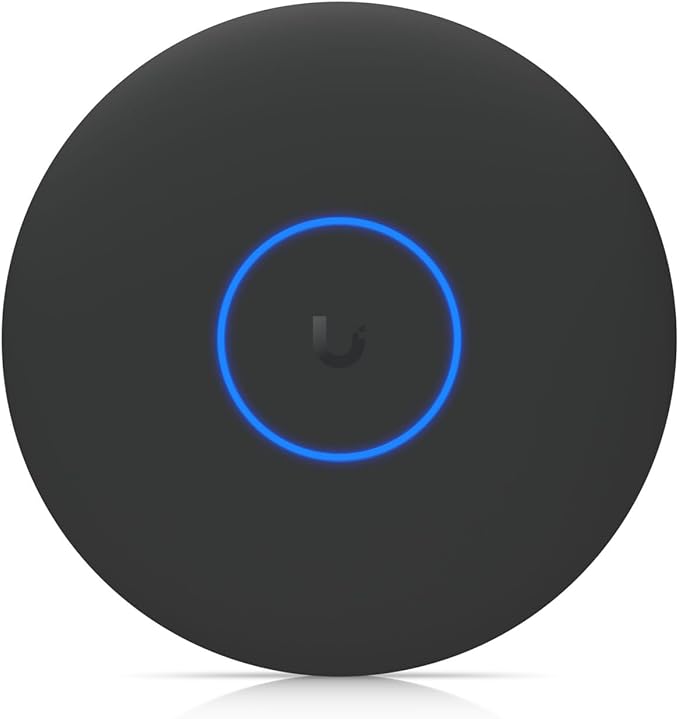
Google Nest Wifi Point 1200 Mbit/s White Hardware/Electronic
Meet the new Nest Wifi. Strong connection. Every direction. Nest Wifi blankets your whole home in fast, reliable Wi‐Fi and keeps buffering at bay in every room. Wi‐Fi the way it should be. Nest Wifi Nest Wifi is a scalable system that gives both whole-home coverage and a consistently strong signal. Each Nest Wifi point is also a smart speaker with the Google Assistant. Stream with speed. One Nest Wifi router with one Wifi point is strong enough to handle up to 200 connected devices, and fast enough to stream multiple 4K videos at a time. Connects. Connects you to the fastest Wi‐Fi point and keeps buffering at bay from room to room. Optimizes. Puts your network on the clearest channel and fastest band to avoid congestion. Updates. Regular software updates improve your Wi‐Fi performance over time. The easy to set up, whole‐home Wi‐Fi system. The router The router plugs into your modem and creates a network with a strong and reliable signal. The point Each point works with the router to expand coverage and keep Wi‐Fi fast in every room. Plus it’s a smart speaker that you can play music on, find answers, and more. Which Nest Wifi system is right for you? Get coverage in every corner, no matter the size and shape of your home. Hands-free help around the house. The Nest Wifi point has a speaker with the Google Assistant so you can play music, manage your Wi‐Fi network, find answers, control your connected devices, and more, using your voice. Being part of your home means respecting your privacy. When it comes to privacy, you know what’s right for you and your family. Here’s how to control your privacy on your Nest Wifi point. Wi‐Fi you’ll want to show off. Nest Wifi was made with your home in mind. Say hello to glow. Soft lighting under the Nest Wifi point lets you know your Google Assistant is ready to help. Simply beautiful. Inspired by ceramic objects, Nest Wifi fits right into your home. More points to expand. Add more points if you need more coverage and help around the house. Better is when everything works together. Nest Wifi blankets your whole home in fast, reliable Wi‐Fi, helping your devices work better together.
Meet the new Nest Wifi. Strong connection. Every direction. Nest Wifi blankets your whole home in fast, reliable Wi‐Fi and keeps buffering at bay in every room. Wi‐Fi the way it should be. Nest Wifi Nest Wifi is a scalable system that gives both whole-home coverage and a consistently strong signal. Each Nest Wifi point is also a smart speaker with the Google Assistant. Stream with speed. One Nest Wifi router with one Wifi point is strong enough to handle up to 200 connected devices, and fast enough to stream multiple 4K videos at a time. Connects. Connects you to the fastest Wi‐Fi point and keeps buffering at bay from room to room. Optimizes. Puts your network on the clearest channel and fastest band to avoid congestion. Updates. Regular software updates improve your Wi‐Fi performance over time. The easy to set up, whole‐home Wi‐Fi system. The router The router plugs into your modem and creates a network with a strong and reliable signal. The point Each point works with the router to expand coverage and keep Wi‐Fi fast in every room. Plus it’s a smart speaker that you can play music on, find answers, and more. Which Nest Wifi system is right for you? Get coverage in every corner, no matter the size and shape of your home. Hands-free help around the house. The Nest Wifi point has a speaker with the Google Assistant so you can play music, manage your Wi‐Fi network, find answers, control your connected devices, and more, using your voice. Being part of your home means respecting your privacy. When it comes to privacy, you know what’s right for you and your family. Here’s how to control your privacy on your Nest Wifi point. Wi‐Fi you’ll want to show off. Nest Wifi was made with your home in mind. Say hello to glow. Soft lighting under the Nest Wifi point lets you know your Google Assistant is ready to help. Simply beautiful. Inspired by ceramic objects, Nest Wifi fits right into your home. More points to expand. Add more points if you need more coverage and help around the house. Better is when everything works together. Nest Wifi blankets your whole home in fast, reliable Wi‐Fi, helping your devices work better together.
Meet the new Nest Wifi. Strong connection. Every direction. Nest Wifi blankets your whole home in fast, reliable Wi‐Fi and keeps buffering at bay in every room. Wi‐Fi the way it should be. Nest Wifi Nest Wifi is a scalable system that gives both whole-home coverage and a consistently strong signal. Each Nest Wifi point is also a smart speaker with the Google Assistant. Stream with speed. One Nest Wifi router with one Wifi point is strong enough to handle up to 200 connected devices, and fast enough to stream multiple 4K videos at a time. Connects. Connects you to the fastest Wi‐Fi point and keeps buffering at bay from room to room. Optimizes. Puts your network on the clearest channel and fastest band to avoid congestion. Updates. Regular software updates improve your Wi‐Fi performance over time. The easy to set up, whole‐home Wi‐Fi system. The router The router plugs into your modem and creates a network with a strong and reliable signal. The point Each point works with the router to expand coverage and keep Wi‐Fi fast in every room. Plus it’s a smart speaker that you can play music on, find answers, and more. Which Nest Wifi system is right for you? Get coverage in every corner, no matter the size and shape of your home. Hands-free help around the house. The Nest Wifi point has a speaker with the Google Assistant so you can play music, manage your Wi‐Fi network, find answers, control your connected devices, and more, using your voice. Being part of your home means respecting your privacy. When it comes to privacy, you know what’s right for you and your family. Here’s how to control your privacy on your Nest Wifi point. Wi‐Fi you’ll want to show off. Nest Wifi was made with your home in mind. Say hello to glow. Soft lighting under the Nest Wifi point lets you know your Google Assistant is ready to help. Simply beautiful. Inspired by ceramic objects, Nest Wifi fits right into your home. More points to expand. Add more points if you need more coverage and help around the house. Better is when everything works together. Nest Wifi blankets your whole home in fast, reliable Wi‐Fi, helping your devices work better together.
Meet the new Nest Wifi. Strong connection. Every direction. Nest Wifi blankets your whole home in fast, reliable Wi‐Fi and keeps buffering at bay in every room. Wi‐Fi the way it should be. Nest Wifi Nest Wifi is a scalable system that gives both whole-home coverage and a consistently strong signal. Each Nest Wifi point is also a smart speaker with the Google Assistant. Stream with speed. One Nest Wifi router with one Wifi point is strong enough to handle up to 200 connected devices, and fast enough to stream multiple 4K videos at a time. Connects. Connects you to the fastest Wi‐Fi point and keeps buffering at bay from room to room. Optimizes. Puts your network on the clearest channel and fastest band to avoid congestion. Updates. Regular software updates improve your Wi‐Fi performance over time. The easy to set up, whole‐home Wi‐Fi system. The router The router plugs into your modem and creates a network with a strong and reliable signal. The point Each point works with the router to expand coverage and keep Wi‐Fi fast in every room. Plus it’s a smart speaker that you can play music on, find answers, and more. Which Nest Wifi system is right for you? Get coverage in every corner, no matter the size and shape of your home. Hands-free help around the house. The Nest Wifi point has a speaker with the Google Assistant so you can play music, manage your Wi‐Fi network, find answers, control your connected devices, and more, using your voice. Being part of your home means respecting your privacy. When it comes to privacy, you know what’s right for you and your family. Here’s how to control your privacy on your Nest Wifi point. Wi‐Fi you’ll want to show off. Nest Wifi was made with your home in mind. Say hello to glow. Soft lighting under the Nest Wifi point lets you know your Google Assistant is ready to help. Simply beautiful. Inspired by ceramic objects, Nest Wifi fits right into your home. More points to expand. Add more points if you need more coverage and help around the house. Better is when everything works together. Nest Wifi blankets your whole home in fast, reliable Wi‐Fi, helping your devices work better together.
in 23 offers
The lowest price for Google Nest Wifi Point 1200 Mbit/s White Hardware/Electronic right now is $94.75 at eBay.com.au, compared across 14 retailers.
The all-time low was $49.00 on 31 Aug 2026 — today's price is 93% above the lowest ever. It has been notably cheaper before — worth setting a price alert.
Prices last updated 4 Oct 2026.
Last updated at 04/10/2026 07:43:57
Google Nest Wifi Add-on Point AS NEW Condition - Australian Version
Affiliate Disclosure: We may receive a small commission for purchases made through this link at no extra cost to you. This helps support our site. Thank you!
Google Nest Wifi Point (Snow)
Delivery $96
Google Nest Wifi Point
Free delivery
Nest WiFi AC1200 Add-on Point Range Extender - Snow (1600 sq ft Coverage) (Renewed)
Free delivery between 14–16 Oct
Google Nest Wi-Fi Point Unit- Point Provides Additional Wi-Fi Coverage, Smart Speaker With The Google Assistant, Compatible With Google Wi-Fi
Google Nest Wifi Home Mesh Wi-Fi System GA00667 - 1 Point Unit
Free delivery between Tue – Wed
Google Nest Wifi Home Mesh Wi-Fi System GA00667 - 1 Point Unit
Free delivery between 7–12 Oct
Google Nest Wifi Home Mesh Wi-Fi System GA00667 - 1 Point Unit
Free delivery
Google Nest H2E Wi-Fi Point, Snow (Open Box)
Delivery between 11–14 Oct $29
Google Nest Mesh Wi-Fi Point Additional Unit For Base GA00667-AU
30-day returns
originally posted on bestbuy.com
I bought this as an additional wifi point bringing my total to 2 in my home. This went in the back bedroom of our house to extend the wifi better to that room as well as the Nest Cam on our back patio. It does the job just fine!Sometimes the wifi point will drop connection maybe once a so every 6-8 weeks. Power cycling it fixes it but my other point does the same from time to time so I think it could also be a update or just a nice reminder to restart my wifi network since you should do it frequently lol. It does reconnect right away though.Deducted a star for that but that is it.
originally posted on nest.com
I picked up a nest WIFI router and 3 access points from Costco for ~350$. A definite overkill for the square footage of my house but now 3 rooms have an access point as well as what is essentially a google nest mini. Also my WIFI coverage extends well beyond my property line.The biggest and maybe only con I have seen so far is the lack of ability to separate the 2.4 and 5ghz channels. This honestly will not be an issue for most. However a lot of WIFI direct dimmer switches can only see 2.4 and this poses a problem during setup. Google's awful "fix" for this is to get to the end of your network range so your phone will switch to 2.4. This is a pain when you have 7000 square foot coverage in 1500 square foot house. My fix was to use the guest WIFI for setting up smart ... MoreI picked up a nest WIFI router and 3 access points from Costco for ~350$. A definite overkill for the square footage of my house but now 3 rooms have an access point as well as what is essentially a google nest mini. Also my WIFI coverage extends well beyond my property line.The biggest and maybe only con I have seen so far is the lack of ability to separate the 2.4 and 5ghz channels. This honestly will not be an issue for most. However a lot of WIFI direct dimmer switches can only see 2.4 and this poses a problem during setup. Google's awful "fix" for this is to get to the end of your network range so your phone will switch to 2.4. This is a pain when you have 7000 square foot coverage in 1500 square foot house. My fix was to use the guest WIFI for setting up smart dimmers and plug. The guest WIFI only uses the 2.4. Just keep in mind that if you often have guest on the guest WIFI, they might have access to some of your switches if they are network savvy.
originally posted on nest.com
There's a lot to like about the Nest Wifi. Automatic speed tests. Easy to install and extend. "Good enough" configuration options.My problem is that it's difficult to set up smart home devices with it. A sizeable number of devices, for better or worse, require you to be on the same 2.4GHz network during initial setup. Because you can't force a connection to the 2.4GHz band on either a modern Android phone or through the router's configuration, you're left to do cumbersome workarounds. Google is aware of the situation, but they do not believe it needs to be addressed. Given that, I can't recommend it. Imagine telling your elderly parents to go outside until their phone drops down to the 2.4GHz band to set up a device. Now imagine that you are Google, and you think ... MoreThere's a lot to like about the Nest Wifi. Automatic speed tests. Easy to install and extend. "Good enough" configuration options.My problem is that it's difficult to set up smart home devices with it. A sizeable number of devices, for better or worse, require you to be on the same 2.4GHz network during initial setup. Because you can't force a connection to the 2.4GHz band on either a modern Android phone or through the router's configuration, you're left to do cumbersome workarounds. Google is aware of the situation, but they do not believe it needs to be addressed. Given that, I can't recommend it. Imagine telling your elderly parents to go outside until their phone drops down to the 2.4GHz band to set up a device. Now imagine that you are Google, and you think this is a "simpler" and more appropriate solution than adding an option in Android or Google Nest Wifi.It's a 5-star device diminished by a zealous and misguided approach to "simplicity" that completely misses the point.
| Wireless Speed Rating | AC2200 |
| Wireless Standard | 802.11ac |
| Wireless Band Count | Dual-Band |
| Wireless Highlights | Mesh Network |
| Device Type | Router |
Google Nest Wifi Add-on Point AS NEW Condition - Australian Version
Affiliate Disclosure: We may receive a small commission for purchases made through this link at no extra cost to you. This helps support our site. Thank you!
Google Nest Wifi Point (Snow)
Delivery $96
Google Nest Wifi Point
Free delivery
Nest WiFi AC1200 Add-on Point Range Extender - Snow (1600 sq ft Coverage) (Renewed)
Free delivery between 14–16 Oct
Google Nest Wi-Fi Point Unit- Point Provides Additional Wi-Fi Coverage, Smart Speaker With The Google Assistant, Compatible With Google Wi-Fi
I bought this as an additional wifi point bringing my total to 2 in my home. This went in the back bedroom of our house to extend the wifi better to that room as well as the Nest Cam on our back patio. It does the job just fine!Sometimes the wifi point will drop connection maybe once a so every 6-8 weeks. Power cycling it fixes it but my other point does the same from time to time so I think it could also be a update or just a nice reminder to restart my wifi network since you should do it frequently lol. It does reconnect right away though.Deducted a star for that but that is it.
I picked up a nest WIFI router and 3 access points from Costco for ~350$. A definite overkill for the square footage of my house but now 3 rooms have an access point as well as what is essentially a google nest mini. Also my WIFI coverage extends well beyond my property line.The biggest and maybe only con I have seen so far is the lack of ability to separate the 2.4 and 5ghz channels. This honestly will not be an issue for most. However a lot of WIFI direct dimmer switches can only see 2.4 and this poses a problem during setup. Google's awful "fix" for this is to get to the end of your network range so your phone will switch to 2.4. This is a pain when you have 7000 square foot coverage in 1500 square foot house. My fix was to use the guest WIFI for setting up smart ... MoreI picked up a nest WIFI router and 3 access points from Costco for ~350$. A definite overkill for the square footage of my house but now 3 rooms have an access point as well as what is essentially a google nest mini. Also my WIFI coverage extends well beyond my property line.The biggest and maybe only con I have seen so far is the lack of ability to separate the 2.4 and 5ghz channels. This honestly will not be an issue for most. However a lot of WIFI direct dimmer switches can only see 2.4 and this poses a problem during setup. Google's awful "fix" for this is to get to the end of your network range so your phone will switch to 2.4. This is a pain when you have 7000 square foot coverage in 1500 square foot house. My fix was to use the guest WIFI for setting up smart dimmers and plug. The guest WIFI only uses the 2.4. Just keep in mind that if you often have guest on the guest WIFI, they might have access to some of your switches if they are network savvy.
There's a lot to like about the Nest Wifi. Automatic speed tests. Easy to install and extend. "Good enough" configuration options.My problem is that it's difficult to set up smart home devices with it. A sizeable number of devices, for better or worse, require you to be on the same 2.4GHz network during initial setup. Because you can't force a connection to the 2.4GHz band on either a modern Android phone or through the router's configuration, you're left to do cumbersome workarounds. Google is aware of the situation, but they do not believe it needs to be addressed. Given that, I can't recommend it. Imagine telling your elderly parents to go outside until their phone drops down to the 2.4GHz band to set up a device. Now imagine that you are Google, and you think ... MoreThere's a lot to like about the Nest Wifi. Automatic speed tests. Easy to install and extend. "Good enough" configuration options.My problem is that it's difficult to set up smart home devices with it. A sizeable number of devices, for better or worse, require you to be on the same 2.4GHz network during initial setup. Because you can't force a connection to the 2.4GHz band on either a modern Android phone or through the router's configuration, you're left to do cumbersome workarounds. Google is aware of the situation, but they do not believe it needs to be addressed. Given that, I can't recommend it. Imagine telling your elderly parents to go outside until their phone drops down to the 2.4GHz band to set up a device. Now imagine that you are Google, and you think this is a "simpler" and more appropriate solution than adding an option in Android or Google Nest Wifi.It's a 5-star device diminished by a zealous and misguided approach to "simplicity" that completely misses the point.
GOOD: Simple design, mesh is great, integrated mic/speakers in points is cool, App controls simple and great, Guest network ready. CONS: Would be great if there was an integrated modem so we don't have to buy separately (outlet space gets tight with all these devices!). On that note, why is the new trend seem to be making plugs that take up 2 or 3 spaces on a standard surge protector??? Make smaller plugs please! Would be nice to have a few networking (CAT5) ports on the router, and if possible maybe on the points? Had to buy an additional switch, which is more $, more power plugs, more wire management, etc. Smart home people like me have other devices that need to be plugged directly into the router like lighting hubs (Philips Hue, Lutron, other smart home hubs, ... MoreGOOD: Simple design, mesh is great, integrated mic/speakers in points is cool, App controls simple and great, Guest network ready. CONS: Would be great if there was an integrated modem so we don't have to buy separately (outlet space gets tight with all these devices!). On that note, why is the new trend seem to be making plugs that take up 2 or 3 spaces on a standard surge protector??? Make smaller plugs please! Would be nice to have a few networking (CAT5) ports on the router, and if possible maybe on the points? Had to buy an additional switch, which is more $, more power plugs, more wire management, etc. Smart home people like me have other devices that need to be plugged directly into the router like lighting hubs (Philips Hue, Lutron, other smart home hubs, etc). Lastly, the power cords could be a bit longer please. Just seemed like I had to stretch as much as possible every time to get it to reach the power strip or outlet. Call it 3.8 stars. =)
Nest Wifi was an upgrade from Google Wifi. Nest Wifi router and satellite points placed in exactly the same position as Google Wifi; with the added benefit of replacing Google Home Mini units at the two satellite points. Light on Satellite units were unresponsive to commands to decrease brightness. Units required hard resets (physically unplugging) over several days to function properly. Google Assistant failed to properly load after setup, with no indication of problems on Google Home Android App. Satellite points required hard resets (physically unplugging) over several days for Google Assistant to function properly. After several weeks of usage, satellite points continue to experience intermittent connectivity errors. Outages are typically several minutes, but ... MoreNest Wifi was an upgrade from Google Wifi. Nest Wifi router and satellite points placed in exactly the same position as Google Wifi; with the added benefit of replacing Google Home Mini units at the two satellite points. Light on Satellite units were unresponsive to commands to decrease brightness. Units required hard resets (physically unplugging) over several days to function properly. Google Assistant failed to properly load after setup, with no indication of problems on Google Home Android App. Satellite points required hard resets (physically unplugging) over several days for Google Assistant to function properly. After several weeks of usage, satellite points continue to experience intermittent connectivity errors. Outages are typically several minutes, but have lasted a couple hours as well.
I had high expectations of this product. We are a gaming family and speeds have always been something I've tried to get the most out of. Having a high end Nighthawk, I was curious if we could improve even further on that. Enter the mesh wifi. With the goal of strengthening the signal throughout our home (1,600sqft) it did just thr opposite. After having everything set up correctly (I did this multiple times to ensure I wasn't missing something) my Xbox in the master bedroom was only running 65mbps. Now that's great don't get me wrong, but I was previously running 300-400 on a slow day with the nighthawk. Signal improved, speeds drastically dropped. The other issue I'm guessing is from the "smart connect" where it decides of you should be on the 2.4 or 5 band. We ... MoreI had high expectations of this product. We are a gaming family and speeds have always been something I've tried to get the most out of. Having a high end Nighthawk, I was curious if we could improve even further on that. Enter the mesh wifi. With the goal of strengthening the signal throughout our home (1,600sqft) it did just thr opposite. After having everything set up correctly (I did this multiple times to ensure I wasn't missing something) my Xbox in the master bedroom was only running 65mbps. Now that's great don't get me wrong, but I was previously running 300-400 on a slow day with the nighthawk. Signal improved, speeds drastically dropped. The other issue I'm guessing is from the "smart connect" where it decides of you should be on the 2.4 or 5 band. We would all at least once a day get dropped signal, kicked from our game, and then reconnect. Some days this happened multiple times in a few hours. Needless to say the complaints from not only me but the family rolled in.
I have purchased two nest routers and 6 points, for two different properties. I recommend the this mesh system because it is very easy to set up overall. It allows you to set a guest network with a separate password. It works well with other nest or goggle products like doorbells, cameras, lights, etc. The only issue is the Google home app which links and controls all the devices, router, cameras, thermostats tv’s, has some kinks to work out. Goggle bought out nest and combined the nest app with goggle home and sometimes its has hic-ups. Overall it is a great product with excellent coverage and I will continue to buy this product for other homes in the future.
To start with, setting up the Nest Wi-Fi Router and access point was not easy. It took over 10 factory resets just to get through the installation. Most often I would get to the end of it, finalizing the access point and testing the mesh which it said was great, then immediately it would lose connection and the offered trouble shooting steps did not work. - Factory reset. The next issue is the lack of a separate 2.4ghz band. Apparently Google in it's wisdom thinks we don't need one, or at least all the other smart devices that people own which are specifically on 2.4ghz don't matter.Because every other device I own, whether it's a smart bulb or plug, does not see the Google Nest wifi. These are devices bought within the last few years, and the best solution is to ... MoreTo start with, setting up the Nest Wi-Fi Router and access point was not easy. It took over 10 factory resets just to get through the installation. Most often I would get to the end of it, finalizing the access point and testing the mesh which it said was great, then immediately it would lose connection and the offered trouble shooting steps did not work. - Factory reset. The next issue is the lack of a separate 2.4ghz band. Apparently Google in it's wisdom thinks we don't need one, or at least all the other smart devices that people own which are specifically on 2.4ghz don't matter.Because every other device I own, whether it's a smart bulb or plug, does not see the Google Nest wifi. These are devices bought within the last few years, and the best solution is to plug in my old router into the Ethernet port of the Google Nest router. That way I use the 2.4ghz from the old router for the smart devices, and Google Nest provides the 5ghz. Seems like a major misstep from Google.
We bought the nest wifi to replace a 5/6 year old router. Had a fair amount of trouble getting the device setup initially. Worked with google support to 5 hours plus to get the nest router to connect to the internet. Once connect, the wifi signal and speed has been great. The biggest issue has been maintaining an internet connect. Phones, laptops, and tablets need to continually turn the wifi off/on or even forget the network and reconnect just to get internet signal. Never had this issue with our prior setup. It’s quite a nuisance when you try to browse the web or open an app and there’s no internet connection while connected to the wifi. For the price of the devices, one would think these issues wouldn’t exist but after reading multiple forums about the nest wifi ... MoreWe bought the nest wifi to replace a 5/6 year old router. Had a fair amount of trouble getting the device setup initially. Worked with google support to 5 hours plus to get the nest router to connect to the internet. Once connect, the wifi signal and speed has been great. The biggest issue has been maintaining an internet connect. Phones, laptops, and tablets need to continually turn the wifi off/on or even forget the network and reconnect just to get internet signal. Never had this issue with our prior setup. It’s quite a nuisance when you try to browse the web or open an app and there’s no internet connection while connected to the wifi. For the price of the devices, one would think these issues wouldn’t exist but after reading multiple forums about the nest wifi system, it seems this is a fairly common issue. Even while writing this review, I’ve had to turn off wifi on my phone to maintain internet connection. Disappointed to say the least.
I'm in deep using the Google ecosystem, too deep to turn around, unfortunately. I own the Nest Wifi two points, Pixel 6, Android Auto devices, Nest hub, 5 x Chromecasts with Google TV, Google Homes, Nest Thermostats, Nest Protects, and countless other devices that connect my supposedly "smart" home powered by Google.The Nest Wifi is beautifully designed, much like most of their product line. Unfotunelty the software is as buggy as ever. Google Assistant is always a mess, answering questions randomly, playing media, not turning on the correct devices, and so on. The Wifi is stable but lacks improvements and features like Wifi6. Not nearly as fast as my previous Netgear router, but covers the house better. I'm always disappointed with Google's push for new products ... MoreI'm in deep using the Google ecosystem, too deep to turn around, unfortunately. I own the Nest Wifi two points, Pixel 6, Android Auto devices, Nest hub, 5 x Chromecasts with Google TV, Google Homes, Nest Thermostats, Nest Protects, and countless other devices that connect my supposedly "smart" home powered by Google.The Nest Wifi is beautifully designed, much like most of their product line. Unfotunelty the software is as buggy as ever. Google Assistant is always a mess, answering questions randomly, playing media, not turning on the correct devices, and so on. The Wifi is stable but lacks improvements and features like Wifi6. Not nearly as fast as my previous Netgear router, but covers the house better. I'm always disappointed with Google's push for new products and ambitious features that end up breaking other devices and "smart" capabilities. How about you focus on creating and working out the countless software bugs on your current devices before moving on.
| Wireless Speed Rating | AC2200 |
| Wireless Standard | 802.11ac |
| Wireless Band Count | Dual-Band |
| Wireless Highlights | Mesh Network |
| Device Type | Router |