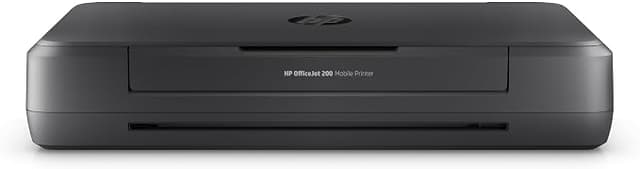
HP Officejet 200 CZ993A Mobile Printer
HP OfficeJet 200 Mobile Printer (CZ993A) Overview Make the world your office with powerful portable printingno network necessary.1 This quick, quiet printer delivers professional prints and has a long- lasting battery life.2 Easy portable printing wherever you need it Simply print from your laptop or mobile devices wirelessly, with or without a router.1,3 Start printing in minutes. HP Auto Wireless Connect makes setup easy. This durable, compact printer fits in your car, backpack, and more, for convenient printing anywhere. Lead the way with fast, easy mobile printing Reduce charging interruptions with a long-lasting battery. Get high page yields, using Original HP cartridges. Set the pace for success wherever you go. Keep moving through the day with fast print speeds.4 High-powered quality and reliability Power through the workday. Charge from home, in your car or office, and more.5 Plug in your AC power source to charge within 90 minutes while the printer is off, with HP Fast Charge.6 Minimize disruptions with premium design and quiet performance. Impress clients, without noisy interruptions.
HP OfficeJet 200 Mobile Printer (CZ993A) Overview Make the world your office with powerful portable printingno network necessary.1 This quick, quiet printer delivers professional prints and has a long- lasting battery life.2 Easy portable printing wherever you need it Simply print from your laptop or mobile devices wirelessly, with or without a router.1,3 Start printing in minutes. HP Auto Wireless Connect makes setup easy. This durable, compact printer fits in your car, backpack, and more, for convenient printing anywhere. Lead the way with fast, easy mobile printing Reduce charging interruptions with a long-lasting battery. Get high page yields, using Original HP cartridges. Set the pace for success wherever you go. Keep moving through the day with fast print speeds.4 High-powered quality and reliability Power through the workday. Charge from home, in your car or office, and more.5 Plug in your AC power source to charge within 90 minutes while the printer is off, with HP Fast Charge.6 Minimize disruptions with premium design and quiet performance. Impress clients, without noisy interruptions.
HP OfficeJet 200 Mobile Printer (CZ993A) Overview Make the world your office with powerful portable printingno network necessary.1 This quick, quiet printer delivers professional prints and has a long- lasting battery life.2 Easy portable printing wherever you need it Simply print from your laptop or mobile devices wirelessly, with or without a router.1,3 Start printing in minutes. HP Auto Wireless Connect makes setup easy. This durable, compact printer fits in your car, backpack, and more, for convenient printing anywhere. Lead the way with fast, easy mobile printing Reduce charging interruptions with a long-lasting battery. Get high page yields, using Original HP cartridges. Set the pace for success wherever you go. Keep moving through the day with fast print speeds.4 High-powered quality and reliability Power through the workday. Charge from home, in your car or office, and more.5 Plug in your AC power source to charge within 90 minutes while the printer is off, with HP Fast Charge.6 Minimize disruptions with premium design and quiet performance. Impress clients, without noisy interruptions.
HP OfficeJet 200 Mobile Printer (CZ993A) Overview Make the world your office with powerful portable printingno network necessary.1 This quick, quiet printer delivers professional prints and has a long- lasting battery life.2 Easy portable printing wherever you need it Simply print from your laptop or mobile devices wirelessly, with or without a router.1,3 Start printing in minutes. HP Auto Wireless Connect makes setup easy. This durable, compact printer fits in your car, backpack, and more, for convenient printing anywhere. Lead the way with fast, easy mobile printing Reduce charging interruptions with a long-lasting battery. Get high page yields, using Original HP cartridges. Set the pace for success wherever you go. Keep moving through the day with fast print speeds.4 High-powered quality and reliability Power through the workday. Charge from home, in your car or office, and more.5 Plug in your AC power source to charge within 90 minutes while the printer is off, with HP Fast Charge.6 Minimize disruptions with premium design and quiet performance. Impress clients, without noisy interruptions.
in 3 offers
The lowest price for HP Officejet 200 CZ993A Mobile Printer right now is $359.95 at Amazon.com.au, compared across 3 retailers.
The all-time low was $268.91 on 14 July 2025 — today's price is 34% above the lowest ever. It has been notably cheaper before — worth setting a price alert.
Prices last updated 16 Sept 2026.
Last updated at 16/09/2026 17:39:53
HP 2M32H38 Officejet 200 Colour Wireless Mobile Printer, Black
Affiliate Disclosure: We may receive a small commission for purchases made through this link at no extra cost to you. This helps support our site. Thank you!
HP OfficeJet 200 A4 Colour Mobile Inkjet Printer
Delivery $35
Hewlett Packard HP OfficeJet 200 Wireless Mobile Printer [CZ993A]
Delivery $29.95
originally posted on staples.ca
The HP OfficeJet 200 is a must-have for the busy professional or someone with a hobby who travels a lot and needs to print documents on the spot, perhaps a contract, drawing or receipt. The OfficeJet 200 Mobile is compact and weighs approximately 6 pounds, the size of a big-screen laptop. It holds 50-sheets and handles multiple sizes and thickness of stock. Printed pages land on whatever surface the printer is sitting on, eliminating the need for an output tray. The print speed is something to be expected of any mobile printer - not extremely fast but not extremely slow either.Setting up was fairly easy. Initial setup took less than 20 minutes. The printer is easy to configure and use on the go. It is light enough to carry, turn on, and start printing from any ... MoreThe HP OfficeJet 200 is a must-have for the busy professional or someone with a hobby who travels a lot and needs to print documents on the spot, perhaps a contract, drawing or receipt. The OfficeJet 200 Mobile is compact and weighs approximately 6 pounds, the size of a big-screen laptop. It holds 50-sheets and handles multiple sizes and thickness of stock. Printed pages land on whatever surface the printer is sitting on, eliminating the need for an output tray. The print speed is something to be expected of any mobile printer - not extremely fast but not extremely slow either.Setting up was fairly easy. Initial setup took less than 20 minutes. The printer is easy to configure and use on the go. It is light enough to carry, turn on, and start printing from any mobile device that supports Wi-Fi Direct/Wireless Direct or that has a USB port on it. You'll need a WEP password for WiFi. The OfficeJet 200 supports another mobile-connectivity feature, called HP Auto Wireless Connect that, once set up, printer reconnects with your computer or mobile device automatically when the two devices â₏œseeâ₏ each other again.The OfficeJet 200 can also print from USB thumb drives, as well as PictBridge-compatible digital cameras and other PictBridge-ready devices, via another USB port dedicated to that, or cloud sites.Although it's small, the OfficeJet 200 prints quite well and the print quality looks similar to that of most other inkjets. Text is clear enough for most business applications needed on the spot, like handouts, diagrams and flyers. Colors are bright, clear, and accurate, and the graphics and photos embedded in documents came out detailed and without perceptible banding. Although the OfficeJet 200 is not meant as a photo printer, photos printed on premium paper came out a very good quality.When ready to recharge the battery for the next show, demonstration or next day's work, simply charge the battery off AC power with the unit turned off and reach a full charge within 90 minutes. You can also charge the battery, more slowly, via a USB connection. The battery is good for about 500 prints.A disadvantage is, since the OfficeJet 200 uses only two ink cartridges, an outage of just one color means you'll have to replace the whole three-color cartridge instead of each individual color. Overall, the capabilities of the HP OfficeJet 200 are impressive - the printer far exceeded my expectations. I would definitely recommend this printer to friends and family members.
originally posted on Google
I have read a lot of good and a lot of bad reviews for this product. However, in my opinion, it does exactly what its name suggests. It prints. Some users report difficulty in installation of hardware. For myself it was more of a plug and play installation using the Hp Smart application that came installed on my Hp All in One Home computer. Two simple questions two easy clicks and installation was complete using a USB cable. I have little use for wireless products though a small few I have to admit do come in handy. However for this printer, if you need a home printer that you don't expect a lot from, with a small footprint, and don't require a wireless connection, though Hp recommends it, this is it. It works very well with a USB connection and at a ... MoreI have read a lot of good and a lot of bad reviews for this product. However, in my opinion, it does exactly what its name suggests. It prints. Some users report difficulty in installation of hardware. For myself it was more of a plug and play installation using the Hp Smart application that came installed on my Hp All in One Home computer. Two simple questions two easy clicks and installation was complete using a USB cable. I have little use for wireless products though a small few I have to admit do come in handy. However for this printer, if you need a home printer that you don't expect a lot from, with a small footprint, and don't require a wireless connection, though Hp recommends it, this is it. It works very well with a USB connection and at a reasonable speed for the student and average home user, I would think. For me, it was a breath of fresh air from all the hype on printer technology.
originally posted on hp.com
After much searching online, I bought this printer for living and working on my boat. It wasn't the cheapest model I looked at, but I work from home and needed a certain level of print quality, and this printer seemed to have the best online reviews. The reviews led me to believe that I would save money in the long run by spending a bit more upfront (saving ink and replacement printer costs). I can't speak to that yet--I've only had the printer for a couple of weeks--but I can say that I'm impressed so far. First of all, it was easy to find a place for it, even in the confined spaces of a boat. Second, the printer was easy to set up, even for a technophobe like me. I had it connected and printing within the hour! But the best part of the printer for me is the print ... MoreAfter much searching online, I bought this printer for living and working on my boat. It wasn't the cheapest model I looked at, but I work from home and needed a certain level of print quality, and this printer seemed to have the best online reviews. The reviews led me to believe that I would save money in the long run by spending a bit more upfront (saving ink and replacement printer costs). I can't speak to that yet--I've only had the printer for a couple of weeks--but I can say that I'm impressed so far. First of all, it was easy to find a place for it, even in the confined spaces of a boat. Second, the printer was easy to set up, even for a technophobe like me. I had it connected and printing within the hour! But the best part of the printer for me is the print speed and quality. It prints faster and with better image quality than the much larger printer I had in my previous home office. I do wish it supported automatic duplexing (two-sided printing), but otherwise, I can't think of a way I would improve upon the product. How long will it survive life on a boat? Only time will tell. But for now, it seems like I made a smart investment.
| General Information | |
| Manufacturer | HP Inc. |
| Manufacturer Part Number | CZ993A#B1H |
| Brand Name | HP |
| Product Name | OfficeJet 200 Mobile Printer |

HP 2M32H38 Officejet 200 Colour Wireless Mobile Printer, Black
Affiliate Disclosure: We may receive a small commission for purchases made through this link at no extra cost to you. This helps support our site. Thank you!
HP OfficeJet 200 A4 Colour Mobile Inkjet Printer
Delivery $35
Hewlett Packard HP OfficeJet 200 Wireless Mobile Printer [CZ993A]
Delivery $29.95
The HP OfficeJet 200 is a must-have for the busy professional or someone with a hobby who travels a lot and needs to print documents on the spot, perhaps a contract, drawing or receipt. The OfficeJet 200 Mobile is compact and weighs approximately 6 pounds, the size of a big-screen laptop. It holds 50-sheets and handles multiple sizes and thickness of stock. Printed pages land on whatever surface the printer is sitting on, eliminating the need for an output tray. The print speed is something to be expected of any mobile printer - not extremely fast but not extremely slow either.Setting up was fairly easy. Initial setup took less than 20 minutes. The printer is easy to configure and use on the go. It is light enough to carry, turn on, and start printing from any ... MoreThe HP OfficeJet 200 is a must-have for the busy professional or someone with a hobby who travels a lot and needs to print documents on the spot, perhaps a contract, drawing or receipt. The OfficeJet 200 Mobile is compact and weighs approximately 6 pounds, the size of a big-screen laptop. It holds 50-sheets and handles multiple sizes and thickness of stock. Printed pages land on whatever surface the printer is sitting on, eliminating the need for an output tray. The print speed is something to be expected of any mobile printer - not extremely fast but not extremely slow either.Setting up was fairly easy. Initial setup took less than 20 minutes. The printer is easy to configure and use on the go. It is light enough to carry, turn on, and start printing from any mobile device that supports Wi-Fi Direct/Wireless Direct or that has a USB port on it. You'll need a WEP password for WiFi. The OfficeJet 200 supports another mobile-connectivity feature, called HP Auto Wireless Connect that, once set up, printer reconnects with your computer or mobile device automatically when the two devices â₏œseeâ₏ each other again.The OfficeJet 200 can also print from USB thumb drives, as well as PictBridge-compatible digital cameras and other PictBridge-ready devices, via another USB port dedicated to that, or cloud sites.Although it's small, the OfficeJet 200 prints quite well and the print quality looks similar to that of most other inkjets. Text is clear enough for most business applications needed on the spot, like handouts, diagrams and flyers. Colors are bright, clear, and accurate, and the graphics and photos embedded in documents came out detailed and without perceptible banding. Although the OfficeJet 200 is not meant as a photo printer, photos printed on premium paper came out a very good quality.When ready to recharge the battery for the next show, demonstration or next day's work, simply charge the battery off AC power with the unit turned off and reach a full charge within 90 minutes. You can also charge the battery, more slowly, via a USB connection. The battery is good for about 500 prints.A disadvantage is, since the OfficeJet 200 uses only two ink cartridges, an outage of just one color means you'll have to replace the whole three-color cartridge instead of each individual color. Overall, the capabilities of the HP OfficeJet 200 are impressive - the printer far exceeded my expectations. I would definitely recommend this printer to friends and family members.
I have read a lot of good and a lot of bad reviews for this product. However, in my opinion, it does exactly what its name suggests. It prints. Some users report difficulty in installation of hardware. For myself it was more of a plug and play installation using the Hp Smart application that came installed on my Hp All in One Home computer. Two simple questions two easy clicks and installation was complete using a USB cable. I have little use for wireless products though a small few I have to admit do come in handy. However for this printer, if you need a home printer that you don't expect a lot from, with a small footprint, and don't require a wireless connection, though Hp recommends it, this is it. It works very well with a USB connection and at a ... MoreI have read a lot of good and a lot of bad reviews for this product. However, in my opinion, it does exactly what its name suggests. It prints. Some users report difficulty in installation of hardware. For myself it was more of a plug and play installation using the Hp Smart application that came installed on my Hp All in One Home computer. Two simple questions two easy clicks and installation was complete using a USB cable. I have little use for wireless products though a small few I have to admit do come in handy. However for this printer, if you need a home printer that you don't expect a lot from, with a small footprint, and don't require a wireless connection, though Hp recommends it, this is it. It works very well with a USB connection and at a reasonable speed for the student and average home user, I would think. For me, it was a breath of fresh air from all the hype on printer technology.
After much searching online, I bought this printer for living and working on my boat. It wasn't the cheapest model I looked at, but I work from home and needed a certain level of print quality, and this printer seemed to have the best online reviews. The reviews led me to believe that I would save money in the long run by spending a bit more upfront (saving ink and replacement printer costs). I can't speak to that yet--I've only had the printer for a couple of weeks--but I can say that I'm impressed so far. First of all, it was easy to find a place for it, even in the confined spaces of a boat. Second, the printer was easy to set up, even for a technophobe like me. I had it connected and printing within the hour! But the best part of the printer for me is the print ... MoreAfter much searching online, I bought this printer for living and working on my boat. It wasn't the cheapest model I looked at, but I work from home and needed a certain level of print quality, and this printer seemed to have the best online reviews. The reviews led me to believe that I would save money in the long run by spending a bit more upfront (saving ink and replacement printer costs). I can't speak to that yet--I've only had the printer for a couple of weeks--but I can say that I'm impressed so far. First of all, it was easy to find a place for it, even in the confined spaces of a boat. Second, the printer was easy to set up, even for a technophobe like me. I had it connected and printing within the hour! But the best part of the printer for me is the print speed and quality. It prints faster and with better image quality than the much larger printer I had in my previous home office. I do wish it supported automatic duplexing (two-sided printing), but otherwise, I can't think of a way I would improve upon the product. How long will it survive life on a boat? Only time will tell. But for now, it seems like I made a smart investment.
HP claims on their web page that when using the mobile 200 your "Computer or device can connect to both printer and Internet simultaneously." I spent 1 1/2 hours with HP technician who finally said, "Everyone knows NOTHING can do that!" (What about a computer connected to the internet and simultaneously broadcasting to a Chromecast?? Couldn't explain.) The documentation also says "Printer name that displays when printing DIRECT-xx-HP [your printer model name]." This is also false according to support technician, "Rocky." Only the HP XXX200 Mobile Printer" appears in your print devices. (You may see difference between HP Wireless printing and WiFi Direct printing here: support.hp.com/us-en/product/hp-officejet-200-mobile-printer-series/5156326/document/c04090221) ... MoreHP claims on their web page that when using the mobile 200 your "Computer or device can connect to both printer and Internet simultaneously." I spent 1 1/2 hours with HP technician who finally said, "Everyone knows NOTHING can do that!" (What about a computer connected to the internet and simultaneously broadcasting to a Chromecast?? Couldn't explain.) The documentation also says "Printer name that displays when printing DIRECT-xx-HP [your printer model name]." This is also false according to support technician, "Rocky." Only the HP XXX200 Mobile Printer" appears in your print devices. (You may see difference between HP Wireless printing and WiFi Direct printing here: support.hp.com/us-en/product/hp-officejet-200-mobile-printer-series/5156326/document/c04090221) Strange how the blue wireless light and white WiFi direct lights can be on simultaneously. So I was told you MUST disconnect from the internet and connect to the WiFi direct wirelessly to print, then the print driver will work. It connects quickly wirelessly, but takes about a full minute to connect to the "DIRECT HP XX- 200" printer SSID. Installing cartridges requires the cart dropped in, then the colored plastic "pinched" in from back to clip on the top. The printer produces very nice output. Not sure how long the #62 and 62XL cartridges last. Prices start at $16 each. Very easy to load paper in the straight path, but must have the paper guides against the paper.
I absolutely love the small footprint and mobility of this printer (HP OfficeJet 200) as well as its ease of use. I also love the rechargability of the battery which places it at a next level for mobility. Also very happy with the print quality (except for a minor issue noted below)50 sheet input is respectable for a small printer like this.Although I've seen some reviews list print speed as a "con", I think it is more than acceptable for a printer of this type. I can't speak to the longevity of the ink since I've only printed 20 or 30 pages so far.The two cons that caused me to rate the printer 4 stars rather than 5 are 1) the high price of an older printer and 2) the tri-color cartridge that came with the printer was defective.Botom line for me: A very ... MoreI absolutely love the small footprint and mobility of this printer (HP OfficeJet 200) as well as its ease of use. I also love the rechargability of the battery which places it at a next level for mobility. Also very happy with the print quality (except for a minor issue noted below)50 sheet input is respectable for a small printer like this.Although I've seen some reviews list print speed as a "con", I think it is more than acceptable for a printer of this type. I can't speak to the longevity of the ink since I've only printed 20 or 30 pages so far.The two cons that caused me to rate the printer 4 stars rather than 5 are 1) the high price of an older printer and 2) the tri-color cartridge that came with the printer was defective.Botom line for me: A very good mobile printer!
Love the portability of this printer as well as the convenience it's offered to me. Picture quality is pretty good and doable for small projects for school. It's also been useful every time I need to print something quick. Ink has lasted a few months as well. I've been able to make the battery last for a few months without charging by turning it on when I need to use it and turning it off right away. One of the best purchases I've made.
I just received this printer today, tried installing and the color cartridge is defective. Says alignment was unsuccessful. I have a different printer that takes the same HP 62. I installed the cartridge in that printer, and it also showed unsuccessful. I installed the software and I hope it installed correctly. I use the USB cable. So now I think it will print only in black. I ordered it online because the nearest OfficeMax doesn't carry it in stock so I couldn't take advantage of the trade-in offer at the time.
I travel constantly for corporate events and this little thing goes with me everywhere. While I do eventually burn through them, this thing is also my only printer. I print up to 409 sheets a week in color and lug this thing from plane to taxi to hotel and back with no leaks or issues in accuracy.I also love the included battery and lack if an external power brick! Highly recommended!!
I have used this line of mobile printers for 30 years. The 200 is my second printer in that time frame. It’s predecesor was the 100 and they have survived all kinds of travel abuse (for work) and they just kept going. Light enough to back pack with my laptop. Easy setup and great print quality. It will always be my “go to”. I recently retired and had to turn the 200 back into my company. I just went and purchased the same one for my home use.
This is a very good portable printer. It's small, light, and easy to use. It comes with a battery, which puts it a leg up over the comparable Canon model.This is only getting 4 stars because while the print quality is good, it isn't great. The ink cartridges also have a very limited life. These are reasonable tradeoffs for a printer that can work anywhere. I wish it included bluetooth which would make it much easier to connect to a phone.Still, overall I would recommend this to someone who needs a travel printer. This is a poor desktop substitute, but it's great for someone who needs to work on the road and must bring a printer along for printing small jobs.
| General Information | |
| Manufacturer | HP Inc. |
| Manufacturer Part Number | CZ993A#B1H |
| Brand Name | HP |
| Product Name | OfficeJet 200 Mobile Printer |


