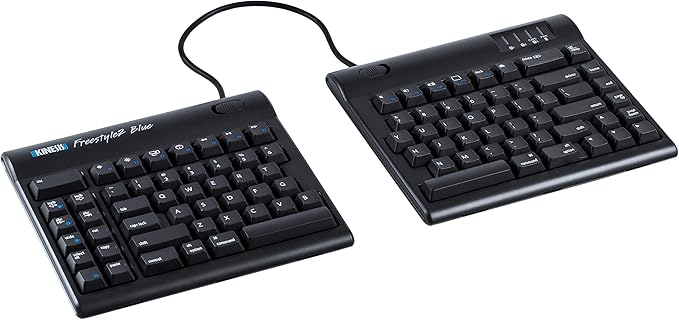
Kinesis Mac 20cm Separation Keyboard
Sleek, low-profile design Most keyboards including ergonomic models have a 10 degree positive slope from front to back. These designs tend to bend your wrists. The Freestyle2 has a zero degree slope which minimizes the height, effectively creating negative slope and reducing wrist extension. The slim design provides a 2-in-1 office and travel keyboard. Accommodates a wide range of individuals From small to tall and body types in between, the Freestyle2 allows for maximum flexibility catering to each individual's unique needs. Out of the box both modules are connected together by a flexible pivot tether allowing an infinite range of splay. Disconnecting the pivot tether allows up to 9 or 20 inches of complete separation of both left and right keying modules. Perfect for individual needs ranging from a narrow footprint to complete separation. This design greatly reduces and or/eliminates ulnar deviation. Low-force, tactile key switches The Freestyle2 utilizes a quiet, low-force, tactile membrane key switch. The typical average maximum key force of a switch is 45 grams. This is at least 25% less than most traditional and many ergonomic keyboards such as the Microsoft 4000 with maximum key forces of over 60 grams. 2-Port 2.0 USB hub The 2-port 2.0 USB hub enables you to easily connect other input devices such as mice without having to access USB ports on your computer. Left side driverless hot keys Driverless hot keys for commonly used mouse actions. (Internet Page Forward and Back, Beginning of Line, End of Line, Cut, Undo, Copy, Select All and Paste). A vertical rib is located on the inside row of hot keys to provide tactile notification to the user Standard key layout Familiar key layout provides for minimal adaptation time. Optional palm supports Optional padded palm supports reduce wrist extension by keeping wrists neutral.
Sleek, low-profile design Most keyboards including ergonomic models have a 10 degree positive slope from front to back. These designs tend to bend your wrists. The Freestyle2 has a zero degree slope which minimizes the height, effectively creating negative slope and reducing wrist extension. The slim design provides a 2-in-1 office and travel keyboard. Accommodates a wide range of individuals From small to tall and body types in between, the Freestyle2 allows for maximum flexibility catering to each individual's unique needs. Out of the box both modules are connected together by a flexible pivot tether allowing an infinite range of splay. Disconnecting the pivot tether allows up to 9 or 20 inches of complete separation of both left and right keying modules. Perfect for individual needs ranging from a narrow footprint to complete separation. This design greatly reduces and or/eliminates ulnar deviation. Low-force, tactile key switches The Freestyle2 utilizes a quiet, low-force, tactile membrane key switch. The typical average maximum key force of a switch is 45 grams. This is at least 25% less than most traditional and many ergonomic keyboards such as the Microsoft 4000 with maximum key forces of over 60 grams. 2-Port 2.0 USB hub The 2-port 2.0 USB hub enables you to easily connect other input devices such as mice without having to access USB ports on your computer. Left side driverless hot keys Driverless hot keys for commonly used mouse actions. (Internet Page Forward and Back, Beginning of Line, End of Line, Cut, Undo, Copy, Select All and Paste). A vertical rib is located on the inside row of hot keys to provide tactile notification to the user Standard key layout Familiar key layout provides for minimal adaptation time. Optional palm supports Optional padded palm supports reduce wrist extension by keeping wrists neutral.
Sleek, low-profile design Most keyboards including ergonomic models have a 10 degree positive slope from front to back. These designs tend to bend your wrists. The Freestyle2 has a zero degree slope which minimizes the height, effectively creating negative slope and reducing wrist extension. The slim design provides a 2-in-1 office and travel keyboard. Accommodates a wide range of individuals From small to tall and body types in between, the Freestyle2 allows for maximum flexibility catering to each individual's unique needs. Out of the box both modules are connected together by a flexible pivot tether allowing an infinite range of splay. Disconnecting the pivot tether allows up to 9 or 20 inches of complete separation of both left and right keying modules. Perfect for individual needs ranging from a narrow footprint to complete separation. This design greatly reduces and or/eliminates ulnar deviation. Low-force, tactile key switches The Freestyle2 utilizes a quiet, low-force, tactile membrane key switch. The typical average maximum key force of a switch is 45 grams. This is at least 25% less than most traditional and many ergonomic keyboards such as the Microsoft 4000 with maximum key forces of over 60 grams. 2-Port 2.0 USB hub The 2-port 2.0 USB hub enables you to easily connect other input devices such as mice without having to access USB ports on your computer. Left side driverless hot keys Driverless hot keys for commonly used mouse actions. (Internet Page Forward and Back, Beginning of Line, End of Line, Cut, Undo, Copy, Select All and Paste). A vertical rib is located on the inside row of hot keys to provide tactile notification to the user Standard key layout Familiar key layout provides for minimal adaptation time. Optional palm supports Optional padded palm supports reduce wrist extension by keeping wrists neutral.
Sleek, low-profile design Most keyboards including ergonomic models have a 10 degree positive slope from front to back. These designs tend to bend your wrists. The Freestyle2 has a zero degree slope which minimizes the height, effectively creating negative slope and reducing wrist extension. The slim design provides a 2-in-1 office and travel keyboard. Accommodates a wide range of individuals From small to tall and body types in between, the Freestyle2 allows for maximum flexibility catering to each individual's unique needs. Out of the box both modules are connected together by a flexible pivot tether allowing an infinite range of splay. Disconnecting the pivot tether allows up to 9 or 20 inches of complete separation of both left and right keying modules. Perfect for individual needs ranging from a narrow footprint to complete separation. This design greatly reduces and or/eliminates ulnar deviation. Low-force, tactile key switches The Freestyle2 utilizes a quiet, low-force, tactile membrane key switch. The typical average maximum key force of a switch is 45 grams. This is at least 25% less than most traditional and many ergonomic keyboards such as the Microsoft 4000 with maximum key forces of over 60 grams. 2-Port 2.0 USB hub The 2-port 2.0 USB hub enables you to easily connect other input devices such as mice without having to access USB ports on your computer. Left side driverless hot keys Driverless hot keys for commonly used mouse actions. (Internet Page Forward and Back, Beginning of Line, End of Line, Cut, Undo, Copy, Select All and Paste). A vertical rib is located on the inside row of hot keys to provide tactile notification to the user Standard key layout Familiar key layout provides for minimal adaptation time. Optional palm supports Optional padded palm supports reduce wrist extension by keeping wrists neutral.
in 3 offers
The lowest price for Kinesis Mac 20cm Separation Keyboard right now is $190.92 at Amazon.com.au, compared across 3 retailers.
The all-time low was $135.84 on 20 Feb 2025 — today's price is 41% above the lowest ever. It has been notably cheaper before — worth setting a price alert.
Prices last updated 9 July 2026.
Last updated at 09/07/2026 08:52:23
KINESIS Freestyle2 USB Keyboard for Mac (9" Standard Separation), Black
Free delivery
Affiliate Disclosure: We may receive a small commission for purchases made through this link at no extra cost to you. This helps support our site. Thank you!
Kinesis Freestyle 2 for Mac Keyboard – 20cm of separation
Delivery $40
Kinesis Freestyle2 Ergonomic Split Keyboard with USB 2.0 Hub (Mac Layout) - Black KB800HMBUS | Computers & Accessories
Delivery $8.95
originally posted on posturite.co.uk
I have been using this in combination with the 'Freestyle2 VIP3 Accessory Kit' for a few weeks. It is much more comfortable for my hands and wrists than my previous standard keyboard. It took a bit of time to adjust to the slightly different key layout (I still forget that the 'B' key is on the left hand side) but am getting used to this and am almost back up to typing as fast as on my previous keyboard. I especially like being able to move the two halves of the keyboard independently and typically type with them separated by a few inches and tilted at the maximum angle possible. I would definitely recommend for anyone who finds a conventional keyboard too constrictive or finds twisting your wrists to type uncomfortable.
originally posted on ebay.com
I'm not a big guy (6' 0" and a 44L), but I hate how my hands are always feeling cramped. Not any more. I can set this keyboard up so the I have 8-9" between my index fingers on the desk and my elbows comfortably on the arm rest. I highly recommend the VIP3 lifters and i even cut two pieces if 1x2 lumber and place under the front of the keyboard giving each half a lot on negative front to back tilt. This really works best if you have low desk height, of course the. You need monitor stands but. They make those too. I try to keep desk highly low and chair high so my elbows bend at 90 or close to it while typing. This is by far one of the most economical ergonomics keyboards available. ( my MS ergo 4000 wins on value this wins con comfort). The shortcut keys are great ... MoreI'm not a big guy (6' 0" and a 44L), but I hate how my hands are always feeling cramped. Not any more. I can set this keyboard up so the I have 8-9" between my index fingers on the desk and my elbows comfortably on the arm rest. I highly recommend the VIP3 lifters and i even cut two pieces if 1x2 lumber and place under the front of the keyboard giving each half a lot on negative front to back tilt. This really works best if you have low desk height, of course the. You need monitor stands but. They make those too. I try to keep desk highly low and chair high so my elbows bend at 90 or close to it while typing. This is by far one of the most economical ergonomics keyboards available. ( my MS ergo 4000 wins on value this wins con comfort). The shortcut keys are great and the key force is nice and light.
originally posted on nomorepainergonomics.com.au
I purchased these two items because of mild RSI in both wrists.And after using them for just a week, the discomfort is already subsiding. Both are great products and I'd highly recommend them to anyone regardless of whether you're experiencing RSI symptoms.Money well spent.The team at No More Pain Ergonomics was responsive and helpful because one of the packages was delayed due to the high demand on AustPost brought on by COVID-19. They managed that experience very well. So well done team.Steve
| Connectivity technology | USB |
| Keyboard description | Multimedia |
| Recommended uses for product | Office |
| Included Components | USB Cable |
| Style | Contemporary |

KINESIS Freestyle2 USB Keyboard for Mac (9" Standard Separation), Black
Free delivery
Affiliate Disclosure: We may receive a small commission for purchases made through this link at no extra cost to you. This helps support our site. Thank you!
Kinesis Freestyle 2 for Mac Keyboard – 20cm of separation
Delivery $40
Kinesis Freestyle2 Ergonomic Split Keyboard with USB 2.0 Hub (Mac Layout) - Black KB800HMBUS | Computers & Accessories
Delivery $8.95
I have been using this in combination with the 'Freestyle2 VIP3 Accessory Kit' for a few weeks. It is much more comfortable for my hands and wrists than my previous standard keyboard. It took a bit of time to adjust to the slightly different key layout (I still forget that the 'B' key is on the left hand side) but am getting used to this and am almost back up to typing as fast as on my previous keyboard. I especially like being able to move the two halves of the keyboard independently and typically type with them separated by a few inches and tilted at the maximum angle possible. I would definitely recommend for anyone who finds a conventional keyboard too constrictive or finds twisting your wrists to type uncomfortable.
I'm not a big guy (6' 0" and a 44L), but I hate how my hands are always feeling cramped. Not any more. I can set this keyboard up so the I have 8-9" between my index fingers on the desk and my elbows comfortably on the arm rest. I highly recommend the VIP3 lifters and i even cut two pieces if 1x2 lumber and place under the front of the keyboard giving each half a lot on negative front to back tilt. This really works best if you have low desk height, of course the. You need monitor stands but. They make those too. I try to keep desk highly low and chair high so my elbows bend at 90 or close to it while typing. This is by far one of the most economical ergonomics keyboards available. ( my MS ergo 4000 wins on value this wins con comfort). The shortcut keys are great ... MoreI'm not a big guy (6' 0" and a 44L), but I hate how my hands are always feeling cramped. Not any more. I can set this keyboard up so the I have 8-9" between my index fingers on the desk and my elbows comfortably on the arm rest. I highly recommend the VIP3 lifters and i even cut two pieces if 1x2 lumber and place under the front of the keyboard giving each half a lot on negative front to back tilt. This really works best if you have low desk height, of course the. You need monitor stands but. They make those too. I try to keep desk highly low and chair high so my elbows bend at 90 or close to it while typing. This is by far one of the most economical ergonomics keyboards available. ( my MS ergo 4000 wins on value this wins con comfort). The shortcut keys are great and the key force is nice and light.
I purchased these two items because of mild RSI in both wrists.And after using them for just a week, the discomfort is already subsiding. Both are great products and I'd highly recommend them to anyone regardless of whether you're experiencing RSI symptoms.Money well spent.The team at No More Pain Ergonomics was responsive and helpful because one of the packages was delayed due to the high demand on AustPost brought on by COVID-19. They managed that experience very well. So well done team.Steve
I had ulnar nerve damage from an accident which made my right wrist difficult to rotate and twist. The freestyle2 let me move my two hands into positions which made them both comfortable for extended periods of work. And since they freely move (not required to just pivot), I could adjust them independently as the work day moves on. This is a work-day saver. I absolutely recommend this to anyone suffering from wrist pain due to carpal or ulnar nerve issues.The absolute only downside is that the wrist pads were a separate expense rather than included (however I can understand how this may be a plus for some people). I would highly suggest getting the attachment as it allows for near 45 degree tilting of the hand rests.Overall, it is worth the expense. I bought one ... MoreI had ulnar nerve damage from an accident which made my right wrist difficult to rotate and twist. The freestyle2 let me move my two hands into positions which made them both comfortable for extended periods of work. And since they freely move (not required to just pivot), I could adjust them independently as the work day moves on. This is a work-day saver. I absolutely recommend this to anyone suffering from wrist pain due to carpal or ulnar nerve issues.The absolute only downside is that the wrist pads were a separate expense rather than included (however I can understand how this may be a plus for some people). I would highly suggest getting the attachment as it allows for near 45 degree tilting of the hand rests.Overall, it is worth the expense. I bought one for my home office as well.
I've used a kinesis Freestyle 2 keyboard and wrist rests for many years. Finally the keyboard wore out and the rests had the fabric cover missing from so much use. I had to use a temporary keyboard for a few days and I couldn't wait to get back to the things that I have grown to love. These keyboard rests are great and work very well. Just what I wanted for a good price.
I love the ergonomic design of this keyboard and bought it because it is designed to be used for a mac. Unfortunately, the keyboard is NOT wireless and requires a stupid USB input. I don't have any space on my computer for another USB cord to be plugged in. I also hate the look of a stupid cord running from my keyboard to my computer. I wish Staples would've posted an actual pic of the keyboard containing the two cords (one between each section and the other USB cord). I can't believe anyone wanting to use a keyboard with a stupid USB cord.
One of the best split key-boards made. And it's made well - and holds up! Unlike Microsoft's split keyboard - where I've had 3 go bad in a row - with the space bar wearing out - a very touchy flimsy mechanism that I find unrepairable.
This is my first split keyboard. It looks and feels weird for the first hour, but after that one wonders why people still have unsplit keyboards.The Kinesis is of high quality. It is larger than my Mac magic keyboard, and that takes some getting used to. Also, the split exposes some bad typing habits one has, like reaching over with your right hand to type "b". But that is soon relearned. I also added the tenting and palm rest accessories, and in my opinion they are essential. The palm rests come with neoprene cushions which are really comfortable.Some considerations:- If you use the tenting, the keyboard is raised. This can alter the ergonomics of your desk hight.- The "short" version (cable between the halves), is just long enough for me (one can fit an A4 ... MoreThis is my first split keyboard. It looks and feels weird for the first hour, but after that one wonders why people still have unsplit keyboards.The Kinesis is of high quality. It is larger than my Mac magic keyboard, and that takes some getting used to. Also, the split exposes some bad typing habits one has, like reaching over with your right hand to type "b". But that is soon relearned. I also added the tenting and palm rest accessories, and in my opinion they are essential. The palm rests come with neoprene cushions which are really comfortable.Some considerations:- If you use the tenting, the keyboard is raised. This can alter the ergonomics of your desk hight.- The "short" version (cable between the halves), is just long enough for me (one can fit an A4 page between the halves with 4cm to spare). But if you have broad shoulders, consider the extended version.- The extra USB ports on the keyboard are actually handy if you have a Mac.
I wanted to get a (fully) split keyboard. The product here is as described, it allows for about 7 inches of separation between the boards. This will not be fully ergonomic for many people without tenting and without wrist wrests. I The main drawback to this used product was that it didn't work at all when I first got it! I didn't do anything to fix it, I put it into the closet with all my other old keyboards, and when I pulled it out a month ago and plugged it in, all of a sudden it started working. To this day I don't know how it started working again. The feel of the keys is completely normal. It's a membrane keyboard. It takes a bit more effort to press than if you were using a laptop keyboard. In practice I use this for up to 30 minutes at a time on my mobile ... MoreI wanted to get a (fully) split keyboard. The product here is as described, it allows for about 7 inches of separation between the boards. This will not be fully ergonomic for many people without tenting and without wrist wrests. I The main drawback to this used product was that it didn't work at all when I first got it! I didn't do anything to fix it, I put it into the closet with all my other old keyboards, and when I pulled it out a month ago and plugged it in, all of a sudden it started working. To this day I don't know how it started working again. The feel of the keys is completely normal. It's a membrane keyboard. It takes a bit more effort to press than if you were using a laptop keyboard. In practice I use this for up to 30 minutes at a time on my mobile standing desk. When I get tired of standing, I use the laptop on my bed. I type noticeably faster on my laptop keyboard than this. If you have money, and some time, I recommend building your own split keyboard.
Hi! I've been using a keyboard like this for several years now, ever since I injured my neck. I highly recommend it for anyone with neck and/or shoulder injuries/pain, because you can keep your shoulders in a neutral position, instead of pinching them together or rolling them inward. This is especially true if you are a full-figured/busted women who has to navigate a round body. It puts extra stress on the area and this keyboard helps you customize your desk/keyboard set up to make it as ergonomic as possible. Again, if you have any kind of pain issues in the upper body, I would recommend this. I also recommend using a Contour Roller Mouse pro3 with this. It also allows you to leave your hands in neutral and use either hand to use the mouse.
| Connectivity technology | USB |
| Keyboard description | Multimedia |
| Recommended uses for product | Office |
| Included Components | USB Cable |
| Style | Contemporary |