Last updated at 24/07/2024 19:10:04
originally posted on bhphotovideo.com
This is a wonderful external drive. I own three of them and also three of the older, 2TB drives with Thunderbolt and Micro-USB 3.0 connections. All have proved to be absolutely reliable and fast enough for simultaneous playback of multiple high-resolution videos. I haven't tried dropping one onto a concrete sidewalk from the top of a tall building, but the orange bumper around the drive certainly provides plenty of protection against ordinary wear and tear. (As I said, I've never had one fail.) The bumper also provides good friction, so that the drive will sit on any surface without slipping. It also means there's no need to keep the drive in a separate case. Lacie originally made drives predominantly for MACs, and those who used the older drives may have experience ... MoreThis is a wonderful external drive. I own three of them and also three of the older, 2TB drives with Thunderbolt and Micro-USB 3.0 connections. All have proved to be absolutely reliable and fast enough for simultaneous playback of multiple high-resolution videos. I haven't tried dropping one onto a concrete sidewalk from the top of a tall building, but the orange bumper around the drive certainly provides plenty of protection against ordinary wear and tear. (As I said, I've never had one fail.) The bumper also provides good friction, so that the drive will sit on any surface without slipping. It also means there's no need to keep the drive in a separate case. Lacie originally made drives predominantly for MACs, and those who used the older drives may have experience some minor inconvenience installing them on PCs. But these new drives are completely plug-and-play. Also, on the older drives, the orange bumper extended too close the USB socket, so that the connection was not perfectly tight. This has also been corrected on the newer modes. Overall, a great drive.
originally posted on bestbuy.com
This supposedly "rugged" thing died on me only a month after I bought it, when it accidentally slipped off my lap desk and fell a few short inches onto a couch cushion. Apparently, a short drop onto a soft surface was too much for its "rugged" self. Instantly, it locked up, started clicking, and was utterly unsalvageable. I've had numerous Western Digital drives that have lasted me for years through far worse accidents, and this thing couldn't survive a pillow. The claim this drive is rugged and the rubber bumper around the case are both nothing but marketing. Save yourself a headache and wasted money and buy something else.
originally posted on bhphotovideo.com
I should have listened to the other reviews. This drive is utter garbage. I just received it yesterday from B&H and immediately upon plugging it in, I started experiencing disconnect issues. I did nothing except plug it in and go to get some other drives to move data off of. So I figure it could be a format thing, I'll just format it to MacOS like my other drives and my computer will stop losing connections with it, right? Wrong! Even after formatting the drive I still experienced disconnects. Not just one or two. But if I left this drive plugged in, it would essentially just cycle off and on and i'd get warnings on my computer saying that the drive was disconnected. So, maybe it's just a cable issue. I was using the brand new cable that came with the drive in the ... MoreI should have listened to the other reviews. This drive is utter garbage. I just received it yesterday from B&H and immediately upon plugging it in, I started experiencing disconnect issues. I did nothing except plug it in and go to get some other drives to move data off of. So I figure it could be a format thing, I'll just format it to MacOS like my other drives and my computer will stop losing connections with it, right? Wrong! Even after formatting the drive I still experienced disconnects. Not just one or two. But if I left this drive plugged in, it would essentially just cycle off and on and i'd get warnings on my computer saying that the drive was disconnected. So, maybe it's just a cable issue. I was using the brand new cable that came with the drive in the box - which presumably would be a working, quality cable. But in the interest of eliminating all possible variables, I decided to try another usb-c cable, also brand new (from another drive which works great). Same issue! So, in summary: This drive constantly disconnects. It's unreliable, defective, garbage. I would never trust my data on this drive. Lucky for me, I discovered this before ever moving one byte of data onto the drive! Immediately contact B&H support and sent it back for a refund. Take it from me, don't buy this drive. Clearly LaCie thinks they can just ride on their reputation and not deliver a quality working product. AVOID.
| General | |
| Device Type | Hard drive - external (portable) |
| Capacity | 2 TB |
| Interface | USB 3.1 Gen 1 |
| Features | Rugged pocket-sized design, rain-resistant, impact-resistant, crush-resistant |
This is a wonderful external drive. I own three of them and also three of the older, 2TB drives with Thunderbolt and Micro-USB 3.0 connections. All have proved to be absolutely reliable and fast enough for simultaneous playback of multiple high-resolution videos. I haven't tried dropping one onto a concrete sidewalk from the top of a tall building, but the orange bumper around the drive certainly provides plenty of protection against ordinary wear and tear. (As I said, I've never had one fail.) The bumper also provides good friction, so that the drive will sit on any surface without slipping. It also means there's no need to keep the drive in a separate case. Lacie originally made drives predominantly for MACs, and those who used the older drives may have experience ... MoreThis is a wonderful external drive. I own three of them and also three of the older, 2TB drives with Thunderbolt and Micro-USB 3.0 connections. All have proved to be absolutely reliable and fast enough for simultaneous playback of multiple high-resolution videos. I haven't tried dropping one onto a concrete sidewalk from the top of a tall building, but the orange bumper around the drive certainly provides plenty of protection against ordinary wear and tear. (As I said, I've never had one fail.) The bumper also provides good friction, so that the drive will sit on any surface without slipping. It also means there's no need to keep the drive in a separate case. Lacie originally made drives predominantly for MACs, and those who used the older drives may have experience some minor inconvenience installing them on PCs. But these new drives are completely plug-and-play. Also, on the older drives, the orange bumper extended too close the USB socket, so that the connection was not perfectly tight. This has also been corrected on the newer modes. Overall, a great drive.
This supposedly "rugged" thing died on me only a month after I bought it, when it accidentally slipped off my lap desk and fell a few short inches onto a couch cushion. Apparently, a short drop onto a soft surface was too much for its "rugged" self. Instantly, it locked up, started clicking, and was utterly unsalvageable. I've had numerous Western Digital drives that have lasted me for years through far worse accidents, and this thing couldn't survive a pillow. The claim this drive is rugged and the rubber bumper around the case are both nothing but marketing. Save yourself a headache and wasted money and buy something else.
I should have listened to the other reviews. This drive is utter garbage. I just received it yesterday from B&H and immediately upon plugging it in, I started experiencing disconnect issues. I did nothing except plug it in and go to get some other drives to move data off of. So I figure it could be a format thing, I'll just format it to MacOS like my other drives and my computer will stop losing connections with it, right? Wrong! Even after formatting the drive I still experienced disconnects. Not just one or two. But if I left this drive plugged in, it would essentially just cycle off and on and i'd get warnings on my computer saying that the drive was disconnected. So, maybe it's just a cable issue. I was using the brand new cable that came with the drive in the ... MoreI should have listened to the other reviews. This drive is utter garbage. I just received it yesterday from B&H and immediately upon plugging it in, I started experiencing disconnect issues. I did nothing except plug it in and go to get some other drives to move data off of. So I figure it could be a format thing, I'll just format it to MacOS like my other drives and my computer will stop losing connections with it, right? Wrong! Even after formatting the drive I still experienced disconnects. Not just one or two. But if I left this drive plugged in, it would essentially just cycle off and on and i'd get warnings on my computer saying that the drive was disconnected. So, maybe it's just a cable issue. I was using the brand new cable that came with the drive in the box - which presumably would be a working, quality cable. But in the interest of eliminating all possible variables, I decided to try another usb-c cable, also brand new (from another drive which works great). Same issue! So, in summary: This drive constantly disconnects. It's unreliable, defective, garbage. I would never trust my data on this drive. Lucky for me, I discovered this before ever moving one byte of data onto the drive! Immediately contact B&H support and sent it back for a refund. Take it from me, don't buy this drive. Clearly LaCie thinks they can just ride on their reputation and not deliver a quality working product. AVOID.
I've owned this drive for several months now and I'm not very happy with the performance. Although this is a USB-C/USB 3.1 drive, it's extremely slow due to the spinning hard drive. I knew what I was buying when I decided to purchase this model, but I did not expect the transfer speeds to be THIS slow. I get about 50-60 MB/s transfer speed benchmarked using Blackmagic Disk Speed Test. Drive is connected to a Thunderbolt 3 port on an iMac capable of a theoretical 40 Gb/s. This drive might as well be connected to a USB 2.0 port and you still wouldn't max out USB 2.0 transfer speeds. Bottom line, the bottleneck is the spinning hard drive, not the interface, and from the looks of it, this is one heck of a slow spinning drive. I thought I might be able to use this to ... MoreI've owned this drive for several months now and I'm not very happy with the performance. Although this is a USB-C/USB 3.1 drive, it's extremely slow due to the spinning hard drive. I knew what I was buying when I decided to purchase this model, but I did not expect the transfer speeds to be THIS slow. I get about 50-60 MB/s transfer speed benchmarked using Blackmagic Disk Speed Test. Drive is connected to a Thunderbolt 3 port on an iMac capable of a theoretical 40 Gb/s. This drive might as well be connected to a USB 2.0 port and you still wouldn't max out USB 2.0 transfer speeds. Bottom line, the bottleneck is the spinning hard drive, not the interface, and from the looks of it, this is one heck of a slow spinning drive. I thought I might be able to use this to expand my video editing library on iMovie, but I was very wrong. Unusable for anything other than storage. You can't run anything live from this drive and expect any kind of usable performance.
On June 16th, 2022 I purchased a LaCie Rugged Mini 5TB USB-C Portable Hard Drive. I was embarking on a 12 week photographic tour of outback Australia and I needed a portable HDD to store my photographs. I am using a MacBook Pro. I set up the LaCie with folder for each location I was visiting and making it easy to downland and edit photos whilst travelling. I use Adobe Lightroom / Adobe Photoshop for this purpose. less than 2 weeks after commencing my trip and downloading some images, the LaCie became corrupted and folders containing and folders contains images I had downloaded simply disappeared and there is no trace. Even some of the folders that I hade created and downloaded images into but had had not worked on, just disappeared. I contacted Seagate as I believed ... MoreOn June 16th, 2022 I purchased a LaCie Rugged Mini 5TB USB-C Portable Hard Drive. I was embarking on a 12 week photographic tour of outback Australia and I needed a portable HDD to store my photographs. I am using a MacBook Pro. I set up the LaCie with folder for each location I was visiting and making it easy to downland and edit photos whilst travelling. I use Adobe Lightroom / Adobe Photoshop for this purpose. less than 2 weeks after commencing my trip and downloading some images, the LaCie became corrupted and folders containing and folders contains images I had downloaded simply disappeared and there is no trace. Even some of the folders that I hade created and downloaded images into but had had not worked on, just disappeared. I contacted Seagate as I believed they would provide a rescue plan to recover this lost images. Firstly I was connected to a technician whose English was so poor I could not understand her. What I could understand is that they need to disc back and it will take 12 to 16 weeks to see if the data is recoverable. This is a complete waste of time as I am on the road travelling, not HDD to download the images onto. If this is the level of support offered by Seagate then I will move to another brand of portable HDD. Overall, the technical support offers is pathetic and I am left without a portable HDD to store my images. When I return home, I will be returning the LaCie for a full refund, not a replacement as Seagate are not a company I wish to ever deal with again.
As far as external drives go, this is the best one I've had. It's reliable, feels durable, and connects via USB-C. After two bad experiences with Western Digital drives, I'm staying with Seagate/LaCie. Both this drive and my 500GB Seagate external HDD are my daily drivers, and I've yet to experience any data reading/writing problems. There's just one quirk with this drive. When I connect to my MacBook using the USB Type-C-to-Type-C cable, the drive will start to disconnect itself at semi-regular intervals after a few minutes. This only happens on my Mac; my PC laptop is immune to this problem. I reached out to LaCie, and they recommended trying a different cable. When I connect with the USB Type-A-to-Type-C cable, the problem goes away. I assume it's either just the ... MoreAs far as external drives go, this is the best one I've had. It's reliable, feels durable, and connects via USB-C. After two bad experiences with Western Digital drives, I'm staying with Seagate/LaCie. Both this drive and my 500GB Seagate external HDD are my daily drivers, and I've yet to experience any data reading/writing problems. There's just one quirk with this drive. When I connect to my MacBook using the USB Type-C-to-Type-C cable, the drive will start to disconnect itself at semi-regular intervals after a few minutes. This only happens on my Mac; my PC laptop is immune to this problem. I reached out to LaCie, and they recommended trying a different cable. When I connect with the USB Type-A-to-Type-C cable, the problem goes away. I assume it's either just the cable or my computer, but I figured I might as well throw that experience out there. Overall, all I have to say is: Don't regret buying cheap crap. Just get a LaCie Rugged drive and you won't have to worry about losing anything.
I’ve bought this external HD twice. First for my MacBook Pro, to use with Time Machine. Since it’s used for a laptop, I like the fact that it has a silicone(?) bumper. But the original reason I bought it was because it was USB-C (the little one), which meant I didn’t have to get a USB-B to USB-C converter. I’ve been happily using it for a few years, It travels with the laptop (bumpy rides), and has been a breeze to use. The most recent one I got was for my husband’s MacBook Pro. I discovered that he had NO BACK UP for his laptop (his only computer). So it was a no-brainer to get this external for him. I knew if it was anything complicated, he wouldn’t bother using it. Or, he would continuously ask all sorts of questions (What do I do to use this? (plug it in), Which ... MoreI’ve bought this external HD twice. First for my MacBook Pro, to use with Time Machine. Since it’s used for a laptop, I like the fact that it has a silicone(?) bumper. But the original reason I bought it was because it was USB-C (the little one), which meant I didn’t have to get a USB-B to USB-C converter. I’ve been happily using it for a few years, It travels with the laptop (bumpy rides), and has been a breeze to use. The most recent one I got was for my husband’s MacBook Pro. I discovered that he had NO BACK UP for his laptop (his only computer). So it was a no-brainer to get this external for him. I knew if it was anything complicated, he wouldn’t bother using it. Or, he would continuously ask all sorts of questions (What do I do to use this? (plug it in), Which slot should I plug this into? (Any slot on the MacBook) Do I really need this? (Yes, remember when you got a shutdown alert and thought you lost everything?). He does now use this external HD, And, he even uses it to transport other files (besides using Time Machine), since the HD has so much memory.
Having seen the drive advertised for less, but with an older DOM, I was happy to see the DOM is 10/2022. This gives me confidence in the 3-Year warranty. Bought this version because I like the idea of having a full drive rescue and I also wanted access to Adobe for 30-days. 1TB suffices and it’s compact plus durable. I wish it had dual functionality for USB computers but I understand the need to modernize technology. Too soon to know if drive won’t fail within warranty period. However, by then, I’ll have a new computer.
I got a new Surface Laptop Studio together with this drive. The problem I'm having with it that when I attempt to save directly to this drive, it crashes my software (Adobe Illustrator), it crashes Windows Explorer (Windows 11), and sometimes crashed the PC. It took me a minute to get an opinion on why this is happening. I believe it is simply because when the drive is idle for a while, it shuts off. And when I try to save directly to it, its not there. It wakes up quickly, but not quick enough for the system to crash. Also, when it's asleep, I can navigate to the drive inside Windows Explorer and get a message that the drive is not there, momentarily, then suddenly, the drive is there. So it looks to me like the problem is that the drive shuts off. This may be ... MoreI got a new Surface Laptop Studio together with this drive. The problem I'm having with it that when I attempt to save directly to this drive, it crashes my software (Adobe Illustrator), it crashes Windows Explorer (Windows 11), and sometimes crashed the PC. It took me a minute to get an opinion on why this is happening. I believe it is simply because when the drive is idle for a while, it shuts off. And when I try to save directly to it, its not there. It wakes up quickly, but not quick enough for the system to crash. Also, when it's asleep, I can navigate to the drive inside Windows Explorer and get a message that the drive is not there, momentarily, then suddenly, the drive is there. So it looks to me like the problem is that the drive shuts off. This may be because the drive is powered by the USB-C port on the laptop. Lastly, I sort of noticed that there was an optional driver update in Windows Updates for a Western Digital drive. I kind of hoping/wondering that Windows has noticed the problem and that this is a fix, but that's probably wishful thinking. I haven't had a chance to test whether this problem is fixed or not. But the drive is not going to serve me in the way I intended if I can't save directly to it at any time. Other considerations that I have not explored is whether the laptop was on battery or plugged in when this was happening. I remember plugging it in after quickly running out of battery life but I can't remember when the crashes were occurring. But I lost a couple hours of work. I had to start saving to the desktop then moving to this drive.
I normally buy Seagate External Hard drives, but I know so many photographers that swear by these! I bought two of them at the beginning of wedding season because I didn't want to be caught up in editing mid-wedding season and run out of space on my current external hard drives. Well, here we are mid August and I just opened one, formatted it for my computer OS, and began backing up files. Almost immediately I started experiencing problems. The hard drive kept disconnecting, then re-connecting, then disconnecting again without me touching anything or even moving the desk. As some one who works in Lightroom directly off of my external hard drives, it wouldn't even stay connected long enough to create a new Lightroom catalog for it. Needless to say it is impossible to ... MoreI normally buy Seagate External Hard drives, but I know so many photographers that swear by these! I bought two of them at the beginning of wedding season because I didn't want to be caught up in editing mid-wedding season and run out of space on my current external hard drives. Well, here we are mid August and I just opened one, formatted it for my computer OS, and began backing up files. Almost immediately I started experiencing problems. The hard drive kept disconnecting, then re-connecting, then disconnecting again without me touching anything or even moving the desk. As some one who works in Lightroom directly off of my external hard drives, it wouldn't even stay connected long enough to create a new Lightroom catalog for it. Needless to say it is impossible to work off of. Sadly in an attempt to be prepared, I ordered so long ago that both drives are no longer refundable. I just sticking to what works next time. I have never had a problem with Seagate drives and will be working off of them from here on out.
| General | |
| Device Type | Hard drive - external (portable) |
| Capacity | 2 TB |
| Interface | USB 3.1 Gen 1 |
| Features | Rugged pocket-sized design, rain-resistant, impact-resistant, crush-resistant |
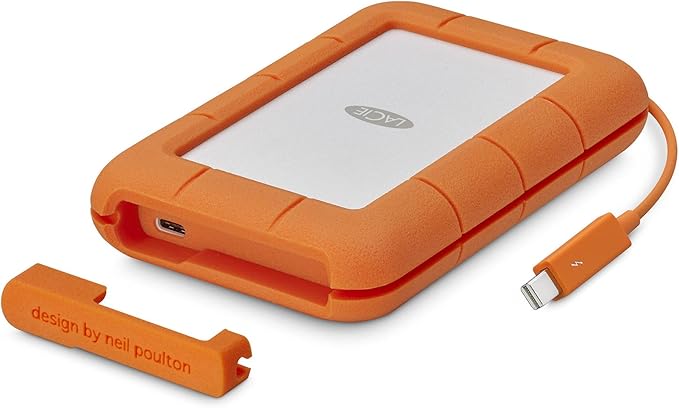
The LaCie Rugged USB-C portable drive combines rugged durability with cutting-edge USB-C connectivity. The result is a secure vault for your data that’s compatible with the latest MacBook Pro models as well as other USB computers. It offers impressive storage capacity for its size, giving you plenty of space to store your digital present—and future. As a result, you can use the LaCie Rugged USB-C as a shuttle drive to transport footage from set to post-production or to store a huge Lightroom library. For additional protection from the unexpected, this drive comes with two years of Rescue Data Recovery Service. If your drive should stop working, LaCie recovers the data and returns it to you on a new piece of external storage. Also includes 24/7 online case status tracking. With this service your equipment is eligible for one In-Lab Data Recovery attempt during the term of coverage.
The LaCie Rugged USB-C portable drive combines rugged durability with cutting-edge USB-C connectivity. The result is a secure vault for your data that’s compatible with the latest MacBook Pro models as well as other USB computers. It offers impressive storage capacity for its size, giving you plenty of space to store your digital present—and future. As a result, you can use the LaCie Rugged USB-C as a shuttle drive to transport footage from set to post-production or to store a huge Lightroom library. For additional protection from the unexpected, this drive comes with two years of Rescue Data Recovery Service. If your drive should stop working, LaCie recovers the data and returns it to you on a new piece of external storage. Also includes 24/7 online case status tracking. With this service your equipment is eligible for one In-Lab Data Recovery attempt during the term of coverage.
in 8 offers
The lowest price for LaCie Rugged USB-C Portable Hard Drive - 2TB right now is $189.00.
The all-time low was $103.96 on 6 Apr 2023 — today's price is 82% above the lowest ever. It has been notably cheaper before — worth setting a price alert.
Prices last updated 24 July 2024.
LaCie Rugged USB-C Portable Hard Drive - 2TB
The LaCie Rugged USB-C portable drive combines rugged durability with cutting-edge USB-C connectivity. The result is a secure vault for your data that’s compatible with the latest MacBook Pro models as well as other USB computers. It offers impressive storage capacity for its size, giving you plenty of space to store your digital present—and future. As a result, you can use the LaCie Rugged USB-C as a shuttle drive to transport footage from set to post-production or to store a huge Lightroom library. For additional protection from the unexpected, this drive comes with two years of Rescue Data Recovery Service. If your drive should stop working, LaCie recovers the data and returns it to you on a new piece of external storage. Also includes 24/7 online case status tracking. With this service your equipment is eligible for one In-Lab Data Recovery attempt during the term of coverage.
The LaCie Rugged USB-C portable drive combines rugged durability with cutting-edge USB-C connectivity. The result is a secure vault for your data that’s compatible with the latest MacBook Pro models as well as other USB computers. It offers impressive storage capacity for its size, giving you plenty of space to store your digital present—and future. As a result, you can use the LaCie Rugged USB-C as a shuttle drive to transport footage from set to post-production or to store a huge Lightroom library. For additional protection from the unexpected, this drive comes with two years of Rescue Data Recovery Service. If your drive should stop working, LaCie recovers the data and returns it to you on a new piece of external storage. Also includes 24/7 online case status tracking. With this service your equipment is eligible for one In-Lab Data Recovery attempt during the term of coverage.