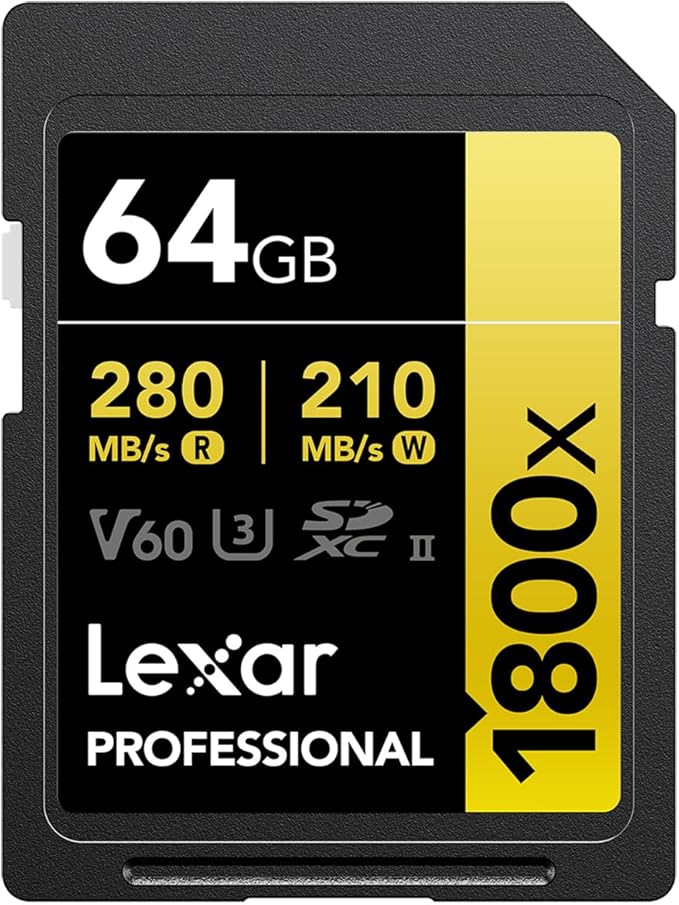
Lexar 64GB Professional 1667x UHS-II SDXC Memory Card
Professional-level performance with exceptional quality The Lexar Professional 1667x SDXC UHS-II card let you quickly capture and transfer high-quality photos, including 1080p Full-HD, 3D, and 4K video, with a read transfer speed up to 250MB/s (1667x)1. This card leverages UHS-II technology (UHS Speed Class 3 (U3)) for high-speed performance. This dramatically accelerates workflow from start to finish. Shoot high-quality images and1080p Full-HD, 3D, and 4K video Using a DSLR, HD camcorder or 3D camera, you’ll be able to leverage the latest photo and video features available for shooting high-quality images and stunning 1080p Full-HD, 3D, and 4K video. Capture extended lengths of video with high-capacity options With growing HD, 3D, and 4K video capabilities, you need high-performance cards you can rely on, and high-capacity options to keep you shooting longer without changing cards. The Lexar Professional 1667x SDXC UHS-II card makes it easy by leveraging UHS Speed Class 3 (U3) performance and providing you with large capacity options up to 256GB. Save time with dramatically accelerated workflow The high-speed performance of Lexar Professional 1667x SDXC UHS-II cards dramatically accelerate your workflow from start to finish, so you can save time and get back to the business of photography. Backwards compatible at the highest UHS-I speeds For versatility, the cards are also backwards compatible with UHS-I devices, performing up to the maximum thresholds of UHS-I speed capabilities. The cards also work with older, non-UHS-I devices, performing at Class 10 speeds. Rigorously tested All Lexar product designs undergo extensive testing in the Lexar Quality Labs, facilities with more than 1,100 digital devices, to ensure performance, quality, compatibility, and reliability.
Professional-level performance with exceptional quality The Lexar Professional 1667x SDXC UHS-II card let you quickly capture and transfer high-quality photos, including 1080p Full-HD, 3D, and 4K video, with a read transfer speed up to 250MB/s (1667x)1. This card leverages UHS-II technology (UHS Speed Class 3 (U3)) for high-speed performance. This dramatically accelerates workflow from start to finish. Shoot high-quality images and1080p Full-HD, 3D, and 4K video Using a DSLR, HD camcorder or 3D camera, you’ll be able to leverage the latest photo and video features available for shooting high-quality images and stunning 1080p Full-HD, 3D, and 4K video. Capture extended lengths of video with high-capacity options With growing HD, 3D, and 4K video capabilities, you need high-performance cards you can rely on, and high-capacity options to keep you shooting longer without changing cards. The Lexar Professional 1667x SDXC UHS-II card makes it easy by leveraging UHS Speed Class 3 (U3) performance and providing you with large capacity options up to 256GB. Save time with dramatically accelerated workflow The high-speed performance of Lexar Professional 1667x SDXC UHS-II cards dramatically accelerate your workflow from start to finish, so you can save time and get back to the business of photography. Backwards compatible at the highest UHS-I speeds For versatility, the cards are also backwards compatible with UHS-I devices, performing up to the maximum thresholds of UHS-I speed capabilities. The cards also work with older, non-UHS-I devices, performing at Class 10 speeds. Rigorously tested All Lexar product designs undergo extensive testing in the Lexar Quality Labs, facilities with more than 1,100 digital devices, to ensure performance, quality, compatibility, and reliability.
Professional-level performance with exceptional quality The Lexar Professional 1667x SDXC UHS-II card let you quickly capture and transfer high-quality photos, including 1080p Full-HD, 3D, and 4K video, with a read transfer speed up to 250MB/s (1667x)1. This card leverages UHS-II technology (UHS Speed Class 3 (U3)) for high-speed performance. This dramatically accelerates workflow from start to finish. Shoot high-quality images and1080p Full-HD, 3D, and 4K video Using a DSLR, HD camcorder or 3D camera, you’ll be able to leverage the latest photo and video features available for shooting high-quality images and stunning 1080p Full-HD, 3D, and 4K video. Capture extended lengths of video with high-capacity options With growing HD, 3D, and 4K video capabilities, you need high-performance cards you can rely on, and high-capacity options to keep you shooting longer without changing cards. The Lexar Professional 1667x SDXC UHS-II card makes it easy by leveraging UHS Speed Class 3 (U3) performance and providing you with large capacity options up to 256GB. Save time with dramatically accelerated workflow The high-speed performance of Lexar Professional 1667x SDXC UHS-II cards dramatically accelerate your workflow from start to finish, so you can save time and get back to the business of photography. Backwards compatible at the highest UHS-I speeds For versatility, the cards are also backwards compatible with UHS-I devices, performing up to the maximum thresholds of UHS-I speed capabilities. The cards also work with older, non-UHS-I devices, performing at Class 10 speeds. Rigorously tested All Lexar product designs undergo extensive testing in the Lexar Quality Labs, facilities with more than 1,100 digital devices, to ensure performance, quality, compatibility, and reliability.
Professional-level performance with exceptional quality The Lexar Professional 1667x SDXC UHS-II card let you quickly capture and transfer high-quality photos, including 1080p Full-HD, 3D, and 4K video, with a read transfer speed up to 250MB/s (1667x)1. This card leverages UHS-II technology (UHS Speed Class 3 (U3)) for high-speed performance. This dramatically accelerates workflow from start to finish. Shoot high-quality images and1080p Full-HD, 3D, and 4K video Using a DSLR, HD camcorder or 3D camera, you’ll be able to leverage the latest photo and video features available for shooting high-quality images and stunning 1080p Full-HD, 3D, and 4K video. Capture extended lengths of video with high-capacity options With growing HD, 3D, and 4K video capabilities, you need high-performance cards you can rely on, and high-capacity options to keep you shooting longer without changing cards. The Lexar Professional 1667x SDXC UHS-II card makes it easy by leveraging UHS Speed Class 3 (U3) performance and providing you with large capacity options up to 256GB. Save time with dramatically accelerated workflow The high-speed performance of Lexar Professional 1667x SDXC UHS-II cards dramatically accelerate your workflow from start to finish, so you can save time and get back to the business of photography. Backwards compatible at the highest UHS-I speeds For versatility, the cards are also backwards compatible with UHS-I devices, performing up to the maximum thresholds of UHS-I speed capabilities. The cards also work with older, non-UHS-I devices, performing at Class 10 speeds. Rigorously tested All Lexar product designs undergo extensive testing in the Lexar Quality Labs, facilities with more than 1,100 digital devices, to ensure performance, quality, compatibility, and reliability.
in 36 offers
The lowest price for Lexar 64GB Professional 1667x UHS-II SDXC Memory Card right now is $27.40 at PB Tech, compared across 24 retailers.
The all-time low was $18.99 on 24 Mar 2025 — today's price is 44% above the lowest ever. It has been notably cheaper before — worth setting a price alert.
Prices last updated 9 Oct 2026.
Last updated at 09/10/2026 11:08:25
Lexar Professional SDXC Memory Card - 64GB UHS-II - V60 - 1667x - Read up to 250MB/s - Write up to 120MB/s - Captures High-Quality Images & Extended
7-day returns
Lexar Professional 1667x 64GB SDXC UHS-II Card SILVER Series speed up to 250MB/s 1 including 1080p Full-HD, 3D, and 4K video
Lexar Professional 1667x 64GB SDXC UHS-II Card SILVER Series speed up to 250MB/s 1 including 1080p Full-HD, 3D, and 4K video
Delivery $7.95
Lexar Professional 1667x 64GB SDXC UHS-II Card SILVER Series speed up to 250MB/s 1 including 1080p Full-HD, 3D, and 4K video LSD64GCB1667
Lexar Professional 1667x 64GB SDXC UHS-II Card SILVER Series speed up to 250MB/s 1 including 1080p Full-HD, 3D, and 4K video
Free delivery between 13–16 Oct
Lexar Professional 1667x 64GB SDXC UHS-II Card SILVER Series speed up to 250MB/s 1 including 1080p Full-HD, 3D, and 4K video
Delivery between 14–22 Oct $15
Lexar Professional 1667X Sdxc UHS-II 64GB - C10, UHS-II(U3), V60, up to 250MB/s read, 120MB/s write
Delivery between 14–16 Oct $9.70
Lexar 1667x UHS-II SDXC SD Card - 64GB - Live Price Matching
Delivery $7.95
Lexar Professional 1667x SDXC UHS-II Card 64GB
Free delivery between Mon – Wed
Lexar 64GB SD Card SDXC UHS-II Professional 1667x Camera DSLR TF Memory Card V60 U3 4K 250MB/s
Delivery $5
originally posted on bhphotovideo.com
This memory works fine. If I hadn't already used a 64Gb 299M/s write speed Sony SF-G64T memory card in my Sony A9, I might be more satisfied with this much slower Lexar card. In truth, this card is perfectly fine. It writes as fast as claimed, but when shooting bursts of more than just a few frames, I'm seeing the camera taking several seconds to clear the buffer. This is only an issue when I want to shoot video while the buffer clears. I can keep shooting stills, but am restricted from shooting video until the memory card catches up. I never once had this issue with the faster Sony card. You get what you pay for!
originally posted on bhphotovideo.com
I’ve been using SDXC cards since some of the first pro video SDXC cameras. Early on it was easier to select a good card, since those lower bit rates and resolutions didn’t require as much space and speed. With 4K cameras and higher-quality HD recording devices today, all that’s changed. And, if you’re like me looking for a “one card fits all” solution, it gets even more difficult.I thought I had found the perfect combination of price, capacity, and speed with the Samsung EVO Pro SDXC cards. EVO SSD drives have been some of the best drives for our computers, so EVO cards got to work great for cameras, right? Wrong.In testing they worked great – Even in my 4k JVC 250, which is pickier than my Sony FX70 and Cannon 80D. So, I went and bought 10 ofthem for a major ... MoreI’ve been using SDXC cards since some of the first pro video SDXC cameras. Early on it was easier to select a good card, since those lower bit rates and resolutions didn’t require as much space and speed. With 4K cameras and higher-quality HD recording devices today, all that’s changed. And, if you’re like me looking for a “one card fits all” solution, it gets even more difficult.I thought I had found the perfect combination of price, capacity, and speed with the Samsung EVO Pro SDXC cards. EVO SSD drives have been some of the best drives for our computers, so EVO cards got to work great for cameras, right? Wrong.In testing they worked great – Even in my 4k JVC 250, which is pickier than my Sony FX70 and Cannon 80D. So, I went and bought 10 ofthem for a major concert event, only to find on post that on the Blackjmagic Hyperdeck Studio Mini these cards drop frames every few seconds or so after the first 10 minutes of recording.That’s when I came to terms with the fact that not all SDXC cards are the same. A card rated at 95 Mbps may read at that speed, but only write around 30 Mbps. In the video world, it’s not the read speed we have to be careful of, it’s the write speed. Thankfully, B&H (unlike other stores) lists both the read speed and the write speed of their SDXC cards.With the specs provided by B&H, I was able to find these Lexar Professional 1667x cards and decided to try them as an all-in-all solution. They are a reasonable price trade-off and work fine in all of our cameras.The Hyperdeck Test - Recently, on a shoot with BET Networks, we tried the Lexar Professional 1667X on the Hyperdeck. At the Hyperdeck’s highest H.264 record settings, these cards did drop frames. However, that was easily fixed by dropping down to ProRes at a slightly lower bit rate. In short, we can use these cards in all of our equipment, just not the ultimate record mode on the Hyperdeck – Which is fine for the vast majority of what we shoot.We would recommend this card for professional videography, but like with any card, suggest you purchase a couple and test them thoroughly in your specific equipment and workflow.
originally posted on bhphotovideo.com
I take extreme pride in purchasing ONLY the best no matter the cost.Everything I purchase is usually at minimum top of the line. When these Lexar cards went on sale, I did something I usually would never do...I tried to save some money! BIG MISTAKE!I purchased (6) of the 128 gb, and (2) of the 256 gb. Thinking these are professional grade with all the bells and whistles per the label.If the photos or video you put into these is critical, DO NOT BUY these!On 1st day, one of the 125 gb failed, saying the card cannot be read, and must be formatted (I took and it held a bunch of photos in it!), I started second guessing myself thinking do they need to be formatted first? But then realized, I have never had to do that in the past with Scandisk drives in the past! ... MoreI take extreme pride in purchasing ONLY the best no matter the cost.Everything I purchase is usually at minimum top of the line. When these Lexar cards went on sale, I did something I usually would never do...I tried to save some money! BIG MISTAKE!I purchased (6) of the 128 gb, and (2) of the 256 gb. Thinking these are professional grade with all the bells and whistles per the label.If the photos or video you put into these is critical, DO NOT BUY these!On 1st day, one of the 125 gb failed, saying the card cannot be read, and must be formatted (I took and it held a bunch of photos in it!), I started second guessing myself thinking do they need to be formatted first? But then realized, I have never had to do that in the past with Scandisk drives in the past! With no other choice, I formatted it (lost all the photos).Then the 256 gb failed, saying the same thing, it must be formatted with wedding photos in it! This time it would not even format...just a complete FAILURE! (luckily I use Canon with dual disk and had a back up Scandisk CF card with the photos! If I did not, I would have lost a Wedding!! I hate to leave this bad review! But, you can see from my experience it is very, very deserving!!To Lexar get it together or get out of the business!! For some like myself, the possibility of losing photos or videos is just NOT an Options...period!
| Brand | Lexar |
| Write Protected | Yes |
| SD Format | SDXC |
| Format | SD |
| SD Speed Class | UHS Class 3 |
Lexar Professional SDXC Memory Card - 64GB UHS-II - V60 - 1667x - Read up to 250MB/s - Write up to 120MB/s - Captures High-Quality Images & Extended
7-day returns
Lexar Professional 1667x 64GB SDXC UHS-II Card SILVER Series speed up to 250MB/s 1 including 1080p Full-HD, 3D, and 4K video
Lexar Professional 1667x 64GB SDXC UHS-II Card SILVER Series speed up to 250MB/s 1 including 1080p Full-HD, 3D, and 4K video
Delivery $7.95
Lexar Professional 1667x 64GB SDXC UHS-II Card SILVER Series speed up to 250MB/s 1 including 1080p Full-HD, 3D, and 4K video LSD64GCB1667
Lexar Professional 1667x 64GB SDXC UHS-II Card SILVER Series speed up to 250MB/s 1 including 1080p Full-HD, 3D, and 4K video
Free delivery between 13–16 Oct
This memory works fine. If I hadn't already used a 64Gb 299M/s write speed Sony SF-G64T memory card in my Sony A9, I might be more satisfied with this much slower Lexar card. In truth, this card is perfectly fine. It writes as fast as claimed, but when shooting bursts of more than just a few frames, I'm seeing the camera taking several seconds to clear the buffer. This is only an issue when I want to shoot video while the buffer clears. I can keep shooting stills, but am restricted from shooting video until the memory card catches up. I never once had this issue with the faster Sony card. You get what you pay for!
I’ve been using SDXC cards since some of the first pro video SDXC cameras. Early on it was easier to select a good card, since those lower bit rates and resolutions didn’t require as much space and speed. With 4K cameras and higher-quality HD recording devices today, all that’s changed. And, if you’re like me looking for a “one card fits all” solution, it gets even more difficult.I thought I had found the perfect combination of price, capacity, and speed with the Samsung EVO Pro SDXC cards. EVO SSD drives have been some of the best drives for our computers, so EVO cards got to work great for cameras, right? Wrong.In testing they worked great – Even in my 4k JVC 250, which is pickier than my Sony FX70 and Cannon 80D. So, I went and bought 10 ofthem for a major ... MoreI’ve been using SDXC cards since some of the first pro video SDXC cameras. Early on it was easier to select a good card, since those lower bit rates and resolutions didn’t require as much space and speed. With 4K cameras and higher-quality HD recording devices today, all that’s changed. And, if you’re like me looking for a “one card fits all” solution, it gets even more difficult.I thought I had found the perfect combination of price, capacity, and speed with the Samsung EVO Pro SDXC cards. EVO SSD drives have been some of the best drives for our computers, so EVO cards got to work great for cameras, right? Wrong.In testing they worked great – Even in my 4k JVC 250, which is pickier than my Sony FX70 and Cannon 80D. So, I went and bought 10 ofthem for a major concert event, only to find on post that on the Blackjmagic Hyperdeck Studio Mini these cards drop frames every few seconds or so after the first 10 minutes of recording.That’s when I came to terms with the fact that not all SDXC cards are the same. A card rated at 95 Mbps may read at that speed, but only write around 30 Mbps. In the video world, it’s not the read speed we have to be careful of, it’s the write speed. Thankfully, B&H (unlike other stores) lists both the read speed and the write speed of their SDXC cards.With the specs provided by B&H, I was able to find these Lexar Professional 1667x cards and decided to try them as an all-in-all solution. They are a reasonable price trade-off and work fine in all of our cameras.The Hyperdeck Test - Recently, on a shoot with BET Networks, we tried the Lexar Professional 1667X on the Hyperdeck. At the Hyperdeck’s highest H.264 record settings, these cards did drop frames. However, that was easily fixed by dropping down to ProRes at a slightly lower bit rate. In short, we can use these cards in all of our equipment, just not the ultimate record mode on the Hyperdeck – Which is fine for the vast majority of what we shoot.We would recommend this card for professional videography, but like with any card, suggest you purchase a couple and test them thoroughly in your specific equipment and workflow.
I take extreme pride in purchasing ONLY the best no matter the cost.Everything I purchase is usually at minimum top of the line. When these Lexar cards went on sale, I did something I usually would never do...I tried to save some money! BIG MISTAKE!I purchased (6) of the 128 gb, and (2) of the 256 gb. Thinking these are professional grade with all the bells and whistles per the label.If the photos or video you put into these is critical, DO NOT BUY these!On 1st day, one of the 125 gb failed, saying the card cannot be read, and must be formatted (I took and it held a bunch of photos in it!), I started second guessing myself thinking do they need to be formatted first? But then realized, I have never had to do that in the past with Scandisk drives in the past! ... MoreI take extreme pride in purchasing ONLY the best no matter the cost.Everything I purchase is usually at minimum top of the line. When these Lexar cards went on sale, I did something I usually would never do...I tried to save some money! BIG MISTAKE!I purchased (6) of the 128 gb, and (2) of the 256 gb. Thinking these are professional grade with all the bells and whistles per the label.If the photos or video you put into these is critical, DO NOT BUY these!On 1st day, one of the 125 gb failed, saying the card cannot be read, and must be formatted (I took and it held a bunch of photos in it!), I started second guessing myself thinking do they need to be formatted first? But then realized, I have never had to do that in the past with Scandisk drives in the past! With no other choice, I formatted it (lost all the photos).Then the 256 gb failed, saying the same thing, it must be formatted with wedding photos in it! This time it would not even format...just a complete FAILURE! (luckily I use Canon with dual disk and had a back up Scandisk CF card with the photos! If I did not, I would have lost a Wedding!! I hate to leave this bad review! But, you can see from my experience it is very, very deserving!!To Lexar get it together or get out of the business!! For some like myself, the possibility of losing photos or videos is just NOT an Options...period!
I have used the Lexar 128gb and have zero problems. They have been by FAR the best and most reliable cards I have owned to date. These cards, on the other hand, have been a nightmare within minutes of opening the box.On shoot my camera was getting error readings, but nothing was being erased and I was backing up my images on a second card so I continued through and hoped for the best.Once I got home and uploaded them to my laptop Lightroom was having trouble recognizing the card. After a couple tries it popped up and I was able to upload them at dial-up speed. I swear I could have uploaded 3 weddings before this one finished. It took almost 45 minutes to “upload” 250 images.... I used upload in quotation because it was only copying the file into Lightroom and ... MoreI have used the Lexar 128gb and have zero problems. They have been by FAR the best and most reliable cards I have owned to date. These cards, on the other hand, have been a nightmare within minutes of opening the box.On shoot my camera was getting error readings, but nothing was being erased and I was backing up my images on a second card so I continued through and hoped for the best.Once I got home and uploaded them to my laptop Lightroom was having trouble recognizing the card. After a couple tries it popped up and I was able to upload them at dial-up speed. I swear I could have uploaded 3 weddings before this one finished. It took almost 45 minutes to “upload” 250 images.... I used upload in quotation because it was only copying the file into Lightroom and not importing the images onto my computer.I thought this was human error but I went through everything to see where I was messing up but it was 100% the card. Now my laptop won’t recognize the card at all, and it’s only a matter of time that they will completely fail. Thankfully I got the raw images on to my laptop before that happened...If you want to go into a shoot with the adrenaline rush of not knowing whether you’ll have a tangible product for your clients, then buy these. If you want to keep your reputation as a photographer (or just keep the pictures that are important to you), look somewhere else.
I got these cards as they were recommended for a newCanon EOS 90D camera I was purchasing from B&H. I have also used Lexar Professional media cards in my other digital cameras and a new Canon HF G60 video camera. My Lexar media cards have all functioned properly and I have never had one fail. So when I saw that these Lexar 128gb Professional cards were recommended for my new Canon 90D, I added the 2-pack to my camera order. Shipping was fast, got the cards and the new camera within 3 days of ordering them. These will be perfect for an upcoming vacation trip. Thanks B&H for the great service.
Purchased these to use as backup cards, but they replaced my older cards and now are the main ones I use in my Canon DSLRs. I plan to use them as well in my soon to get Canon mirrorless bodies.Have used Lexar products since digital started and never an issue.These are a great value as well having them be a 2 pack.ONLY wish that they came with the small plastic protective case that most every other one comes with.
Your mileage may vary.Warning: The rest of this review is a total geekshow, on how to test the cards and get good speeds out of your PC.I tested them on a late model Dell XPS 15, 9570, running Win10 PRO 64, using the OEM internal card reader. Cards were tested using the excellent H2Testw v1.4 shareware.However, I found the speed to be very sensitive to format and partition parameters. One of my cards was ghastly slow out of the box. (66 MB/S read & write)It took some digging around to find that the format parameters were the same but the offset on the disk partitions was not. I repartitioned the slow card with an offset of 16384kb, using the DISKPART utility and then formatted exFAT with allocation unit size of 128kb to match the good card. That ... MoreYour mileage may vary.Warning: The rest of this review is a total geekshow, on how to test the cards and get good speeds out of your PC.I tested them on a late model Dell XPS 15, 9570, running Win10 PRO 64, using the OEM internal card reader. Cards were tested using the excellent H2Testw v1.4 shareware.However, I found the speed to be very sensitive to format and partition parameters. One of my cards was ghastly slow out of the box. (66 MB/S read & write)It took some digging around to find that the format parameters were the same but the offset on the disk partitions was not. I repartitioned the slow card with an offset of 16384kb, using the DISKPART utility and then formatted exFAT with allocation unit size of 128kb to match the good card. That worked.Note: Formatting the card in my EM-1 produced a usable but slow card. Formatting it as described above producced a card my EM-1 could use and that blazed when reading back files.It also seems that maximum read and write speeds depend on driver and firmware updates, especially when using an external USB card reader.Of course, you have to have a UHS-II reader to get the full speeds. It may not be worth the hassle to tweak everything up right, but the cards do perform very well if you do. (the spec sheet only promises 80/250. So getting 100/250 was a nice surprise)For these kinds of speeds, there are data bottlenecks lurking everywhere. The XPS 15's internal drive had the highest speeds of the several reads and PCs I tested, so that's what I used to exercise the cards.Lessons learned:1: Try several readers on several PCs, with different format types before you decide that a card is bad or slow.2: when you get a fast configuration, *document* it. (I used the detail disk and detail part commands in diskpart)
Actually I've always used sandisk. But as the quality became different so I started looking for something stable and came to the Lexar.And where to buy it to get not a fake? Of course from the dealer. So I came to BH where in addition to the above I also received a good price with a discount.As for the card itself: looks solid and quality made. The speed is enough for recording 4K video in max quality on my Canon R6 in non-stop mode (I'll post the exact speed later but you can find it everywhere).The price-speed ratio is the best.I have Lexar not so long so I can't say much about the failure and durability but it should be good regarding reviews.I currently recommend this product.
Using this for my Lumix G95 camera recording 4k video without any problems. The card keeps up with the data rate the camera writes to it. This is my first 250 mb/s card and I love it! It is so much faster than my other cards especially noticeable when transferring videos from the card to the PC. I have always liked Lexar cards because I had never a failure.
I got these to use with my Panasonic G9 for a mixture of photos and video. These handled 10-bit, 150mbps 4K video without any problems and I haven't had any reliability or data corruption issues despite rewriting the entire cards dozens of times.With my Kingston UHS-II card reader these meet the advertised speed of 250 MB/s when reading large video files and I have been very happy with these cards. I do wish they would write faster during burst shooting, but that's probably a job for V90 cards.
| Brand | Lexar |
| Write Protected | Yes |
| SD Format | SDXC |
| Format | SD |
| SD Speed Class | UHS Class 3 |