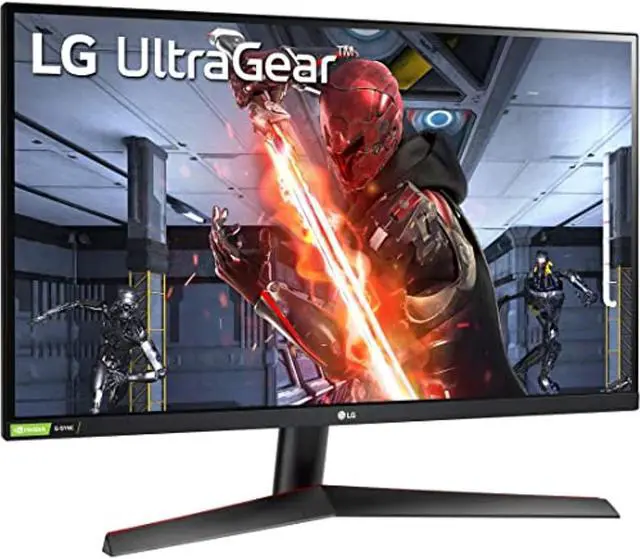
See your way to victory with the innovative 27GN950 UltraGear gaming monitor. Experience the next level immersion on a 4K Nano IPS display with a 1ms response time.
See your way to victory with the innovative 27GN950 UltraGear gaming monitor. Experience the next level immersion on a 4K Nano IPS display with a 1ms response time.
in 3 offers
The lowest price for LG 27GN950-B: 27" UltraGear 4K UHD Nano IPS 1ms 144Hz G-Sync Compatible Gaming Monitor right now is $1,199.00 at Factory Plus, compared across 3 retailers.
The all-time low was $530.74 on 11 May 2026 — today's price is 126% above the lowest ever. It has been notably cheaper before — worth setting a price alert.
Prices last updated 9 July 2026.
LG 27GN950-B: 27" UltraGear 4K UHD Nano IPS 1ms 144Hz G-Sync Compatible Gaming Monitor
See your way to victory with the innovative 27GN950 UltraGear gaming monitor. Experience the next level immersion on a 4K Nano IPS display with a 1ms response time.
See your way to victory with the innovative 27GN950 UltraGear gaming monitor. Experience the next level immersion on a 4K Nano IPS display with a 1ms response time.
Last updated at 09/07/2026 05:12:58
LG 27GN950-B 27-inch UltraGear 4K UHD Nano IPS 1ms 144Hz G-Sync Compatible Gaming Monitor - Factory Seconds
Lg Ultragear 27gn950-b 27" Ultra Hd Ips Led Gaming Monitor - Black
Delivery $309.19
Affiliate Disclosure: We may receive a small commission for purchases made through this link at no extra cost to you. This helps support our site. Thank you!
LG 27GN950-B Ultragear Gaming Monitor 27 UHD 3840 x 2160 Nano IPS Display, 1ms Response Time, 144Hz Refresh Rate, G-SYNC Compatibility, AMD FreeSync
Delivery between 13–17 July $15.52
originally posted on pbtech.co.nz
I had upgraded from the LG 34UC79G, which is a 1080 ultrawide, to the LG 34GN850, which is a 1440 ultrawide, early this year but I found the screen too small for the increase in resolution when I wasn't gaming, given the increased spacing between it and me on the new desk, so I upgraded again to the 38GN950, which is a 1600 ultrawide, and it's a lot better.At 100% font size in Windows the text isn't too small, and I don't have the scaling problems when using RDC to older Windows systems, so it is a pleasure to use when I'm working. It's a lot easier to write code when you don't have to keep scrolling up and down to see the whole function, and viewing 3 pages across when writing documentation allows me to see the flow better, but it really comes into it's own when ... MoreI had upgraded from the LG 34UC79G, which is a 1080 ultrawide, to the LG 34GN850, which is a 1440 ultrawide, early this year but I found the screen too small for the increase in resolution when I wasn't gaming, given the increased spacing between it and me on the new desk, so I upgraded again to the 38GN950, which is a 1600 ultrawide, and it's a lot better.At 100% font size in Windows the text isn't too small, and I don't have the scaling problems when using RDC to older Windows systems, so it is a pleasure to use when I'm working. It's a lot easier to write code when you don't have to keep scrolling up and down to see the whole function, and viewing 3 pages across when writing documentation allows me to see the flow better, but it really comes into it's own when I'm gaming.The main thing I noticed was the colours. They are much more vibrant. The red mushrooms in Valheim really pop, and paired with my 6900 XT, running games like Farcry 6, Icarus, Horizon Zero Dawn, and Cyberpunk 2077 in high settings makes them look gorgeous without impacting my FPS.The rear sphere RGB lighting, when set up to dynamically change based on the screen colours, works very well with my Logitech G560 speakers, which are set up to do the same thing, washing the rear wall with colour and blurring the usual hard edge if you're not gaming in the dark.One problem is that LG don't have Windows drivers for this monitor yet, so it'll show up as Generic PnP. The other downside, if it could be considered that, is the 3840x1600 resolution. It's not a common standard as it fits between 1440 and 4K. This may mean that games don't support it, although I've not seen that so far.
originally posted on LG
I like how this monitor looks, and the thin bezel around the edge with no logos is great. However, there are a couple issues that drive me crazy and make me regret my purchase:1. There is no way to disable the flashing of the LED light ring on the back of the monitor, which flashes at full brightness EVERY time the monitor is turned on or receives a new video signal, even if the light setting is set to off. It's super annoying.2. This monitor does not support DisplayPort / HDMI Deep Sleep mode. This feature was advertised in the user manual, but did not appear in the on screen menu. When I contacted LG support, they republished the user manual removing the mention of this feature, and then denied that they ever change their user manuals, even though the last ... MoreI like how this monitor looks, and the thin bezel around the edge with no logos is great. However, there are a couple issues that drive me crazy and make me regret my purchase:1. There is no way to disable the flashing of the LED light ring on the back of the monitor, which flashes at full brightness EVERY time the monitor is turned on or receives a new video signal, even if the light setting is set to off. It's super annoying.2. This monitor does not support DisplayPort / HDMI Deep Sleep mode. This feature was advertised in the user manual, but did not appear in the on screen menu. When I contacted LG support, they republished the user manual removing the mention of this feature, and then denied that they ever change their user manuals, even though the last updated date on their website had changed.3. The combination of the above issues means that when connected to my Razer Blade 15" Advanced gaming laptop, the monitor wakes up every 2-3 minutes, even though the laptop is not outputting a video signal because the laptop is not in use and the display has been turned off by the OS. When this happens, the LG monitor flashes the light ring at full brightness, searches for a video signal, can't find one, and goes back to low power mode. This also causes a mysterious USB device in the monitor to be detected by Windows and then disconnect again, which causes USB connect/disconnect sound alerts. These annoying sounds and obnoxiously bright light shows repeats every 2-3 minutes all night ad nauseum if I ever forget to turn off the monitor before I go to bed.I contacted LG support multiple times, and they have been unable to do anything to resolve any of these issues. For the price I paid, I would expect this monitor to "just work" and not have these crazymaking quality of life issues that drive me bonkers. I want to love it, but I can't without these issues being fixed.
originally posted on LG
I had my eye on this for almost a year and finally got it when it was in stock a little over 6 months ago. Like most of LG monitors the color accuracy and range is great, response time is very low, wide viewing angle, and easy to use controls. Getting a 4K monitor with refresh rate and low response time is of course costs you $$$, but if you are reading this you already know that. The only complaint that I have is about the stand. It does go up and down and tilt, but won't rotate. I guess I can always rotate the base, but... RGB lighting on this is awesome. All in all, if you are a 4k gamer or you want to use this for work and gaming both (4K matters when reading pdfs and writing code), I cannot think of any bettter monitor. Trust me, I even bought the acer 4k high ... MoreI had my eye on this for almost a year and finally got it when it was in stock a little over 6 months ago. Like most of LG monitors the color accuracy and range is great, response time is very low, wide viewing angle, and easy to use controls. Getting a 4K monitor with refresh rate and low response time is of course costs you $$$, but if you are reading this you already know that. The only complaint that I have is about the stand. It does go up and down and tilt, but won't rotate. I guess I can always rotate the base, but... RGB lighting on this is awesome. All in all, if you are a 4k gamer or you want to use this for work and gaming both (4K matters when reading pdfs and writing code), I cannot think of any bettter monitor. Trust me, I even bought the acer 4k high refresh rate low response time equivalent and had to return it because of build quality, color bleed, etc. And I have actually looked for a year.
| Cabinet Color | Black |
| Bezel Design | Frameless |
| Screen Size | 27" |
| Widescreen | Yes |
| LED Backlight | Yes |
LG 27GN950-B 27-inch UltraGear 4K UHD Nano IPS 1ms 144Hz G-Sync Compatible Gaming Monitor - Factory Seconds
Lg Ultragear 27gn950-b 27" Ultra Hd Ips Led Gaming Monitor - Black
Delivery $309.19
Affiliate Disclosure: We may receive a small commission for purchases made through this link at no extra cost to you. This helps support our site. Thank you!
LG 27GN950-B Ultragear Gaming Monitor 27 UHD 3840 x 2160 Nano IPS Display, 1ms Response Time, 144Hz Refresh Rate, G-SYNC Compatibility, AMD FreeSync
Delivery between 13–17 July $15.52
I had upgraded from the LG 34UC79G, which is a 1080 ultrawide, to the LG 34GN850, which is a 1440 ultrawide, early this year but I found the screen too small for the increase in resolution when I wasn't gaming, given the increased spacing between it and me on the new desk, so I upgraded again to the 38GN950, which is a 1600 ultrawide, and it's a lot better.At 100% font size in Windows the text isn't too small, and I don't have the scaling problems when using RDC to older Windows systems, so it is a pleasure to use when I'm working. It's a lot easier to write code when you don't have to keep scrolling up and down to see the whole function, and viewing 3 pages across when writing documentation allows me to see the flow better, but it really comes into it's own when ... MoreI had upgraded from the LG 34UC79G, which is a 1080 ultrawide, to the LG 34GN850, which is a 1440 ultrawide, early this year but I found the screen too small for the increase in resolution when I wasn't gaming, given the increased spacing between it and me on the new desk, so I upgraded again to the 38GN950, which is a 1600 ultrawide, and it's a lot better.At 100% font size in Windows the text isn't too small, and I don't have the scaling problems when using RDC to older Windows systems, so it is a pleasure to use when I'm working. It's a lot easier to write code when you don't have to keep scrolling up and down to see the whole function, and viewing 3 pages across when writing documentation allows me to see the flow better, but it really comes into it's own when I'm gaming.The main thing I noticed was the colours. They are much more vibrant. The red mushrooms in Valheim really pop, and paired with my 6900 XT, running games like Farcry 6, Icarus, Horizon Zero Dawn, and Cyberpunk 2077 in high settings makes them look gorgeous without impacting my FPS.The rear sphere RGB lighting, when set up to dynamically change based on the screen colours, works very well with my Logitech G560 speakers, which are set up to do the same thing, washing the rear wall with colour and blurring the usual hard edge if you're not gaming in the dark.One problem is that LG don't have Windows drivers for this monitor yet, so it'll show up as Generic PnP. The other downside, if it could be considered that, is the 3840x1600 resolution. It's not a common standard as it fits between 1440 and 4K. This may mean that games don't support it, although I've not seen that so far.
I like how this monitor looks, and the thin bezel around the edge with no logos is great. However, there are a couple issues that drive me crazy and make me regret my purchase:1. There is no way to disable the flashing of the LED light ring on the back of the monitor, which flashes at full brightness EVERY time the monitor is turned on or receives a new video signal, even if the light setting is set to off. It's super annoying.2. This monitor does not support DisplayPort / HDMI Deep Sleep mode. This feature was advertised in the user manual, but did not appear in the on screen menu. When I contacted LG support, they republished the user manual removing the mention of this feature, and then denied that they ever change their user manuals, even though the last ... MoreI like how this monitor looks, and the thin bezel around the edge with no logos is great. However, there are a couple issues that drive me crazy and make me regret my purchase:1. There is no way to disable the flashing of the LED light ring on the back of the monitor, which flashes at full brightness EVERY time the monitor is turned on or receives a new video signal, even if the light setting is set to off. It's super annoying.2. This monitor does not support DisplayPort / HDMI Deep Sleep mode. This feature was advertised in the user manual, but did not appear in the on screen menu. When I contacted LG support, they republished the user manual removing the mention of this feature, and then denied that they ever change their user manuals, even though the last updated date on their website had changed.3. The combination of the above issues means that when connected to my Razer Blade 15" Advanced gaming laptop, the monitor wakes up every 2-3 minutes, even though the laptop is not outputting a video signal because the laptop is not in use and the display has been turned off by the OS. When this happens, the LG monitor flashes the light ring at full brightness, searches for a video signal, can't find one, and goes back to low power mode. This also causes a mysterious USB device in the monitor to be detected by Windows and then disconnect again, which causes USB connect/disconnect sound alerts. These annoying sounds and obnoxiously bright light shows repeats every 2-3 minutes all night ad nauseum if I ever forget to turn off the monitor before I go to bed.I contacted LG support multiple times, and they have been unable to do anything to resolve any of these issues. For the price I paid, I would expect this monitor to "just work" and not have these crazymaking quality of life issues that drive me bonkers. I want to love it, but I can't without these issues being fixed.
I had my eye on this for almost a year and finally got it when it was in stock a little over 6 months ago. Like most of LG monitors the color accuracy and range is great, response time is very low, wide viewing angle, and easy to use controls. Getting a 4K monitor with refresh rate and low response time is of course costs you $$$, but if you are reading this you already know that. The only complaint that I have is about the stand. It does go up and down and tilt, but won't rotate. I guess I can always rotate the base, but... RGB lighting on this is awesome. All in all, if you are a 4k gamer or you want to use this for work and gaming both (4K matters when reading pdfs and writing code), I cannot think of any bettter monitor. Trust me, I even bought the acer 4k high ... MoreI had my eye on this for almost a year and finally got it when it was in stock a little over 6 months ago. Like most of LG monitors the color accuracy and range is great, response time is very low, wide viewing angle, and easy to use controls. Getting a 4K monitor with refresh rate and low response time is of course costs you $$$, but if you are reading this you already know that. The only complaint that I have is about the stand. It does go up and down and tilt, but won't rotate. I guess I can always rotate the base, but... RGB lighting on this is awesome. All in all, if you are a 4k gamer or you want to use this for work and gaming both (4K matters when reading pdfs and writing code), I cannot think of any bettter monitor. Trust me, I even bought the acer 4k high refresh rate low response time equivalent and had to return it because of build quality, color bleed, etc. And I have actually looked for a year.
I searched for the previous generation of this monitor at MSRP for well over a year (the 27GN950-B), after many faithful years from my last LG monitor...finally having a good enough PC to feel stepping up to 4K was almost a necessity and not simply to have a 4K visual that the rest of my system would have trouble keeping up with at max settings.After meticulously digging through review sites, opinions, and specifications...trying to find the perfect monitor for all my needs, now and further down the road I was far from surprised that I ended up looking at another LG Monitor and refused to purchase any other even as I hunted to find one for retail price--which is by far the biggest issue with this monitor, it is so highly sought after that finding one is almost ... MoreI searched for the previous generation of this monitor at MSRP for well over a year (the 27GN950-B), after many faithful years from my last LG monitor...finally having a good enough PC to feel stepping up to 4K was almost a necessity and not simply to have a 4K visual that the rest of my system would have trouble keeping up with at max settings.After meticulously digging through review sites, opinions, and specifications...trying to find the perfect monitor for all my needs, now and further down the road I was far from surprised that I ended up looking at another LG Monitor and refused to purchase any other even as I hunted to find one for retail price--which is by far the biggest issue with this monitor, it is so highly sought after that finding one is almost impossible.I have to say that it was well worth the wait.My PC runs both Widows 7/10 as of writing this, most of the software is not (by default) compatible with Windows 7, including G-Sync compatible mode. I have an EVGA 3090 XC Ultra 24GB and even running games on max at 4K without G-Sync I have yet to see any screen tearing or quality loss even while using HDR.The quality difference between my 1080p monitor and this are like night and day, which I suppose is to be expected...but its not just the resolution, everything from the color to the shadows right out of the box look incredible.Even with the few minor flaws I have come across like minor light reflection (which in truth may be my lights), and Windows 7 incompatibility I couldn't be happier with my purchase.The fan is so silent I was unsure if it was even functioning at first and had called LG to ask about the fact, when I did i was reassured if there was any malfunction on my brand new unit they would fix it rather than insist I return it to the place of purchase...but it turned out it was just that quiet fortunately.There are a lot of gaming monitors out there, this was the only one i found with literally every feature you could want for Intel/AMD/Console all the way down the line and at an extremely affordable price at that. I really couldn't recommend it enough.
This is a GREAT monitor with one flaw: By default it is configured with a variable backlight setting that is hard to find but easily disabled.Out of the box there's a setting under GENERAL > SMART ENERGY SAVING that defaults to ON. Unfortunately it causes the backlight to randomly dim with content which drives me crazy. There are a few other settings that reference backlight autodimming but this one is hidden and easy to miss. After turning it off this monitor has been excellent.This monitor gets super bright, I have to run it at 35% brightness in my darker room which should be about 300 nits. Full brightness is crazy bright.The colors on this monitor are very accurate, and the white tone at the "Medium" Color Temp is very close to 6500K. Other modes use ... MoreThis is a GREAT monitor with one flaw: By default it is configured with a variable backlight setting that is hard to find but easily disabled.Out of the box there's a setting under GENERAL > SMART ENERGY SAVING that defaults to ON. Unfortunately it causes the backlight to randomly dim with content which drives me crazy. There are a few other settings that reference backlight autodimming but this one is hidden and easy to miss. After turning it off this monitor has been excellent.This monitor gets super bright, I have to run it at 35% brightness in my darker room which should be about 300 nits. Full brightness is crazy bright.The colors on this monitor are very accurate, and the white tone at the "Medium" Color Temp is very close to 6500K. Other modes use various other Color Temps but GAME2 seems to default to Medium and is probably the best out-of-the-box mode to use.Overall this is a fantastic monitor.
I originally bought this monitor as an open box item, around $300 i think i paid. i have the protection plan from bestbuy and it comes in handy for everything you buy from them. Even though it was an open box item they replaced it when i found that the original one i purchased had dead pixels on the screen. I paid $30 more for a unopened new monitor and it was perfect. I think who ever bought the first one i bought did a good old switch and replace with the messed up one. I will never know, but having that protection plan is very helpful! If your able to buy this monitor on sale do it! I don’t know if it’s really worth msrp for being such an old model, but it works very well and overclocks to 165mhz if you really need that. Also the lighting on the back is very cool ... MoreI originally bought this monitor as an open box item, around $300 i think i paid. i have the protection plan from bestbuy and it comes in handy for everything you buy from them. Even though it was an open box item they replaced it when i found that the original one i purchased had dead pixels on the screen. I paid $30 more for a unopened new monitor and it was perfect. I think who ever bought the first one i bought did a good old switch and replace with the messed up one. I will never know, but having that protection plan is very helpful! If your able to buy this monitor on sale do it! I don’t know if it’s really worth msrp for being such an old model, but it works very well and overclocks to 165mhz if you really need that. Also the lighting on the back is very cool and bright if it’s against a wall it looks really sweet.
I bought this monitor from Amazon, very excited about my upgrade to a decently priced 4K monitor! Unfortunately, the I found the monitor shut off after 45 seconds of being on. The power button light would blink red, twice, every 2-3 seconds. I troubleshooted, read forums on possible fixes, tried everything such as plugging the monitor directly into the wall instead of a power strip, etc. The monitor requires you use the accompanying hardware/cables. I finally called the support number to see if there was anything else I could do, and ended up having to ship the monitor to the repair store for an easy fix. Timeline to repair was up to three weeks; I got the monitor back after one week which I was pleased with. However, after setting up the monitor again, there was ... MoreI bought this monitor from Amazon, very excited about my upgrade to a decently priced 4K monitor! Unfortunately, the I found the monitor shut off after 45 seconds of being on. The power button light would blink red, twice, every 2-3 seconds. I troubleshooted, read forums on possible fixes, tried everything such as plugging the monitor directly into the wall instead of a power strip, etc. The monitor requires you use the accompanying hardware/cables. I finally called the support number to see if there was anything else I could do, and ended up having to ship the monitor to the repair store for an easy fix. Timeline to repair was up to three weeks; I got the monitor back after one week which I was pleased with. However, after setting up the monitor again, there was absolutely zero repairs done and I was still stuck with the same issue - it shut off after 45 seconds, power light blinked red every couple seconds. All in all, an inconvenient situation and huge waste of time and resources for me.
I bought this monitor in July of 2020, and it's been such a great monitor! I'm using this monitor with my PC, and I got extremely lucky and got an RTX 3080 through a local supplier (albeit a little overpriced) and so I get to take advantage of the high refresh rate and resolution on the daily. I love the backlight on the monitor, it doesn't get in the way or distract from the screen at all, and you can actually set it up so that the backlight matches the colors currently on the display. It's surprisingly adjustable too, you can tilt the monitor up and down on the stand and it can move up and down as well! What you see in the thumbnail picture is the monitor at around max height, you can adjust it to be much lower to the table if you prefer.Oh, and in order to take ... MoreI bought this monitor in July of 2020, and it's been such a great monitor! I'm using this monitor with my PC, and I got extremely lucky and got an RTX 3080 through a local supplier (albeit a little overpriced) and so I get to take advantage of the high refresh rate and resolution on the daily. I love the backlight on the monitor, it doesn't get in the way or distract from the screen at all, and you can actually set it up so that the backlight matches the colors currently on the display. It's surprisingly adjustable too, you can tilt the monitor up and down on the stand and it can move up and down as well! What you see in the thumbnail picture is the monitor at around max height, you can adjust it to be much lower to the table if you prefer.Oh, and in order to take advantage of 4k 144hz visuals, you do need to use the fancy display port cable provided with the monitor. The HDMI connector just isn't fast enough to transfer all that data. Even then, the display port uses some compression to achieve such quality, but there's no perceptible loss of image quality.Some people are suggesting that most games won't even run at 144hz 4k, but that depends entirely on what kind of games you're playing. Destiny 2 runs great, Satisfactory, Subnautica, Elite Dangerous (before the latest expansion) all took advantage of the fast refresh rate and 4k resolution. Battlefront 2 and Jedi: Fallen Order were too much for my PC to handle in 4k surprisingly, so I played at 2k resolution and still had a great time visually.I would recommend this for anyone who has an RTX 3080 or 3090, or the higher end AMD video cards, otherwise you're probably better off using a 2k high refresh rate monitor or maybe a 4k 60hz if you do video editing.
Everything seems really good, did a lot of tests with this monitor and it was everything i wanted so far.the only three things i noticed.if you use the "Faster" Response time.there was ghosting, so i had to use "Fast" which defeats the whole purpose of the 1MS delay of the panel.the 2nd is the HDR, a lot of things are good with HDR, but it could be a lot better.(this is my first HDR monitor, and noticed this monitor did the minimum for it).the 3rd is for consoles(i dont really have any that goes over 60fps atm for consoles).that is, The HDMI does not supports higher Hz than 60hz/fps, i read online that it needs to be 2.0 ports to support it, and its not, And you could probably try a DP to HDMI to get it to work, but i am not 100% sure. So i figured i ... MoreEverything seems really good, did a lot of tests with this monitor and it was everything i wanted so far.the only three things i noticed.if you use the "Faster" Response time.there was ghosting, so i had to use "Fast" which defeats the whole purpose of the 1MS delay of the panel.the 2nd is the HDR, a lot of things are good with HDR, but it could be a lot better.(this is my first HDR monitor, and noticed this monitor did the minimum for it).the 3rd is for consoles(i dont really have any that goes over 60fps atm for consoles).that is, The HDMI does not supports higher Hz than 60hz/fps, i read online that it needs to be 2.0 ports to support it, and its not, And you could probably try a DP to HDMI to get it to work, but i am not 100% sure. So i figured i would throw this one in despite not really gaming on consoles as much(i keep them exclusive to the console and everything PC)other than that, everything seems great.i game, work(make models/games and texture edit), and do a lot of reading on this monitor.
I bought this monitor directly from LG.com at a time when it was scarce on shelves at other retailers and LG allowed my to pre-order. Pairs great for gaming with my RTX 3080ti and great for every day use as it's my primary remote work monitor too. For the gaming features, you're getting the absolute top performance (G-SYNC, 4K, HDR, 160hz) for $200-300 cheaper than other manufacturers. I also don't love the over-the-top design of other Gaming monitors. This one still looks like a Gaming monitor but is significantly more understated. It's also easy to turn off the RGB.I had this monitor for almost a year when the DisplayPort jack just stopped recognizing input. I looked up the warranty process and was told I could send it back for fixing. The whole process was ... MoreI bought this monitor directly from LG.com at a time when it was scarce on shelves at other retailers and LG allowed my to pre-order. Pairs great for gaming with my RTX 3080ti and great for every day use as it's my primary remote work monitor too. For the gaming features, you're getting the absolute top performance (G-SYNC, 4K, HDR, 160hz) for $200-300 cheaper than other manufacturers. I also don't love the over-the-top design of other Gaming monitors. This one still looks like a Gaming monitor but is significantly more understated. It's also easy to turn off the RGB.I had this monitor for almost a year when the DisplayPort jack just stopped recognizing input. I looked up the warranty process and was told I could send it back for fixing. The whole process was super easy and quick. I think it was a total of 1.5 weeks between sending it out and getting a working monitor back in the mail at no cost to me. I understand that defects happen, I've found them on many top-end products so I'm not docking a star for that. What matters to me is how the company handles it. Thank you LG for standing behind your products!
| Cabinet Color | Black |
| Bezel Design | Frameless |
| Screen Size | 27" |
| Widescreen | Yes |
| LED Backlight | Yes |